【C4002 毫米波雷达】OLED数据显示
2026-06-0418
AI 快速预览详细
本文介绍了 DFRobot C4002 毫米波雷达模块结合树莓派 Pico 和 OLED 屏幕实现数据实时显示的项目设计。项目包括硬件连接、流程图、代码和效果演示。通过详细的步骤,帮助用户快速搭建并运行项目,实现毫米波雷达数据在 OLED 屏幕上的实时显示。适合初学者和 STEM 教育场景。
【C4002 毫米波雷达】OLED数据显示
本文介绍了 DFRobot C4002 毫米波雷达模块结合树莓派 Pico 和 OLED 模块实现雷达数据实时显示的项目设计,包括硬件连接、流程图、代码、效果演示等。
项目介绍
DFRobot C4002 毫米波雷达模块结合树莓派 Pico 和 OLED 模块实现采集数据的实时显示。
准备工作:硬件连接、环境搭建、MicroPython固件、扩展板等;
工程测试:流程图、关键代码、效果演示等;
硬件连接
C4002 雷达模块与树莓派 Pico 的接线方式如下
| C4002 | Pico | Note |
|---|---|---|
| RX | GP0 (TX0) | Receive |
| TX | GP1 (RX0) | Transmit |
| Out | GP6 | Outpin |
| GND | GND | Ground |
| VIN | 3V3_Out | Power |
OLED 屏幕与树莓派 Pico 接线方式如下
| OLED | Pico | Note |
|---|---|---|
| SCL | GP5 | Serial Clock Line |
| SDA | GP4 | Serial Data Line |
| GND | GND | Ground |
| VCC | 3V3_Out | Power |
实物图
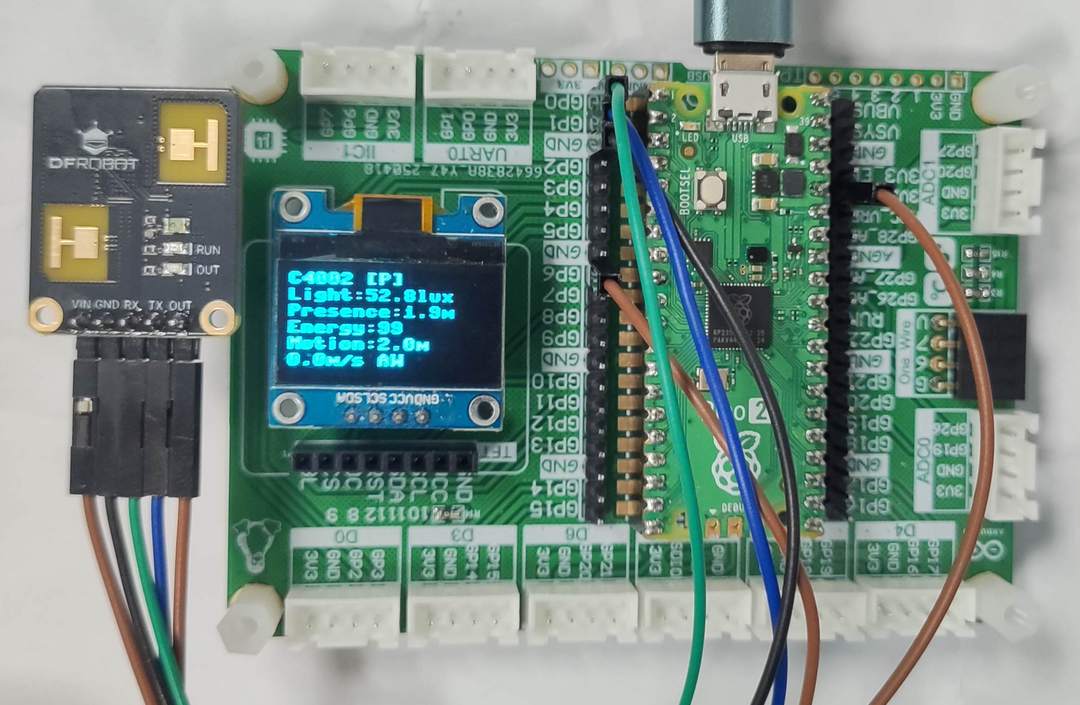
扩展板详见:树莓派Pico扩展板 .
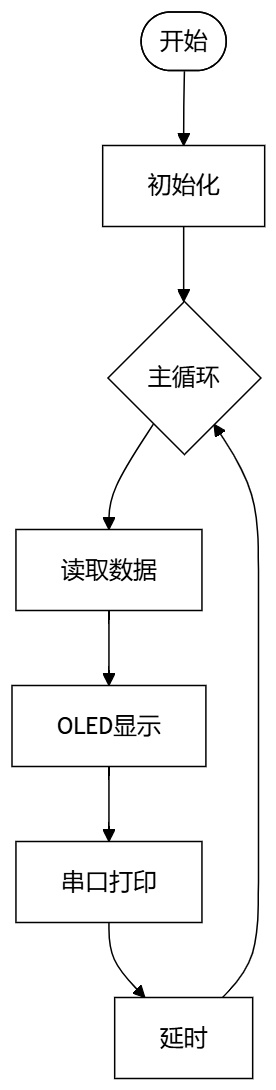
流程图
工程代码
运行 Thonny IDE 新建文件,添加如下代码
代码见附件。
保存代码。
效果演示
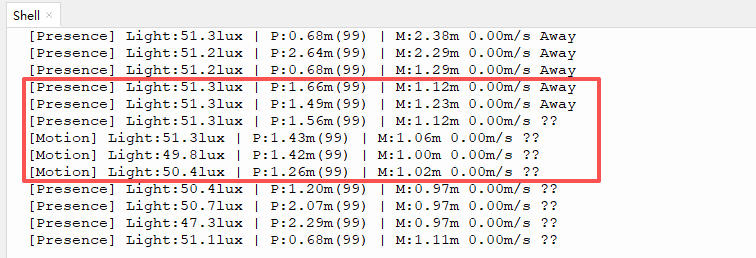
运行程序,Shell 终端输出数据采集结果;
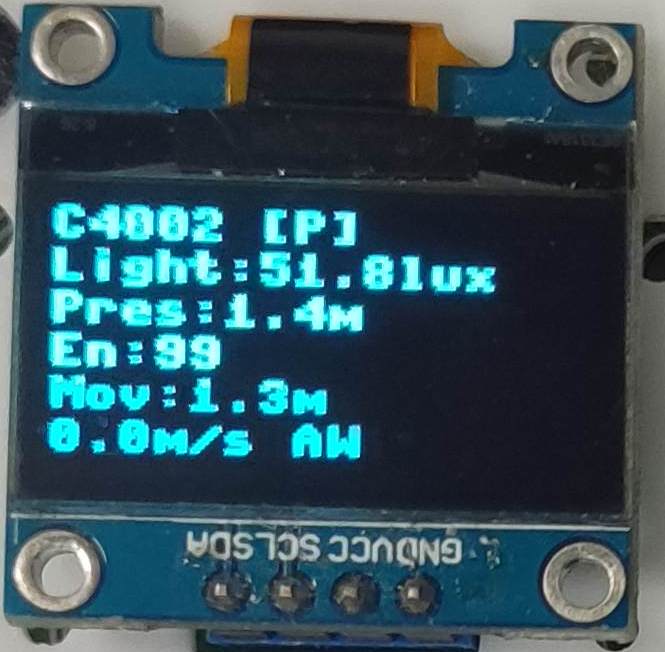
OLED 显示数据采集结果;
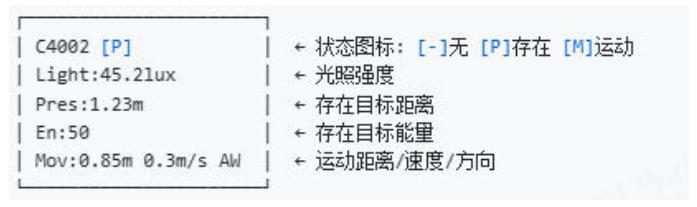
OLED 显示各个字段的含义如下
总结
本文介绍了 DFRobot C4002 毫米波雷达模块结合树莓派 Pico 和 OLED 模块实现雷达数据实时显示的项目设计,包括硬件连接、流程图、代码、效果演示等,为相关产品的快速开发和应用设计提供了参考。
代码
"""
C4002 Radar Sensor - OLED Display Data
RaspberryPi Pico: UART0 (tx=0, rx=1)
"""

from dfrobot_c4002 import (
    DFRobot_C4002,
    NoteType,
    MotionDirection,
    TargetState
)
from machine import Pin, I2C
from ssd1306 import SSD1306_I2C
import time

# ========== OLED 初始化 ===========
i2c = I2C(0, sda=Pin(4), scl=Pin(5), freq=400000)
oled = SSD1306_I2C(128, 64, i2c)

# ========== 显示函数 ===========
def display_radar(state, light, presence, motion):
    """OLED 显示雷达数据"""
    oled.fill(0)

    # 状态图标
    icons = {
        TargetState.NO_TARGET: "[-]",
        TargetState.PRESENCE:  "[P]",
        TargetState.MOTION:    "[M]"
    }
    icon = icons.get(state, "[?]")

    # 第1行:状态
    oled.text(f"C4002 {icon}", 0, 0)

    # 第2行:光照
    oled.text(f"Light:{light:.1f}lux", 0, 10)

    # 第3行:存在目标
    if presence['distance'] > 0:
        oled.text(f"Presence:{presence['distance']:.1f}m", 0, 20)
        oled.text(f"Energy:{presence['energy']}", 0, 30)
    else:
        oled.text("Presence:--", 0, 20)

    # 第4行:运动目标
    dir_map = {0: "AW", 1: "--", 2: "AP"}
    d = dir_map.get(motion['direction'], "??")
    if motion['distance'] > 0:
        oled.text(f"Motion:{motion['distance']:.1f}m", 0, 40)
        oled.text(f"{motion['speed']:.1f}m/s {d}", 0, 50)
    else:
        oled.text("Motion:--", 0, 40)
    oled.rotate(0)
    oled.show()

# ========== 串口打印 ===========
def print_data(state, light, presence, motion):
    """串口输出调试信息"""
    state_names = {
        TargetState.NO_TARGET: "NoTarget",
        TargetState.PRESENCE:  "Presence",
        TargetState.MOTION:    "Motion"
    }
    dir_names = {
        MotionDirection.AWAY:         "Away",
        MotionDirection.NO_DIRECTION: "Still",
        MotionDirection.APPROACHING:  "Approach"
    }

    s = state_names.get(state, "Unknown")
    d = dir_names.get(motion['direction'], "??")

    print(f"[{s}] Light:{light:.1f}lux | "
          f"P:{presence['distance']:.2f}m({presence['energy']}) | "
          f"M:{motion['distance']:.2f}m {motion['speed']:.2f}m/s {d}")

# ========== 主程序 ===========
def main():
    print("Initializing C4002...")

    # OLED 显示启动信息
    oled.fill(0)
    oled.text("C4002 Radar", 15, 20)
    oled.text("Initializing...", 10, 35)
    oled.rotate(0)
    oled.show()

    # 初始化传感器
    sensor = DFRobot_C4002(uart_id=0, baud=115200, tx_pin=0, rx_pin=1)

    while not sensor.begin():
        print("C4002 begin failed, retrying...")
        oled.fill(0)
        oled.text("C4002 Error", 20, 25)
        oled.text("Retrying...", 25, 40)
        oled.rotate(0)
        oled.show()
        time.sleep(1)

    print("C4002 initialized!")

    # 设置上报周期 1 秒
    sensor.set_report_period(10)

    # 启动成功提示
    oled.fill(0)
    oled.text("C4002 Ready!", 20, 25)
    oled.rotate(0)
    oled.show()
    time.sleep(1)

    print("\n=== C4002 Radar Running ===\n")

    # 主循环
    while True:
        try:
            note = sensor.get_note_info()

            if note['note_type'] == NoteType.RESULT:
                # 读取数据
                state = sensor.get_target_state()
                light = sensor.get_light_intensity()
                presence = sensor.get_presence_target_info()
                motion = sensor.get_motion_target_info()

                # OLED 显示
                display_radar(state, light, presence, motion)

                # 串口打印
                print_data(state, light, presence, motion)

            elif note['note_type'] == NoteType.CALIBRATION:
                # 校准中
                oled.fill(0)
                oled.text("Calibrating...", 15, 25)
                oled.text(f"{note['calib_countdown']}s", 50, 40)
                oled.rotate(0)
                oled.show()
                print(f"Calibrating... {note['calib_countdown']}s")

        except Exception as e:
            print(f"Error: {e}")
            oled.fill(0)
            oled.text("Error!", 40, 25)
            oled.rotate(0)
            oled.show()
            time.sleep(2)

        time.sleep(0.5)

# 运行
if __name__ == "__main__":
    main()