

开贴扯蛋BLUNO乐高小车搭建过程(视频已更新)
2014-01-256.9万

AI 快速预览详细
本文详细记录了BLUNO乐高小车的搭建过程。首先展示了BLUNO板子的外观和特点,然后逐步介绍了如何将BLUNO板子与乐高积木结合,搭建出一个可编程的小车。整个过程适合家长与孩子共同参与,不仅能够锻炼孩子的动手能力,还能激发他们对科技的兴趣。
|
感谢DFROBOT!感谢社区向导!有幸拿到BLUNO试用活动提供的板子! 年底大家都很忙,年终总结、系统测试上线、各路催债的、各种面子工程政绩工程、某监会又不失时机地给俺们增加工作量:Q(真想吐槽这些爷们。。。。。。) 总算能稍微喘口气,开贴记录一下BLUNO乐高小车搭建过程。哥在公司要伺候领导,到家要伺候小祖宗,等小祖宗睡了才能开整,否则逃不出小祖宗的小爪,非把板子废了不可,因此搭建、更新过程慢,请看官和社区向导谅解。。。。。。 秀一下拿到的板子。。。。。。 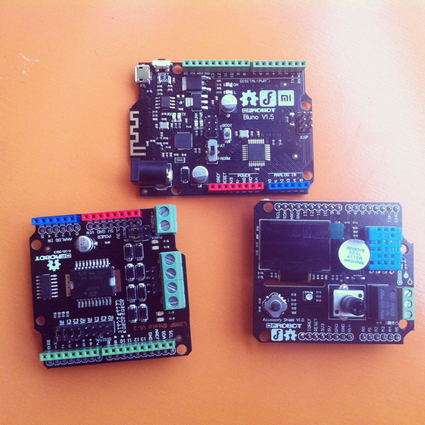 板子非常小巧,做工精良(只是BLUNO一个排母焊得稍微斜了点) |
感觉键盘操控,小车反应有点延迟,程序里delay(100)太大了?隔了两层无线,无线键盘和pc、pc再通过串口助手、ble-link和bluno蓝牙通讯
开源硬件代替lego nxt还是有些空间的,一个nxt要900多rmb,大家可以玩玩:)
BLE-Link接电脑USB,和bluno蓝牙配对,BLE-Link为“主”,bluno为“从”,具体方法见DF官方资料,配置主从设置前,
BLE-Link和bluno都要拨到"AT"模式,配置好后,都拨回“Normal"模式,BLE-Link上绿色Link灯亮,同时bluno上红色Link灯亮,
表示自动配对成功,非常简单。
bluno通过电源转接头用jst口的锂电池供电
之后打开OpenJumper串口助手,切换到键盘模式,电脑就可以遥控乐高小车了。
一个人不方便拍视频,用手机简单拍了一下,不太习惯键盘操控,小车还要用乐高加固一下,明天上视频。
哪位借我一台安卓4.3、蓝牙4.0手机测试?
pc上插个usb蓝牙4.0配合google adt环境能不能测?
准备做最后测试----
通过串口助手,连续发送字符w、s、a、d,验证bluno上的arduino程序运行完全正确,能够带动电机、舵机前进后退、左右转向
to be continue......
可能不支持4.04和普通蓝牙,无法连接bluno。求有经验的高人指点。。。。。。
To be continue......
[code]package com.example.myfirstapp;
import java.io.IOException;
import java.io.OutputStream;
import java.util.UUID;
import android.app.Activity;
import android.os.Bundle;
import android.bluetooth.BluetoothAdapter;
import android.bluetooth.BluetoothDevice;
import android.bluetooth.BluetoothSocket;
import android.content.DialogInterface;
import android.content.DialogInterface.OnClickListener;
import android.provider.ContactsContract.CommonDataKinds.Event;
import android.util.Log;
import android.view.MotionEvent;
import android.view.View;
import android.widget.Button;
import android.widget.Toast;
public class MainActivity extends Activity
{
private static final String TAG = "THINBTCLIENT";
private static final boolean D = true;
private BluetoothAdapter mBluetoothAdapter = null;
private BluetoothSocket btSocket = null;
private OutputStream outStream = null;
Button mButtonF;
Button mButtonB;
Button mButtonL;
Button mButtonR;
Button mButtonS;
private static final UUID MY_UUID = UUID.fromString( "00001101-0000-1000-8000-00805F9B34FB" );
private static String address = "88:33:14:DF:1F:FD";
/** Called when the activity is first created. */
@Override
public void onCreate( Bundle savedInstanceState )
{
super.onCreate(savedInstanceState);
setContentView(R.layout.main);
//前进
mButtonF=(Button)findViewById(R.id.btnF);
mButtonF.setOnTouchListener(new Button.OnTouchListener()
{
@Override
public boolean onTouch(View v, MotionEvent event)
{
String message;
byte[] msgBuffer;
int action = event.getAction();
switch(action)
{
case MotionEvent.ACTION_DOWN:
try
{
outStream = btSocket.getOutputStream();
}
catch (IOException e)
{
Log.e(TAG, "ON RESUME: Output stream creation failed.", e);
}
message = "w";
msgBuffer = message.getBytes();
try
{
outStream.write(msgBuffer);
}
catch (IOException e)
{
Log.e(TAG, "ON RESUME: Exception during write.", e);
}
break;
case MotionEvent.ACTION_UP:
try
{
outStream = btSocket.getOutputStream();
}
catch (IOException e)
{
Log.e(TAG, "ON RESUME: Output stream creation failed.", e);
}
message = "0";
msgBuffer = message.getBytes();
try
{
outStream.write(msgBuffer);
}
catch (IOException e)
{
Log.e(TAG, "ON RESUME: Exception during write.", e);
}
break;
}
return false;
} // end of onTouch
});
//后退
mButtonB=(Button)findViewById(R.id.btnB);
mButtonB.setOnTouchListener(new Button.OnTouchListener()
{
@Override
public boolean onTouch(View v, MotionEvent event)
{
// TODO Auto-generated method stub
String message;
byte[] msgBuffer;
int action = event.getAction();
switch(action)
{
case MotionEvent.ACTION_DOWN:
try
{
outStream = btSocket.getOutputStream();
}
catch (IOException e)
{
Log.e(TAG, "ON RESUME: Output stream creation failed.", e);
}
message = "s";
msgBuffer = message.getBytes();
try
{
outStream.write(msgBuffer);
}
catch (IOException e)
{
Log.e(TAG, "ON RESUME: Exception during write.", e);
}
break;
case MotionEvent.ACTION_UP:
try
{
outStream = btSocket.getOutputStream();
}
catch (IOException e)
{
Log.e(TAG, "ON RESUME: Output stream creation failed.", e);
}
message = "0";
msgBuffer = message.getBytes();
try
{
outStream.write(msgBuffer);
}
catch (IOException e)
{
Log.e(TAG, "ON RESUME: Exception during write.", e);
}
break;
}
return false;
} // end of onTouch
}); // end of setOnTouchListener
//左转
mButtonL=(Button)findViewById(R.id.btnL);
mButtonL.setOnTouchListener(new Button.OnTouchListener()
{
@Override
public boolean onTouch(View v, MotionEvent event)
{
// TODO Auto-generated method stub
String message;
byte[] msgBuffer;
int action = event.getAction();
switch(action)
{
case MotionEvent.ACTION_DOWN:
try
{
outStream = btSocket.getOutputStream();
}
catch (IOException e)
{
Log.e(TAG, "ON RESUME: Output stream creation failed.", e);
}
message = "a";
msgBuffer = message.getBytes();
try
{
outStream.write(msgBuffer);
}
catch (IOException e)
{
Log.e(TAG, "ON RESUME: Exception during write.", e);
}
break;
case MotionEvent.ACTION_UP:
try
{
outStream = btSocket.getOutputStream();
}
catch (IOException e)
{
Log.e(TAG, "ON RESUME: Output stream creation failed.", e);
}
message = "0";
msgBuffer = message.getBytes();
try
{
outStream.write(msgBuffer);
}
catch (IOException e)
{
Log.e(TAG, "ON RESUME: Exception during write.", e);
}
break;
}
return false;
}
});
//右转
mButtonR=(Button)findViewById(R.id.btnR);
mButtonR.setOnTouchListener(new Button.OnTouchListener()
{
@Override
public boolean onTouch(View v, MotionEvent event)
{
// TODO Auto-generated method stub
String message;
byte[] msgBuffer;
int action = event.getAction();
switch(action)
{
case MotionEvent.ACTION_DOWN:
try
{
outStream = btSocket.getOutputStream();
}
catch (IOException e)
{
Log.e(TAG, "ON RESUME: Output stream creation failed.", e);
}
message = "d";
msgBuffer = message.getBytes();
try
{
outStream.write(msgBuffer);
}
catch (IOException e)
{
Log.e(TAG, "ON RESUME: Exception during write.", e);
}
break;
case MotionEvent.ACTION_UP:
try
{
outStream = btSocket.getOutputStream();
}
catch (IOException e)
{
Log.e(TAG, "ON RESUME: Output stream creation failed.", e);
}
message = "0";
msgBuffer = message.getBytes();
try
{
outStream.write(msgBuffer);
}
catch (IOException e)
{
Log.e(TAG, "ON RESUME: Exception during write.", e);
}
break;
}
return false;
}
});
//停止
mButtonS=(Button)findViewById(R.id.btnS);
mButtonS.setOnTouchListener(new Button.OnTouchListener()
{
@Override
public boolean onTouch(View v, MotionEvent event)
{
// TODO Auto-generated method stub
if (event.getAction()==MotionEvent.ACTION_DOWN)
try
{
outStream = btSocket.getOutputStream();
}
catch (IOException e)
{
Log.e(TAG, "ON RESUME: Output stream creation failed.", e);
}
String message = "0";
byte[] msgBuffer = message.getBytes();
try
{
outStream.write(msgBuffer);
}
catch (IOException e)
{
Log.e(TAG, "ON RESUME: Exception during write.", e);
}
return false;
}
});
if ( D )
Log.e(TAG, "+++ ON CREATE +++");
mBluetoothAdapter = BluetoothAdapter.getDefaultAdapter();
if (mBluetoothAdapter == null)
{
Toast.makeText(this, "Bluetooth is not available.", Toast.LENGTH_LONG).show();
finish();
return;
}
if (!mBluetoothAdapter.isEnabled())
{
Toast.makeText(this, "Please enable your Bluetooth and re-run this program.", Toast.LENGTH_LONG).show();
finish();
return;
}
if ( D )
Log.e(TAG, "+++ DONE IN ON CREATE, GOT LOCAL BT ADAPTER +++");
} // end of onCreate
@Override
public void onStart()
{
super.onStart();
if (D)
Log.e(TAG, "++ ON START ++");
}
@Override
public void onResume()
{
super.onResume();
if ( D )
{
Log.e(TAG, "+ ON RESUME +");
Log.e(TAG, "+ ABOUT TO ATTEMPT CLIENT CONNECT +");
}
BluetoothDevice device = mBluetoothAdapter.getRemoteDevice(address);
try
{
btSocket = device.createRfcommSocketToServiceRecord(MY_UUID);
}
catch (IOException e)
{
Log.e(TAG, "ON RESUME: Socket creation failed.", e);
}
mBluetoothAdapter.cancelDiscovery();
try
{
btSocket.connect();
Log.e(TAG, "ON RESUME: BT connection established, data transfer link open.");
}
catch (IOException e)
{
try
{
btSocket.close();
}
catch (IOException e2)
{
Log .e(TAG,"ON RESUME: Unable to close socket during connection failure", e2);
}
}
// Create a data stream so we can talk to server.
if ( D )
Log.e(TAG, "+ ABOUT TO SAY SOMETHING TO SERVER +");
/* try {
outStream = btSocket.getOutputStream();
} catch (IOException e) {
Log.e(TAG, "ON RESUME: Output stream creation failed.", e);
}
String message = "1";
byte[] msgBuffer = message.getBytes();
try {
outStream.write(msgBuffer);
} catch (IOException e) {
Log.e(TAG, "ON RESUME: Exception during write.", e);
}
*/
}
@Override
public void onPause()
{
super.onPause();
if ( D )
Log.e(TAG, "- ON PAUSE -");
if (outStream != null)
{
try
{
outStream.flush();
}
catch (IOException e)
{
Log.e(TAG, "ON PAUSE: Couldn't flush output stream.", e);
}
}
try
{
btSocket.close();
}
catch (IOException e2)
{
Log.e(TAG, "ON PAUSE: Unable to close socket.", e2);
}
}
@Override
public void onStop()
{
super.onStop();
if ( D )
Log.e(TAG, "-- ON STOP --");
}
@Override
public void onDestroy()
{
super.onDestroy();
if ( D )
Log.e(TAG, "--- ON DESTROY ---");
}
// @Override
// protected void onCreate(Bundle savedInstanceState) {
// super.onCreate(savedInstanceState);
// setContentView(R.layout.activity_main);
// }
//
// @Override
// public boolean onCreateOptionsMenu(Menu menu) {
// // Inflate the menu; this adds items to the action bar if it is present.
// getMenuInflater().inflate(R.menu.main, menu);
// return true;
// }
}
[/code]
bluno端的arduino程序--
[code]#include
const int timing = 100; //value to control delay in reading serial port, useful to control responsiveness to input
int dir = 0; //beginning value for determining last direction indicated, 0 - no direction, 1 - forward, 2 - reverse
int pwm_a = 6; //PWM control for Ardumoto outputs 1 and 2 is on digital pin 3
int dir_a = 7; //direction control for Ardumoto outputs 1 and 2 is on digital pin 12
Servo servo1; // servo control object
void setup()
{
pinMode(pwm_a, OUTPUT); //set control pins to be outputs
pinMode(dir_a, OUTPUT);
Serial.begin(9600); //initialize serial
servo1.attach(8); //start sending control commands to the servo
}
void loop()
{
//forw();
//forward();
char getData = Serial.read(); //read the serial port
delay(timing);
if(getData == 'w'){ //if 'w' is pressed, set motor to forward and go
forw();
forward();
dir = 1;
}else if(getData == 's'){ //if 's' is pressed, set motor to reverse and go
back();
backward();
dir = 2;
}else if(getData == 'a'){ //if 'a' is pressed, turn servo 45 degrees to the left and go in the last direction pressed
if(dir == 0){
servo1.write(155);
}else if(dir == 1){
servo1.write(155);
forw();
forward();
}else if(dir == 2){
servo1.write(155);
back();
backward();
}
}else if(getData == 'd'){ //if 'd' is pressed, turn servo 45 degrees to the right and go in the last direction pressed
if(dir == 0){
servo1.write(25);
}else if(dir == 1){
servo1.write(25);
forw();
forward();
}else if(dir == 2){
servo1.write(25);
back();
backward();
}
}else if(getData != 'w' || 'a' || 's' || 'd'){ //stop motor and set servo to 90 degrees (center) if nothing is pressed
stopped();
servo1.write(90);
}
}
void forw() // no pwm defined
{
digitalWrite(dir_a, HIGH); //set motor direction forward
}
void back() // no pwm defined
{
digitalWrite(dir_a, LOW); //set motor direction back
}
void forward() //full speed forward
{
digitalWrite(dir_a, HIGH); //set motor direction forward
analogWrite(pwm_a, 255); //set motor to run at 100% duty cycle (fast)
}
void backward() //full speed backward
{
digitalWrite(dir_a, LOW); //set motor direction back
analogWrite(pwm_a, 255); //set motor to run at 100% duty cycle (fast)
}
void stopped() //stop
{
digitalWrite(dir_a, LOW); //set motor direction back
analogWrite(pwm_a, 0); //set motor to stop
}
[/code]
有空来参加我们的3D打印机大奖:https://mc.dfrobot.com.cn/thread-941-1-1.html,乐高的受欢迎度应该很高!!
google的安卓开发环境,准备自己改写控制代码。。。。。。
这个真不好搞,蓝牙4.0是4.3系统以后才开始支持的。。
没有蓝牙4.0手机,等下周红米手机到货
9g舵机需要用老版的,否则无法连乐高十字轴
电池需要一个转接头,我看df商城上有,2块多,现在暂时直接插在电脑上供电
线还没焊,直接插在板子和电机上
主要是第一个问题,只等测手机上的程序就OK了,再录视频