做项目的时候,一旦牵涉到通信,就需要建立一套自己的协议,这不仅会花很长时间,而且在协议的解析过程中也很容易出现各种各样的问题。如果其他人需要使用这个协议,必须用很长的时间来看懂协议。这个过程也会非常痛苦。
为什么这种协议不能变得简单而易于使用呢?通过借鉴JavaScript Object Notation(JSON),我们完成这个基于明文协议的Arduino库。
它使用起来非常方便,继承了Arduino的函数调用习惯,更加方便,易懂。
并且可以在基于串口的任何一种通信设备上使用,比如Zigbee,Wi-Fi, 蓝牙等等。
下载PlainProtocol库
如何安装Arduino库
发送端的样例代码:
- #include <PlainProtocol.h>
-
- PlainProtocol mytest(Serial);
-
- void setup() {
- mytest.begin(57600);
- }
-
- void loop() {
- mytest.write("speed",100); //set the speed to 100
- mytest.write("destination", 23, 56); //set the destination to (23,56)
- mytest.write("display","Hello World!",10,35);//show the string on display at (10,35)
- delay(2000);
- }
上传完这个代码以后,你就可以打开Arduino的串口监视器中看到如下的字符串,这个字符串就是编码过之后的数据。
- <speed>100;
-
- <destination>23,56;
-
- <displayHello World!>10,35;
接收端的样例代码:
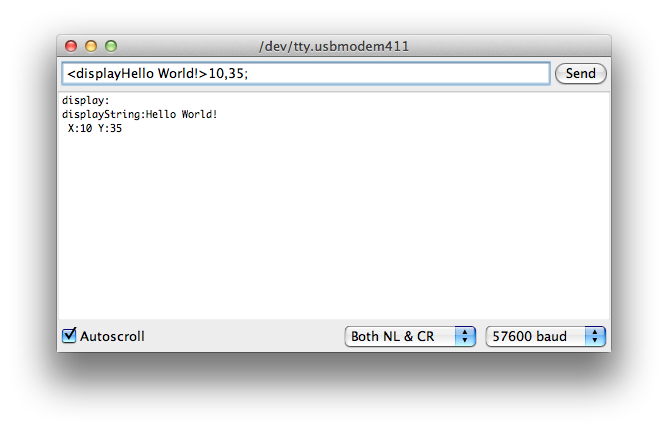
这是一个接收端的DEMO,你可以打开串口监视器,发送以下几条数据。然后就可以看到,PlainProtocol正确解析了发送出来的数据并且打印了出来。
- <speed>100;
-
- <destination>23,56;
-
- <displayHello World!>10,35;
- #include <PlainProtocol.h>
-
- PlainProtocol mytest(Serial);
-
- int motorSpeed;
- int motorDestination[2];
-
- String displayString="";
- int displayPosition[2];
-
- void setup() {
- mytest.begin(57600);
- }
- /*
- This is the receiving demo code for plainprotocol.
-
- You can send the following frame in Serial monitor to test whether the PlainProtocol can phrase the frame correctly:
-
- <speed>100;
- <destination>23,56;
- <displayHello World!>10,35;
-
- */
-
- void loop() {
-
- if (mytest.available()) {
- if (mytest.equals("speed")) { //send "<speed>100;" in Serial monitor
- //the "speed" process
- motorSpeed=mytest.read();
-
- Serial.print("speed:");
- Serial.println(motorSpeed);
- }
- else if (mytest.equals("destination")){ //send "<destination>23,56;" in Serial monitor
- //the "destination" process
- motorDestination[0]=mytest.read();
- motorDestination[1]=mytest.read();
-
- Serial.println("destination:");
- Serial.print(" X:");
- Serial.print(motorDestination[0]);
- Serial.print(" Y:");
- Serial.println(motorDestination[1]);
-
- }
- else if (mytest.equals("display")){ //send "<displayHello World!>10,35;" in Serial monitor
- //the "destination" process
- displayString=mytest.readString();
- displayPosition[0]=mytest.read();
- displayPosition[1]=mytest.read();
-
- Serial.println("display:");
- Serial.print("displayString:");
- Serial.println(displayString);
- Serial.print(" X:");
- Serial.print(displayPosition[0]);
- Serial.print(" Y:");
- Serial.println(displayPosition[1]);
- }
- else{
- //no matching command
- }
- }
- }
英文版参考链接
[/table]
[table]
tutorials |