

Arduino与C#串口通信的问题
2014-04-301.8万

AI 快速预览详细
本文探讨了使用Arduino ATMEGA328或ATMEGA2560板子与C#程序进行串口通信时遇到的问题。具体表现为程序死机和内存错误。通过详细记录故障现象和排查步骤,帮助开发者解决通信不稳定的问题。文章还提到了TX指示灯的状态变化,为故障排查提供了重要线索。
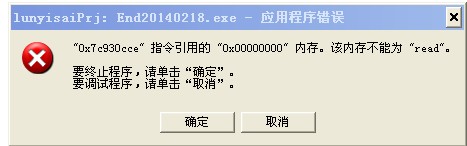
背景说明: 互动多媒体程序是用C#写的,Arduino只负责发送四个值,A,B,C,D。不接受任何来自C#程序的值。使用的板子是 Arduino ATMEGA328 或者ATMEGA2560,均为淘宝山寨板。Arduino烧录的代码如下: 遇到的状况是: 在arduino-1.03下模拟测试一点问题都没有。但是在C#程序下,在按A,B,C,D值切换的时候很容易造成程序死机,而退出程序后重新打开程序后就OK了。 今天测试的时候发现一个情况,说明如下: ATMEGA328板子,正常情况下,往C#传值的时候,Arduino板子上的TX指示灯会闪一下。在arduino-1.0.3软件的模拟下一切正常。 但是在C#程序中会出现 L指示灯(闪红灯)跟TX指示灯同时闪的情况,而且当A,B通信几次后就程序死机,再按A,B键TX灯也不闪了。退出C#程序后再运行的时候TX指示灯会闪烁一下(绿灯)。程序可以正常运行。 将板子换成ATMEGA2560后,L指示灯偶尔会闪黄灯,测试C#程序没有死机的情况,但偶尔会报“0X7c930cee"的内存错误。出现的几率比死机的情况低一半。再按A,B按钮TX指示灯正常闪烁。 请大神们指点,问题出在哪里,是板子芯片不稳定呢还是我的程序有问题,内存开销不够造成的死机?或者是其他问题,谢谢! |
-
QQ图片20140430110153.jpg (18.87 KB, 下载次数: 7780)




[code]/*
Debounce
Each time the input pin goes from LOW to HIGH (e.g. because of a push-button
press), the output pin is toggled from LOW to HIGH or HIGH to LOW. There's
a minimum delay between toggles to debounce the circuit (i.e. to ignore
noise).
The circuit:
* LED attached from pin 13 to ground
* pushbutton attached from pin 2 to +5V
* 10K resistor attached from pin 2 to ground
* Note: On most Arduino boards, there is already an LED on the board
connected to pin 13, so you don't need any extra components for this example.
created 21 November 2006
by David A. Mellis
modified 30 Aug 2011
by Limor Fried
This example code is in the public domain.
http://www.arduino.cc/en/Tutorial/Debounce
*/
// constants won't change. They're used here to
// set pin numbers:
const int buttonPin = 2; // the number of the pushbutton pin
const int ledPin = 13; // the number of the LED pin
// Variables will change:
int ledState = HIGH; // the current state of the output pin
int buttonState; // the current reading from the input pin
int lastButtonState = LOW; // the previous reading from the input pin
// the following variables are long's because the time, measured in miliseconds,
// will quickly become a bigger number than can be stored in an int.
long lastDebounceTime = 0; // the last time the output pin was toggled
long debounceDelay = 50; // the debounce time; increase if the output flickers
void setup() {
pinMode(buttonPin, INPUT);
pinMode(ledPin, OUTPUT);
}
void loop() {
// read the state of the switch into a local variable:
int reading = digitalRead(buttonPin);
// check to see if you just pressed the button
// (i.e. the input went from LOW to HIGH), and you've waited
// long enough since the last press to ignore any noise:
// If the switch changed, due to noise or pressing:
if (reading != lastButtonState) {
// reset the debouncing timer
lastDebounceTime = millis();
}
if ((millis() - lastDebounceTime) > debounceDelay) {
// whatever the reading is at, it's been there for longer
// than the debounce delay, so take it as the actual current state:
buttonState = reading;
}
// set the LED using the state of the button:
digitalWrite(ledPin, buttonState);
// save the reading. Next time through the loop,
// it'll be the lastButtonState:
lastButtonState = reading;
}[/code]
串口比特率是跟C#统一的。delay 后边两个被我注释掉了,因为每次出问题都出在串口输出A,B上,C,D没有问题。
if((time%1000) == 0)
{
Serial.flush();
//Serial.print("undo");
// Serial.print("\n");
}
另外还有个问题请教下:一般的按钮,按照我贴出的代码,输出A的代码 在按钮按下跟弹起都会有输出,输出B的代码 在按钮按下不放的情况下一直会有输出B,好像这个问题只能通过delay 加时间间隔解决。
Serial.begin(9600) 改成 Serial.begin(115200)
如果这个正常,那就是C#程序问题了。