yeelink与WIFI Shield v3递增数数据上传测试
2014-06-241.4万
AI 快速预览详细 收起
本文介绍了使用WIFI Shield v3和yeelink进行递增数数据上传的方法。通过Grey大神的教程,可以轻松实现数据上传。需要注意的是,在配置完成后,将V3扩展板上的开关切到Arduino一边,才能让系统正常工作。此外,由于硬件推送速率比服务器保存数据的速率高,建议推送速率大于10秒。
用Grey大神发的帖子做的递增数wifi数据上传样例。Grey大神教程的连接:https://www.dfrobot.com.cn/commun ... viewthread&tid=2285
挺好用的,很好用的教程,配合上yeelink官方的一些配置信息很快的就能跑通。不过在通过手机配置路由器设置和外网ip设定,完成后,切断手机连接并且将V3扩展板上的开关切到Arduino一边,才能让系统正常工作。这个小细节需要注意一下。这点其实在其他小伙伴的帖子里面也有提到:https://mc.dfrobot.com.cn/forum.php?mod=viewthread&tid=2516&extra=page%3D1
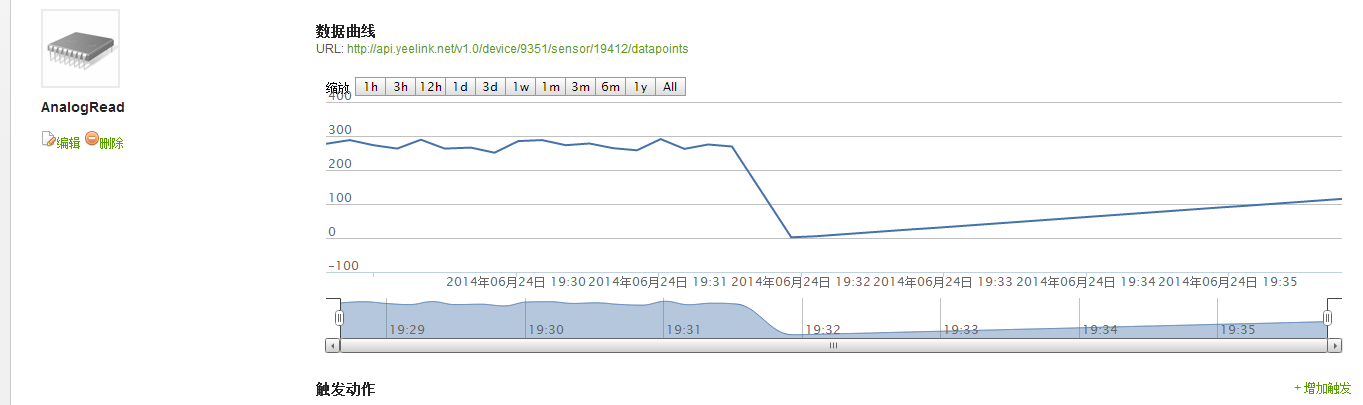
这是我在yeelink上上传的递增数,不过,通过递增数的测试可以发现,yeelink服务器的采样率在10s,样例程序用了2s推送一个数据的形式往服务器上推递增数。硬件推送速率比服务器保存数据的速率高,所以,保存的实际有意义的数值,只有0,5,10,15,20.....其他数据全部都会被服务器滤掉。所以硬件节点端推送速率比10s长会比较合适!
以下是基于Grey大神的样例改的自己的yeelink,递增数样例=。=
void setup() {
Serial.begin(115200);
pinMode(13,OUTPUT);
}
int randomValue = 0;
void loop() {
if(randomValue < 255) randomValue ++;
else randomValue = 0;
// Serial.println(sensorValue, DEC);
digitalWrite(13,HIGH);
Serial.println("POST /v1.0/device/9351/sensor/19412/datapoints HTTP/1.1"); //“/device/4290/sensor/9970/”device,sensor 后面的数值用你自己的替代
Serial.println("Host: api.yeelink.net");
Serial.print("Accept: *");
Serial.print("/");
Serial.println("*");
Serial.print("U-ApiKey: ");
Serial.println("2400c0117d8c58b363f1b6e03132a9ee"); // 此处用你的APIKEY替代
Serial.print("Content-Length: ");
int thisLength = 10 + getLength(randomValue);
Serial.println(thisLength);
Serial.println("Content-Type: application/x-www-form-urlencoded");
Serial.println("Connection: close");
Serial.println();
Serial.print("{\"value\":");
Serial.print(randomValue);
Serial.println("}");
delay(1000);
digitalWrite(13,LOW);
delay(1000);
}
int getLength(int someValue) {
// there's at least one byte:
int digits = 1;
// continually divide the value by ten,
// adding one to the digit count for each
// time you divide, until you're at 0:
int dividend = someValue /10;
while (dividend > 0) {
dividend = dividend /10;
digits++;
}
// return the number of digits:
return digits;
}
|








