

用arduino作AVR ISP——烧bootloader
2014-12-053.8万

AI 快速预览详细
本文介绍了如何使用一块Arduino板作为ISP烧录器,为另一块丢失bootloader的Arduino板烧录bootloader。首先,打开ArduinoISP样例代码,并上传到作为ISP烧录器的Arduino板(板A)。然后,根据具体的板子类型进行连线,确保正确连接。接着,选择目标板(板B)对应的型号,并选择Programmer > Arduino as ISP命令。最后,点击Burn Bootloader按钮,等待完成即可。本文还特别提到了在Arduino 1.0版本中,需要将heartbeat()函数中的delay(40)改为delay(20)。
|
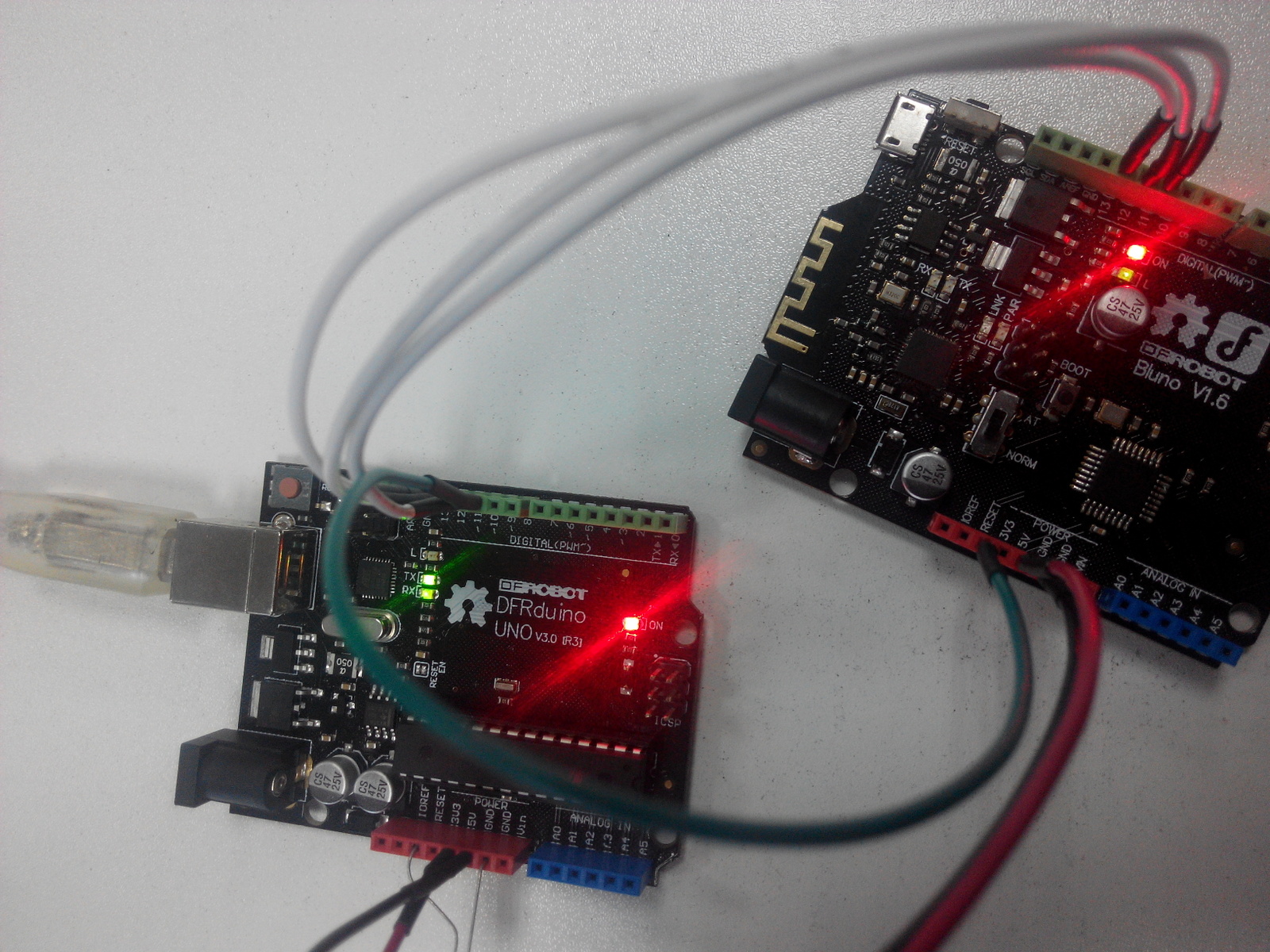
thk god,发帖不易! 因为有两块arduino板子,我们把作为ISP烧录器的arduino板子成为板A,丢了bootloader的arduino板子叫板B。(注:本贴中板A仅支持arduino的ATmega168 / 328 芯片,就是UNO,Mega,Leonardo不支持 ) (如何用Leonardo做ISP 烧写器,请访问英文论坛图文教程链接:Using Leonardo as the ISP programmer) 好了我们开始: 1 打开ArduinoISP样例代码; 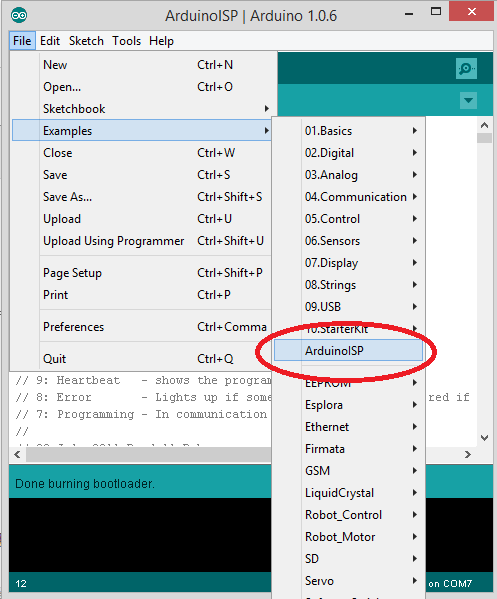 注:对于Arduino 1.0, 要对程序做些修改:找到 heartbeat() 子函数,把"delay(40);" 改成 "delay(20);" 2 将板A和电脑连接上,选好板A对应的型号、串口号,把ArduinoISP样例上传; 3 连线; 注:① 板A如果是Arduino Uno,需在reset和GND之间加一个10μF的电容(电解电容有+-极,长脚接reset,短脚接GND); ② 板B如果是Uno、Bluno可按图1连线,如果是其他类型板子如:Romeo,MEGA2560等,则需对应ICSP的对应管脚关系连线,参照图2 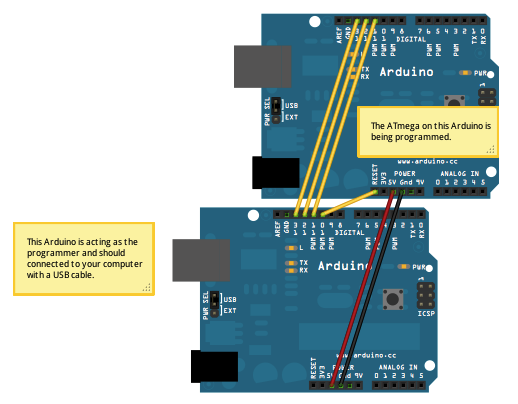 图1 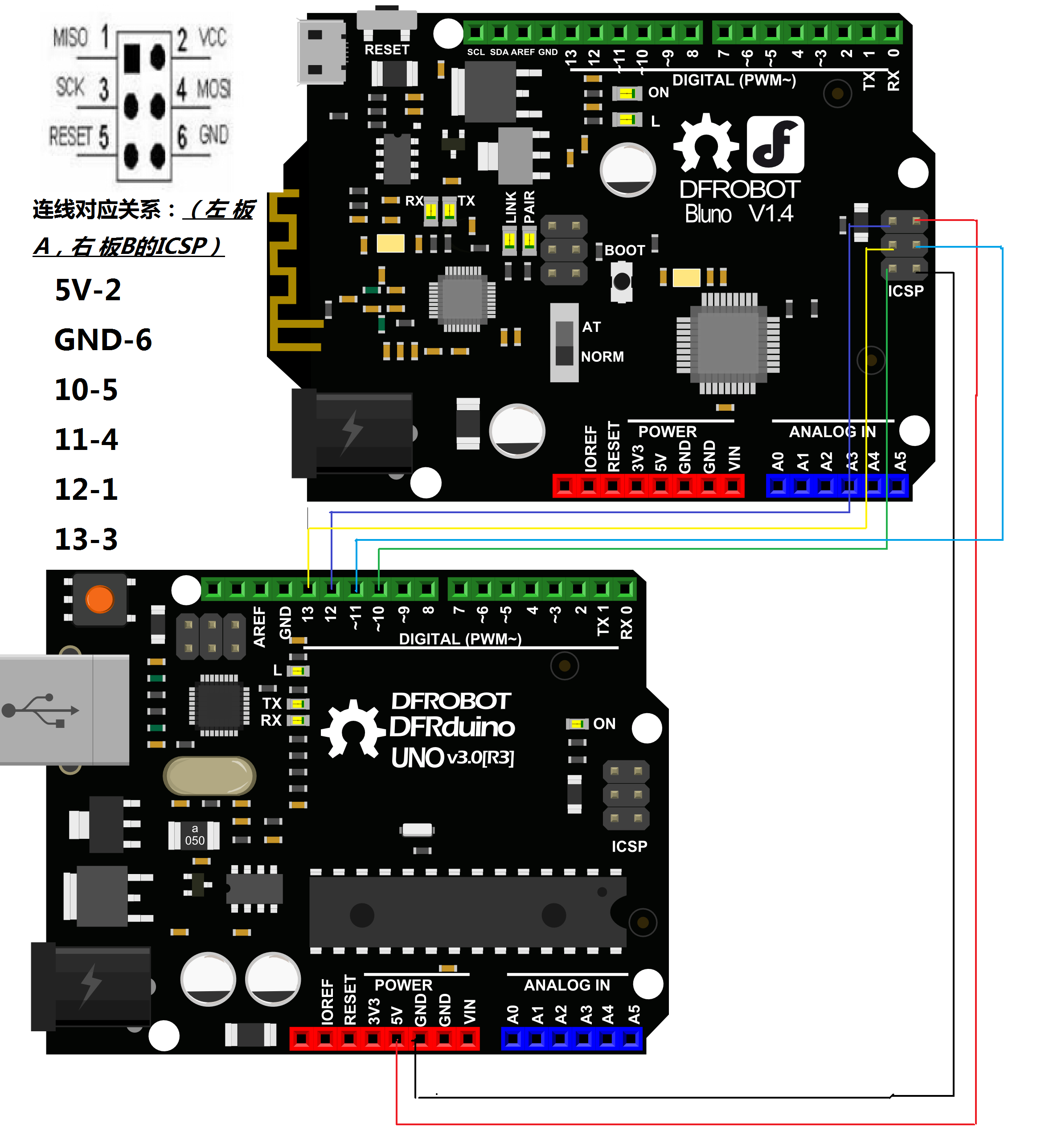 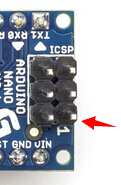 图2 找到对应管脚很重要,后期error很可能卡在这里! 4 选好板B对应的型号,选择 Programmer > Arduino as ISP command. 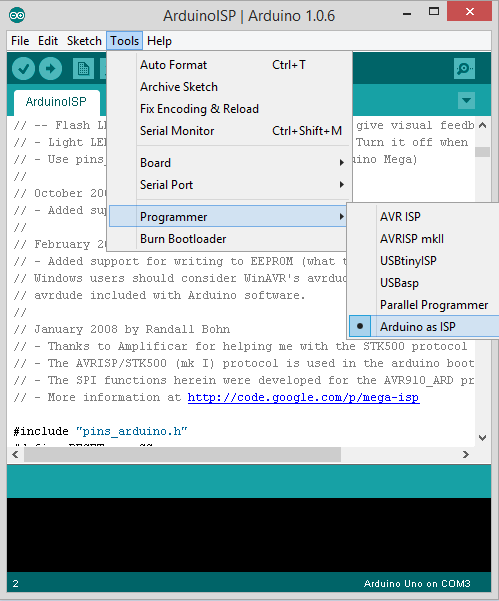 5点击Burn Bootloader,静等……done! 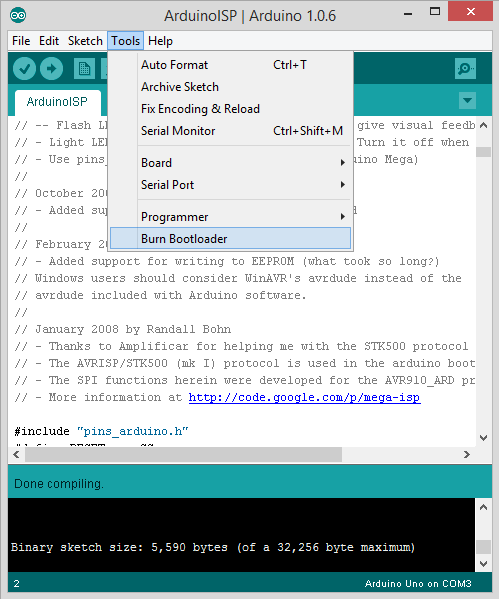 bling~ling! |
-
img_20141204_18082900.jpg (693 KB, 下载次数: 11066)


this check.
这是啥意思?
Burn bootloader前要把board改为板B的版型
大神知道一下 问啥 引导程序也烧录不进去
Arduino:1.6.10 (Windows 7), 开发板:"Arduino/Genuino Uno"
构建选项已变更,全部重新构建
项目使用了 4,380 字节,占用了 (13%) 程序存储空间。最大为 32,256 字节。
全局变量使用了481字节,(23%)的动态内存,余留1,567字节局部变量。最大为2,048字节。
avrdude: stk500_recv(): programmer is not responding
avrdude: stk500_getsync() attempt 1 of 10: not in sync: resp=0x96
avrdude: stk500_recv(): programmer is not responding
avrdude: stk500_getsync() attempt 2 of 10: not in sync: resp=0x96
avrdude: stk500_recv(): programmer is not responding
avrdude: stk500_getsync() attempt 3 of 10: not in sync: resp=0x96
avrdude: stk500_recv(): programmer is not responding
avrdude: stk500_getsync() attempt 4 of 10: not in sync: resp=0x96
avrdude: stk500_recv(): programmer is not responding
avrdude: stk500_getsync() attempt 5 of 10: not in sync: resp=0x96
avrdude: stk500_recv(): programmer is not responding
avrdude: stk500_getsync() attempt 6 of 10: not in sync: resp=0x96
avrdude: stk500_recv(): programmer is not responding
avrdude: stk500_getsync() attempt 7 of 10: not in sync: resp=0x96
avrdude: stk500_recv(): programmer is not responding
avrdude: stk500_getsync() attempt 8 of 10: not in sync: resp=0x96
avrdude: stk500_recv(): programmer is not responding
avrdude: stk500_getsync() attempt 9 of 10: not in sync: resp=0x96
avrdude: stk500_recv(): programmer is not responding
avrdude: stk500_getsync() attempt 10 of 10: not in sync: resp=0x96
上传出错。查看http://www.arduino.cc/en/Guide/Troubleshooting#upload 获取建议。
在文件 -> 首选项开启
“编译过程中显示详细输出”选项
这份报告会包含更多信息。
需要选择正确的"board"比如用的是UNO的话要选UNO
如果是Nano的话要选Nano哦
反正当你失望伤心难过悲痛等齐上心头的时候就可以烧一烧。
有事可以烧一烧,没事也可以烧一烧
不顶不能忍啊!!!