|
【背景】 新拿到一堆各式各样的灯带,测试了很多效果,结果就是亮瞎眼…面对一堆的像素块就想到了贪吃蛇,又觉得太一般,于是加入了player2,负责捣蛋。利用Arduino, Joy Stick以及procesing/蓝牙做成了这个双人捣蛋贪吃蛇游戏。
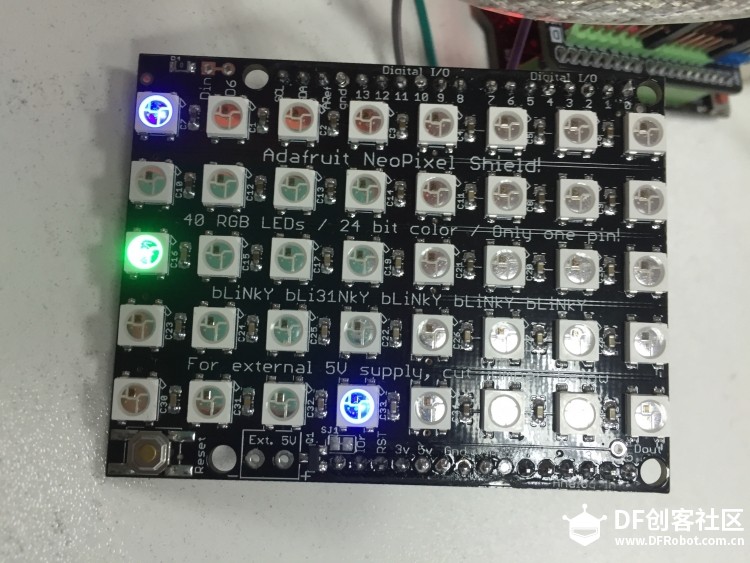
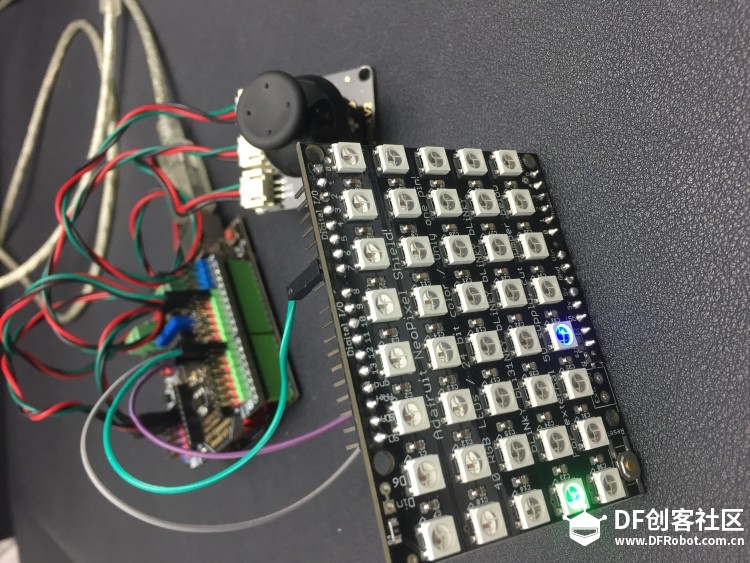
【介绍】 蓝色代表蛇,绿色代表食物 玩家1: 按下按钮游戏开始 上下左右四个方向操控蛇的方向(每次转向之后要将摇杆位置归0以便下次检测) 如果没能在5秒内吃到食物 食物位置将随机改变 出界或碰到自己的尾巴游戏结束 红灯亮起 再次按下按钮重置游戏 再按下按钮新一轮游戏开始 玩家2: 每隔1秒有一次移动食物一格的机会 负责捣蛋! 我尝试了两种玩家2的操控方法,一种是利用BLE link蓝牙模块,用现有的走你!(GoBLE)APP来控制食物的移动,但是每次移动时灯阵里的(0,0)号灯一直会变成蓝色灯,值为1,我会在下文附上所有代码,个人认为Arduino代码并没有问题,怀疑是GoBLE的库有问题,还希望大家能一起讨论一下。另一种方法是用键盘,借助processing控制食物。
【硬件清单】 必要硬件: 1 x NeoPixel (未上架) 可选硬件:
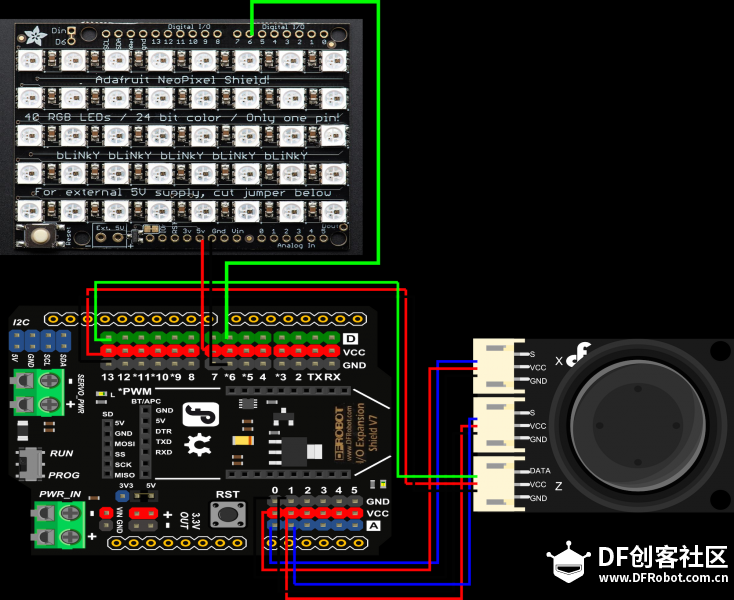
【接线图】 键盘控制版本
蓝牙控制版本 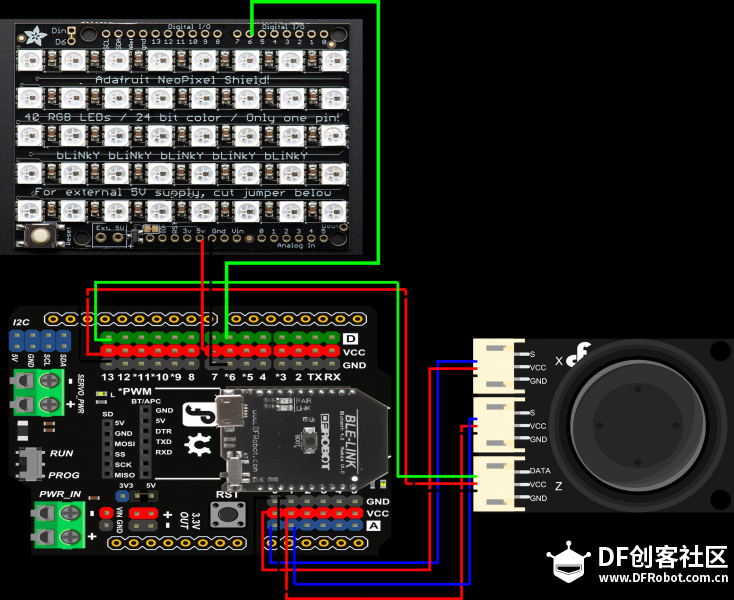
JoyStick-X PinA0 JoyStick-Y PinA1
JoyStick-Z Pin13 NeoPixels Shield Pin6
【代码】 键盘控制版本 Arduino
- /*
- *This code is loosely base off the project found here https://www.kosbie.net/cmu/fall-10/15-110/handouts/snake/snake.html
- *Created by Ada Zhao <adazhao1211@gmail.com>
- *12/23/2015
- */
-
- #include <Adafruit_NeoPixel.h>//the library can be found at https://github.com/adafruit/Adafruit_NeoPixel
- #include <Metro.h>
-
- #define PIN 6//data pin for NeoPixel
-
- // Parameter 1 = number of pixels in strip
- // Parameter 2 = pin number (most are valid)
- // Parameter 3 = pixel type flags, add together as needed:
- // NEO_KHZ800 800 KHz bitstream (most NeoPixel products w/WS2812 LEDs)
- // NEO_KHZ400 400 KHz (classic 'v1' (not v2) FLORA pixels, WS2811 drivers)
- // NEO_GRB Pixels are wired for GRB bitstream (most NeoPixel products)
- // NEO_RGB Pixels are wired for RGB bitstream (v1 FLORA pixels, not v2)
- Adafruit_NeoPixel strip = Adafruit_NeoPixel(40, PIN, NEO_GRB + NEO_KHZ800);
-
- #define X 5//this is the depth of the field
- #define Y 8//this is the length of the field
-
- //global vars
- int hrow=0,hcol=0;//sets the row and col of the snake head
- bool game = true;//game is good
- bool start = false;//start the game with true
- bool ignoreNextTimer=false;//tells the game timer wether or not it should run
- //When true the game timer will not update due to the update by a keypress
- int sx=4,sy=3;//set the initial snake location
- long previousMillis = 0;//used for the game timer
- long interval = 350; //how long between each update of the game
- unsigned long currentMillis = 0;//used for the game timer
-
- //used for update food location every five seconds
- unsigned long currentfoodtime=0;
- long prevfoodtime=0;
- long foodinterval=10000;
- int rx,ry;//food location
-
- int sDr=-1,sDc=0;//used to keep last direction, start off going up
-
- int gameBoard[X][Y] = //game field, 0 is empty, -1 is food, >0 is snake
- {
- {0,0,0,0,0,0,0,0},
- {0,0,0,0,0,0,0,0},
- {0,0,0,0,0,0,0,0},
- {0,0,0,0,0,0,0,0},
- {0,0,0,0,0,0,0,0}
- };
-
- //joystick
- int pinX = A0;
- int pinY = A1;
- int pinZ = 13;
- bool doMove = true;
- bool startGame = true;
- bool detect = true;
-
- //move food
- int buttonState[4];
- long prevTime = 0;
- long foodTime = 1000;
-
- void setup(){
- pinMode(pinZ, INPUT);
- Serial.begin(9600);
- //snake head
- hrow=sx;
- hcol=sy;
- strip.begin();//start the NeoPixel Sheild
- strip.show(); // Initialize all pixels to 'off'
- resetGame();//clear and set the game
- }
-
- void loop(){
- currentMillis = millis();//get the current time
- //game clock
- if(currentMillis - previousMillis >= interval) {
- previousMillis = currentMillis;
- if (game&&start&&ignoreNextTimer==false){
- drawBoard();
- updateGame();
- }
- ignoreNextTimer=false;//resets the ignore bool
- }
- //check joystick
- checkJoyStick();
- //check keyboard
- if (Serial.available()){
- int val = Serial.read();
- changeFood(val);
- }
-
- }
-
-
- void checkJoyStick(){
- //check joyStick
- float valX = analogRead(pinX);
- float valY = analogRead(pinY);
- int valZ = digitalRead(pinZ);
-
- //four directions
- if (valX <= 100 && valY <= 616 && valY >= 416 && doMove){//move left
- if (game&&start){
- moveSnake(0,-1);
- ignoreNextTimer=true;
- }
- doMove = false;
- }
- else if (valX >= 923 && valY >= 416 && valY <= 616 && doMove){//move right
- if (game&&start){
- moveSnake(0,1);
- ignoreNextTimer=true;
- }
- doMove = false;
-
- }
- else if (valY >= 923 && valX >= 411 && valX <= 611 && doMove){//move up
- if (game&&start){
- moveSnake(-1,0);
- ignoreNextTimer=true;
- }
- doMove = false;
-
- }
- else if (valY <= 100 && valX >= 411 && valX <= 611 && doMove){//move down
- if (game&&start){
- moveSnake(1,0);
- ignoreNextTimer=true;
- }
- doMove = false;
-
- }
- else if (valX <= 530 && valX >= 500 && valY <= 540 && valY >= 500 && doMove == false){
- //reset joyStick
- doMove = true;
- }
-
- //start or reset game by pressing the Z button
- if (startGame && valZ == 0 && detect){
- start = true;
- drawBoard();
- detect = false;
- startGame = false;
- }
- if (valZ == 1 && detect == false){
- detect = true;
- }
- if (valZ == 0 && startGame == false && detect){
- resetGame();
- detect = false;
- startGame = true;
- }
-
- }
-
-
- void changeFood(int foodDir){
- if(currentMillis-prevTime>=foodTime){
- //player 2 can move the food every three seconds
- gameBoard[rx][ry] = 0;
- switch (foodDir){
- case 1:
- rx --;
- break;
- case 4:
- ry ++;
- break;
- case 2:
- rx ++;
- break;
- case 3:
- ry --;
- break;
- }
- if (gameBoard[rx][ry] != 0 || rx < 0 || rx > X-1 || ry < 0 || ry > Y-1){
- switch (foodDir){
- case 1:
- rx ++;
- break;
- case 4:
- ry --;
- break;
- case 2:
- rx --;
- break;
- case 3:
- ry ++;
- break;
- }
- }else{
- Serial.println("reset");
- gameBoard[rx][ry] = -1;
- val = 0;
- drawBoard();
- prevTime = millis();
- }
- }
- }
-
- void updateGame(){
- if (game && start){
- moveSnake(sDr,sDc);
- //If the snake hasn't get the food within an interval, then replace the food to another place.
- currentfoodtime=millis();
- if(currentfoodtime-prevfoodtime>=foodinterval){
- if(gameBoard[rx][ry]==-1){
- gameBoard[rx][ry]=0;
- }
- placeFood();
- drawBoard();
- }
- }
- if (game && start){
- drawBoard();//update the screen
- }
- }
-
- void resetGame(){
- resetBoard();
- sDr=-1;
- sDc=0;
- loadSnake();
- placeFood();
- findSnakeHead();//find where the snake is starting from
- game=true;
- start=false;
- ignoreNextTimer=false;
- drawBoard();
- }
-
-
- void placeFood(){
-
- rx = random(0,X-1);
- ry = random(0,Y-1);
-
- while(gameBoard[rx][ry]>0){
- rx = random(0,X-1);
- ry = random(0,Y-1);
- }
- gameBoard[rx][ry]=-1;
- prevfoodtime=millis();
- }
-
- void loadSnake(){
- gameBoard[sx][sy]=1;
- }
-
- void resetBoard(){
- for(int x=0;x<X;x++){
- for(int y =0;y< Y;y++){
- gameBoard[x][y]=0;
- }
-
- }
- loadSnake();
- }
-
- void gameOver(){
- game = false;
- start = false;
-
- for(int light=0;light<40;light += 4){
- for(int i =0;i< strip.numPixels();i++){
- strip.setPixelColor(i,strip.Color(light,0,0));
- }
- strip.show();
- delay(25);
- }
- for(int light=39;light >= 0;light --){
- for(int i =0;i< strip.numPixels();i++){
- strip.setPixelColor(i,strip.Color(light,0,0));
- }
- strip.show();
- delay(25);
- }
- }
-
- void moveSnake(int row, int col){//row and col
-
- sDr = row;
- sDc = col;
-
- int new_r=0,new_c=0;
- new_r=hrow+row;
- new_c=hcol+col;
- if (new_r>=X||new_r<0||new_c>=Y||new_c<0){
- gameOver();
- }
- else if(gameBoard[new_r][new_c]>0){
- gameOver();
- }
- else if (gameBoard[new_r][new_c]==-1){
- gameBoard[new_r][new_c] = 1+gameBoard[hrow][hcol];
- hrow=new_r;
- hcol=new_c;
- placeFood();
- drawBoard();
- }
- else{
- gameBoard[new_r][new_c] = 1+gameBoard[hrow][hcol];
- hrow=new_r;
- hcol=new_c;
- removeTail();
- drawBoard();
- }
-
- }
-
- void removeTail(){
- for (int x=0;x<X;x++){
- for (int y=0;y<Y;y++){
- if(gameBoard[x][y]>0){
- gameBoard[x][y]--;
- }
- }
- }
- }
-
- void drawBoard(){
- clear_dsp();
-
- for (int x=0;x<X;x++){
- for (int y=0;y<Y;y++){
- if(gameBoard[x][y]==-1){ //food
- strip.setPixelColor(SetElement(x,y),strip.Color(0,20,0));
- }
-
- else if(gameBoard[x][y]==0){
- strip.setPixelColor(SetElement(x,y),strip.Color(0,0,0));
- }
- else{
- strip.setPixelColor(SetElement(x,y),strip.Color(0,0,10));
- }
-
- }
- }
- strip.show();
- }
-
- void findSnakeHead(){
- hrow=0;//clearing out old location
- hcol=0;//clearing out old location
-
- for (int x=0;x<X;x++){
- for (int y=0;y<Y;y++){
- if (gameBoard[x][y]>gameBoard[hrow][hcol]){
- hrow=x;
- hcol=y;
- }
- }
- }
- }
-
- void clear_dsp(){
- for(int i =0;i< strip.numPixels();i++){
- strip.setPixelColor(i,strip.Color(0,0,0));
- }
- strip.show();
- }
-
- uint16_t SetElement(uint16_t row, uint16_t col){
- //array[width * row + col] = value;
- return Y * row+col;
- }
Processing - import processing.serial.*;
-
- Serial myPort; // Create object from Serial class
-
- void setup()
- {
- size(200,200); //make our canvas 200 x 200 pixels big
- String portName = Serial.list()[2]; //change the 0 to a 1 or 2 etc. to match your port
- print(portName);
- myPort = new Serial(this, portName, 9600);
- }
-
- void draw() {
- }
-
- void keyPressed() {
- if (key == CODED) {
- if (keyCode == UP) {
- myPort.write(1);
- } else if (keyCode == DOWN) {
- myPort.write(2);
- } else if (keyCode == LEFT) {
- myPort.write(3);
- } else {
- myPort.write(4);
- }
- }
- }
蓝牙控制版本 在源代码基础上添加/修改以下部分 - #include <Adafruit_NeoPixel.h>//the library can be found at https://github.com/adafruit/Adafruit_NeoPixel
- #include <Metro.h>
- #include "GoBLE.h"
-
- //ble
- int buttonState[4];
- long prevTime = 0;
- long foodTime = 3000;
-
- void setup()
- {
- Goble.begin();
- pinMode(pinZ, INPUT);
- Serial.begin(115200);
- }
-
- void loop()
- {
- //check GoBle
- checkGoBle();
- }
-
- void checkGoBle ()
- {
- if(Goble.available()){
- buttonState[SWITCH_UP] = Goble.readSwitchUp();
- buttonState[SWITCH_DOWN] = Goble.readSwitchDown();
- buttonState[SWITCH_LEFT] = Goble.readSwitchLeft();
- buttonState[SWITCH_RIGHT] = Goble.readSwitchRight();
-
- for (int i = 1; i < 5; i++) {
- if (buttonState[i] == PRESSED)
- {
- int foodDir = i;
- Serial.println(foodDir);
- changeFood(foodDir);
- }
- }
- }
- }
-
- void changeFood(int foodDir){
- if(currentMillis-prevTime>=foodTime)
- {
- Serial.println("moving food!!!");
- gameBoard[rx][ry] = 0;
- switch (foodDir){
- case 1:
- rx --;
- break;
- case 2:
- ry ++;
- break;
- case 3:
- rx ++;
- break;
- case 4:
- ry --;
- break;
- }
- if (gameBoard[rx][ry] != 0){
- switch (foodDir){
- case 1:
- rx ++;
- break;
- case 2:
- ry --;
- break;
- case 3:
- rx --;
- break;
- case 4:
- ry ++;
- break;
- }
- }else{
- Serial.println("reset");
- gameBoard[rx][ry] = -1;
- drawBoard();
- prevTime = millis();
- }
- }
- }
【语句分析】 总括: Adafruit_NeoPixel strip = Adafruit_NeoPixel(40, PIN, NEO_GRB +NEO_KHZ800); 初始化led阵,建立一个类型为Ada_NeoPixel,名为strip(可更改)的对象,三个参数分别为LED的总数,与Arduino连接的pin以及像素类型。这种led可以通过一个数字控制脚控制每一个单独的led,非常方便。 int gameBoard[X][Y] 建立一个与灯阵一致的矩阵,不同数值代表不同的物体,0为背景,-1为食物,大0的值为蛇 currentMillis = millis(); 读取当前时间,与上次更新游戏的时间做减法,决定蛇是静止还是向前移动
贪吃蛇部分: 基本逻辑是将贪食蛇看做一个数列,每一节有一个值,尾巴尖为1,依次递增,蛇头的值最大。每次蛇移动时执行moveSnake(),检测移动后蛇头的位置——食物/背景/蛇身/出界,后两种情况执行gameover(),如果是食物,给检测的位置附上蛇头+1的值,形成新的数列;如果是背景,执行removetTail(),在现有的基础上让数列里的每个数都-1,蛇的长度保持不变。如果吃到食物或距离上次进食超过5秒,执行placeFood(),随机放置食物。
玩家1部分: checkJoySitck()实时检测摇杆位置,当摇杆处于中间位置时重置摇杆,开始下一次检测。
玩家2部分: 键盘版本需要打开并运行processing文件。通过Serial,processing可以将读到的键盘输入的信息实时传送给Arduino。 蓝牙版本需要包含GoBLE的库,实时检测用户是否在通过蓝牙下指令,如果下了指令并且时间间隔多余1秒,执行moveFood(),移动食物
【存在问题】 用蓝牙控制时(0,0)位置的灯会亮蓝色,值为1,上下右三个方向都会使(0,0)灯亮起,向左正常工作。
|