【六足机器人】关于arduino mega 2560 的问题
2018-09-121.4万
AI 快速预览详细
本文讨论了使用Arduino Mega 2560作为控制器的六足机器人在串口控制中遇到的问题。用户报告在发送几条命令后,Arduino卡住,不再响应后续命令。通过Visual Studio IDE debugger,发现卡在Millis is currently105555。文章提供了详细的故障排查步骤,包括检查Configuration.h文件中的舵机连接引脚配置。此外,还列出了常用的串口命令,如move(X,Y)、turn(Angle)等,帮助用户更好地理解和调试六足机器人。
|
我用 Arduino mega 2560 作为控制器制作了一个六足机器人,通过串口发送命令控制机器人运动。当发送几条命令后,arduino就像是卡住一样,再发送命令也没反应了。 下图是我用Visual Studio IDE debugger 时显示的信息,就卡在 Millis is currently105555. 我怀疑是开发板的问题。跪求大神帮忙看看。至于舵机连接引脚在Configuration.h文件中 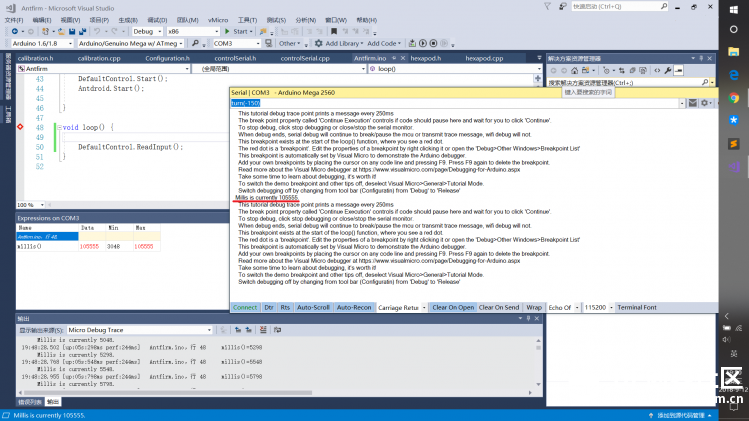 代码下载:  Antfirm.zip Antfirm.zip串口命令: Command list: move(X,Y) Move hexapod with (X,Y) step with selected gait. X: distance forward in milimeters. Y: distance left side in milimeters. Default gait: tripod. Example of use: move(30,-20); turn(Angle) Turn hexapod with selected gait.(positive value: clockwork side) Angle: degrees with one decimal. Default gait: tripod. Example of use: turn(-150); gait [OPTIONS] Select gait. -t, --tripod select tripod gait. -r, --ripple select ripple gait. Default gait: tripod. Example of use: gait -t; balance(pitch, roll, yaw) Balance hexapod mode without move. Pitch: pitch angle in degrees with one decimal. Roll: pitch angle in degrees with one decimal. Yaw: pitch angle in degrees with one decimal. Example of use: balance(50,-60,150); speed [OPTIONS] Change speed of hexapod movements. -r rise speed -d decrease speed -c change step of rise/decrease (speed is [0,255] range) Example of use: speed -c30; height [OPTIONS] Change height of hexapod. -r rise height -d decrease height -c change step of rise/decrease (height is in milimeters) Example of use: height -c30; foot_distance [OPTIONS] Change foot distance of hexapod legs. -r rise foot distance -d decrease foot distance -c change step of rise/decrease (foot distance is in milimeters) Example of use: foot distance -c30; calibrate(Leg,Member,Angle) Calibration of the indicated leg. Leg: number of the leg [0 - 5]. Member: Coxa = 0, Femur = 1, Tibia = 2 [0 - 2]. Angle: angle to default position [0 - 120]. NOTE: to complete calibration send angle 255. Example of use: calibrate(3,0,90); log [OPTIONS] Change information given by the log. -1 error messages -2 error and warn messages -3 error, warn and info messages Example of use: log -2; -4 error, warn, info and debug messages Example of use: log -2; |