如何制作植物监测仪
2019-05-051.9万

精华项目
AI 快速预览详细
本项目介绍如何使用光子(Particle Photon)物联网开发板和电容式土壤湿度传感器制作植物监测仪。硬件包括光子开发板、土壤湿度传感器等,软件则使用IFTTT Maker服务和ThingSpeak应用程序界面。当土壤湿度低于20%时,系统通过IFTTT向手机发送提醒,同时LED闪烁提示。该项目适合家长和孩子一起动手实践,学习科技知识。
|
本项目主要制作一款植物监测仪,功能是:水分传感器提示LED闪烁,并在植物需要用水时使用IFTTT向手机发送相关信息。 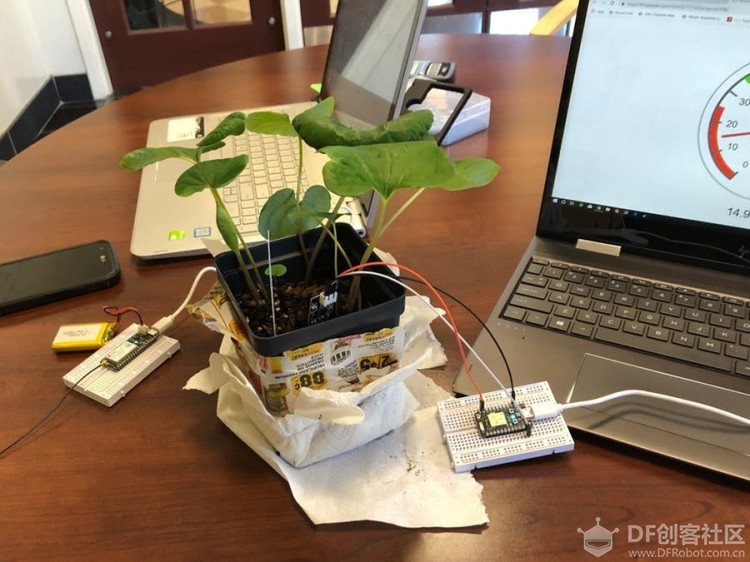 该项目需要使用的东西: 硬件 Particle Electron 软件 IFTTT Maker服务 ThingSpeak应用程序界面 故事 大部分人的房子里面都有一种或多种盆栽植物需要定期进行浇水。问题是,除非您是开专业花店的,否则您并不知道每棵植物何时需要浇水。为了解决这个问题,我们开发了一个系统,当您的植物需要水分时,系统会通过手机向您发送通知。 首先,水分传感器连接Photon并放置在盆栽植物中。然后,当传感器读取湿度值低于20时,Photon会通过编程方式发布一个名为“moisturePercentage”的事件。同时,Electron会订阅和发布该事件,以及发布自己的事件,两个事件被称为“plantStatus”和“handshake”;届时它将会把名为thirsty的变量的值从true更改为false。IFTTT将订阅“plantStatus”并向用户的IFTTT应用程序发送相关通知,而Photon将订阅“handshake”事件并在听到它时停止发布“moisturePercentage”。在electron的代码中,某个while循环将导致其LED开始闪烁,并对变量进行赋值thirsty = true。这为用户提供了另一种通知方式,防止用户未带手机的情况。当植物淹泡在水中时,水分含量将升至45以上,这导致Photon发布另一个名为“plantWatered”的事件,Electron会订阅该事件。这使得植物缺水的变量设置为false,防止电子LED闪烁。经过一段时间后,这些水分将被植物所吸收,并且整个过程将重新开始。  我们决定观察植物吸收水分时,水分含量如何变化,这个过程将非常有趣。因此,每次Photon对其进行记录时,我们都会通过一些事物对水含量进行记录。我们发现我们所选的血根草植物能够很快吸收我们供给的水,并且必须每隔一天至少浇一次水。  原理图  Particle Photon的代码: [mw_shl_code=applescript,true]int boardLed = D7; //LED D7 for testing purposes int moisture_pin = A1; //connection point for moisture sensor bool messageSent = false; //variable for checking if notification has been sent to phone String plantWatered = "Your plant has been watered and is moist"; void setup() { pinMode(boardLed,OUTPUT); //output to turn on LED for setup pinMode(moisture_pin,INPUT); //Input from moisture sensor //Flashes LED to indicate that flash is successful. digitalWrite(boardLed,HIGH); delay(2000); digitalWrite(boardLed,LOW); delay(2000); digitalWrite(boardLed,HIGH); delay(2000); digitalWrite(boardLed,LOW); delay(2000); } void loop() { //digitalWrite(boardLed,HIGH); // Now we'll take some readings... int moisture_analog = analogRead(moisture_pin); // read capacitive sensor float moisture_percentage = (100 - ((moisture_analog/4095.00) * 100 )); Particle.subscribe("handshake", handShake, "34002f000a47373336373936"); //Subscribe command to listen to other device if (moisture_percentage <= 22 && messageSent == false){ //Checks if moisture percentage is below threshold and also checks if the water message has been sent Particle.publish("moisturePercentage", String(moisture_percentage),60,PUBLIC); //Publishes for message to be sent } if (moisture_percentage > 40 && messageSent == true){ //Checks if moisture levels have gone back up and also checks if message has been sent Particle.publish("plantWatered", plantWatered, 60, PUBLIC); messageSent = false; //If message sent, and plant watered, it resets the program so that the function above will run } Particle.publish("plantStatus_percentage", String(moisture_percentage),60,PUBLIC); //Publish command for logging data and sending it to thingspeak //digitalWrite(boardLed,LOW); delay(15000); } void handShake( const char *event, const char *data){ //If the message has been sent, it sets messageSent to true messageSent = true; }[/mw_shl_code] Particle Electron 的代码: [mw_shl_code=applescript,true]int led=D7;//led that indicates the plant needs water bool sent=false;// has the notification to water the plant been sent bool thirsty=false;//whether or not the plant needs water void setup() { pinMode(led,OUTPUT); } void loop() { Particle.subscribe("moisturePercentage",waterPlant,"3c0026001747373335333438"); while(thirsty==true) {//while the plant needs water the LED flashes and the electron listens for when the water level goes up digitalWrite(led,HIGH); delay(500); digitalWrite(led,LOW); delay(500); Particle.subscribe("plantWatered",breakloop,"3c0026001747373335333438");// checks for when the plant has been waterd. } delay(5000);// this loop every five minutes } void waterPlant( const char *event, const char*data) { Particle.publish("plantStatus","thirsty",60,PUBLIC);//sends a message to IFTTT to notify me to water my plants. sent=true; Particle.publish("handshake","sent",60,PUBLIC);// notifies the photon that the message has been sent thirsty=true; } void breakloop( const char *event, const char*data)// changes thirsty to false to break the while loop and stop the led from flashing { thirsty=false; sent=false; } [/mw_shl_code] |