[App Inventor]Arduino101加速度传感器应用
2019-06-087370

精华项目
AI 快速预览详细
本教程介绍了如何使用App Inventor和Arduino 101制作一个简单的加速度传感器应用。首先需要修改ino文件,将ACCELEROMETER设置为ENABLED。然后在App Inventor中设置界面,添加标签并导入插件。接着定义变量和过程,实现当蓝牙连接成功后,实时更新显示加速度传感器的数据。通过这个项目,用户可以了解如何利用Arduino 101内置的加速度传感器进行编程,并实现实时数据展示。
|
加速度传感器app(Arduino101)
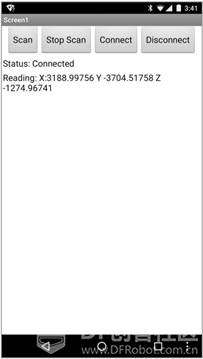
实验目标 制作一个简单的应用程序,显示Arduino设备在X,Y和Z方向上的加速度。 倾斜或移动Arduino会改变加速度读数。 实验器材 主控板:Arduino 101(内置加速度传感器) 打开AIM- for –Things – Arduino 101.ino文件,将ACCELEROMETER设置为ENABLED,其余所有项均设置为DISABLED。(文件下载见“前置条件”贴) ![[App Inventor]Arduino101加速度传感器应用图1](https://imagemc.dfrobot.com.cn/data/attachment/forum/201906/07/163129qvr5z9vdeamoddqz.png?imageView2/2/format/webp/q/80) 界面设置: • 打开BasicIoTSetup.aia项目文件并另存为Iot_Accelerometer • 从用户界面中拖动一个标签放到标签_数据和蓝牙列表之间 • 将标签重命名为标签_数据 • 设置其文本属性为"数据: " • 在组件面板中,点击Extension,导入插件 • 将Arduino101Accelerometer 拖到工作面板中,并将其BluetoothDevice属性设置为BluetoothLE1 ![[App Inventor]Arduino101加速度传感器应用图2](https://imagemc.dfrobot.com.cn/data/attachment/forum/201906/07/163205ih4a22haxz6r1st4.png?imageView2/2/format/webp/q/80) ![[App Inventor]Arduino101加速度传感器应用图3](https://imagemc.dfrobot.com.cn/data/attachment/forum/201906/07/163219cf6fngic929y042x.png?imageView2/2/format/webp/q/80) 导入插件方法 • 方法1:将aix文件下载,选择“From my computer”导入 • 方法2:点击URL,直接将网址输入导入http://iot.appinventor.mit.edu/assets/resources/edu.mit.appinventor.iot.arduino101.aix(如下载不了见“前置条件”贴) ![[App Inventor]Arduino101加速度传感器应用图4](https://imagemc.dfrobot.com.cn/data/attachment/forum/201906/07/163237cuxv8cudvvq3o7qo.png?imageView2/2/format/webp/q/80) ![[App Inventor]Arduino101加速度传感器应用图5](https://imagemc.dfrobot.com.cn/data/attachment/forum/201906/07/163246hfflwvvlwb3gwbgg.png?imageView2/2/format/webp/q/80) 逻辑设计:当蓝牙连接成功后 • 在原有语句块下添加调用请求更新加速度传感器数据过程 ![[App Inventor]Arduino101加速度传感器应用图6](https://imagemc.dfrobot.com.cn/data/attachment/forum/201906/07/163310tzu0f10pm1005tgl.png?imageView2/2/format/webp/q/80) 逻辑设计:定义变量 • 从变量抽屉中拖出三个初始化全局变量程序块并分别命名为Accel_X, Accel_Y, Accel_Z,这三个变量分别保存Arduino设备在X,Y和Z方向上的速度,将三个变量的初始值设置初始值为0。 ![[App Inventor]Arduino101加速度传感器应用图7](https://imagemc.dfrobot.com.cn/data/attachment/forum/201906/07/163319h9yks88q97g8zu1y.png?imageView2/2/format/webp/q/80) 定义过程:更新数据标签 • 从过程抽屉中拖出定义过程块,并重命名为"更新数据标签" • 从标签_数据抽屉中拖出设置文本程序块 • 从文本抽屉中拖出合并字符串程序块,点击蓝色的轮子呼出添加字符串,额外添加4个字符串块(共6个),按图进行设置 ![[App Inventor]Arduino101加速度传感器应用图8](https://imagemc.dfrobot.com.cn/data/attachment/forum/201906/07/163337h7y6thyt6j76mzzo.png?imageView2/2/format/webp/q/80) ![[App Inventor]Arduino101加速度传感器应用图9](https://imagemc.dfrobot.com.cn/data/attachment/forum/201906/07/163347kuj6jqvq96uo2k5k.png?imageView2/2/format/webp/q/80) 逻辑设计:当加速度传感器有数据更新时 • 将获取的传感器的X, Y, Z的值分别赋值给三个变量,并调用过程“更新数据标签”,在标签中显示最新的数据 ![[App Inventor]Arduino101加速度传感器应用图10](https://imagemc.dfrobot.com.cn/data/attachment/forum/201906/07/163358wc9icy3yrl9wct3d.png?imageView2/2/format/webp/q/80) 测试应用 • 蓝牙设备连接成功后,会实时更新显示加速度传感器返回的数据 ![[App Inventor]Arduino101加速度传感器应用图11](https://imagemc.dfrobot.com.cn/data/attachment/forum/201906/07/222448if2ufrh5nlshslaf.png?imageView2/2/format/webp/q/80) |
-
截图201906071634137228.png (20.02 KB, 下载次数: 3885)
-

-
161.72 KB, 下载次数: 1
售价: 3 创造力 [记录]
.aix文件
-
-
158.85 KB, 下载次数: 0
.aia文件