

【花雕体验】17 Beetle ESP32C3与WS2812的音乐可视化节奏灯
2022-07-091.3万
AI 快速预览详细
本文介绍了如何使用MAX9814麦克风放大器、17 Beetle ESP32C3和WS2812 LED灯带来实现音乐可视化节奏灯。项目通过麦克风捕捉声音信号,并将其转化为LED灯带的动态灯光效果。MAX9814具有自动增益控制(AGC)和低噪声麦克风偏置,确保音质清晰。适合电子爱好者和STEM教育场景。
|
MAX9814 是一款低成本高性能麦克风放大器,具有自动增益控制(AGC)和低噪声麦克风偏置。器件具有低噪声前端放大器、可变增益放大(VGA)、输出放大器、麦克风偏置电压发生器和AGC控制电路。 ●自动增益控制(AGC) ●3种增益设置(40dB、50dB、60dB) ●可编程动作时间 ●可编程动作和释放时间比 ●电源电压范围2.7V~5.5V ●低THD:0.04% (典型值) ●低功耗关断模式 ●内置2V低噪声麦克风偏置 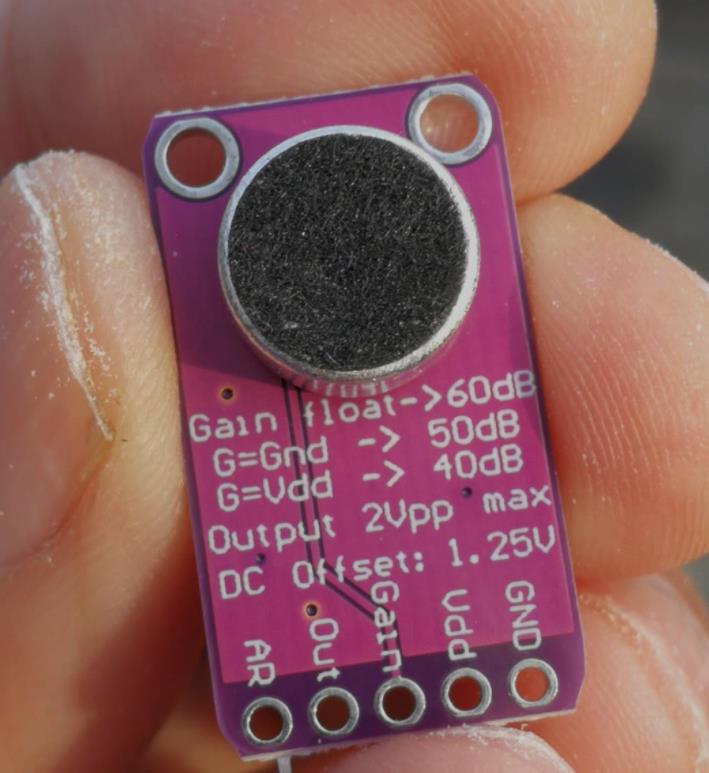 |



https://v.youku.com/v_show/id_XNTg4NzQ1ODMzMg==.html?spm=a2hcb.playlsit.page.1
[media=x,500,375]https://v.youku.com/v_show/id_XNTg4NzQ1ODMzMg==.html?spm=a2hcb.playlsit.page.1[/media]
https://v.youku.com/v_show/id_XNTg4ODUzMjI5Mg==.html?spm=a2hcb.playlsit.page.1
[media=x,500,375]https://v.youku.com/v_show/id_XNTg4ODUzMjI5Mg==.html?spm=a2hcb.playlsit.page.1[/media]
实验程序四:MegunoLink音乐反应式LED灯带
模块接线:WS2812B接D6
MAX9814 ESP32_C3
VCC 5V
GND GND
OUT A0
[code]/*
【花雕体验】17 Beetle ESP32C3与WS2812屏音乐可视化节奏灯
实验程序四:MegunoLink音乐反应式LED灯带
模块接线:WS2812B接D6
MAX9814 ESP32_C3
VCC 5V
GND GND
OUT A0
*/
#include
#include
#include
// define necessary parameters
#define N_PIXELS 24
#define MIC_PIN A0
#define LED_PIN 6
// the following parameters can be tweaked according to your audio levels
#define NOISE 150
#define TOP (N_PIXELS+2) // allow the max level to be slightly off scale
#define LED_TYPE WS2811
#define BRIGHTNESS 18 // a little dim for recording purposes
#define COLOR_ORDER GRB
// declare the LED array
CRGB leds[N_PIXELS];
// define the variables needed for the audio levels
int lvl = 0, minLvl = 0, maxLvl = 100; // tweak the min and max as needed
// instantiate the filter class for smoothing the raw audio signal
ExponentialFilter
void setup() {
// put your setup code here, to run once:
Serial.begin(115200);
// initialize the LED object
FastLED.addLeds
FastLED.setBrightness(BRIGHTNESS);
}
void loop() {
// put your main code here, to run repeatedly:
// read the audio signal and filter it
int n, height;
n = analogRead(MIC_PIN);
// remove the MX9614 bias of 1.25VDC
n = abs(1023 - n);
// hard limit noise/hum
n = (n <= NOISE) ? 0 : abs(n - NOISE);
// apply the exponential filter to smooth the raw signal
ADCFilter.Filter(n);
lvl = ADCFilter.Current();
// // plot the raw versus filtered signals
// Serial.print(n);
// Serial.print(" ");
// Serial.println(lvl);
// calculate the number of pixels as a percentage of the range
// TO-DO: can be done dynamically by using a running average of min/max audio levels
height = TOP * (lvl - minLvl) / (long)(maxLvl - minLvl);
if(height < 0L) height = 0;
else if(height > TOP) height = TOP;
// turn the LEDs corresponding to the level on/off
for(uint8_t i = 0; i < N_PIXELS; i++) {
// turn off LEDs above the current level
if(i >= height) leds[i] = CRGB(0,0,0);
// otherwise, turn them on!
else leds[i] = Wheel( map( i, 0, N_PIXELS-1, 30, 150 ) );
}
FastLED.show();
}
CRGB Wheel(byte WheelPos) {
// return a color value based on an input value between 0 and 255
if(WheelPos < 85)
return CRGB(WheelPos * 3, 255 - WheelPos * 3, 0);
else if(WheelPos < 170) {
WheelPos -= 85;
return CRGB(255 - WheelPos * 3, 0, WheelPos * 3);
} else {
WheelPos -= 170;
return CRGB(0, WheelPos * 3, 255 - WheelPos * 3);
}
}[/code]
https://v.youku.com/v_show/id_XNTg4NTgwNTkyNA==.html?spm=a2hcb.playlsit.page.1
[media=x,500,375]https://v.youku.com/v_show/id_XNTg4NTgwNTkyNA==.html?spm=a2hcb.playlsit.page.1[/media]
实验程序三:通过快速傅里叶变换在ws2812b灯板上显示频谱
[code]/*
【花雕体验】17 Beetle ESP32C3与WS2812屏音乐可视化节奏灯
实验程序三:通过快速傅里叶变换在ws2812b灯板上显示频谱
*/
#include "arduinoFFT.h"
#include
#define NUM_LEDS 256
#define LED_TYPE WS2812
#define COLOR_ORDER GRB
arduinoFFT FFT = arduinoFFT();
CRGB leds[NUM_LEDS];
#define CHANNEL A0
#define DATA_PIN 6
const uint8_t max_bright = 2;
const uint16_t samples = NUM_LEDS / 4;
const byte halfsamples = samples / 2;
uint8_t gHue;
int value;
double vReal[samples];
double vImag[samples];
char toData[halfsamples];
int pointJump[halfsamples];
int uJump[halfsamples];
int dJump[halfsamples];
int uValue;
int dValue;
int tValue;
int toDown = 0;
uint8_t toDownSpeed = 3;
int pointDown = 0;
uint8_t pointDownSpeed = 9;
void setup(){
delay(100);
Serial.println("Ready");
FastLED.addLeds
FastLED.setBrightness(max_bright);
}
void loop(){
FastLED.clear();
EVERY_N_MILLISECONDS(10) {
gHue += 10;
}
for (int i = 0; i < samples; i++)
{
value = analogRead(CHANNEL);
vReal[i] = value;
vImag[i] = 0.0;
}
FFT.Windowing(vReal, samples, FFT_WIN_TYP_HAMMING, FFT_FORWARD);
FFT.Compute(vReal, vImag, samples, FFT_FORWARD);
FFT.ComplexToMagnitude(vReal, vImag, samples);
for (int i = 0; i < halfsamples; i++)
{
toData[i] = vReal[i + halfsamples / 2];
toData[i] = constrain(toData[i], 0, 100);
toData[i] = map(toData[i], 0, 100, 1, 7);
}
for (int i = 0; i < halfsamples; i++)
{
uValue = toData[i];
uJump[i]++;
if (uValue > uJump[i])
{
uValue = uJump[i];
}
else
{
uJump[i] = uValue;
}
dValue = uValue;
toDown++;
if (toDown % toDownSpeed == 0)
{
dJump[i]--;
toDown = 0;
}
if (dValue > pointJump[i])
{
dJump[i] = dValue;
}
else
{
dValue = dJump[i];
}
tValue = uValue;
pointDown++;
if (pointDown % pointDownSpeed == 0)
{
pointJump[i]--;
pointDown = 0;
}
if (tValue > pointJump[i])
{
pointJump[i] = tValue;
}
else
{
tValue = pointJump[i];
}
fill_rainbow(leds + 8 * i, uValue, gHue, 30);
fill_rainbow(leds + 8 * i, dValue, gHue, 30);
fill_solid(leds + 8 * i + tValue, 1, CRGB::White);
}
FastLED.show();
delay(10);
}[/code]
[backcolor=rgb(255, 255, 255)][font="]
[/font][/backcolor]
[backcolor=rgb(255, 255, 255)][font="]
[/font][/backcolor]
实验程序二:简易测量环境声级
模块接线:
MAX9814 Beetle ESP32C3
VCC 5V
GND GND
OUT A0
[code]/*
【花雕体验】17 Beetle ESP32C3与WS2812屏音乐可视化节奏灯
实验程序二:简易测量环境声级
模块接线:
MAX9814 Beetle ESP32C3
VCC 5V
GND GND
OUT A0
*/
const int sampleWindow = 50; // 以mS为单位的采样窗口宽度(50 mS = 20Hz)
unsigned int sample;
void setup() {
Serial.begin(115200);
pinMode(A0,INPUT);
}
void loop() {
unsigned long startMillis= millis(); // 样本窗口的开始
unsigned int peakToPeak = 0; // 峰峰值
unsigned int signalMax = 0;
unsigned int signalMin = 3600;
// collect data for 50 mS
while (millis() - startMillis < sampleWindow)
{
sample = analogRead(A0);
if (sample < 3600) // 抛出错误的读数
{
if (sample > signalMax)
{
signalMax = sample; // 只保存最大级别
}
else if (sample < signalMin)
{
signalMin = sample; // 仅保存最低级别
}
}
}
peakToPeak = signalMax - signalMin; // max-min =峰峰值幅度
double volts = (peakToPeak * 5.0) / 170;
Serial.println(volts);
}[/code]
实验程序一:测试MAX9814麦克风放大器模块
模块接线:
MAX9814 Beetle ESP32C3
VCC 5V
GND GND
OUT A0
[code]/*
【花雕体验】17 Beetle ESP32C3与WS2812屏音乐可视化节奏灯
实验程序一:测试MAX9814麦克风放大器模块
模块接线:
MAX9814 Beetle ESP32C3
VCC 5V
GND GND
OUT A0
*/
void setup() {
Serial.begin(9600);
pinMode(A0, INPUT);
}
void loop() {
Serial.println(analogRead(A0));
delay(100);
}[/code]
模块电原理图
[backcolor=rgb(255, 255, 255)][font="]MAX9814主要特征[/font][/backcolor]
[backcolor=rgb(255, 255, 255)][font="]自动增益控制(AGC)[/font][/backcolor]
[backcolor=rgb(255, 255, 255)][font="]三种增益设置(40dB,50dB,60dB)[/font][/backcolor]
[backcolor=rgb(255, 255, 255)][font="]可编程攻击时间[/font][/backcolor]
[backcolor=rgb(255, 255, 255)][font="]可编程的攻击和释放比率[/font][/backcolor]
[backcolor=rgb(255, 255, 255)][font="]2.7V至5.5V电源电压范围[/font][/backcolor]
[backcolor=rgb(255, 255, 255)][font="]30nV /的低输入参考噪声密度[/font][/backcolor]
[backcolor=rgb(255, 255, 255)][font="]低总谐波失真(THD):0.04%(典型值)[/font][/backcolor]
[backcolor=rgb(255, 255, 255)][font="]低功耗关机模式[/font][/backcolor]
[backcolor=rgb(255, 255, 255)][font="]内部低噪声麦克风偏置,2V[/font][/backcolor]
[backcolor=rgb(255, 255, 255)][font="]采用节省空间的14引脚TDFN(3mm×3mm)封装[/font][/backcolor]
[backcolor=rgb(255, 255, 255)][font="]-40°C至+ 85°C扩展温度范围[/font][/backcolor]
[backcolor=rgb(255, 255, 255)][font="]
[/font][/backcolor]