mind+自定义用户库
2022-08-111.6万
AI 快速预览详细
本文讨论了在Mind+中上传自定义Arduino舵机操作用户库时遇到的链接失败问题。具体错误表现为`undefined reference to 'Servo::attach(int)'`等。文章详细描述了问题现象、操作流程,并提供了具体的解决步骤。首先,确保Servo库文件正确放置在项目目录中;其次,检查main.ts中的库引用是否正确。通过这些步骤,可以有效解决上传报错问题,确保代码能够成功编译和运行。
|
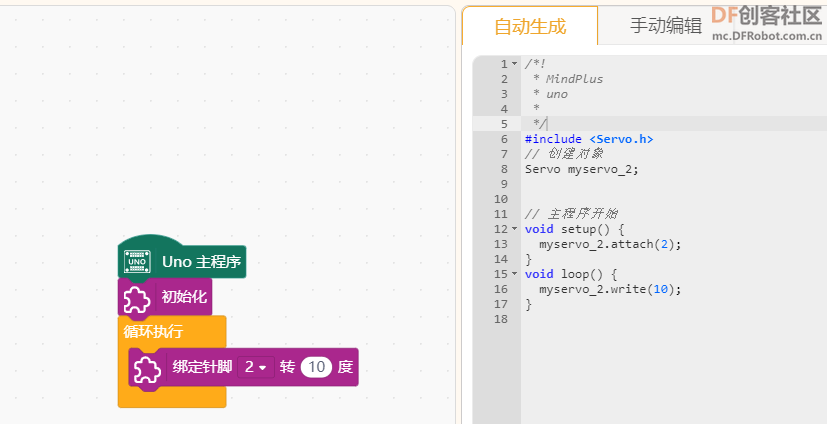
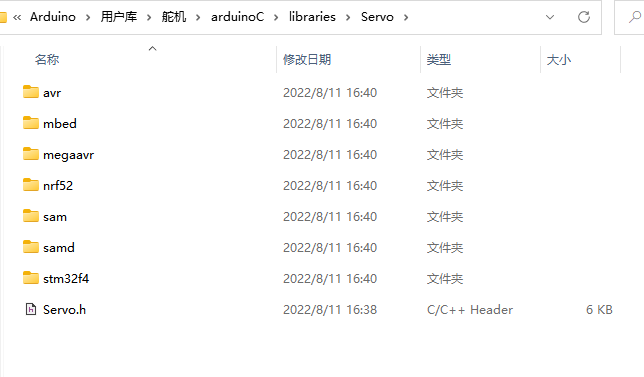
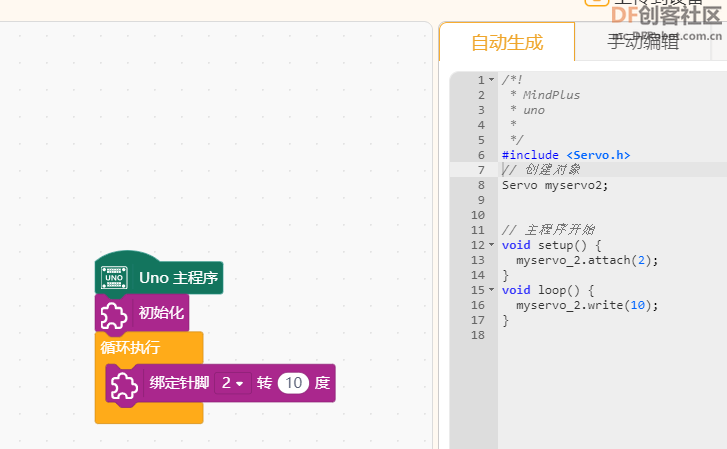
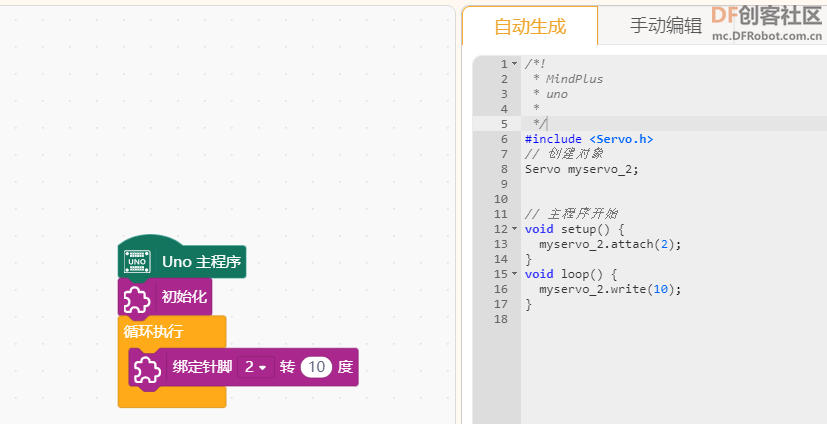
我开发了一个舵机操作的用户库(官方的当然也能用,目的也是为了学习)。 现在遇到的问题是用mind+上传会报错。 我的操作流程是 1:main.ts的内容是 //% color="#AA278D" iconWidth=50 iconHeight=40 namespace ArduinoHouXinxin { //% block="初始化" blockType="command" export function myBlock(parameter: any, block: any) { Generator.addInclude('Servo', '#include <Servo.h>'); } //% block="绑定针脚[YINJIAO]转[VALUE]度" blockType="command" //% YINJIAO.shadow="dropdown" YINJIAO.options="PIN_DigitalWrite" //% VALUE.shadow="number" export function myservoAttach(parameter: any, block: any) { let YINJIAOVALUE = parameter.YINJIAO.code; let VALUEVALUE = parameter.VALUE.code; Generator.addObject(`myservo_${YINJIAOVALUE}`, `Servo`, `myservo${YINJIAOVALUE};`); Generator.addSetup(`myservo_${YINJIAOVALUE}.attach`, `myservo_${YINJIAOVALUE}.attach(${YINJIAOVALUE});`); Generator.addCode(`myservo_${YINJIAOVALUE}.write(${VALUEVALUE})`); } } 2:然后在项目所在的\libraries文件夹中也放了Servo这个类库,具体路径如下,我也试着去掉上层的Servo这个目录也不好使 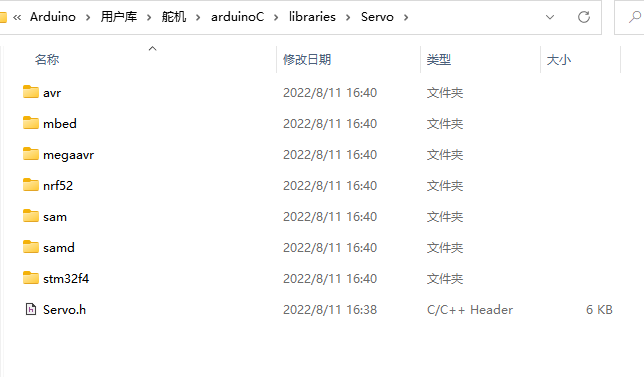 3:mind+中生成的代码如下 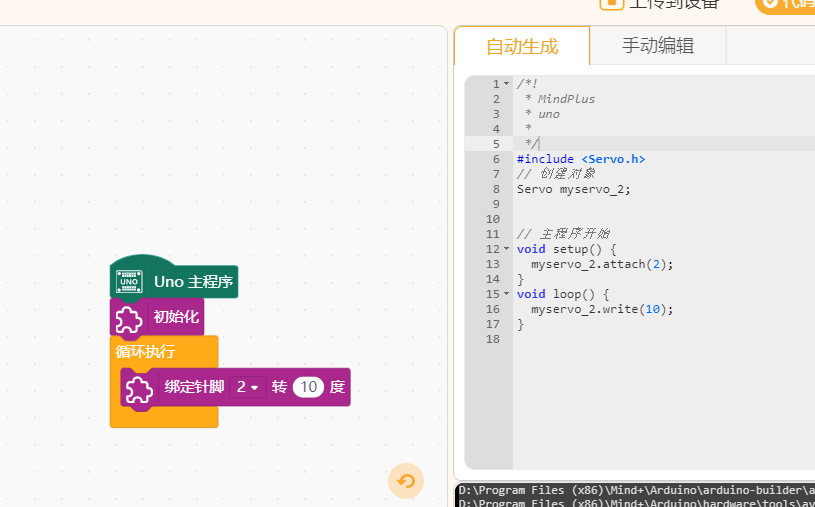 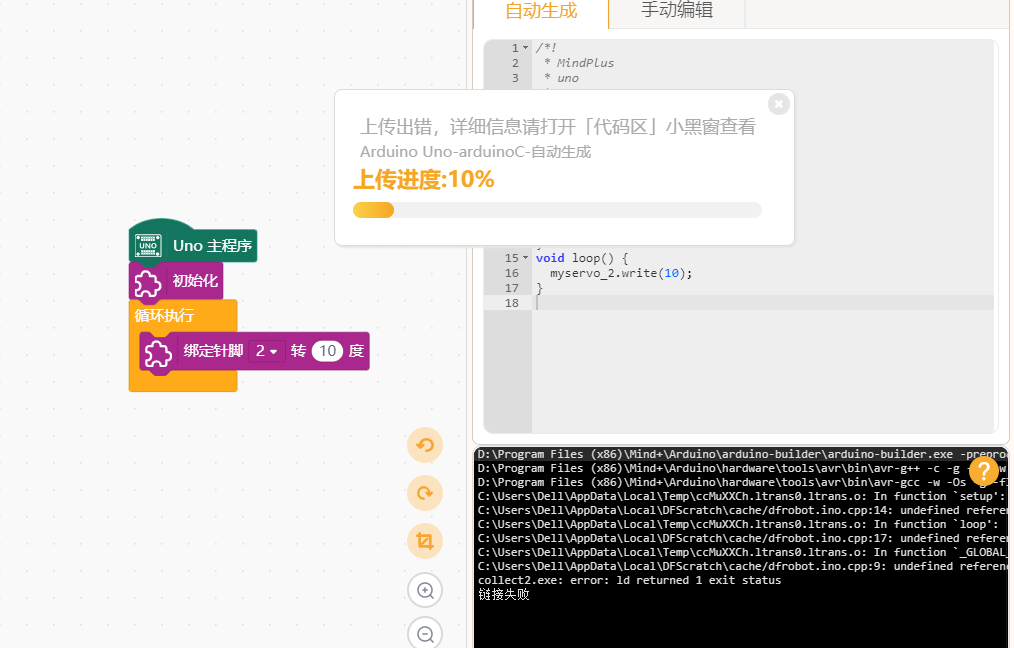 4:在原生编辑器中是没有问题的 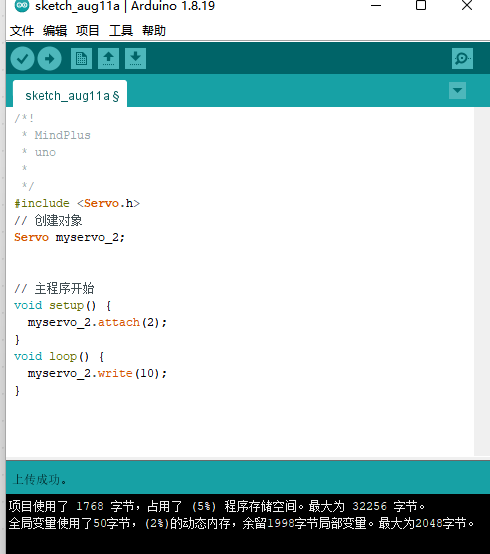 5:然后mind+中上传就会报错 错误如下 D:\Program Files (x86)\Mind+\Arduino\arduino-builder\arduino-builder.exe -preprocess -logger=machine -hardware D:\Program Files (x86)\Mind+\Arduino\hardware -tools D:\Program Files (x86)\Mind+\Arduino\arduino-builder -tools D:\Program Files (x86)\Mind+\Arduino\hardware\tools\avr -libraries C:\Users\Dell\AppData\Local\DFScratch\extensions\houxinxin-houxinxinservo001-thirdex\arduinoC\libraries -built-in-libraries D:\Program Files (x86)\Mind+\Arduino\libraries -fqbn=arduino:avr:uno -vid-pid=0X2341_0X0043 -ide-version=10804 -build-path C:\Users\Dell\AppData\Local\DFScratch\build -warnings=none -build-cache C:\Users\Dell\AppData\Local\DFScratch\cache -prefs=build.warn_data_percentage=75 -prefs=runtime.tools.avr-gcc.path=D:\Program Files (x86)\Mind+\Arduino\hardware\tools\avr -prefs=runtime.tools.arduinoOTA.path=D:\Program Files (x86)\Mind+\Arduino\hardware\tools\avr -prefs=runtime.tools.avrdude.path=D:\Program Files (x86)\Mind+\Arduino\hardware\tools\avr -verbose C:\Users\Dell\AppData\Local\DFScratch\dfrobot\dfrobot.ino D:\Program Files (x86)\Mind+\Arduino\hardware\tools\avr\bin\avr-g++ -c -g -Os -w -std=gnu++11 -fpermissive -fno-exceptions -ffunction-sections -fdata-sections -fno-threadsafe-statics -MMD -flto -mmcu=atmega328p -DF_CPU=16000000L -DARDUINO=10804 -DARDUINO_AVR_NANO -DARDUINO_ARCH_AVR -I D:\Program Files (x86)\Mind+\Arduino\hardware\arduino\avr\cores\arduino -I D:\Program Files (x86)\Mind+\Arduino\hardware\arduino\avr\variants\eightanaloginputs -I D:\Program Files (x86)\Mind+\Arduino\hardware\arduino\avr\cores\arduino -I D:\Program Files (x86)\Mind+\Arduino\hardware\arduino\avr\variants\standard -I C:\Users\Dell\AppData\Local\DFScratch\extensions\houxinxin-houxinxinservo001-thirdex\arduinoC\libraries\Servo C:\Users\Dell\AppData\Local\DFScratch\cache\dfrobot.ino.cpp -o C:\Users\Dell\AppData\Local\DFScratch\cache\dfrobot.ino.cpp.o D:\Program Files (x86)\Mind+\Arduino\hardware\tools\avr\bin\avr-gcc -w -Os -g -flto -fuse-linker-plugin -Wl,--gc-sections -mmcu=atmega328p -o C:\Users\Dell\AppData\Local\DFScratch\build\dfrobot.ino.elf C:\Users\Dell\AppData\Local\DFScratch\cache\dfrobot.ino.cpp.o D:\Program Files (x86)\Mind+\Arduino\static/core/uno/core.a -lm C:\Users\Dell\AppData\Local\Temp\ccMuXXCh.ltrans0.ltrans.o: In function `setup': C:\Users\Dell\AppData\Local\DFScratch\cache/dfrobot.ino.cpp:14: undefined reference to `Servo::attach(int)' C:\Users\Dell\AppData\Local\Temp\ccMuXXCh.ltrans0.ltrans.o: In function `loop': C:\Users\Dell\AppData\Local\DFScratch\cache/dfrobot.ino.cpp:17: undefined reference to `Servo::write(int)' C:\Users\Dell\AppData\Local\Temp\ccMuXXCh.ltrans0.ltrans.o: In function `_GLOBAL__sub_I_myservo_2': C:\Users\Dell\AppData\Local\DFScratch\cache/dfrobot.ino.cpp:9: undefined reference to `Servo::Servo()' collect2.exe: error: ld returned 1 exit status 链接失败 有没有大佬知道这是为啥 |
-
ThuAugust-202208119798..png (22.9 KB, 下载次数: 2955)

-
ThuAugust-202208119340..png (41.88 KB, 下载次数: 2930)
-
ThuAugust-202208117298..png (41.4 KB, 下载次数: 2935)
-
ThuAugust-202208117826..png (41.4 KB, 下载次数: 2868)