

【Arduino】168种传感器系列实验(214)---8x32位全彩WS2812B屏
2022-10-215.4万
AI 快速预览详细
本文介绍了使用Arduino控制8x32位全彩WS2812B屏的实验。通过详细的代码和仿真编程方法,展示了如何实现多种显示效果。无论是初学者还是有经验的创客,都可以从中受益。关键词包括Arduino, WS2812B屏, 8x32点阵LED显示屏, 传感器模块, 编程, 仿真编程, 图形编程, DFRobot, 创客, LED显示, 传感器实验, Arduino项目, 全彩RGB像素屏, 8x32点阵屏, 传感器系列实验, 电子制作, 创客教程, 电子DIY, STEM教育, 生态互联型, Arduino与WS2812B连接, 如何实现全彩LED显示。
|
37款传感器与模块的提法,在网络上广泛流传,其实Arduino能够兼容的传感器模块肯定是不止37种的。鉴于本人手头积累了一些传感器和执行器模块,依照实践出真知(一定要动手做)的理念,以学习和交流为目的,这里准备逐一动手试试多做实验,不管成功与否,都会记录下来——小小的进步或是搞不掂的问题,希望能够抛砖引玉。 【Arduino】168种传感器模块系列实验(资料代码+仿真编程+图形编程) 实验二百一十四:WS2812B全彩RGB像素屏 8x32点阵LED显示屏 可编程硬屏模块 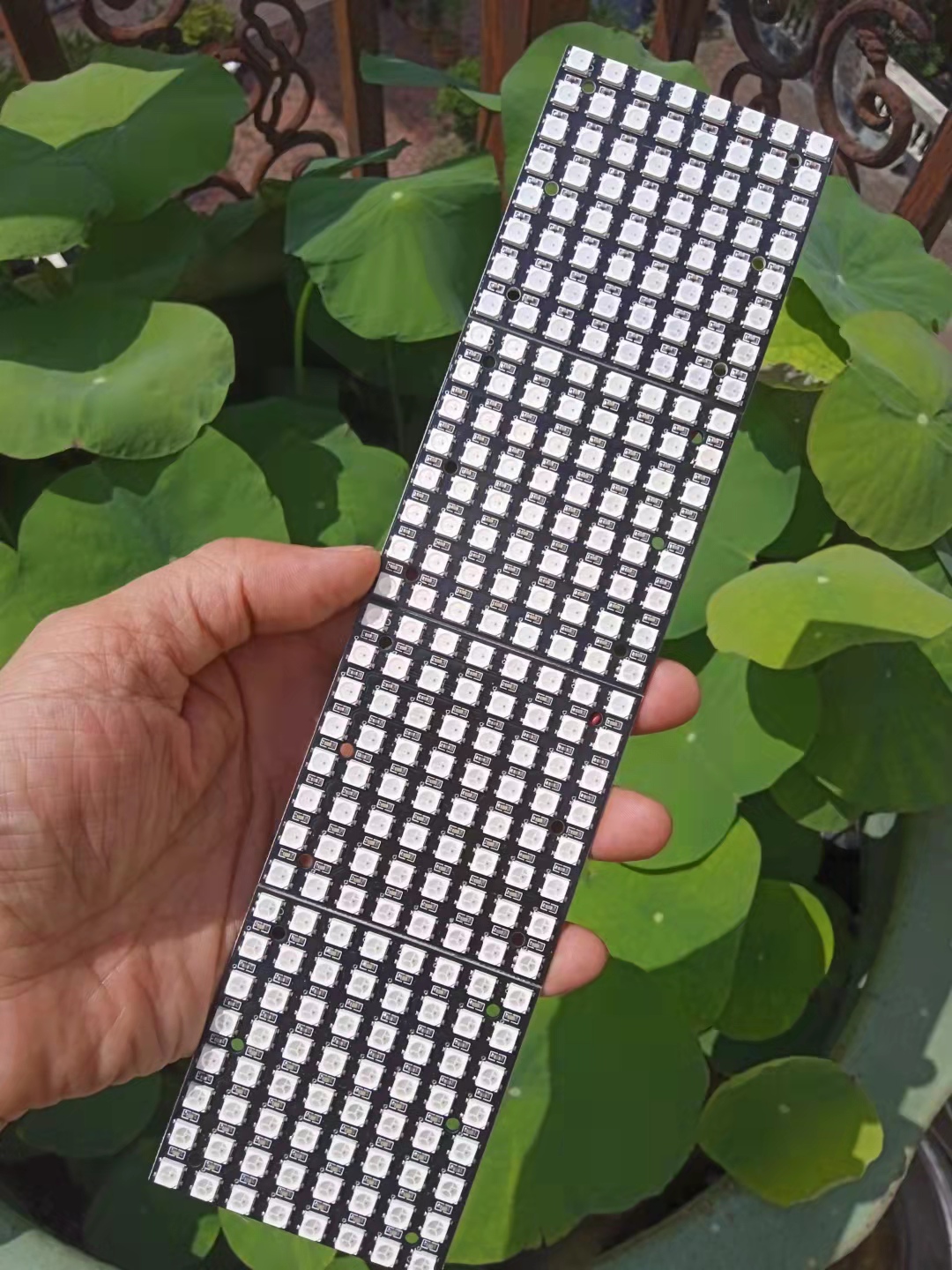 |


优酷:
B站:https://www.bilibili.com/video/BV1ge4y127bD/?vd_source=98c6b1fc23b2787403d97f8d3cc0b7e5
[media=x,500,375]https://www.bilibili.com/video/BV1ge4y127bD/?vd_source=98c6b1fc23b2787403d97f8d3cc0b7e5[/media]
实验二百一十四:WS2812B全彩RGB像素屏 8x32点阵LED显示屏 硬屏模块
项目程序二十一:通过快速傅里叶变换在8*32灯板上显示频谱
[code]/*
【Arduino】168种传感器模块系列实验(资料代码+仿真编程+图形编程)
实验二百一十四:WS2812B全彩RGB像素屏 8x32点阵LED显示屏 硬屏模块
项目程序二十一:通过快速傅里叶变换在8*32灯板上显示频谱
*/
#include "arduinoFFT.h"
#include
#define NUM_LEDS 256
#define LED_TYPE WS2812
#define COLOR_ORDER GRB
arduinoFFT FFT = arduinoFFT();
CRGB leds[NUM_LEDS];
#define CHANNEL A0
#define DATA_PIN 6
const uint8_t max_bright = 2;
const uint16_t samples = NUM_LEDS / 4;
const byte halfsamples = samples / 2;
uint8_t gHue;
int value;
double vReal[samples];
double vImag[samples];
char toData[halfsamples];
int pointJump[halfsamples];
int uJump[halfsamples];
int dJump[halfsamples];
int uValue;
int dValue;
int tValue;
int toDown = 0;
uint8_t toDownSpeed = 3;
int pointDown = 0;
uint8_t pointDownSpeed = 9;
void setup(){
delay(100);
Serial.println("Ready");
FastLED.addLeds
FastLED.setBrightness(max_bright);
}
void loop(){
FastLED.clear();
EVERY_N_MILLISECONDS(10) {
gHue += 10;
}
for (int i = 0; i < samples; i++)
{
value = analogRead(CHANNEL);
vReal[i] = value;
vImag[i] = 0.0;
}
FFT.Windowing(vReal, samples, FFT_WIN_TYP_HAMMING, FFT_FORWARD);
FFT.Compute(vReal, vImag, samples, FFT_FORWARD);
FFT.ComplexToMagnitude(vReal, vImag, samples);
for (int i = 0; i < halfsamples; i++)
{
toData[i] = vReal[i + halfsamples / 2];
toData[i] = constrain(toData[i], 0, 100);
toData[i] = map(toData[i], 0, 100, 1, 7);
}
for (int i = 0; i < halfsamples; i++)
{
uValue = toData[i];
uJump[i]++;
if (uValue > uJump[i])
{
uValue = uJump[i];
}
else
{
uJump[i] = uValue;
}
dValue = uValue;
toDown++;
if (toDown % toDownSpeed == 0)
{
dJump[i]--;
toDown = 0;
}
if (dValue > pointJump[i])
{
dJump[i] = dValue;
}
else
{
dValue = dJump[i];
}
tValue = uValue;
pointDown++;
if (pointDown % pointDownSpeed == 0)
{
pointJump[i]--;
pointDown = 0;
}
if (tValue > pointJump[i])
{
pointJump[i] = tValue;
}
else
{
tValue = pointJump[i];
}
fill_rainbow(leds + 8 * i, uValue, gHue, 30);
fill_rainbow(leds + 8 * i, dValue, gHue, 30);
fill_solid(leds + 8 * i + tValue, 1, CRGB::White);
}
FastLED.show();
delay(10);
}[/code]
优酷:
B站:https://www.bilibili.com/video/BV1L14y157PU/?vd_source=98c6b1fc23b2787403d97f8d3cc0b7e5
[media=x,500,375]https://www.bilibili.com/video/BV1L14y157PU/?vd_source=98c6b1fc23b2787403d97f8d3cc0b7e5[/media]
实验二百一十四:WS2812B全彩RGB像素屏 8x32点阵LED显示屏 硬屏模块
项目程序二十:Arduino 和 FastLED多彩音乐灯
[code]/*
【Arduino】168种传感器模块系列实验(资料代码+仿真编程+图形编程)
实验二百一十四:WS2812B全彩RGB像素屏 8x32点阵LED显示屏 硬屏模块
项目程序二十:Arduino 和 FastLED多彩音乐灯
*/
#include
#define SAMPLEPERIODUS 200
#define MIC_PIN A0
#define LED_DT 6
#define COLOR_ORDER GRB
#define LED_TYPE WS2812
#define NUM_LEDS 256
uint8_t max_bright = 33;
struct CRGB leds[NUM_LEDS];
CRGBPalette16 currentPalette = RainbowColors_p;
CRGBPalette16 targetPalette;
void setup() {
pinMode(LED_BUILTIN, OUTPUT);
LEDS.addLeds
FastLED.setBrightness(max_bright);
}
float bassFilter(float sample) {
static float xv[3] = {0, 0, 0}, yv[3] = {0, 0, 0};
xv[0] = xv[1]; xv[1] = xv[2];
xv[2] = sample / 9.1f;
yv[0] = yv[1]; yv[1] = yv[2];
yv[2] = (xv[2] - xv[0]) + (-0.7960060012f * yv[0]) + (1.7903124146f * yv[1]);
return yv[2];
}
float envelopeFilter(float sample) {
static float xv[2] = {0, 0}, yv[2] = {0, 0};
xv[0] = xv[1];
xv[1] = sample / 160.f;
yv[0] = yv[1];
yv[1] = (xv[0] + xv[1]) + (0.9875119299f * yv[0]);
return yv[1];
}
float beatFilter(float sample) {
static float xv[3] = {0, 0, 0}, yv[3] = {0, 0, 0};
xv[0] = xv[1]; xv[1] = xv[2];
xv[2] = sample / 7.015f;
yv[0] = yv[1]; yv[1] = yv[2];
yv[2] = (xv[2] - xv[0]) + (-0.7169861741f * yv[0]) + (1.4453653501f * yv[1]);
return yv[2];
}
void loop() {
unsigned long time = micros();
float sample, value, envelope, beat, thresh, micLev;
for (uint8_t i = 0; ; ++i) {
sample = (float)analogRead(MIC_PIN);
micLev = ((micLev * 67) + sample) / 68;
sample -= micLev;
value = bassFilter(sample);
value = abs(value);
envelope = envelopeFilter(value);
if (i == 200) {
beat = beatFilter(envelope);
thresh = 0.02f * 75.;
if (beat > thresh) {
digitalWrite(LED_BUILTIN, LOW);
int strt = random8(NUM_LEDS / 2);
int ende = strt + random8(NUM_LEDS / 2);
for (int i = strt; i < ende; i++) {
uint8_t index = inoise8(i * 30, millis() + i * 30);
leds[i] = ColorFromPalette(currentPalette, index, 255, LINEARBLEND);
}
} else {
digitalWrite(LED_BUILTIN, HIGH);
}
i = 0;
}
EVERY_N_SECONDS(5) {
uint8_t baseC = random8();
targetPalette = CRGBPalette16(CHSV(baseC + random8(32), 255, random8(128, 255)),
CHSV(baseC + random8(64), 255, random8(128, 255)),
CHSV(baseC + random8(64), 192, random8(128, 255)),
CHSV(baseC + random8(), 255, random8(128, 255)));
}
EVERY_N_MILLISECONDS(50) {
uint8_t maxChanges = 24;
nblendPaletteTowardPalette(currentPalette, targetPalette, maxChanges);
}
EVERY_N_MILLIS(50) {
fadeToBlackBy(leds, NUM_LEDS, 64);
FastLED.show();
}
for (unsigned long up = time + SAMPLEPERIODUS; time > 20 && time < up; time = micros()) { }
} // for i
} // loop()[/code]
优酷:https://v.youku.com/v_show/id_XNTkxMjYwODI2NA==.html?spm=a2hcb.playlsit.page.1
B站:https://www.bilibili.com/video/BV1FG411j7Vr/?vd_source=98c6b1fc23b2787403d97f8d3cc0b7e5
[media=x,500,375]https://v.youku.com/v_show/id_XNTkxMjYwODI2NA==.html?spm=a2hcb.playlsit.page.1[/media]
实验二百一十四:WS2812B全彩RGB像素屏 8x32点阵LED显示屏 硬屏模块
项目程序十九:FHT音乐反应256位动态频谱灯
[code]/*
【Arduino】168种传感器模块系列实验(资料代码+仿真编程+图形编程)
实验二百一十四:WS2812B全彩RGB像素屏 8x32点阵LED显示屏 硬屏模块
项目程序十九:FHT音乐反应256位动态频谱灯
*/
#include "FastLED.h"
#define OCTAVE 1 // // Group buckets into octaves (use the log output function LOG_OUT 1)
#define OCT_NORM 0 // Don't normalise octave intensities by number of bins
#define FHT_N 256 // set to 256 point fht
#include
//int noise[] = {204,188,68,73,150,98,88,68}; // noise level determined by playing pink noise and seeing levels [trial and error]{204,188,68,73,150,98,88,68}
// int noise[] = {204,190,108,85,65,65,55,60}; // noise for mega adk
int noise[] = {204, 195, 100, 90, 85, 80, 75, 75}; // noise for NANO
//int noise[] = {204,198,100,85,85,80,80,80};
float noise_fact[] = {15, 7, 1.5, 1, 1.2, 1.4, 1.7, 3}; // noise level determined by playing pink noise and seeing levels [trial and error]{204,188,68,73,150,98,88,68}
float noise_fact_adj[] = {15, 7, 1.5, 1, 1.2, 1.4, 1.7, 3}; // noise level determined by playing pink noise and seeing levels [trial and error]{204,188,68,73,150,98,88,68}
#define LED_PIN 6
#define LED_TYPE WS2812
#define COLOR_ORDER GRB
// Params for width and height
const uint8_t kMatrixWidth = 8;
const uint8_t kMatrixHeight = 32;//----------was 27
//#define NUM_LEDS (kMatrixWidth * kMatrixHeight)
#define NUM_LEDS 256
CRGB leds[NUM_LEDS];
int counter2 = 0;
void setup() {
Serial.begin(9600);
delay(1000);
FastLED.addLeds
FastLED.setBrightness (133);
fill_solid(leds, NUM_LEDS, CRGB::Black);
FastLED.show();
// TIMSK0 = 0; // turn off timer0 for lower jitter
ADCSRA = 0xe5; // set the adc to free running mode
ADMUX = 0x40; // use adc0
DIDR0 = 0x01; // turn off the digital input for adc0
}
void loop() {
int prev_j[8];
int beat = 0;
int prev_oct_j;
int counter = 0;
int prev_beat = 0;
int led_index = 0;
int saturation = 0;
int saturation_prev = 0;
int brightness = 0;
int brightness_prev = 0;
while (1) { // reduces jitter
cli(); // UDRE interrupt slows this way down on arduino1.0
for (int i = 0 ; i < FHT_N ; i++) { // save 256 samples
while (!(ADCSRA & 0x10)); // wait for adc to be ready
ADCSRA = 0xf5; // restart adc
byte m = ADCL; // fetch adc data
byte j = ADCH;
int k = (j << 8) | m; // form into an int
k -= 0x0200; // form into a signed int
k <<= 6; // form into a 16b signed int
fht_input[i] = k; // put real data into bins
}
fht_window(); // window the data for better frequency response
fht_reorder(); // reorder the data before doing the fht
fht_run(); // process the data in the fht
fht_mag_octave(); // take the output of the fht fht_mag_log()
// every 50th loop, adjust the volume accourding to the value on A2 (Pot)
if (counter >= 50) {
ADMUX = 0x40 | (1 & 0x07); // set admux to look at Analogpin A1 - Master Volume
while (!(ADCSRA & 0x10)); // wait for adc to be ready
ADCSRA = 0xf5; // restart adc
delay(10);
while (!(ADCSRA & 0x10)); // wait for adc to be ready
ADCSRA = 0xf5; // restart adc
byte m = ADCL; // fetch adc data
byte j = ADCH;
int k = (j << 8) | m; // form into an int
float master_volume = (k + 0.1) / 1000 + .75; // so the valu will be between ~0.5 and 1.---------------------+.75 was .5
Serial.println (master_volume);
for (int i = 1; i < 8; i++) {
noise_fact_adj[i] = noise_fact[i] * master_volume;
}
ADMUX = 0x40 | (0 & 0x07); // set admux back to look at A0 analog pin (to read the microphone input
counter = 0;
}
sei();
counter++;
// End of Fourier Transform code - output is stored in fht_oct_out[i].
// i=0-7 frequency (octave) bins (don't use 0 or 1), fht_oct_out[1]= amplitude of frequency for bin 1
// for loop a) removes background noise average and takes absolute value b) low / high pass filter as still very noisy
// c) maps amplitude of octave to a colour between blue and red d) sets pixel colour to amplitude of each frequency (octave)
for (int i = 1; i < 8; i++) { // goes through each octave. skip the first 1, which is not useful
int j;
j = (fht_oct_out[i] - noise[i]); // take the pink noise average level out, take the asbolute value to avoid negative numbers
if (j < 10) {
j = 0;
}
j = j * noise_fact_adj[i];
if (j < 10) {
j = 0;
}
else {
j = j * noise_fact_adj[i];
if (j > 180) {
if (i >= 7) {
beat += 2;
}
else {
beat += 1;
}
}
j = j / 30;
j = j * 30; // (force it to more discrete values)
}
prev_j[i] = j;
// Serial.print(j);
// Serial.print(" ");
// this fills in 11 LED's with interpolated values between each of the 8 OCT values
if (i >= 2) {
led_index = 2 * i - 3;
prev_oct_j = (j + prev_j[i - 1]) / 2;
saturation = constrain(j + 50, 0, 255); //-----------50 was 30
saturation_prev = constrain(prev_oct_j + 50, 0, 255);
brightness = constrain(j, 0, 255);
brightness_prev = constrain(prev_oct_j, 0, 255);
if (brightness == 255) {
saturation = 50;
brightness = 200;
}
if (brightness_prev == 255) {
saturation_prev = 50;
brightness_prev = 200;
}
for (uint8_t y = 0; y < kMatrixHeight; y++) {
leds[XY(led_index - 1, y)] = CHSV(j + y * 30, saturation, brightness);
if (i > 2) {
prev_oct_j = (j + prev_j[i - 1]) / 2;
leds[ XY(led_index - 2, y)] = CHSV(prev_oct_j + y * 30, saturation_prev, brightness_prev);
}
}
}
}
if (beat >= 7) {
fill_solid(leds, NUM_LEDS, CRGB::Gray);
FastLED.setBrightness(200);
}
else {
if (prev_beat != beat) {
FastLED.setBrightness(40 + beat * beat * 5);
prev_beat = beat;
}
}
FastLED.show();
if (beat) {
counter2 += ((beat + 4) / 2 - 2);
if (counter2 < 0) {
counter2 = 1000;
}
if (beat > 3 && beat < 7) {
FastLED.delay (20);
}
beat = 0;
}
// Serial.println();
}
}
// Param for different pixel layouts
const bool kMatrixSerpentineLayout = false;
// Set 'kMatrixSerpentineLayout' to false if your pixels are
// laid out all running the same way, like this:
// Set 'kMatrixSerpentineLayout' to true if your pixels are
// laid out back-and-forth, like this:
uint16_t XY( uint8_t x, uint8_t y)
{
uint16_t i;
if ( kMatrixSerpentineLayout == false) {
i = (y * kMatrixWidth) + x;
}
if ( kMatrixSerpentineLayout == true) {
if ( y & 0x01) {
// Odd rows run backwards
uint8_t reverseX = (kMatrixWidth - 1) - x;
i = (y * kMatrixWidth) + reverseX;
} else {
// Even rows run forwards
i = (y * kMatrixWidth) + x;
}
}
i = (i + counter2) % NUM_LEDS;
return i;
}[/code]
实验二百一十四:WS2812B全彩RGB像素屏 8x32点阵LED显示屏 硬屏模块
项目程序十八:应用Adafruit_NeoPixel库的入门极简程序
[code]/*
【Arduino】168种传感器模块系列实验(资料代码+仿真编程+图形编程)
实验二百一十四:WS2812B全彩RGB像素屏 8x32点阵LED显示屏 硬屏模块
项目程序十八:应用Adafruit_NeoPixel库的入门极简程序
*/
#include
#define PIN 6 //接脚
#define NUMPIXELS 256 //数量
Adafruit_NeoPixel pixels(NUMPIXELS, PIN, NEO_GRB + NEO_KHZ800);
#define DELAYVAL 100 //延时
void setup() {
pixels.setBrightness(22);//亮度
pixels.begin();//启动
}
void loop() {
pixels.clear();
for (int i = 0; i < NUMPIXELS; i++) {
pixels.setPixelColor(i, pixels.Color(50, 250, 0));
pixels.show();
delay(2);
}
}[/code]
1、连接串口后,在底部窗口输入1-21,转换显示效果
2、点击16个效果按钮
[backcolor=rgb(255, 255, 255)][font=Tahoma, "]
[/font][/backcolor]
[backcolor=rgb(255, 255, 255)][font=Tahoma, "]
[/font][/backcolor]
实验二百一十四:WS2812B全彩RGB像素屏 8x32点阵LED显示屏 硬屏模块
项目程序十七:使用Adafruit_NeoPixel库的串口控制20种效果
[code]/*
【Arduino】168种传感器模块系列实验(资料代码+仿真编程+图形编程)
实验二百一十四:WS2812B全彩RGB像素屏 8x32点阵LED显示屏 硬屏模块
项目程序十七:使用Adafruit_NeoPixel库的串口控制20种效果
*/
#include
#define PIN 6 //LED'in Din pinini yazın
#define NUM_LEDS 256 //Kaç tane LED'iniz varsa buraya yazın
#define BRIGHTNESS 20
Adafruit_NeoPixel strip = Adafruit_NeoPixel(NUM_LEDS, PIN, NEO_GRB + NEO_KHZ800);
int mod;
int lastmod;
String veri;
int randommod;
int parlaklik = 0;
void setup() {
Serial.begin(9600);
veri.reserve(5);
strip.begin();
strip.show();
strip.setBrightness(BRIGHTNESS); //亮度范围0-255
Serial.println("WS2812准备就绪");
Serial.println("串口输入1-21");
}
void loop() {
switch (mod) {
case 1:
Serial.println("RGBLoop");
RGBLoop();
break;
case 2:
Serial.println("Strobe");
Strobe(0xff, 0xff, 0xff, 10, 50, 1000);
break;
case 3:
Serial.println("HalloweenEyes");
HalloweenEyes(0xff, 0x00, 0x00, 1, 4, true, random(5, 50), random(10, 50), random(50, 300));
break;
case 4:
Serial.println("NewKITT RightToLeft");
NewKITT(0xff, 0, 0, 8, 10, 50);
break;
case 5:
Serial.println("Twinkle");
Twinkle(0xff, 0, 0, 10, 100, false);
break;
case 6:
Serial.println("TwinkleRandom");
Twinkle(0xff, 0, 0, 10, 100, false);
break;
case 7:
Serial.println("Sparkle");
Sparkle(0xff, 0xff, 0xff, 0);
break;
case 8:
Serial.println("SnowSparkle");
SnowSparkle(0x10, 0x10, 0x10, 20, random(100, 1000));
break;
case 9:
Serial.println("RunningLights");
RunningLights(0xff, 0xff, 0x00, 50);
break;
case 10:
Serial.println("colorWipe");
colorWipe(0x00, 0xff, 0x00, 50);
colorWipe(0xff, 0x00, 0x00, 50);
break;
case 11:
Serial.println("rainbowCycle");
rainbowCycle(20);
break;
case 12:
Serial.println("theaterChase");
theaterChase(0xff, 0, 0, 50);
break;
case 13:
Serial.println("theaterChaseRainbow");
theaterChaseRainbow(50);
break;
case 14:
Serial.println("Fire");
Fire(55, 120, 15);
break;
case 15:
Serial.println("BouncingBalls");
meteorRain(0xff, 0xff, 0xff, 10, 64, true, 30);
break;
case 16:
Serial.println("meteorRain");
meteorRain(0xff, 0xff, 0xff, 10, 64, true, 30);
break;
case 17:
Serial.println("Red");
setAll(255, 0, 0);
break;
case 18:
Serial.println("Green");
setAll(0, 255, 0);
break;
case 19:
Serial.println("Blue");
setAll(0, 0, 255);
break;
case 20:
Serial.println("ON");
randommod = random(1, 19);
switch (randommod) {
case 1:
Serial.println("RGBLoop");
RGBLoop();
break;
case 2:
Serial.println("Strobe");
Strobe(0xff, 0xff, 0xff, 10, 50, 1000);
break;
case 3:
Serial.println("HalloweenEyes");
HalloweenEyes(0xff, 0x00, 0x00, 1, 4, true, random(5, 50), random(10, 50), random(50, 300));
break;
case 4:
Serial.println("NewKITT RightToLeft");
NewKITT(0xff, 0, 0, 8, 10, 50);
break;
case 5:
Serial.println("Twinkle");
Twinkle(0xff, 0, 0, 10, 100, false);
break;
case 6:
Serial.println("TwinkleRandom");
Twinkle(0xff, 0, 0, 10, 100, false);
break;
case 7:
Serial.println("Sparkle");
Sparkle(0xff, 0xff, 0xff, 0);
break;
case 8:
Serial.println("SnowSparkle");
SnowSparkle(0x10, 0x10, 0x10, 20, random(100, 1000));
break;
case 9:
Serial.println("RunningLights");
RunningLights(0xff, 0xff, 0x00, 50);
break;
case 10:
Serial.println("colorWipe");
colorWipe(0x00, 0xff, 0x00, 50);
colorWipe(0xff, 0x00, 0x00, 50);
break;
case 11:
Serial.println("rainbowCycle");
rainbowCycle(20);
break;
case 12:
Serial.println("theaterChase");
theaterChase(0xff, 0, 0, 50);
break;
case 13:
Serial.println("theaterChaseRainbow");
theaterChaseRainbow(50);
break;
case 14:
Serial.println("Fire");
Fire(55, 120, 15);
break;
case 15:
Serial.println("BouncingBalls");
meteorRain(0xff, 0xff, 0xff, 10, 64, true, 30);
break;
case 16:
Serial.println("meteorRain");
meteorRain(0xff, 0xff, 0xff, 10, 64, true, 30);
break;
case 17:
Serial.println("Red");
setAll(255, 0, 0);
break;
case 18:
Serial.println("Green");
setAll(0, 255, 0);
break;
case 19:
Serial.println("Blue");
setAll(0, 0, 255);
break;
}
break;
case 21:
Serial.println("OFF");
setAll(0, 0, 0);
break;
default:
//Serial.println("Red");
setAll(255, 0, 0);
break;
}
}
void meteorRain(byte red, byte green, byte blue, byte meteorSize, byte meteorTrailDecay, boolean meteorRandomDecay, int SpeedDelay) {
setAll(0, 0, 0);
for (int i = 0; i < NUM_LEDS + NUM_LEDS; i++) {
// fade brightness all LEDs one step
for (int j = 0; j < NUM_LEDS; j++) {
if ( (!meteorRandomDecay) || (random(10) > 5) ) {
fadeToBlack(j, meteorTrailDecay );
}
if (serialEvent() != false) break;
}
// draw meteor
for (int j = 0; j < meteorSize; j++) {
if ( ( i - j < NUM_LEDS) && (i - j >= 0) ) {
setPixel(i - j, red, green, blue);
}
if (serialEvent() != false) break;
}
showStrip();
delay(SpeedDelay);
if (serialEvent() != false) break;
}
}
void fadeToBlack(int ledNo, byte fadeValue) {
#ifdef ADAFRUIT_NEOPIXEL_H
// NeoPixel
uint32_t oldColor;
uint8_t r, g, b;
int value;
oldColor = strip.getPixelColor(ledNo);
r = (oldColor & 0x00ff0000UL) >> 16;
g = (oldColor & 0x0000ff00UL) >> 8;
b = (oldColor & 0x000000ffUL);
r = (r <= 10) ? 0 : (int) r - (r * fadeValue / 256);
g = (g <= 10) ? 0 : (int) g - (g * fadeValue / 256);
b = (b <= 10) ? 0 : (int) b - (b * fadeValue / 256);
strip.setPixelColor(ledNo, r, g, b);
#endif
#ifndef ADAFRUIT_NEOPIXEL_H
// FastLED
leds[ledNo].fadeToBlackBy( fadeValue );
#endif
}
void BouncingBalls(byte red, byte green, byte blue, int BallCount) {
float Gravity = -9.81;
int StartHeight = 1;
float Height[BallCount];
float ImpactVelocityStart = sqrt( -2 * Gravity * StartHeight );
float ImpactVelocity[BallCount];
float TimeSinceLastBounce[BallCount];
int Position[BallCount];
long ClockTimeSinceLastBounce[BallCount];
float Dampening[BallCount];
for (int i = 0 ; i < BallCount ; i++) {
ClockTimeSinceLastBounce[i] = millis();
Height[i] = StartHeight;
Position[i] = 0;
ImpactVelocity[i] = ImpactVelocityStart;
TimeSinceLastBounce[i] = 0;
Dampening[i] = 0.90 - float(i) / pow(BallCount, 2);
if (serialEvent() != false) break;
}
while (true) {
for (int i = 0 ; i < BallCount ; i++) {
TimeSinceLastBounce[i] = millis() - ClockTimeSinceLastBounce[i];
Height[i] = 0.5 * Gravity * pow( TimeSinceLastBounce[i] / 1000 , 2.0 ) + ImpactVelocity[i] * TimeSinceLastBounce[i] / 1000;
if ( Height[i] < 0 ) {
Height[i] = 0;
ImpactVelocity[i] = Dampening[i] * ImpactVelocity[i];
ClockTimeSinceLastBounce[i] = millis();
if ( ImpactVelocity[i] < 0.01 ) {
ImpactVelocity[i] = ImpactVelocityStart;
}
}
Position[i] = round( Height[i] * (NUM_LEDS - 1) / StartHeight);
if (serialEvent() != false) break;
}
for (int i = 0 ; i < BallCount ; i++) {
setPixel(Position[i], red, green, blue);
if (serialEvent() != false) break;
}
showStrip();
setAll(0, 0, 0);
if (serialEvent() != false) break;
}
}
void Fire(int Cooling, int Sparking, int SpeedDelay) {
static byte heat[NUM_LEDS];
int cooldown;
for ( int i = 0; i < NUM_LEDS; i++) {
cooldown = random(0, ((Cooling * 10) / NUM_LEDS) + 2);
if (cooldown > heat[i]) {
heat[i] = 0;
} else {
heat[i] = heat[i] - cooldown;
}
if (serialEvent() != false) break;
}
for ( int k = NUM_LEDS - 1; k >= 2; k--) {
heat[k] = (heat[k - 1] + heat[k - 2] + heat[k - 2]) / 3;
if (serialEvent() != false) break;
}
if ( random(255) < Sparking ) {
int y = random(7);
heat[y] = heat[y] + random(160, 255);
}
for ( int j = 0; j < NUM_LEDS; j++) {
setPixelHeatColor(j, heat[j] );
if (serialEvent() != false) break;
}
showStrip();
delay(SpeedDelay);
}
void setPixelHeatColor (int Pixel, byte temperature) {
byte t192 = round((temperature / 255.0) * 191);
byte heatramp = t192 & 0x3F; // 0..63
heatramp <<= 2; // scale up to 0..252
if ( t192 > 0x80) { // hottest
setPixel(Pixel, 255, 255, heatramp);
} else if ( t192 > 0x40 ) { // middle
setPixel(Pixel, 255, heatramp, 0);
} else { // coolest
setPixel(Pixel, heatramp, 0, 0);
}
}
void theaterChaseRainbow(int SpeedDelay) {
byte *c;
for (int j = 0; j < 256; j++) {
for (int q = 0; q < 3; q++) {
for (int i = 0; i < NUM_LEDS; i = i + 3) {
c = Wheel( (i + j) % 255);
setPixel(i + q, *c, *(c + 1), *(c + 2));
if (serialEvent() != false) break;
}
showStrip();
delay(SpeedDelay);
for (int i = 0; i < NUM_LEDS; i = i + 3) {
setPixel(i + q, 0, 0, 0);
if (serialEvent() != false) break;
}
if (serialEvent() != false) break;
}
if (serialEvent() != false) break;
}
}
void theaterChase(byte red, byte green, byte blue, int SpeedDelay) {
for (int j = 0; j < 10; j++) {
for (int q = 0; q < 3; q++) {
for (int i = 0; i < NUM_LEDS; i = i + 3) {
setPixel(i + q, red, green, blue);
if (serialEvent() != false) break;
}
showStrip();
delay(SpeedDelay);
for (int i = 0; i < NUM_LEDS; i = i + 3) {
setPixel(i + q, 0, 0, 0);
if (serialEvent() != false) break;
}
if (serialEvent() != false) break;
}
if (serialEvent() != false) break;
}
}
void rainbowCycle(int SpeedDelay) {
byte *c;
uint16_t i, j;
for (j = 0; j < 256 * 5; j++) {
for (i = 0; i < NUM_LEDS; i++) {
c = Wheel(((i * 256 / NUM_LEDS) + j) & 255);
setPixel(i, *c, *(c + 1), *(c + 2));
if (serialEvent() != false) break;
}
showStrip();
delay(SpeedDelay);
if (serialEvent() != false) break;
}
}
byte * Wheel(byte WheelPos) {
static byte c[3];
if (WheelPos < 85) {
c[0] = WheelPos * 3;
c[1] = 255 - WheelPos * 3;
c[2] = 0;
} else if (WheelPos < 170) {
WheelPos -= 85;
c[0] = 255 - WheelPos * 3;
c[1] = 0;
c[2] = WheelPos * 3;
} else {
WheelPos -= 170;
c[0] = 0;
c[1] = WheelPos * 3;
c[2] = 255 - WheelPos * 3;
}
return c;
}
void colorWipe(byte red, byte green, byte blue, int SpeedDelay) {
for (uint16_t i = 0; i < NUM_LEDS; i++) {
setPixel(i, red, green, blue);
showStrip();
delay(SpeedDelay);
if (serialEvent() != false) break;
}
}
void RunningLights(byte red, byte green, byte blue, int WaveDelay) {
int Position = 0;
for (int j = 0; j < NUM_LEDS * 2; j++)
{
Position++; // = 0; //Position + Rate;
for (int i = 0; i < NUM_LEDS; i++) {
// sine wave, 3 offset waves make a rainbow!
//float level = sin(i+Position) * 127 + 128;
//setPixel(i,level,0,0);
//float level = sin(i+Position) * 127 + 128;
setPixel(i, ((sin(i + Position) * 127 + 128) / 255)*red,
((sin(i + Position) * 127 + 128) / 255)*green,
((sin(i + Position) * 127 + 128) / 255)*blue);
if (serialEvent() != false) break;
}
showStrip();
delay(WaveDelay);
if (serialEvent() != false) break;
}
}
void SnowSparkle(byte red, byte green, byte blue, int SparkleDelay, int SpeedDelay) {
setAll(red, green, blue);
int Pixel = random(NUM_LEDS);
setPixel(Pixel, 0xff, 0xff, 0xff);
showStrip();
delay(SparkleDelay);
setPixel(Pixel, red, green, blue);
showStrip();
delay(SpeedDelay);
}
void Sparkle(byte red, byte green, byte blue, int SpeedDelay) {
int Pixel = random(NUM_LEDS);
setPixel(Pixel, red, green, blue);
showStrip();
delay(SpeedDelay);
setPixel(Pixel, 0, 0, 0);
}
void TwinkleRandom(int Count, int SpeedDelay, boolean OnlyOne) {
setAll(0, 0, 0);
for (int i = 0; i < Count; i++) {
setPixel(random(NUM_LEDS), random(0, 255), random(0, 255), random(0, 255));
showStrip();
delay(SpeedDelay);
if (OnlyOne) {
setAll(0, 0, 0);
}
if (serialEvent() != false) break;
}
delay(SpeedDelay);
}
void Twinkle(byte red, byte green, byte blue, int Count, int SpeedDelay, boolean OnlyOne) {
setAll(0, 0, 0);
for (int i = 0; i < Count; i++) {
setPixel(random(NUM_LEDS), red, green, blue);
showStrip();
delay(SpeedDelay);
if (OnlyOne) {
setAll(0, 0, 0);
}
if (serialEvent() != false) break;
}
delay(SpeedDelay);
}
void NewKITT(byte red, byte green, byte blue, int EyeSize, int SpeedDelay, int ReturnDelay) {
RightToLeft(red, green, blue, EyeSize, SpeedDelay, ReturnDelay);
LeftToRight(red, green, blue, EyeSize, SpeedDelay, ReturnDelay);
/*OutsideToCenter(red, green, blue, EyeSize, SpeedDelay, ReturnDelay);
CenterToOutside(red, green, blue, EyeSize, SpeedDelay, ReturnDelay);
LeftToRight(red, green, blue, EyeSize, SpeedDelay, ReturnDelay);
RightToLeft(red, green, blue, EyeSize, SpeedDelay, ReturnDelay);
OutsideToCenter(red, green, blue, EyeSize, SpeedDelay, ReturnDelay);
CenterToOutside(red, green, blue, EyeSize, SpeedDelay, ReturnDelay);*/
}
void CenterToOutside(byte red, byte green, byte blue, int EyeSize, int SpeedDelay, int ReturnDelay) {
for (int i = ((NUM_LEDS - EyeSize) / 2); i >= 0; i--) {
setAll(0, 0, 0);
setPixel(i, red / 10, green / 10, blue / 10);
for (int j = 1; j <= EyeSize; j++) {
setPixel(i + j, red, green, blue);
if (serialEvent() != false) break;
}
setPixel(i + EyeSize + 1, red / 10, green / 10, blue / 10);
setPixel(NUM_LEDS - i, red / 10, green / 10, blue / 10);
for (int j = 1; j <= EyeSize; j++) {
setPixel(NUM_LEDS - i - j, red, green, blue);
if (serialEvent() != false) break;
}
setPixel(NUM_LEDS - i - EyeSize - 1, red / 10, green / 10, blue / 10);
showStrip();
delay(SpeedDelay);
if (serialEvent() != false) break;
}
delay(ReturnDelay);
}
void OutsideToCenter(byte red, byte green, byte blue, int EyeSize, int SpeedDelay, int ReturnDelay) {
for (int i = 0; i <= ((NUM_LEDS - EyeSize) / 2); i++) {
setAll(0, 0, 0);
setPixel(i, red / 10, green / 10, blue / 10);
for (int j = 1; j <= EyeSize; j++) {
setPixel(i + j, red, green, blue);
if (serialEvent() != false) break;
}
setPixel(i + EyeSize + 1, red / 10, green / 10, blue / 10);
setPixel(NUM_LEDS - i, red / 10, green / 10, blue / 10);
for (int j = 1; j <= EyeSize; j++) {
setPixel(NUM_LEDS - i - j, red, green, blue);
if (serialEvent() != false) break;
}
setPixel(NUM_LEDS - i - EyeSize - 1, red / 10, green / 10, blue / 10);
showStrip();
delay(SpeedDelay);
if (serialEvent() != false) break;
}
delay(ReturnDelay);
}
void LeftToRight(byte red, byte green, byte blue, int EyeSize, int SpeedDelay, int ReturnDelay) {
for (int i = 0; i < NUM_LEDS - EyeSize - 2; i++) {
setAll(0, 0, 0);
setPixel(i, red / 10, green / 10, blue / 10);
for (int j = 1; j <= EyeSize; j++) {
setPixel(i + j, red, green, blue);
if (serialEvent() != false) break;;
}
setPixel(i + EyeSize + 1, red / 10, green / 10, blue / 10);
showStrip();
delay(SpeedDelay);
if (serialEvent() != false) break;
}
delay(ReturnDelay);
}
void RightToLeft(byte red, byte green, byte blue, int EyeSize, int SpeedDelay, int ReturnDelay) {
for (int i = NUM_LEDS - EyeSize - 2; i > 0; i--) {
setAll(0, 0, 0);
setPixel(i, red / 10, green / 10, blue / 10);
for (int j = 1; j <= EyeSize; j++) {
setPixel(i + j, red, green, blue);
if (serialEvent() != false) break;
}
setPixel(i + EyeSize + 1, red / 10, green / 10, blue / 10);
showStrip();
delay(SpeedDelay);
if (serialEvent() != false) break;
}
delay(ReturnDelay);
}
void HalloweenEyes(byte red, byte green, byte blue, int EyeWidth, int EyeSpace, boolean Fade, int Steps, int FadeDelay, int EndPause) {
randomSeed(analogRead(0));
int i;
int StartPoint = random( 0, NUM_LEDS - (2 * EyeWidth) - EyeSpace );
int Start2ndEye = StartPoint + EyeWidth + EyeSpace;
for (i = 0; i < EyeWidth; i++) {
setPixel(StartPoint + i, red, green, blue);
setPixel(Start2ndEye + i, red, green, blue);
if (serialEvent() != false) break;
}
showStrip();
if (Fade == true) {
float r, g, b;
for (int j = Steps; j >= 0; j--) {
r = j * (red / Steps);
g = j * (green / Steps);
b = j * (blue / Steps);
for (i = 0; i < EyeWidth; i++) {
setPixel(StartPoint + i, r, g, b);
setPixel(Start2ndEye + i, r, g, b);
if (serialEvent() != false) break;
}
showStrip();
delay(FadeDelay);
if (serialEvent() != false) break;
}
}
setAll(0, 0, 0); // Set all black
delay(EndPause);
}
void Strobe(byte red, byte green, byte blue, int StrobeCount, int FlashDelay, int EndPause) {
for (int j = 0; j < StrobeCount; j++) {
setAll(red, green, blue);
showStrip();
delay(FlashDelay);
setAll(0, 0, 0);
showStrip();
delay(FlashDelay);
if (serialEvent() != false) break;
}
delay(EndPause);
}
void RGBLoop() {
for (int j = 0; j < 3; j++ ) {
// Fade IN
for (int k = 0; k < 256; k++) {
switch (j) {
case 0: setAll(k, 0, 0); if (serialEvent() != false) break; break;
case 1: setAll(0, k, 0); if (serialEvent() != false) break; break;
case 2: setAll(0, 0, k); if (serialEvent() != false) break; break;
}
showStrip();
if (serialEvent() != false)break;
}
// Fade OUT
for (int k = 255; k >= 0; k--) {
switch (j) {
case 0: setAll(k, 0, 0); if (serialEvent() != false) break; break;
case 1: setAll(0, k, 0); if (serialEvent() != false) break; break;
case 2: setAll(0, 0, k); if (serialEvent() != false) break; break;
}
showStrip();
if (serialEvent() != false)break;
}
if (serialEvent() != false)break;
}
}
void showStrip() {
#ifdef ADAFRUIT_NEOPIXEL_H
// NeoPixel
strip.show();
#endif
#ifndef ADAFRUIT_NEOPIXEL_H
// FastLED
FastLED.show();
#endif
}
void setPixel(int Pixel, byte red, byte green, byte blue) {
#ifdef ADAFRUIT_NEOPIXEL_H
// NeoPixel
strip.setPixelColor(Pixel, strip.Color(red, green, blue));
#endif
#ifndef ADAFRUIT_NEOPIXEL_H
// FastLED
leds[Pixel].r = red;
leds[Pixel].g = green;
leds[Pixel].b = blue;
#endif
}
void setAll(byte red, byte green, byte blue) {
for (int i = 0; i < NUM_LEDS; i++ ) {
setPixel(i, red, green, blue);
}
showStrip();
}
bool serialEvent() {
if (Serial.available()) {
veri = Serial.readString();
if (veri.charAt(0) == 'b') {
veri = veri.substring(1, 4);
parlaklik = veri.toInt();
parlaklik = map(parlaklik, 0, 100, 0, 255);
strip.setBrightness(parlaklik);
}
else {
mod = veri.toInt();
return true;
}
}
return false;
}[/code]
[backcolor=rgb(255, 255, 255)][font=Tahoma, "]静态- 不闪烁。只是普通的旧静态灯。[/font][/backcolor]
[backcolor=rgb(255, 255, 255)][font=Tahoma, "]闪烁- 正常闪烁。50% 开/关时间。[/font][/backcolor]
[backcolor=rgb(255, 255, 255)][font=Tahoma, "]呼吸- 众所周知的 i-Devices 的“待机呼吸”。固定速度。[/font][/backcolor]
[backcolor=rgb(255, 255, 255)][font=Tahoma, "]颜色擦除- 依次点亮所有 LED。然后按顺序关闭它们。重复。[/font][/backcolor]
[backcolor=rgb(255, 255, 255)][font=Tahoma, "]颜色擦除反转 - 与 Color Wipe 相同,但交换开/关颜色。[/font][/backcolor]
[backcolor=rgb(255, 255, 255)][font=Tahoma, "]颜色擦除反向 - 依次点亮所有 LED。然后以相反的顺序关闭它们。重复。[/font][/backcolor]
[backcolor=rgb(255, 255, 255)][font=Tahoma, "]颜色擦除反向反向 - 与 上条相同,除了交换开/关颜色。[/font][/backcolor]
[backcolor=rgb(255, 255, 255)][font=Tahoma, "]随机颜色擦除- 将所有 LED 依次变为随机颜色。然后用另一种颜色重新开始。[/font][/backcolor]
[backcolor=rgb(255, 255, 255)][font=Tahoma, "]随机颜色- 以一种随机颜色点亮所有 LED。然后将它们切换到下一个随机颜色。[/font][/backcolor]
[backcolor=rgb(255, 255, 255)][font=Tahoma, "]单动态- 以随机颜色点亮每个 LED。将一个随机的 LED 一个接一个地更改为随机颜色。[/font][/backcolor]
[backcolor=rgb(255, 255, 255)][font=Tahoma, "]多动态- 以随机颜色点亮每个 LED。同时将所有 LED 更改为新的随机颜色。[/font][/backcolor]
[backcolor=rgb(255, 255, 255)][font=Tahoma, "]彩虹- 通过彩虹一次循环所有 LED。[/font][/backcolor]
[backcolor=rgb(255, 255, 255)][font=Tahoma, "]彩虹循环- 在整个 LED 串上循环彩虹。[/font][/backcolor]
[backcolor=rgb(255, 255, 255)][font=Tahoma, "]扫描- 来回运行单个像素。[/font][/backcolor]
[backcolor=rgb(255, 255, 255)][font=Tahoma, "]双扫描- 以相反的方向来回运行两个像素。[/font][/backcolor]
[backcolor=rgb(255, 255, 255)][font=Tahoma, "]淡入淡出- 使 LED 灯再次亮起和(几乎)熄灭。[/font][/backcolor]
[backcolor=rgb(255, 255, 255)][font=Tahoma, "]剧院追逐 - 剧院式爬行灯。受 Adafruit 示例的启发。[/font][/backcolor]
[backcolor=rgb(255, 255, 255)][font=Tahoma, "]剧院追逐彩虹- 具有彩虹效果的剧院式爬行灯。受 Adafruit 示例的启发。[/font][/backcolor]
[backcolor=rgb(255, 255, 255)][font=Tahoma, "]行车灯- 带平滑正弦过渡的行车灯效果。[/font][/backcolor]
[backcolor=rgb(255, 255, 255)][font=Tahoma, "]闪烁- 使多个 LED 闪烁、重置、重复。[/font][/backcolor]
[backcolor=rgb(255, 255, 255)][font=Tahoma, "]闪烁随机 - 以随机颜色闪烁几个 LED,重置,重复。[/font][/backcolor]
[backcolor=rgb(255, 255, 255)][font=Tahoma, "]闪烁淡入淡出 - 闪烁几个 LED,然后逐渐消失。[/font][/backcolor]
[backcolor=rgb(255, 255, 255)][font=Tahoma, "]19 / 5000[/font][/backcolor]
[backcolor=rgb(255, 255, 255)][font=Tahoma, "]翻译结果[/font][/backcolor]
[backcolor=rgb(255, 255, 255)][font=Tahoma, "]闪烁淡入淡出随机 - 以随机颜色闪烁几个 LED,然后逐渐消失。[/font][/backcolor]
[backcolor=rgb(255, 255, 255)][font=Tahoma, "]闪烁- 一次闪烁一个 LED。[/font][/backcolor]
[backcolor=rgb(255, 255, 255)][font=Tahoma, "]Flash Sparkle - 以所选颜色点亮所有 LED。随机闪烁单个白色像素。[/font][/backcolor]
[backcolor=rgb(255, 255, 255)][font=Tahoma, "]Hyper Sparkle - 像闪光一样。更多的闪光。[/font][/backcolor]
[backcolor=rgb(255, 255, 255)][font=Tahoma, "]频闪- 经典频闪效果。[/font][/backcolor]
[backcolor=rgb(255, 255, 255)][font=Tahoma, "]频闪彩虹- 经典频闪效果。骑自行车穿过彩虹。[/font][/backcolor]
[backcolor=rgb(255, 255, 255)][font=Tahoma, "]Multi Strobe - 具有不同频闪次数和暂停的频闪效果,由速度设置控制。[/font][/backcolor]
[backcolor=rgb(255, 255, 255)][font=Tahoma, "]闪烁彩虹- 经典闪烁效果。骑自行车穿过彩虹。[/font][/backcolor]
[backcolor=rgb(255, 255, 255)][font=Tahoma, "]Chase White - 在白色上运行的颜色。[/font][/backcolor]
[backcolor=rgb(255, 255, 255)][font=Tahoma, "]Chase Color - 白色在颜色上运行。[/font][/backcolor]
[backcolor=rgb(255, 255, 255)][font=Tahoma, "]Chase Random - 白色运行,然后是随机颜色。[/font][/backcolor]
[backcolor=rgb(255, 255, 255)][font=Tahoma, "]Chase Rainbow - 白色在彩虹上奔跑。[/font][/backcolor]
[backcolor=rgb(255, 255, 255)][font=Tahoma, "]Chase Flash - 白色闪烁彩色。[/font][/backcolor]
[backcolor=rgb(255, 255, 255)][font=Tahoma, "]Chase Flash Random - 白色闪烁,然后是随机颜色。[/font][/backcolor]
[backcolor=rgb(255, 255, 255)][font=Tahoma, "]Chase Rainbow White - 运行在白色的彩虹。[/font][/backcolor]
[backcolor=rgb(255, 255, 255)][font=Tahoma, "]Chase Blackout - 黑色在彩色上运行。[/font][/backcolor]
[backcolor=rgb(255, 255, 255)][font=Tahoma, "]Chase Blackout Rainbow - 黑色在彩虹上奔跑。[/font][/backcolor]
[backcolor=rgb(255, 255, 255)][font=Tahoma, "]随机颜色扫描- 从条带的开始和结束交替引入随机颜色。[/font][/backcolor]
[backcolor=rgb(255, 255, 255)][font=Tahoma, "]运行颜色- 交替运行的颜色/白色像素。[/font][/backcolor]
[backcolor=rgb(255, 255, 255)][font=Tahoma, "]Running Red Blue - 交替运行红色/蓝色像素。[/font][/backcolor]
[backcolor=rgb(255, 255, 255)][font=Tahoma, "]随机运行- 随机彩色像素运行。[/font][/backcolor]
[backcolor=rgb(255, 255, 255)][font=Tahoma, "]Larson 扫描仪- KITT[/font][/backcolor]
[backcolor=rgb(255, 255, 255)][font=Tahoma, "]Comet - 从一端发射彗星。[/font][/backcolor]
[backcolor=rgb(255, 255, 255)][font=Tahoma, "]烟花- 烟花火花。[/font][/backcolor]
[backcolor=rgb(255, 255, 255)][font=Tahoma, "]Fireworks Random - 随机彩色烟花火花。[/font][/backcolor]
[backcolor=rgb(255, 255, 255)][font=Tahoma, "]圣诞快乐- 交替运行绿色/红色像素。[/font][/backcolor]
[backcolor=rgb(255, 255, 255)][font=Tahoma, "]火焰闪烁- 火焰闪烁效果。就像在狂风中。[/font][/backcolor]
[backcolor=rgb(255, 255, 255)][font=Tahoma, "]Fire Flicker (soft) - 火焰闪烁效果。跑得更慢/更软。[/font][/backcolor]
[backcolor=rgb(255, 255, 255)][font=Tahoma, "]Fire Flicker (intense) - 火焰闪烁效果。颜色范围更广。[/font][/backcolor]
[backcolor=rgb(255, 255, 255)][font=Tahoma, "]Circus Combustus - 交替运行的白色/红色/黑色像素。[/font][/backcolor]
[backcolor=rgb(255, 255, 255)][font=Tahoma, "]万圣节- 交替运行橙色/紫色像素。[/font][/backcolor]
[backcolor=rgb(255, 255, 255)][font=Tahoma, "]双色追逐- 两个 LED 在背景色上运行。[/font][/backcolor]
[backcolor=rgb(255, 255, 255)][font=Tahoma, "]三色追逐- 交替运行三个彩色像素。[/font][/backcolor]
[backcolor=rgb(255, 255, 255)][font=Tahoma, "]TwinkleFOX - 灯光随机淡入淡出。[/font][/backcolor]
[backcolor=rgb(255, 255, 255)][font=Tahoma, "]通过 63.自定义- 最多八个用户创建的自定义效果。[/font][/backcolor]
[*]
[list=1]
[*][code]setSegment(segment index, start LED, stop LED, mode, color, speed, reverse);[/code]
[/list]
[/list]
[align=left][font=Tahoma, "][font=-apple-system, BlinkMacSystemFont, "][size=16px]请注意,某些效果使用不止一种颜色(最多三种),并通过指定颜色数组进行编程:[/font][/size][/font][/align]
[list=1]
[*]
[list=1]
[*][code]setSegment(segment index, start LED, stop LED, mode, colors[], speed, reverse);[/code]
[/list]
[code]//将 LED 串分成两个独立的部分
uint32_t colours[] = {RED, GREEN};
ws2812fx.setSegment( 0 , 0 , (LED_COUNT/ 2 )- 1 , FX_MODE_BLINK, colors, 1000 , false );
ws2812fx.setSegment( 1 , LED_COUNT/ 2 , LED_COUNT- 1 , FX_MODE_BLINK, COLORS(ORANGE, PURPLE), 1000 , false );[/code]
[/list][font=Tahoma, "]
[/font]