

【花雕学编程】Arduino动手做(220)---P6全彩板11个小实验
2022-11-074.4万
AI 快速预览详细
本文介绍了使用Arduino进行P6全彩LED模组的11个小实验。提供了详细的代码和仿真编程步骤,适合零基础新手。通过这些实验,可以学习和交流Arduino编程,并记录下实验过程。
|
37款传感器与模块的提法,在网络上广泛流传,其实Arduino能够兼容的传感器模块肯定是不止37种的。鉴于本人手头积累了一些传感器和执行器模块,依照实践出真知(一定要动手做)的理念,以学习和交流为目的,这里准备逐一动手试试多做实验,不管成功与否,都会记录下来——小小的进步或是搞不掂的问题,希望能够抛砖引玉。 【Arduino】168种传感器模块系列实验(资料代码+仿真编程+图形编程) 实验二百二十:P6全彩LED模组 16X32显示屏单元板 P6-RGB-16X32-8S室内全彩8扫电子屏(HX-P6-16X32-A) 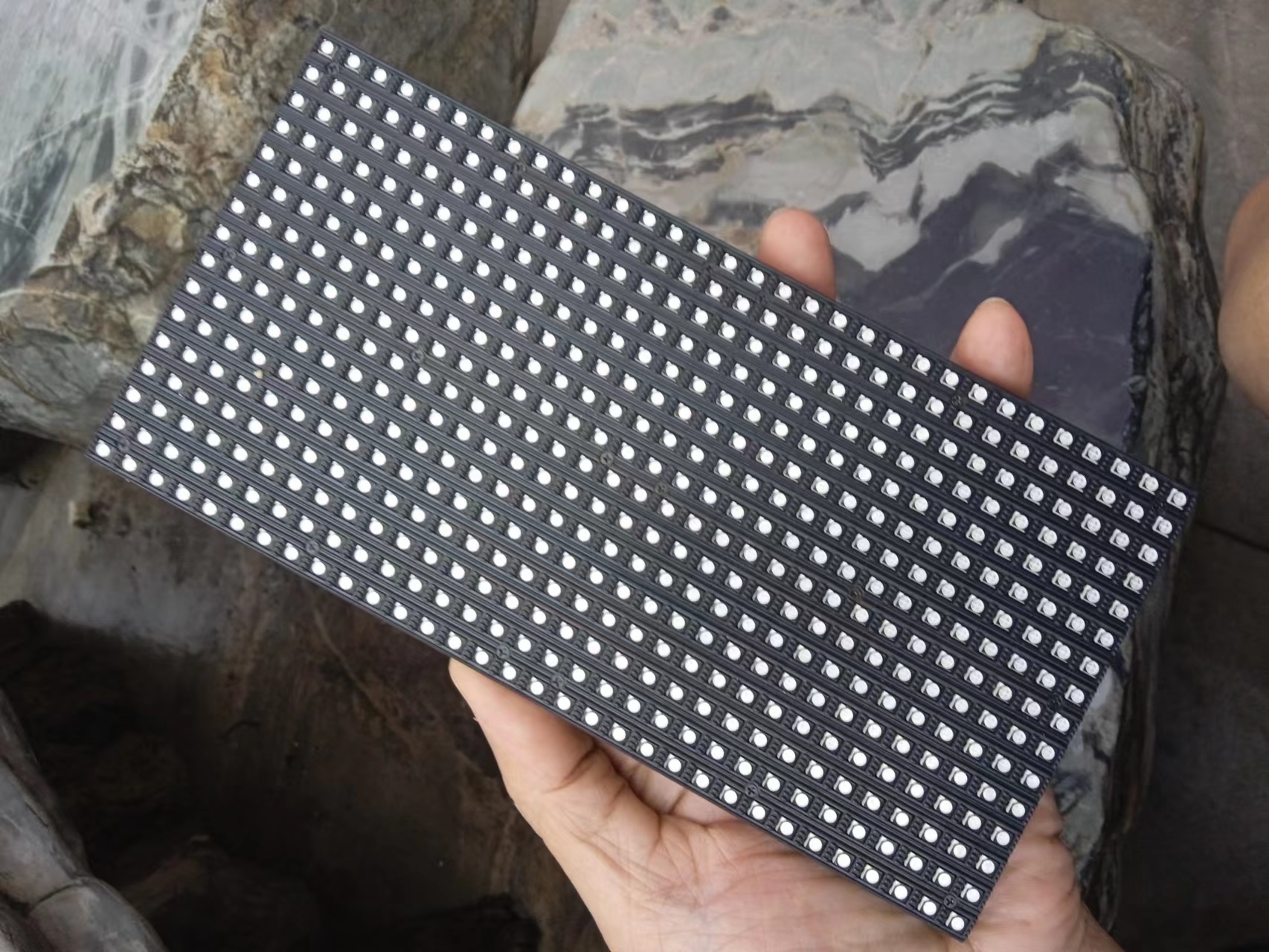 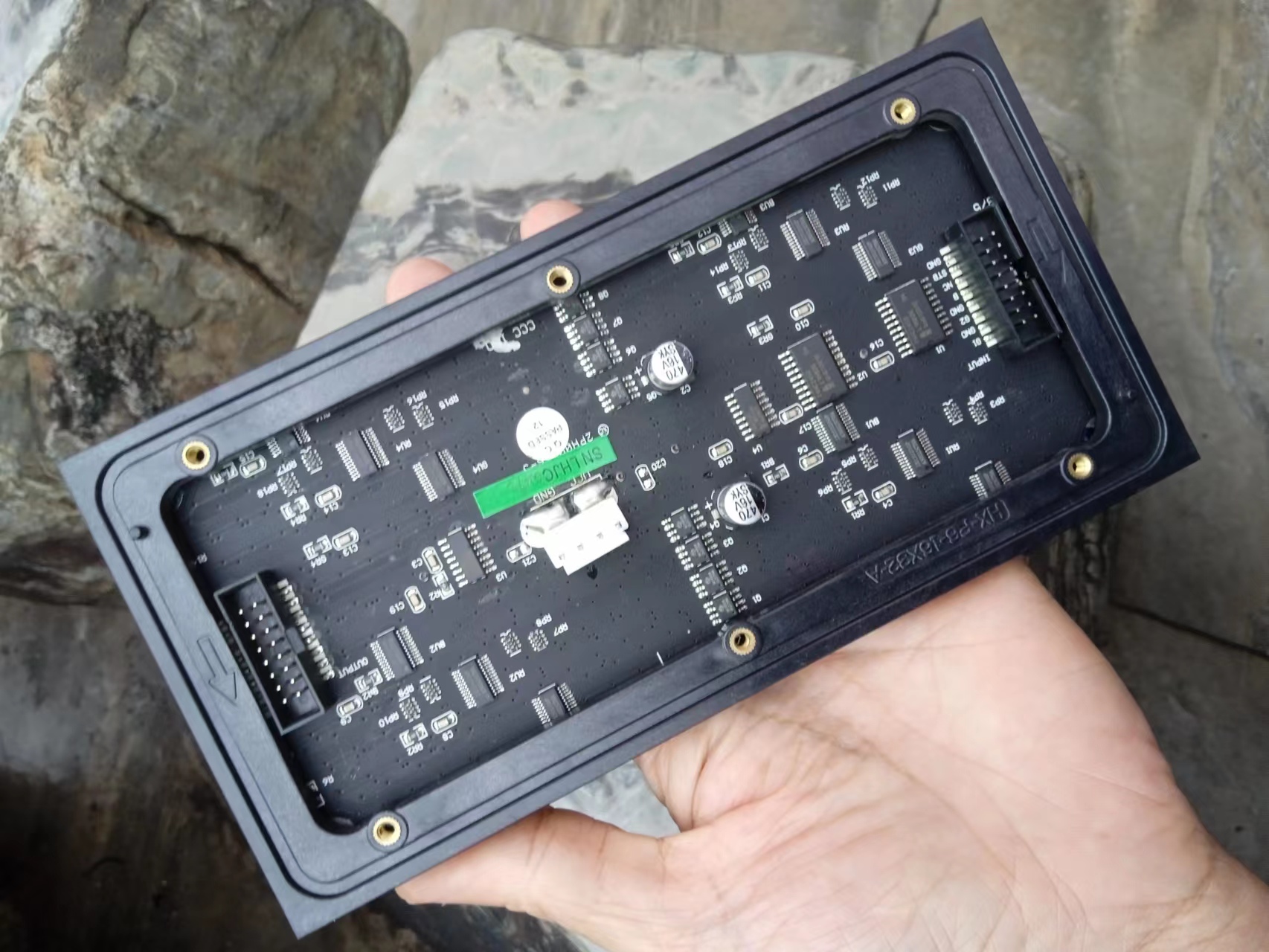 |


优酷:https://v.youku.com/v_show/id_XNTkxODE5MDQ4NA==.html?spm=a2hcb.playlsit.page.3
B站:https://www.bilibili.com/video/BV1xW4y1s7bX/?vd_source=98c6b1fc23b2787403d97f8d3cc0b7e5
[media=x,500,375]https://v.youku.com/v_show/id_XNTkxODE5MDQ4NA==.html?spm=a2hcb.playlsit.page.3[/media]
实验二百二十:P6全彩LED模组 16X32显示屏单元板 P6-RGB-16X32-8S
室内全彩8扫电子屏(HX-P6-16X32-A)
项目程序之十一:尝试运行空气动力学的康威(Conways)生存游戏v1版本
[code]/*
【Arduino】168种传感器模块系列实验(资料代码+仿真编程+图形编程)
实验二百二十:P6全彩LED模组 16X32显示屏单元板 P6-RGB-16X32-8S
室内全彩8扫电子屏(HX-P6-16X32-A)
项目程序之十一:尝试运行空气动力学的康威(Conways)生存游戏v1版本
*/
#include
#include
#include
//Definition of the pattern if you use the pattern initialization
int pattern_size[] = {7, 22}; // row x Column
char pattern_init[] =
".........*,\
.......*.*,\
......*.*,\
**...*..*...........**,\
**....*.*...........**,\
.......*.*,\
.........*!";
bool WORLD[16][32]; // Creation of the wordl
int step_GOL; //used to know the generation
//Definition of the LED Matrix Object
#define CLK 8 // MUST be on PORTB! (Use pin 11 on Mega)
#define LAT A3
#define OE 9
#define A A0
#define B A1
#define C A2
// Last parameter = 'true' enables double-BUFFER_WORLDing, for flicker-free,
// buttery smooth animatrixion. Note that NOTHING WILL SHOW ON THE DISPLAY
// until the first call to swapBuffers(). This is normal.
RGBmatrixPanel matrix(A, B, C, CLK, LAT, OE, false); //I couldn't use double buffering because it uses
//too much memory
void setup() {
//Serial.begin(115200); //use to print the game on the serial monitor (to debug)
//Randomly initialazing the world for the first step
randomSeed(analogRead(5));
for (byte i = 0; i < 16; i++) {
for (byte j = 0; j < 32; j++) {
WORLD[i][j] = random(0, 2);
}
}
//init_WORLD(); // Uncomment if you want to init with a specific pattern
step_GOL = 0;
matrix.begin();
print_WORLD(); //Display the first generation
}
void loop() {
if (step_GOL == 60) { // This if reboot the world after 60 generation to avoid static world
step_GOL = 0;
matrix.fillScreen(0);
delay(500);
randomSeed(analogRead(5));
for (byte i = 0; i < 16; i++) {
for (byte j = 0; j < 32; j++) {
WORLD[i][j] = random(0, 2);
}
}
}
//This double "for" is used to update the world to the next generation
//The buffer state is written on the EEPROM Memory
for (byte i = 0; i < 16; i++) {
for (byte j = 0; j < 32; j++) {
if (i == 0 || i == 15 || j == 0 || j == 31) // I choose to keep the border at 0
{
EEPROM.write(i * 31 + j , 0);
}
else {
byte num_alive = WORLD[i - 1][j - 1] + WORLD[i - 1][j] + WORLD[i - 1][j + 1] + WORLD[i][j - 1] + WORLD[i][j + 1] + WORLD[i + 1][j - 1] + WORLD[i + 1][j] + WORLD[i + 1][j + 1];
bool state = WORLD[i][j];
//RULE#1 if you are surrounded by 3 cells --> you live
if (num_alive == 3) {
EEPROM.write(i * 31 + j , 1);
}
//RULE#2 if you are surrounded by 2 cells --> you stay in your state
else if (num_alive == 2) {
EEPROM.write(i * 31 + j , state);
}
//RULE#3 otherwise you die from overpopulation or subpopulation
else {
EEPROM.write(i * 31 + j , 0);
}
}
}
}
//Updating the World
for (byte i = 0; i < 16; i++) {
for (byte j = 0; j < 32; j++) {
WORLD[i][j] = EEPROM.read(i * 31 + j);
}
}
//Displaying the world
print_WORLD();
//Increasing the generation
step_GOL++;
}
// PRINT THE WORLD
void print_WORLD()
{
for (byte j = 0; j < 32; j++) {
for (byte i = 0; i < 16; i++) {
if (WORLD[i][j] == 0) {
matrix.drawPixel(j, i, matrix.Color333(0, 0, 0));
}
else
{
matrix.drawPixel(j, i, matrix.Color333(0, 1, 2));
}
}
}
}
//Those two function are used to display the world on the serial monitor
//Not beautiful but useful to debug
void print_WORLD_SERIAL()
{
clearscreen();
Serial.print("Step = "); Serial.println(step_GOL);
for (int i = 0; i < 16; i++) {
for (int j = 0; j < 32; j++) {
if (WORLD[i][j] == 0) {
Serial.print(".");
Serial.print(" ");
}
else
{
Serial.print("*");
Serial.print(" ");
}
}
Serial.println("");
}
Serial.println("");
}
void clearscreen() {
for (int i = 0; i < 10; i++) {
Serial.println("\n\n\n\n");
}
}
//This function is used to init the world with a know pattern
//It read . and * to convert them to 0 and 1.
//Inspired from life 1.05 format
// NB : this function needs improvment to center the pattern
void init_WORLD() {
int k = 0;
int row = 0;
int column = 0;
while (pattern_init[k] != '!') {
if (pattern_init[k] == ',') {
row++;
k++;
column = 0;
}
else if (pattern_init[k] == '.') {
WORLD[row + 2][column + 4] = 0;
k++;
column ++;
}
else {
WORLD[row + 2][column + 4] = 1;
k++;
column ++;
}
}
}[/code]
优酷:https://v.youku.com/v_show/id_XNTkxODE4ODg3Mg==.html?spm=a2hcb.playlsit.page.1
B站:https://www.bilibili.com/video/BV1Gd4y1k7Na/?vd_source=98c6b1fc23b2787403d97f8d3cc0b7e5
[media=x,500,375]https://v.youku.com/v_show/id_XNTkxODE4ODg3Mg==.html?spm=a2hcb.playlsit.page.1[/media]
实验二百二十:P6全彩LED模组 16X32显示屏单元板 P6-RGB-16X32-8S
室内全彩8扫电子屏(HX-P6-16X32-A)
项目程序之十:3个弹力球与流动文本“Arduino 16x32 RGB LED矩阵”
[code]/*
【Arduino】168种传感器模块系列实验(资料代码+仿真编程+图形编程)
实验二百二十:P6全彩LED模组 16X32显示屏单元板 P6-RGB-16X32-8S
室内全彩8扫电子屏(HX-P6-16X32-A)
项目程序之十:3个弹力球与流动文本“Arduino 16x32 RGB LED矩阵”
*/
#include
#include
#define CLK 8 //必须在这个端口上! (在Mega上使用PIN 11)
#define LAT A3
#define OE 9
#define A A0
#define B A1
#define C A2
//最后一个参数='false'禁用双缓冲
RGBmatrixPanel matrix(A, B, C, CLK, LAT, OE, false);
static const unsigned char PROGMEM bitmap[64] = {0x02, 0x00, 0x01, 0x00, 0x02, 0x00, 0x01, 0x00, 0x02, 0x00, 0x01, 0x00, 0x7F, 0xFC, 0x01, 0x00, 0x04, 0x00, 0x21, 0x08, 0x09, 0x00, 0x21, 0x08, 0x11, 0x00, 0x21, 0x08, 0x21, 0x00, 0x21, 0x08, 0x3F, 0xF8, 0x21, 0x08, 0x01, 0x00, 0x21, 0x08, 0x09, 0x20, 0x21, 0x08, 0x11, 0x10, 0x21, 0x08, 0x21, 0x08, 0x21, 0x08, 0x41, 0x04, 0x3F, 0xF8, 0x05, 0x00, 0x00, 0x08, 0x02, 0x00, 0x00, 0x00};
#define F2(progmem_ptr) (const __FlashStringHelper *)progmem_ptr
const char str[] PROGMEM = " Arduino 16x32 RGB LED Matrix";
int16_t textX = matrix.width(),
textMin = sizeof(str) * -12,
hue = 0;
int8_t ball[3][4] = {
{ 3, 0, 1, 1 }, //初始x速度3个弹力球
{ 17, 15, 1, -1 },
{ 27, 4, -1, 1 }
};
static const uint16_t PROGMEM ballcolor[3] = {
0x0080, // 绿色=1
0x0002, // 蓝色=1
0x1000 // 红色=1
};
void setup() {
matrix.begin();
matrix.setTextWrap(false);
matrix.setTextSize(2);
}
void loop(){
byte i;
matrix.fillScreen(0);
for(i=0; i<3; i++) {
matrix.fillCircle(ball[i][0], ball[i][1], 5, pgm_read_word(&ballcolor[i]));
ball[i][0] += ball[i][2];
ball[i][1] += ball[i][3];
if((ball[i][0] == 0) || (ball[i][0] == (matrix.width() - 1)))
ball[i][2] *= -1;
if((ball[i][1] == 0) || (ball[i][1] == (matrix.height() - 1)))
ball[i][3] *= -1;
}
matrix.setTextColor(matrix.ColorHSV(hue, 255, 255, true));
matrix.setCursor(textX, 1);
matrix.print(F2(str));
if((--textX) < textMin) textX = matrix.width();
hue += 7;
if(hue >= 1536) hue -= 1536;
#if !defined(__AVR__)
delay(20);
#endif
matrix.swapBuffers(false);
}[/code]
实验二百二十:P6全彩LED模组 16X32显示屏单元板 P6-RGB-16X32-8S
室内全彩8扫电子屏(HX-P6-16X32-A)
项目程序之九:打印汉字“东山”
[code]/*
【Arduino】168种传感器模块系列实验(资料代码+仿真编程+图形编程)
实验二百二十:P6全彩LED模组 16X32显示屏单元板 P6-RGB-16X32-8S
室内全彩8扫电子屏(HX-P6-16X32-A)
项目程序之九:打印汉字“东山”
*/
#include
#include
#define CLK 8 //必须在这个端口上! (在Mega上使用PIN 11)
#define LAT A3
#define OE 9
#define A A0
#define B A1
#define C A2
//最后一个参数='false'禁用双缓冲
RGBmatrixPanel matrix(A, B, C, CLK, LAT, OE, false);
static const unsigned char PROGMEM bitmap[64] = {0x02, 0x00, 0x01, 0x00, 0x02, 0x00, 0x01, 0x00, 0x02, 0x00, 0x01, 0x00, 0x7F, 0xFC, 0x01, 0x00, 0x04, 0x00, 0x21, 0x08, 0x09, 0x00, 0x21, 0x08, 0x11, 0x00, 0x21, 0x08, 0x21, 0x00, 0x21, 0x08, 0x3F, 0xF8, 0x21, 0x08, 0x01, 0x00, 0x21, 0x08, 0x09, 0x20, 0x21, 0x08, 0x11, 0x10, 0x21, 0x08, 0x21, 0x08, 0x21, 0x08, 0x41, 0x04, 0x3F, 0xF8, 0x05, 0x00, 0x00, 0x08, 0x02, 0x00, 0x00, 0x00};
void setup() {
matrix.begin();
}
void loop() {
matrix.drawBitmap(0, 0, bitmap, 32, 16, matrix.Color333(0, 0, 7));
delay(1000);
matrix.drawBitmap(0, 0, bitmap, 32, 16, matrix.Color333(0, 7, 0));
delay(1000);
matrix.drawBitmap(0, 0, bitmap, 32, 16, matrix.Color333(7, 0, 0));
delay(1000);
}[/code]
优酷:https://v.youku.com/v_show/id_XNTkxODAwMjE2OA==.html?spm=a2hcb.playlsit.page.1
B站:https://www.bilibili.com/video/BV1cG4y1b7Hp/?vd_source=98c6b1fc23b2787403d97f8d3cc0b7e5
[media=x,500,375]https://v.youku.com/v_show/id_XNTkxODAwMjE2OA==.html?spm=a2hcb.playlsit.page.1[/media]
实验二百二十:P6全彩LED模组 16X32显示屏单元板 P6-RGB-16X32-8S
室内全彩8扫电子屏(HX-P6-16X32-A)
项目程序之八:你好世界! 这是滚动文字(左向流动)
[code]/*
【Arduino】168种传感器模块系列实验(资料代码+仿真编程+图形编程)
实验二百二十:P6全彩LED模组 16X32显示屏单元板 P6-RGB-16X32-8S
室内全彩8扫电子屏(HX-P6-16X32-A)
项目程序之八:你好世界! 这是滚动文字(左向流动)
*/
#include
#include "font.h"
HUB75driver matrix;
const char str[] PROGMEM = { "Hello world! This is scrolling text :)" };
void setup() {
//if first argument is true double buffering used, need swapBuffers() to refresh
//if second argument is true additional dimming will be applyed. brightness will reduce by half
matrix.init(true, true);
matrix.begin();//Enable interupt
}
void loop() {
uint8_t i = 0;
uint8_t len = strlen_P(str);
for (i = 0; i < len; i++) {
for (uint8_t offset = 0; offset < 8; offset++) {
matrix.cleanScreen();
put_string_from_progmem(-offset, 4, str, i, 3, 0, 0);
//put_string_from_progmem(-offset+1, 4, str, i, r, g, b);
matrix.swapBuffers();
delay(25);
}
}
}
void put_string_from_progmem(uint8_t x, uint8_t y, const char message[], uint8_t start, uint8_t r, uint8_t g, uint8_t b) {
char c;
uint8_t len = strlen_P(message);
if (!message) return;
for (uint8_t i = 0; i < 5; i++) {
uint8_t offset = start + i;
if (offset < len) {
c = pgm_read_word_near(message + offset);
putNormalChar(x + 8 * i, y, c, r, g, b);
}
}
}
void putNormalChar(uint8_t x, uint8_t y, char c, uint8_t r, uint8_t g, uint8_t b) {
// fonts defined for ascii 32 and beyond (index 0 in font array is ascii 32);
byte charIndex = c - 32;
putChar(x, y, myfont8x8[charIndex], 8, 8, r, g, b);
}
void putChar(uint8_t x, uint8_t y, const unsigned char * c, uint8_t h, uint8_t w, uint8_t r, uint8_t g, uint8_t b) {
for (byte row = 0; row < h; row++)
{
byte rowDots = pgm_read_byte_near(&c[row]);
for (byte col = 0; col < w; col++)
{
if (rowDots & (1 << (col)))
matrix.drawPixel(x + col, y + row, r, g, b);
}
}
}[/code]
优酷:https://v.youku.com/v_show/id_XNTkxOTc3MDQyNA==.html?spm=a2hcb.playlsit.page.1
B站:https://www.bilibili.com/video/BV16R4y1Z7pr/?vd_source=98c6b1fc23b2787403d97f8d3cc0b7e5
[media=x,500,375]https://www.bilibili.com/video/BV16R4y1Z7pr/?vd_source=98c6b1fc23b2787403d97f8d3cc0b7e5[/media]