Arduino 作为 I2C Slave 算是比较冷门的使用方式,下面是一个经过测试能够在 ESP32 下使用的例子:
- #include <Wire.h>
-
- byte i2c_rcv=0; // data received from I2C bus
-
- void setup() {
- Wire.begin(0x08); // join I2C bus as Slave with address 0x08
-
- // event handler initializations
- Wire.onReceive(dataRcv); // register an event handler for received data
- Wire.onRequest(dataRqst); // register an event handler for data request
- Serial.begin(115200);
- }
-
- void loop() {
- }
-
- //received data handler function
- void dataRcv(int numBytes) {
- Serial.print("Slave Received ");
- Serial.print(numBytes);
- Serial.println("Bytes");
- while (Wire.available()) { // read all bytes received
- i2c_rcv = Wire.read();
- Serial.print("[");
- Serial.print(i2c_rcv);
- Serial.print("]");
- }
- Serial.println("");
- }
-
- // requests data handler function
- void dataRqst() {
- Wire.write(i2c_rcv); // send potentiometer position
- Serial.print("Slave send ");
- Serial.print(i2c_rcv,HEX);
- }
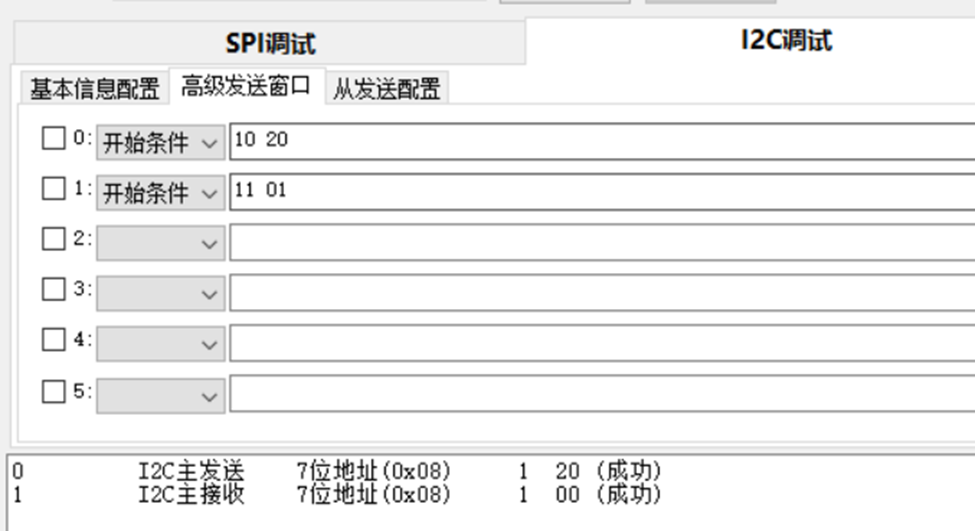
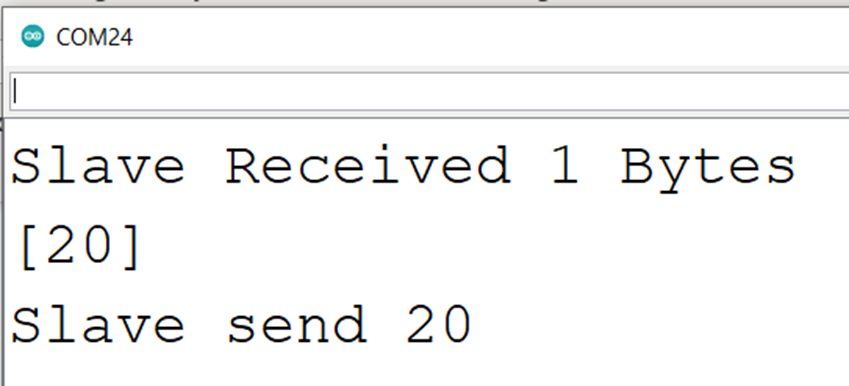
运行之后,Arduino作为一个地址为 0x08 的I2C设备。当它收到 Master 发送过来的数据,会进入 void dataRcv(int numBytes) 函数,然后将收到的数据输出到串口上;当它收到 Master 发送的读请求,会进入voiddataRqst() 函数,将之前收到的数据返回给 Master 。 试验使用 Leonardo 板子,使用调试器发送 10 17 表示对 0x08 地址的设备发送 0x17,之后调试器发送 11 01 表示从 0x08 设备读取一字节数据:
|