- #include <Arduino_CAN.h>
- #include <CanUtil.h>
- #include <R7FA4M1_CAN.h>
- #include <R7FA6M5_CAN.h>
- #include <SyncCanMsgRingbuffer.h>
-
- static uint32_t const CAN_ID = 0x601;
-
- void setup() {
-
- Serial.begin(115200);
-
- while (!Serial) {}
-
- CAN.begin(CanBitRate::BR_125k);
-
- if (CAN.begin(CanBitRate::BR_125k)) {
- Serial.println("CAN.begin(...) Complished.");
- delay(100);
- Serial.println("CAN_BR is 125k.");
- }
-
- if (!CAN.begin(CanBitRate::BR_250k)) {
- Serial.println("CAN.begin(...) failed.");
- }
- }
-
- static uint32_t msg0_cnt = 0;
- static uint32_t msg1_cnt = 0;
- static uint32_t msg2_cnt = 0;
-
- void loop(){
- uint8_t const msg0_data[] = { 0xCA, 0xFE, 0x01, 0x02, 0x03, 0x04, 0x05, 0x06 };
- memcpy((void *)(msg0_data + 4), &msg0_cnt, sizeof(msg0_cnt));
- CanMsg const msg0(CanStandardId(CAN_ID), sizeof(msg0_data), msg0_data);
- CAN.write(msg0);
- if (int const rc = CAN.write(msg0); rc < 0) {
- Serial.print("CAN.write(...) failed with error code ");
- Serial.println(rc);
- }
- msg0_cnt++;
- delay(1000);
- }
[size=15.008px]需要用Arduino Uno R4(板载CAN总线)跟伺服驱动器通信。
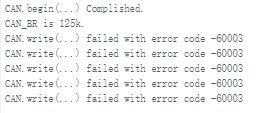
[size=15.008px]程序编译成功,但串行端口监视器始终显示传输失败的消息。[size=15.008px]
[size=15.008px]我觉得可能是发送命令的函数没用对,希望有大佬能给指点一下!!!!
|