之前帖子提到的usb显示器
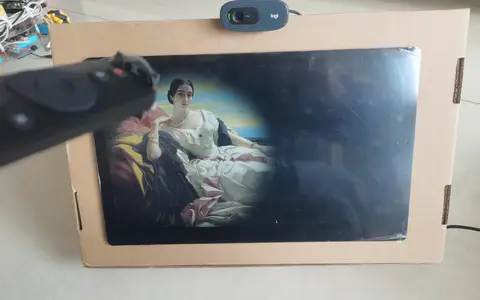
lattepanda mu+lite载板+usb显示器+自制3D打印支架
变成了完整的桌面小电脑

很适合跑一些写好的项目,比如这个mediapipe检测的头部姿态
- import math
-
- import cv2
- import mediapipe as mp
- import numpy as np
-
- mp_face_mesh = mp.solutions.face_mesh
- face_mesh = mp_face_mesh.FaceMesh(min_detection_confidence=0.5,
- min_tracking_confidence=0.5)
- cap = cv2.VideoCapture(0)
-
-
- def rotation_matrix_to_angles(rotation_matrix):
- """
- Calculate Euler angles from rotation matrix.
- :param rotation_matrix: A 3*3 matrix with the following structure
- [Cosz*Cosy Cosz*Siny*Sinx - Sinz*Cosx Cosz*Siny*Cosx + Sinz*Sinx]
- [Sinz*Cosy Sinz*Siny*Sinx + Sinz*Cosx Sinz*Siny*Cosx - Cosz*Sinx]
- [ -Siny CosySinx Cosy*Cosx ]
- :return: Angles in degrees for each axis
- """
- x = math.atan2(rotation_matrix[2, 1], rotation_matrix[2, 2])
- y = math.atan2(-rotation_matrix[2, 0], math.sqrt(rotation_matrix[0, 0] ** 2 +
- rotation_matrix[1, 0] ** 2))
- z = math.atan2(rotation_matrix[1, 0], rotation_matrix[0, 0])
- return np.array([x, y, z]) * 180. / math.pi
-
-
- while cap.isOpened():
- success, image = cap.read()
-
- # Convert the color space from BGR to RGB and get Mediapipe results
- image = cv2.cvtColor(image, cv2.COLOR_BGR2RGB)
- results = face_mesh.process(image)
-
- # Convert the color space from RGB to BGR to display well with Opencv
- image = cv2.cvtColor(image, cv2.COLOR_RGB2BGR)
-
- face_coordination_in_real_world = np.array([
- [285, 528, 200],
- [285, 371, 152],
- [197, 574, 128],
- [173, 425, 108],
- [360, 574, 128],
- [391, 425, 108]
- ], dtype=np.float64)
-
- h, w, _ = image.shape
- face_coordination_in_image = []
-
- if results.multi_face_landmarks:
- for face_landmarks in results.multi_face_landmarks:
- for idx, lm in enumerate(face_landmarks.landmark):
- if idx in [1, 9, 57, 130, 287, 359]:
- x, y = int(lm.x * w), int(lm.y * h)
- face_coordination_in_image.append([x, y])
-
- face_coordination_in_image = np.array(face_coordination_in_image,
- dtype=np.float64)
-
- # The camera matrix
- focal_length = 1 * w
- cam_matrix = np.array([[focal_length, 0, w / 2],
- [0, focal_length, h / 2],
- [0, 0, 1]])
-
- # The Distance Matrix
- dist_matrix = np.zeros((4, 1), dtype=np.float64)
-
- # Use solvePnP function to get rotation vector
- success, rotation_vec, transition_vec = cv2.solvePnP(
- face_coordination_in_real_world, face_coordination_in_image,
- cam_matrix, dist_matrix)
-
- # Use Rodrigues function to convert rotation vector to matrix
- rotation_matrix, jacobian = cv2.Rodrigues(rotation_vec)
-
- result = rotation_matrix_to_angles(rotation_matrix)
- for i, info in enumerate(zip(('pitch', 'yaw', 'roll'), result)):
- k, v = info
- text = f'{k}: {int(v)}'
- cv2.putText(image, text, (20, i*30 + 20),
- cv2.FONT_HERSHEY_SIMPLEX, 0.7, (200, 0, 200), 2)
-
-
- cv2.imshow('Head Pose Angles', image)
-
- if cv2.waitKey(5) & 0xFF == 27:
- break
-
- cap.release()
-
演示视频可见:
|




![[HowTo构建X86 SBC Homelab #4]: Home Assistant 智能家居实践](https://imagemc.dfrobot.com.cn/download/file/v2-b4a7fec59123cefc77bd75103ecafe23_1440w.png?imageView2/1/w/480/h/300/format/webp/q/80)