DF创客社区
发现
DF创客商城
教程
产品资料库
搜索
热门搜索
人工智能
视觉传感器
AI 人工智能
行空板
主控板
二哈识图
热门活动
关闭
DF创客社区
发现
DF创客商城
教程
产品资料库
【Arduino 动手做】Esghati:一个由垃圾制成的机器人
2025-05-22
2167
驴友花雕
UID: 1737
2964
文章
158
粉丝
1.1万
获取喜欢
0
0
AI 快速预览
详细
收起
Esghati是一个由废旧材料制成的Arduino机器人。该项目展示了如何利用废旧电机、塑料瓶等材料,制作出一个可以动起来的机器人。无需复杂的工具,只需简单的材料,就能激发创造力,实现环保意识的提升。
创作许可协议
本项目采用
None(不开放任何权利,保留所有权利)
进行许可。
其他主题
Arduino
添加到合集
0
0
相关推荐
DF创客社区2014年度编辑选择奖 教程篇
Ash1
3.9万
3
我的Q&A问答专栏
陈德熹
2
0
BLE Arduino开发神器 Bluno Beetle开启免费试用啦!
Ash1
2.3万
0
评论(10)
驴友花雕
作者
回复
驴友花雕
作者
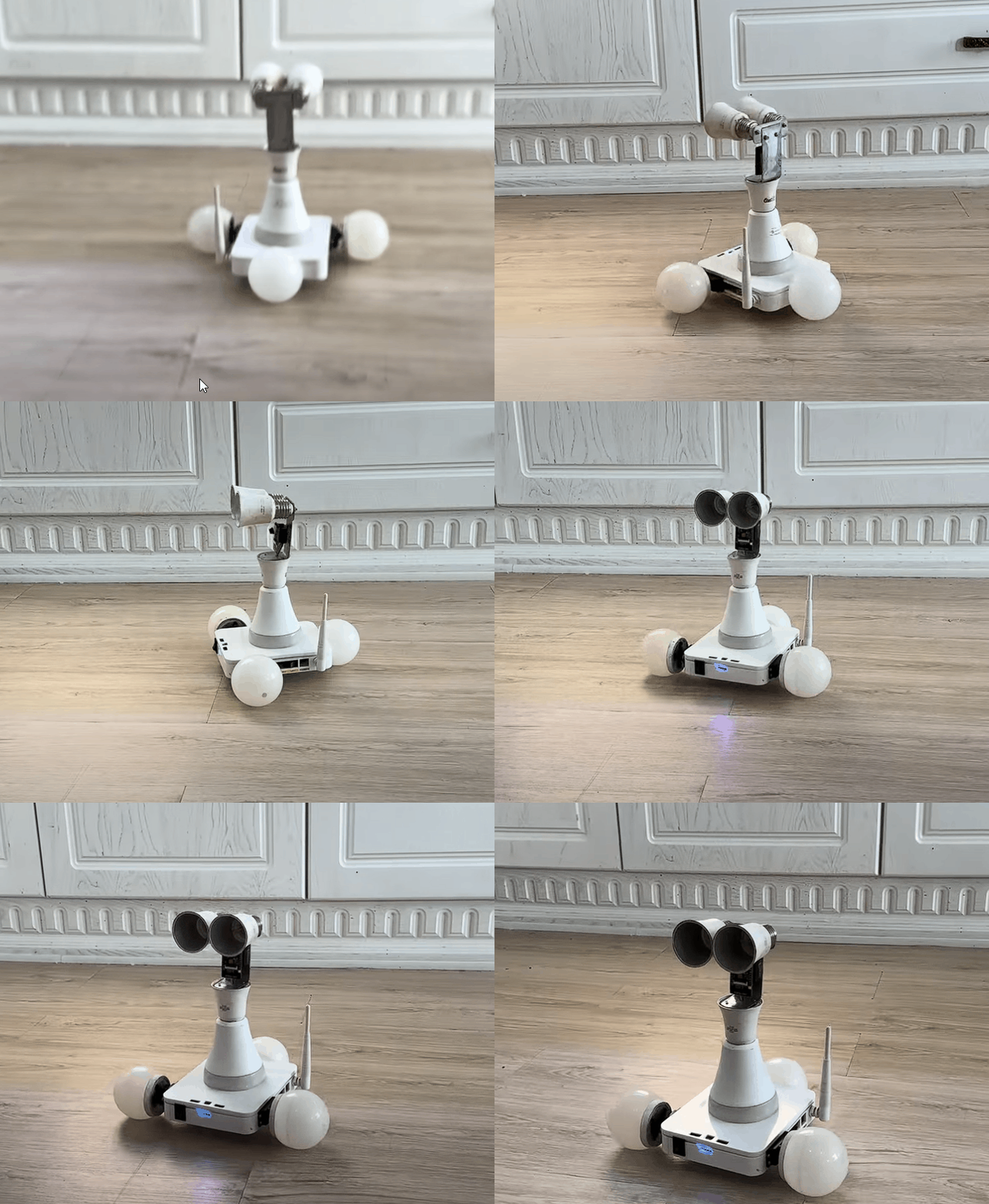
项目场景动态图
附录
项目链接:
https://www.instructables.com/Esghati-a-Robot-Made-From-Garbage/
项目作者:伊朗 索拉什·莫拉迪萨尼(Sorush Moradisani)
项目视频(1分钟):
https://www.youtube.com/watch?v=d39NgJqNWr8&t=57s
项目开源代码:
https://github.com/Sorush-moradisani/Esghati
参考:
https://github.com/robotzero1/esp32cam-access-control
回复
驴友花雕
作者
第 6 步:项目代码
我基于这个项目开发了 Esghati 的平台并添加了更多功能。我在 GitHub 上上传了该项目的源代码,单击此处重定向。
[code]#include
#include
SoftwareSerial mySerial(4, 3);
VarSpeedServo Rwheel;
VarSpeedServo Lwheel;
int VSPEED = 5 , HSPEED = 10 , MSPEED = 50, MACCEL = 125;
int MAX_VSPEED = 10 , MAX_HSPEED = 20 , MAX_MSPEED = 255, MSTOP = 1500, MSTOPdeg = 90;
String command;
bool commandEnd=false;
char inByte;
int arg = 0;
void setup() {
// put your setup code here, to run once:
Serial.begin(115200);
mySerial.begin(9600);
Rwheel.attach(6);
delay(100);
Rwheel.write(MSTOP);
delay(300);
Lwheel.attach(5);
delay(100);
Lwheel.write(MSTOP);
delay(300);
}
void loop() {
// put your main code here, to run repeatedly:
if (mySerial.available() > 0) {
if(commandEnd){
command="";
commandEnd=false;
}
inByte = mySerial.read();
if (inByte != '\n') {
if (inByte == '=') {
arg = mySerial.parseInt();
//Serial.println(arg);
} else {
command += inByte;
}
}else{
commandEnd=true;
Serial.println(command);
execute(command, arg);
}
}
}
void execute(String command, int arg){
if(compareString(command, "l-rotate")){
Rwheel.write(MSTOPdeg-MSPEED,MACCEL);
Lwheel.write(MSTOPdeg-MSPEED,MACCEL);
command="";
}else if(compareString(command, "r-rotate")){
Rwheel.write(MSTOPdeg+MSPEED,MACCEL);
Lwheel.write(MSTOPdeg+MSPEED,MACCEL);
command="";
}else if(compareString(command, "f-forward")){
Rwheel.write(MSTOPdeg-MSPEED, MACCEL);
Lwheel.write(MSTOPdeg+MSPEED, MACCEL);
command="";
}else if(compareString(command, "f-left")){
Rwheel.write(MSTOPdeg-MSPEED,MACCEL);
Lwheel.write(MSTOP);
command="";
}else if(compareString(command, "f-right")){
Rwheel.write(MSTOP);
Lwheel.write(MSTOPdeg+MSPEED,MACCEL);
command="";
}else if(compareString(command, "b-backward")){
Rwheel.write(MSTOPdeg+MSPEED,MACCEL);
Lwheel.write(MSTOPdeg-MSPEED,MACCEL);
command="";
}else if(compareString(command, "b-right")){
Rwheel.write(MSTOPdeg+MSPEED,MACCEL);
Lwheel.write(MSTOP);
command="";
}else if(compareString(command, "b-left")){
Rwheel.write(MSTOP);
Lwheel.write(MSTOPdeg-MSPEED,MACCEL);
command="";
}else if(compareString(command, "stop")){
Rwheel.write(MSTOP);
Lwheel.write(MSTOP);
command="";
}
command="";
}
boolean compareString(String a, String b) {
if (a.length() != b.length() + 1) {
return false;
}
for (int i = 0; i < a.length() - 1; i++) {
if (a[i] != b[i]) {
return false;
}
}
return true;
}[/code]
[code]#include
#include "esp_http_server.h"
#include "esp_timer.h"
#include "esp_camera.h"
#include "camera_index.h"
#include "Arduino.h"
#include "fd_forward.h"
#include "fr_forward.h"
#include "fr_flash.h"
#include "fb_gfx.h"
const char* ssid = "your ssid";
const char* password = "your password";
#define ENROLL_CONFIRM_TIMES 5
#define FACE_ID_SAVE_NUMBER 7
#define LED_BUILTIN 4
bool INT_LED = false;
hw_timer_t *My_timer = NULL;
// Select camera model
//#define CAMERA_MODEL_WROVER_KIT
//#define CAMERA_MODEL_ESP_EYE
//#define CAMERA_MODEL_M5STACK_PSRAM
//#define CAMERA_MODEL_M5STACK_WIDE
#define CAMERA_MODEL_AI_THINKER
#include "camera_pins.h"
using namespace websockets;
WebsocketsServer socket_server;
camera_fb_t * fb = NULL;
long current_millis;
long last_detected_millis = 0;
#define RED 15 // pin 12 can also be used
#define GREEN 14
#define BLUE 2
#define Mic 12
int light = 0;
unsigned long door_opened_millis = 0;
long interval = 5000; // open lock for ... milliseconds
bool face_recognised = false;
const int numReadings = 5;
int readings[numReadings]; // the readings from the analog input
int readIndex = 0;
int total = 0; // the running total
int average_face_size = 0; // the average
int face_distance;
int face_id = 0;
String command;
bool commandEnd=false;
char inByte;
int arg = 0;
bool follow = 0;
//void app_facenet_main();
//void app_httpserver_init();
typedef struct
{
uint8_t *image;
box_array_t *net_boxes;
dl_matrix3d_t *face_id;
} http_img_process_result;
static inline mtmn_config_t app_mtmn_config()
{
mtmn_config_t mtmn_config = {0};
mtmn_config.type = FAST;
mtmn_config.min_face = 80;
mtmn_config.pyramid = 0.707;
mtmn_config.pyramid_times = 4;
mtmn_config.p_threshold.score = 0.6;
mtmn_config.p_threshold.nms = 0.7;
mtmn_config.p_threshold.candidate_number = 20;
mtmn_config.r_threshold.score = 0.7;
mtmn_config.r_threshold.nms = 0.7;
mtmn_config.r_threshold.candidate_number = 10;
mtmn_config.o_threshold.score = 0.7;
mtmn_config.o_threshold.nms = 0.7;
mtmn_config.o_threshold.candidate_number = 1;
return mtmn_config;
}
mtmn_config_t mtmn_config = app_mtmn_config();
face_id_name_list st_face_list;
static dl_matrix3du_t *aligned_face = NULL;
httpd_handle_t camera_httpd = NULL;
typedef enum
{
START_STREAM,
START_DETECT,
SHOW_FACES,
START_RECOGNITION,
START_ENROLL,
ENROLL_COMPLETE,
DELETE_ALL,
} en_fsm_state;
en_fsm_state g_state;
typedef struct
{
char enroll_name[ENROLL_NAME_LEN];
} httpd_resp_value;
httpd_resp_value st_name;
void IRAM_ATTR onTimer(){
Serial.println("task");
}
void setup() {
Serial.begin(9600);
Serial.setDebugOutput(true);
Serial.println();
pinMode (LED_BUILTIN, OUTPUT);
pinMode(RED, OUTPUT);
pinMode(GREEN, OUTPUT);
pinMode(BLUE, OUTPUT);
pinMode(33, OUTPUT);
pinMode(Mic, INPUT);
digitalWrite(33, HIGH);
digitalWrite(RED, LOW);
digitalWrite(GREEN, LOW);
digitalWrite(BLUE, LOW);
camera_config_t config;
config.ledc_channel = LEDC_CHANNEL_0;
config.ledc_timer = LEDC_TIMER_0;
config.pin_d0 = Y2_GPIO_NUM;
config.pin_d1 = Y3_GPIO_NUM;
config.pin_d2 = Y4_GPIO_NUM;
config.pin_d3 = Y5_GPIO_NUM;
config.pin_d4 = Y6_GPIO_NUM;
config.pin_d5 = Y7_GPIO_NUM;
config.pin_d6 = Y8_GPIO_NUM;
config.pin_d7 = Y9_GPIO_NUM;
config.pin_xclk = XCLK_GPIO_NUM;
config.pin_pclk = PCLK_GPIO_NUM;
config.pin_vsync = VSYNC_GPIO_NUM;
config.pin_href = HREF_GPIO_NUM;
config.pin_sscb_sda = SIOD_GPIO_NUM;
config.pin_sscb_scl = SIOC_GPIO_NUM;
config.pin_pwdn = PWDN_GPIO_NUM;
config.pin_reset = RESET_GPIO_NUM;
config.xclk_freq_hz = 10000000;
config.pixel_format = PIXFORMAT_JPEG;
//init with high specs to pre-allocate larger buffers
if (psramFound()) {
config.frame_size = FRAMESIZE_UXGA;
config.jpeg_quality = 10;
config.fb_count = 2;
} else {
config.frame_size = FRAMESIZE_SVGA;
config.jpeg_quality = 12;
config.fb_count = 1;
}
#if defined(CAMERA_MODEL_ESP_EYE)
pinMode(13, INPUT_PULLUP);
pinMode(14, INPUT_PULLUP);
#endif
// camera init
esp_err_t err = esp_camera_init(&config);
if (err != ESP_OK) {
Serial.printf("Camera init failed with error 0x%x", err);
return;
}
sensor_t * s = esp_camera_sensor_get();
s->set_framesize(s, FRAMESIZE_QVGA);
#if defined(CAMERA_MODEL_M5STACK_WIDE)
s->set_vflip(s, 1);
s->set_hmirror(s, 1);
#endif
WiFi.softAP(ssid, password);
IPAddress IP = WiFi.softAPIP();
Serial.print("ACCESS POINT IP address: ");
Serial.println(IP);
app_httpserver_init();
app_facenet_main();
socket_server.listen(82);
Serial.print("Camera Ready! Use 'http://");
Serial.print(WiFi.localIP());
Serial.println("' to connect");
My_timer = timerBegin(0, 80, true);
timerAttachInterrupt(My_timer, &onTimer, true);
timerAlarmWrite(My_timer, 300000000, true);
timerAlarmEnable(My_timer);
}
static esp_err_t index_handler(httpd_req_t *req) {
httpd_resp_set_type(req, "text/html");
httpd_resp_set_hdr(req, "Content-Encoding", "gzip");
return httpd_resp_send(req, (const char *)index_ov2640_html_gz, index_ov2640_html_gz_len);
}
httpd_uri_t index_uri = {
.uri = "/",
.method = HTTP_GET,
.handler = index_handler,
.user_ctx = NULL
};
void app_httpserver_init ()
{
httpd_config_t config = HTTPD_DEFAULT_CONFIG();
if (httpd_start(&camera_httpd, &config) == ESP_OK)
Serial.println("httpd_start");
{
httpd_register_uri_handler(camera_httpd, &index_uri);
}
}
void app_facenet_main()
{
face_id_name_init(&st_face_list, FACE_ID_SAVE_NUMBER, ENROLL_CONFIRM_TIMES);
aligned_face = dl_matrix3du_alloc(1, FACE_WIDTH, FACE_HEIGHT, 3);
read_face_id_from_flash_with_name(&st_face_list);
}
static inline int do_enrollment(face_id_name_list *face_list, dl_matrix3d_t *new_id)
{
ESP_LOGD(TAG, "START ENROLLING");
int left_sample_face = enroll_face_id_to_flash_with_name(face_list, new_id, st_name.enroll_name);
ESP_LOGD(TAG, "Face ID %s Enrollment: Sample %d",
st_name.enroll_name,
ENROLL_CONFIRM_TIMES - left_sample_face);
return left_sample_face;
}
static esp_err_t send_face_list(WebsocketsClient &client)
{
client.send("delete_faces"); // tell browser to delete all faces
face_id_node *head = st_face_list.head;
char add_face[64];
for (int i = 0; i < st_face_list.count; i++) // loop current faces
{
sprintf(add_face, "listface:%s", head->id_name);
client.send(add_face); //send face to browser
head = head->next;
}
}
static esp_err_t delete_all_faces(WebsocketsClient &client)
{
delete_face_all_in_flash_with_name(&st_face_list);
client.send("delete_faces");
}
void handle_message(WebsocketsClient &client, WebsocketsMessage msg)
{
timerWrite(My_timer, 0); //reset timer (feed watchdog)
//Serial.println(msg.data());
if (msg.data() == "stream") {
g_state = START_STREAM;
client.send("STREAMING");
}else if (msg.data() == "detect") {
g_state = START_DETECT;
client.send("DETECTING");
}else if (msg.data().substring(0, 8) == "capture:") {
g_state = START_ENROLL;
char person[FACE_ID_SAVE_NUMBER * ENROLL_NAME_LEN] = {0,};
msg.data().substring(8).toCharArray(person, sizeof(person));
memcpy(st_name.enroll_name, person, strlen(person) + 1);
client.send("CAPTURING");
}else if (msg.data() == "recognise") {
g_state = START_RECOGNITION;
client.send("RECOGNISING");
}else if (msg.data().substring(0, 7) == "remove:") {
char person[ENROLL_NAME_LEN * FACE_ID_SAVE_NUMBER];
msg.data().substring(7).toCharArray(person, sizeof(person));
delete_face_id_in_flash_with_name(&st_face_list, person);
send_face_list(client); // reset faces in the browser
}else if (msg.data().substring(0, 5) == "tilt:") {
//int i = msg.data().substring(5).toInt();
Serial.print("tilt=");
Serial.println(msg.data().substring(5));
}else if (msg.data().substring(0, 4) == "pan:") {
//int j = msg.data().substring(4).toInt();
Serial.print("pan=");
Serial.println(msg.data().substring(4));
}else if (msg.data().substring(0, 9) == "lr-rhand:") {
//int i = msg.data().substring(5).toInt();
Serial.print("lr-rhand=");
Serial.println(msg.data().substring(9));
}else if (msg.data().substring(0, 9) == "ud-rhand:") {
//int j = msg.data().substring(4).toInt();
Serial.print("ud-rhand=");
Serial.println(msg.data().substring(9));
}else if (msg.data().substring(0, 9) == "lr-lhand:") {
//int i = msg.data().substring(5).toInt();
Serial.print("lr-lhand=");
Serial.println(msg.data().substring(9));
}else if (msg.data().substring(0, 9) == "ud-lhand:") {
//int j = msg.data().substring(4).toInt();
Serial.print("ud-lhand=");
Serial.println(msg.data().substring(9));
}else if (msg.data() == "stop") {
Serial.println("stop");
}else if (msg.data() == "r-rotate") {
Serial.println("r-rotate");
}else if (msg.data() == "l-rotate") {
Serial.println("l-rotate");
}else if (msg.data() == "f-left") {
Serial.println("f-left");
}else if (msg.data() == "f-forward") {
Serial.println("f-forward");
}else if (msg.data() == "f-right") {
Serial.println("f-right");
}else if (msg.data() == "b-left") {
Serial.println("b-left");
}else if (msg.data() == "b-backward") {
Serial.println("b-backward");
}else if (msg.data() == "b-right") {
Serial.println("b-right");
}else if (msg.data() == "introduce") {
Serial.println("introduce");
}else if (msg.data() == "greet") {
Serial.println("greet");
}else if (msg.data() == "find" && g_state == START_RECOGNITION) {
Serial.println("find");
}else if (msg.data() == "follow") {
if(!follow){
Serial.println("follow");
follow = true;
}else{
Serial.println("nofollow");
follow = false;
}
}else if (msg.data() == "dance") {
Serial.println("dance");
}else if (msg.data() == "random") {
Serial.println("random");
}else if (msg.data() == "history") {
Serial.println("history");
}else if (msg.data() == "hymn") {
Serial.println("hymn");
}else if (msg.data() == "hreset") {
Serial.println("hreset");
}else if (msg.data() == "reset") {
Serial.println("reset");
}else if (msg.data() == "light") {
if(INT_LED){
digitalWrite(LED_BUILTIN, LOW);
INT_LED = false;
}else{
digitalWrite(LED_BUILTIN, HIGH);
INT_LED = true;
}
Serial.println("light");
}else if (msg.data() == "rgb") {
if(light == 0){
digitalWrite(RED, HIGH);
digitalWrite(GREEN, LOW);
digitalWrite(BLUE, LOW);
light++;
}else if(light == 1){
digitalWrite(RED, LOW);
digitalWrite(GREEN, HIGH);
digitalWrite(BLUE, LOW);
light++;
}else if(light == 2){
digitalWrite(RED, LOW);
digitalWrite(GREEN, LOW);
digitalWrite(BLUE, HIGH);
light++;
}else{
digitalWrite(RED, LOW);
digitalWrite(GREEN, LOW);
digitalWrite(BLUE, LOW);
light=0;
}
Serial.println("rgb");
}else if (msg.data() == "fire") {
Serial.println("fire");
}else if (msg.data() == "voicemode") {
Serial.println("voicemode");
}else if (msg.data() == "clearcache") {
Serial.println("free heap: ");
Serial.println(ESP.getFreeHeap());
}else if (msg.data() == "seq1") {
Serial.println("seq1");
}else if (msg.data() == "seq2") {
Serial.println("seq2");
}else if (msg.data() == "seq3") {
Serial.println("seq3");
}else if (msg.data() == "seq4") {
Serial.println("seq4");
}
}
void open_door(WebsocketsClient &client) {
if (true/*digitalRead(relay_pin) == LOW*/) {
//digitalWrite(relay_pin, HIGH); //close (energise) relay so door unlocks
Serial.println("sorush");
client.send("door_open");
door_opened_millis = millis(); // time relay closed and door opened
}
}
static void draw_face_boxes(dl_matrix3du_t *image_matrix, box_array_t *boxes)
{
int x, y, w, h, i, half_width, half_height;
fb_data_t fb;
fb.width = image_matrix->w;
fb.height = image_matrix->h;
fb.data = image_matrix->item;
fb.bytes_per_pixel = 3;
fb.format = FB_BGR888;
for (i = 0; i < boxes->len; i++) {
// Convoluted way of finding face centre...
x = ((int)boxes->box[i].box_p[0]);
w = (int)boxes->box[i].box_p[2] - x + 1;
half_width = w / 2;
int face_center_pan = x + half_width; // current face centre x co-ordinate
y = (int)boxes->box[i].box_p[1];
h = (int)boxes->box[i].box_p[3] - y + 1;
half_height = h / 2;
int face_center_tilt = y + half_height; // current face centre y co-ordinate
// subtract the last reading:
total = total - readings[readIndex];
// add current face height:
readings[readIndex] = h;
// add the reading to the total:
total = total + readings[readIndex];
// advance to the next position in the array:
readIndex = readIndex + 1;
// if we're at the end of the array...
if (readIndex >= numReadings) {
// ...wrap around to the beginning:
readIndex = 0;
}
// calculate the average:
average_face_size = total / numReadings;
int eq_top = 3.6 * 200 * 240; //f(mm) x real height(mm) x image height(px)
int eq_bottom = average_face_size * 2.7; //object height(px) x sensor height(mm)
int face_distance = eq_top / eq_bottom;
/*Serial.print('<'); // start marker
Serial.print(face_center_pan);
Serial.print(','); // comma separator
Serial.print(face_center_tilt);
Serial.print(','); // comma separator
Serial.print(face_distance);
Serial.println('>'); // end marker*/
Serial.print("autopan=");
Serial.println(face_center_pan);
Serial.print("autotilt=");
Serial.println(face_center_tilt);
Serial.print("distance=");
Serial.println(face_distance);
}
}
void loop() {
auto client = socket_server.accept();
client.onMessage(handle_message);
dl_matrix3du_t *image_matrix = dl_matrix3du_alloc(1, 320, 240, 3);
http_img_process_result out_res = {0};
out_res.image = image_matrix->item;
send_face_list(client);
client.send("STREAMING");
while (client.available()) {
client.poll();
// char voice[12];
// sprintf(voice, "voice:%s", (const char *)analogRead(12));
// client.send(voice);
// Serial.println(analogRead(12));
// client.sendBinary((const char *)analogRead(12));
if (Serial.available()) {
String command = Serial.readStringUntil('\n');
if (command == "red") {
digitalWrite(RED, HIGH);
digitalWrite(GREEN, LOW);
digitalWrite(BLUE, LOW);
} else if (command == "green") {
digitalWrite(RED, LOW);
digitalWrite(GREEN, HIGH);
digitalWrite(BLUE, LOW);
} else if (command == "blue") {
digitalWrite(RED, LOW);
digitalWrite(GREEN, LOW);
digitalWrite(BLUE, HIGH);
} else if (command == "norgb") {
digitalWrite(RED, LOW);
digitalWrite(GREEN, LOW);
digitalWrite(BLUE, LOW);
}
}
if (millis() - interval > door_opened_millis) { // current time - face recognised time > 5 secs
//digitalWrite(relay_pin, LOW); //open relay
}
fb = esp_camera_fb_get();
if (g_state == START_DETECT || g_state == START_ENROLL || g_state == START_RECOGNITION)
{
out_res.net_boxes = NULL;
out_res.face_id = NULL;
fmt2rgb888(fb->buf, fb->len, fb->format, out_res.image);
out_res.net_boxes = face_detect(image_matrix, &mtmn_config);
if (out_res.net_boxes)
{
if (align_face(out_res.net_boxes, image_matrix, aligned_face) == ESP_OK)
{
out_res.face_id = get_face_id(aligned_face);
last_detected_millis = millis();
if (g_state == START_DETECT) {
client.send("FACE DETECTED");
}
if(follow){
draw_face_boxes(image_matrix, out_res.net_boxes);
}
if (g_state == START_ENROLL)
{
int left_sample_face = do_enrollment(&st_face_list, out_res.face_id);
char enrolling_message[64];
sprintf(enrolling_message, "SAMPLE NUMBER %d FOR %s", ENROLL_CONFIRM_TIMES - left_sample_face, st_name.enroll_name);
client.send(enrolling_message);
if (left_sample_face == 0)
{
ESP_LOGI(TAG, "Enrolled Face ID: %s", st_face_list.tail->id_name);
g_state = START_STREAM;
char captured_message[64];
sprintf(captured_message, "FACE CAPTURED FOR %s", st_face_list.tail->id_name);
client.send(captured_message);
send_face_list(client);
}
}
if (g_state == START_RECOGNITION && (st_face_list.count > 0))
{
face_id_node *f = recognize_face_with_name(&st_face_list, out_res.face_id);
if (f)
{
char recognised_message[64];
sprintf(recognised_message, "Hi %s", f->id_name);
open_door(client);
client.send(recognised_message);
}
else
{
client.send("FACE NOT RECOGNISED");
Serial.println("stranger");
}
}
dl_matrix3d_free(out_res.face_id);
}
free(out_res.net_boxes->score); // Free allocated memory
free(out_res.net_boxes->box);
free(out_res.net_boxes->landmark);
free(out_res.net_boxes);
}
else
{
if (g_state != START_DETECT) {
client.send("NO FACE DETECTED");
}
}
if (g_state == START_DETECT && millis() - last_detected_millis > 500) { // Detecting but no face detected
client.send("DETECTING");
}
}
client.sendBinary((const char *)fb->buf, fb->len);
esp_camera_fb_return(fb);
fb = NULL;
}
}
boolean compareString(String a, String b) {
if (a.length() != b.length() + 1) {
return false;
}
for (int i = 0; i < a.length() - 1; i++) {
if (a[i] != b[i]) {
return false;
}
}
return true;
}[/code]
ESP32-CAM 系列:
首先,您需要从开发板管理器安装 ESP32 1.0.4 版本(或其他版本)。然后安装所有缺少的库。将您的板子连接到 USB 到 TTL 转换器。将 GPIO0 连接到 GND 以启用引导模式。从工具中选择 AI Thinker ESP32-CAM 板,然后选择 Huge APP 作为您的分区方案。最后输入 wifi 凭据,选择您的 COM 端口并开始上传程序。
注意:您可能会遇到诸如 guru meditation 或 brownout detector was triggered 之类的错误。它们通常是由电缆连接质量差或电力短缺引起的。为了消除错误,请将板连接到外部电源并确保连接良好。此外,将地线连接到系统和电源也非常重要。
注意:建议您使用 5V 引脚旁边的 GND 引脚为模块供电。
现在,您可以测试您的模块,退出引导模式并重新启动模块。然后用手机或笔记本电脑连接到 ESP32-CAM,并在 chrome 浏览器中输入 192.168.4.1。您应该会看到如图所示的控制面板。灯光和人脸识别功能可以立即进行测试。
Arduino Nano:
首先安装所有库并从板管理器中选择 arduino nano。选择 COM 并单击 upload (上传)。如果您在上传处理器类型时遇到问题。当处理器设置为 ATmega328P Old Bootloader 时,我可以对我的 arduino nanos 进行编程。
现在您可以将轮子连接到框架上,两个在伺服系统上,一个在后面,以保持平衡。现在我们已经完成了这个项目!
享受你的机器人。
回复
驴友花雕
作者
第 5 步:电子元件
在这里,您需要决定是要使用 USB 端口为整个系统供电,还是要将电源线直接焊接到移动电源 PCB 上的 USB 引脚。我将电线焊接到 PCB 上,因为它更干净,您还可以使用额外的 USB 端口来连接其他电子设备,甚至为一些手机和小工具充电。
Arduino 适合 wifi 路由器机箱,不需要特殊支架,只是不要将电线直接焊接到上面;使用 pin 接头。现在一切都已连接,我们可以继续下一步。
回复
驴友花雕
作者
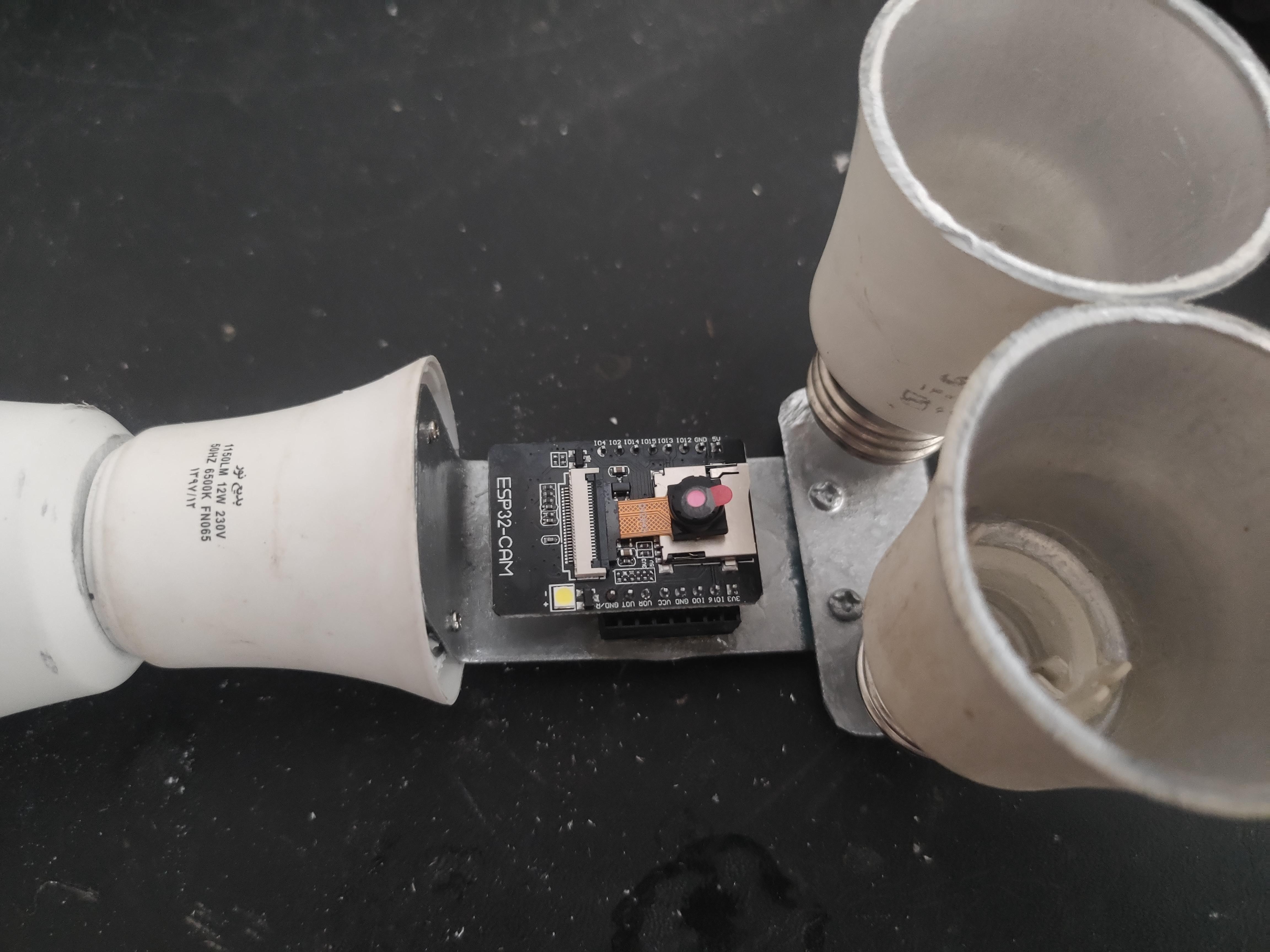
第 4 步:ESP32-CAM 支架
现在我们需要两个 8 行 2.54mm 2 行 40 针直角 将 ESP32-CAM 安装在 T 型支架上。首先,将内排排针连接到模块,使排针彼此指向。然后将外引脚粘在 T 型支架上,不要打扰内引脚,因为我们需要它们连接到模块。
一旦胶水固定好,您就可以开始为电子设备布线了。
回复
驴友花雕
作者
第 3 步:上半身
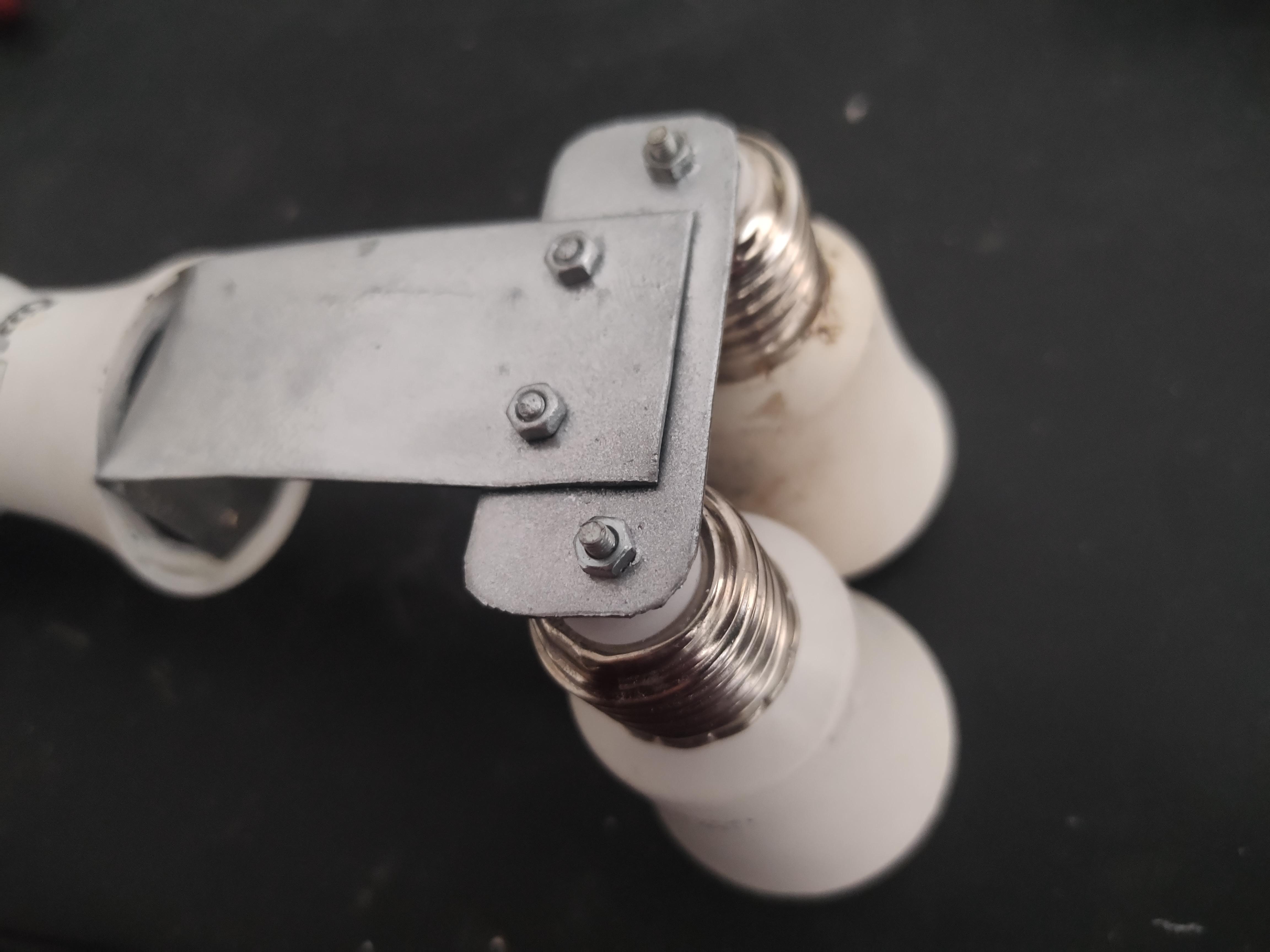
我们需要一个更大的灯泡和一个较小的上半身灯泡。从大灯泡上取下灯泡,剪断盖子,如图所示插入第二个小盖子。现在,您可以切割或钻孔较小的灯泡帽的底部,以便电线可以进入槽。您可以将这两个部分首尾相连,但不要将它们连接到机箱。
拿一块垃圾板金属,做一个至少 12 厘米长、3.5 厘米宽的 T 形支架。然后根据较小灯泡的底座弯曲 T 型支架的底部,并将其拧到小灯泡的顶部。
接下来,将轮子上剩余的灯泡体连接到机器人眼睛的 T 形支架的顶部。
最后,将大灯泡从底座上切成两半,并将其底部粘在机箱上,以便将上半身安装在其上。我这样做是为了随时可以拆下上半身,而且它也可以牢牢地安装在机箱上。但仍然不要将上半身连接到底盘。
回复
驴友花雕
作者
第 2 步:移动电源
布线:
接线非常简单,先将电池并联在一起,然后将负极连接到移动电源的负极。然后用中间的开/关开关将它们的正极连接在一起。
蒙太奇:
现在是时候将我们的移动电源连接到机箱了。首先,仔细测量移动电源模块端口,在机身的任何一侧打一些适合它们的孔,然后将电池和模块粘在机箱上。我亲自将它们连接到机器人的顶部前部。然后测量开/关开关并在机箱上为其留出一个位置。建议您将所有组件粘在机箱的一侧,以便可以轻松地继续其余的蒙太奇作。
最后,确保您的移动电源电池电量指示器通过机箱可见,无论是 LED 指示灯还是 LCD 指示灯。现在您可以继续下一步。
回复
驴友花雕
作者
第 1 步:底盘和车轮
我会告诉你我为 Esghati 的身体所做的一切,以防你想制作精确的机器人。
车轮:
首先,我们从 LED PCB 后面切割两个相同尺寸的 LED 灯。你最后应该得到像照片这样的东西。然后将 LED PCB 中间的伺服手柄连接起来。断开灯泡与 PCB 部分的连接,并开始从内部粘合 PCB 的角落,以获得额外的保护。将它们放在一边晾干,然后进行下一步。
基础:
底座由旧的破损 wifi 路由器制成,因此请拿起螺丝刀打开路由器并移除所有电子设备。我保持天线完好无损,因为它看起来很酷,但如果你愿意,你可以把它取下来。现在您需要为机器人的前部选择路由器的一侧。选择一侧后,开始测量伺服系统,然后根据测量值开始切割路由器的两侧。现在将伺服器安装在路由器中,如图所示。您可以使用热胶或伺服系统随附的螺钉,不用说始终建议使用螺钉。
您可能希望稍后安装轮子,因为安装其他没有轮子的部件更容易。我将它们连接起来以进行演示。
回复
驴友花雕
作者
材料与用品
身体部位没什么特别的,只是我身边的一些垃圾。你可以用你的想象力来设计你的机器人的身体。它可以是一个破损的玩具,或者一个手工制作的纸板机器人,或者像我这样完全无关紧要的东西。我使用了四个坏掉的 LED 灯和一个旧的 wifi 路由器外壳作为机身。
电气部件包括:
1 个 ESP32-CAM
1x Arduino Nano (根据您的模块购买 USB 数据线)
2 节锂离子电池 18650 3.7V,至少 2000 mAh
2x 母针接头 2.54mm 2 排 40 针 直角
1x FT232RL Mini USB 转 TTL 串口转换器适配器模块 3.3V/5.5V
1 个 ON/OFF 开关
1 个移动电源模块,带 2 个 USB 输出
1 x 公 USB 转 USB 电缆(购买前请阅读文章)
2x MG996R 360 度舵机(建议使用金属变速箱)
一些电线
工具:
使用 3 毫米钻头钻孔
迷你角磨机或钢锯
烙铁
焊锡丝和油
螺丝刀
热胶枪
统治者
金属剪刀
刀具
回复
驴友花雕
作者
Esghati 是一款基于 ESP32-CAM 和 Arduino nano 的非常简单的机器人。我为学校的学生制作了它,这样他们就可以自己制作,并认为与世界各地的其他孩子分享它会很有趣。它超级便宜、超级简单且极具教育意义。
该项目的制作方式是,每一步您都会学习制作一个单独的小工具。首先,您将学习制作移动电源,下一步您将 ESP32-CAM 添加为具有人脸识别功能的摄像头,然后添加移动机构和身体,使其成为机器人。
那么它是如何工作的呢?这个机器人不需要控制器,只需要你的手机或笔记本电脑或任何带有 Web 浏览器的东西。您可以使用任何设备连接到 Esghati 的 wifi,您可以通过它的摄像头看到并使用浏览器控制它。它还具有人脸识别功能!
我想向我的学生展示,很酷的东西是由***创造的,不花钱购买花哨的机器人零件就可以完成,我还希望为他们所有人提供一个平等的竞争平台,无论他们的家庭财富如何。所以所有的身体部位都是直接来自垃圾的。
回复
- 没有更多了 -
驴友花雕
UID: 1737
2964
文章
158
粉丝
1.1万
获取喜欢
创作许可协议
本项目采用
None(不开放任何权利,保留所有权利)
进行许可。
相关推荐
DF创客社区2014年度编辑选择奖 教程篇
Ash1
3.9万
3
我的Q&A问答专栏
陈德熹
2
0
BLE Arduino开发神器 Bluno Beetle开启免费试用啦!
Ash1
2.3万
0





附录
项目链接:https://www.instructables.com/Esghati-a-Robot-Made-From-Garbage/
项目作者:伊朗 索拉什·莫拉迪萨尼(Sorush Moradisani)
项目视频(1分钟):https://www.youtube.com/watch?v=d39NgJqNWr8&t=57s
项目开源代码:https://github.com/Sorush-moradisani/Esghati
参考:https://github.com/robotzero1/esp32cam-access-control
我基于这个项目开发了 Esghati 的平台并添加了更多功能。我在 GitHub 上上传了该项目的源代码,单击此处重定向。
[code]#include
#include
SoftwareSerial mySerial(4, 3);
VarSpeedServo Rwheel;
VarSpeedServo Lwheel;
int VSPEED = 5 , HSPEED = 10 , MSPEED = 50, MACCEL = 125;
int MAX_VSPEED = 10 , MAX_HSPEED = 20 , MAX_MSPEED = 255, MSTOP = 1500, MSTOPdeg = 90;
String command;
bool commandEnd=false;
char inByte;
int arg = 0;
void setup() {
// put your setup code here, to run once:
Serial.begin(115200);
mySerial.begin(9600);
Rwheel.attach(6);
delay(100);
Rwheel.write(MSTOP);
delay(300);
Lwheel.attach(5);
delay(100);
Lwheel.write(MSTOP);
delay(300);
}
void loop() {
// put your main code here, to run repeatedly:
if (mySerial.available() > 0) {
if(commandEnd){
command="";
commandEnd=false;
}
inByte = mySerial.read();
if (inByte != '\n') {
if (inByte == '=') {
arg = mySerial.parseInt();
//Serial.println(arg);
} else {
command += inByte;
}
}else{
commandEnd=true;
Serial.println(command);
execute(command, arg);
}
}
}
void execute(String command, int arg){
if(compareString(command, "l-rotate")){
Rwheel.write(MSTOPdeg-MSPEED,MACCEL);
Lwheel.write(MSTOPdeg-MSPEED,MACCEL);
command="";
}else if(compareString(command, "r-rotate")){
Rwheel.write(MSTOPdeg+MSPEED,MACCEL);
Lwheel.write(MSTOPdeg+MSPEED,MACCEL);
command="";
}else if(compareString(command, "f-forward")){
Rwheel.write(MSTOPdeg-MSPEED, MACCEL);
Lwheel.write(MSTOPdeg+MSPEED, MACCEL);
command="";
}else if(compareString(command, "f-left")){
Rwheel.write(MSTOPdeg-MSPEED,MACCEL);
Lwheel.write(MSTOP);
command="";
}else if(compareString(command, "f-right")){
Rwheel.write(MSTOP);
Lwheel.write(MSTOPdeg+MSPEED,MACCEL);
command="";
}else if(compareString(command, "b-backward")){
Rwheel.write(MSTOPdeg+MSPEED,MACCEL);
Lwheel.write(MSTOPdeg-MSPEED,MACCEL);
command="";
}else if(compareString(command, "b-right")){
Rwheel.write(MSTOPdeg+MSPEED,MACCEL);
Lwheel.write(MSTOP);
command="";
}else if(compareString(command, "b-left")){
Rwheel.write(MSTOP);
Lwheel.write(MSTOPdeg-MSPEED,MACCEL);
command="";
}else if(compareString(command, "stop")){
Rwheel.write(MSTOP);
Lwheel.write(MSTOP);
command="";
}
command="";
}
boolean compareString(String a, String b) {
if (a.length() != b.length() + 1) {
return false;
}
for (int i = 0; i < a.length() - 1; i++) {
if (a[i] != b[i]) {
return false;
}
}
return true;
}[/code]
[code]#include
#include "esp_http_server.h"
#include "esp_timer.h"
#include "esp_camera.h"
#include "camera_index.h"
#include "Arduino.h"
#include "fd_forward.h"
#include "fr_forward.h"
#include "fr_flash.h"
#include "fb_gfx.h"
const char* ssid = "your ssid";
const char* password = "your password";
#define ENROLL_CONFIRM_TIMES 5
#define FACE_ID_SAVE_NUMBER 7
#define LED_BUILTIN 4
bool INT_LED = false;
hw_timer_t *My_timer = NULL;
// Select camera model
//#define CAMERA_MODEL_WROVER_KIT
//#define CAMERA_MODEL_ESP_EYE
//#define CAMERA_MODEL_M5STACK_PSRAM
//#define CAMERA_MODEL_M5STACK_WIDE
#define CAMERA_MODEL_AI_THINKER
#include "camera_pins.h"
using namespace websockets;
WebsocketsServer socket_server;
camera_fb_t * fb = NULL;
long current_millis;
long last_detected_millis = 0;
#define RED 15 // pin 12 can also be used
#define GREEN 14
#define BLUE 2
#define Mic 12
int light = 0;
unsigned long door_opened_millis = 0;
long interval = 5000; // open lock for ... milliseconds
bool face_recognised = false;
const int numReadings = 5;
int readings[numReadings]; // the readings from the analog input
int readIndex = 0;
int total = 0; // the running total
int average_face_size = 0; // the average
int face_distance;
int face_id = 0;
String command;
bool commandEnd=false;
char inByte;
int arg = 0;
bool follow = 0;
//void app_facenet_main();
//void app_httpserver_init();
typedef struct
{
uint8_t *image;
box_array_t *net_boxes;
dl_matrix3d_t *face_id;
} http_img_process_result;
static inline mtmn_config_t app_mtmn_config()
{
mtmn_config_t mtmn_config = {0};
mtmn_config.type = FAST;
mtmn_config.min_face = 80;
mtmn_config.pyramid = 0.707;
mtmn_config.pyramid_times = 4;
mtmn_config.p_threshold.score = 0.6;
mtmn_config.p_threshold.nms = 0.7;
mtmn_config.p_threshold.candidate_number = 20;
mtmn_config.r_threshold.score = 0.7;
mtmn_config.r_threshold.nms = 0.7;
mtmn_config.r_threshold.candidate_number = 10;
mtmn_config.o_threshold.score = 0.7;
mtmn_config.o_threshold.nms = 0.7;
mtmn_config.o_threshold.candidate_number = 1;
return mtmn_config;
}
mtmn_config_t mtmn_config = app_mtmn_config();
face_id_name_list st_face_list;
static dl_matrix3du_t *aligned_face = NULL;
httpd_handle_t camera_httpd = NULL;
typedef enum
{
START_STREAM,
START_DETECT,
SHOW_FACES,
START_RECOGNITION,
START_ENROLL,
ENROLL_COMPLETE,
DELETE_ALL,
} en_fsm_state;
en_fsm_state g_state;
typedef struct
{
char enroll_name[ENROLL_NAME_LEN];
} httpd_resp_value;
httpd_resp_value st_name;
void IRAM_ATTR onTimer(){
Serial.println("task");
}
void setup() {
Serial.begin(9600);
Serial.setDebugOutput(true);
Serial.println();
pinMode (LED_BUILTIN, OUTPUT);
pinMode(RED, OUTPUT);
pinMode(GREEN, OUTPUT);
pinMode(BLUE, OUTPUT);
pinMode(33, OUTPUT);
pinMode(Mic, INPUT);
digitalWrite(33, HIGH);
digitalWrite(RED, LOW);
digitalWrite(GREEN, LOW);
digitalWrite(BLUE, LOW);
camera_config_t config;
config.ledc_channel = LEDC_CHANNEL_0;
config.ledc_timer = LEDC_TIMER_0;
config.pin_d0 = Y2_GPIO_NUM;
config.pin_d1 = Y3_GPIO_NUM;
config.pin_d2 = Y4_GPIO_NUM;
config.pin_d3 = Y5_GPIO_NUM;
config.pin_d4 = Y6_GPIO_NUM;
config.pin_d5 = Y7_GPIO_NUM;
config.pin_d6 = Y8_GPIO_NUM;
config.pin_d7 = Y9_GPIO_NUM;
config.pin_xclk = XCLK_GPIO_NUM;
config.pin_pclk = PCLK_GPIO_NUM;
config.pin_vsync = VSYNC_GPIO_NUM;
config.pin_href = HREF_GPIO_NUM;
config.pin_sscb_sda = SIOD_GPIO_NUM;
config.pin_sscb_scl = SIOC_GPIO_NUM;
config.pin_pwdn = PWDN_GPIO_NUM;
config.pin_reset = RESET_GPIO_NUM;
config.xclk_freq_hz = 10000000;
config.pixel_format = PIXFORMAT_JPEG;
//init with high specs to pre-allocate larger buffers
if (psramFound()) {
config.frame_size = FRAMESIZE_UXGA;
config.jpeg_quality = 10;
config.fb_count = 2;
} else {
config.frame_size = FRAMESIZE_SVGA;
config.jpeg_quality = 12;
config.fb_count = 1;
}
#if defined(CAMERA_MODEL_ESP_EYE)
pinMode(13, INPUT_PULLUP);
pinMode(14, INPUT_PULLUP);
#endif
// camera init
esp_err_t err = esp_camera_init(&config);
if (err != ESP_OK) {
Serial.printf("Camera init failed with error 0x%x", err);
return;
}
sensor_t * s = esp_camera_sensor_get();
s->set_framesize(s, FRAMESIZE_QVGA);
#if defined(CAMERA_MODEL_M5STACK_WIDE)
s->set_vflip(s, 1);
s->set_hmirror(s, 1);
#endif
WiFi.softAP(ssid, password);
IPAddress IP = WiFi.softAPIP();
Serial.print("ACCESS POINT IP address: ");
Serial.println(IP);
app_httpserver_init();
app_facenet_main();
socket_server.listen(82);
Serial.print("Camera Ready! Use 'http://");
Serial.print(WiFi.localIP());
Serial.println("' to connect");
My_timer = timerBegin(0, 80, true);
timerAttachInterrupt(My_timer, &onTimer, true);
timerAlarmWrite(My_timer, 300000000, true);
timerAlarmEnable(My_timer);
}
static esp_err_t index_handler(httpd_req_t *req) {
httpd_resp_set_type(req, "text/html");
httpd_resp_set_hdr(req, "Content-Encoding", "gzip");
return httpd_resp_send(req, (const char *)index_ov2640_html_gz, index_ov2640_html_gz_len);
}
httpd_uri_t index_uri = {
.uri = "/",
.method = HTTP_GET,
.handler = index_handler,
.user_ctx = NULL
};
void app_httpserver_init ()
{
httpd_config_t config = HTTPD_DEFAULT_CONFIG();
if (httpd_start(&camera_httpd, &config) == ESP_OK)
Serial.println("httpd_start");
{
httpd_register_uri_handler(camera_httpd, &index_uri);
}
}
void app_facenet_main()
{
face_id_name_init(&st_face_list, FACE_ID_SAVE_NUMBER, ENROLL_CONFIRM_TIMES);
aligned_face = dl_matrix3du_alloc(1, FACE_WIDTH, FACE_HEIGHT, 3);
read_face_id_from_flash_with_name(&st_face_list);
}
static inline int do_enrollment(face_id_name_list *face_list, dl_matrix3d_t *new_id)
{
ESP_LOGD(TAG, "START ENROLLING");
int left_sample_face = enroll_face_id_to_flash_with_name(face_list, new_id, st_name.enroll_name);
ESP_LOGD(TAG, "Face ID %s Enrollment: Sample %d",
st_name.enroll_name,
ENROLL_CONFIRM_TIMES - left_sample_face);
return left_sample_face;
}
static esp_err_t send_face_list(WebsocketsClient &client)
{
client.send("delete_faces"); // tell browser to delete all faces
face_id_node *head = st_face_list.head;
char add_face[64];
for (int i = 0; i < st_face_list.count; i++) // loop current faces
{
sprintf(add_face, "listface:%s", head->id_name);
client.send(add_face); //send face to browser
head = head->next;
}
}
static esp_err_t delete_all_faces(WebsocketsClient &client)
{
delete_face_all_in_flash_with_name(&st_face_list);
client.send("delete_faces");
}
void handle_message(WebsocketsClient &client, WebsocketsMessage msg)
{
timerWrite(My_timer, 0); //reset timer (feed watchdog)
//Serial.println(msg.data());
if (msg.data() == "stream") {
g_state = START_STREAM;
client.send("STREAMING");
}else if (msg.data() == "detect") {
g_state = START_DETECT;
client.send("DETECTING");
}else if (msg.data().substring(0, 8) == "capture:") {
g_state = START_ENROLL;
char person[FACE_ID_SAVE_NUMBER * ENROLL_NAME_LEN] = {0,};
msg.data().substring(8).toCharArray(person, sizeof(person));
memcpy(st_name.enroll_name, person, strlen(person) + 1);
client.send("CAPTURING");
}else if (msg.data() == "recognise") {
g_state = START_RECOGNITION;
client.send("RECOGNISING");
}else if (msg.data().substring(0, 7) == "remove:") {
char person[ENROLL_NAME_LEN * FACE_ID_SAVE_NUMBER];
msg.data().substring(7).toCharArray(person, sizeof(person));
delete_face_id_in_flash_with_name(&st_face_list, person);
send_face_list(client); // reset faces in the browser
}else if (msg.data().substring(0, 5) == "tilt:") {
//int i = msg.data().substring(5).toInt();
Serial.print("tilt=");
Serial.println(msg.data().substring(5));
}else if (msg.data().substring(0, 4) == "pan:") {
//int j = msg.data().substring(4).toInt();
Serial.print("pan=");
Serial.println(msg.data().substring(4));
}else if (msg.data().substring(0, 9) == "lr-rhand:") {
//int i = msg.data().substring(5).toInt();
Serial.print("lr-rhand=");
Serial.println(msg.data().substring(9));
}else if (msg.data().substring(0, 9) == "ud-rhand:") {
//int j = msg.data().substring(4).toInt();
Serial.print("ud-rhand=");
Serial.println(msg.data().substring(9));
}else if (msg.data().substring(0, 9) == "lr-lhand:") {
//int i = msg.data().substring(5).toInt();
Serial.print("lr-lhand=");
Serial.println(msg.data().substring(9));
}else if (msg.data().substring(0, 9) == "ud-lhand:") {
//int j = msg.data().substring(4).toInt();
Serial.print("ud-lhand=");
Serial.println(msg.data().substring(9));
}else if (msg.data() == "stop") {
Serial.println("stop");
}else if (msg.data() == "r-rotate") {
Serial.println("r-rotate");
}else if (msg.data() == "l-rotate") {
Serial.println("l-rotate");
}else if (msg.data() == "f-left") {
Serial.println("f-left");
}else if (msg.data() == "f-forward") {
Serial.println("f-forward");
}else if (msg.data() == "f-right") {
Serial.println("f-right");
}else if (msg.data() == "b-left") {
Serial.println("b-left");
}else if (msg.data() == "b-backward") {
Serial.println("b-backward");
}else if (msg.data() == "b-right") {
Serial.println("b-right");
}else if (msg.data() == "introduce") {
Serial.println("introduce");
}else if (msg.data() == "greet") {
Serial.println("greet");
}else if (msg.data() == "find" && g_state == START_RECOGNITION) {
Serial.println("find");
}else if (msg.data() == "follow") {
if(!follow){
Serial.println("follow");
follow = true;
}else{
Serial.println("nofollow");
follow = false;
}
}else if (msg.data() == "dance") {
Serial.println("dance");
}else if (msg.data() == "random") {
Serial.println("random");
}else if (msg.data() == "history") {
Serial.println("history");
}else if (msg.data() == "hymn") {
Serial.println("hymn");
}else if (msg.data() == "hreset") {
Serial.println("hreset");
}else if (msg.data() == "reset") {
Serial.println("reset");
}else if (msg.data() == "light") {
if(INT_LED){
digitalWrite(LED_BUILTIN, LOW);
INT_LED = false;
}else{
digitalWrite(LED_BUILTIN, HIGH);
INT_LED = true;
}
Serial.println("light");
}else if (msg.data() == "rgb") {
if(light == 0){
digitalWrite(RED, HIGH);
digitalWrite(GREEN, LOW);
digitalWrite(BLUE, LOW);
light++;
}else if(light == 1){
digitalWrite(RED, LOW);
digitalWrite(GREEN, HIGH);
digitalWrite(BLUE, LOW);
light++;
}else if(light == 2){
digitalWrite(RED, LOW);
digitalWrite(GREEN, LOW);
digitalWrite(BLUE, HIGH);
light++;
}else{
digitalWrite(RED, LOW);
digitalWrite(GREEN, LOW);
digitalWrite(BLUE, LOW);
light=0;
}
Serial.println("rgb");
}else if (msg.data() == "fire") {
Serial.println("fire");
}else if (msg.data() == "voicemode") {
Serial.println("voicemode");
}else if (msg.data() == "clearcache") {
Serial.println("free heap: ");
Serial.println(ESP.getFreeHeap());
}else if (msg.data() == "seq1") {
Serial.println("seq1");
}else if (msg.data() == "seq2") {
Serial.println("seq2");
}else if (msg.data() == "seq3") {
Serial.println("seq3");
}else if (msg.data() == "seq4") {
Serial.println("seq4");
}
}
void open_door(WebsocketsClient &client) {
if (true/*digitalRead(relay_pin) == LOW*/) {
//digitalWrite(relay_pin, HIGH); //close (energise) relay so door unlocks
Serial.println("sorush");
client.send("door_open");
door_opened_millis = millis(); // time relay closed and door opened
}
}
static void draw_face_boxes(dl_matrix3du_t *image_matrix, box_array_t *boxes)
{
int x, y, w, h, i, half_width, half_height;
fb_data_t fb;
fb.width = image_matrix->w;
fb.height = image_matrix->h;
fb.data = image_matrix->item;
fb.bytes_per_pixel = 3;
fb.format = FB_BGR888;
for (i = 0; i < boxes->len; i++) {
// Convoluted way of finding face centre...
x = ((int)boxes->box[i].box_p[0]);
w = (int)boxes->box[i].box_p[2] - x + 1;
half_width = w / 2;
int face_center_pan = x + half_width; // current face centre x co-ordinate
y = (int)boxes->box[i].box_p[1];
h = (int)boxes->box[i].box_p[3] - y + 1;
half_height = h / 2;
int face_center_tilt = y + half_height; // current face centre y co-ordinate
// subtract the last reading:
total = total - readings[readIndex];
// add current face height:
readings[readIndex] = h;
// add the reading to the total:
total = total + readings[readIndex];
// advance to the next position in the array:
readIndex = readIndex + 1;
// if we're at the end of the array...
if (readIndex >= numReadings) {
// ...wrap around to the beginning:
readIndex = 0;
}
// calculate the average:
average_face_size = total / numReadings;
int eq_top = 3.6 * 200 * 240; //f(mm) x real height(mm) x image height(px)
int eq_bottom = average_face_size * 2.7; //object height(px) x sensor height(mm)
int face_distance = eq_top / eq_bottom;
/*Serial.print('<'); // start marker
Serial.print(face_center_pan);
Serial.print(','); // comma separator
Serial.print(face_center_tilt);
Serial.print(','); // comma separator
Serial.print(face_distance);
Serial.println('>'); // end marker*/
Serial.print("autopan=");
Serial.println(face_center_pan);
Serial.print("autotilt=");
Serial.println(face_center_tilt);
Serial.print("distance=");
Serial.println(face_distance);
}
}
void loop() {
auto client = socket_server.accept();
client.onMessage(handle_message);
dl_matrix3du_t *image_matrix = dl_matrix3du_alloc(1, 320, 240, 3);
http_img_process_result out_res = {0};
out_res.image = image_matrix->item;
send_face_list(client);
client.send("STREAMING");
while (client.available()) {
client.poll();
// char voice[12];
// sprintf(voice, "voice:%s", (const char *)analogRead(12));
// client.send(voice);
// Serial.println(analogRead(12));
// client.sendBinary((const char *)analogRead(12));
if (Serial.available()) {
String command = Serial.readStringUntil('\n');
if (command == "red") {
digitalWrite(RED, HIGH);
digitalWrite(GREEN, LOW);
digitalWrite(BLUE, LOW);
} else if (command == "green") {
digitalWrite(RED, LOW);
digitalWrite(GREEN, HIGH);
digitalWrite(BLUE, LOW);
} else if (command == "blue") {
digitalWrite(RED, LOW);
digitalWrite(GREEN, LOW);
digitalWrite(BLUE, HIGH);
} else if (command == "norgb") {
digitalWrite(RED, LOW);
digitalWrite(GREEN, LOW);
digitalWrite(BLUE, LOW);
}
}
if (millis() - interval > door_opened_millis) { // current time - face recognised time > 5 secs
//digitalWrite(relay_pin, LOW); //open relay
}
fb = esp_camera_fb_get();
if (g_state == START_DETECT || g_state == START_ENROLL || g_state == START_RECOGNITION)
{
out_res.net_boxes = NULL;
out_res.face_id = NULL;
fmt2rgb888(fb->buf, fb->len, fb->format, out_res.image);
out_res.net_boxes = face_detect(image_matrix, &mtmn_config);
if (out_res.net_boxes)
{
if (align_face(out_res.net_boxes, image_matrix, aligned_face) == ESP_OK)
{
out_res.face_id = get_face_id(aligned_face);
last_detected_millis = millis();
if (g_state == START_DETECT) {
client.send("FACE DETECTED");
}
if(follow){
draw_face_boxes(image_matrix, out_res.net_boxes);
}
if (g_state == START_ENROLL)
{
int left_sample_face = do_enrollment(&st_face_list, out_res.face_id);
char enrolling_message[64];
sprintf(enrolling_message, "SAMPLE NUMBER %d FOR %s", ENROLL_CONFIRM_TIMES - left_sample_face, st_name.enroll_name);
client.send(enrolling_message);
if (left_sample_face == 0)
{
ESP_LOGI(TAG, "Enrolled Face ID: %s", st_face_list.tail->id_name);
g_state = START_STREAM;
char captured_message[64];
sprintf(captured_message, "FACE CAPTURED FOR %s", st_face_list.tail->id_name);
client.send(captured_message);
send_face_list(client);
}
}
if (g_state == START_RECOGNITION && (st_face_list.count > 0))
{
face_id_node *f = recognize_face_with_name(&st_face_list, out_res.face_id);
if (f)
{
char recognised_message[64];
sprintf(recognised_message, "Hi %s", f->id_name);
open_door(client);
client.send(recognised_message);
}
else
{
client.send("FACE NOT RECOGNISED");
Serial.println("stranger");
}
}
dl_matrix3d_free(out_res.face_id);
}
free(out_res.net_boxes->score); // Free allocated memory
free(out_res.net_boxes->box);
free(out_res.net_boxes->landmark);
free(out_res.net_boxes);
}
else
{
if (g_state != START_DETECT) {
client.send("NO FACE DETECTED");
}
}
if (g_state == START_DETECT && millis() - last_detected_millis > 500) { // Detecting but no face detected
client.send("DETECTING");
}
}
client.sendBinary((const char *)fb->buf, fb->len);
esp_camera_fb_return(fb);
fb = NULL;
}
}
boolean compareString(String a, String b) {
if (a.length() != b.length() + 1) {
return false;
}
for (int i = 0; i < a.length() - 1; i++) {
if (a[i] != b[i]) {
return false;
}
}
return true;
}[/code]
ESP32-CAM 系列:
首先,您需要从开发板管理器安装 ESP32 1.0.4 版本(或其他版本)。然后安装所有缺少的库。将您的板子连接到 USB 到 TTL 转换器。将 GPIO0 连接到 GND 以启用引导模式。从工具中选择 AI Thinker ESP32-CAM 板,然后选择 Huge APP 作为您的分区方案。最后输入 wifi 凭据,选择您的 COM 端口并开始上传程序。
注意:您可能会遇到诸如 guru meditation 或 brownout detector was triggered 之类的错误。它们通常是由电缆连接质量差或电力短缺引起的。为了消除错误,请将板连接到外部电源并确保连接良好。此外,将地线连接到系统和电源也非常重要。
注意:建议您使用 5V 引脚旁边的 GND 引脚为模块供电。
现在,您可以测试您的模块,退出引导模式并重新启动模块。然后用手机或笔记本电脑连接到 ESP32-CAM,并在 chrome 浏览器中输入 192.168.4.1。您应该会看到如图所示的控制面板。灯光和人脸识别功能可以立即进行测试。
Arduino Nano:
首先安装所有库并从板管理器中选择 arduino nano。选择 COM 并单击 upload (上传)。如果您在上传处理器类型时遇到问题。当处理器设置为 ATmega328P Old Bootloader 时,我可以对我的 arduino nanos 进行编程。
现在您可以将轮子连接到框架上,两个在伺服系统上,一个在后面,以保持平衡。现在我们已经完成了这个项目!
享受你的机器人。
在这里,您需要决定是要使用 USB 端口为整个系统供电,还是要将电源线直接焊接到移动电源 PCB 上的 USB 引脚。我将电线焊接到 PCB 上,因为它更干净,您还可以使用额外的 USB 端口来连接其他电子设备,甚至为一些手机和小工具充电。
Arduino 适合 wifi 路由器机箱,不需要特殊支架,只是不要将电线直接焊接到上面;使用 pin 接头。现在一切都已连接,我们可以继续下一步。
现在我们需要两个 8 行 2.54mm 2 行 40 针直角 将 ESP32-CAM 安装在 T 型支架上。首先,将内排排针连接到模块,使排针彼此指向。然后将外引脚粘在 T 型支架上,不要打扰内引脚,因为我们需要它们连接到模块。
一旦胶水固定好,您就可以开始为电子设备布线了。
我们需要一个更大的灯泡和一个较小的上半身灯泡。从大灯泡上取下灯泡,剪断盖子,如图所示插入第二个小盖子。现在,您可以切割或钻孔较小的灯泡帽的底部,以便电线可以进入槽。您可以将这两个部分首尾相连,但不要将它们连接到机箱。
拿一块垃圾板金属,做一个至少 12 厘米长、3.5 厘米宽的 T 形支架。然后根据较小灯泡的底座弯曲 T 型支架的底部,并将其拧到小灯泡的顶部。
接下来,将轮子上剩余的灯泡体连接到机器人眼睛的 T 形支架的顶部。
最后,将大灯泡从底座上切成两半,并将其底部粘在机箱上,以便将上半身安装在其上。我这样做是为了随时可以拆下上半身,而且它也可以牢牢地安装在机箱上。但仍然不要将上半身连接到底盘。
布线:
接线非常简单,先将电池并联在一起,然后将负极连接到移动电源的负极。然后用中间的开/关开关将它们的正极连接在一起。
蒙太奇:
现在是时候将我们的移动电源连接到机箱了。首先,仔细测量移动电源模块端口,在机身的任何一侧打一些适合它们的孔,然后将电池和模块粘在机箱上。我亲自将它们连接到机器人的顶部前部。然后测量开/关开关并在机箱上为其留出一个位置。建议您将所有组件粘在机箱的一侧,以便可以轻松地继续其余的蒙太奇作。
最后,确保您的移动电源电池电量指示器通过机箱可见,无论是 LED 指示灯还是 LCD 指示灯。现在您可以继续下一步。
我会告诉你我为 Esghati 的身体所做的一切,以防你想制作精确的机器人。
车轮:
首先,我们从 LED PCB 后面切割两个相同尺寸的 LED 灯。你最后应该得到像照片这样的东西。然后将 LED PCB 中间的伺服手柄连接起来。断开灯泡与 PCB 部分的连接,并开始从内部粘合 PCB 的角落,以获得额外的保护。将它们放在一边晾干,然后进行下一步。
基础:
底座由旧的破损 wifi 路由器制成,因此请拿起螺丝刀打开路由器并移除所有电子设备。我保持天线完好无损,因为它看起来很酷,但如果你愿意,你可以把它取下来。现在您需要为机器人的前部选择路由器的一侧。选择一侧后,开始测量伺服系统,然后根据测量值开始切割路由器的两侧。现在将伺服器安装在路由器中,如图所示。您可以使用热胶或伺服系统随附的螺钉,不用说始终建议使用螺钉。
您可能希望稍后安装轮子,因为安装其他没有轮子的部件更容易。我将它们连接起来以进行演示。
身体部位没什么特别的,只是我身边的一些垃圾。你可以用你的想象力来设计你的机器人的身体。它可以是一个破损的玩具,或者一个手工制作的纸板机器人,或者像我这样完全无关紧要的东西。我使用了四个坏掉的 LED 灯和一个旧的 wifi 路由器外壳作为机身。
电气部件包括:
1 个 ESP32-CAM
1x Arduino Nano (根据您的模块购买 USB 数据线)
2 节锂离子电池 18650 3.7V,至少 2000 mAh
2x 母针接头 2.54mm 2 排 40 针 直角
1x FT232RL Mini USB 转 TTL 串口转换器适配器模块 3.3V/5.5V
1 个 ON/OFF 开关
1 个移动电源模块,带 2 个 USB 输出
1 x 公 USB 转 USB 电缆(购买前请阅读文章)
2x MG996R 360 度舵机(建议使用金属变速箱)
一些电线
工具:
使用 3 毫米钻头钻孔
迷你角磨机或钢锯
烙铁
焊锡丝和油
螺丝刀
热胶枪
统治者
金属剪刀
刀具
该项目的制作方式是,每一步您都会学习制作一个单独的小工具。首先,您将学习制作移动电源,下一步您将 ESP32-CAM 添加为具有人脸识别功能的摄像头,然后添加移动机构和身体,使其成为机器人。
那么它是如何工作的呢?这个机器人不需要控制器,只需要你的手机或笔记本电脑或任何带有 Web 浏览器的东西。您可以使用任何设备连接到 Esghati 的 wifi,您可以通过它的摄像头看到并使用浏览器控制它。它还具有人脸识别功能!
我想向我的学生展示,很酷的东西是由***创造的,不花钱购买花哨的机器人零件就可以完成,我还希望为他们所有人提供一个平等的竞争平台,无论他们的家庭财富如何。所以所有的身体部位都是直接来自垃圾的。