

【Arduino 动手做】带有 2xHC-SR04 传感器的 360° Arduino 雷达
2025-06-091824
AI 快速预览详细
本文介绍了如何使用两个HC-SR04超声波传感器和一个伺服电机构建一个360度扫描的Arduino雷达。这种方法不仅简化了设计,避免了电缆缠绕问题,还提供了全面的空间扫描能力。适合零基础新手尝试,特别适合STEM教育场景。
|
超声波传感器模块安装在旋转 0 至 180° 之间的伺服电机上,在这种情况下,有趣的是使用两个传感器来扫描整个 360 度空间。 这次我将向您展示如何制作基于 Arduino 的超声波雷达。我们可以称之为声纳,因为它利用的是声音,但声纳通常被认为是在水下使用的。在本例中,有趣的是,我们使用两个传感器来扫描整个 360 度空间。超声波传感器模块安装在一个可在 0 到 180° 之间旋转的伺服电机上。这种方法也简化了设计,因为您不会遇到电缆缠绕在伺服电机上的问题。 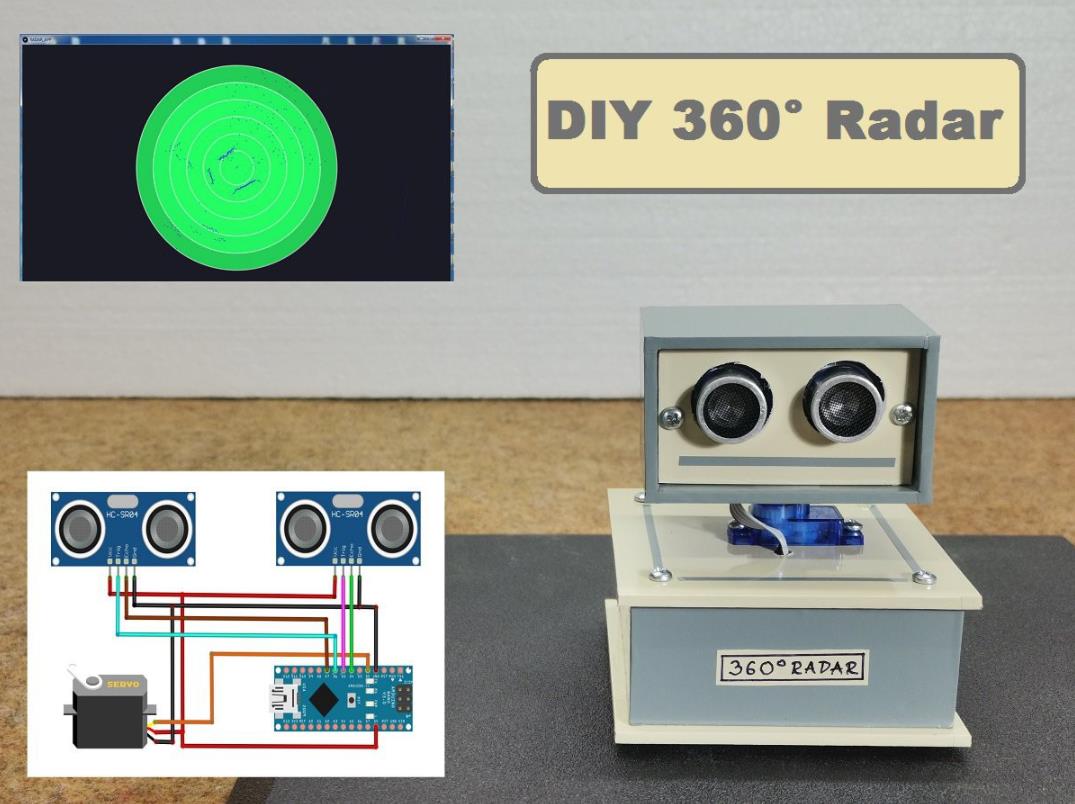 |



项目链接:https://hackaday.io/project/181643-360-arduino-radar-with-2xhc-sr04-sensors
项目作者:米尔塞姆克
项目代码:https://cdn.hackaday.io/files/1816437771414112/Original%20code.txt
[code]#include
#include
UltraSonicDistanceSensor distanceSensor(6, 7); //Create the 1st sensor object
UltraSonicDistanceSensor distanceSensor2(5, 4); //Create the 2nd sensor object
Servo servoMotor; //Create the Servo object
int delayTime = 5; //Delay value to wait for the servo to reach the 1 angle difference
long d; //Distance from 1st sensor calculated
long d2; //Distance from 2nd sensor calculated
void setup() {
Serial.begin(9600); //Initialize the Serial communication at 9600 bauds
servoMotor.attach(2); //Attach the servo to the Digital PWM pin 2
servoMotor.write(180); //Rotate the servo to the 180?
delay(1000); //Wait for the servo to reach 180?
servoMotor.write(0); //Rotate the servo to the 0?
delay(1000); //Wait for the servo to reach 0?
}
void loop() {
for (int i = 1; i < 180; i++) { //Move the Servo 180 degrees forward
readSensors(); //Read the sensors
Serial.print(i); //Print the angle
Serial.print(","); //Print a ","
Serial.print(d); //Print the 1st distance
Serial.print(","); //Print a ","
Serial.println(d2); //Print the 2nd distance with end line
servoMotor.write(i); //Set the sensor at the angle
delay(delayTime); //Wait for the servo to reach i?
}
for (int i = 180; i > 1; i--) { //Move the Servo 180 degrees backward
readSensors(); //Read the sensors
Serial.print(i); //Print the angle
Serial.print(","); //Print a ","
Serial.print(d); //Print the 1st distance
Serial.print(","); //Print a ","
Serial.println(d2); //Print the 2nd distance with end line
servoMotor.write(i); //Set the sensor at the angle
delay(delayTime); //Wait for the servo to reach i?
}
}
void readSensors() {
d = distanceSensor.measureDistanceCm();
d2 = distanceSensor2.measureDistanceCm();
}[/code]
该过程从测试伺服器旋转开始。首先,它旋转 0° 到 180°,然后旋转 180° 到 0°,以检查耳机是否正确移动。该过程从测试伺服器旋转开始。首先,它旋转 0° 到 180°,然后旋转 180° 到 0°,以检查耳机是否正确移动。该过程从测试伺服器旋转开始。首先,它旋转 0° 到 180°,然后旋转 180° 到 0°,以检查耳机是否正确移动。
该设备构建起来非常简单,由以下几个元素组成:
- Arduino Nano 微控制器
- 小型 9g 伺服电机
- 和两个 HC-SR04 超声波模块