

【Arduino 动手做】我使用 Arduino UNO 创建了一个绘图时钟
2025-06-201921
AI 快速预览详细
这个项目使用Arduino UNO创建了一个绘图时钟,通过UV LED光照射发光贴纸来显示时间。解决了传统白板笔易干和污渍的问题,实现了手写风格的时间显示。项目包括电路图、草图和校准步骤,适合STEM教育和零基础新手。
|
当我思考要做什么的时候,我想起很久以前在YouTube上看到过一个情节时钟的视频,其中的时间画在白板上。 情节时钟看起来就像这样:你写下时间,擦掉,然后再写一次。它有一种模拟的感觉,很有趣。 我犹豫是否要使用像视频中那样的水性白板笔,因为擦拭时会出现污渍,而且笔也会变干。 不过, YouTube上有一个视频解决了这个问题。 通过将UV LED光照射到发光贴纸上来显示时间。由于照射后会残留余辉,因此如果连续绘制时间会弄脏,但如果按下按钮开关即可显示时间,则没有问题。 这次我们将尝试创建这种类型。 所用零件 电路图、草图、案例 有关如何创建和设置的说明,请参阅上面的参考视频(第 1 部分:制作)和下面的参考视频(第 2 部分:设置)。 创建和校准 临时组装在面包板上 为了进行调整和检查操作,我将其连接到面包板上,打印了前面板,并连接了伺服器等。 校准 我们将参考视频第二部分进行校准。将四个角粗略对齐后,您可以在显示时间的同时进行进一步的调整,但这种调整需要相当长的时间。 另外,如果连接臂的螺丝拧得太紧,显示的字符就会变形,因此如果字符显示不正确,则需要进行调整。 我尝试显示它,我喜欢它手写的样子。 我临时拼装了一下,确认没问题。请勿抄袭笔顺。(^_^) 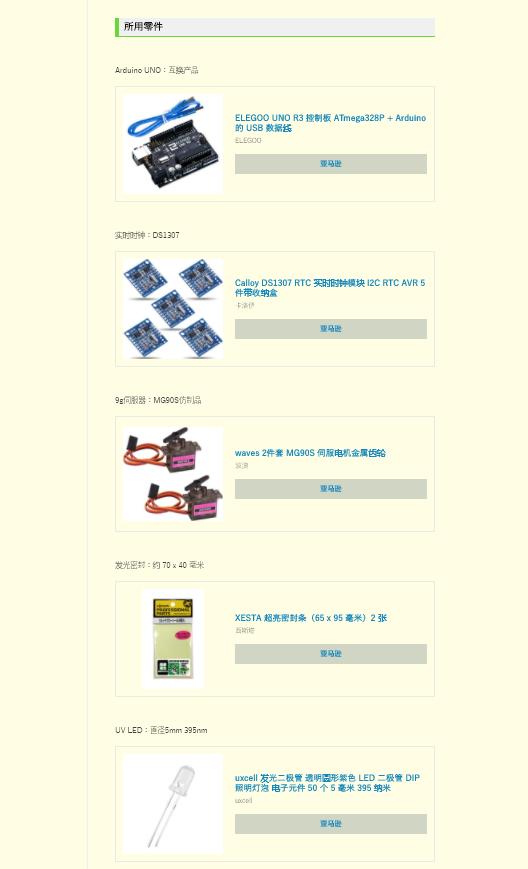 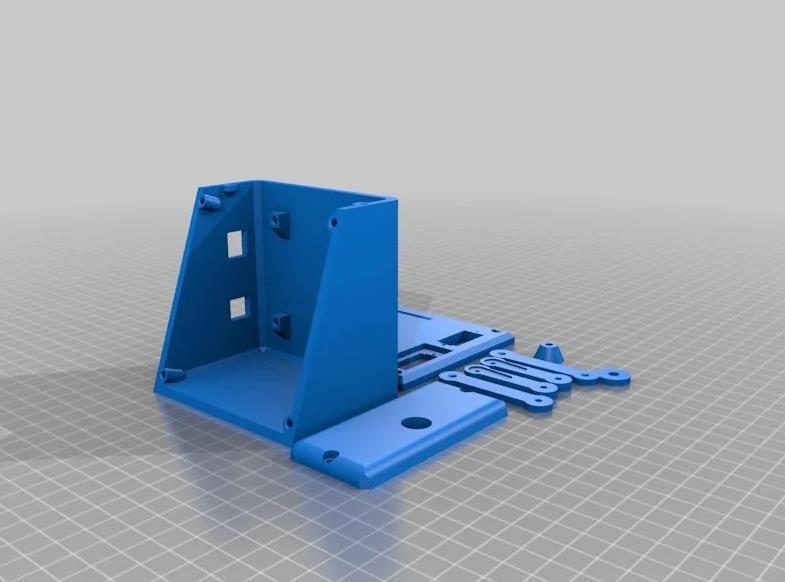 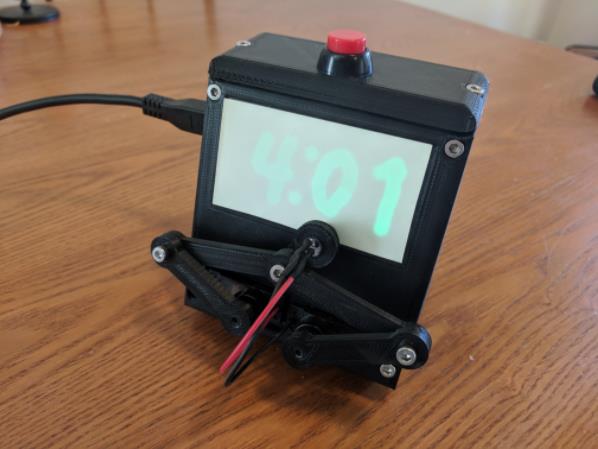 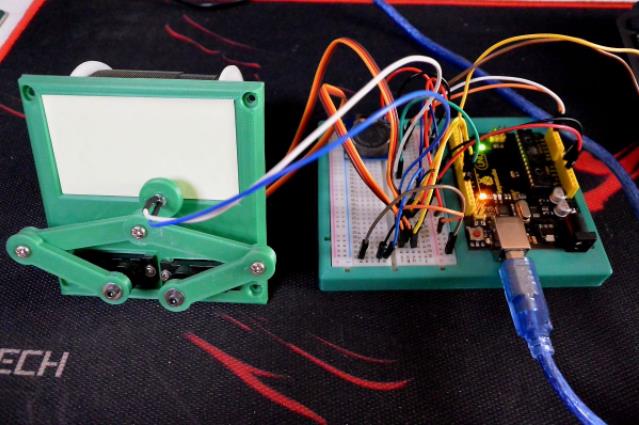 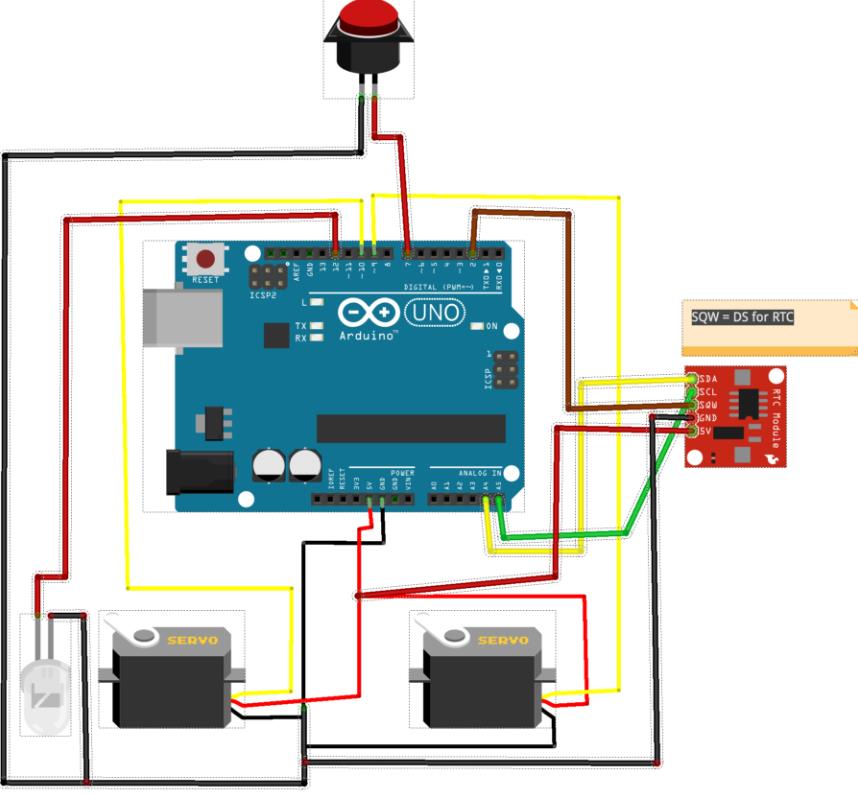 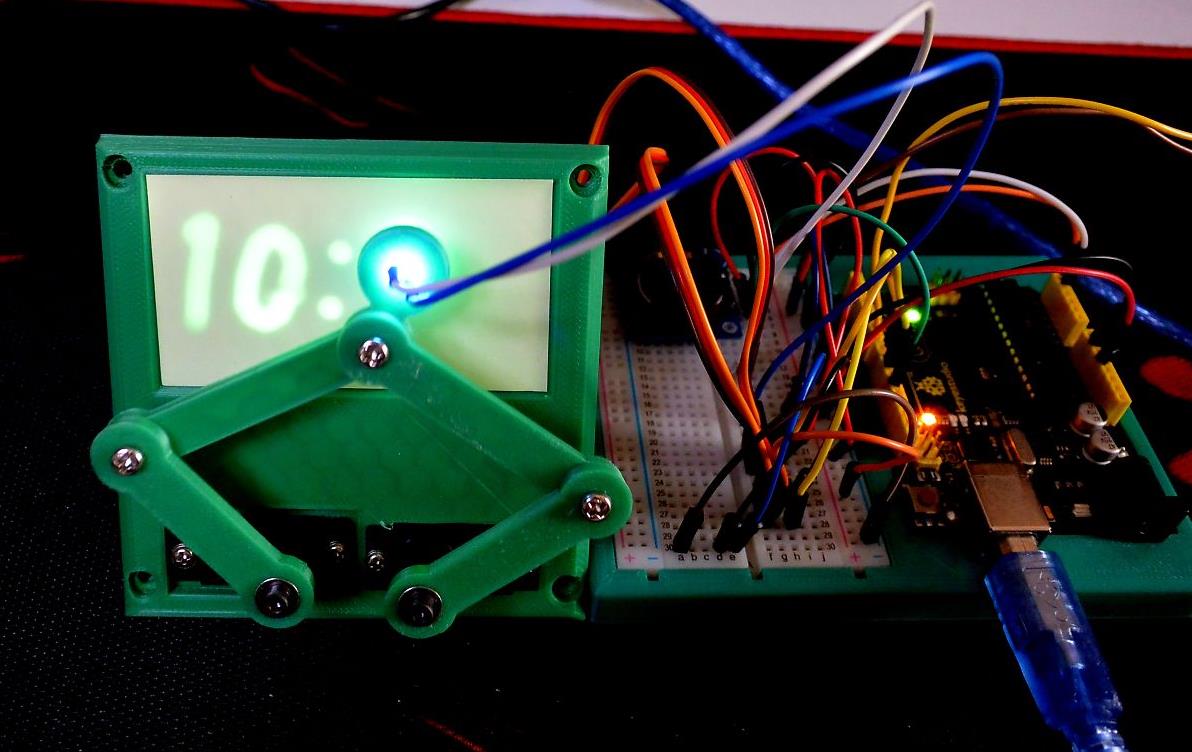 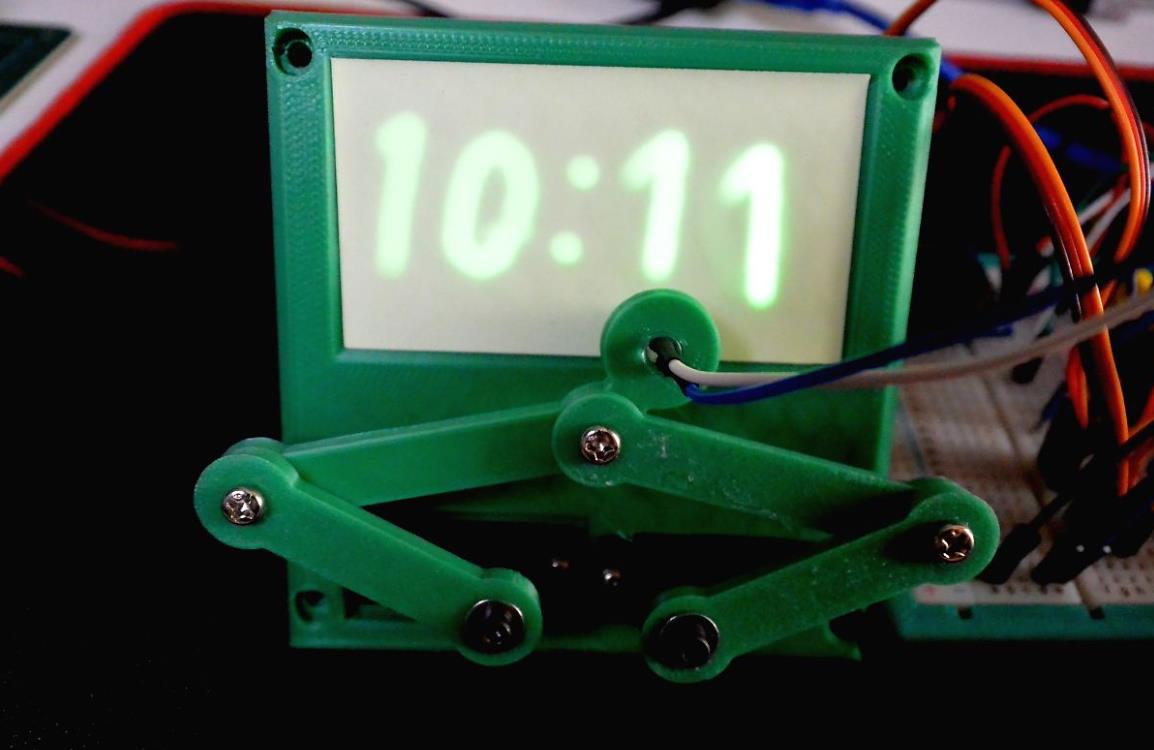 |



项目链接:https://blogdaichan.hatenablog.com/entry/2021/10/12/125826
项目作者:Daichan ( id: blogdaichan )
项目视频 :
https://www.youtube.com/watch?v=4viW9ADqX2w
https://www.youtube.com/watch?v=-MnolVyKqvo
https://www.youtube.com/watch?v=2DZSj8b2RGw
项目代码:https://gist.github.com/DeanDavis/7a9a830037dddbfc4af3d70103680a8b
3D 文件:
https://www.thingiverse.com/thing:2833916
https://www.thingiverse.com/thing:248009
[code]//#define CALIBRATE
//#define GRID // After Calibration this mode should plot a pretty good dot grid on the screen
// See additional calibration comments in the code down by the "#ifdef CALIBRATE"
// Adjust these values for servo arms in position for state 1 _|
const double SERVO_LEFT_ZERO = 1600;
const double SERVO_RIGHT_SCALE = 690; // + makes rotate further left
// Adjust these values for servo arms in position for state 2 |_
const double SERVO_RIGHT_ZERO = 650;
const double SERVO_LEFT_SCALE = 650;
#define OPTION_12_HOUR // 12 or comment out this line for 24 hour time
//#define OPTION_MONTH_DAY // commented out = month/day or uncomment the line for day/month
const double DRAW_DELAY = 5; // 3
///////////////////////////////////////////////////////////////////////////////
// Plotclock
// cc - by Johannes Heberlein 2014
// modified for glow clock - Tucker Shannon 2018
// improved - 12Me21 2018
// v 1.07ddd
// thingiverse.com/joo wiki.fablab-nuernberg.de
// thingiverse.com/TuckerPi
// units: mm; microseconds; radians
// origin: bottom left of drawing surface
// time library see http://playground.arduino.cc/Code/time
// RTC library see http://playground.arduino.cc/Code/time
// or http://www.pjrc.com/teensy/td_libs_DS1307RTC.html
// Change log:
// 1.01 Release by joo at https://github.com/9a/plotclock
// 1.02 Additional features implemented by Dave (https://github.com/Dave1001/):
// - added ability to calibrate servofaktor seperately for left and right servos
// - added code to support DS1307, DS1337 and DS3231 real time clock chips
// - see http://www.pjrc.com/teensy/td_libs_DS1307RTC.html for how to hook up the real time clock
// 1.03 Fixed the length bug at the servoplotclockogp2 angle calculation, other fixups
// 1.04 Modified for Tuck's glow clock
// 1.05 Modified calibration mode to draw a 4 point square instead
// 1.06 Rewrote most of the code, improved calibration, added date drawing, fixed bug in angle calculations, etc.
// 1.07ddd Reverted code to return it to using the DS1307 Library and removed the long press date code.
// Did this because I liked this codes calibration code better than the v1.05 calibration code that drew a square.
// Plus the bug fixes in 1.06 are good
// Added comments on how to calibrate
// Split Number drawing and letter drawing into two different functions
// Improved the letter "I"
///////////////////////////////////////////////////////////////////////////////
#include
#include
#include
#include
#include
//pins
const int SERVO_LEFT_PIN = 6;
const int SERVO_RIGHT_PIN = 5;
const int LED_PIN = 12;
const int BUTTON_PIN = 13;
//Sizes
const double LOWER_ARM = 35; //servo to lower arm joint
const double UPPER_ARM_LEFT = 56; //lower arm joint to led
const double LED_ARM = 13.5; //upper arm joint to led
const double UPPER_ARM = 45; //lower arm joint to upper arm joint
double cosineRule(double a, double b, double c);
const double LED_ANGLE = cosineRule(UPPER_ARM_LEFT,UPPER_ARM,LED_ARM);
//Location of servos relative to origin
const double SERVO_LEFT_X = 22;
const double SERVO_LEFT_Y = -32;
const double SERVO_RIGHT_X = SERVO_LEFT_X + 25.5;
const double SERVO_RIGHT_Y = SERVO_LEFT_Y;
// lovely macros
#define radian(angle) (M_PI*2* angle)
#define dist(x,y) sqrt(sq(x)+sq(y))
#define angle(x,y) atan2(y,x)
//digit location/size constants
const double TIME_BOTTOM = 12;
const double TIME_WIDTH = 11;
const double TIME_HEIGHT = 18; //16;
const double DAY_WIDTH = 7;
const double DAY_HEIGHT = 12;
const double DAY_BOTTOM = 5;
const double DATE_BOTTOM = 24;
const double HOME_X = 55, HOME_Y = -5;
Servo servoLeft, servoRight;
// Sunday is the first triple
const char weekDays[] = {8,10,12, 5,6,12, 9,10,2, 11,2,13, 9,4,10, 3,7,14, 8,1,9}; //character set: AEFHMORSTUWNDI
double lastX = HOME_X, lastY = HOME_Y;
bool lightOn = false;
void setup() {
pinMode(LED_PIN, OUTPUT);
digitalWrite(LED_PIN, LOW);
pinMode(BUTTON_PIN, INPUT_PULLUP);
}
void light(bool state){
lightOn = state == HIGH; //I'm *pretty* sure HIGH/LOW are just true/false, but...
delay(100);
digitalWrite(LED_PIN, state);
}
const int LONG_PRESS_DURATION = 750;
void loop(){
if(digitalRead(BUTTON_PIN) != LOW)
return;
if (!servoLeft.attached()) servoLeft.attach(SERVO_LEFT_PIN);
if (!servoRight.attached()) servoRight.attach(SERVO_RIGHT_PIN);
#ifdef CALIBRATE
// Pressing the button alternates the servo arms between 2 states.
// State one if left arm pointing to 9 o'clock and right arm pointing to 12 o'clock _|
// State two if left arm pointing to 12 o'clock and right arm pointing to 3 o'clock |_
// At the very top of the code you adjust the 4 constants to get the arms into these exact positions.
// Adjust SERVO_LEFT_ZERO so that the left servo points to 9 o'clock when in state one
// Adjust SERVO_RIGHT_SCALE so that the right servo points to 12 o'clock when in state one
// Adjust SERVO_RIGHT_ZERO so that the right servo points to 3 o'clock when in state two
// Adjust SERVO_LEFT_SCALE so that the left servo points to 12 o'clock when in state two
static bool half;
servoLeft.writeMicroseconds(floor(SERVO_LEFT_ZERO + (half ? - M_PI/2 : 0) * SERVO_LEFT_SCALE ));
servoRight.writeMicroseconds(floor(SERVO_RIGHT_ZERO + (half ? 0 : M_PI/2 ) * SERVO_RIGHT_SCALE ));
light(half ? LOW : HIGH);
half = !half;
delay(2000);
#else //CALIBRATE
#ifdef GRID
for(int i = 0; i <= 70; i += 10)
for(int j = 0; j <= 40; j += 10){
drawTo(i, j);
light(HIGH);
light(LOW);
}
#else //GRID
delay(10); // debounce
uint32_t longpress = millis() + LONG_PRESS_DURATION;
while ((!digitalRead(BUTTON_PIN)) && (millis() < longpress))
{ }; // wait
bool date = false;
if (millis() >= longpress)
date = true;
drawTo(HOME_X, 0);
tmElements_t tm;
//time_t tt;
uint8_t dayOfWeek; // 0 = Sunday, 6 = Saturday
if (RTC.read(tm))
{
setTime(tm.Hour,tm.Minute,tm.Second,tm.Day,tm.Month,tm.Year);
//tt = makeTime(tm); // need a normal time so it can be converted to day of week. Sunday = 1
dayOfWeek = dayOfWeek(makeTime(tm)) - 1; // the minus 1 normalized so Sunday = 0
}
if (date) {
#ifdef OPTION_MONTH_DAY
int temp = tm.Day;
tm.Day = tm.Month;
tm.Month = temp;
#endif
//draw month
if(tm.Month / 10)
drawDigit(70-(DAY_WIDTH+3)*5, DATE_BOTTOM, DAY_WIDTH, DAY_HEIGHT, tm.Month / 10);
drawDigit(70-(DAY_WIDTH+3)*4, DATE_BOTTOM, DAY_WIDTH, DAY_HEIGHT, tm.Month % 10);
// Draw Slash
drawDigit(70-(DAY_WIDTH+3)*3, DATE_BOTTOM, DAY_WIDTH, DAY_HEIGHT, 12);
//day
if(tm.Day / 10){
drawDigit(70-(DAY_WIDTH+3)*2, DATE_BOTTOM, DAY_WIDTH, DAY_HEIGHT, tm.Day / 10);
drawDigit(70-(DAY_WIDTH+3), DATE_BOTTOM, DAY_WIDTH, DAY_HEIGHT, tm.Day % 10);
}else
drawDigit(70-(DAY_WIDTH+3)*2, DATE_BOTTOM, DAY_WIDTH, DAY_HEIGHT, tm.Day % 10);
//weekday
drawChar(5,DAY_BOTTOM,DAY_WIDTH,DAY_HEIGHT,weekDays[dayOfWeek*3]);
drawChar(5+DAY_WIDTH+5,DAY_BOTTOM,DAY_WIDTH,DAY_HEIGHT, weekDays[dayOfWeek*3+1]);
drawChar(5+(DAY_WIDTH+5)*2,DAY_BOTTOM,DAY_WIDTH,DAY_HEIGHT,weekDays[dayOfWeek*3+2]);
} else {
#ifdef OPTION_12_HOUR
if(tm.Hour >= 12){
tm.Hour = tm.Hour - 12;
// drawDigit(5,35,1,1,10); // Draws a DOT - Not sure why
}
if(tm.Hour == 0)
tm.Hour = 12;
#endif
//draw hour
if(tm.Hour / 10)
drawDigit(3, TIME_BOTTOM, TIME_WIDTH, TIME_HEIGHT, tm.Hour / 10);
drawDigit(3+TIME_WIDTH+3, TIME_BOTTOM, TIME_WIDTH, TIME_HEIGHT, tm.Hour % 10);
// Draw colon
drawDigit((69-TIME_WIDTH)/2, TIME_BOTTOM, TIME_WIDTH, TIME_HEIGHT, 11);
//minute
drawDigit(69-(TIME_WIDTH+3)*2, TIME_BOTTOM, TIME_WIDTH, TIME_HEIGHT, tm.Minute / 10);
drawDigit(72-(TIME_WIDTH+3), TIME_BOTTOM, TIME_WIDTH, TIME_HEIGHT, tm.Minute % 10);
}
#endif // NOT CALIBRATE OR GRID
drawTo(HOME_X, HOME_Y);
#endif // GRID or Normal Plot Time
servoLeft.detach();
servoRight.detach();
}
#define digitMove(dx, dy) drawTo(x + width*dx, y + height*dy)
#define digitStart(dx, dy) digitMove(dx, dy); light(HIGH)
#define digitArc(dx, dy, rx, ry, start, last) drawArc(x + width*dx, y + height*dy, width*rx, height*ry, radian(start), radian(last))
// Symbol is drawn with the lower left corner at (x,y) and a size of (width,height).
void drawDigit(double x, double y, double width, double height, char digit) {
//see macros for reference
switch (digit) {
case 0: //
digitStart(1/2,1);
digitArc(1/2,1/2, 1/2,1/2, 1/4, -3/4);
//digitStart(1,1/2);
//digitArc(1/2,1/2, 1/2,1/2, 0, 1.02);
break;
case 1: //
digitStart(1/4,7/8);
digitMove(1/2,1);
digitMove(1/2,0);
break;
case 2: //
digitStart(0,3/4);
digitArc(1/2,3/4, 1/2,1/4, 1/2, -1/8);
digitArc(1,0, 1,1/2, 3/8, 1/2);
digitMove(1,0);
break;
case 3:
digitStart(0,3/4);
digitArc(1/2,3/4, 1/2,1/4, 3/8, -1/4);
digitArc(1/2,1/4, 1/2,1/4, 1/4, -3/8);
break;
case 4:
digitStart(1,3/8);
digitMove(0,3/8);
digitMove(3/4,1);
digitMove(3/4,0);
break;
case 5: //wayy too many damn lines
digitStart(1,1);
digitMove(0,1);
digitMove(0,1/2);
digitMove(1/2,1/2);
digitArc(1/2,1/4, 1/2,1/4, 1/4, -1/4);
digitMove(0,0);
break;
case 6:
digitStart(0,1/4);
digitArc(1/2,1/4, 1/2,1/4, 1/2, -1/2);
digitArc(1,1/2, 1,1/2, 1/2, 1/4);
break;
case 7:
digitStart(0,1);
digitMove(1,1);
digitMove(1/4,0);
break;
case 8:
digitStart(1/2,1/2);
digitArc(1/2,3/4, 1/2,1/4, -1/4, 3/4);
digitArc(1/2,1/4, 1/2,1/4, 1/4, -3/4);
break;
case 9:
digitStart(1,3/4);
digitArc(1/2,3/4, 1/2,1/4, 0, 1);
digitMove(3/4,0);
break;
case 10: //dot
digitStart(0,0);
//digitMove(0,1);
//digitMove(1,1);
//digitMove(1,0);
break;
case 11: //colon
digitStart(1/2,3/4);
light(LOW);
digitStart(1/2,1/4);
break;
case 12: //slash
digitStart(3/4,5/4);
digitMove(1/4,-1/4);
break;
}
light(LOW);
}
void drawChar(double x, double y, double width, double height, char digit) {
//see macros for reference
switch (digit) {
//letters for the day of the week
case 1: //A
digitStart(0,0);
digitMove(1/2,1);
digitMove(1,0);
light(LOW);
digitStart(1/4,1/2);
digitMove(3/4,1/2);
break;
case 2: //E
digitStart(1,0);
digitMove(0,0);
digitMove(0,1);
digitMove(1,1);
light(LOW);
digitStart(0,1/2);
digitMove(1,1/2);
break;
case 3: //F
digitStart(0,0);
digitMove(0,1);
digitMove(1,1);
light(LOW);
digitStart(0,1/2);
digitMove(1,1/2);
break;
case 4: //H
digitStart(0,1);
digitMove(0,0);
light(LOW);
digitStart(0,1/2);
digitMove(1,1/2);
light(LOW);
digitStart(1,1);
digitMove(1,0);
break;
case 5: //M
digitStart(0,0);
digitMove(0,1);
digitMove(1/2,1/2);
digitMove(1,1);
digitMove(1,0);
break;
case 6: //O (0)
digitStart(1,1/2);
digitArc(1/2,1/2, 1/2,1/2, 0, 1.02);
break;
case 7: //R
digitStart(0,0);
digitMove(0,1);
digitMove(1/2,1);
digitArc(1/2,3/4, 1/2,1/4, 1/4, -1/4);
digitMove(0,1/2);
digitMove(1,0);
break;
case 8: //S
digitStart(0,0);
digitMove(1/2,0);
digitArc(1/2,1/4, 1/2,1/4, -1/4, 1/4);
digitArc(1/2,3/4, 1/2,1/4, 3/4, 1/4);
digitMove(1,1);
break;
case 9: //T
digitStart(1,1);
digitMove(-1/2,1); //bad
light(LOW);
digitStart(1/2,1);
digitMove(1/2,0);
break;
case 10: //U
digitStart(0,1);
digitMove(0,1/4);
digitArc(1/2,1/4, 1/2,1/4, -1/2, 0);
digitMove(1,1);
break;
case 11: //W
digitStart(0,1);
digitMove(0,0);
digitMove(1/2,1/2);
digitMove(1,0);
digitMove(1,1);
break;
case 12: //N
digitStart(0,0);
digitMove(0,1);
digitMove(1,0);
digitMove(1,1);
break;
case 13: //D
digitStart(0,0);
digitMove(0,1);
digitMove(1/2,1);
digitArc(1/2,1/2, 1/2,1/2, 1/4,-1/4);
digitMove(0,0);
break;
case 14: //I
digitStart(1/2,1);
digitMove(1/2,0);
light(LOW);
digitStart(0,0);
digitMove(1,0);
light(LOW);
digitStart(1,1);
digitMove(0,1);
break;
}
light(LOW);
}
#define ARCSTEP 0.05 //0.05 //should change depending on radius...
void drawArc(double x, double y, double rx, double ry, double pos, double last) {
if(pos < last)
for(; pos <= last; pos += ARCSTEP)
drawTo(x + cos(pos)*rx, y + sin(pos)*ry);
else
for(; pos >= last; pos -= ARCSTEP)
drawTo(x + cos(pos)*rx, y + sin(pos)*ry);
}
//didn't really change this
void drawTo(double pX, double pY) {
double dx, dy, c;
int i;
// dx dy of new point
dx = pX - lastX;
dy = pY - lastY;
//path length in mm, times 4 equals 4 steps per mm
c = floor(4 * dist(dx,dy));
if (c < 1)
c = 1;
// draw line point by point
for (i = 1; i <= c; i++){
set_XY(lastX + (i * dx / c), lastY + (i * dy / c));
if (lightOn)
delay(DRAW_DELAY);
}
lastX = pX;
lastY = pY;
}
// cosine rule for angle between c and a
double cosineRule(double a, double b, double c) {
return acos((sq(a)+sq(c)-sq(b))/(2*a*c));
}
void set_XY(double x, double y) {
//Calculate triangle between left servo, left arm joint, and light
//Position of pen relative to left servo
//rectangular
double penX = x - SERVO_LEFT_X;
double penY = y - SERVO_LEFT_Y;
//polar
double penAngle = angle(penX,penY);
double penDist = dist(penX,penY);
//get angle between lower arm and a line connecting the left servo and the pen
double bottomAngle = cosineRule(LOWER_ARM, UPPER_ARM_LEFT, penDist);
servoLeft.writeMicroseconds(floor(SERVO_LEFT_ZERO + (bottomAngle + penAngle - M_PI) * SERVO_LEFT_SCALE));
//calculate middle arm joint location
double topAngle = cosineRule(UPPER_ARM_LEFT, LOWER_ARM, penDist);
double lightAngle = penAngle - topAngle + LED_ANGLE + M_PI;
double jointX = x - SERVO_RIGHT_X + cos(lightAngle) * LED_ARM;
double jointY = y - SERVO_RIGHT_Y + sin(lightAngle) * LED_ARM;
bottomAngle = cosineRule(LOWER_ARM, UPPER_ARM, dist(jointX, jointY));
double jointAngle = angle(jointX, jointY);
servoRight.writeMicroseconds(floor(SERVO_RIGHT_ZERO + (jointAngle - bottomAngle) * SERVO_RIGHT_SCALE));
}[/code]