

【花雕动手做】基于Kitronik可编程开发板之贪吃毛毛虫
2025-09-181520
AI 快速预览详细
Kitronik ARCADE是一款专为编程教学与创客实践设计的可编程游戏机开发板,支持MakeCode Arcade平台。它集成了彩色LCD显示屏、方向控制键、功能按键、蜂鸣器和震动马达等交互组件,提供完整的游戏输入输出体验。无论是初学者进行编程启蒙,还是创客群体开发交互式作品,Kitronik ARCADE都能作为理想的硬件载体,助力创意实现。
|
Kitronik ARCADE 是一款由英国教育科技公司 Kitronik 精心打造的可编程游戏机开发板,专为编程教学与创客实践而设计。该设备原生支持微软的 MakeCode Arcade 平台,用户可通过图形化或 JavaScript 编程方式,轻松创建、下载并运行复古风格的街机游戏。 它集成了彩色 LCD 显示屏、方向控制键、功能按键、蜂鸣器和震动马达等交互组件,提供完整的游戏输入输出体验。无论是初学者进行编程启蒙,还是创客群体开发交互式作品,Kitronik ARCADE 都能作为理想的硬件载体,助力创意实现。 凭借其开源友好、易于上手、兼容性强等特点,该开发板广泛应用于中小学编程课程、创客工作坊、游戏开发教学以及个人项目原型设计,深受教育者与技术爱好者的喜爱。 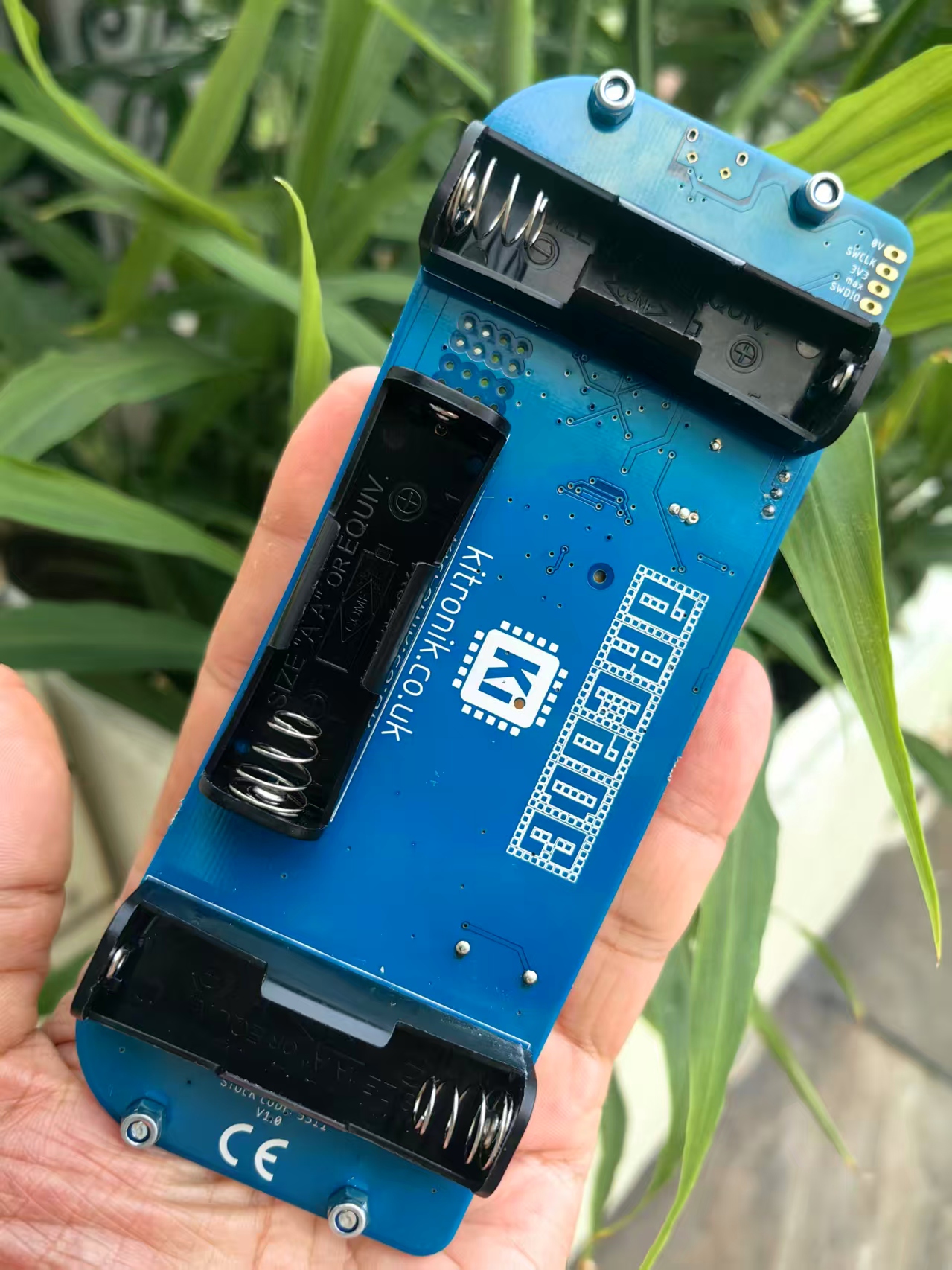 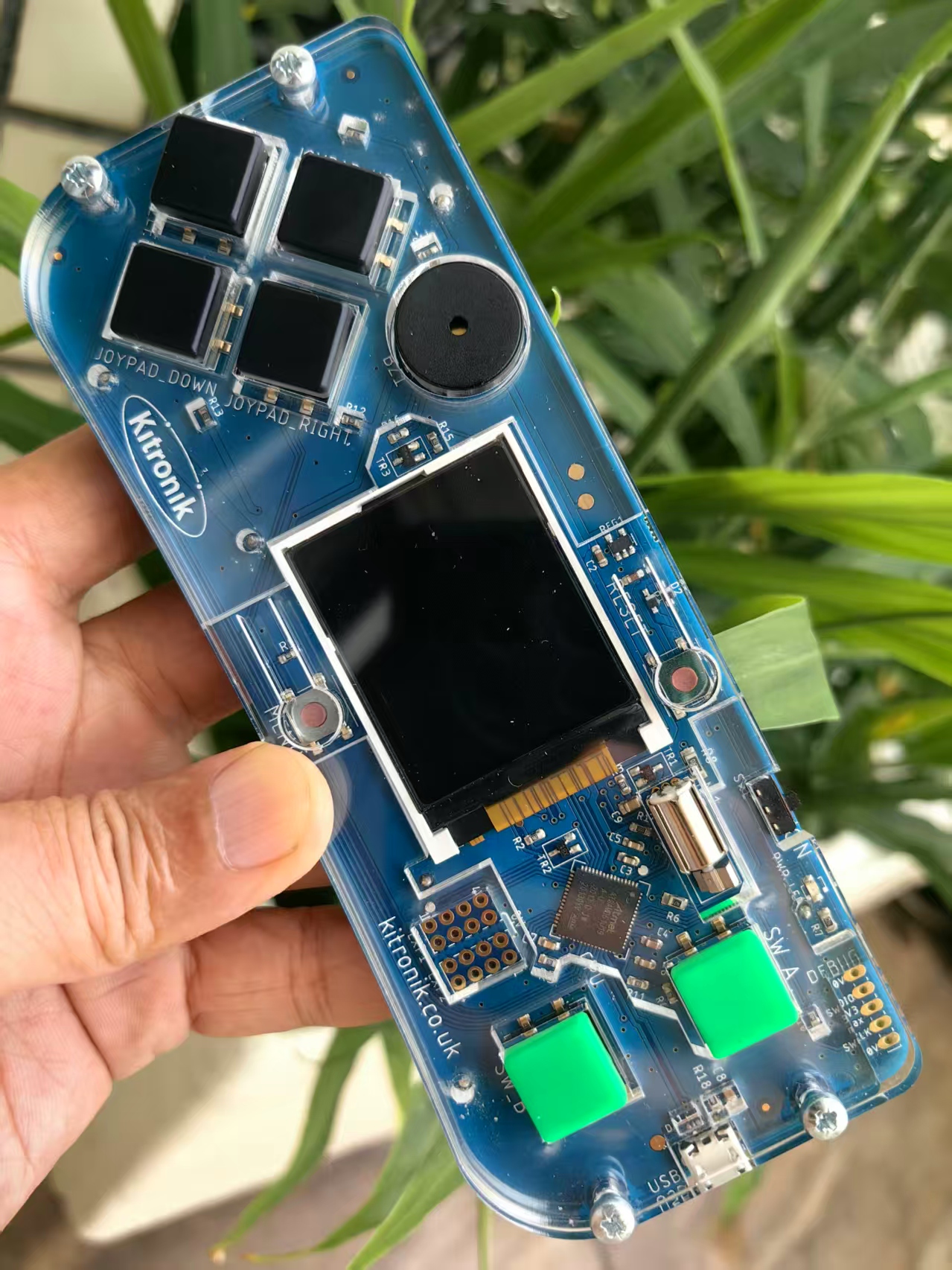 |



实验场景记录
这是一个经典的贪吃蛇游戏变体,玩家控制一条毛毛虫吃叶子并增长身体。
代码结构分析
1. 常量和枚举定义
javascript
[code]const NEXT_SECTION_KEY = "__child_node"; // 用于存储下一节身体的键名
namespace SpriteKind {
export const Tail = SpriteKind.create(); // 创建尾部精灵类型
}
enum Direction {
Up, // 上
Down, // 下
Left, // 左
Right // 右
}
const size = 8; // 网格大小(像素)[/code]
2. 毛毛虫头部初始化
javascript
[code]const caterpillarHead = sprites.create(img`
. . 3 3 3 3 . .
. 3 2 2 2 2 3 .
3 2 f 2 2 f 2 3
3 2 f 2 2 f 2 3
3 2 2 2 2 2 2 3
3 2 2 2 2 2 2 3
. 3 2 2 2 2 3 .
. . 3 3 3 3 . .
`, SpriteKind.Player);
caterpillarHead.left = 4 * size; // 初始位置X
caterpillarHead.top = 12 * size; // 初始位置Y
caterpillarHead.data = {}; // 存储自定义数据[/code]
3. 游戏地图和叶子设置
javascript
[code]tiles.setTilemap(tilemap`level`); // 设置游戏地图
// 普通叶子图像
const leafImage = img`
. . . . . f f 7
. . . f f f 6 f
. . f 6 7 f f f
. f 6 7 f 7 7 f
f f 7 f 7 7 7 f
f 6 f 7 7 7 f .
f 6 7 7 f f . .
f f f f f . . .
`;
// 闪光叶子图像(用于动画效果)
const shinyLeafImage = img`
. . 1 . . f f 7
. 1 . f f f 6 f
1 . f 6 7 f f f
. f 6 7 f 7 7 f
f f 7 f 7 7 7 f
f 6 f 7 7 7 f .
f 6 7 7 f f . 1
f f f f f . 1 .
`;
placeFruit(); // 放置第一个叶子
info.setScore(0); // 初始化分数[/code]
4. 游戏状态变量
javascript
[code]let direction = Direction.Up; // 当前移动方向
let addSection = true; // 是否需要添加身体节
let enqueued = false; // 方向改变是否已排队
let lastIteration = 0; // 上次迭代时间
let timeout = 500; // 移动间隔时间(毫秒)[/code]
5. 主游戏循环
javascript
[code]forever(function () {
// 边界检查 - 如果碰到边界游戏结束
if (caterpillarHead.left < 0 || caterpillarHead.right > screen.width
|| caterpillarHead.top < 0 || caterpillarHead.bottom > screen.height) {
game.over(false);
}
// 检查是否到了移动时间
if (!enqueued && game.runtime() - lastIteration < timeout) {
return;
}
// 添加身体节或移动身体
if (addSection) {
addToBody();
} else {
move(caterpillarHead);
}
// 根据方向移动头部
switch (direction) {
case Direction.Up:
caterpillarHead.y -= size;
break;
case Direction.Down:
caterpillarHead.y += size;
break;
case Direction.Left:
caterpillarHead.x -= size;
break;
case Direction.Right:
caterpillarHead.x += size;
break;
}
// 重置状态变量
enqueued = false;
lastIteration = game.runtime();
});[/code]
6. 添加身体节函数
javascript
[code]function addToBody() {
const newSection = sprites.create(img`
. . f f f f . .
. f 1 1 1 1 f .
f 1 1 1 1 1 1 f
f 1 1 1 1 1 1 f
f 1 1 1 1 1 1 f
f 1 1 1 1 1 1 f
. f 1 1 1 1 f .
. . f f f f . .
`, SpriteKind.Tail);
newSection.data = {};
// 随机生成身体节颜色(避免使用特定颜色)
let newColor: number;
do {
newColor = randint(0x1, 0xE);
} while (newColor === 0x6);
newSection.image.replace(0x1, newColor);
do {
newColor = randint(0x1, 0xE);
} while (newColor === 0x6);
newSection.image.replace(0xF, newColor);
// 设置身体节位置
newSection.x = caterpillarHead.x;
newSection.y = caterpillarHead.y;
// 链接身体节(链表结构)
newSection.data[NEXT_SECTION_KEY] = caterpillarHead.data[NEXT_SECTION_KEY];
caterpillarHead.data[NEXT_SECTION_KEY] = newSection;
addSection = false; // 重置添加标志
}[/code]
7. 移动身体函数
javascript
[code]function move(piece: Sprite) {
const next = piece.data[NEXT_SECTION_KEY];
if (next) {
move(next); // 递归移动下一节
next.x = piece.x; // 设置位置为前一节的位置
next.y = piece.y;
}
}[/code]
8. 碰撞检测事件
javascript
[code]// 吃到叶子事件
sprites.onOverlap(SpriteKind.Player, SpriteKind.Food, function (sprite: Sprite, otherSprite: Sprite) {
info.changeScoreBy(1); // 增加分数
otherSprite.destroy(effects.disintegrate); // 销毁叶子
music.baDing.play(); // 播放音效
timeout = Math.max(150, timeout - 50); // 加快游戏速度
addSection = true; // 标记需要添加身体节
placeFruit(); // 放置新叶子
});
// 碰到自己身体事件
sprites.onOverlap(SpriteKind.Player, SpriteKind.Tail, function (sprite: Sprite, otherSprite: Sprite) {
game.over(false); // 游戏结束
});[/code]
9. 方向控制函数
javascript
[code]// 上方向键
controller.up.onEvent(ControllerButtonEvent.Pressed, function () {
setDirection(Direction.Up, Direction.Down, img`
. . 3 3 3 3 . .
. 3 2 2 2 2 3 .
3 2 f 2 2 f 2 3
3 2 f 2 2 f 2 3
3 2 2 2 2 2 2 3
3 2 2 2 2 2 2 3
. 3 2 2 2 2 3 .
. . 3 3 3 3 . .
`);
});
// 下方向键
controller.down.onEvent(ControllerButtonEvent.Pressed, function () {
setDirection(Direction.Down, Direction.Up, img`
. . 3 3 3 3 . .
. 3 2 2 2 2 3 .
3 2 2 2 2 2 2 3
3 2 2 2 2 2 2 3
3 2 f 2 2 f 2 3
3 2 f 2 2 f 2 3
. 3 2 2 2 2 3 .
. . 3 3 3 3 . .
`);
});
// 左方向键
controller.left.onEvent(ControllerButtonEvent.Pressed, function () {
setDirection(Direction.Left, Direction.Right, img`
. . 3 3 3 3 . .
. 3 2 2 2 2 3 .
3 2 f f 2 2 2 3
3 2 2 2 2 2 2 3
3 2 2 2 2 2 2 3
3 2 f f 2 2 2 3
. 3 2 2 2 2 3 .
. . 3 3 3 3 . .
`);
});
// 右方向键
controller.right.onEvent(ControllerButtonEvent.Pressed, function () {
setDirection(Direction.Right, Direction.Left, img`
. . 3 3 3 3 . .
. 3 2 2 2 2 3 .
3 2 2 2 f f 2 3
3 2 2 2 2 2 2 3
3 2 2 2 2 2 2 3
3 2 2 2 f f 2 3
. 3 2 2 2 2 3 .
. . 3 3 3 3 . .
`);
});
// 设置方向函数
function setDirection(targetDir: Direction, oppositeDir: Direction, im: Image) {
if (!enqueued && direction !== targetDir && direction !== oppositeDir) {
caterpillarHead.setImage(im); // 更新头部图像
direction = targetDir; // 设置新方向
enqueued = true; // 标记方向已改变
}
}[/code]
10. 放置叶子函数[backcolor=rgb(247, 247, 247)]
[/backcolor]
[backcolor=rgb(247, 247, 247)]javascript[/backcolor]
[code]function placeFruit() {
currentLeaf = sprites.create(leafImage, SpriteKind.Food);
do {
// 随机位置(网格对齐)
currentLeaf.left = randint(0, 19) * size;
currentLeaf.top = randint(0, 14) * size;
} while (
// 确保不放在角落或身体上
(currentLeaf.top === 0 && currentLeaf.right === screen.width)
|| sprites
.allOfKind(SpriteKind.Tail)
.some(s => s.overlapsWith(currentLeaf))
);
}[/code]
11. 叶子闪烁动画
javascript
[code]game.onUpdateInterval(500, function () {
// 切换叶子图像创建闪烁效果
if (currentLeaf.image === leafImage) {
currentLeaf.setImage(shinyLeafImage);
} else {
currentLeaf.setImage(leafImage);
}
});[/code]
游戏机制解析
移动机制:毛毛虫以固定时间间隔移动,方向键控制移动方向
身体增长:每吃一个叶子,身体增加一节
碰撞检测:
碰到边界游戏结束
碰到自己身体游戏结束
碰到叶子得分并增长
难度递增:随着分数增加,移动速度加快
视觉效果:叶子有闪烁动画,身体节有随机颜色
这个游戏使用了链表数据结构来管理毛毛虫的身体节,每个身体节都存储指向下一节的引用,实现了高效的移动和碰撞检测。
打开网页版:https://arcade.makecode.com/,设置项目名称:贪吃毛毛虫
JavaScript 实验代码
[code]const NEXT_SECTION_KEY = "__child_node";
namespace SpriteKind {
export const Tail = SpriteKind.create();
}
enum Direction {
Up,
Down,
Left,
Right
}
const size = 8;
const caterpillarHead = sprites.create(img`
. . 3 3 3 3 . .
. 3 2 2 2 2 3 .
3 2 f 2 2 f 2 3
3 2 f 2 2 f 2 3
3 2 2 2 2 2 2 3
3 2 2 2 2 2 2 3
. 3 2 2 2 2 3 .
. . 3 3 3 3 . .
`, SpriteKind.Player);
caterpillarHead.left = 4 * size;
caterpillarHead.top = 12 * size;
caterpillarHead.data = {};
let currentLeaf: Sprite;
tiles.setTilemap(tilemap`level`);
const leafImage = img`
. . . . . f f 7
. . . f f f 6 f
. . f 6 7 f f f
. f 6 7 f 7 7 f
f f 7 f 7 7 7 f
f 6 f 7 7 7 f .
f 6 7 7 f f . .
f f f f f . . .
`;
const shinyLeafImage = img`
. . 1 . . f f 7
. 1 . f f f 6 f
1 . f 6 7 f f f
. f 6 7 f 7 7 f
f f 7 f 7 7 7 f
f 6 f 7 7 7 f .
f 6 7 7 f f . 1
f f f f f . 1 .
`;
placeFruit();
info.setScore(0);
let direction = Direction.Up;
let addSection = true;
let enqueued = false;
let lastIteration = 0;
let timeout = 500;
forever(function () {
if (caterpillarHead.left < 0 || caterpillarHead.right > screen.width
|| caterpillarHead.top < 0 || caterpillarHead.bottom > screen.height) {
game.over(false);
}
if (!enqueued && game.runtime() - lastIteration < timeout) {
return;
}
if (addSection) {
addToBody();
} else {
move(caterpillarHead);
}
switch (direction) {
case Direction.Up:
caterpillarHead.y -= size;
break;
case Direction.Down:
caterpillarHead.y += size;
break;
case Direction.Left:
caterpillarHead.x -= size;
break;
case Direction.Right:
caterpillarHead.x += size;
break;
}
enqueued = false;
lastIteration = game.runtime();
function addToBody() {
const newSection = sprites.create(img`
. . f f f f . .
. f 1 1 1 1 f .
f 1 1 1 1 1 1 f
f 1 1 1 1 1 1 f
f 1 1 1 1 1 1 f
f 1 1 1 1 1 1 f
. f 1 1 1 1 f .
. . f f f f . .
`, SpriteKind.Tail);
newSection.data = {};
let newColor: number;
do {
newColor = randint(0x1, 0xE);
} while (newColor === 0x6);
newSection.image.replace(0x1, newColor);
do {
newColor = randint(0x1, 0xE);
} while (newColor === 0x6);
newSection.image.replace(0xF, newColor);
newSection.x = caterpillarHead.x;
newSection.y = caterpillarHead.y;
newSection.data[NEXT_SECTION_KEY] = caterpillarHead.data[NEXT_SECTION_KEY];
caterpillarHead.data[NEXT_SECTION_KEY] = newSection;
addSection = false;
}
function move(piece: Sprite) {
const next = piece.data[NEXT_SECTION_KEY];
if (next) {
move(next);
next.x = piece.x;
next.y = piece.y;
}
}
});
sprites.onOverlap(SpriteKind.Player, SpriteKind.Food, function (sprite: Sprite, otherSprite: Sprite) {
info.changeScoreBy(1);
otherSprite.destroy(effects.disintegrate);
music.baDing.play();
timeout = Math.max(150, timeout - 50);
addSection = true;
placeFruit();
});
sprites.onOverlap(SpriteKind.Player, SpriteKind.Tail, function (sprite: Sprite, otherSprite: Sprite) {
game.over(false);
});
controller.up.onEvent(ControllerButtonEvent.Pressed, function () {
setDirection(Direction.Up, Direction.Down, img`
. . 3 3 3 3 . .
. 3 2 2 2 2 3 .
3 2 f 2 2 f 2 3
3 2 f 2 2 f 2 3
3 2 2 2 2 2 2 3
3 2 2 2 2 2 2 3
. 3 2 2 2 2 3 .
. . 3 3 3 3 . .
`);
});
controller.down.onEvent(ControllerButtonEvent.Pressed, function () {
setDirection(Direction.Down, Direction.Up, img`
. . 3 3 3 3 . .
. 3 2 2 2 2 3 .
3 2 2 2 2 2 2 3
3 2 2 2 2 2 2 3
3 2 f 2 2 f 2 3
3 2 f 2 2 f 2 3
. 3 2 2 2 2 3 .
. . 3 3 3 3 . .
`);
});
controller.left.onEvent(ControllerButtonEvent.Pressed, function () {
setDirection(Direction.Left, Direction.Right, img`
. . 3 3 3 3 . .
. 3 2 2 2 2 3 .
3 2 f f 2 2 2 3
3 2 2 2 2 2 2 3
3 2 2 2 2 2 2 3
3 2 f f 2 2 2 3
. 3 2 2 2 2 3 .
. . 3 3 3 3 . .
`);
});
controller.right.onEvent(ControllerButtonEvent.Pressed, function () {
setDirection(Direction.Right, Direction.Left, img`
. . 3 3 3 3 . .
. 3 2 2 2 2 3 .
3 2 2 2 f f 2 3
3 2 2 2 2 2 2 3
3 2 2 2 2 2 2 3
3 2 2 2 f f 2 3
. 3 2 2 2 2 3 .
. . 3 3 3 3 . .
`);
});
function setDirection(targetDir: Direction, oppositeDir: Direction, im: Image) {
if (!enqueued && direction !== targetDir && direction !== oppositeDir) {
caterpillarHead.setImage(im);
direction = targetDir;
enqueued = true;
}
}
function placeFruit() {
currentLeaf = sprites.create(leafImage, SpriteKind.Food);
do {
currentLeaf.left = randint(0, 19) * size;
currentLeaf.top = randint(0, 14) * size;
} while (
(currentLeaf.top === 0 && currentLeaf.right === screen.width)
|| sprites
.allOfKind(SpriteKind.Tail)
.some(s => s.overlapsWith(currentLeaf))
);
}
game.onUpdateInterval(500, function () {
if (currentLeaf.image === leafImage) {
currentLeaf.setImage(shinyLeafImage);
} else {
currentLeaf.setImage(leafImage);
}
});[/code]