第二章 Nanobot的AI赋能,网络搜索,知识库和自我学习技能每个开发者都有自己编程的习惯,笔者也尝试了VScode,CodeBuddy,Qwen,Trae CN,Kiro等编译器,但是ssh连接Arduino UNO Q(以下简称:Q板)时都会出现不稳定的现象,最好的方法是MobaXterm和Claude code,上传和下载文件特别方便。还有一个隐藏的彩蛋,MobaXterm支持中文输入,也不必考虑Q板的中文输入法直接输入中文就可以了。
一,MobaXterm的使用
MobaXterm的下载地址:MobaXterm Xserver with SSH, telnet, RDP, VNC and X11 - Download
1,此时Arduino UNO Q已经登录到局域网上了,获得的IP是192.168.3.20,用户名输入:arduino,点击ok。那么这就完成了ssh登录的配置。 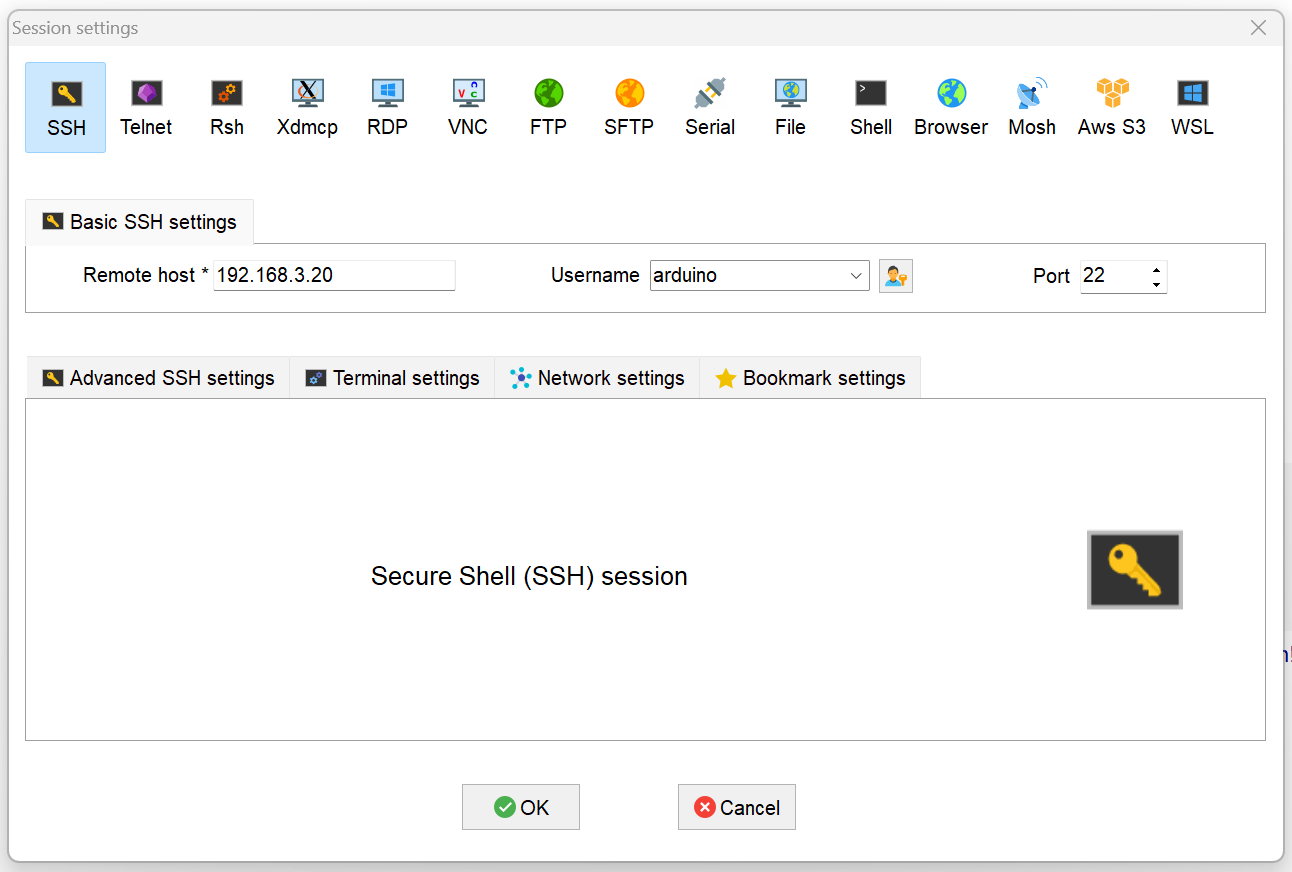
2,Q板作为SBC(单板计算机)使用,有的爱好者喜欢VNC连接,但是配置起来非常麻烦。笔者用RDP就很方便易用。
- # 编辑SSH配置文件
- sudo nano /etc/ssh/sshd_config
-
- # 确保以下行未被注释,Nanobot网络和显示需要的运行条件
- Port 22
- AddressFamily any
- ListenAddress 0.0.0.0
- ListenAddress ::
-
- GatewayPorts yes
- X11Forwarding yes
- X11DisplayOffset 10
- X11UseLocalhost yes
-
- # 重启SSH服务
- sudo systemctl restart sshd
-
- # 安装xauth(关键!)Debian 13已经自带
- sudo apt install xauth
- sudo apt install xrdp
-
- # 启动xrdp和状态
- systemctl status xrdp
- systemctl start xrdp
3,在MobaXterm中设置RDP Session,端口是3389。RDP连接状态下,就不需要另外购置鼠标键盘来操作了,直接用PC的输入设备来远程操控 Q板。
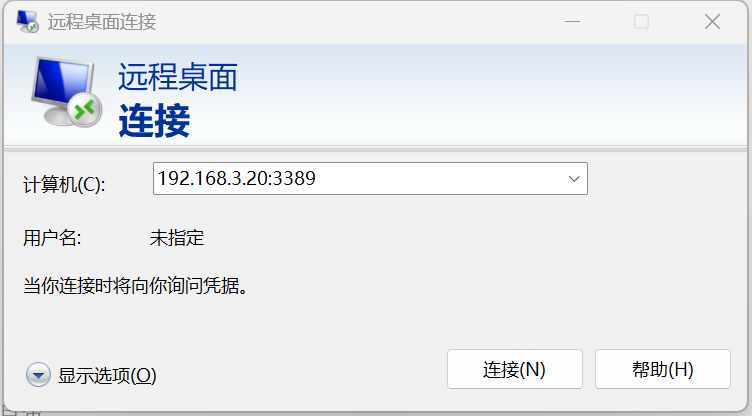
4,在PC的搜索栏输入远程桌面,输入IP:3389。也能够远程登录到Arduino UNO Q的桌面。
 5,一般用ssh登录,在终端输入:claude ,启动Claude Code来为下面配置Nanobot进行AI赋能。调试好以后,另外一种AI赋能就是用飞书通信通道和Nanobot进行自然语言的交流操作。 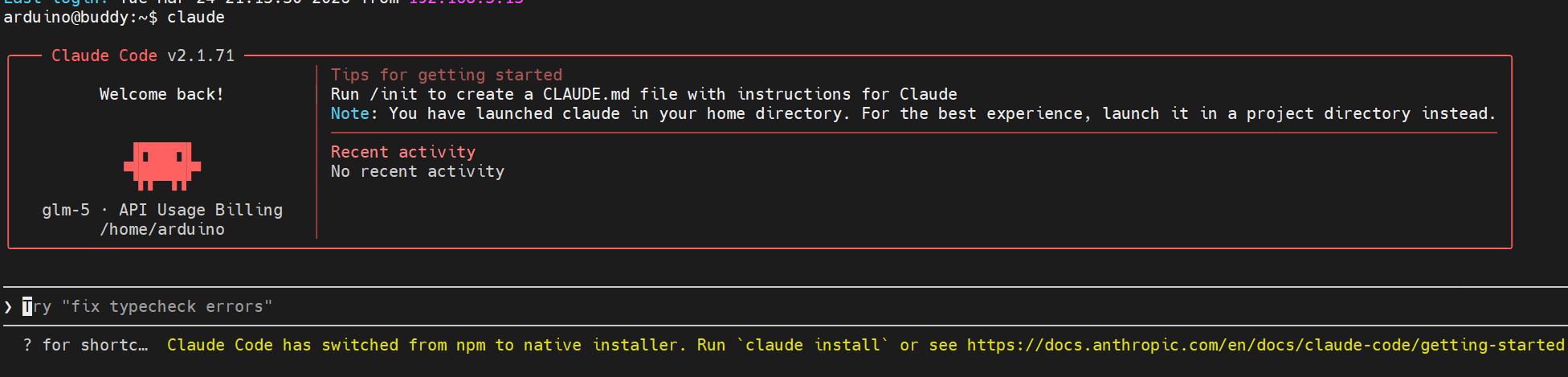
二,Nanobot的调试
掉电后的自启动,这样设置以后它就能24小时不间断的工作。 - 设置 Nanobot 自启动
-
- 方法:使用 systemd 用户服务
-
- 1. 创建服务文件
-
- mkdir -p ~/.config/systemd/user
- nano ~/.config/systemd/user/nanobot-gateway.service
-
- 2. 写入以下内容
-
- [Unit]
- Description=Nanobot Gateway Service
- After=network-online.target
- Wants=network-online.target
-
- [Service]
- Type=simple
- WorkingDirectory=/home/arduino/nanobot
- ExecStart=/home/arduino/nanobot/.venv/bin/nanobot gateway
- Restart=always
- RestartSec=10
- TimeoutStartSec=30
- TimeoutStopSec=10
-
- # 环境变量
- Environment="PATH=/home/arduino/nanobot/.venv/bin:/usr/local/bin:/usr/bin:/bin"
-
- # 安全设置
- NoNewPrivileges=yes
- ProtectSystem=strict
- ReadWritePaths=/home/arduino /tmp
-
- # 日志
- StandardOutput=journal
- StandardError=journal
-
- [Install]
- WantedBy=default.target
-
- 3. 启用并启动服务
-
- # 重新加载 systemd 配置
- systemctl --user daemon-reload
-
- # 启用自启动
- systemctl --user enable nanobot-gateway
-
- # 立即启动
- systemctl --user start nanobot-gateway
-
- # 查看状态
- systemctl --user status nanobot-gateway
-
- 4. 允许用户服务在登录前启动(可选)
-
- 如果需要系统启动时就运行(不必等用户登录):
-
- sudo loginctl enable-linger $USER
2,Nanobot的项目结构(笔者优化后的结构) - Nanobot 项目结构
-
- nanobot/
- ├── nanobot/ # 核心模块
- │ ├── __main__.py # 入口点: python -m nanobot
- │ │
- │ ├── cli/ # 命令行接口
- │ │ └── commands.py # Typer CLI 命令
- │ │
- │ ├── agent/ # Agent 核心
- │ │ ├── loop.py # 主循环引擎 (接收消息→构建上下文→调用LLM→执行工具→返回响应)
- │ │ ├── context.py # 上下文构建器
- │ │ ├── memory.py # 记忆存储
- │ │ ├── subagent.py # 子代理管理
- │ │ ├── skills.py # 技能系统
- │ │ └── tools/ # 内置工具
- │ │ ├── filesystem.py # 文件操作
- │ │ ├── shell.py # 命令执行
- │ │ ├── web.py # 网络搜索/抓取
- │ │ ├── spawn.py # 子进程
- │ │ ├── knowledge.py # 知识库
- │ │ └── ...
- │ │
- │ ├── channels/ # 消息渠道
- │ │ ├── base.py # 渠道基类
- │ │ ├── manager.py # 渠道管理器
- │ │ ├── feishu.py # 飞书/Lark
- │ │ ├── dingtalk.py # 钉钉
- │ │ ├── mochat.py # MoChat (微信)
- │ │ ├── qq.py # QQ
- │ │ └── email.py # 邮件
- │ │
- │ ├── config/ # 配置系统
- │ │ ├── schema.py # Pydantic 配置模型
- │ │ └── loader.py # 配置加载器
- │ │
- │ ├── providers/ # LLM 提供商
- │ │ ├── base.py # 基类
- │ │ ├── litellm_provider.py # LiteLLM 适配
- │ │ ├── registry.py # 提供商注册表
- │ │ └── ...
- │ │
- │ ├── bus/ # 消息总线
- │ │ ├── queue.py # 消息队列
- │ │ └── events.py # 事件定义
- │ │
- │ ├── session/ # 会话管理
- │ │ └── manager.py # 会话管理器
- │ │
- │ ├── skills/ # 技能扩展
- │ │ ├── weather/ # 天气查询
- │ │ ├── github/ # GitHub 操作
- │ │ ├── summarize/ # 文本摘要
- │ │ ├── memory/ # 记忆管理
- │ │ ├── cron/ # 定时任务
- │ │ ├── tmux/ # 终端复用
- │ │ └── ...
- │ │
- │ ├── knowledge/ # 知识库
- │ │ ├── base.py # 基类
- │ │ └── local_kb.py # 本地知识库
- │ │
- │ ├── heartbeat/ # 心跳服务
- │ │ └── service.py # 定时心跳检测
- │ │
- │ ├── cron/ # 定时任务
- │ │
- │ └── utils/ # 工具函数
- │
- ├── .venv/ # Python 虚拟环境
- ├── pyproject.toml # 项目依赖
- ├── start_gateway.sh # 启动脚本
- └── nanobot_arch.png # 架构图
3,删减改查
在确保核心组件和功能前提下,对原来程序进行删减,把原有条目总数量压缩一半。 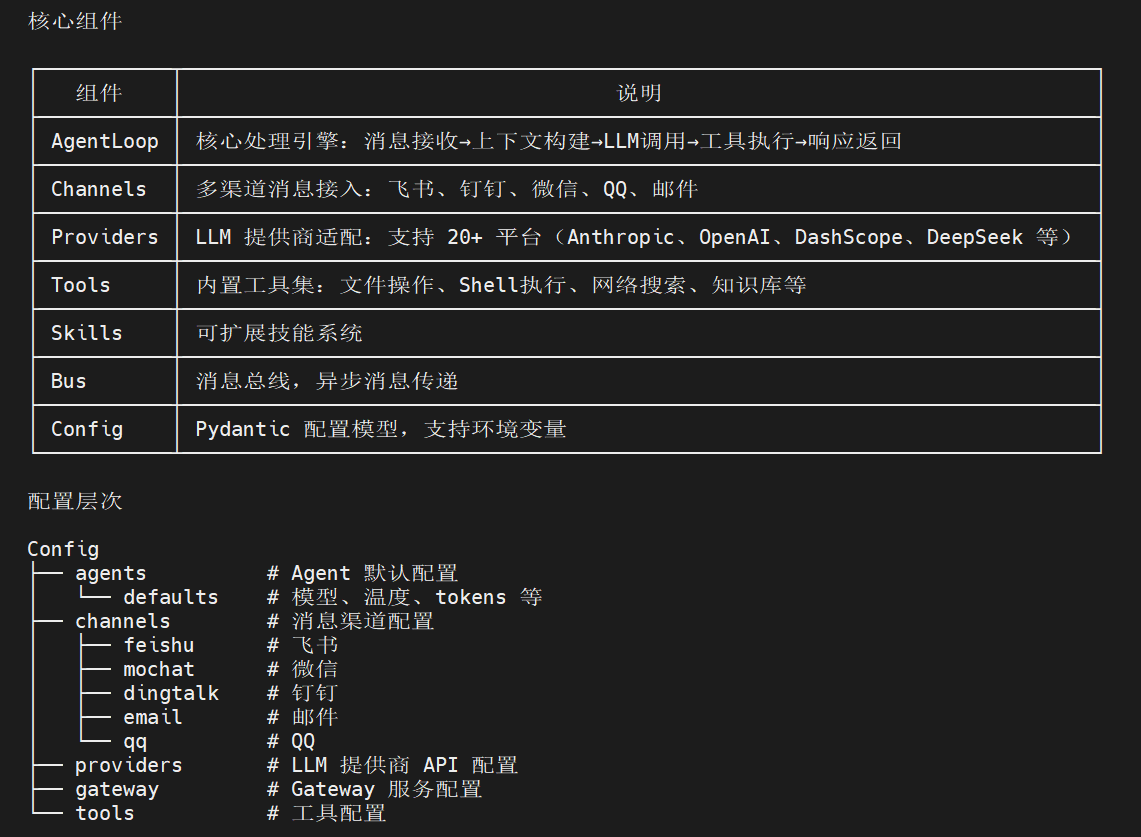
Nanobot 的网络搜索实现在 /home/arduino/nanobot/nanobot/agent/tools/web.py 原来的搜索引擎不适合中国网络,所以采用了百度千帆智能搜索。 (1}. WebSearchTool (网络搜索)
支持两种搜索方式:
a,百度千帆搜索 API(默认);
b,通义千问内置搜索(模型自带); (2). WebFetchTool (网页抓取)
抓取 URL 并提取内容:
- 使用 Readability 提取正文
- 支持 HTML → Markdown 转换
- 支持 JSON 直接解析 4,通信通道和QQ邮箱
笔者只用了飞书的通信通道,网上教程很多,限于篇幅关系就不展开讲。
QQ邮箱要接收Nanobot的劳动成果,设置中要QQ邮箱授权码:
登录 QQ邮箱网页版,设置 → 账户 → POP3/IMAP/SMTP/Exchange/CardDAV/CalDAV服务,生成授权码。 5,Nanobot的自我学习,修复和管理
知识库和clawhub skill是笔者独特之处。使Nanobot对专项知识有理论的支撑。
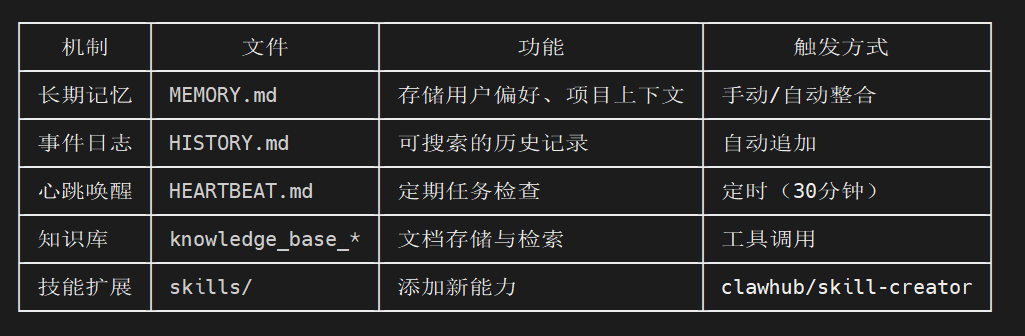
- 一、Memory 记忆系统(核心学习机制)
-
- 位置: /home/arduino/nanobot/nanobot/agent/memory.py
-
- 双层记忆架构
-
- ~/.nanobot/workspace/memory/
- ├── MEMORY.md # 长期记忆(始终加载到上下文)
- └── HISTORY.md # 事件日志(grep 搜索,不自动加载)
-
- 自动整合机制
-
- class MemoryStore:
- async def consolidate(self, session, provider, model, ...):
- """
- 1. 提取旧对话
- 2. 调用 LLM 分析,提取关键信息
- 3. 更新 MEMORY.md(长期事实)
- 4. 追加到 HISTORY.md(事件日志)
- """
-
- 工作流程:
- 1. 当会话消息超过阈值时自动触发
- 2. LLM 分析对话内容
- 3. 通过 save_memory 工具调用保存结果
- 4. 更新 session.last_consolidated 标记
-
- 触发条件:
- - 消息数超过 memory_window // 2
- - 或显式调用 archive_all=True
-
- ---
- 二、Heartbeat 心跳服务(自我唤醒)
-
- 位置: /home/arduino/nanobot/nanobot/heartbeat/service.py
-
- class HeartbeatService:
- """定期唤醒 agent 检查任务"""
-
- async def _tick(self):
- """
- 1. 读取 HEARTBEAT.md
- 2. LLM 决定是否有任务需要执行
- 3. 有任务则执行并通过通知渠道返回结果
- """
-
- 配置:
- {
- "gateway": {
- "heartbeat": {
- "enabled": true,
- "interval_s": 1800 // 30分钟
- }
- }
- }
-
- HEARTBEAT.md 示例:
- # Heartbeat Tasks
-
- ## Periodic
- - 每2小时检查新闻并发送摘要
- - 每天检查系统状态
-
- ## One-time
- - 2026-03-25 10:00 提醒会议
-
- ---
- 三、Knowledge Base 知识库
-
- 位置: /home/arduino/nanobot/nanobot/knowledge/
-
- 功能:
- - 创建/删除知识库
- - 添加文档/文件
- - 语义搜索
-
- 工具调用:
- # 创建知识库
- knowledge_base_create(name="project-docs", description="项目文档")
-
- # 添加文档
- knowledge_base_add(kb_id="xxx", content="...", metadata={...})
-
- # 搜索
- knowledge_base_search(kb_id="xxx", query="如何配置...", top_k=5)
-
- ---
- 四、Skill 技能系统(自我扩展)
-
- 1. skill-creator(创建技能)
-
- 位置: /home/arduino/nanobot/nanobot/skills/skill-creator/
-
- 技能结构:
- skill-name/
- ├── SKILL.md # 必需:技能说明 + YAML frontmatter
- ├── scripts/ # 可选:脚本文件
- ├── references/ # 可选:参考文档
- └── assets/ # 可选:资源文件
-
- 创建流程:
- # 1. 初始化
- scripts/init_skill.py my-skill --path ~/.nanobot/workspace/skills
-
- # 2. 编辑 SKILL.md
-
- # 3. 打包
- scripts/package_skill.py my-skill
-
- 2. clawhub(技能仓库)
-
- 搜索安装技能:
- # 搜索
- npx --yes clawhub@latest search "web scraping" --limit 5
-
- # 安装
- npx --yes clawhub@latest install <slug> --workdir ~/.nanobot/workspace
-
- ---
(待续)
|