Git 仓库监测终端-行空板

本项目基于行空板开发,制作一款 Git 仓库信息监测终端。设备联网后,可通过屏幕 GUI 界面查看 Gitee/GitHub 账号下仓库信息,支持切换平台、自动定时刷新仓库数据,所有账号配置在电脑终端输入
硬件清单
行空板*1
仓库连接准备
这里我们用gitee为大家做示范
浏览器输入https://gitee.com/进入gitee,登录好自己的账号,进入账号设置
左侧下翻找到安全设置-私人令牌进入
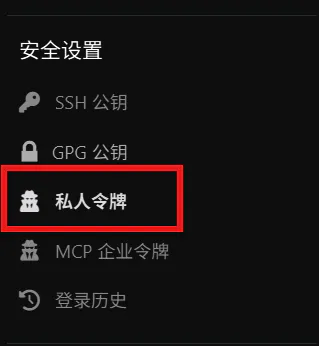
点击生成新令牌,描述可以随便写,权限全选就行,之后点提交就会得到令牌,点击复制,之后令牌码不会再出现,请仔细保存,记录自己的用户名,为之后设置做准备。
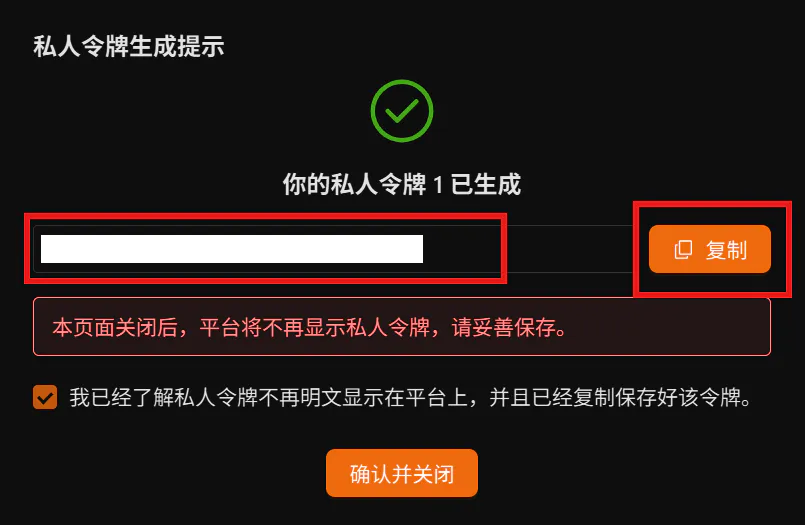
GitHub则为以下方法
登录 GitHub 网页,进入【Settings】→【Developer settings】→【Personal access tokens】
新建 Token,权限勾选repo(读取公开仓库)
生成并复制令牌,记录 GitHub 用户名
代码编写(我使用Mind+的python积木模式手动编辑)
我写了图形化的库为大家参考,暂时提交了还没上架,这里为大家附上gitee仓库地址est2-giteeconnect: mind+连接gitee仓库读取仓库信息
- 导入库 + 配置读取
import time
import requests
from unihiker import GUI

# ===================== 终端交互式读取配置 =====================
print("===== Gitee/GitHub 仓库监控面板【配置向导】 =====")
print("提示:直接按回车 = 留空,跳过当前项目\n")

def input_prompt(tip):
    try:
        res = input(tip)
        return res.strip()
    except EOFError:
        # 捕获无终端输入的报错,GUI模式下自动留空不崩溃
        print("无终端输入,该项留空")
        return ""

GITEE_TOKEN = input_prompt("请输入Gitee私人令牌:")
GITEE_USERNAME = input_prompt("请输入Gitee用户名(login):")

GITHUB_TOKEN = input_prompt("请输入GitHub令牌:")
GITHUB_USERNAME = input_prompt("请输入GitHub用户名:")
# ============================================================

# 全局变量初始化
REFRESH_INTERVAL = 60  # 自动刷新间隔,单位秒
current_platform = "gitee"
need_refresh = True
last_refresh_time = time.time()

user_info = {"name": "加载中..."}
repo_list = []
is_loading = False

# 初始化GUI画布
gui = GUI()
# 绘制深色背景
gui.draw_rect(x=0, y=0, w=240, h=320, color="#0F172A")
# 页面标题
title_text = gui.draw_text(text="git仓库监测终端", x=10, y=4, font_size=18, color="#38bdf8")- 编写按钮回调函数,实现平台切换、清空旧数据
# 切换到Gitee
def switch_gitee():
    global current_platform, need_refresh, user_info, repo_list
    current_platform = "gitee"
    # 清空旧仓库信息
    repo_list = []
    user_info = {"name": "加载中..."}
    status_text.config(text="切换到Gitee,加载中...")
    need_refresh = True

# 切换到GitHub
def switch_github():
    global current_platform, need_refresh, user_info, repo_list
    current_platform = "github"
    repo_list = []
    user_info = {"name": "加载中..."}
    status_text.config(text="切换到GitHub,加载中...")
    need_refresh = True

# 创建两个切换按钮
btn_gitee = gui.add_button(x=10, y=42, w=90, h=32, text="Gitee", onclick=switch_gitee)
btn_github = gui.add_button(x=115, y=42, w=90, h=32, text="GitHub", onclick=switch_github)

# 页面文字控件
platform_text = gui.draw_text(text="平台:Gitee", x=10, y=80, font_size=16, color="#FFFFFF")
name_text = gui.draw_text(text="昵称:加载中...", x=10, y=106, font_size=14, color="#FFFFFF")
status_text = gui.draw_text(text="状态:请求数据...", x=10, y=128, font_size=11, color="#cccccc")

# 仓库信息文本容器(最多显示2个仓库)
repo_texts = []
start_y = 150
for i in range(2):
    t1 = gui.draw_text(text="", x=10, y=start_y + i*60, font_size=12, color="#38bdf8")
    t2 = gui.draw_text(text="", x=10, y=start_y + i*60 + 22, font_size=11, color="#94a3b8")
repo_texts.append([t1, t2])- API 请求函数,从 Gitee/GitHub 拉取仓库数据
def fetch_data(platform):
    user_data = {}
    repos = []
    try:
        if platform == "gitee":
            if not GITEE_TOKEN or not GITEE_USERNAME:
                return {}, [], "Gitee配置为空,请检查账号令牌"
            headers = {"Authorization": f"token {GITEE_TOKEN}"}
            # 获取用户基础信息
            user_resp = requests.get(f"https://gitee.com/api/v5/users/{GITEE_USERNAME}", headers=headers, timeout=8)
            if user_resp.status_code == 200:
                user_data = user_resp.json()
            # 获取仓库列表
            repo_resp = requests.get(f"https://gitee.com/api/v5/users/{GITEE_USERNAME}/repos", headers=headers, timeout=8)
            if repo_resp.status_code == 200:
                repos = repo_resp.json()

        elif platform == "github":
            if not GITHUB_USERNAME:
                return {}, [], "GitHub用户名为空"
            headers = {}
            if GITHUB_TOKEN:
                headers["Authorization"] = f"token {GITHUB_TOKEN}"
            user_resp = requests.get(f"https://api.github.com/users/{GITHUB_USERNAME}", headers=headers, timeout=8)
            if user_resp.status_code == 200:
                user_data = user_resp.json()
            repo_resp = requests.get(f"https://api.github.com/users/{GITHUB_USERNAME}/repos", headers=headers, timeout=8)
            if repo_resp.status_code == 200:
                repos = repo_resp.json()

        return user_data, repos, "数据获取成功"

    except Exception as err:
return {}, [], "网络请求失败,请检查网络"- 后台线程,定时自动刷新数据
import threading

def background_fetch():
    global user_info, repo_list, is_loading, need_refresh, last_refresh_time
    while True:
        if need_refresh and not is_loading:
            is_loading = True
            user_data, repos, msg = fetch_data(current_platform)
            status_text.config(text=msg)
            if user_data:
                user_info = user_data
            if repos:
                repo_list = repos
            need_refresh = False
            is_loading = False
        # 定时自动刷新
        now = time.time()
        if now - last_refresh_time > REFRESH_INTERVAL and not is_loading:
            need_refresh = True
            last_refresh_time = now
        time.sleep(1)

# 启动后台刷新线程
thread = threading.Thread(target=background_fetch, daemon=True)
thread.start()- 主循环,实时刷新屏幕文字显示
while True:
    # 更新平台名称
    if current_platform == "gitee":
        platform_text.config(text="平台:Gitee")
    else:
        platform_text.config(text="平台:GitHub")
    # 更新用户名
    if user_info.get("name"):
        name_text.config(text=f"昵称:{user_info.get('name')}")
    elif user_info.get("login"):
        name_text.config(text=f"昵称:{user_info.get('login')}")
    # 清空仓库显示
    for item in repo_texts:
        item[0].config(text="")
        item[1].config(text="")
    # 填充仓库信息,最多展示2条
    show_count = min(2, len(repo_list))
    for i in range(show_count):
        repo = repo_list[i]
        repo_name = repo.get("name","")
        star = repo.get("stargazers_count",0)
        fork = repo.get("forks_count",0)
        repo_texts[i][0].config(text=repo_name)
        repo_texts[i][1].config(text=f"Star:{star}  Fork:{fork}")

    time.sleep(0.3)
就此程序编写完成以下为完整代码
import time
import requests
import threading
from unihiker import GUI

# ===================== 终端交互式读取配置(带EOF捕获) =====================
print("===== Gitee/GitHub 仓库监控面板【配置向导】 =====")
print("提示:直接按回车 = 留空,跳过当前项目\n")

def input_prompt(tip):
    try:
        res = input(tip)
        return res.strip()
    except EOFError:
        # GUI模式下捕获EOF报错,自动留空不崩溃
        print("无终端输入,该项留空")
        return ""

GITEE_TOKEN = input_prompt("请输入Gitee私人令牌:")
GITEE_USERNAME = input_prompt("请输入Gitee用户名(login):")

GITHUB_TOKEN = input_prompt("请输入GitHub令牌:")
GITHUB_USERNAME = input_prompt("请输入GitHub用户名:")
# ========================================================================

# 全局变量初始化
REFRESH_INTERVAL = 60  # 自动刷新间隔,单位秒
current_platform = "gitee"
need_refresh = True
last_refresh_time = time.time()

user_info = {"name": "加载中..."}
repo_list = []
is_loading = False

# 初始化GUI画布
gui = GUI()
# 绘制深色背景
gui.draw_rect(x=0, y=0, w=240, h=320, color="#0F172A")
# 页面标题
title_text = gui.draw_text(text="git仓库监测终端", x=10, y=4, font_size=18, color="#38bdf8")

# 切换到Gitee
def switch_gitee():
    global current_platform, need_refresh, user_info, repo_list
    current_platform = "gitee"
    repo_list = []
    user_info = {"name": "加载中..."}
    status_text.config(text="切换到Gitee,加载中...")
    need_refresh = True

# 切换到GitHub
def switch_github():
    global current_platform, need_refresh, user_info, repo_list
    current_platform = "github"
    repo_list = []
    user_info = {"name": "加载中..."}
    status_text.config(text="切换到GitHub,加载中...")
    need_refresh = True

# 创建两个切换按钮
btn_gitee = gui.add_button(x=10, y=42, w=90, h=32, text="Gitee", onclick=switch_gitee)
btn_github = gui.add_button(x=115, y=42, w=90, h=32, text="GitHub", onclick=switch_github)

# 页面文字控件
platform_text = gui.draw_text(text="平台:Gitee", x=10, y=80, font_size=16, color="#FFFFFF")
name_text = gui.draw_text(text="昵称:加载中...", x=10, y=106, font_size=14, color="#FFFFFF")
status_text = gui.draw_text(text="状态:请求数据...", x=10, y=128, font_size=11, color="#cccccc")

# 仓库信息文本容器(最多显示2个仓库)
repo_texts = []
start_y = 150
for i in range(2):
    t1 = gui.draw_text(text="", x=10, y=start_y + i*60, font_size=12, color="#38bdf8")
    t2 = gui.draw_text(text="", x=10, y=start_y + i*60 + 22, font_size=11, color="#94a3b8")
    repo_texts.append([t1, t2])

# API请求函数,从Gitee/GitHub拉取仓库数据
def fetch_data(platform):
    user_data = {}
    repos = []
    try:
        if platform == "gitee":
            if not GITEE_TOKEN or not GITEE_USERNAME:
                return {}, [], "Gitee配置为空,请检查账号令牌"
            headers = {"Authorization": f"token {GITEE_TOKEN}"}
            # 获取用户基础信息
            user_resp = requests.get(f"https://gitee.com/api/v5/users/{GITEE_USERNAME}", headers=headers, timeout=8)
            if user_resp.status_code == 200:
                user_data = user_resp.json()
            # 获取仓库列表
            repo_resp = requests.get(f"https://gitee.com/api/v5/users/{GITEE_USERNAME}/repos", headers=headers, timeout=8)
            if repo_resp.status_code == 200:
                repos = repo_resp.json()

        elif platform == "github":
            if not GITHUB_USERNAME:
                return {}, [], "GitHub用户名为空"
            headers = {}
            if GITHUB_TOKEN:
                headers["Authorization"] = f"token {GITHUB_TOKEN}"
            user_resp = requests.get(f"https://api.github.com/users/{GITHUB_USERNAME}", headers=headers, timeout=8)
            if user_resp.status_code == 200:
                user_data = user_resp.json()
            repo_resp = requests.get(f"https://api.github.com/users/{GITHUB_USERNAME}/repos", headers=headers, timeout=8)
            if repo_resp.status_code == 200:
                repos = repo_resp.json()

        return user_data, repos, "数据获取成功"

    except Exception as err:
        return {}, [], "网络请求失败,请检查网络"

# 后台线程,定时自动刷新数据
def background_fetch():
    global user_info, repo_list, is_loading, need_refresh, last_refresh_time
    while True:
        if need_refresh and not is_loading:
            is_loading = True
            user_data, repos, msg = fetch_data(current_platform)
            status_text.config(text=msg)
            if user_data:
                user_info = user_data
            if repos:
                repo_list = repos
            need_refresh = False
            is_loading = False
        # 定时自动刷新
        now = time.time()
        if now - last_refresh_time > REFRESH_INTERVAL and not is_loading:
            need_refresh = True
            last_refresh_time = now
        time.sleep(1)

# 启动后台刷新线程
thread = threading.Thread(target=background_fetch, daemon=True)
thread.start()

# 主循环,实时刷新屏幕文字显示
while True:
    # 更新平台名称
    if current_platform == "gitee":
        platform_text.config(text="平台:Gitee")
    else:
        platform_text.config(text="平台:GitHub")
    # 更新用户名
    if user_info.get("name"):
        name_text.config(text=f"昵称:{user_info.get('name')}")
    elif user_info.get("login"):
        name_text.config(text=f"昵称:{user_info.get('login')}")
    # 清空仓库显示
    for item in repo_texts:
        item[0].config(text="")
        item[1].config(text="")
    # 填充仓库信息,最多展示2条
    show_count = min(2, len(repo_list))
    for i in range(show_count):
        repo = repo_list[i]
        repo_name = repo.get("name","")
        star = repo.get("stargazers_count",0)
        fork = repo.get("forks_count",0)
        repo_texts[i][0].config(text=repo_name)
        repo_texts[i][1].config(text=f"Star:{star}  Fork:{fork}")

time.sleep(0.3)这里连接行空板时一定要确定行空板安装好了requests库,如果没有打开终端输入pip install requests安装
现在注意,以下的每一步都是重点,务必注意
Mind+没有标准输入通道,input()无法接收电脑输入,直接报错。不能点 Mind + 界面的运行按钮!
所以现在我们需要进行以下操作
- 数据线连接行空板(10.1.2.3)
- 浏览器输入10.1.2.3进入行空板配置,连接好网络后查看IP地址,一般为192.168.xx.xx(我们连接完网络就可以断开数据线给行空板单独供电了)
- Mind+网络连接行空板
- 在 Mind+中,粘贴完整代码,点击【运行】,将代码上传到行空板。上传之后什么都不用管,点击停止
- 打开 Mind+的远程终端(命令行)
切换到项目目录(例如我的的项目路径:/root/mindplus2/python-block/projects/git)
cd /root/mindplus2/python-block/projects/git查看目录确认文件存在
ls看到main.py说明路径正确
执行脚本启动程序
python main.py或者我们可以直接输入以下命令执行一键启动
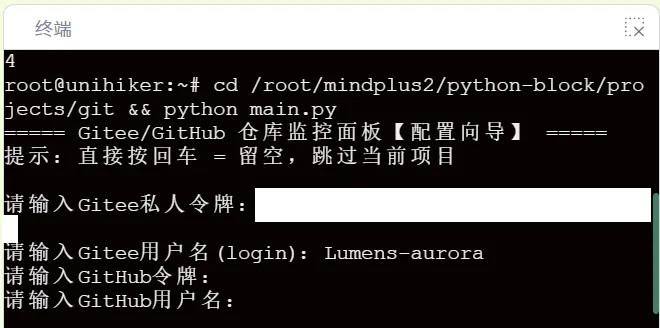
cd /root/mindplus2/python-block/projects/git && python main.py等待电脑终端弹出以下内容则证明运行成功

根据下方提升输入自己的信息进行设置,没有则直接回车
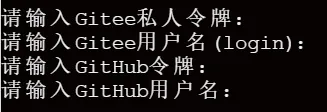
给大家进行示例
现在我们就可以看到行空板正在运行了
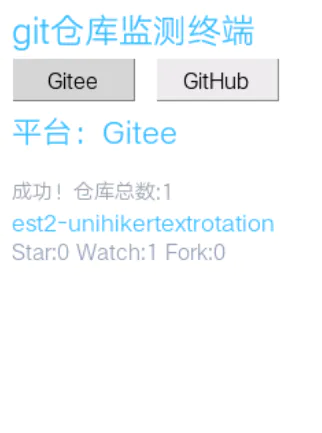
项目功能说明
双平台切换:点击屏幕按钮切换 Gitee / GitHub
自动定时刷新:60 秒自动重新拉取仓库数据
仓库信息展示:仓库名称、Star 收藏数量、Fork 复刻数量
电脑终端配置:账号令牌在电脑终端输入,无需修改代码
拓展升级方向(大家复刻时有能力可以向以下发展)
增加更多仓库展示数量。
自定义自动刷新时间。
增加仓库简介、创建时间显示。
增加声光提醒,Star 数量变化时蜂鸣器提示。