用行空板 M10 做一支「AI 电焊笔」:手势绘画 + 电焊粒子
> 本文项目代码已在行空板 M10 + DFRobot 800万 USB 自动对焦摄像头上实测跑通,包含完整的环境搭建、踩坑记录和核心实现思路。代码完整版见文末附件说明。一、项目缘起
一直想在行空板上做一个「不碰屏幕就能画画」的小玩意。最初的想法很简单:摄像头识别手指,食指当笔,在屏幕上画线。但真做起来发现,光是“画出来”太单薄了——画完就消失,没有编辑,没有保存,交互也没层次。
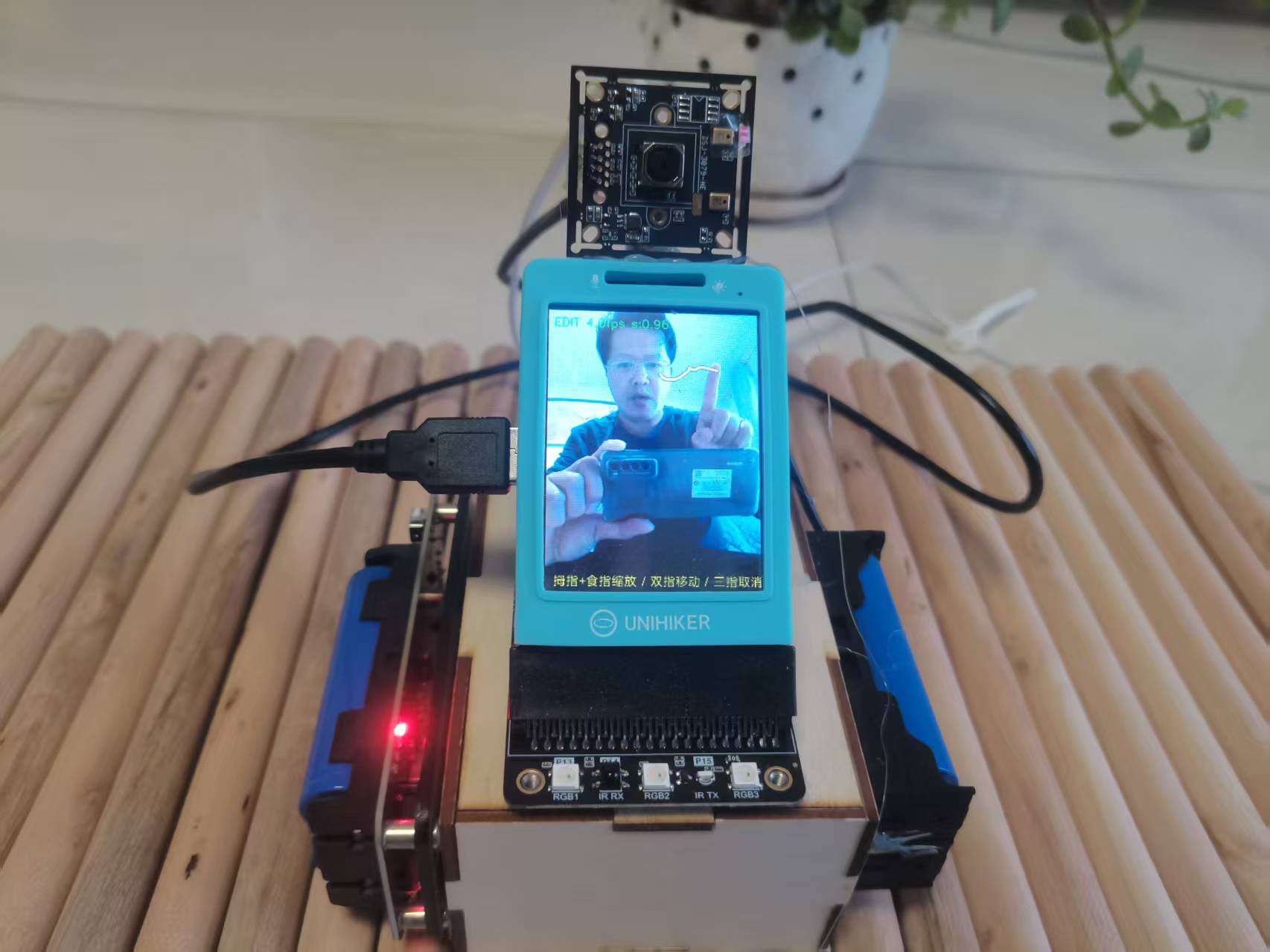
于是我把需求一点点加厚,最终变成了这样一个东西:
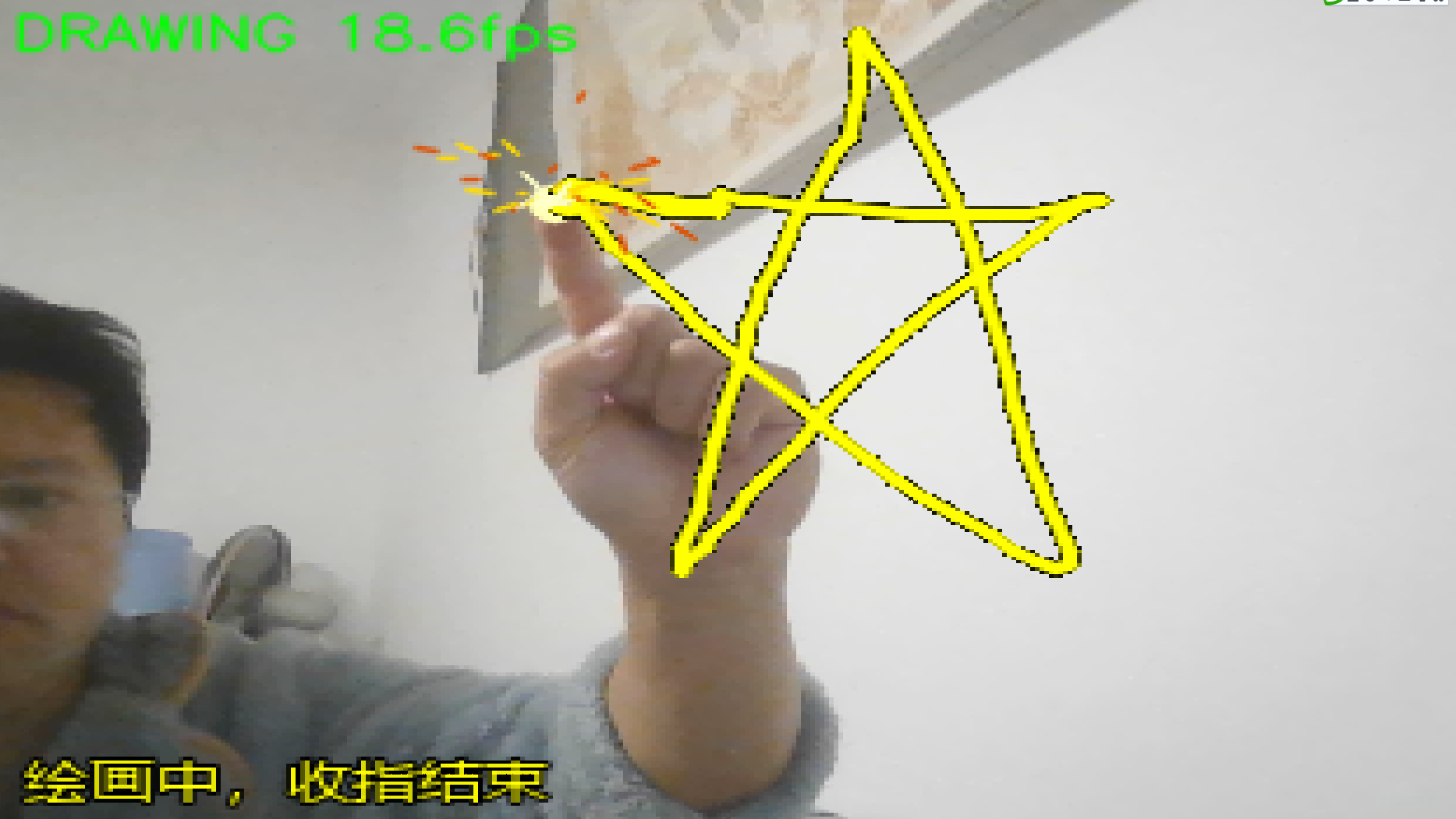
- 食指画线,笔尖带电焊火星粒子效果,颜色从亮黄到橙红逐渐冷却
- 食指+中指可以拖动图形
- 拇指+食指捏合可以缩放图形
- 三指取消当前图形
- 握拳确认锁定,图形永久保留
- 五指张开清空所有图形
- 可以不断累积新的图形,画好的不会消失
整个项目在行空板 M10 上全屏运行,摄像头 320×240,实测帧率在 5–10 FPS 之间(取决于手部姿态),交互流畅度基本够用。
二、硬件与软件清单
硬件
| 名称 | 数量 | 说明 |
|---|---|---|
| 行空板 M10 | 1 | 主控,自带 320×240 彩色屏幕 |
| DFRobot 800万 USB 自动对焦摄像头(FIT0729) | 1 | 索尼 IMX179,UVC 免驱,支持 Linux |
| USB 数据线(摄像头自带 1 米线) | 1 | 必须是数据线,不是充电线 |
为什么选这颗摄像头?
行空板 M10 的 USB 口对摄像头的兼容性有一定要求,UVC(USB Video Class)免驱协议是硬门槛。这颗 FIT0729 明确标注支持 UVC,兼容 Linux(内核 2.6.26 以上),在行空板的 Debian 系统下理论上可以即插即用。
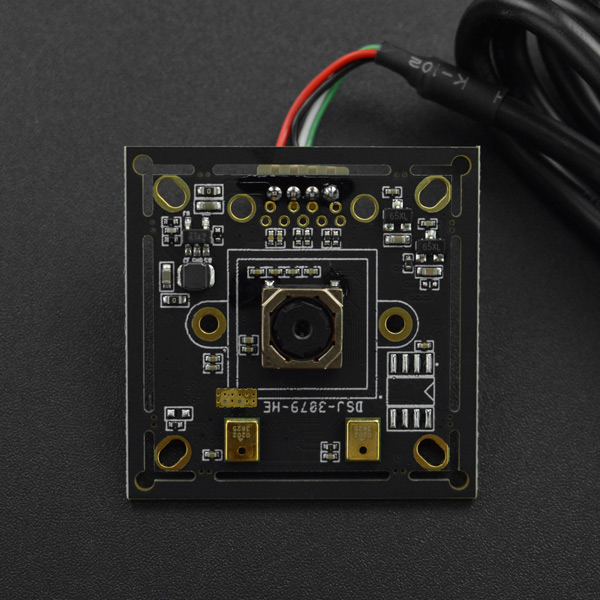
它的几个特性对这个项目特别有用:
- 自动对焦:手在屏幕前 20–50cm 移动时,画面始终清晰,不会像定焦摄像头那样“近了糊、远了也糊”
- 76° 视角:单手完整进入画面不需要把手伸得太远
- 640×480 @ 30fps:本项目实际用的就是这个分辨率,匹配行空板的处理能力
- USB2.0 High Speed:带宽足够,不会因为传输瓶颈卡帧
⚠️ 注意:这颗摄像头工作电流 160–260mA,行空板 USB 口供电能力有限。如果出现摄像头时好时坏、
lsusb偶尔能识别偶尔不能的情况,优先怀疑供电——换一根短一点、粗一点的数据线,或者加一个带独立供电的 USB Hub。
软件
| 名称 | 版本 | 说明 |
|---|---|---|
| Python | 3.7.x | 行空板自带 |
| opencv-python | 4.8.x | 支持 V4L2 后端 |
| mediapipe | 0.10.21 | 新版移除了 mp.solutions,必须降级 |
| numpy | < 2 | MediaPipe 0.10.21 强制要求 |
| pillow | 9.x | 用于中文绘制 |
三、交互设计
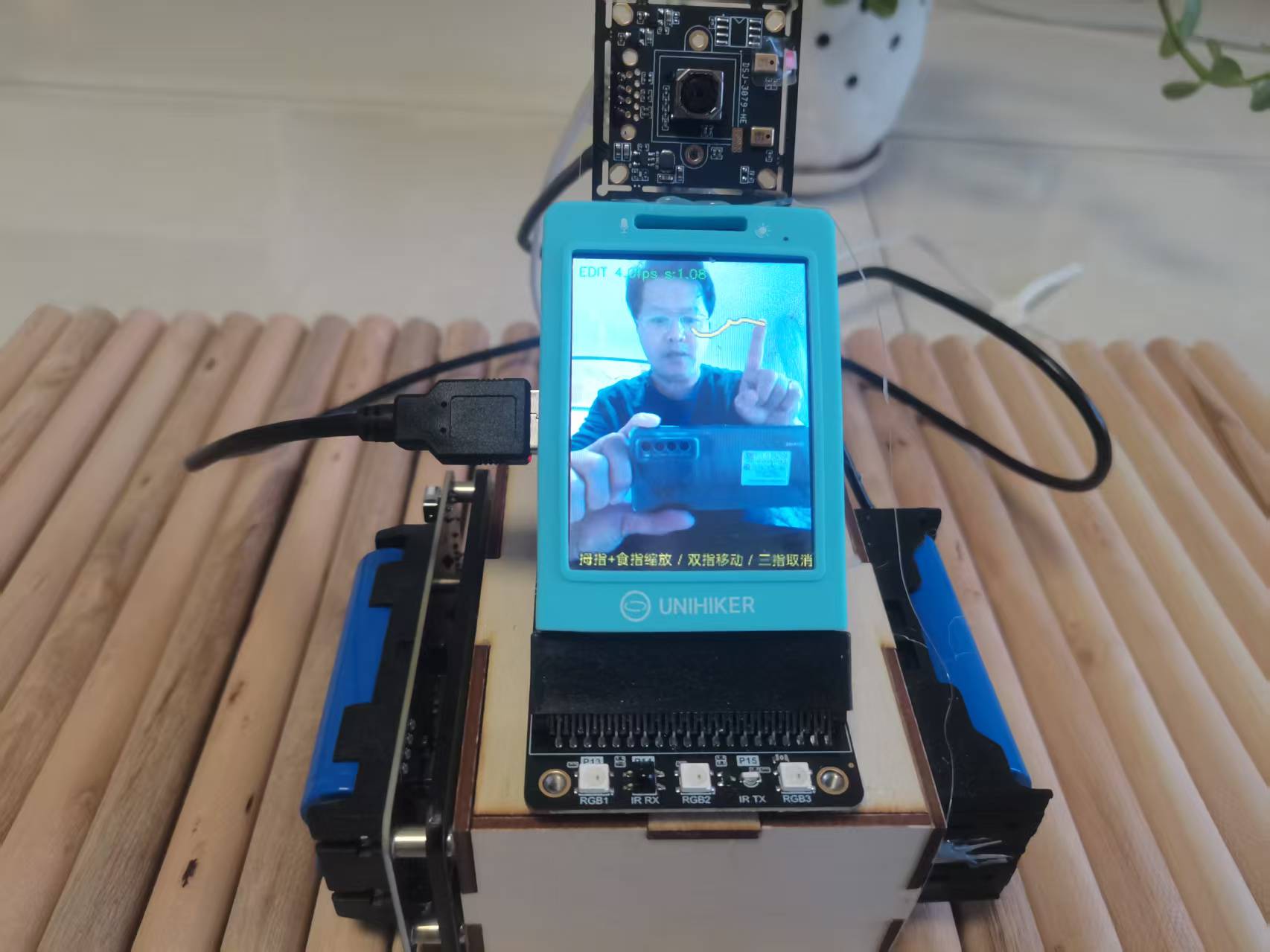
手势设计是这个项目里最花心思的部分。手指伸出/收起的组合必须区分度足够大,同时又要单手可完成。最终确定的手势表如下:
| 手势 | 状态 | 效果 |
|---|---|---|
| 只伸食指 | IDLE → DRAWING | 开始绘画,笔尖电焊粒子 |
| 收回食指 | DRAWING → EDIT | 结束当前笔画,进入编辑 |
| 食指+中指 | EDIT | 拖动图形 |
| 拇指+食指(中指收起) | EDIT | 缩放图形(按距离比例) |
| 食指+中指+无名指 | EDIT | 取消当前图形 |
| 握拳(持续 5 帧) | EDIT | 确认锁定图形 |
| 五指张开(持续 3 帧) | 任意 | 清空所有图形 |
所有手势都加了帧数防抖(5 帧 ≈ 0.16 秒,3 帧 ≈ 0.1 秒),避免手抖误触。

四、制作过程
4.1 环境搭建:MediaPipe 是最大门槛
行空板自带 Python 3.7,安装 MediaPipe 有两条路:
路线 A:DFRobot 官方脚本
在 DF 社区下载「行空板 AI 案例代码包」,里面有一个 1-Install_dependency.py 脚本,一键安装 MediaPipe 和 OpenCV。这是最省事的方式,但版本可能不是最新的,如果你的项目需要特定 API,得自己手动调整。
路线 B:pip 手动安装
pip install "mediapipe==0.10.21" "opencv-python<4.12" "numpy<2" pillow
为什么必须锁 0.10.21?
MediaPipe 从 0.10.15 开始弃用 mp.solutions 接口,0.10.31 直接移除。而我们用的 mp.solutions.hands 在 0.10.21 里还能用,新版直接 AttributeError: module 'mediapipe' has no attribute 'solutions'。
装完后快速验证:
python3 -c "import mediapipe as mp; print(mp.__version__, hasattr(mp, 'solutions'))"
期望输出:0.10.21 True。
4.2 摄像头:UVC 免驱 + V4L2 后端 + 多索引尝试
先确认摄像头被系统识别:
lsusb
插上 FIT0729 后,lsusb 列表里应该出现一个包含厂商名称的 USB 设备条目。如果只有几个 root hub,说明物理层就没连上——检查线缆是不是数据线、USB 口是否插紧,或者供电是否足够。
然后看视频节点:
ls /dev/video*
UVC 摄像头通常会生成 video0 和 video1 两个节点。但 video0 不一定是视频流节点,有时是元数据节点。所以打开摄像头时要做多索引、多后端尝试:
def open_camera():
    for idx in [0, 1, 2]:
        for backend in [cv2.CAP_V4L2, cv2.CAP_ANY]:
            cap = cv2.VideoCapture(idx, backend)
            if cap.isOpened():
                cap.set(cv2.CAP_PROP_FRAME_WIDTH, 320)
                cap.set(cv2.CAP_PROP_FRAME_HEIGHT, 240)
                cap.set(cv2.CAP_PROP_BUFFERSIZE, 1)  # 降低延迟
                return cap
            cap.release()
    return None
CAP_PROP_BUFFERSIZE = 1 是关键优化——OpenCV 默认会缓存几帧,导致画面延迟明显。设为 1 后画面跟手很多。
分辨率怎么选?
FIT0729 支持从 640×480@30fps 到 3264×2448@15fps 的多种分辨率。行空板 M10 的算力有限,640×480 是性价比最高的选择:MediaPipe 的手部检测在这个分辨率下已经足够准确,再高只会拖慢帧率。如果实测帧率仍然偏低(< 5 FPS),可以降到 320×240,手势识别精度不会有明显下降。
4.3 手部关键点与手势判断
MediaPipe 输出 21 个手部关键点。判断手指“是否伸出”的规则:
- 食/中/无名/小指:指尖 y 坐标 小于 PIP 关节 y 坐标 → 伸出
- 拇指:需要判断左右手,右手时
thumb_tip.x < thumb_ip.x表示伸出,左手相反
def fingers_up(landmarks, handedness_label):
    tips = [4, 8, 12, 16, 20]
    pips = [3, 6, 10, 14, 18]
    up = []
    if handedness_label == "Right":
        up.append(landmarks[4].x < landmarks[3].x)
    else:
        up.append(landmarks[4].x > landmarks[3].x)
    for tip, pip in zip(tips[1:], pips[1:]):
        up.append(landmarks[tip].y < landmarks[pip].y)
    return up
返回的 up 是 [拇指, 食指, 中指, 无名指, 小指] 的布尔数组,后续判断组合手势就很方便:
only_index  = up[1] and not up[0] and not up[2] and not up[3] and not up[4]
two_finger  = up[1] and up[2] and not up[3] and not up[4]
thumb_index = up[0] and up[1] and not up[2] and not up[3]
three_finger = up[1] and up[2] and up[3] and not up[4]
fist = not any(up)
4.4 电焊粒子:短寿命 + 重力 + 拖尾
电焊火星的视觉特征:亮白黄色核心、橙红色外围、寿命短、向下坠落、带短拖尾。每个粒子维护 6 个变量:
class WeldParticle:
    __slots__ = ("x", "y", "vx", "vy", "life", "max_life", "size")
    def __init__(self, x, y):
        self.x, self.y = x, y
        angle = random.uniform(-math.pi, 0)  # 主要向上飞溅
        speed = random.uniform(1.2, 4.5)
        self.vx = math.cos(angle) * speed
        self.vy = math.sin(angle) * speed
        self.max_life = random.randint(6, 18)
        self.life = self.max_life
        self.size = random.choice([1, 1, 1, 2])
每帧更新时加上重力(vy += 0.25)和空气阻力(vx *= 0.98),颜色根据 life / max_life 从白黄渐变到橙红:
t = p.life / p.max_life
if t > 0.7:
    color = (200, 255, 255)   # 亮白黄
elif t > 0.35:
    color = (0, 220, 255)     # 金黄
else:
    color = (0, 80, 220)      # 橙红
用 cv2.line 画一小段拖尾(从当前位置到 x - vx*2, y - vy*2),比单纯画圆更有“火星”感。
性能注意:粒子上限设成 200,超过就停止发射新粒子,否则长时间画线会拖慢帧率。
4.5 绘画画布
用一个独立的 canvas 数组记录笔画,只在绘画状态叠加到画面上:
canvas = np.zeros((h, w, 3), dtype=np.uint8)

if prev_point is None:
    prev_point = tip
elif math.hypot(tip[0] - prev_point[0], tip[1] - prev_point[1]) > 3:
    cv2.line(canvas, prev_point, tip, (0, 255, 255), 2, cv2.LINE_AA)
    prev_point = tip

gray = cv2.cvtColor(canvas, cv2.COLOR_BGR2GRAY)
_, mask = cv2.threshold(gray, 10, 255, cv2.THRESH_BINARY)
frame[mask > 0] = canvas[mask > 0]
笔尖平滑用 EMA,避免 MediaPipe 关键点抖动导致笔画毛糙:
smooth_tip = (int(0.6 * ix + 0.4 * smooth_tip[0]),
              int(0.6 * iy + 0.4 * smooth_tip[1]))
4.6 图形提取与编辑
画完一笔后,从画布中提取出一个独立的图形对象:
def extract_shape(canvas, pad=20):
    gray = cv2.cvtColor(canvas, cv2.COLOR_BGR2GRAY)
    _, mask = cv2.threshold(gray, 10, 255, cv2.THRESH_BINARY)
    if cv2.countNonZero(mask) == 0:
        return None
    x, y, w, h = cv2.boundingRect(mask)
    x0 = max(0, x - pad);  y0 = max(0, y - pad)
    x1 = min(W, x + w + pad); y1 = min(H, y + h + pad)
    return {
        "bgr": canvas[y0:y1, x0:x1].copy(),
        "mask": mask[y0:y1, x0:x1].copy(),
        "w": x1 - x0, "h": y1 - y0,
        "cx": (x0 + x1) / 2.0,
        "cy": (y0 + y1) / 2.0,
        "scale": 1.0,
    }
移动时只修改 cx/cy,缩放时只修改 scale,绘制时以 cx/cy 为中心放置:
new_w = int(shape["w"] * shape["scale"])
new_h = int(shape["h"] * shape["scale"])
ox = int(round(shape["cx"] - new_w / 2.0))
oy = int(round(shape["cy"] - new_h / 2.0))
这样无论怎么缩放,图形中心点都不会漂移。
4.7 全屏显示
行空板的 OpenCV 窗口默认带标题栏,320×240 的屏幕留不住。DF 论坛有现成的全屏方法:
cv2.namedWindow("Weld Draw", cv2.WND_PROP_FULLSCREEN)
cv2.setWindowProperty("Weld Draw", cv2.WND_PROP_FULLSCREEN,
                      cv2.WINDOW_FULLSCREEN)
注意:不要旋转摄像头画面。MediaPipe 对正立的手部识别最准,旋转 90° 后手势识别率会明显下降。
五、踩坑记录
坑 1:AttributeError: module 'mediapipe' has no attribute 'solutions'
原因:MediaPipe 版本太新。0.10.31+ 已经移除 mp.solutions。
解决:pip install "mediapipe==0.10.21"
坑 2:ImportError: numpy.core.multiarray failed to import
原因:numpy 2.x 与 mediapipe 0.10.21 的 ABI 不兼容。
解决:pip install "numpy<2"
坑 3:math.dist 不存在
原因:math.dist 是 Python 3.8 才加入的,行空板是 3.7。
解决:用 math.hypot(dx, dy) 替代。
坑 4:中文显示为 ?????? 或 getbbox 报错
原因:cv2.putText 不支持中文;或者系统字体 fallback 到了 bitmap 字体,没有 getbbox。
解决:行空板自带中文字体,路径是:
/usr/share/fonts/truetype/HYQH/HYQiHei_50S.ttf(汉仪旗黑,推荐)/usr/share/fonts/truetype/wqy/wqy-zenhei.ttc(文泉驿正黑)
用 Pillow 渲染文字为 RGBA 数组贴回画面,并缓存渲染结果,避免每帧重建文字图片拖慢帧率。
坑 5:摄像头打开失败或时好时坏
针对 FIT0729 的排查顺序:
lsusb是否有设备条目:如果只有 root hub,检查数据线和 USB 口- 供电是否足够:FIT0729 工作电流 160–260mA,行空板 USB 口可能供电不足。换短粗线,或加带独立供电的 USB Hub
v4l2-ctl --list-devices:确认哪个/dev/video*是真正的视频流节点fuser -v /dev/video*:检查是否被其他进程占用
坑 6:拖动/缩放误触发
原因:手部关键点每帧都有微小抖动,手势判定会在两个状态之间来回切换。
解决:给每个手势判定加帧数防抖:
- 握拳确认:连续 5 帧
- 五指清空:连续 3 帧
- 双指拖动丢失容忍:8 帧
- 绘画结束判定:4 帧
同时限制手势判定顺序(三指 > 握拳 > 双指移动 > 拇指食指缩放),避免多手势同时满足时误判。
六、效果展示
七、后续改进方向
- 多颜色切换:用不同手势切换画笔颜色
- 撤销/重做:维护操作栈,用特定手势回退
- 图形旋转:加入双指旋转手势
- 导出作品:把
confirmed_shapes合成成图片保存 - 利用 FIT0729 的麦克风:这颗摄像头自带数字麦克风,可以采集环境音,后续做“语音指令切换画笔颜色”
- 手部追踪加速:把 MediaPipe 从
hands换成tasks.HandLandmarker(新版 API,性能更好,但代码要重写)
八、代码下载
完整代码已在附件中提供,文件名 weld_draw_unihiker.py。
运行前请确认:
python3 --version             # 应为 3.7.x
python3 -c "import cv2, mediapipe, PIL, numpy; \
print('cv2', cv2.__version__); \
print('mp', mediapipe.__version__); \
print('PIL', PIL.__version__); \
print('np', numpy.__version__)"
# 应为:cv2 4.8.x / mp 0.10.21 / PIL 9.x / np 1.x
ls /dev/video*
fc-list :lang=zh
4 项都通过后运行:
python3 weld_draw_unihiker.py
启动后控制台会打印两行:
[font] using /usr/share/fonts/truetype/HYQH/HYQiHei_50S.ttf
[cam] opened index=0 backend=V4L2
两行都出现,说明一切就绪。用 FIT0729 对准右手,食指在空中画一笔试试吧。
结语
这个项目从“画一条线”到“完整的手势绘画编辑器”,前后迭代了十几版。最大的体会是:行空板这类 ARM 开发板跑 MediaPipe 是有性能边界的,手势识别能跑,但帧率不会太高,所以交互设计上要尽量“少让用户做快速的连续动作”,多用“持续手势 + 防抖确认”来降低对帧率的依赖。
另一个体会是:摄像头的选择比想象中重要。FIT0729 的 UVC 免驱协议和 Linux 兼容性让环境搭建省了很多事,自动对焦也避免了手在远近移动时画面模糊导致的关键点丢失。如果你的摄像头在行空板上识别不稳定,优先排查供电和 UVC 兼容性,这两件事解决了,剩下的就是手势逻辑和视觉效果的打磨。
完整代码
# weld_draw_unihiker.py
# 行空板 M10 全屏手势绘画
# 依赖:opencv-python, mediapipe(0.10.x), pillow, numpy<2
import os
import math
import random
import time
import cv2
import numpy as np
import mediapipe as mp
from PIL import Image, ImageDraw, ImageFont
# ================== 屏幕与窗口 ==================
SCREEN_W = 320
SCREEN_H = 240
WINDOW_NAME = "Weld Draw"
# 为手势识别准确,建议保持 False(不旋转摄像头画面)
screen_rotation = False
def init_window():
"""DFRobot 论坛全屏方法"""
cv2.namedWindow(WINDOW_NAME, cv2.WND_PROP_FULLSCREEN)
cv2.setWindowProperty(WINDOW_NAME, cv2.WND_PROP_FULLSCREEN,
cv2.WINDOW_FULLSCREEN)
# ================== 中文绘制 ==================
_font_cache = {}
_text_img_cache = {}
def _find_cn_font(size):
key = f"f{size}"
if key in _font_cache:
return _font_cache[key]
candidates = [
"/usr/share/fonts/truetype/HYQH/HYQiHei_50S.ttf",
"/usr/share/fonts/truetype/wqy/wqy-zenhei.ttc",
"./msyh.ttc", "./simhei.ttf",
"/usr/share/fonts/truetype/wqy/wqy-microhei.ttc",
"/usr/share/fonts/opentype/noto/NotoSansCJK-Regular.ttc",
"C:/Windows/Fonts/msyh.ttc",
"C:/Windows/Fonts/simhei.ttf",
"/System/Library/Fonts/PingFang.ttc",
]
font = None
for p in candidates:
if os.path.exists(p):
try:
font = ImageFont.truetype(p, size)
print(f"[font] using {p}")
break
except Exception:
continue
_font_cache[key] = font
return font
def _text_size(font, text):
"""兼容 Pillow 7/8/9/10"""
if hasattr(font, "getbbox"):
try:
b = font.getbbox(text)
return b[2] - b[0], b[3] - b[1], b[0], b[1]
except Exception:
pass
try:
w, h = font.getsize(text)
except Exception:
w, h = len(text) * 20, 24
try:
ox, oy = font.getoffset(text)
except Exception:
ox, oy = 0, 0
return w, h, ox, oy
def _render_text_img(text, size, color_bgr, stroke):
key = (text, size, tuple(color_bgr), stroke)
if key in _text_img_cache:
return _text_img_cache[key]
font = _find_cn_font(size)
if font is None:
return None
tw, th, ox, oy = _text_size(font, text)
if tw <= 0 or th <= 0:
return None
pad = max(2, stroke + 2)
img = Image.new("RGBA", (tw + pad * 2, th + pad * 2), (0, 0, 0, 0))
draw = ImageDraw.Draw(img)
color_rgba = (color_bgr[2], color_bgr[1], color_bgr[0], 255)
try:
draw.text((pad - ox, pad - oy), text, font=font,
fill=color_rgba, stroke_width=stroke,
stroke_fill=(0, 0, 0, 255))
except TypeError:
draw.text((pad - ox, pad - oy), text, font=font, fill=color_rgba)
arr = np.array(img)
_text_img_cache[key] = arr
if len(_text_img_cache) > 64:
_text_img_cache.clear()
return arr
def put_text_cn(frame, text, pos, size=22, color_bgr=(0, 255, 255), stroke=1):
if not text:
return frame
arr = _render_text_img(text, size, color_bgr, stroke)
if arr is None:
return frame
h_t, w_t = arr.shape[:2]
x, y = pos
fh, fw = frame.shape[:2]
x0, y0 = max(0, x), max(0, y)
x1 = min(fw, x + w_t)
y1 = min(fh, y + h_t)
if x1 <= x0 or y1 <= y0:
return frame
sx0, sy0 = x0 - x, y0 - y
sub = arr[sy0:sy0 + (y1 - y0), sx0:sx0 + (x1 - x0)]
alpha = sub[:, :, 3:4].astype(np.float32) / 255.0
rgb_bgr = sub[:, :, 2::-1].astype(np.float32)
roi = frame[y0:y1, x0:x1].astype(np.float32)
frame[y0:y1, x0:x1] = (rgb_bgr * alpha + roi * (1 - alpha)).astype(np.uint8)
return frame
# ================== MediaPipe ==================
mp_hands = mp.solutions.hands
INDEX_TIP = 8
MIDDLE_TIP = 12
THUMB_TIP = 4
THUMB_IP = 3
def fingers_up(landmarks, handedness_label):
tips = [4, 8, 12, 16, 20]
pips = [3, 6, 10, 14, 18]
up = []
if handedness_label == "Right":
up.append(landmarks[THUMB_TIP].x < landmarks[THUMB_IP].x)
else:
up.append(landmarks[THUMB_TIP].x > landmarks[THUMB_IP].x)
for tip, pip in zip(tips[1:], pips[1:]):
up.append(landmarks[tip].y < landmarks[pip].y)
return up
# ================== 电焊粒子 ==================
MAX_PARTICLES = 200
EMIT_PER_FRAME = 4
class WeldParticle:
__slots__ = ("x", "y", "vx", "vy", "life", "max_life", "size")
def __init__(self, x, y):
self.x, self.y = x, y
angle = random.uniform(-math.pi, 0)
speed = random.uniform(1.2, 4.5)
self.vx = math.cos(angle) * speed
self.vy = math.sin(angle) * speed
self.max_life = random.randint(6, 18)
self.life = self.max_life
self.size = random.choice([1, 1, 1, 2])
particles = []
def emit_weld_particles(x, y, count=EMIT_PER_FRAME):
if len(particles) >= MAX_PARTICLES:
return
for _ in range(count):
particles.append(WeldParticle(x, y))
def update_and_draw_particles(frame):
global particles
alive = []
for p in particles:
p.vy += 0.25
p.vx *= 0.98
p.x += p.vx
p.y += p.vy
p.life -= 1
if p.life <= 0:
continue
t = p.life / p.max_life
if t > 0.7:
color = (200, 255, 255)
elif t > 0.35:
color = (0, 220, 255)
else:
color = (0, 80, 220)
cv2.line(frame, (int(p.x), int(p.y)),
(int(p.x - p.vx * 2), int(p.y - p.vy * 2)),
color, max(1, int(p.size * t)), cv2.LINE_AA)
alive.append(p)
particles = alive
# ================== 图形提取与合成 ==================
def extract_shape(canvas, pad=20):
gray = cv2.cvtColor(canvas, cv2.COLOR_BGR2GRAY)
_, mask = cv2.threshold(gray, 10, 255, cv2.THRESH_BINARY)
if cv2.countNonZero(mask) == 0:
return None
x, y, w, h = cv2.boundingRect(mask)
H, W = canvas.shape[:2]
x0 = max(0, x - pad)
y0 = max(0, y - pad)
x1 = min(W, x + w + pad)
y1 = min(H, y + h + pad)
return {
"bgr": canvas[y0:y1, x0:x1].copy(),
"mask": mask[y0:y1, x0:x1].copy(),
"w": x1 - x0,
"h": y1 - y0,
"cx": (x0 + x1) / 2.0,
"cy": (y0 + y1) / 2.0,
"scale": 1.0,
}
def composite_shape(frame, shape):
if shape is None:
return frame
new_w = max(4, int(shape["w"] * shape["scale"]))
new_h = max(4, int(shape["h"] * shape["scale"]))
bgr = cv2.resize(shape["bgr"], (new_w, new_h), interpolation=cv2.INTER_LINEAR)
mask = cv2.resize(shape["mask"], (new_w, new_h), interpolation=cv2.INTER_LINEAR)
ox = int(round(shape["cx"] - new_w / 2.0))
oy = int(round(shape["cy"] - new_h / 2.0))
fh, fw = frame.shape[:2]
x0 = max(0, ox)
y0 = max(0, oy)
x1 = min(fw, ox + new_w)
y1 = min(fh, oy + new_h)
if x1 <= x0 or y1 <= y0:
return frame
sx0 = x0 - ox
sy0 = y0 - oy
sx1 = sx0 + (x1 - x0)
sy1 = sy0 + (y1 - y0)
sub_bgr = bgr[sy0:sy1, sx0:sx1]
sub_mask = mask[sy0:sy1, sx0:sx1]
roi = frame[y0:y1, x0:x1]
m = (sub_mask.astype(np.float32) / 255.0)[..., None]
frame[y0:y1, x0:x1] = (
sub_bgr.astype(np.float32) * m + roi.astype(np.float32) * (1 - m)
).astype(np.uint8)
return frame
# ================== 摄像头 ==================
CAM_INDEX_LIST = [0, 1, 2]
def open_camera():
backends = [("V4L2", cv2.CAP_V4L2), ("ANY", cv2.CAP_ANY)]
for idx in CAM_INDEX_LIST:
for name, backend in backends:
try:
cap = cv2.VideoCapture(idx, backend)
except Exception:
continue
if cap is not None and cap.isOpened():
cap.set(cv2.CAP_PROP_FRAME_WIDTH, SCREEN_W)
cap.set(cv2.CAP_PROP_FRAME_HEIGHT, SCREEN_H)
try:
cap.set(cv2.CAP_PROP_BUFFERSIZE, 1)
except Exception:
pass
print(f"[cam] opened index={idx} backend={name}")
return cap
if cap is not None:
cap.release()
return None
# ================== 主程序 ==================
def main():
init_window()
cap = open_camera()
if cap is None:
print("无法打开摄像头")
return
hands = mp_hands.Hands(max_num_hands=1,
min_detection_confidence=0.6,
min_tracking_confidence=0.5)
# ---- 状态 ----
state = "IDLE"
canvas = None
current_shape = None
confirmed_shapes = []
# ---- 绘画 ----
prev_point = None
smooth_tip = None
draw_miss_frames = 0
DRAW_END_FRAMES = 4
# ---- 拖动 ----
smooth_drag = None
drag_active = False
drag_anchor = None
drag_miss_frames = 0
DRAG_MISS_TOLERANCE = 8
# ---- 缩放 ----
scale_base_dist = None
scale_base_scale = 1.0
# ---- 确认 / 清空 ----
fist_frames = 0
FIST_CONFIRM_FRAMES = 5
five_frames = 0
FIVE_CONFIRM_FRAMES = 3
# ---- 手离开 ----
no_hand_frames = 0
NO_HAND_FRAMES = 20
def reset_all():
nonlocal state, current_shape, canvas
nonlocal prev_point, smooth_tip, draw_miss_frames
nonlocal smooth_drag, drag_active, drag_anchor, drag_miss_frames
nonlocal scale_base_dist, scale_base_scale
nonlocal fist_frames, five_frames
confirmed_shapes.clear()
current_shape = None
canvas[:] = 0
state = "IDLE"
prev_point = None
smooth_tip = None
draw_miss_frames = 0
smooth_drag = None
drag_active = False
drag_anchor = None
drag_miss_frames = 0
scale_base_dist = None
scale_base_scale = 1.0
fist_frames = 0
five_frames = 0
fps_t0 = time.time()
fps_count = 0
fps = 0.0
while True:
ret, frame = cap.read()
if not ret:
print("读帧失败")
break
if frame.shape[1] != SCREEN_W or frame.shape[0] != SCREEN_H:
frame = cv2.resize(frame, (SCREEN_W, SCREEN_H))
if screen_rotation:
frame = cv2.rotate(frame, cv2.ROTATE_90_COUNTERCLOCKWISE)
frame = cv2.flip(frame, 1)
h, w = frame.shape[:2]
if canvas is None:
canvas = np.zeros((h, w, 3), dtype=np.uint8)
rgb = cv2.cvtColor(frame, cv2.COLOR_BGR2RGB)
results = hands.process(rgb)
# ================== 手势与状态机 ==================
if results.multi_hand_landmarks:
no_hand_frames = 0
lm = results.multi_hand_landmarks[0].landmark
label = results.multi_handedness[0].classification[0].label
up = fingers_up(lm, label)
five_open = all(up)
only_index = up[1] and not up[0] and not up[2] and not up[3] and not up[4]
thumb_index = up[0] and up[1] and not up[2] and not up[3]
two_finger = up[1] and up[2] and not up[3] and not up[4]
three_finger = up[1] and up[2] and up[3] and not up[4]
fist = not any(up)
# 五指清空(最高优先级)
if five_open:
five_frames += 1
if five_frames >= FIVE_CONFIRM_FRAMES:
reset_all()
else:
five_frames = 0
# ---------- IDLE ----------
if state == "IDLE":
if only_index and five_frames == 0:
canvas[:] = 0
current_shape = None
prev_point = None
smooth_tip = None
smooth_drag = None
drag_active = False
drag_anchor = None
drag_miss_frames = 0
scale_base_dist = None
scale_base_scale = 1.0
fist_frames = 0
draw_miss_frames = 0
state = "DRAWING"
# ---------- DRAWING ----------
elif state == "DRAWING":
if only_index:
draw_miss_frames = 0
ix = int(lm[INDEX_TIP].x * w)
iy = int(lm[INDEX_TIP].y * h)
if smooth_tip is None:
smooth_tip = (ix, iy)
else:
smooth_tip = (int(0.6 * ix + 0.4 * smooth_tip[0]),
int(0.6 * iy + 0.4 * smooth_tip[1]))
tip = smooth_tip
emit_weld_particles(tip[0], tip[1])
cv2.circle(frame, tip, 5, (180, 255, 255), -1, cv2.LINE_AA)
cv2.circle(frame, tip, 2, (255, 255, 255), -1, cv2.LINE_AA)
if prev_point is None:
prev_point = tip
elif math.hypot(tip[0] - prev_point[0],
tip[1] - prev_point[1]) > 3:
cv2.line(canvas, prev_point, tip,
(0, 255, 255), 2, cv2.LINE_AA)
prev_point = tip
else:
draw_miss_frames += 1
if draw_miss_frames >= DRAW_END_FRAMES:
current_shape = extract_shape(canvas)
if current_shape is not None:
if fist:
confirmed_shapes.append(current_shape)
current_shape = None
state = "IDLE"
else:
state = "EDIT"
else:
state = "IDLE"
prev_point = None
smooth_tip = None
smooth_drag = None
drag_active = False
drag_anchor = None
drag_miss_frames = 0
scale_base_dist = None
scale_base_scale = 1.0
fist_frames = 0
draw_miss_frames = 0
# ---------- EDIT ----------
elif state == "EDIT" and current_shape is not None:
if three_finger:
# 三指取消
current_shape = None
state = "IDLE"
smooth_drag = None
drag_active = False
drag_anchor = None
drag_miss_frames = 0
scale_base_dist = None
scale_base_scale = 1.0
fist_frames = 0
elif fist:
# 握拳确认
fist_frames += 1
if fist_frames >= FIST_CONFIRM_FRAMES:
confirmed_shapes.append(current_shape)
current_shape = None
state = "IDLE"
smooth_drag = None
drag_active = False
drag_anchor = None
drag_miss_frames = 0
scale_base_dist = None
scale_base_scale = 1.0
fist_frames = 0
else:
fist_frames = 0
if two_finger:
# 双指移动
x1 = lm[INDEX_TIP].x * w
y1 = lm[INDEX_TIP].y * h
x2 = lm[MIDDLE_TIP].x * w
y2 = lm[MIDDLE_TIP].y * h
cx = (x1 + x2) * 0.5
cy = (y1 + y2) * 0.5
if smooth_drag is None:
smooth_drag = (cx, cy)
else:
smooth_drag = (0.6 * cx + 0.4 * smooth_drag[0],
0.6 * cy + 0.4 * smooth_drag[1])
scx, scy = smooth_drag
drag_miss_frames = 0
if not drag_active:
drag_active = True
drag_anchor = (scx, scy,
current_shape["cx"],
current_shape["cy"])
else:
ax, ay, ox, oy = drag_anchor
current_shape["cx"] = ox + (scx - ax)
current_shape["cy"] = oy + (scy - ay)
scale_base_dist = None
elif thumb_index:
# 拇指+食指缩放
tx = lm[THUMB_TIP].x * w
ty = lm[THUMB_TIP].y * h
ix = lm[INDEX_TIP].x * w
iy = lm[INDEX_TIP].y * h
d = math.hypot(tx - ix, ty - iy)
if scale_base_dist is None:
scale_base_dist = d
scale_base_scale = current_shape["scale"]
else:
ratio = (d / scale_base_dist
if scale_base_dist > 1e-6 else 1.0)
current_shape["scale"] = max(
0.2, min(6.0, scale_base_scale * ratio))
smooth_drag = None
drag_active = False
drag_anchor = None
else:
# 其它手势:保持不动,容忍短时丢失
if drag_active:
drag_miss_frames += 1
if drag_miss_frames > DRAG_MISS_TOLERANCE:
drag_active = False
drag_anchor = None
drag_miss_frames = 0
smooth_drag = None
scale_base_dist = None
else:
# 手离开画面
no_hand_frames += 1
if no_hand_frames == 1:
fist_frames = 0
five_frames = 0
drag_miss_frames = 0
drag_active = False
drag_anchor = None
smooth_drag = None
scale_base_dist = None
if no_hand_frames >= NO_HAND_FRAMES and state == "DRAWING":
current_shape = extract_shape(canvas)
state = "EDIT" if current_shape is not None else "IDLE"
prev_point = None
smooth_tip = None
draw_miss_frames = 0
# ================== 画面合成 ==================
if state == "DRAWING":
gray = cv2.cvtColor(canvas, cv2.COLOR_BGR2GRAY)
_, mk = cv2.threshold(gray, 10, 255, cv2.THRESH_BINARY)
frame[mk > 0] = canvas[mk > 0]
for s in confirmed_shapes:
frame = composite_shape(frame, s)
if current_shape is not None:
frame = composite_shape(frame, current_shape)
update_and_draw_particles(frame)
# FPS
fps_count += 1
if time.time() - fps_t0 >= 1.0:
fps = fps_count / (time.time() - fps_t0)
fps_t0 = time.time()
fps_count = 0
# 顶部 HUD
info = f"{state} {fps:.1f}fps"
if state == "EDIT" and current_shape is not None:
info += f" s:{current_shape['scale']:.2f}"
if confirmed_shapes:
info += f" L:{len(confirmed_shapes)}"
cv2.putText(frame, info, (6, 18),
cv2.FONT_HERSHEY_SIMPLEX, 0.45, (0, 255, 0), 1, cv2.LINE_AA)
# 底部中文提示
tips = {
"IDLE": "伸食指绘画 / 五指清空",
"DRAWING": "绘画中,收指结束",
"EDIT": "拇指+食指缩放 / 双指移动 / 三指取消 / 握拳锁定",
}
frame = put_text_cn(frame, tips.get(state, ""), (6, h - 22),
size=14, color_bgr=(0, 255, 255), stroke=1)
cv2.imshow(WINDOW_NAME, frame)
if cv2.waitKey(1) & 0xFF == ord("q"):
break
cap.release()
cv2.destroyAllWindows()
hands.close()
if __name__ == "__main__":
main()