9浏览
查看: 9|回复: 0

[项目] ps2手柄与Leonardo控制万物,基于Leonardo的控制盒子(v1.0)

[复制链接]
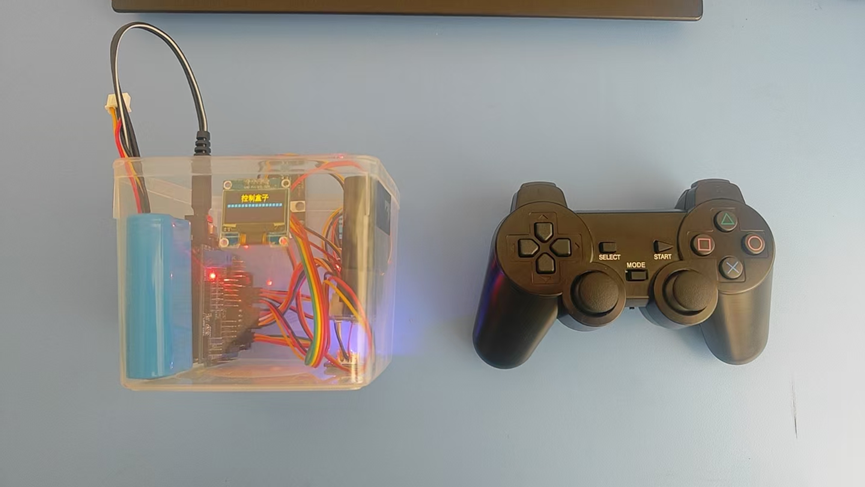
用PS2手柄玩游戏都见过,但是用没有蓝牙的PS2手柄控制电脑,操控红外设备还是第一次见。这篇文章将让你的PS2手柄摇身一变,让你知道PS2手柄不光只能连上ps2主机玩游戏,还可以制现实生活里的万物。
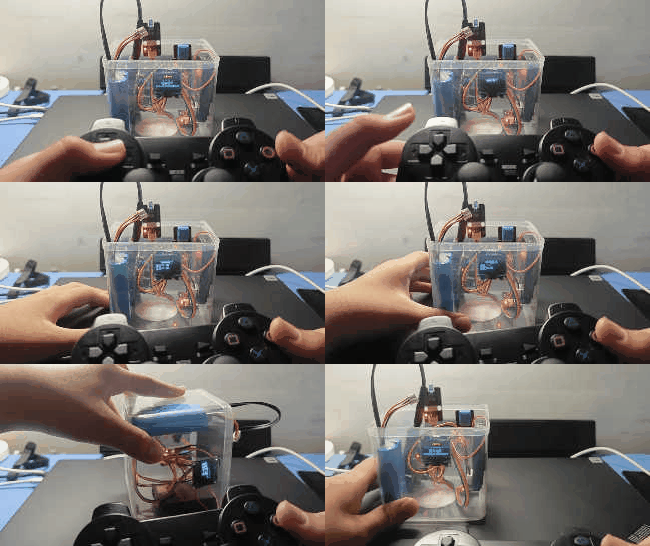
ps2手柄与Leonardo控制万物,基于Leonardo的控制盒子(v1.0)图1
【硬件列表】
  
名称
  
数量
作用
  
1Arduino leonarod
  
1
核心算力和控制
  
2PS2手柄接受模块
  
1
发射信号
  
3红外发射模块
  
1
发射红外信号
  
4oled12864
  
1
显示器
  
5温湿度传感器
  
1
传感温湿度
  
6倾斜传感器
  
1
传感是否倾斜
  
7USB线
  
1
烧录和控制电脑
  
8三拼线
  
若干
传输信号
【实验过程】
1链接各个模块与主板:
(1)             将PS2手柄接收器的DAT, CMD, CS,CLK分别连在D4-D7引脚。
(2)             将OLED12864显示器SDA和SCL连在D2和D3引脚上(因为和UNO不同,Leonardo的SCL和SDA分别在D3和D2引脚上)
(3)             将DHT11温湿度传感器连接在D9引脚
(4)             将红外发射连接在D8引脚
(5)             将倾斜传感器连接在D10引脚
2 注入灵魂(烧录代码)(我是用MAND+做的程序是我复制的,亲谅解,后续会学会使用IDE的)
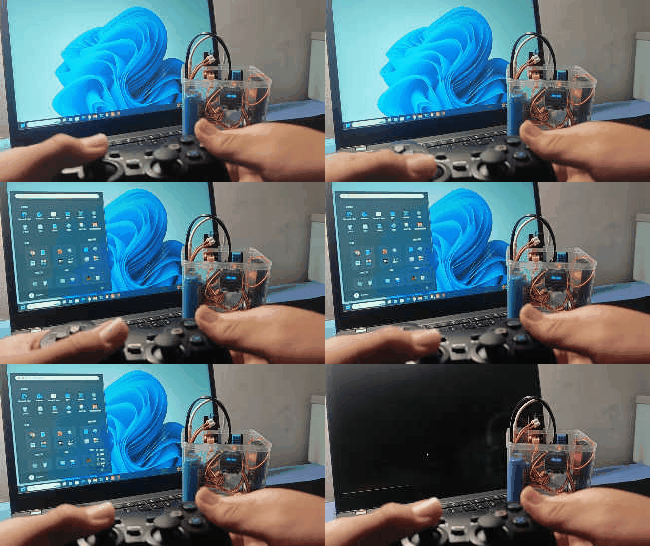
(1)     功能1:操作电脑——使用ps2手柄左摇杆控制鼠标,右摇杆方向键上下左右,L2,R2为鼠标左右键,L1,R2为Ctrl,shift,键。
  1. void DF_DianNaoCaoZuo() {
  2.         Keyboard.releaseAll();
  3.         oled12864.fillScreen(0);
  4.         oled12864.setCursor(0, 1);
  5.         oled12864.print("    操作电脑");
  6.         while (!ps2x.Button(PSB_SELECT)) {
  7.                 ps2x.read_gamepad();
  8.                 delay(30);
  9.                 if ((ps2x.Analog(PSS_LX)>=230)) {
  10.                         Mouse.move(20, 0, 0);
  11.                 }
  12.                 if ((ps2x.Analog(PSS_LY)>=230)) {
  13.                         Mouse.move(0, 20, 0);
  14.                 }
  15.                 if ((ps2x.Analog(PSS_LY)<=40)) {
  16.                         Mouse.move(0, -20, 0);
  17.                 }
  18.                 if ((ps2x.Analog(PSS_LX)<=40)) {
  19.                         Mouse.move(-20, 0, 0);
  20.                 }
  21.                 if (((ps2x.Analog(PSS_LX)>=140) && (ps2x.Analog(PSS_LX)<230))) {
  22.                         Mouse.move(10, 0, 0);
  23.                 }
  24.                 if (((ps2x.Analog(PSS_LY)>=160) && (ps2x.Analog(PSS_LY)<230))) {
  25.                         Mouse.move(0, 10, 0);
  26.                 }
  27.                 if (((ps2x.Analog(PSS_LY)>40) && (ps2x.Analog(PSS_LY)<100))) {
  28.                         Mouse.move(0, -10, 0);
  29.                 }
  30.                 if (((ps2x.Analog(PSS_LX)>40) && (ps2x.Analog(PSS_LX)<100))) {
  31.                         Mouse.move(-10, 0, 0);
  32.                 }
  33.                 if (ps2x.Button(PSB_RED)) {
  34.                         delay(20);
  35.                         Keyboard.press(KEY_F3);
  36.                 }
  37.                 else {
  38.                         Keyboard.release(KEY_F3);
  39.                 }
  40.                 if (ps2x.Button(PSB_GREEN)) {
  41.                         delay(20);
  42.                         Keyboard.press(KEY_F1);
  43.                 }
  44.                 else {
  45.                         Keyboard.release(KEY_F1);
  46.                 }
  47.                 if (ps2x.Button(PSB_PINK)) {
  48.                         delay(20);
  49.                         Keyboard.press(KEY_F2);
  50.                 }
  51.                 else {
  52.                         Keyboard.release(KEY_F2);
  53.                 }
  54.                 if (ps2x.Button(PSB_BLUE)) {
  55.                         delay(20);
  56.                         Keyboard.press(KEY_F4);
  57.                 }
  58.                 else {
  59.                         Keyboard.release(KEY_F4);
  60.                 }
  61.                 if ((ps2x.Button(PSB_PAD_RIGHT) || (ps2x.Analog(PSS_RX)>=200))) {
  62.                         delay(20);
  63.                         Keyboard.press(KEY_RIGHT_ARROW);
  64.                 }
  65.                 else {
  66.                         Keyboard.release(KEY_RIGHT_ARROW);
  67.                 }
  68.                 if ((ps2x.Button(PSB_PAD_DOWN) || (ps2x.Analog(PSS_RY)>=200))) {
  69.                         delay(20);
  70.                         Keyboard.press(KEY_DOWN_ARROW);
  71.                 }
  72.                 else {
  73.                         Keyboard.release(KEY_DOWN_ARROW);
  74.                 }
  75.                 if ((ps2x.Button(PSB_PAD_UP) || (ps2x.Analog(PSS_RY)<=100))) {
  76.                         delay(20);
  77.                         Keyboard.press(KEY_UP_ARROW);
  78.                 }
  79.                 else {
  80.                         Keyboard.release(KEY_UP_ARROW);
  81.                 }
  82.                 if ((ps2x.Button(PSB_PAD_LEFT) || (ps2x.Analog(PSS_RX)<=100))) {
  83.                         delay(20);
  84.                         Keyboard.press(KEY_LEFT_ARROW);
  85.                 }
  86.                 else {
  87.                         Keyboard.release(KEY_LEFT_ARROW);
  88.                 }
  89.                 if (ps2x.Button(PSB_L1)) {
  90.                         delay(20);
  91.                         Keyboard.press(KEY_LEFT_CTRL);
  92.                 }
  93.                 else {
  94.                         Keyboard.release(KEY_LEFT_CTRL);
  95.                 }
  96.                 if (ps2x.Button(PSB_L2)) {
  97.                         delay(20);
  98.                         Mouse.press(MOUSE_LEFT);
  99.                 }
  100.                 else {
  101.                         Mouse.release(MOUSE_LEFT);
  102.                 }
  103.                 if (ps2x.Button(PSB_R1)) {
  104.                         delay(20);
  105.                         Keyboard.press(KEY_RIGHT_SHIFT);
  106.                 }
  107.                 else {
  108.                         Keyboard.release(KEY_RIGHT_SHIFT);
  109.                 }
  110.                 if (ps2x.Button(PSB_R2)) {
  111.                         delay(20);
  112.                         Mouse.press(MOUSE_RIGHT);
  113.                 }
  114.                 else {
  115.                         Mouse.release(MOUSE_RIGHT);
  116.                 }
  117.                 ps2x.read_gamepad();
  118.                 delay(30);
  119.         }
  120.         DF_XuanZeMoShi();
  121. }
复制代码

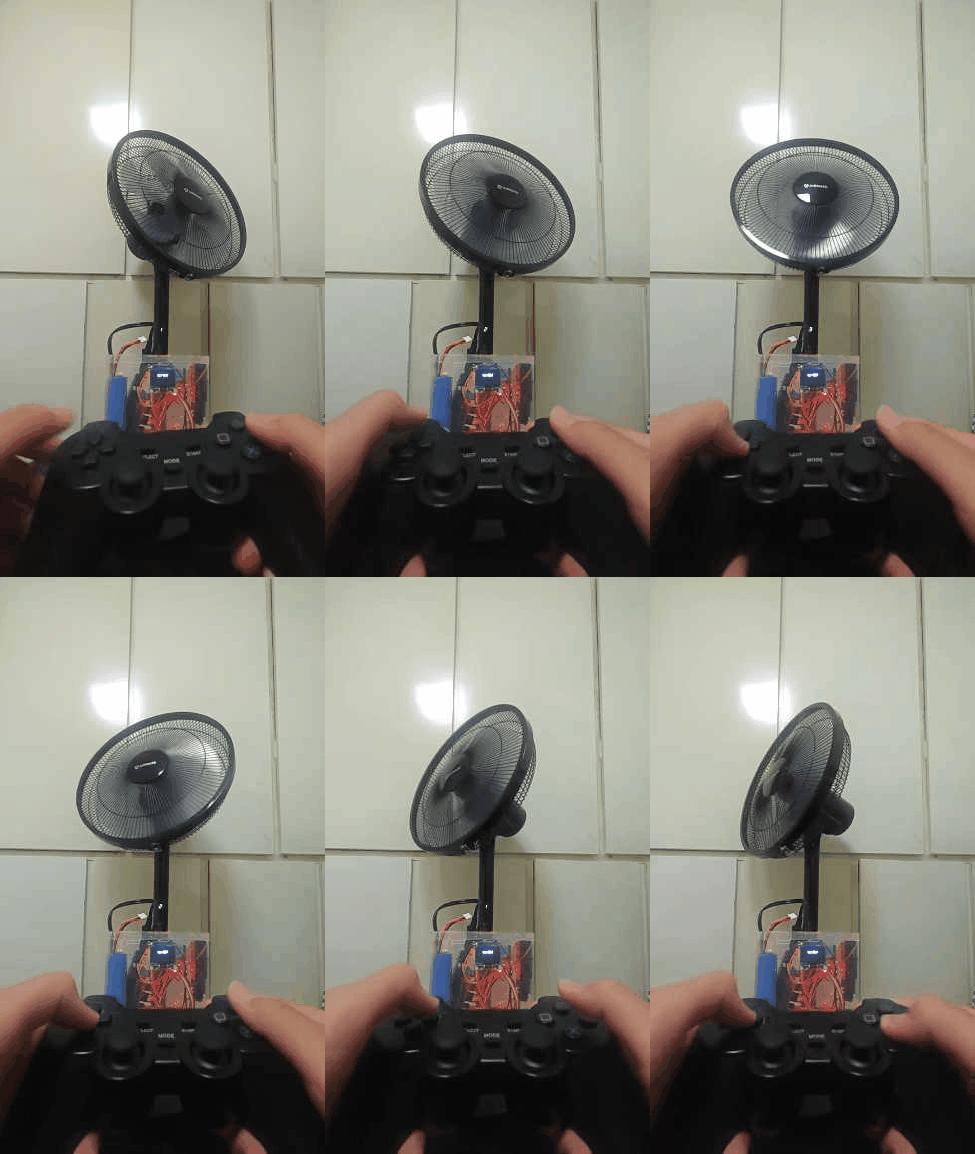
(2)     功能2:红外操作,可以用ps2的按键状态传感,用红外发射模块控制红外设备。
  1. void DF_HongWaiCaoZuo() {
  2.         oled12864.fillScreen(0);
  3.         oled12864.setCursor(0, 1);
  4.         oled12864.print("    红外操作");
  5.         while (!ps2x.Button(PSB_SELECT)) {
  6.                 ps2x.read_gamepad();
  7.                 delay(30);
  8.                 if (ps2x.Button(PSB_RED)) {
  9.                         delay(200);
  10.                         // 开关
  11.                         remoteSend_8.sendNEC(0xFF00FF, 32);
  12.                         delay(150);
  13.                 }
  14.                 if (ps2x.Button(PSB_GREEN)) {
  15.                         delay(200);
  16.                         // 摆头
  17.                         remoteSend_8.sendNEC(0xFF40BF, 32);
  18.                         delay(150);
  19.                 }
  20.                 if (ps2x.Button(PSB_PAD_UP)) {
  21.                         delay(200);
  22.                         // 风量
  23.                         remoteSend_8.sendNEC(0xFF20DF, 32);
  24.                         delay(150);
  25.                 }
  26.                 if (ps2x.Button(PSB_PAD_DOWN)) {
  27.                         for (int index = 0; index < 7; index++) {
  28.                                 delay(30);
  29.                                 remoteSend_8.sendNEC(0xFF20DF, 32);
  30.                                 delay(20);
  31.                         }
  32.                 }
  33.                 if (ps2x.Button(PSB_PAD_RIGHT)) {
  34.                         delay(200);
  35.                         // 定时
  36.                         remoteSend_8.sendNEC(0xFF609F, 32);
  37.                         delay(150);
  38.                 }
  39.                 if (ps2x.Button(PSB_PAD_LEFT)) {
  40.                         for (int index = 0; index < 9; index++) {
  41.                                 delay(30);
  42.                                 remoteSend_8.sendNEC(0xFF609F, 32);
  43.                                 delay(20);
  44.                         }
  45.                 }
  46.                 if (ps2x.Button(PSB_BLUE)) {
  47.                         delay(200);
  48.                         // 静音
  49.                         remoteSend_8.sendNEC(0xFF10EF, 32);
  50.                         delay(150);
  51.                 }
  52.                 ps2x.read_gamepad();
  53.                 delay(30);
  54.         }
  55.         DF_XuanZeMoShi();
  56. }
复制代码

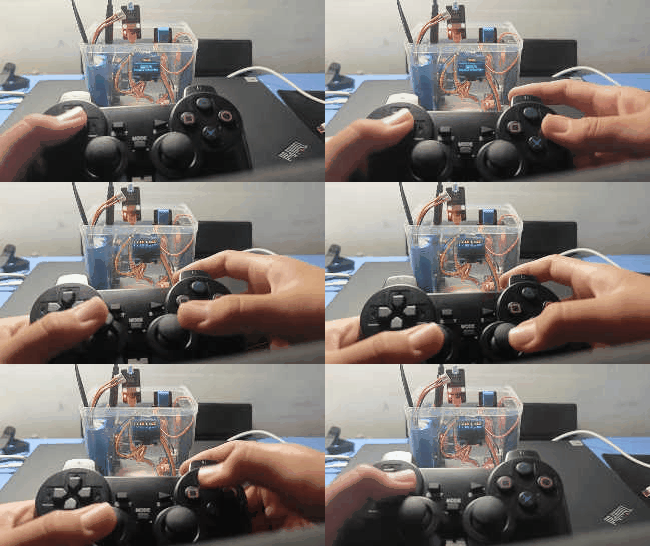
(3)     功能3:通道显示,可以显示出来ps2手柄的各个通道的数值。
  1. void DF_TongDaoXianShi() {
  2.         oled12864.fillScreen(0);
  3.         while (!ps2x.Button(PSB_SELECT)) {
  4.                 ps2x.read_gamepad();
  5.                 delay(30);
  6.                 oled12864.setCursor(0, 0);
  7.                 oled12864.print((String("L x:") + String(ps2x.Analog(PSS_LX))));
  8.                 oled12864.setCursor(65, 0);
  9.                 oled12864.print((String("L y:") + String(ps2x.Analog(PSS_LY))));
  10.                 oled12864.setCursor(0, 1);
  11.                 oled12864.print((String("R x:") + String(ps2x.Analog(PSS_RX))));
  12.                 oled12864.setCursor(65, 1);
  13.                 oled12864.print((String("R y:") + String(ps2x.Analog(PSS_RY))));
  14.                 if (ps2x.Button(PSB_GREEN)) {
  15.                         oled12864.setCursor(0, 2);
  16.                         oled12864.print(" △ ");
  17.                 }
  18.                 else {
  19.                         oled12864.setCursor(0, 2);
  20.                         oled12864.print("   ");
  21.                 }
  22.                 if (ps2x.Button(PSB_RED)) {
  23.                         oled12864.setCursor(25, 2);
  24.                         oled12864.print(" ○ ");
  25.                 }
  26.                 else {
  27.                         oled12864.setCursor(25, 2);
  28.                         oled12864.print("   ");
  29.                 }
  30.                 if (ps2x.Button(PSB_BLUE)) {
  31.                         oled12864.setCursor(51, 2);
  32.                         oled12864.print(" x ");
  33.                 }
  34.                 else {
  35.                         oled12864.setCursor(51, 2);
  36.                         oled12864.print("   ");
  37.                 }
  38.                 if (ps2x.Button(PSB_PINK)) {
  39.                         oled12864.setCursor(76, 2);
  40.                         oled12864.print(" □ ");
  41.                 }
  42.                 else {
  43.                         oled12864.setCursor(76, 2);
  44.                         oled12864.print("   ");
  45.                 }
  46.                 if (ps2x.Button(PSB_PAD_UP)) {
  47.                         oled12864.setCursor(0, 3);
  48.                         oled12864.print(" ↑ ");
  49.                 }
  50.                 else {
  51.                         oled12864.setCursor(0, 3);
  52.                         oled12864.print("   ");
  53.                 }
  54.                 if (ps2x.Button(PSB_PAD_RIGHT)) {
  55.                         oled12864.setCursor(25, 3);
  56.                         oled12864.print(" → ");
  57.                 }
  58.                 else {
  59.                         oled12864.setCursor(25, 3);
  60.                         oled12864.print("   ");
  61.                 }
  62.                 if (ps2x.Button(PSB_PAD_DOWN)) {
  63.                         oled12864.setCursor(51, 3);
  64.                         oled12864.print(" ↓ ");
  65.                 }
  66.                 else {
  67.                         oled12864.setCursor(51, 3);
  68.                         oled12864.print("   ");
  69.                 }
  70.                 if (ps2x.Button(PSB_PAD_LEFT)) {
  71.                         oled12864.setCursor(76, 3);
  72.                         oled12864.print(" ← ");
  73.                 }
  74.                 else {
  75.                         oled12864.setCursor(76, 3);
  76.                         oled12864.print("   ");
  77.                 }
  78.         }
  79.         DF_XuanZeMoShi();
  80. }
复制代码

(4)     功能4:睡眠模式,可以让显示器进入睡眠模式进行温湿度显示。
  1. void DF_ShuiMianMoShi() {
  2.         oled12864.fillScreen(0);
  3.         oled12864.setCursor(0, 1);
  4.         oled12864.print("    睡眠模式");
  5.         delay(3000);
  6.         while (!(ps2x.Button(PSB_SELECT) || (!digitalRead(10)))) {
  7.                 oled12864.setCursorLine(3);
  8.                 oled12864.printLine(dht11_9.getTemperature());
  9.                 oled12864.setCursorLine(4);
  10.                 oled12864.printLine(dht11_9.getHumidity());
  11.         }
  12.         DF_XuanZeMoShi();
  13. }
复制代码

【功能演示】
1,       操作电脑
ps2手柄与Leonardo控制万物,基于Leonardo的控制盒子(v1.0)图4
2,       红外操作
ps2手柄与Leonardo控制万物,基于Leonardo的控制盒子(v1.0)图5
3,       通道显示
ps2手柄与Leonardo控制万物,基于Leonardo的控制盒子(v1.0)图2
4,       睡眠模式
ps2手柄与Leonardo控制万物,基于Leonardo的控制盒子(v1.0)图3
[size=18.6667px]【总结】
        本项目利用了主要利用Leonardo的usb通讯并且使用电器的红外编码来实现控制电脑和红外电器的如果有感兴趣的朋友欢迎来网盘下载程序https://ayccode.lanzoue.com/b01eupl2af密码:ayccode
您需要登录后才可以回帖 登录 | 立即注册

本版积分规则

为本项目制作心愿单
购买心愿单
心愿单 编辑
[[wsData.name]]

硬件清单

  • [[d.name]]
btnicon
我也要做!
点击进入购买页面
上海智位机器人股份有限公司 沪ICP备09038501号-4 备案 沪公网安备31011502402448

© 2013-2026 Comsenz Inc. Powered by Discuz! X3.4 Licensed

mail