上课笔记。
这周讲到了Event-driven Programming。
先举个栗子,这是一个猜数字的小游戏:
- # template for "Guess the number" mini-project
- # input will come from buttons and an input field
- # all output for the game will be printed in the console
- import simplegui
- import random
-
- secret_number = 0
- end = 100
- remaining_guess = 7
-
- # helper function to start and restart the game
- def new_game():
- # initialize global variables used in your code here
- global secret_number
- global end
- secret_number = random.randrange(0, end)
-
- print "New game. Range is from 0 to", end
- print "Number of remaining guesses is", remaining_guess
- print ""
-
-
- # define event handlers for control panel
- def range100():
- # button that changes the range to [0,100) and starts a new game
- global remaining_guess
- remaining_guess = 7
-
- global end
- end = 100
-
- new_game()
-
-
- def range1000():
- # button that changes the range to [0,1000) and starts a new game
- global remaining_guess
- remaining_guess = 10
-
- global end
- end = 1000
-
- new_game()
-
- def input_guess(guess):
- # main game logic goes here
- global secret_number
- global remaining_guess
-
- guessi = int(guess)
- print "Guess was", guessi
- remaining_guess -= 1
- print "Number of remaining guesses is", remaining_guess
-
- if guessi < secret_number:
- print "Higher"
- elif guessi > secret_number:
- print "Lower"
- else:
- print "Correct"
- print ""
- range100()
-
- print ""
-
- if remaining_guess == 0:
- print "You lose."
- print ""
- range100()
-
-
- # create frame
- frame = simplegui.create_frame("game", 200, 200)
-
- # register event handlers for control elements and start frame
- frame.add_button('Range is [0,100)', range100, 200)
- frame.add_button('Range is [0,1000)', range1000, 200)
-
- frame.add_input("Input your guess: ", input_guess, 50)
-
-
-
- # call new_game
- new_game()
-
- # always remember to check your completed program against the grading rubric
http://www.codeskulptor.org/#user41_5azXiELlsx_1.py
这个网址要翻一下墙的哈 - -
而且由于simpleGUI这个API的特殊性,貌似只能在codeskulpter网站运行。
点开运行了之后是这样的:

运行结果是这样的:
- New game. Range is from 0 to 100
- Number of remaining guesses is 7
-
- Guess was 25
- Number of remaining guesses is 6
- Higher
-
- Guess was 50
- Number of remaining guesses is 5
- Lower
-
- Guess was 38
- Number of remaining guesses is 4
- Lower
-
- Guess was 31
- Number of remaining guesses is 3
- Higher
-
- Guess was 34
- Number of remaining guesses is 2
- Lower
-
- Guess was 33
- Number of remaining guesses is 1
- Lower
-
- Guess was 32
- Number of remaining guesses is 0
- Correct
-
- New game. Range is from 0 to 100
- Number of remaining guesses is 7
这个module的重点是,event-driven programming的思想。
我们知道,一般玩个什么游戏、使个什么交互应用,每次有不同的操作,就会产生不同的结果。
如下图所示,初始化之后,根据用户的操作,会产生不同的触发事件,当有input event进来的时候,就会等待handler来进行处理,知道最后程序运行结束。
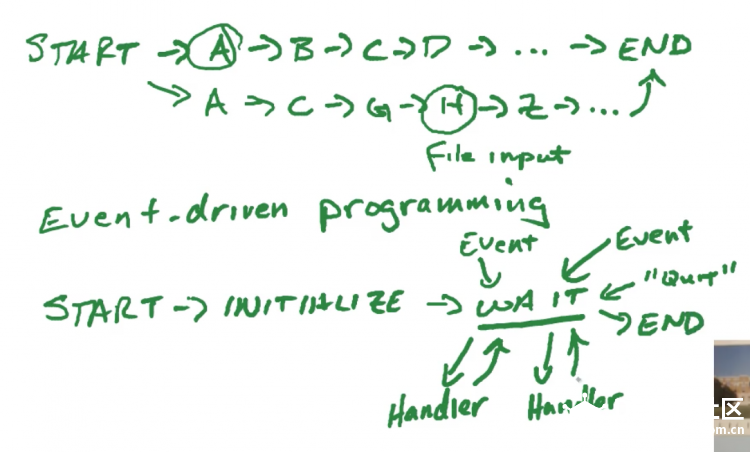
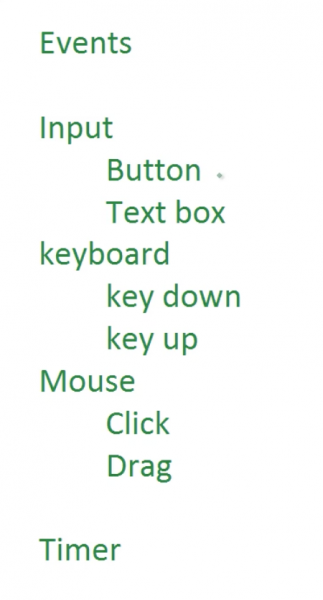
event的种类常见的以下几种:
一般使用下面的program structure是比较合理而符合人的认知以及写代码结构的:

那么这就是刚才的小program里的代码编写顺序。
几点需要注意的tips:
1. 全局变量与局部变量
Python与其他编程语言比较相异的一点是,Python对于变量的定义区分基本上是没有的- -。
因此就会产生一点需要注意的问题。
- num1 = 1
- print "num1 =", num1
-
- def fun():
- num2 = num1 + 1
- print "num2 =", num2
-
- fun()
-
- print "num1 =", num1
- print "num2 =", num2
运行这个Python文件,输出结果是这样的:
- num1 = 1
- num2 = 2
- num1 = 1
- num2 =
- Traceback (most recent call last):
- Line 11, in <module>
- print "num2 =", num2
- NameError: name 'num2' is not defined
出现了一个NameError,这是为什么呢?
因为在函数体内部定义的变量是局部变量,当程序执行调用函数体的时候才会产生,当函数体调用结束后这个局部变量也就随之消失了。因此在全局中要求输出num2的时候它已经不在了。
而全局变量则不然,它是随着程序一直存在的。
把上面的例子改一改:
- num1 = 1
- print "num1 =", num1
-
- def fun():
- num1 = 2
- num2 = num1 + 1
- print "num2 =", num2
-
- fun()
-
- print "num1 =", num1
运行结果是:
- num1 = 1
- num2 = 3
- num1 = 1
我们看到,最后输出的num1还是全局变量的num1,而非函数体中的那一个,函数体中的那一个早就随函数调用的结束消失了。
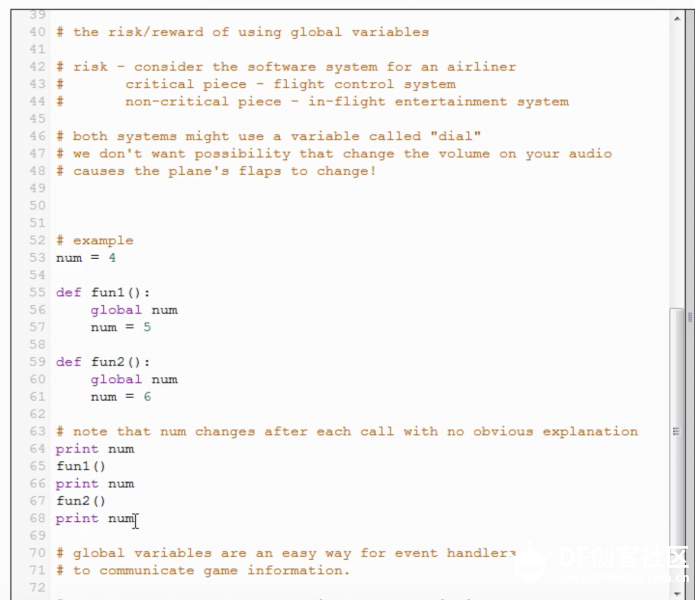
那么,如果我们要在函数中用到全局变量,我们应该怎么用呢?
在函数中变量前加global申明即可。
如下例所示:
- num = 4
-
- def fun1():
- global num
- num = 5
-
- def fun2():
- global num
- num = 6
-
- print num
- fun1()
- print num
- fun2()
- print num
运行结果是:
复制代码
2. 输入值的转换
在课上使用的simpleGUI的API中,使用add_input这个接口输入的值都是string类型的,因此如果我们需要数字,必须进行强制类型转换。
在开头的例子中,用的是这行代码:
复制代码
3. 代码规范(参见Python官方文档https://docs.python.org/release/2.6.8/tutorial/controlflow.html#intermezzo-coding-style)
提高易读性,减少易错性。
- Use 4-space indentation, and no tabs.
4 spaces are a good compromise between small indentation (allows greater nesting depth) and large indentation (easier to read). Tabs introduce confusion, and are best left out.- Wrap lines so that they don’t exceed 79 characters.
- This helps users with small displays and makes it possible to have several code files side-by-side on larger displays.
- Use blank lines to separate functions and classes, and larger blocks of code inside functions.
- When possible, put comments on a line of their own.
- Use docstrings.
- Use spaces around operators and after commas, but not directly inside bracketing constructs: a = f(1, 2) + g(3, 4).
- Name your classes and functions consistently; the convention is to use CamelCase for classes and lower_case_with_underscores for functions and methods. Always use self as the name for the first method argument (see A First Look at Classes for more on classes and methods).
- Don’t use fancy encodings if your code is meant to be used in international environments. Plain ASCII works best in any case.
|