想体验和小宝宝一起生活吗?婴儿抚育机器人可以帮到你!
2017-07-099444

AI 快速预览详细
婴儿抚育机器人是一款帮助准爸妈体验如何与婴儿相处的机器人。它通过陀螺仪和传感器指导正确的抱姿,Realsense扫描分析室内环境预警危险物品,模拟婴儿学习说话。硬件清单包括DF Robot (SKU:ROB0112)履带机器人移动平台、Intel Realsense Camera R200、Lattepanda等。制作步骤包括3D建模、连接硬件、组装履带机器人移动平台、上传代码和组装外壳。这款机器人可以帮助准爸妈提前感受育儿体验,为未来做好准备。
|
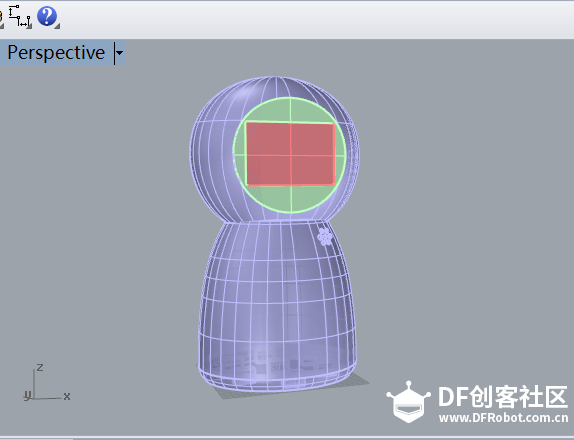
请看视频: 项目简介: 这是一款帮助您体验如何与婴儿相处的机器人。 在第一个关卡,我们的机器人内置了几款通用标准姿势,通过陀螺仪和传感器判断当前触碰位置及压力值,指导准爸妈们学习正确的抱姿。进入第二关后机器人通过Realsense扫描分析室内环境,当遇到可能对婴儿造成威胁的物品时,会预警提示,帮助营造一个安全的家庭环境。在“说说说”环节,机器人会模拟婴儿学习说话的情境,只有当反复教她说某个词句到达一定量次后,她才会掌握这个词句。同时它会默默记录您的语言习惯,不时说出您常说的词句,让您意识到作为家长在孩子的成长过程中扮演着“被学习者”的角色。 如果您想要个孩子,可以借助这款机器人提前感受当爸妈的体验,为未来对的婴儿抚育做好准备;如果您不确定会不会要孩子,和机器人互动的体验也可以作为参考依据。 硬件清单: DF Robot (SKU:ROB0112)履带机器人移动平台 Intel RealsenseCamera R200 Lattepanda 显示屏 Arduino 触摸传感器 陀螺仪 微型音箱或喇叭 USB麦克风 LED灯珠 5号电池 可能使用的工具及设备: 十字螺丝刀 热熔胶枪 3D打印机 缝纫机 激光切割机 等 使用场景: 制作步骤: 1.3D建模—— 打印3D模型 —— 拼接3D模型 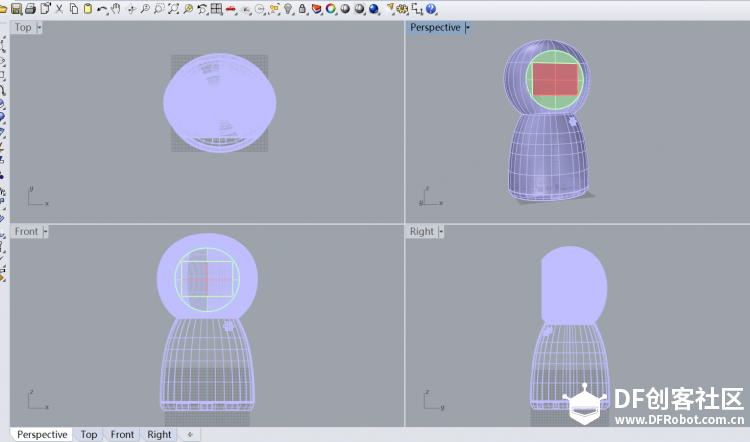 2.连接Intel Realsense Camera R200、Lattepanda与显示屏、Arduino、触摸传感器、陀螺仪、喇叭与USB麦克风和LED 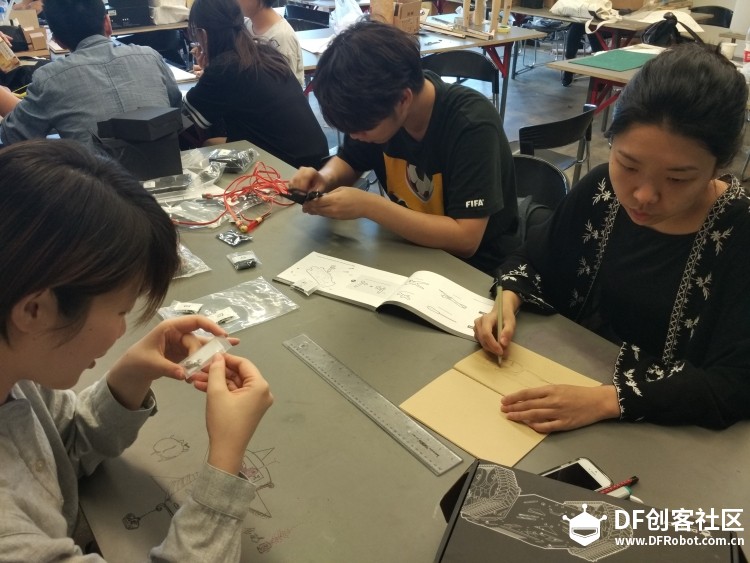 a a3.组装DF Robot (SKU:ROB0112) 履带机器人移动平台   4.上传代码 [mw_shl_code=csharp,true]using System; using System.Collections.Generic; using System.ComponentModel; using System.Data; using System.Drawing; using System.Linq; using System.Text; using System.Threading.Tasks; using System.Windows.Forms; using System.Threading; namespace version2 { public partial class Form1 : Form { private int index; //private string[] vocabulary = new string[] { }; private PXCMSession session; private bool closing = false; private volatile bool stop = true; //protected string curr_module_name; public bool IsChinese; protected int curr_volume; protected int curr_pitch; protected int curr_speech_rate; public bool _isSuspended = false; Thread thread_voice_recognition; Thread thread_check_suspended; public Form1(PXCMSession session) { InitializeComponent(); this.session = session; Stop.Enabled = false; English.Checked = true; } private void Start_Click(object sender, EventArgs e) { Start.Enabled = false; Stop.Enabled = true; stop = false; //DoVoiceRecognition(); //Thread thread_face_tracking = new Thread(DoVoiceRecognition); thread_voice_recognition = new Thread(DoVoiceRecognition); thread_voice_recognition.Start(); System.Threading.Thread.Sleep(5); thread_check_suspended = new Thread(CheckSuspended); thread_check_suspended.Start(); /*Thread thread_speechSynthesis = new Thread(DoSpeechSynthesis); thread_speechSynthesis.Start(); System.Threading.Thread.Sleep(5);*/ English.Enabled = false; Chinese.Enabled = false; textBox1.Enabled = false; textBox2.Enabled = false; textBox3.Enabled = false; //DoVoiceRecognition(); //DoSpeechSynthesis(); } public void CheckSuspended() { if(_isSuspended) { thread_voice_recognition.Suspend(); } else { if(thread_voice_recognition.ThreadState == ThreadState.Suspended) { thread_voice_recognition.Resume(); } } } public string AlertToString(PXCMSpeechRecognition.AlertType label) { switch (label) { case PXCMSpeechRecognition.AlertType.ALERT_SNR_LOW: return "SNR_LOW"; case PXCMSpeechRecognition.AlertType.ALERT_SPEECH_UNRECOGNIZABLE: return "SPEECH_UNRECOGNIZABLE"; case PXCMSpeechRecognition.AlertType.ALERT_VOLUME_HIGH: return "VOLUME_HIGH"; case PXCMSpeechRecognition.AlertType.ALERT_VOLUME_LOW: return "VOLUME_LOW"; case PXCMSpeechRecognition.AlertType.ALERT_SPEECH_BEGIN: return "SPEECH_BEGIN"; case PXCMSpeechRecognition.AlertType.ALERT_SPEECH_END: return "SPEECH_END"; case PXCMSpeechRecognition.AlertType.ALERT_RECOGNITION_ABORTED: return "REC_ABORT"; case PXCMSpeechRecognition.AlertType.ALERT_RECOGNITION_END: return "REC_END"; } return "Unknown"; } //private delegate void VoiceRecognitionCompleted(); private void DoVoiceRecognition() { //bool _isChinese = this.IsChinese; VoiceRecognition vr = new VoiceRecognition(); vr._isChinese = this.IsChinese; vr.DoIt(this, session); /*this.Invoke(new VoiceRecognitionCompleted( delegate { Start.Enabled = true; Stop.Enabled = false; //Form1.Enabled = true; if (closing) Close(); } ));*/ } /*private void DoSpeechSynthesis() { int volume = int.Parse(textBox1.Text); int pitch = int.Parse(textBox2.Text); int rate = int.Parse(textBox3.Text); bool _isChinese = this.IsChinese; SpeechSynthesis ss = new SpeechSynthesis(); ss.DoIt(volume, pitch, rate, 1, "Today will be sunday", _isChinese); }*/ private delegate void TreeViewUpdateDelegate(string line); public void PrintConsole(string line) { Result.Invoke(new TreeViewUpdateDelegate(delegate(string line1) { Result.Nodes.Add(line1).EnsureVisible(); }), new object[] { line }); } public void PrintStatus(string line) { //Status2.Invoke(new TreeViewUpdateDelegate(delegate(string line1) { Status2.Nodes.Add(line1).EnsureVisible(); }), new object[] { line }); System.Console.WriteLine(line); } private delegate void ConsoleReplaceTextDelegate(TreeNode tn1, string text); public static string TrimScore(string s) { s = s.Trim(); int x = s.IndexOf('['); if (x < 0) return s; return s.Substring(0, x); } public void ClearScores() { foreach (TreeNode n in Result.Nodes) { string s = TrimScore(n.Text); if (s.Length > 0) Result.Invoke(new ConsoleReplaceTextDelegate(delegate(TreeNode tn1, string text) { tn1.Text = text; }), new object[] { n, s }); } } public void SetScore(int label, int confidence) { for (int i = 0; i < Result.Nodes.Count; i++) { string s = TrimScore(Result.Nodes.Text); if (s.Length == 0) continue; if ((label--) != 0) continue; Result.Invoke(new ConsoleReplaceTextDelegate(delegate(TreeNode tn1, string text) { tn1.Text = text; }), new object[] { Result.Nodes, Result.Nodes.Text + " [" + confidence + "%]" }); break; } } private void Stop_Click(object sender, EventArgs e) { Start.Enabled = true; Stop.Enabled = false; stop = true; English.Enabled = true; Chinese.Enabled = true; textBox3.Enabled = true; textBox2.Enabled = true; textBox1.Enabled = true; } private void English_Click(object sender, EventArgs e) { label1.Text = "Volume"; label2.Text = "Pitch"; label3.Text = "Rate"; Start.Text = "Start"; Stop.Text = "Stop"; this.IsChinese = false; } private void Chinese_Click(object sender, EventArgs e) { label1.Text = "音量"; label2.Text = "音调"; label3.Text = "音速"; Start.Text = "开始"; Stop.Text = "结束"; this.IsChinese = true; } } } [/mw_shl_code] 5.组装外壳与硬件  现在你拥有一个像小宝宝一样的机器人了。 我们还在考虑,在你有了真正的小宝宝以后,能不能让它变身成宝宝的玩伴。 |
-
微信图片_20170709164135.png (61.93 KB, 下载次数: 1680)

-
微信图片_20170709185907.jpg (107.51 KB, 下载次数: 1740)