炫书包
2017-08-271.6万
AI 快速预览详细
这个项目是为小学毕业的孩子准备的一款“我的世界”夜光书包,通过添加LED灯带和传感器,实现了根据环境光强自动开关灯光、蜂鸣声音提示等功能。材料清单包括炫彩WS2812 LED灯带、模拟环境光线传感器、数字蜂鸣器模块等。最终效果是书包在夜间更加安全且具有炫酷效果,适合STEM教育场景。
|
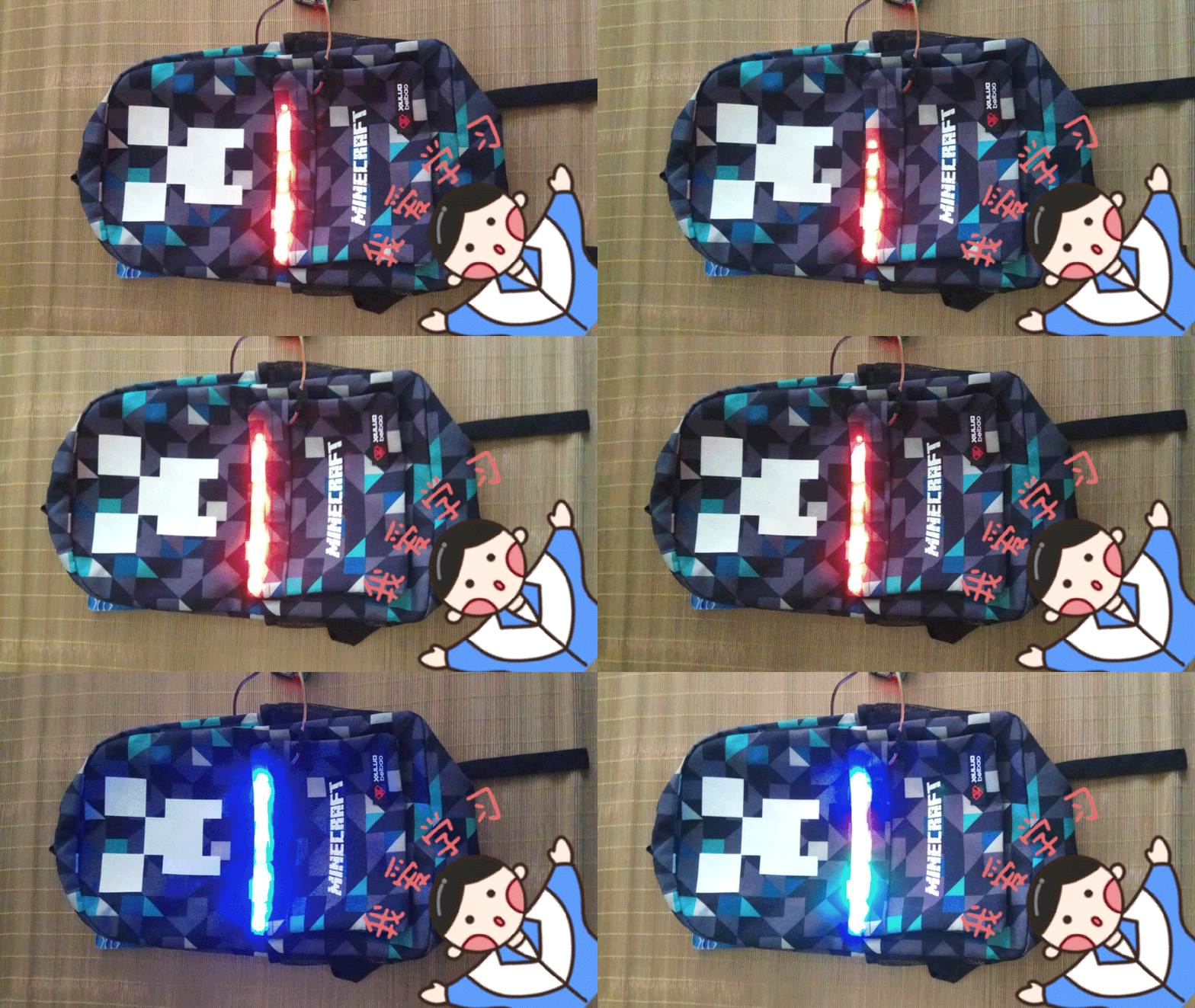
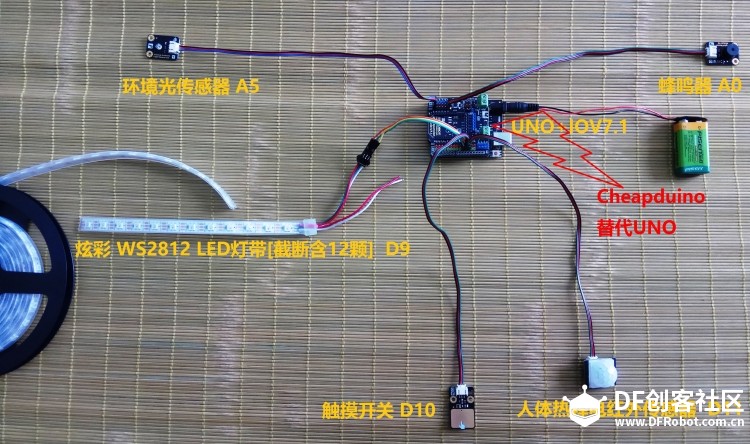
小学毕业的儿子准备上中学了,自己搜索选购了一 款“我的世界“夜光书包。 受其发光警示作用的激发~夜路更安全,我决定用LED灯带和传感器给它添点炫酷效果。  【简单功能】 1.根据环境光强自动决定开关炫彩(随机七种)灯光 2.蜂鸣声音提示背后7米左右有人尾随 3.触摸开关可切换关闭蜂鸣提示 【材料清单】 3.数字蜂鸣器模块 6.UNO+IO传感器扩展板【实验用方便】 【Arduino 代码】 注:书包上的控制器最好选CheapDuino,小巧,低功耗,可用旧手机电池(3.7~4.2V)  [mw_shl_code=cpp,true] #include <Adafruit_NeoPixel.h> #define BUZZER_PIN A0 #define AmbientLight_PIN A5 #define TOUCH_PIN 10 #define PIXEL_PIN 9 #define PIR_PIN 11 // Parameter 1 = number of pixels in strip, neopixel stick has 8 // Parameter 2 = pin number (most are valid) // Parameter 3 = pixel type flags, add together as needed: // NEO_RGB Pixels are wired for RGB bitstream // NEO_GRB Pixels are wired for GRB bitstream, correct for neopixel stick // NEO_KHZ400 400 KHz bitstream (e.g. FLORA pixels) // NEO_KHZ800 800 KHz bitstream (e.g. High Density LED strip), correct for neopixel stick Adafruit_NeoPixel strip = Adafruit_NeoPixel(PIXEL_COUNT, PIXEL_PIN, NEO_GRB + NEO_KHZ800); bool oldTouch = LOW; bool newTouch = LOW; bool touchState = 0; /////////////////////////////////////////////////////// void setup() { pinMode(AmbientLight_PIN, INPUT); pinMode(BUZZER_PIN, OUTPUT); pinMode(PIR_PIN, INPUT); pinMode(TOUCH_PIN, INPUT_PULLUP); strip.begin(); strip.show(); // Initialize all pixels to 'off' } /////////////////////////////////////////////////////// void loop() { // Get current button state. int ambLight = analogRead(AmbientLight_PIN); bool newTouch = digitalRead(TOUCH_PIN); bool pirYes = digitalRead(PIR_PIN); // Check if state changed from high to low (button press). if( ambLight < 5 ){ if( (oldTouch == LOW) && (newTouch == HIGH )){ touchState = 1 - touchState; delay(25); } if(touchState == 1) startShow(random(8)); else if(pirYes == HIGH){ startShow( 7 ); // Red buzzerAlarm(); }else startShow(random(8)); } // Set the last button touchState to the old state. oldTouch = newTouch; } // end ambLight ////////////////////////////////////////////////////////// ////////////////////////////////////////////////////////// void startShow(int i) { switch(i){ case 0: colorWipe(strip.Color(0, 0, 0), 20); // Black/off break; case 1: colorWipe(strip.Color(0, 0, 0), 20); // Black/off colorWipe(strip.Color(255, 0, 0), 20); // Red break; case 2: colorWipe(strip.Color(0, 0, 0), 20); // Black/off colorWipe(strip.Color(0, 255, 0), 20); // Green break; case 3: colorWipe(strip.Color(0, 0, 0), 20); // Black/off colorWipe(strip.Color(0, 0, 255), 20); // Blue break; case 4: colorWipe(strip.Color(0, 0, 0), 20); // Black/off theaterChase(strip.Color(127, 127, 127), 20); // white break; case 5: colorWipe(strip.Color(0, 0, 0), 20); // Black/off rainbow(10); break; case 6: colorWipe(strip.Color(0, 0, 0), 20); // Black/off rainbowCycle(1); break; case 7: colorWipe(strip.Color(0, 0, 0), 20); // Black/off for(int i=0;i<5;i++){ colorWipe(strip.Color(255, 0, 0), 10); // Red colorWipe(strip.Color(0, 0, 0), 10); // Black/off } break; } } //////////////////////////////////// void buzzerAlarm(){ for(int i=0;i<80;i++){ // Buzzer start digitalWrite(BUZZER_PIN, HIGH); delay(1); digitalWrite(BUZZER_PIN, LOW); delay(1); } for(int i=0;i<100;i++){ digitalWrite(BUZZER_PIN, HIGH); delay(2); digitalWrite(BUZZER_PIN, LOW); delay(2); } } // Buzzer end /////////////////////////////////////////////////////// // Fill the dots one after the other with a color void colorWipe(uint32_t c, uint8_t wait) { for(uint16_t i=0; i<strip.numPixels(); i++) { strip.setPixelColor(i, c); strip.show(); delay(wait); } } void rainbow(uint8_t wait) { uint16_t i, j; for(j=0; j<256; j++) { for(i=0; i<strip.numPixels(); i++) { strip.setPixelColor(i, Wheel((i+j) & 255)); } strip.show(); delay(wait); } } // Slightly different, this makes the rainbow equally distributed throughout void rainbowCycle(uint8_t wait) { uint16_t i, j; for(j=0; j<256*5; j++) { // 5 cycles of all colors on wheel for(i=0; i< strip.numPixels(); i++) { strip.setPixelColor(i, Wheel(((i * 256 / strip.numPixels()) + j) & 255)); } strip.show(); delay(wait); } } //Theatre-style crawling lights. void theaterChase(uint32_t c, uint8_t wait) { for (int j=0; j<10; j++) { //do 10 cycles of chasing for (int q=0; q < 3; q++) { for (int i=0; i < strip.numPixels(); i=i+3) { strip.setPixelColor(i+q, c); //turn every third pixel on } strip.show(); delay(wait); for (int i=0; i < strip.numPixels(); i=i+3) { strip.setPixelColor(i+q, 0); //turn every third pixel off } } } } //Theatre-style crawling lights with rainbow effect void theaterChaseRainbow(uint8_t wait) { for (int j=0; j < 256; j++) { // cycle all 256 colors in the wheel for (int q=0; q < 3; q++) { for (int i=0; i < strip.numPixels(); i=i+3) { strip.setPixelColor(i+q, Wheel( (i+j) % 255)); //turn every third pixel on } strip.show(); delay(wait); for (int i=0; i < strip.numPixels(); i=i+3) { strip.setPixelColor(i+q, 0); //turn every third pixel off } } } } // Input a value 0 to 255 to get a color value. // The colours are a transition r - g - b - back to r. uint32_t Wheel(byte WheelPos) { WheelPos = 255 - WheelPos; if(WheelPos < 85) { return strip.Color(255 - WheelPos * 3, 0, WheelPos * 3); } if(WheelPos < 170) { WheelPos -= 85; return strip.Color(0, WheelPos * 3, 255 - WheelPos * 3); } WheelPos -= 170; return strip.Color(WheelPos * 3, 255 - WheelPos * 3, 0); }[/mw_shl_code] |

-
1503722232117.gif (3.52 MB, 下载次数: 8544)