arduino激光报警器tripwire
2018-09-161.3万

AI 快速预览详细
本文介绍了一个基于Arduino的激光报警器项目。通过A4引脚读取光敏电阻值,当检测到光线变化超过20时触发警报。该项目适合零基础新手入门,无需复杂编程技能。硬件清单包括Arduino、光敏电阻等。最终效果是当激光被遮挡时,会触发警报声和LED灯亮起。
|
记得小时候看的国外电影,尤其对里面的激光报警很感兴趣。 看了几个程序,搜索了下资料。就搭建了个激光报警电路 把这个很简单的程序给更多和我一样的小白参考下 Arduino这么多io口,可以完全做一个以其为核心的功能完善的报警系统了。 太多啦下一个项目的主角就是你了先看一个简单点的 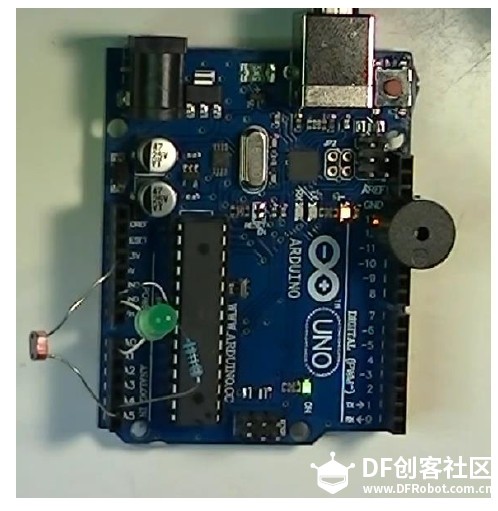 [mw_shl_code=applescript,true] int ldrPin = A4; // the battery and 10K pulldown are connected to a0 int sirenPin = 11; int ledPin = A0; long ldrValue1, ldrValue2; void setup(void) { pinMode (sirenPin,OUTPUT); // set the siren pin as output pinMode (ledPin,OUTPUT); // set the siren pin as output pinMode (ldrPin,INPUT); // set the siren pin as output //Serial.begin(9600); } void loop(void) { ldrValue1 = analogRead(ldrPin); delay(10); ldrValue2 = analogRead(ldrPin); if (ldrValue1-ldrValue2 > 20){ digitalWrite(sirenPin,HIGH); digitalWrite(ledPin,HIGH); delay(1000); } else{ digitalWrite(sirenPin,LOW); digitalWrite(ledPin,LOW); } //Serial.print("Analog reading = "); //Serial.println(ldrValue1); // the raw analog reading } [/mw_shl_code] 再加个警车警报 [mw_shl_code=applescript,true] int ldrPin = A4; // the cell and 10K pulldown are connected to a0 int sirenPin = 11; //pin 3 selected!! int ledPin = A0; long ldrValue1, ldrValue2; void setup(void) { pinMode (sirenPin,OUTPUT); // set the siren pin as output pinMode (ledPin,OUTPUT); // set the siren pin as output pinMode (ldrPin,INPUT); // set the siren pin as output //Serial.begin(9600); } void loop(void) { ldrValue1 = analogRead(ldrPin); delay(10); ldrValue2 = analogRead(ldrPin); if (ldrValue1-ldrValue2 > 20){ //digitalWrite(sirenPin,HIGH); digitalWrite(ledPin,HIGH); //void beep(){ // Toggle the buzzer at various speeds for (byte x = 255 ; x > 50 ; x=x-2) { for (byte y = 0 ; y < 5 ; y=y+2) { digitalWrite(sirenPin,HIGH); //digitalWrite(sirenPin, HIGH); delayMicroseconds(x); digitalWrite(sirenPin, LOW); delayMicroseconds(x); } //delay(1000); } } else{ digitalWrite(sirenPin,LOW); digitalWrite(ledPin,LOW); } //Serial.print("Analog reading = "); //Serial.println(ldrValue1); // the raw analog reading } [/mw_shl_code] |