【2020】Mind+聊天机器人
2020-01-308222
精华项目
AI 快速预览详细
本文介绍了一个基于Mind+的聊天机器人项目,结合了图灵机器人API和Python编程。首先需要获取图灵机器人的API KEY,然后编写Python代码实现与Mind+的本地物联网通信。最终效果是实现语音识别与合成,适合STEM教育场景,帮助孩子进行编程启蒙。
|
((图灵机器人+python+siot本地物联网+Mind+)) 【演示视频】 【python+siot本地物联网】 python与siot本地物联网互通,请参考本人另一帖子https://mc.dfrobot.com.cn/thread-302643-1-1.html#pid441933 【图灵机器人+python】 1、获取API KEY 首先,前往图灵机器人官方网站 http://www.tuling123.com/ 注册账号。 登录后点击 创建机器人 ,填写一些简单的基本信息之后即可创建。 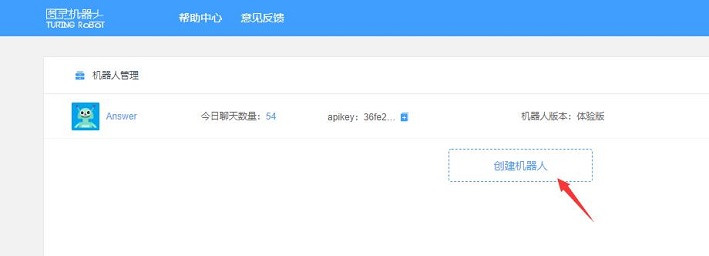 在机器人设置界面找到你的 API KEY ,记录下来。 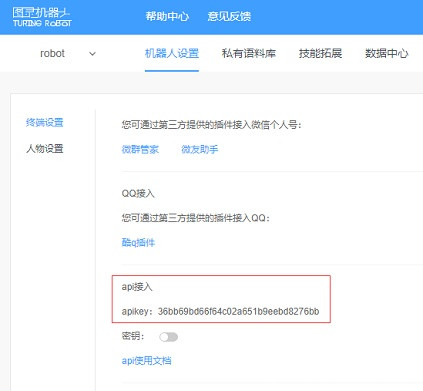 2、在Python中使用图灵机器人API v2.0 基本原理就是使用urllib.request模块,向接口地址发送HTTP POST请求,请求中加入了聊天内容。 speaker.py文件内容: [mw_shl_code=applescript,false]import json 3、在主程序Mask.py中引用speaker.py(两文件在同一文件夹中) import urllib.request def speaker( text_input ): api_url = "http://openapi.tuling123.com/openapi/api/v2" req = { "perception": { "inputText": { "text": text_input }, "selfInfo": { "location": { "city": "河北", "province": "张家口", "street": "涿鹿" } } }, "userInfo": { "apiKey": "API KEY ",#请填写自己申请的 "userId": "OnlyUseAlphabet" } } # print(req) # 将字典格式的req编码为utf8 req = json.dumps(req).encode('utf8') # print(req) http_post = urllib.request.Request(api_url, data=req, headers={'content-type': 'application/json'}) response = urllib.request.urlopen(http_post) response_str = response.read().decode('utf8') # print(response_str) response_dic = json.loads(response_str) # print(response_dic) intent_code = response_dic['intent']['code'] results_text = response_dic['results'][0]['values']['text'] return results_text[/mw_shl_code] 注意红字注释部分 [mw_shl_code=applescript,false]# -*- coding: utf-8 -*- import paho.mqtt.client as mqtt import json import urllib.request import speaker as call#引用speaker.py MQTTHOST = "192.168.0.103"#自己电脑本地IP地址 MQTTPORT = 1883 mqttClient = mqtt.Client() # 连接MQTT服务器 def on_mqtt_connect(): mqttClient.connect(MQTTHOST, MQTTPORT, 60) mqttClient.loop_start() # publish 消息 def on_publish(topic, payload, qos): mqttClient.publish(topic, payload, qos) #print(topic) # 消息处理函数 def on_message_come(lient, userdata, msg): print(msg.topic + " " + ":" +str(msg.payload,encoding='utf-8')) str1 = call.speaker(str(msg.payload,encoding='utf-8')) on_publish("df/tuling", str1, 0)#tuling主题,用于将图灵机器人返回的信息,发送给Mind+ # subscribe 消息 def on_subscribe(): mqttClient.subscribe("df/speaker", 1) mqttClient.on_message = on_message_come # 消息到来处理函数 print("subscribe speaker OK") def main(): on_mqtt_connect() #on_publish("df/speaker", "Hello dfrobot!", 0)#0代表保存在服务器上 #on_publish("df/tuling", "Hello dfrobot!", 0)#0代表保存在服务器上 on_subscribe()#订阅的是speaker主题(自已的主题),用于python接收Mind+传来的信息 while True: #print(mqttClient.is_connected()) pass if __name__ == '__main__': main() [/mw_shl_code] 【Mind+本地物联网siot】Mind+通过本地物联网siot与Python进行通信 1、MQTT及语音识别初始化设置 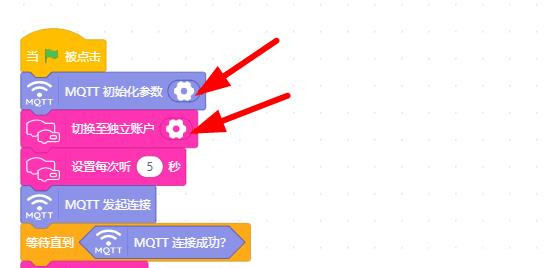 2、语音识别,向本地物联网siot发送语音识别结果 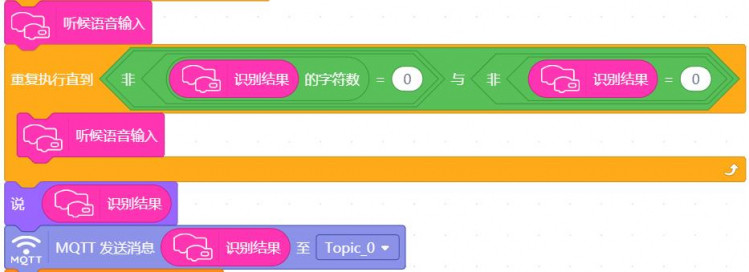  3、当MQTT接收到由Python传来图灵机器人返回的信息,进行相应处理  语音合成时,主程序控制(Microbit)舵机、彩灯,做出反映。  【附件】  语音聊天.rar 语音聊天.rar |