

MicroPython动手做(15)——掌控板之AB按键
2020-04-191.9万
AI 快速预览详细
本文介绍了轻触式按键开关的工作原理和应用。轻触式按键开关是一种电子开关,通过金属弹片受力变化实现通断。它广泛应用于彩色电视机、音响设备、计算机等电子设备中。文章详细解释了按键开关的结构、操作力曲线以及不同类型的按键开关的特点。
|
1、按键开关 主要是指轻触式按键开关,也称之为轻触开关。按键开关是一种电子开关,属于电子元器件类,最早出现在日本[称之为:敏感型开关],使用时以满足操作力的条件向开关操作方向施压开关功能闭合接通,当撤销压力时开关即断开,其内部结构是靠金属弹片受力变化来实现通断的。按键开关由嵌件、基座、弹片、按钮、盖板组成,其中防水类轻触开关在弹片上加一层聚酰亚胺薄膜。 按键开关有接触电阻荷小、精确的操作力误差、规格多样化等方面的优势,在电子设备及白色家电等方面得到广泛的应用如:影音产品、数码产品、遥控器、通讯产品、家用电器、安防产品、玩具、电脑产品、健身器材、医疗器材、验钞笔、雷射笔按键等等。因为按键开关对环境的条件(施压力小于2倍的弹力/环境温湿度条件以及电气性能)大型设备及高负荷的按钮都使用导电橡胶或锅仔开关五金弹片直接来代替,比如医疗器材、电视机遥控器等。 关于五脚按键开关的脚位问题:两个引脚为一组,向开关体正确施压时四个引脚相导通,第五个引脚为接地作用。 按键开关是随着电子技术发展的要求而开发的第四代开关产品,最早的体积为12mm*12mm,8mm*8mm两种,现在为6mm*6mm。产品结构有立式、卧式和卧式带地端三种,现在又有组合式(3M、4M、SM、6M、SM)和电位器按键开关组合两类,满足国内各种电子产品要求。安装尺寸有6.5mm*4.5mm,5.5mm*4mm和6mm*4mm三种。国外已有4.5mm*4.5mm小型按键开关和片式按键开关,片式按键开关适合于表面组装。 现在已有第五代开关—薄膜开关,功能与按键开关相同,主要用于电子仪器和数控机床,但电阻大、手感差。为了克服手感差的现象,也有在薄膜开关内不是用银层做接触点,而是装上接触簧片。 按键开关分成两大类:利用金属簧片作为开关接触片的称按键开关,接触电阻小,手感好,有“滴答”清脆声。利用导电橡胶作为接触通路的开关习惯称为导电橡胶开关。开关手感好,但接触电阻大,一般在100一300n。按键开关的结构是靠按键向下移动,使接触簧片或导电橡胶块接触焊片,形成通路。 按键开关的操作力与簧片所处的状态有关。开始力与簧片的压缩的距离成正比当簧片压缩到5%一70%时操作力突然减少,并伴有“滴答”声。导龟橡胶开关一般有两种结构。操作力曲线随橡胶块的几何形状不同而有很大的差异。 相对湿度:<95% 额定电压:12V 额定电流:50mA 温度:-25~70℃ 按键开关的主要用途有彩色电视机、黑白电视机、音响设备、录像机、摄像机、计算机、游戏机、传真机、对讲机、警棍、机床控制装置、复印、打印机、电子仪器、仪表和其它家用电器。 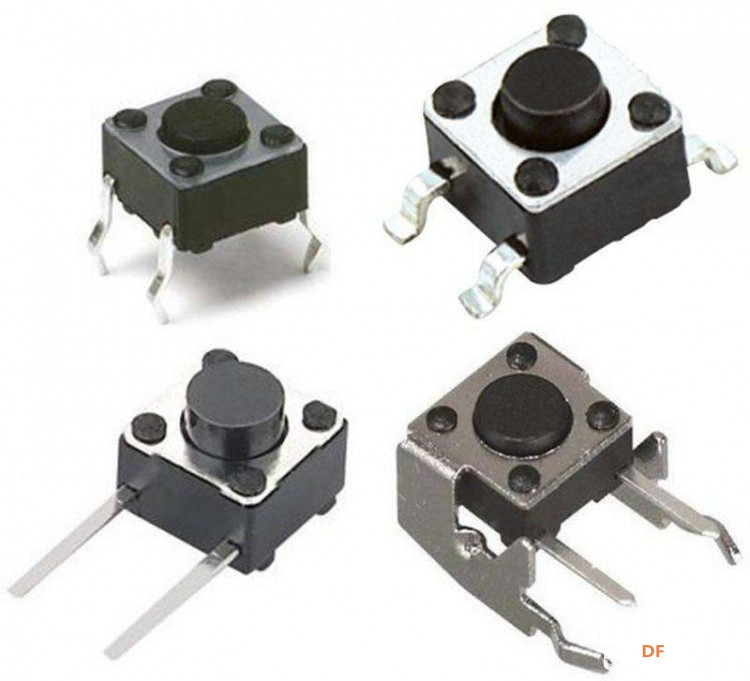 |



秒表主要是用来统计秒数的。它有一般有两个按键。A键和B键。
第一次按下A键时,开始计时。
第二次按下A键时,暂停计时。
再按下A键时,继续上一步暂停的计时。
按下B键,归零。
#MicroPython动手做(15)——掌控板之AB按键
#AB按键秒表计时器
[code]#MicroPython动手做(15)——掌控板之AB按键
#AB按键秒表计时器from mpython import *
import framebuf
import font.digiface_44
import time
from machine import Timer
def timer1_tick(_):
global aaa, ttt
ttt = ttt + 1
oled.fill(0)
display_font(font.digiface_44, (''.join([str(x) for x in [ttt // 60, ':', ttt % 60]])), 2, 8, False, 2)
oled.show()
tim1 = Timer(1)
def on_button_a_down(_):
global aaa, ttt
time.sleep_ms(10)
if button_a.value() == 1: return
if aaa == 1:
aaa = 0
tim1.init(period=1000, mode=Timer.PERIODIC, callback=timer1_tick)
else:
aaa = 1
tim1.deinit()
def on_button_b_down(_):
global aaa, ttt
time.sleep_ms(10)
if button_b.value() == 1: return
ttt = 0
oled.fill(0)
display_font(font.digiface_44, '00:00', 2, 8, False, 2)
oled.show()
aaa = 1
tim1.deinit()
def display_font(_font, _str, _x, _y, _wrap, _z=0):
_start = _x
for _c in _str:
_d = _font.get_ch(_c)
if _wrap and _x > 128 - _d[2]: _x = _start; _y += _d[1]
if _c == '1' and _z > 0: oled.fill_rect(_x, _y, _d[2], _d[1], 0)
oled.blit(framebuf.FrameBuffer(bytearray(_d[0]), _d[2], _d[1],
framebuf.MONO_HLSB), (_x+int(_d[2]/_z)) if _c=='1' and _z>0 else _x, _y)
_x += _d[2]
button_a.irq(trigger=Pin.IRQ_FALLING, handler=on_button_a_down)
button_b.irq(trigger=Pin.IRQ_FALLING, handler=on_button_b_down)
oled.fill(0)
display_font(font.digiface_44, '00:00', 2, 8, False, 2)
oled.show()
ttt = 0
aaa = 1[/code]
#MicroPython动手做(15)——掌控板之AB按键
#AB按键切换声光值与三轴数值
[code]#MicroPython动手做(15)——掌控板之AB按键
#AB按键切换显示声光值与三轴数值
from mpython import *
import time
def on_button_a_down(_):
global sensor, switch
time.sleep_ms(10)
if button_a.value() == 1: return
switch = switch + -1
if switch < 0:
switch = 2
def on_button_b_down(_):
global sensor, switch
time.sleep_ms(10)
if button_b.value() == 1: return
switch = switch + 1
if switch > 2:
switch = 0
button_a.irq(trigger=Pin.IRQ_FALLING, handler=on_button_a_down)
button_b.irq(trigger=Pin.IRQ_FALLING, handler=on_button_b_down)
switch = 0
oled.fill(0)
oled.DispChar("上一个", 0, 0, 1)
oled.DispChar("下一个", 91, 0, 1)
while True:
oled.fill_rect(0, 16, 128, 48, 0)
if switch == 1:
oled.DispChar((str("声音值:") + str(sound.read())), 30, 28, 1)
elif switch == 2:
oled.DispChar((str(" 光线值:") + str(light.read())), 25, 28, 1)
else:
oled.DispChar((str("X 轴:") + str(accelerometer.get_x())), 15, 15, 1)
oled.DispChar((str("Y 轴:") + str(accelerometer.get_y())), 15, 30, 1)
oled.DispChar((str("Z 轴:") + str(accelerometer.get_z())), 15, 45, 1)
oled.show()[/code]
[code]#MicroPython动手做(15)——掌控板之AB按键
#A、B键控制图片转换显示
from mpython import *
import music
def callback_button_a_pressed():
oled.fill(0)
bmp_wZZv = bytearray([0xff,0xff,0xff,0xff,0xff,0xff,0xff,0xff,0xff,0xff,0xff,0xff,0xff,0xff,0xff,0xff,0xff,0xff,0xff,0xff,0xff,0xff,0xff,0xff,0xff,0xff,0xff,0xff,0xff,0xff,0xff,0xff,0xff,0xff,0xff,0xff,0xff,0xff,0xff,0xff,0xff,0xff,0xff,0xff,0xff,0xff,0xff,0xff,0xff,0xff,0xff,0xff,0xff,0xff,0xff,0xff,0xff,0xff,0xff,0xff,0xff,0xff,0xff,0xfb,0xff,0xff,0xff,0xff,0xff,0xff,0xff,0xff,0xff,0xff,0xff,0xff,0xff,0xff,0xff,0xe3,0xff,0xff,0xff,0xff,0xff,0xff,0xff,0xff,0xff,0xff,0xff,0xff,0xff,0xff,0xff,0x89,0xff,0xff,0xff,0xff,0xff,0xff,0xff,0xff,0xff,0xff,0xff,0xff,0xff,0xff,0xff,0x19,0xff,0xff,0xff,0xff,0xff,0xff,0xff,0xff,0xff,0xff,0xff,0xff,0xff,0xff,0xff,0x39,0xff,0xff,0xff,0xff,0xff,0xff,0xf8,0x0,0x3f,0xff,0xff,0xff,0xff,0xff,0xfe,0x79,0xff,0xff,0xff,0xff,0xff,0xff,0xe0,0x1a,0xf,0xff,0xff,0xff,0xff,0xff,0xfe,0xf9,0xff,0xff,0xff,0x3f,0xff,0xff,0x83,0xff,0xe0,0x0,0x0,0x0,0x7f,0xff,0xfc,0xf9,0xff,0xff,0xfc,0xf,0xff,0xfe,0x0,0x7f,0xf0,0x0,0x0,0x0,0x3f,0xff,0xfc,0xf9,0xff,0xf8,0x0,0xe7,0xff,0xfc,0x7e,0xf,0xfc,0xff,0xf3,0xff,0xbf,0xff,0xfc,0xf9,0xff,0xe0,0x0,0x1,0xff,0xf9,0xff,0xc7,0xfe,0x7f,0xf3,0xff,0x9f,0xff,0xfc,0xf9,0xff,0x80,0x0,0x0,0x3,0xf3,0xff,0xc3,0xff,0x3f,0xf3,0xff,0x80,0x3f,0xfe,0xf9,0xfe,0x0,0x7,0xff,0xc0,0x73,0xff,0xc1,0xff,0x9f,0xf3,0xff,0x80,0x0,0x7e,0xf9,0xe0,0x0,0xf,0xff,0xff,0x7,0xf0,0x0,0xff,0x8f,0xf3,0xff,0x80,0x0,0x0,0xf9,0xf0,0x0,0xf,0xff,0xff,0xc7,0x80,0x30,0x7e,0xf,0xf3,0xff,0x80,0x0,0x0,0xf9,0x90,0x0,0x1f,0xbf,0xff,0xf3,0x1f,0x38,0x60,0x3f,0xf7,0xff,0x80,0x0,0x0,0xf9,0xc0,0x0,0x1f,0x3f,0xff,0xf8,0x7f,0x80,0x3,0xbf,0xff,0xff,0x80,0x0,0x0,0xf9,0xc0,0x0,0x1e,0x41,0xff,0xf8,0xff,0xc2,0x1f,0x9f,0xff,0xff,0x80,0x0,0x0,0xf9,0xe0,0x0,0x1e,0x40,0xff,0xfc,0xff,0xff,0x9f,0x9f,0xff,0xff,0x80,0x0,0x0,0xf9,0xf0,0x0,0x1c,0xb0,0xff,0xfc,0xfc,0xff,0xcf,0x9f,0xff,0xff,0x80,0x0,0x0,0xf9,0xf0,0x0,0x1c,0x90,0xff,0xfe,0x40,0x7f,0xcf,0x9f,0xff,0xff,0x80,0x0,0x0,0xf9,0xf0,0x0,0x1c,0x80,0xfd,0xfe,0x6,0x7f,0xcf,0x9f,0xff,0xff,0x80,0x0,0x0,0x1,0xe0,0x0,0x1c,0xc1,0xfc,0xfe,0x3f,0x3f,0xcf,0x9f,0xff,0xff,0x80,0x0,0x1,0x7,0xe0,0x0,0x1f,0xe3,0xfe,0x7f,0x1f,0x38,0xcf,0x9f,0xff,0xff,0x80,0x0,0xff,0xff,0xe0,0x0,0x1f,0xff,0xff,0x7f,0x3,0x80,0x4f,0x9f,0xff,0xff,0x81,0xff,0xff,0xff,0xe0,0x0,0x1f,0xff,0xff,0x3f,0x21,0x9f,0xf,0x9f,0xff,0xff,0xbf,0xff,0xff,0xff,0xe0,0x0,0x1f,0xff,0xff,0x3f,0x0,0x7f,0x9f,0x9f,0xff,0xff,0xbf,0xff,0xff,0xff,0xe0,0x0,0xf,0xff,0xff,0x3f,0x10,0x3f,0xdf,0x9f,0xff,0xff,0xbf,0xff,0xff,0xff,0xe0,0x0,0x1f,0xff,0xff,0xbf,0x39,0x0,0x1f,0x80,0x0,0x0,0x3f,0xff,0xff,0xff,0xe0,0x0,0x1f,0xff,0xff,0xbf,0x3b,0x80,0x1f,0x80,0x0,0x0,0x3f,0xff,0xff,0xff,0xe0,0x0,0x1f,0xff,0xff,0x3f,0x30,0x3f,0x9f,0x1f,0xff,0xff,0xbf,0xff,0xff,0xff,0xe0,0x0,0x1f,0xff,0xff,0x3f,0x0,0x7f,0x9f,0x1f,0xff,0xff,0xbf,0xff,0xff,0xff,0xe0,0x0,0x3f,0xff,0xff,0x3f,0x1,0x9f,0x1c,0x1f,0xff,0xff,0xbf,0xff,0xff,0xff,0xe0,0x0,0x3f,0xff,0xfe,0x7f,0x3,0x80,0x38,0x9f,0xff,0xff,0x9f,0xff,0xff,0xff,0xe0,0x0,0x7f,0xe3,0xfe,0x7f,0x1f,0x30,0xb1,0xdf,0xff,0xff,0x80,0x1f,0xff,0xff,0xf0,0x0,0x3c,0xc1,0xfc,0xff,0x3f,0x3f,0xb3,0xdf,0xff,0xff,0x80,0x0,0x1f,0xff,0xf0,0x0,0x3c,0xb0,0xfd,0xfe,0x6,0x7f,0x87,0xdf,0xff,0xff,0x80,0x0,0x0,0x1,0xf0,0x0,0x1c,0xb0,0xff,0xfe,0x40,0x73,0x87,0xdf,0xff,0xff,0x80,0x0,0x0,0x21,0xf0,0x0,0x1e,0x80,0xff,0xfe,0xfc,0xe0,0xcf,0x9f,0xff,0xff,0x80,0x0,0x0,0xf9,0xf8,0x0,0x1e,0x40,0xff,0xfc,0xff,0xcc,0xf,0x9f,0xff,0xff,0x80,0x0,0x0,0xf9,0xf8,0x0,0x1e,0x61,0xff,0xf8,0x1f,0xcc,0xf,0x9f,0xff,0xff,0x80,0x0,0x0,0xf9,0xfc,0x0,0x1f,0x3f,0xff,0xf9,0x0,0x0,0x60,0x9f,0xff,0xff,0x80,0x0,0x0,0xf9,0xfc,0x0,0x1f,0xff,0xff,0xf3,0xf0,0x70,0x78,0xf,0xf3,0xff,0x80,0x0,0x0,0xf9,0xfe,0x0,0x1f,0xff,0xff,0xc7,0xff,0xfc,0xff,0x8f,0xf3,0xff,0x80,0x0,0x0,0xf9,0xff,0x0,0x1f,0xff,0xfe,0x7,0xff,0xf9,0xff,0x9f,0xf3,0xff,0x80,0x0,0x0,0xf9,0xff,0x80,0xf,0xff,0xc0,0x73,0xff,0xf1,0xff,0x3f,0xf3,0xff,0x80,0x0,0x6,0x79,0xff,0xc0,0x0,0x0,0x3,0xf9,0xff,0xe7,0xfe,0x3f,0xf3,0xff,0x80,0xf,0xfe,0xf9,0xff,0xe0,0x0,0x3,0xff,0xf8,0xff,0xf,0xfc,0x7f,0xf3,0xff,0x9f,0xff,0xfc,0xf9,0xff,0xf8,0x0,0x67,0xff,0xfe,0x0,0x3f,0xf8,0x0,0x0,0x0,0x3f,0xff,0xfc,0xf9,0xff,0xff,0xfe,0xf,0xff,0xff,0x3,0xff,0xe0,0x0,0x0,0x0,0x3f,0xff,0xfc,0xf9,0xff,0xff,0xff,0xbf,0xff,0xff,0xc1,0xff,0x87,0xff,0xff,0xff,0xff,0xff,0xfc,0xf9,0xff,0xff,0xff,0xff,0xff,0xff,0xf0,0x0,0x1f,0xff,0xff,0xff,0xff,0xff,0xfc,0xf9,0xff,0xff,0xff,0xff,0xff,0xff,0xff,0xe7,0xff,0xff,0xff,0xff,0xff,0xff,0xfe,0xf9,0xff,0xff,0xff,0xff,0xff,0xff,0xff,0xff,0xff,0xff,0xff,0xff,0xff,0xff,0xfe,0x79,0xff,0xff,0xff,0xff,0xff,0xff,0xff,0xff,0xff,0xff,0xff,0xff,0xff,0xff,0xff,0x39,0xff,0xff,0xff,0xff,0xff,0xff,0xff,0xff,0xff,0xff,0xff,0xff,0xff,0xff,0xff,0x99,0xff,0xff,0xff,0xff,0xff,0xff,0xff,0xff,0xff,0xff,0xff,0xff,0xff,0xff,0xff,0xc1,0xff,0xff,0xff,0xff,0xff,0xff,0xff,0xff,0xff,0xff,0xff,0xff,0xff,0xff,0xff,0xe3,0xff,0xff,0xff,0xff,0xff,0xff,0xff,0xff,0xff,0xff,0xff,0xff,0xff,0xff,0xff,0xfb,0xff,0xff,0xff,0xff,0xff,0xff,0xff,0xff,0xff,0xff,0xff,0xff,0xff,0xff,0xff,0xff,0xff,0xff,0xff,0xff,0xff,0xff,0xff,0xff,0xff,0xff,0xff,0xff,0xff,0xff,0xff,0xff])
oled.Bitmap(0, 0, bmp_wZZv, 128, 64, 1)
oled.show()
def callback_button_b_pressed():
oled.fill(0)
bmp_h61P = bytearray([0xff,0xff,0xff,0xff,0xff,0xff,0xff,0xff,0xff,0xff,0xff,0xff,0xff,0xff,0xff,0xff,0xff,0xff,0xff,0xff,0xff,0xff,0xff,0xff,0xff,0xff,0xff,0xff,0xff,0xff,0xff,0xff,0xdf,0xff,0xff,0xff,0xff,0xff,0xff,0xff,0xff,0xff,0xff,0xff,0xff,0xff,0xff,0xff,0xc7,0xff,0xff,0xff,0xff,0xff,0xff,0xff,0xff,0xff,0xff,0xff,0xff,0xff,0xff,0xff,0x83,0xff,0xff,0xff,0xff,0xff,0xff,0xff,0xff,0xff,0xff,0xff,0xff,0xff,0xff,0xff,0x99,0xff,0xff,0xff,0xff,0xff,0xff,0xff,0xff,0xff,0xff,0xff,0xff,0xff,0xff,0xff,0x9c,0xff,0xff,0xff,0xff,0xff,0xff,0xff,0xff,0xff,0xff,0xff,0xff,0xff,0xff,0xff,0x9e,0x7f,0xff,0xff,0xff,0xff,0xff,0xff,0xff,0xff,0xff,0xff,0xff,0xff,0xff,0xff,0x9f,0x7f,0xff,0xff,0xff,0xff,0xff,0xff,0xe7,0xff,0xff,0xff,0xff,0xff,0xff,0xff,0x9f,0x3f,0xff,0xff,0xff,0xff,0xff,0xf8,0x0,0xf,0xff,0xff,0xff,0xff,0xff,0xff,0x9f,0x3f,0xff,0xff,0xff,0xff,0xff,0xe1,0xff,0x83,0xff,0xff,0xfd,0xff,0xff,0xff,0x9f,0x3f,0xff,0xfc,0x0,0x0,0x0,0x7,0xff,0xc0,0xff,0xff,0xf0,0x7f,0xff,0xff,0x9f,0x3f,0xff,0xfc,0x0,0x0,0x0,0x1f,0xfc,0x0,0x7f,0xff,0xe6,0x0,0x1f,0xff,0x9f,0x3f,0xff,0xf9,0xff,0xcf,0xfe,0x3f,0xf0,0xff,0x1f,0xff,0xc0,0x0,0x7,0xff,0x9f,0x7f,0xf0,0x1,0xff,0xcf,0xfc,0x7f,0xe7,0xff,0x9f,0xc0,0x0,0x0,0x3,0xff,0x9e,0x60,0x0,0x1,0xff,0xcf,0xfc,0xff,0x8f,0xff,0xce,0x3,0xff,0xf0,0x1,0xff,0x9f,0x0,0x0,0x1,0xff,0xcf,0xf9,0xff,0x9f,0xff,0xe0,0x7f,0xff,0xf8,0x0,0xff,0x9f,0x0,0x0,0x1,0xff,0xcf,0xf1,0xff,0x3f,0xff,0xe3,0xff,0xff,0xf8,0x0,0x7f,0x9f,0x0,0x0,0x1,0xff,0xcf,0xf0,0x1e,0xe,0xf,0xcf,0xff,0xff,0xf8,0x0,0x3f,0x9f,0x0,0x0,0x1,0xff,0xff,0xf9,0x6,0x0,0x0,0x9f,0xff,0xfc,0xf8,0x0,0x3f,0x9f,0x0,0x0,0x1,0xff,0xff,0xf9,0xf0,0x33,0xf8,0x1f,0xff,0x86,0x78,0x0,0x1f,0x9f,0x0,0x0,0x1,0xff,0xff,0xf9,0xf0,0x33,0xff,0x3f,0xff,0x2,0x78,0x0,0x1f,0x9f,0x0,0x0,0x1,0xff,0xff,0xf9,0xf3,0x7,0x3f,0x7f,0xff,0x1,0x78,0x0,0xf,0x84,0x0,0x0,0x1,0xff,0xff,0xfb,0xe1,0xce,0x2,0x7f,0xff,0xd,0x38,0x0,0xf,0x80,0x0,0x0,0x1,0xff,0xff,0xfb,0xe1,0xfe,0x60,0x7f,0xbf,0xd,0x3c,0x0,0xf,0xff,0xf8,0x0,0x1,0xff,0xff,0xfb,0xcd,0xfc,0xfc,0xff,0x3f,0x83,0x3c,0x0,0xf,0xff,0xff,0xf8,0x1,0xff,0xff,0xfb,0x8d,0xc,0xf8,0xfe,0x7f,0xc7,0xfe,0x0,0x7,0xff,0xff,0xff,0xf9,0xff,0xff,0xf9,0x1c,0x1,0xc0,0xfe,0x7f,0xff,0xfc,0x0,0x7,0xff,0xff,0xff,0xfd,0xff,0xff,0xf8,0x38,0xf9,0x80,0xfc,0xff,0xff,0xfc,0x0,0x7,0xff,0xff,0xff,0xfd,0xff,0xff,0xf8,0xf9,0xfe,0x0,0xfc,0xff,0xff,0xf8,0x0,0x7,0xff,0xff,0xff,0xfd,0xff,0xff,0xf8,0xf9,0xfc,0xc,0xfc,0xff,0xff,0xf8,0x0,0x7,0xff,0xff,0xff,0xfc,0x0,0x0,0x1,0xf8,0x1,0xdc,0xfd,0xff,0xff,0xf8,0x0,0x7,0xff,0xff,0xff,0xfc,0x0,0x0,0x1,0xf8,0x0,0x9c,0xfd,0xff,0xff,0xf8,0x0,0x7,0xff,0xff,0xff,0xfd,0xff,0xff,0xf9,0xfb,0xfc,0x8,0xfc,0xff,0xff,0xf0,0x0,0x7,0xff,0xff,0xff,0xfd,0xff,0xff,0xf9,0xf9,0xfe,0x0,0xfc,0xff,0xff,0xf8,0x0,0x7,0xff,0xff,0xff,0xfd,0xff,0xff,0xf9,0xf0,0xf9,0x84,0xfc,0xff,0xff,0xf8,0x0,0x7,0xff,0xff,0xff,0x81,0xff,0xff,0xf9,0xf2,0x1,0xc0,0xfe,0xff,0xff,0xf8,0x0,0x7,0xff,0xff,0x0,0x1,0xff,0xff,0xf9,0xf3,0x1c,0xf8,0xfe,0x7f,0xc7,0xf8,0x0,0x7,0xe0,0x80,0x0,0x1,0xff,0xff,0xf9,0xf3,0xfc,0xfc,0x7f,0x3f,0x83,0x38,0x0,0x7,0x80,0x0,0x0,0x1,0xff,0xff,0xf9,0xf3,0xfe,0x60,0x7f,0xbf,0x1,0x38,0x0,0xf,0x9f,0x0,0x0,0x1,0xff,0xff,0xf9,0xf3,0xfe,0x2,0x7f,0xff,0x9,0x38,0x0,0xf,0x9f,0x0,0x0,0x1,0xff,0xff,0xf9,0xf3,0xff,0x3f,0x3f,0xff,0xd,0x38,0x0,0xf,0x9f,0x0,0x0,0x1,0xff,0xff,0xf9,0xf9,0xff,0xff,0x3f,0xff,0x2,0x78,0x0,0x7,0x9f,0x0,0x0,0x1,0xff,0xff,0xf9,0xf8,0x43,0xff,0x1f,0xff,0x82,0x78,0x0,0x3,0x9f,0x0,0x0,0x1,0xff,0xff,0xfd,0xc0,0x1,0xfe,0x1f,0xff,0xfc,0xf8,0x0,0x3,0x9f,0x0,0x0,0x1,0xff,0xef,0xfc,0x6,0x1c,0xf8,0xcf,0xff,0xfd,0xf8,0x0,0x9,0x9f,0x0,0x0,0x1,0xff,0xcf,0xf0,0x7e,0xc,0x1,0xe3,0xff,0xff,0xf0,0x0,0xf,0x9f,0x0,0x0,0x1,0xff,0xcf,0xf1,0xff,0x0,0xf,0xe0,0xff,0xff,0xf0,0x0,0x7,0x9f,0x7e,0x0,0x1,0xff,0xcf,0xf9,0xff,0x83,0xff,0xce,0x3,0xff,0xe0,0x0,0x7f,0x9f,0x7f,0xfc,0x1,0xff,0xcf,0xfc,0xff,0xc3,0xff,0xcf,0xc0,0x0,0x0,0x1,0xff,0x9f,0x3f,0xff,0xf9,0xff,0xcf,0xfe,0x7f,0xe3,0xff,0x9f,0xff,0x80,0x0,0x7,0xff,0x9f,0x3f,0xff,0xfd,0xff,0xcf,0xff,0x3f,0xf0,0x7e,0x3f,0xff,0xe7,0x0,0x1f,0xff,0x9f,0x3f,0xff,0xfc,0x0,0x0,0x0,0xf,0xfe,0x0,0x7f,0xff,0xf0,0x3f,0xff,0xff,0x9f,0x3f,0xff,0xfe,0x0,0x0,0x0,0x7,0xff,0xc1,0xff,0xff,0xfc,0xff,0xff,0xff,0x9f,0x7f,0xff,0xff,0xff,0xff,0xff,0xf0,0x58,0x7,0xff,0xff,0xff,0xff,0xff,0xff,0x9e,0x7f,0xff,0xff,0xff,0xff,0xff,0xfc,0x0,0x1f,0xff,0xff,0xff,0xff,0xff,0xff,0x9c,0xff,0xff,0xff,0xff,0xff,0xff,0xff,0xff,0xff,0xff,0xff,0xff,0xff,0xff,0xff,0x98,0xff,0xff,0xff,0xff,0xff,0xff,0xff,0xff,0xff,0xff,0xff,0xff,0xff,0xff,0xff,0x91,0xff,0xff,0xff,0xff,0xff,0xff,0xff,0xff,0xff,0xff,0xff,0xff,0xff,0xff,0xff,0xc7,0xff,0xff,0xff,0xff,0xff,0xff,0xff,0xff,0xff,0xff,0xff,0xff,0xff,0xff,0xff,0xdf,0xff,0xff,0xff,0xff,0xff,0xff,0xff,0xff,0xff,0xff,0xff,0xff,0xff,0xff,0xff,0xff,0xff,0xff,0xff,0xff,0xff,0xff,0xff,0xff,0xff,0xff,0xff,0xff,0xff,0xff,0xff,0xff,0xff,0xff,0xff,0xff,0xff,0xff,0xff,0xff,0xff,0xff,0xff,0xff,0xff,0xff,0xff,0xff,0xff,0xff,0xff,0xff,0xff,0xff,0xff,0xff,0xff,0xff,0xff,0xff,0xff,0xff,0xff])
oled.Bitmap(0, 0, bmp_h61P, 128, 64, 1)
oled.show()
def on_button_a_pressed():
while True:
if button_a.value() == 0:
yield callback_button_a_pressed()
else:
yield
def on_button_b_pressed():
while True:
if button_b.value() == 0:
yield callback_button_b_pressed()
else:
yield
func_button_a_pressed = on_button_a_pressed()
func_button_b_pressed = on_button_b_pressed()
while True:
next(func_button_a_pressed)
next(func_button_b_pressed)[/code]
玫瑰曲线,按A加1,按B开始
玫瑰曲线,基本的意思是:平面内,围绕某一中心点平均分布整数个正弦花瓣的曲线。数学公式是:ρ=a*sin(nθ),a为定长,n为整数(不一定是花瓣数)。
由于这个图形不是由直线组成,所以,掌控板上的所有绘图函数均无法使用,只能使用其中的像素点显示功能。命令如下:
display.pixel(50,0,1)
这个命令中:display.pixel(x, y [,c ]) x , y 为点坐标(x,y)。当如果未给出c,则获取指定像素的颜色值。 如果给出c,则将指定的像素设置为给定的颜色,由于掌控板用的是黑白屏幕,所以用1代表点亮就可以了。
[align=left][code]#MicroPython动手做(15)——掌控板之AB按键
#玫瑰曲线,按A加1,按B开始,
from mpython import *
import math,time#引入库文件
def DrawRoseCurve(a,n):#定义函数,函数名称可以自己命名
for t in range(0,360):#循环次数,由于是画一圈,所以是360;可以自行设定
x = math.floor(math.cos(t)*a*math.sin(n*t))#计算x坐标的值,注意:这里需要取整
y = math.floor(math.sin(t)*a*math.sin(n*t))#计算y坐标的值,并且取整
display.pixel(x+64,y+32,1) #显示坐标像素点,为什么要+64、+32,哪是因为要把中心坐标(64,32)作为起点
display.show() #执行
# 按键引脚初始化
display.fill(0)#清屏
display.show()#清屏执行
BTNA = Pin(0, mode=Pin.OPEN_DRAIN,pull=Pin.PULL_UP,value=1)
BTNB = Pin(2, mode=Pin.OPEN_DRAIN,pull=Pin.PULL_UP,value=1)
display.DispChar('玫瑰曲线', 38, 0)
display.DispChar('输入花瓣数量,按A加', 0, 17)
display.DispChar('按B开始', 0, 34)
display.show() #执行
n1 = 0
jishu = True
Start = False
while True:
if jishu:
if BTNA.value() == 0 and BTNB.value() == 1 :
display.fill(0)#清屏
display.show()#清屏执行
n1 = n1+1
display.DispChar('数量:%d' % n1, 0, 0)
display.show()#执行
time.sleep_ms(400)
if BTNA.value() == 1 and BTNB.value() == 0 :
jishu = False
Start = True
if Start:
if n1%2 == 0:
n1=n1/2
display.fill(0)#清屏
display.show()#清屏执行
DrawRoseCurve(30,n1)#调用函数
Break
图灵1950年的时候发表一篇论文,《计算机器与智能》,提出了一个设想。测试者与被测试者(一个人和一台机器)隔开的情况下,通过一些装置(如键盘)向被测试者随意提问。进行多次测试后,如果有超过30%的测试者不能确定出被测试者是人还是机器,那么这台机器就通过了测试,并被认为具有人类智能。
图灵1950年的时候发表一篇论文,《计算机器与智能》,提出了一个设想。测试者与被测试者(一个人和一台机器)隔开的情况下,通过一些装置(如键盘)向被测试者随意提问。进行多次测试后,如果有超过30%的测试者不能确定出被测试者是人还是机器,那么这台机器就通过了测试,并被认为具有人类智能。
[code]#MicroPython动手做(15)——掌控板之AB按键
#模拟“图灵测试”
from mpython import * #从mpython中调用所有的库文件
oled.DispChar('图灵测试', 40, 25) #在x=40,y=25的位置显示“图灵测试”
oled.show() #打开显示
while True: #循环执行
if button_a.value() == 0 or button_b.value() == 0: #如果按钮a或者按钮b被按下
oled.fill(0) #屏幕熄灭
oled.DispChar('你会下国际象棋吗?', 0, 0)
oled.DispChar('A.是的', 0, 16)
oled.DispChar('B.是的', 0, 32)
oled.show()
break#跳出次循环
while True:
if button_a.value() == 0 or button_b.value() == 0:
oled.fill(0)
oled.DispChar('你会下象棋吗?', 0, 0)
oled.DispChar('A.是的', 0, 16)
oled.DispChar('B.我不是说过了吗?', 0, 32)
oled.show()
break
while True:
if button_a.value() == 0 or button_b.value() == 0:
oled.fill(0)
oled.DispChar('你会下象棋吗?', 0, 0)
oled.DispChar('A.是的', 0, 16)
oled.DispChar('B.你烦不烦,干嘛老提', 0, 32)
oled.DispChar('同样的问题。', 0, 48)
oled.show()
break
while True:
if button_a.value() == 0 or button_b.value() == 0:
oled.fill(0)
oled.DispChar('A-A-A,A-B-A', 0, 0)
oled.DispChar('A-A-B,A-B-B', 0, 16)
oled.DispChar('你认为哪个是人的回答?', 0, 32)
oled.DispChar('哪一个是机器人的回答?', 0, 48)
oled.show()
break[/code]
[align=left]十进制的1和0在二进制也是1和0[/align]
[align=left]初始化deng变量为0,按键按下执行异或运算deng^1=1;[/align]
[align=left]此时deng变量为1,按键按下执行异或运算deng^1=0;[/align]
[align=left]依此类推即可实现按键控制deng变量的数值。[/align]
[align=left]a=60,b=13[/align]
[align=left]贴士[/align]
[align=left]按位运算符是以二进制数进行计算的,可以通过十进制转换位二进制运算,十进制与二进制的区别在于:[/align]
[align=left]基数不同,前者满10进1,后者满2进1[/align]
[align=left]有效字符不同,前者有效字符有10个:0,1,2,3,4,5,5,6,7,8,9;后者有效字符有2个:0,1[/align]
在mPython X“数学”模组里找到异或运算符
在程序中我们A键和B键都可以控制灯的亮灭,即按下A键或B键灯亮,再按A键或B键灯灭,我们可以使用按位异或运算符“^”实现效果,按位异或运算是将两个运算分量的对应位按位遵照以下规则进行计算:
0 ^ 0 = 0, 0 ^ 1 = 1, 1 ^ 0 = 1, 1 ^ 1 = 0
即相应位的值相同的,结果为 0,不相同的结果为 1。
例如:
a = 60 (60 = 0011 1100)
b = 13 ( 13 = 0000 1101)
c = a ^ b( 49 = 0011 0001)
#MicroPython动手做(15)——掌控板之AB按键
#双向开关灯
[code]#MicroPython动手做(15)——掌控板之AB按键
#双向开关灯
from mpython import *
import time
def on_button_a_down(_):
global abc, variable
time.sleep_ms(10)
if button_a.value() == 1: return
variable = variable ^ 1
def on_button_b_down(_):
global abc, variable
time.sleep_ms(10)
if button_b.value() == 1: return
variable = variable ^ 1
button_a.irq(trigger=Pin.IRQ_FALLING, handler=on_button_a_down)
button_b.irq(trigger=Pin.IRQ_FALLING, handler=on_button_b_down)
variable = 0
while True:
if variable == 1:
rgb.fill( (0, 0, 0) )
rgb.write()
time.sleep_ms(1)
oled.fill(0)
oled.DispChar("关灯", 50, 25, 1)
else:
rgb.fill((int(255), int(102), int(0)))
rgb.write()
time.sleep_ms(1)
oled.fill(0)
oled.DispChar("开灯", 50, 25, 1)
oled.show()[/code]