
MicroPython动手做(18)——掌控板之声光传感器
2020-04-242.3万
AI 快速预览详细
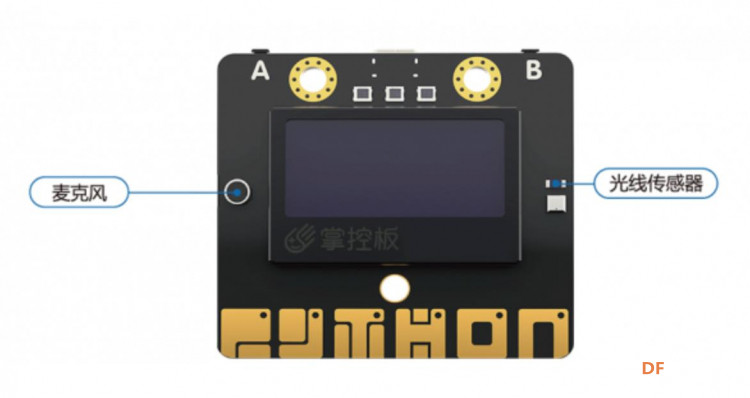
本文介绍了如何使用MicroPython和掌控板的板载麦克风及光线传感器来感知环境中的声音和光线变化。麦克风和光线传感器的侦测范围值为0-4095,适用于STEM教育和少儿编程入门项目。通过这些传感器,孩子们可以轻松地了解和探索周围环境的变化。

创作许可协议
本项目采用 None(不开放任何权利,保留所有权利) 进行许可。
创作许可协议
本项目采用 None(不开放任何权利,保留所有权利) 进行许可。

//MicroPython动手做(18)——掌控板之声光传感器
//十段音量柱状图形显示
[mw_shl_code=applescript,false]//MicroPython动手做(18)——掌控板之声光传感器
//十段音量柱状图形显示
#include
// 动态变量
volatile float mind_n_HengZuoBiao;
// 主程序开始
void setup() {
mPython.begin();
display.lineWidth(5);
}
void loop() {
mind_n_HengZuoBiao = 16;
for (int index = 0; index < 10; index++) {
display.line(mind_n_HengZuoBiao, 55, mind_n_HengZuoBiao, (map((sound.read()), 0, 4095, 50, 0)));
delay(100);
mind_n_HengZuoBiao += 10;
yield();
}
display.fillScreen(0);
}[/mw_shl_code]
通过声音传感器检测到音乐声音的大小,并将其转换为亮灯的数量。
#MicroPython动手做(18)——掌控板之声光传感器
#声控RGB灯环
[mw_shl_code=applescript,false]#MicroPython动手做(18)——掌控板之声光传感器
#声控RGB灯环
from mpython import *
import neopixel
my_rgb = neopixel.NeoPixel(Pin(Pin.P8), n=24, bpp=3, timing=1)
def upRange(start, stop, step):
while start <= stop:
yield start
start += abs(step)
def downRange(start, stop, step):
while start >= stop:
yield start
start -= abs(step)
while True:
oled.fill(0)
oled.DispChar("声音大小", 0, 0, 1)
oled.DispChar((str(sound.read())), 0, 16, 1)
oled.show()
sheng = sound.read() // 140
if sheng == 0:
my_rgb.fill( (0, 0, 0) )
my_rgb.write()
else:
for i in (0 <= int(sheng)) and upRange(0, int(sheng), 1) or downRange(0, int(sheng), 1):
my_rgb[i] = (0, 50, 0)
my_rgb.write()[/mw_shl_code]
[mw_shl_code=python,false]#MicroPython动手做(18)——掌控板之声光传感器
#同时测量声光环境的实时波形
from mpython import *
import time
oled.fill(0)
oled.DispChar(' 声光值数据采集', 0, 16, 1)
oled.DispChar(' 按A开始 按B结束', 0, 32, 1)
oled.show()
time.sleep_ms(50);print(('__TITLE', '声音值', '光线值'));time.sleep_ms(50)
while True:
while button_a.value() == 0:
while not button_b.value() == 0:
print((sound.read(), light.read()))
time.sleep_ms(100)[/mw_shl_code]
[mw_shl_code=applescript,false]#MicroPython动手做(18)——掌控板之声光传感器
#A键声音波形,B键光线波形
import time
from mpython import *
time.sleep_ms(50);print(('__TITLE', '声光波形'));time.sleep_ms(50)
while True:
if button_a.value() == 0:
print((sound.read(),))
if button_b.value() == 0:
print((light.read(),))
oled.fill(0)
oled.DispChar('声音', 35, 16, 1)
oled.DispChar((str(sound.read())), 65, 16, 1)
oled.DispChar('光线', 35, 32, 1)
oled.DispChar((str(light.read())), 65, 32, 1)
oled.show()
[/mw_shl_code]
[mw_shl_code=applescript,false]#MicroPython动手做(18)——掌控板之声光传感器
#实时测量声光强度(垂直柱状条)
from mpython import *
import math
myUI = UI(oled)
while True:
s = ((100 - 0) / (2500 - 0)) * (sound.read() - 0) + 0
g = ((100 - 0) / (4059 - 0)) * (light.read() - 0) + 0
oled.fill(0)
oled.DispChar('声', 16, 1, 1)
oled.DispChar('强', 16, 16, 1)
oled.DispChar('度', 16, 32, 1)
oled.DispChar((str(math.floor(((100 - 0) / (2500 - 0)) * (sound.read() - 0) + 0))), 16, 48, 1)
myUI.stripBar(36, 4, 12, 56, s, 0, 1)
oled.DispChar('光', 80, 1, 1)
oled.DispChar('强', 80, 16, 1)
oled.DispChar('度', 80, 32, 1)
oled.DispChar((str(math.floor(((100 - 0) / (4059 - 0)) * (light.read() - 0) + 0))), 80, 48, 1)
myUI.stripBar(100, 4, 12, 56, g, 0, 1)
oled.show()
[/mw_shl_code]