DF创客社区
发现
DF创客商城
教程
产品资料库
搜索
热门搜索
人工智能
视觉传感器
AI 人工智能
行空板
主控板
二哈识图
热门活动
关闭
DF创客社区
发现
DF创客商城
教程
产品资料库
MicroPython动手做(20)——掌控板之三轴加速度
2020-04-27
2.4万
驴友花雕
UID: 1737
2964
文章
157
粉丝
1.1万
获取喜欢
0
0
AI 快速预览
详细
收起
本文介绍了如何使用掌控板上的三轴加速度计MSA300进行物理实验。测量范围为±2G,适用于STEM教育和编程启蒙。通过动手实践,初学者可以轻松入门物理实验,无需复杂的前置技能。
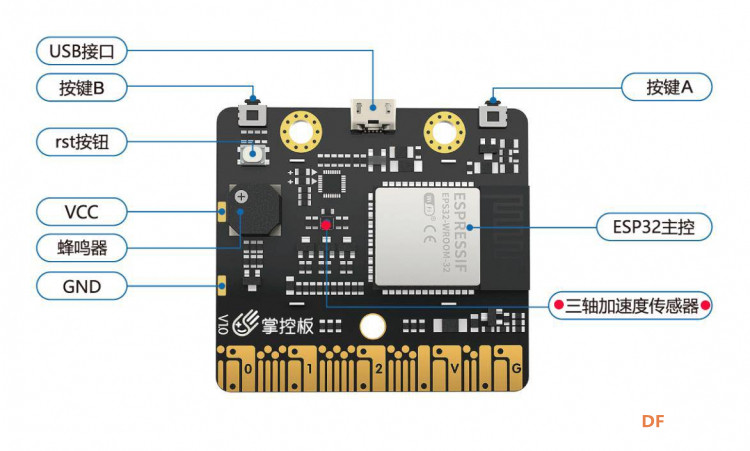
掌控板
载
三轴加速度计MSA300,测量范围:±2G
创作许可协议
本项目采用
None(不开放任何权利,保留所有权利)
进行许可。
ESP32
其他平台
添加到合集
0
0
相关推荐
欧盟发布2026版AI教学指南
木子哦
1722
0
【花雕动手做】使用4040铝型材与250W减速电机的底盘小车
驴友花雕
69
0
BLE Arduino开发神器 Bluno Beetle开启免费试用啦!
Ash1
2.3万
0
评论(53)
驴友花雕
作者
回复
驴友花雕
作者
mPython 图形编程
回复
驴友花雕
作者
17、掌控闪灯大量程计步器(十万步)
#MicroPython动手做(20)——掌控板之三轴加速度
#掌控闪灯大量程计步器(十万步)
[code]#MicroPython动手做(20)——掌控板之三轴加速度
#掌控闪灯大量程计步器(十万步)
from mpython import *
from machine import Timer
_is_shaked = _is_thrown = False
_last_x = _last_y = _last_z = _count_shaked = _count_thrown = 0
def on_shaked():pass
def on_thrown():pass
tim11 = Timer(11)
def timer11_tick(_):
global _is_shaked, _is_thrown, _last_x, _last_y, _last_z, _count_shaked, _count_thrown
if _is_shaked:
_count_shaked += 1
if _count_shaked == 5: _count_shaked = 0
if _is_thrown:
_count_thrown += 1
if _count_thrown == 10: _count_thrown = 0
if _count_thrown > 0: return
x=accelerometer.get_x(); y=accelerometer.get_y(); z=accelerometer.get_z()
_is_thrown = (x * x + y * y + z * z < 0.25)
if _is_thrown: on_thrown();return
if _last_x == 0 and _last_y == 0 and _last_z == 0:
_last_x = x; _last_y = y; _last_z = z; return
diff_x = x - _last_x; diff_y = y - _last_y; diff_z = z - _last_z
_last_x = x; _last_y = y; _last_z = z
if _count_shaked > 0: return
_is_shaked = (diff_x * diff_x + diff_y * diff_y + diff_z * diff_z > 1)
if _is_shaked: on_shaked()
tim11.init(period=100, mode=Timer.PERIODIC, callback=timer11_tick)
import time
import framebuf
import font.digiface_30
def display_font(_font, _str, _x, _y, _wrap, _z=0):
_start = _x
for _c in _str:
_d = _font.get_ch(_c)
if _wrap and _x > 128 - _d[2]: _x = _start; _y += _d[1]
if _c == '1' and _z > 0: oled.fill_rect(_x, _y, _d[2], _d[1], 0)
oled.blit(framebuf.FrameBuffer(bytearray(_d[0]), _d[2], _d[1],
framebuf.MONO_HLSB), (_x+int(_d[2]/_z)) if _c=='1' and _z>0 else _x, _y)
_x += _d[2]
bbb = 0
while True:
oled.fill(0)
oled.DispChar('掌控计步器', 35, 2, 1)
oled.DispChar('步', 115, 40, 1)
if _is_shaked:
rgb.fill((int(0), int(102), int(0)))
rgb.write()
time.sleep_ms(1)
time.sleep_ms(60)
rgb.fill((int(0), int(0), int(0)))
rgb.write()
time.sleep_ms(1)
bbb = bbb + 1
else:
rgb.fill((int(153), int(0), int(0)))
rgb.write()
time.sleep_ms(1)
if bbb >= 0 and bbb <= 9:
display_font(font.digiface_30, (str(bbb)), 55, 24, False, 2)
elif bbb >= 9 and bbb <= 99:
display_font(font.digiface_30, (str(bbb)), 45, 24, False, 2)
elif bbb >= 99 and bbb <= 999:
display_font(font.digiface_30, (str(bbb)), 35, 24, False, 2)
elif bbb >= 999 and bbb <= 9999:
display_font(font.digiface_30, (str(bbb)), 20, 24, False, 2)
elif bbb >= 9999 and bbb <= 99999:
display_font(font.digiface_30, (str(bbb)), 10, 24, False, 2)
oled.show()[/code]
注解
使用摇晃模块,优点是算法简单,不足之处是触发计步的阙值是固定的,不能调整
回复
驴友花雕
作者
回复
驴友花雕
作者
mPython X 图形编程
回复
驴友花雕
作者
16、水平仪和测量角度
#MicroPython动手做(20)——掌控板之三轴加速度
#水平仪和测量角度
[mw_shl_code=python,false]#MicroPython动手做(20)——掌控板之三轴加速度
#水平仪和测量角度
from mpython import *
import math
import framebuf
import font.dvsm_12
import time
def get_tilt_angle(_axis):
_Ax = accelerometer.get_x()
_Ay = accelerometer.get_y()
_Az = accelerometer.get_z()
if 'X' == _axis:
_T = math.sqrt(_Ay ** 2 + _Az ** 2)
if _Az < 0: return math.degrees(math.atan2(_Ax , _T))
else: return 180 - math.degrees(math.atan2(_Ax , _T))
elif 'Y' == _axis:
_T = math.sqrt(_Ax ** 2 + _Az ** 2)
if _Az < 0: return math.degrees(math.atan2(_Ay , _T))
else: return 180 - math.degrees(math.atan2(_Ay , _T))
elif 'Z' == _axis:
_T = math.sqrt(_Ax ** 2 + _Ay ** 2)
if (_Ax + _Ay) < 0: return 180 - math.degrees(math.atan2(_T , _Az))
else: return math.degrees(math.atan2(_T , _Az)) - 180
return 0
def display_font(_font, _str, _x, _y, _wrap, _z=0):
_start = _x
for _c in _str:
_d = _font.get_ch(_c)
if _wrap and _x > 128 - _d[2]: _x = _start; _y += _d[1]
if _c == '1' and _z > 0: oled.fill_rect(_x, _y, _d[2], _d[1], 0)
oled.blit(framebuf.FrameBuffer(bytearray(_d[0]), _d[2], _d[1],
framebuf.MONO_HLSB), (_x+int(_d[2]/_z)) if _c=='1' and _z>0 else _x, _y)
_x += _d[2]
while True:
Tx = get_tilt_angle('X')
oled.fill(0)
display_font(font.dvsm_12, (str(" Angle :") + str(Tx)), 0, 0, False)
oled.circle(64, 60, 46, 1)
oled.fill_circle(64, 60, 5, 1)
Dx = int((64 + math.cos(math.radians(Tx)) * 46))
Dy = int((60 - math.fabs(math.sin(math.radians(Tx)) * 46)))
oled.hline(0, 60, 128, 1)
oled.line(64, 60, Dx, Dy, 1)
oled.fill_rect(0, 61, 128, 3, 0)
oled.vline(64, 61, 2, 1)
Lx = int(numberMap(accelerometer.get_y(),(-1),1,128,0))
oled.vline(Lx, 61, 3, 1)
if Lx == 64:
rgb.fill((int(0), int(51), int(0)))
rgb.write()
time.sleep_ms(1)
oled.fill_circle(13, 20, 3, 1)
oled.hline(7, 20, 13, 1)
else:
oled.fill_rect(7, 16, 13, 6, 0)
rgb.fill( (0, 0, 0) )
rgb.write()
time.sleep_ms(1)
oled.show()[/mw_shl_code]
回复
驴友花雕
作者
回复
驴友花雕
作者
回复
驴友花雕
作者
mPython X 图形编程
回复
驴友花雕
作者
15、倾斜和摇晃的一双眼睛
#MicroPython动手做(20)——掌控板之三轴加速度
#倾斜和摇晃的一双眼睛(应用字典函数)
[code]#MicroPython动手做(20)——掌控板之三轴加速度
#倾斜和摇晃的一双眼睛(应用字典函数)
from mpython import *
from machine import Timer
import time
_is_shaked = _is_thrown = False
_last_x = _last_y = _last_z = _count_shaked = _count_thrown = 0
def on_shaked():pass
def on_thrown():pass
tim11 = Timer(11)
def timer11_tick(_):
global _is_shaked, _is_thrown, _last_x, _last_y, _last_z, _count_shaked, _count_thrown
if _is_shaked:
_count_shaked += 1
if _count_shaked == 5: _count_shaked = 0
if _is_thrown:
_count_thrown += 1
if _count_thrown == 10: _count_thrown = 0
if _count_thrown > 0: return
x=accelerometer.get_x(); y=accelerometer.get_y(); z=accelerometer.get_z()
_is_thrown = (x * x + y * y + z * z < 0.25)
if _is_thrown: on_thrown();return
if _last_x == 0 and _last_y == 0 and _last_z == 0:
_last_x = x; _last_y = y; _last_z = z; return
diff_x = x - _last_x; diff_y = y - _last_y; diff_z = z - _last_z
_last_x = x; _last_y = y; _last_z = z
if _count_shaked > 0: return
_is_shaked = (diff_x * diff_x + diff_y * diff_y + diff_z * diff_z > 1)
if _is_shaked: on_shaked()
tim11.init(period=100, mode=Timer.PERIODIC, callback=timer11_tick)
_dir = ''
def on_tilt_forward():pass
def on_tilt_back():pass
def on_tilt_right():pass
def on_tilt_left():pass
def on_tilt_none():pass
tim14 = Timer(14)
def timer14_tick(_):
global _dir
if accelerometer.get_x() < -0.3:
if 'F' != _dir:_dir = 'F';on_tilt_forward()
elif accelerometer.get_x() > 0.3:
if 'B' != _dir:_dir = 'B';on_tilt_back()
elif accelerometer.get_y() < -0.3:
if 'R' != _dir:_dir = 'R';on_tilt_right()
elif accelerometer.get_y() > 0.3:
if 'L' != _dir:_dir = 'L';on_tilt_left()
else:
if '' != _dir:_dir = '';on_tilt_none()
tim14.init(period=200, mode=Timer.PERIODIC, callback=timer14_tick)
def on_tilt_forward():
global face, dt_faces
face = dt_faces.get("Up")
def on_tilt_back():
global face, dt_faces
face = dt_faces.get("Down")
def on_tilt_left():
global face, dt_faces
face = dt_faces.get("Left")
def on_tilt_right():
global face, dt_faces
face = dt_faces.get("Right")
def on_tilt_none():
global face, dt_faces
face = dt_faces.get("Neutral")
image_picture = Image()
dt_faces = {"Neutral":image_picture.load('face/Eyes/Neutral.pbm', 0), "Up":image_picture.load('face/Eyes/Up.pbm', 0), "Down":image_picture.load('face/Eyes/Down.pbm', 0), "Left":image_picture.load('face/Eyes/Middle left.pbm', 0), "Right":image_picture.load('face/Eyes/Middle right.pbm', 0), "Dizzy":image_picture.load('face/Eyes/Dizzy.pbm', 0)}
face = dt_faces.get("Neutral")
while True:
oled.fill(0)
if _is_shaked:
oled.blit(dt_faces.get("Dizzy"), 20, 0)
oled.show()
time.sleep_ms(2000)
else:
oled.blit(face, 20, 0)
oled.show()[/code]
字典
字典是一种可变容器模型,且可存储任意类型对象,格式如 d = {key1 : value1, key2 : value2},键必须是唯一的,但值则不必。
回复
驴友花雕
作者
回复
驴友花雕
作者
mPython X 图形编程
回复
驴友花雕
作者
14、三轴X、Y加速度水平测量仪
#MicroPython动手做(20)——掌控板之三轴加速度
#三轴X、Y加速度水平测量仪
[mw_shl_code=applescript,false]#MicroPython动手做(20)——掌控板之三轴加速度
#三轴X、Y加速度水平测量仪
from mpython import *
import framebuf
import font.dvsm_12
def display_font(_font, _str, _x, _y, _wrap, _z=0):
_start = _x
for _c in _str:
_d = _font.get_ch(_c)
if _wrap and _x > 128 - _d[2]: _x = _start; _y += _d[1]
if _c == '1' and _z > 0: oled.fill_rect(_x, _y, _d[2], _d[1], 0)
oled.blit(framebuf.FrameBuffer(bytearray(_d[0]), _d[2], _d[1],
framebuf.MONO_HLSB), (_x+int(_d[2]/_z)) if _c=='1' and _z>0 else _x, _y)
_x += _d[2]
while True:
oled.fill(0)
oled.vline(64, 0, 64, 1)
oled.hline(32, 32, 64, 1)
oled.circle(64, 32, 31, 1)
oled.circle(64, 32, 18, 1)
oled.circle(64, 32, 5, 1)
oled.fill_circle(64, 32, 4, 0)
x = int(numberMap(accelerometer.get_y(),1,(-1),92,32))
y = int(numberMap(accelerometer.get_x(),1,(-1),2,62))
oled.fill_circle(x, y, 4, 1)
oled.DispChar("水平仪", 0, 0, 1)
display_font(font.dvsm_12, (str("x:") + str(x - 64)), 92, 40, False)
display_font(font.dvsm_12, (str("y:") + str(32 - y)), 92, 52, False)
oled.show()[/mw_shl_code]
回复
驴友花雕
作者
#MicroPython动手做(20)——掌控板之三轴加速度
#摇出好心情(演示视频)
https://v.youku.com/v_show/id_XNDY2NDE3ODIwMA==.html?spm=a2h0c.8166622.PhoneSokuUgc_1.dtitle
[media=x,500,375]https://v.youku.com/v_show/id_XNDY2NDE3ODIwMA==.html?spm=a2h0c.8166622.PhoneSokuUgc_1.dtitle[/media]
回复
驴友花雕
作者
mPython 图形编程
回复
驴友花雕
作者
13、摇出好心情
#MicroPython动手做(20)——掌控板之三轴加速度
#摇出好心情
[mw_shl_code=applescript,false]#MicroPython动手做(20)——掌控板之三轴加速度
#摇出好心情
from mpython import *
import time
from machine import Timer
_is_shaked = _is_thrown = False
_last_x = _last_y = _last_z = _count_shaked = _count_thrown = 0
def on_shaked():pass
def on_thrown():pass
tim11 = Timer(11)
def timer11_tick(_):
global _is_shaked, _is_thrown, _last_x, _last_y, _last_z, _count_shaked, _count_thrown
if _is_shaked:
_count_shaked += 1
if _count_shaked == 5: _count_shaked = 0
if _is_thrown:
_count_thrown += 1
if _count_thrown == 10: _count_thrown = 0
if _count_thrown > 0: return
x=accelerometer.get_x(); y=accelerometer.get_y(); z=accelerometer.get_z()
_is_thrown = (x * x + y * y + z * z < 0.25)
if _is_thrown: on_thrown();return
if _last_x == 0 and _last_y == 0 and _last_z == 0:
_last_x = x; _last_y = y; _last_z = z; return
diff_x = x - _last_x; diff_y = y - _last_y; diff_z = z - _last_z
_last_x = x; _last_y = y; _last_z = z
if _count_shaked > 0: return
_is_shaked = (diff_x * diff_x + diff_y * diff_y + diff_z * diff_z > 1)
if _is_shaked: on_shaked()
tim11.init(period=100, mode=Timer.PERIODIC, callback=timer11_tick)
def on_shaked():
global yao
yao = yao + 10
myUI = UI(oled)
image_picture = Image()
yao = 0
oled.fill(0)
oled.DispChar('我们准备了一个小惊喜', 3, 0, 1)
oled.DispChar('你想知道是什么吗?', 8, 16, 1)
oled.show()
time.sleep_ms(1500)
while True:
oled.fill(0)
oled.DispChar('请大力摇晃吧', 30, 8, 1)
myUI.ProgressBar(30, 35, 70, 8, yao)
oled.show()
if yao >= 100:
break
oled.fill(0)
oled.DispChar('祝你每天有个好心情', 10, 16, 1)
oled.DispChar('笑脸常开', 40, 32, 1)
oled.show()
time.sleep_ms(2000)
oled.fill(0)
oled.blit(image_picture.load('face/4.pbm', 0), 32, 0)
oled.show()[/mw_shl_code]
回复
驴友花雕
作者
回复
驴友花雕
作者
mPython X 图形编程
回复
驴友花雕
作者
12、四方向动态体感灯
#MicroPython动手做(20)——掌控板之三轴加速度
#四方向动态体感灯
[code]#MicroPython动手做(20)——掌控板之三轴加速度
#四方向动态体感灯
from mpython import *
import time
while True:
oled.fill(0)
oled.DispChar("掌控体感灯", 36, 32, 1)
oled.show()
if accelerometer.get_x() < -0.3:
oled.fill(0)
oled.DispChar("向前倾斜", 38, 16, 1)
oled.show()
rgb.fill((int(153), int(0), int(0)))
rgb.write()
time.sleep_ms(1)
time.sleep_ms(1000)
if accelerometer.get_x() > 0.3:
oled.fill(0)
oled.DispChar("向后倾斜", 38, 16, 1)
oled.show()
rgb.fill((int(51), int(51), int(255)))
rgb.write()
time.sleep_ms(1)
time.sleep_ms(1000)
if accelerometer.get_y() > 0.3:
oled.fill(0)
oled.DispChar("向左倾斜", 38, 16, 1)
oled.show()
rgb.fill((int(0), int(153), int(0)))
rgb.write()
time.sleep_ms(1)
time.sleep_ms(1000)
if accelerometer.get_y() < -0.3:
oled.fill(0)
oled.DispChar("向右倾斜", 38, 16, 1)
oled.show()
rgb.fill((int(204), int(153), int(51)))
rgb.write()
time.sleep_ms(1)
time.sleep_ms(1000)[/code]
回复
驴友花雕
作者
回复
加载更多评论
驴友花雕
UID: 1737
2964
文章
157
粉丝
1.1万
获取喜欢
创作许可协议
本项目采用
None(不开放任何权利,保留所有权利)
进行许可。
相关推荐
欧盟发布2026版AI教学指南
木子哦
1722
0
【花雕动手做】使用4040铝型材与250W减速电机的底盘小车
驴友花雕
69
0
BLE Arduino开发神器 Bluno Beetle开启免费试用啦!
Ash1
2.3万
0





#MicroPython动手做(20)——掌控板之三轴加速度
#掌控闪灯大量程计步器(十万步)
[code]#MicroPython动手做(20)——掌控板之三轴加速度
#掌控闪灯大量程计步器(十万步)
from mpython import *
from machine import Timer
_is_shaked = _is_thrown = False
_last_x = _last_y = _last_z = _count_shaked = _count_thrown = 0
def on_shaked():pass
def on_thrown():pass
tim11 = Timer(11)
def timer11_tick(_):
global _is_shaked, _is_thrown, _last_x, _last_y, _last_z, _count_shaked, _count_thrown
if _is_shaked:
_count_shaked += 1
if _count_shaked == 5: _count_shaked = 0
if _is_thrown:
_count_thrown += 1
if _count_thrown == 10: _count_thrown = 0
if _count_thrown > 0: return
x=accelerometer.get_x(); y=accelerometer.get_y(); z=accelerometer.get_z()
_is_thrown = (x * x + y * y + z * z < 0.25)
if _is_thrown: on_thrown();return
if _last_x == 0 and _last_y == 0 and _last_z == 0:
_last_x = x; _last_y = y; _last_z = z; return
diff_x = x - _last_x; diff_y = y - _last_y; diff_z = z - _last_z
_last_x = x; _last_y = y; _last_z = z
if _count_shaked > 0: return
_is_shaked = (diff_x * diff_x + diff_y * diff_y + diff_z * diff_z > 1)
if _is_shaked: on_shaked()
tim11.init(period=100, mode=Timer.PERIODIC, callback=timer11_tick)
import time
import framebuf
import font.digiface_30
def display_font(_font, _str, _x, _y, _wrap, _z=0):
_start = _x
for _c in _str:
_d = _font.get_ch(_c)
if _wrap and _x > 128 - _d[2]: _x = _start; _y += _d[1]
if _c == '1' and _z > 0: oled.fill_rect(_x, _y, _d[2], _d[1], 0)
oled.blit(framebuf.FrameBuffer(bytearray(_d[0]), _d[2], _d[1],
framebuf.MONO_HLSB), (_x+int(_d[2]/_z)) if _c=='1' and _z>0 else _x, _y)
_x += _d[2]
bbb = 0
while True:
oled.fill(0)
oled.DispChar('掌控计步器', 35, 2, 1)
oled.DispChar('步', 115, 40, 1)
if _is_shaked:
rgb.fill((int(0), int(102), int(0)))
rgb.write()
time.sleep_ms(1)
time.sleep_ms(60)
rgb.fill((int(0), int(0), int(0)))
rgb.write()
time.sleep_ms(1)
bbb = bbb + 1
else:
rgb.fill((int(153), int(0), int(0)))
rgb.write()
time.sleep_ms(1)
if bbb >= 0 and bbb <= 9:
display_font(font.digiface_30, (str(bbb)), 55, 24, False, 2)
elif bbb >= 9 and bbb <= 99:
display_font(font.digiface_30, (str(bbb)), 45, 24, False, 2)
elif bbb >= 99 and bbb <= 999:
display_font(font.digiface_30, (str(bbb)), 35, 24, False, 2)
elif bbb >= 999 and bbb <= 9999:
display_font(font.digiface_30, (str(bbb)), 20, 24, False, 2)
elif bbb >= 9999 and bbb <= 99999:
display_font(font.digiface_30, (str(bbb)), 10, 24, False, 2)
oled.show()[/code]
注解
使用摇晃模块,优点是算法简单,不足之处是触发计步的阙值是固定的,不能调整
#MicroPython动手做(20)——掌控板之三轴加速度
#水平仪和测量角度
[mw_shl_code=python,false]#MicroPython动手做(20)——掌控板之三轴加速度
#水平仪和测量角度
from mpython import *
import math
import framebuf
import font.dvsm_12
import time
def get_tilt_angle(_axis):
_Ax = accelerometer.get_x()
_Ay = accelerometer.get_y()
_Az = accelerometer.get_z()
if 'X' == _axis:
_T = math.sqrt(_Ay ** 2 + _Az ** 2)
if _Az < 0: return math.degrees(math.atan2(_Ax , _T))
else: return 180 - math.degrees(math.atan2(_Ax , _T))
elif 'Y' == _axis:
_T = math.sqrt(_Ax ** 2 + _Az ** 2)
if _Az < 0: return math.degrees(math.atan2(_Ay , _T))
else: return 180 - math.degrees(math.atan2(_Ay , _T))
elif 'Z' == _axis:
_T = math.sqrt(_Ax ** 2 + _Ay ** 2)
if (_Ax + _Ay) < 0: return 180 - math.degrees(math.atan2(_T , _Az))
else: return math.degrees(math.atan2(_T , _Az)) - 180
return 0
def display_font(_font, _str, _x, _y, _wrap, _z=0):
_start = _x
for _c in _str:
_d = _font.get_ch(_c)
if _wrap and _x > 128 - _d[2]: _x = _start; _y += _d[1]
if _c == '1' and _z > 0: oled.fill_rect(_x, _y, _d[2], _d[1], 0)
oled.blit(framebuf.FrameBuffer(bytearray(_d[0]), _d[2], _d[1],
framebuf.MONO_HLSB), (_x+int(_d[2]/_z)) if _c=='1' and _z>0 else _x, _y)
_x += _d[2]
while True:
Tx = get_tilt_angle('X')
oled.fill(0)
display_font(font.dvsm_12, (str(" Angle :") + str(Tx)), 0, 0, False)
oled.circle(64, 60, 46, 1)
oled.fill_circle(64, 60, 5, 1)
Dx = int((64 + math.cos(math.radians(Tx)) * 46))
Dy = int((60 - math.fabs(math.sin(math.radians(Tx)) * 46)))
oled.hline(0, 60, 128, 1)
oled.line(64, 60, Dx, Dy, 1)
oled.fill_rect(0, 61, 128, 3, 0)
oled.vline(64, 61, 2, 1)
Lx = int(numberMap(accelerometer.get_y(),(-1),1,128,0))
oled.vline(Lx, 61, 3, 1)
if Lx == 64:
rgb.fill((int(0), int(51), int(0)))
rgb.write()
time.sleep_ms(1)
oled.fill_circle(13, 20, 3, 1)
oled.hline(7, 20, 13, 1)
else:
oled.fill_rect(7, 16, 13, 6, 0)
rgb.fill( (0, 0, 0) )
rgb.write()
time.sleep_ms(1)
oled.show()[/mw_shl_code]
#MicroPython动手做(20)——掌控板之三轴加速度
#倾斜和摇晃的一双眼睛(应用字典函数)
[code]#MicroPython动手做(20)——掌控板之三轴加速度
#倾斜和摇晃的一双眼睛(应用字典函数)
from mpython import *
from machine import Timer
import time
_is_shaked = _is_thrown = False
_last_x = _last_y = _last_z = _count_shaked = _count_thrown = 0
def on_shaked():pass
def on_thrown():pass
tim11 = Timer(11)
def timer11_tick(_):
global _is_shaked, _is_thrown, _last_x, _last_y, _last_z, _count_shaked, _count_thrown
if _is_shaked:
_count_shaked += 1
if _count_shaked == 5: _count_shaked = 0
if _is_thrown:
_count_thrown += 1
if _count_thrown == 10: _count_thrown = 0
if _count_thrown > 0: return
x=accelerometer.get_x(); y=accelerometer.get_y(); z=accelerometer.get_z()
_is_thrown = (x * x + y * y + z * z < 0.25)
if _is_thrown: on_thrown();return
if _last_x == 0 and _last_y == 0 and _last_z == 0:
_last_x = x; _last_y = y; _last_z = z; return
diff_x = x - _last_x; diff_y = y - _last_y; diff_z = z - _last_z
_last_x = x; _last_y = y; _last_z = z
if _count_shaked > 0: return
_is_shaked = (diff_x * diff_x + diff_y * diff_y + diff_z * diff_z > 1)
if _is_shaked: on_shaked()
tim11.init(period=100, mode=Timer.PERIODIC, callback=timer11_tick)
_dir = ''
def on_tilt_forward():pass
def on_tilt_back():pass
def on_tilt_right():pass
def on_tilt_left():pass
def on_tilt_none():pass
tim14 = Timer(14)
def timer14_tick(_):
global _dir
if accelerometer.get_x() < -0.3:
if 'F' != _dir:_dir = 'F';on_tilt_forward()
elif accelerometer.get_x() > 0.3:
if 'B' != _dir:_dir = 'B';on_tilt_back()
elif accelerometer.get_y() < -0.3:
if 'R' != _dir:_dir = 'R';on_tilt_right()
elif accelerometer.get_y() > 0.3:
if 'L' != _dir:_dir = 'L';on_tilt_left()
else:
if '' != _dir:_dir = '';on_tilt_none()
tim14.init(period=200, mode=Timer.PERIODIC, callback=timer14_tick)
def on_tilt_forward():
global face, dt_faces
face = dt_faces.get("Up")
def on_tilt_back():
global face, dt_faces
face = dt_faces.get("Down")
def on_tilt_left():
global face, dt_faces
face = dt_faces.get("Left")
def on_tilt_right():
global face, dt_faces
face = dt_faces.get("Right")
def on_tilt_none():
global face, dt_faces
face = dt_faces.get("Neutral")
image_picture = Image()
dt_faces = {"Neutral":image_picture.load('face/Eyes/Neutral.pbm', 0), "Up":image_picture.load('face/Eyes/Up.pbm', 0), "Down":image_picture.load('face/Eyes/Down.pbm', 0), "Left":image_picture.load('face/Eyes/Middle left.pbm', 0), "Right":image_picture.load('face/Eyes/Middle right.pbm', 0), "Dizzy":image_picture.load('face/Eyes/Dizzy.pbm', 0)}
face = dt_faces.get("Neutral")
while True:
oled.fill(0)
if _is_shaked:
oled.blit(dt_faces.get("Dizzy"), 20, 0)
oled.show()
time.sleep_ms(2000)
else:
oled.blit(face, 20, 0)
oled.show()[/code]
字典
字典是一种可变容器模型,且可存储任意类型对象,格式如 d = {key1 : value1, key2 : value2},键必须是唯一的,但值则不必。
#MicroPython动手做(20)——掌控板之三轴加速度
#三轴X、Y加速度水平测量仪
[mw_shl_code=applescript,false]#MicroPython动手做(20)——掌控板之三轴加速度
#三轴X、Y加速度水平测量仪
from mpython import *
import framebuf
import font.dvsm_12
def display_font(_font, _str, _x, _y, _wrap, _z=0):
_start = _x
for _c in _str:
_d = _font.get_ch(_c)
if _wrap and _x > 128 - _d[2]: _x = _start; _y += _d[1]
if _c == '1' and _z > 0: oled.fill_rect(_x, _y, _d[2], _d[1], 0)
oled.blit(framebuf.FrameBuffer(bytearray(_d[0]), _d[2], _d[1],
framebuf.MONO_HLSB), (_x+int(_d[2]/_z)) if _c=='1' and _z>0 else _x, _y)
_x += _d[2]
while True:
oled.fill(0)
oled.vline(64, 0, 64, 1)
oled.hline(32, 32, 64, 1)
oled.circle(64, 32, 31, 1)
oled.circle(64, 32, 18, 1)
oled.circle(64, 32, 5, 1)
oled.fill_circle(64, 32, 4, 0)
x = int(numberMap(accelerometer.get_y(),1,(-1),92,32))
y = int(numberMap(accelerometer.get_x(),1,(-1),2,62))
oled.fill_circle(x, y, 4, 1)
oled.DispChar("水平仪", 0, 0, 1)
display_font(font.dvsm_12, (str("x:") + str(x - 64)), 92, 40, False)
display_font(font.dvsm_12, (str("y:") + str(32 - y)), 92, 52, False)
oled.show()[/mw_shl_code]
#摇出好心情(演示视频)
https://v.youku.com/v_show/id_XNDY2NDE3ODIwMA==.html?spm=a2h0c.8166622.PhoneSokuUgc_1.dtitle
[media=x,500,375]https://v.youku.com/v_show/id_XNDY2NDE3ODIwMA==.html?spm=a2h0c.8166622.PhoneSokuUgc_1.dtitle[/media]
#MicroPython动手做(20)——掌控板之三轴加速度
#摇出好心情
[mw_shl_code=applescript,false]#MicroPython动手做(20)——掌控板之三轴加速度
#摇出好心情
from mpython import *
import time
from machine import Timer
_is_shaked = _is_thrown = False
_last_x = _last_y = _last_z = _count_shaked = _count_thrown = 0
def on_shaked():pass
def on_thrown():pass
tim11 = Timer(11)
def timer11_tick(_):
global _is_shaked, _is_thrown, _last_x, _last_y, _last_z, _count_shaked, _count_thrown
if _is_shaked:
_count_shaked += 1
if _count_shaked == 5: _count_shaked = 0
if _is_thrown:
_count_thrown += 1
if _count_thrown == 10: _count_thrown = 0
if _count_thrown > 0: return
x=accelerometer.get_x(); y=accelerometer.get_y(); z=accelerometer.get_z()
_is_thrown = (x * x + y * y + z * z < 0.25)
if _is_thrown: on_thrown();return
if _last_x == 0 and _last_y == 0 and _last_z == 0:
_last_x = x; _last_y = y; _last_z = z; return
diff_x = x - _last_x; diff_y = y - _last_y; diff_z = z - _last_z
_last_x = x; _last_y = y; _last_z = z
if _count_shaked > 0: return
_is_shaked = (diff_x * diff_x + diff_y * diff_y + diff_z * diff_z > 1)
if _is_shaked: on_shaked()
tim11.init(period=100, mode=Timer.PERIODIC, callback=timer11_tick)
def on_shaked():
global yao
yao = yao + 10
myUI = UI(oled)
image_picture = Image()
yao = 0
oled.fill(0)
oled.DispChar('我们准备了一个小惊喜', 3, 0, 1)
oled.DispChar('你想知道是什么吗?', 8, 16, 1)
oled.show()
time.sleep_ms(1500)
while True:
oled.fill(0)
oled.DispChar('请大力摇晃吧', 30, 8, 1)
myUI.ProgressBar(30, 35, 70, 8, yao)
oled.show()
if yao >= 100:
break
oled.fill(0)
oled.DispChar('祝你每天有个好心情', 10, 16, 1)
oled.DispChar('笑脸常开', 40, 32, 1)
oled.show()
time.sleep_ms(2000)
oled.fill(0)
oled.blit(image_picture.load('face/4.pbm', 0), 32, 0)
oled.show()[/mw_shl_code]
#MicroPython动手做(20)——掌控板之三轴加速度
#四方向动态体感灯
[code]#MicroPython动手做(20)——掌控板之三轴加速度
#四方向动态体感灯
from mpython import *
import time
while True:
oled.fill(0)
oled.DispChar("掌控体感灯", 36, 32, 1)
oled.show()
if accelerometer.get_x() < -0.3:
oled.fill(0)
oled.DispChar("向前倾斜", 38, 16, 1)
oled.show()
rgb.fill((int(153), int(0), int(0)))
rgb.write()
time.sleep_ms(1)
time.sleep_ms(1000)
if accelerometer.get_x() > 0.3:
oled.fill(0)
oled.DispChar("向后倾斜", 38, 16, 1)
oled.show()
rgb.fill((int(51), int(51), int(255)))
rgb.write()
time.sleep_ms(1)
time.sleep_ms(1000)
if accelerometer.get_y() > 0.3:
oled.fill(0)
oled.DispChar("向左倾斜", 38, 16, 1)
oled.show()
rgb.fill((int(0), int(153), int(0)))
rgb.write()
time.sleep_ms(1)
time.sleep_ms(1000)
if accelerometer.get_y() < -0.3:
oled.fill(0)
oled.DispChar("向右倾斜", 38, 16, 1)
oled.show()
rgb.fill((int(204), int(153), int(51)))
rgb.write()
time.sleep_ms(1)
time.sleep_ms(1000)[/code]