ESP32 作为蓝牙音源

2020-10-121.8万
AI 快速预览详细 收起
本文介绍了如何将ESP32配置为蓝牙音频播放端。首先确定蓝牙接收器名称(如JABRATALK),然后安装ESP32-A2DP-master库。代码示例展示了如何连接蓝牙设备并传输音频数据。特别需要注意的是,连接时可能需要多次尝试,确保蓝牙耳机处于配对模式。文章还提供了视频演示和相关库文件下载链接。
前面介绍过 ESP32 作为蓝牙音频接收端(蓝牙音箱),这里介绍它作为蓝牙音频的播放端。

首先需要确定蓝牙接收器的名称,用笔记本电脑连接后,可以再设备管理器中看到,这里我使用的是一款蓝牙耳机,名称是“JABRATALK”:
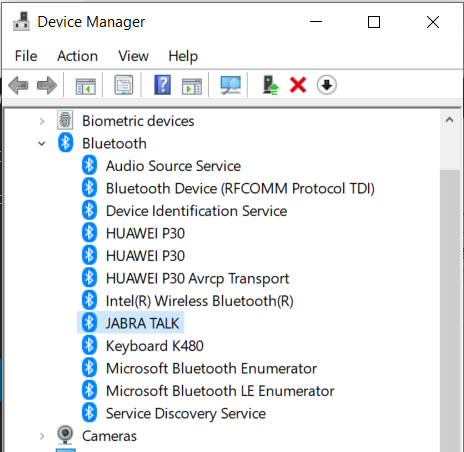
ESP32 作为蓝牙音源图1

接下来需要安装 ESP32-A2DP-master 这个库。下面的代码是从这个库的Example中修改而来,代码如下:

  1. /*
  2.   Streaming of sound data with Bluetooth to an other Bluetooth device.
  3.   We provide the complete sound data as a simple c array which
  4.   can be prepared e.g. in the following way
  5.   - Open any sound file in Audacity. Make sure that it contains 2 channels
  6.     - Select Tracks -> Resample and select 44100
  7.     - Export -> Export Audio -> Header Raw ; Signed 16 bit PCM
  8.   - Convert to c file e.g. with "xxd -i file_example_WAV_1MG.raw file_example_WAV_1MG.c"
  9.     - add the const qualifier to the array definition. E.g const unsigned char file_example_WAV_1MG_raw[] = {
  10.   Copyright (C) 2020 Phil Schatzmann
  11.   This program is free software: you can redistribute it and/or modify
  12.   it under the terms of the GNU General Public License as published by
  13.   the Free Software Foundation, either version 3 of the License, or
  14.   (at your option) any later version.
  15.   This program is distributed in the hope that it will be useful,
  16.   but WITHOUT ANY WARRANTY; without even the implied warranty of
  17.   MERCHANTABILITY or FITNESS FOR A PARTICULAR PURPOSE.  See the
  18.   GNU General Public License for more details.
  19.   You should have received a copy of the GNU General Public License
  20.   along with this program.  If not, see <<a href="http://www.gnu.org/licenses/" target="_blank">http://www.gnu.org/licenses/>.</a>
  21. */
  22. #include "BluetoothA2DPSource.h"
  23. #include "StarWars30.h"
  24. BluetoothA2DPSource a2dp_source;
  25. //SoundData *data = new TwoChannelSoundData((Channels*)StarWars10_raw,StarWars10_raw_len/4);
  26. SoundData *data = new OneChannelSoundData((int16_t*)StarWars30_raw, StarWars30_raw_len/2);
  27. void setup() {
  28.   Serial.begin(115200);
  29.   Serial.println("Start");
  30.   a2dp_source.start("JABRA TALK");   
  31. }
  32. void loop() {
  33.   if (a2dp_source.isConnected()==true) {
  34.       Serial.println("Connected!");
  35.       if (a2dp_source.hasSoundData()==true) {
  36.           Serial.println("Has sound!");
  37.         }
  38.       else {
  39.           Serial.println("No sound!");
  40.           a2dp_source.writeData(data);  
  41.       }
  42.     }
  43.     else {
  44.       Serial.println("Not connected!");
  45.     }
  46.   delay(2000);
  47. }
复制代码


特别注意,因为代码有音频数据需要特别选择 Huge APP 模式:
ESP32 作为蓝牙音源图2

测试使用的板子是ESP-WROOM-32,特点是价格偏移兼容性还不错:
ESP32 作为蓝牙音源图3


ESP32 作为蓝牙音源图4

测试的视频:


特别注意:连接时需要比较有耐心多次尝试,先将耳机设置为配对模式,然后ESP32上电。从资料来看,这样的搭配似乎有兼容性问题,淘宝上的卖家都不承诺蓝牙音频端能够兼容客户的蓝牙接收端。


创作许可协议

本项目采用 None(不开放任何权利,保留所有权利) 进行许可。

评论(1)
gouba
gouba
博主,有源码可以分享一下吗,谢谢
zoologist
zoologist
作者
回复gouba
就是帖子最后的那个库
- 没有更多了 -