【项目背景】
回力镖(Boomerang),又称回飞棒、飞旋镖、回旋镖,一种掷出后可以利用空气动力学原理飞回来的打猎用具,曾作为一些地区土著的狩猎工具。其中澳大利亚原住民的最为著名。飞去来器绕着弧形轨道飞行,在不使用其他的工具的情况下,以最短的时间飞出最长的距离。
【项目设计】
设计一个“回力车”,丢出去会自己回来。
【项目原理】
使用掌控板的“指南针”,将方向指向自己。利用“PID”控制小车沿着设定的方向前进。
【项目设想】
使用手机Bylnk,向掌控板发送方向,控制小车按方向前进。
【项目准备】
1、PID
PID即:Proportional(比例)、Integral(积分)、Differential(微分)的缩写。顾名思义,PID控制算法是结合比例、积分和微分三种环节于一体的控制算法,它是连续系统中技术最为成熟、应用最为广泛的一种控制算法,该控制算法出现于20世纪30至40年代,适用于对被控对象模型了解不清楚的场合。
介绍的很清楚:
使用PID库,轻松搞定PID:https://www.arduino.cn/thread-15176-1-2.html
【编写自己的PID】
1、添加“掌控宝”库
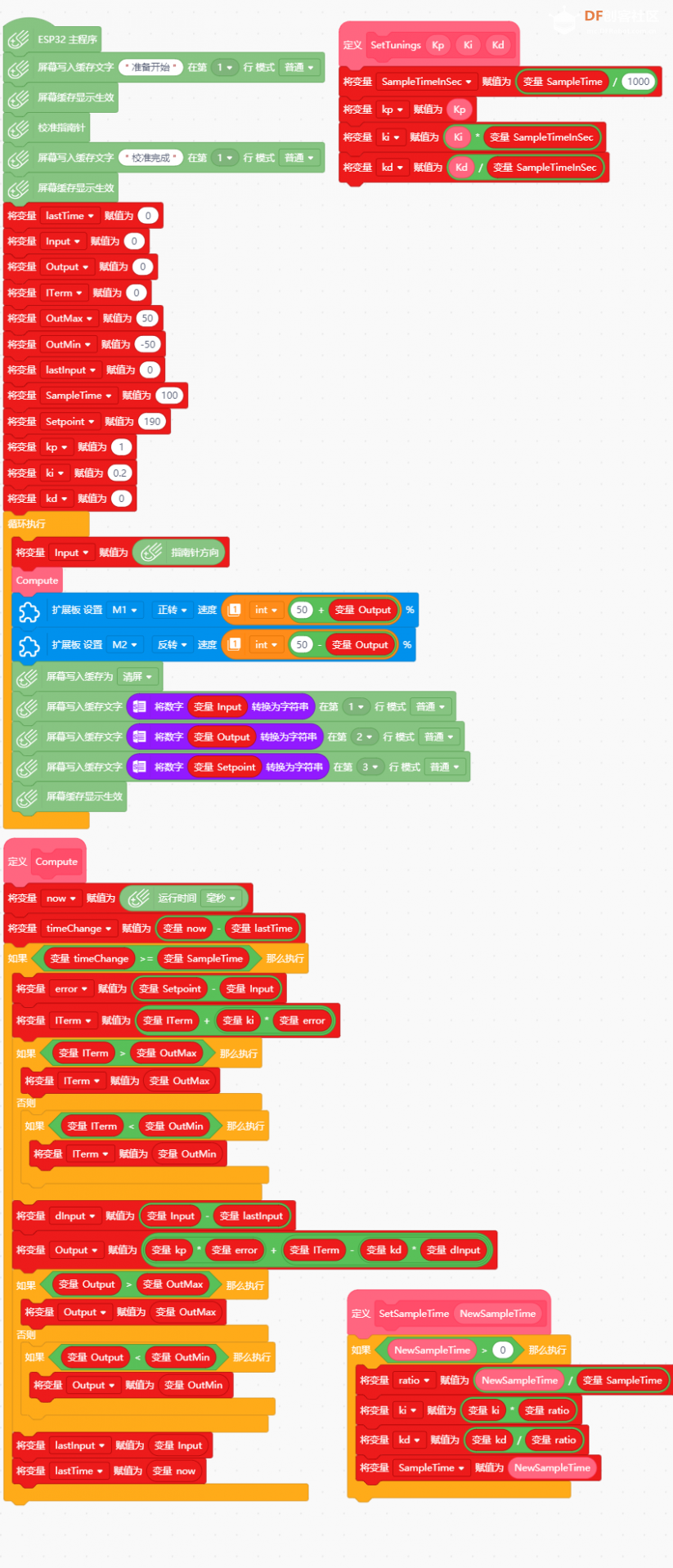
2、Mind+代码
- # MindPlus
- # mpython
- from mpython import *
- import parrot
- import math
- import time
-
- # 自定义函数
- def SetTunings(Kp, Ki, Kd):
- global lastTime, Input, Output, Setpoint, kp, ki, kd, now, timeChange, error, SampleTime, SampleTimeInSec, ratio, lastInput, dInput, ITerm, OutMax, OutMin
- SampleTimeInSec = (SampleTime / 1000)
- kp = Kp
- ki = (Ki * SampleTimeInSec)
- kd = (Kd / SampleTimeInSec)
- def Compute():
- global lastTime, Input, Output, Setpoint, kp, ki, kd, now, timeChange, error, SampleTime, SampleTimeInSec, ratio, lastInput, dInput, ITerm, OutMax, OutMin
- now = time.ticks_ms()
- timeChange = (now - lastTime)
- if (timeChange >= SampleTime):
- error = (Setpoint - Input)
- ITerm = (ITerm + (ki * error))
- if (ITerm > OutMax):
- ITerm = OutMax
- else:
- if (ITerm < OutMin):
- ITerm = OutMin
- dInput = (Input - lastInput)
- Output = ((kp * error) + (ITerm - (kd * dInput)))
- if (Output > OutMax):
- Output = OutMax
- else:
- if (Output < OutMin):
- Output = OutMin
- lastInput = Input
- lastTime = now
- def SetSampleTime(NewSampleTime):
- global lastTime, Input, Output, Setpoint, kp, ki, kd, now, timeChange, error, SampleTime, SampleTimeInSec, ratio, lastInput, dInput, ITerm, OutMax, OutMin
- if (NewSampleTime > 0):
- ratio = (NewSampleTime / SampleTime)
- ki = (ki * ratio)
- kd = (kd / ratio)
- SampleTime = NewSampleTime
-
-
- oled.DispChar("准备开始", 0, (1-1)*16, 1)
- oled.show()
- magnetic.calibrate()
- oled.DispChar("校准完成", 0, (1-1)*16, 1)
- oled.show()
- lastTime = 0
- Input = 0
- Output = 0
- ITerm = 0
- OutMax = 50
- OutMin = -50
- lastInput = 0
- SampleTime = 100
- Setpoint = 190
- kp = 1
- ki = 0.2
- kd = 0
- while True:
- Input = magnetic.get_heading()
- Compute()
- parrot.set_speed(parrot.MOTOR_1, (int((50 + Output))))
- parrot.set_speed(parrot.MOTOR_2, -(int((50 - Output))))
- oled.fill(0)
- oled.DispChar((str(Input)), 0, (1-1)*16, 1)
- oled.DispChar((str(Output)), 0, (2-1)*16, 1)
- oled.DispChar((str(Setpoint)), 0, (3-1)*16, 1)
- oled.show()
-
-
-
-
3、图型
4、调整Kp,Kikp = 1
ki = 0.2
kd = 0
慢慢调
【回力车】
【演示视频】
|