【项目背景】
智能控制开关,是我很早就在考虑的一个项目。一直没有做主要是因为,我有以下几个要求:1、不破坏原有的器件(媳妇不让)。
2、不动220V(危险)
3、具有一定可调整性(开关大小不一致)。
我见过最简单的方法是,把舵机直接用热熔胶粘在开关边上(简单粗暴)。有的把设置粘在墙面上(有破坏性)。
我发现一个现象,就是一般的开关都是要突出于墙面,应该是方便拆卸(外面是一个壳,用力能抠下来,里面有螺丝)。而突出这部分正是我可以利用的,因为我没有3D打印和激光切割机,只能使用一些金属构件。
【项目设计】
主控使用,FireBeetle Board ESP32 E,主要原因是它有蓝牙、Wifi功能,可无线控制。驱动开关使用SG90舵机,小巧且不用单独供电。
方案1:使用蓝牙和WIfi热点,手机app控制。
方案2:使用通过STA 模式:ESP32模块通过路由器连接互联网,手机通过互联网实现对设备的远程控制。
方案3:通过红外模块,使用遥控器控制
方案1的优点是,手机是随身携带物品,且不用连接互联网。缺点是使用前需连接蓝牙或热点。
方案2的优点是,手机一般情况都是连着互联网的。缺点是,FireBeetle Board ESP32 E需要一直连接互联网,当然家里如果Wifi一直不关的话,也不是问题。
方案3的优点是,遥控器拿起来就用,不像手机还要解锁、开程序等,使用方便。缺点是,我们不会把遥控器一直带在身上,当然开关灯也不会频繁进行,遥控器放在床边或办公桌上就可以。还有一个缺点就是使用遥控器,显得不高大上。
下面将使用方案1进行测试,“WIfi热点”。
【编程环境】
Arduino IDE 编译环境配置,参考:https://wiki.dfrobot.com.cn/_SKU ... rd_ESP32_E#target_6
【硬件设备】
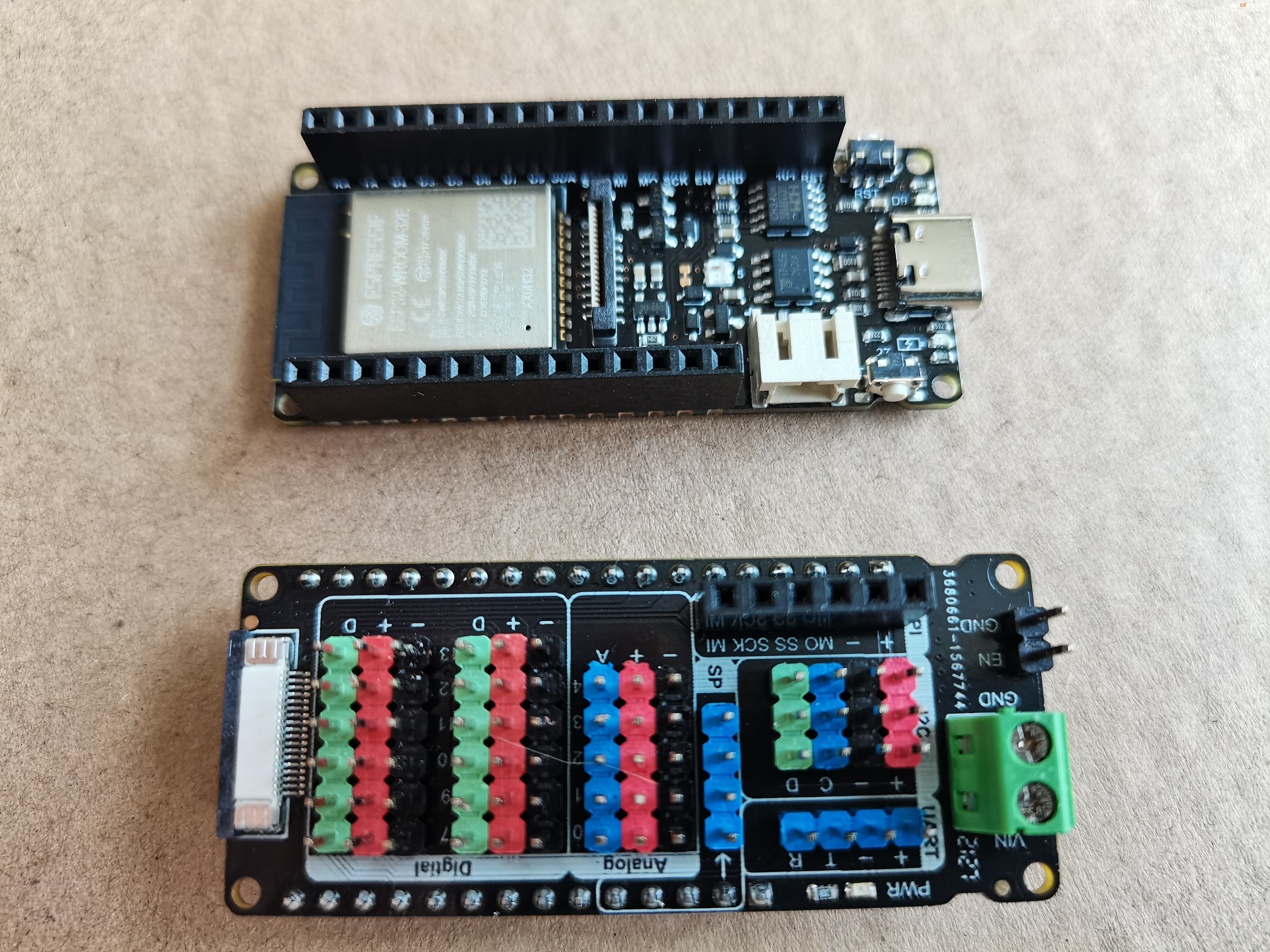
1、FireBeetle ESP32-E是一款基于ESP-WROOM-32E双核芯片的主控板,它专为IoT设计。 它支持WIFI和蓝牙双模通信并具有体积小巧、超低功耗、板载充电电路、接口易用等特性。FireBeetle ESP32-E深度支持ArduinoIDE编程。 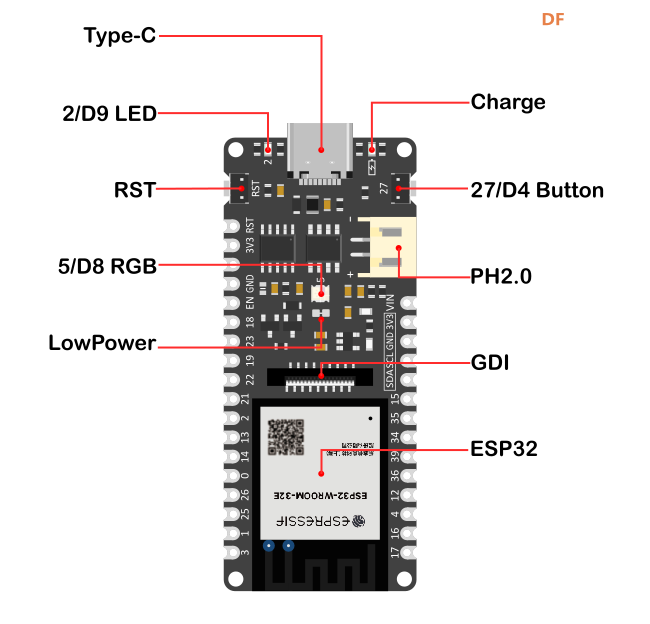
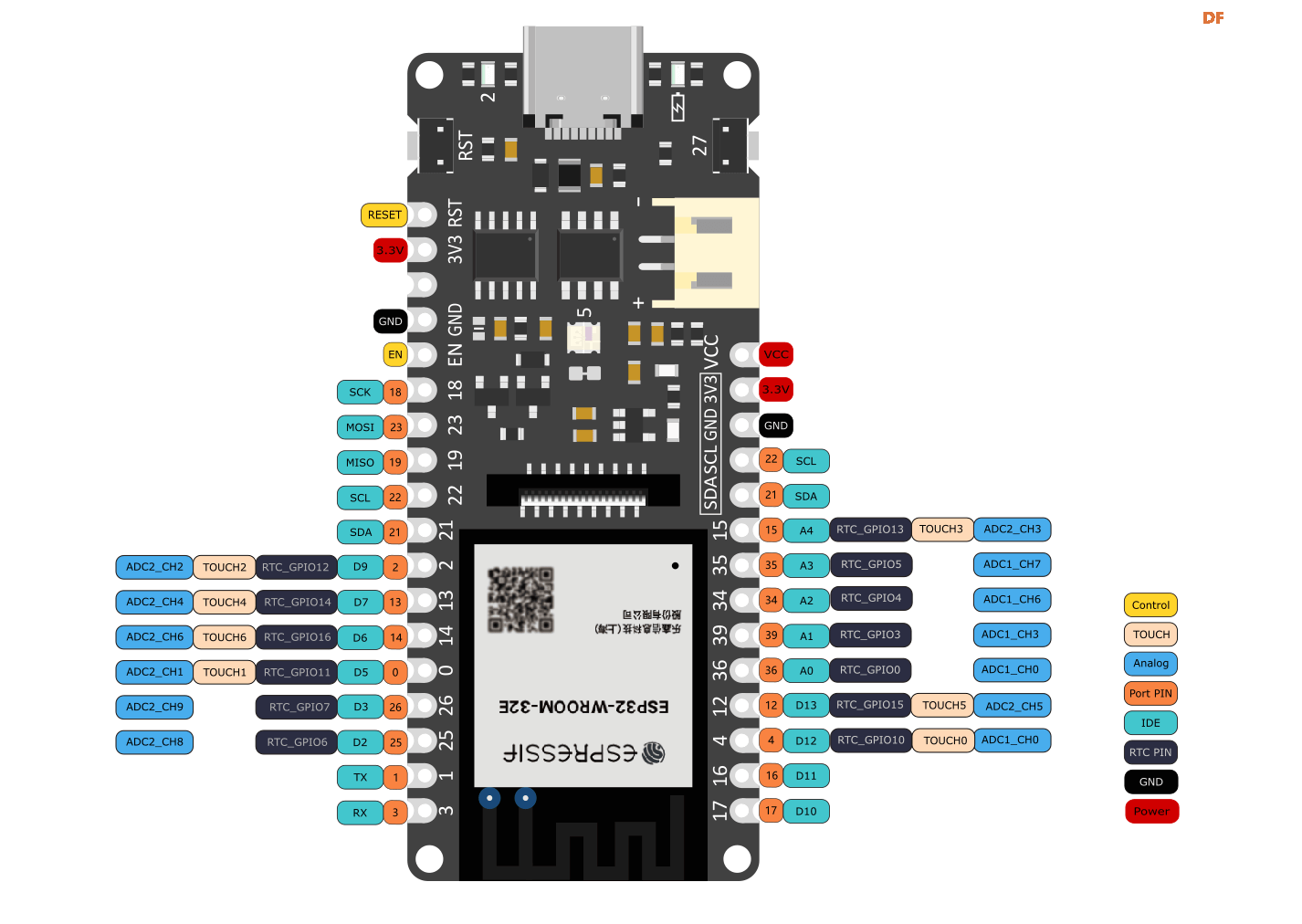
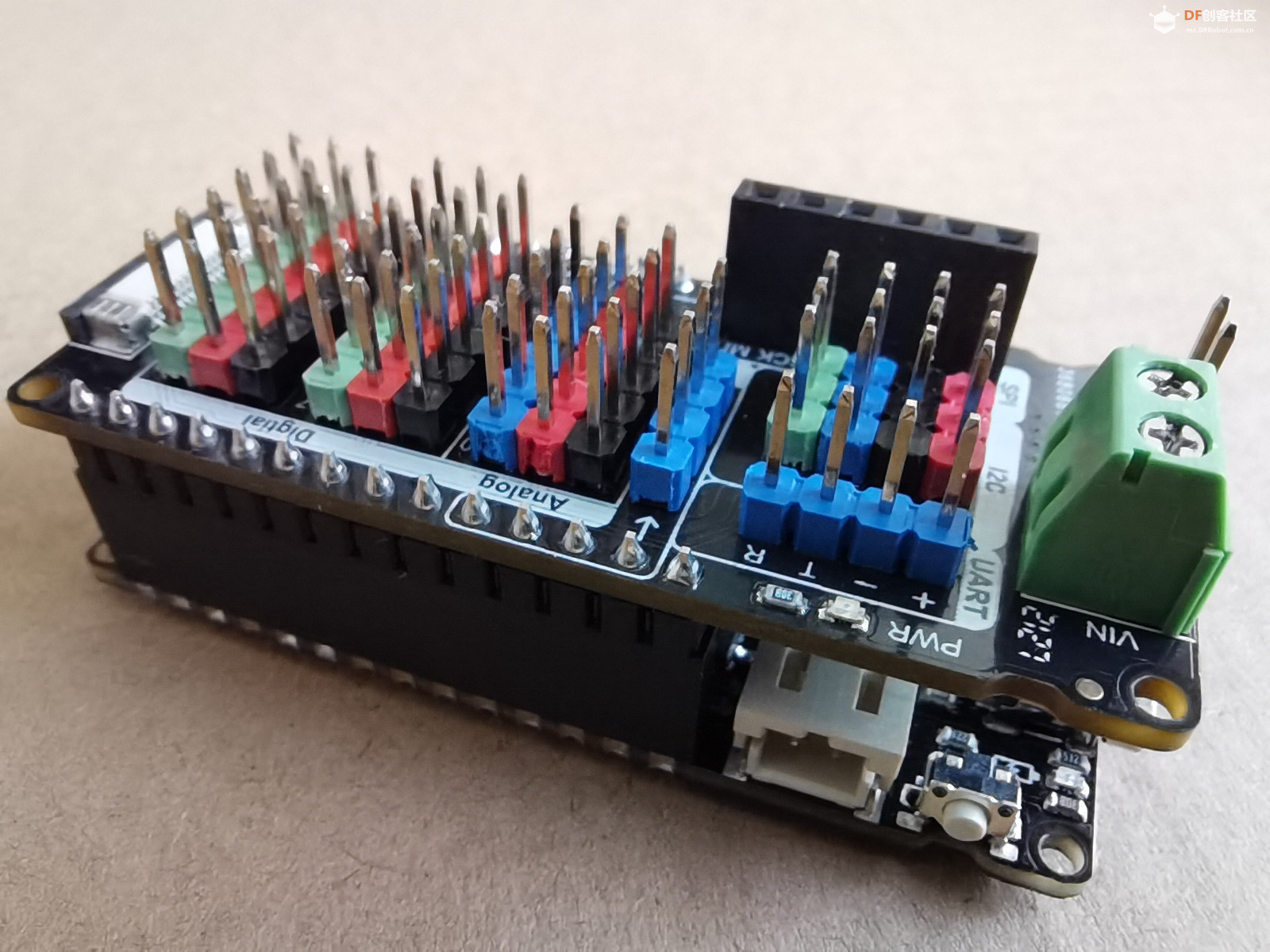
2、扩展板 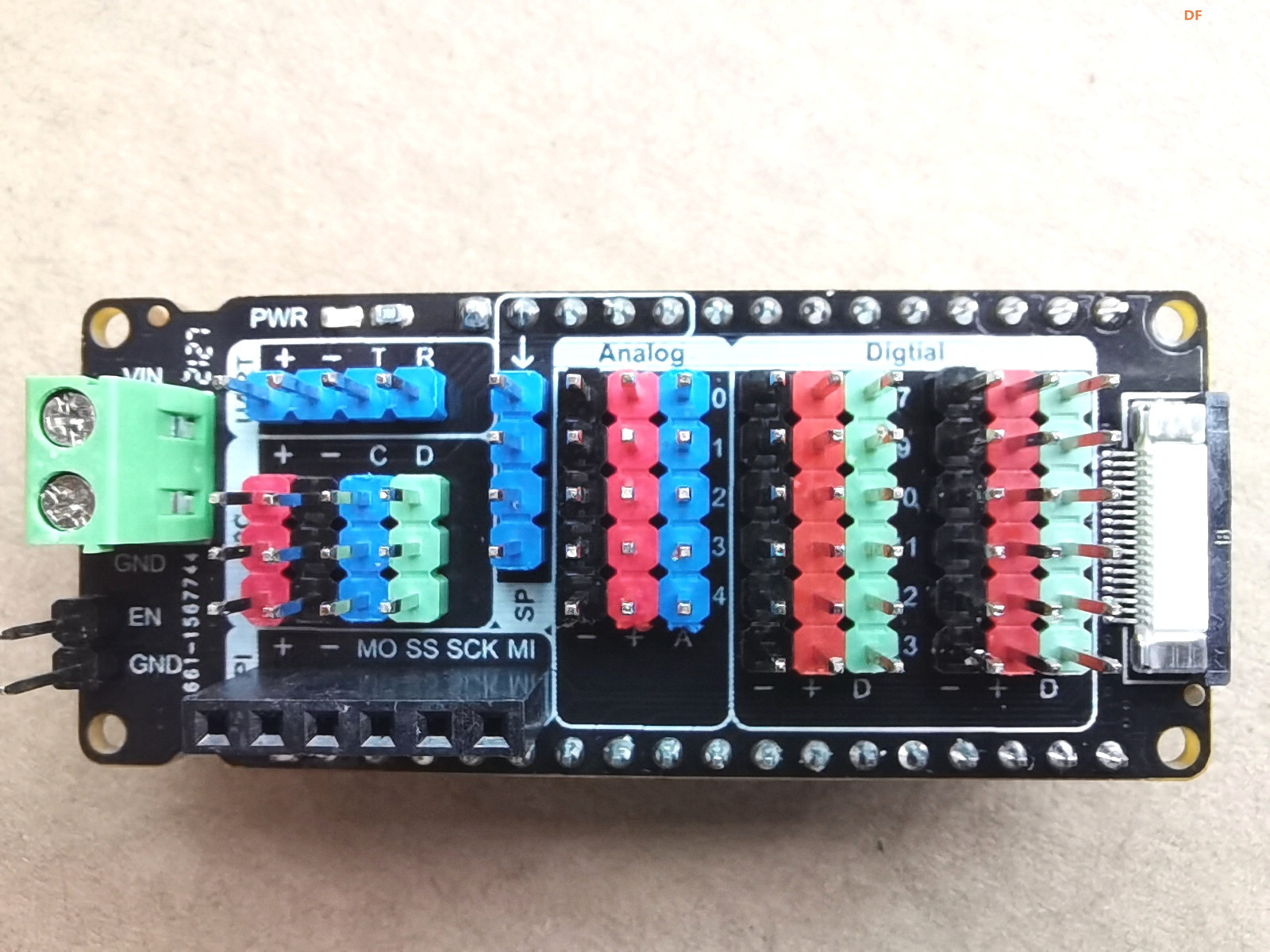
- 接口方式:Gravity标准接口
- GDI显示接口,单线连接显示屏
- 支持数字输入输出:13
- 支持模拟输入:5
- 支持I2C*3
- 支持UART
- 支持SPI
- 支持SP
- 支持低功耗
- 支持外接电源
【控制舵机】
esp32 在arduino ide环境下控制180°舵机
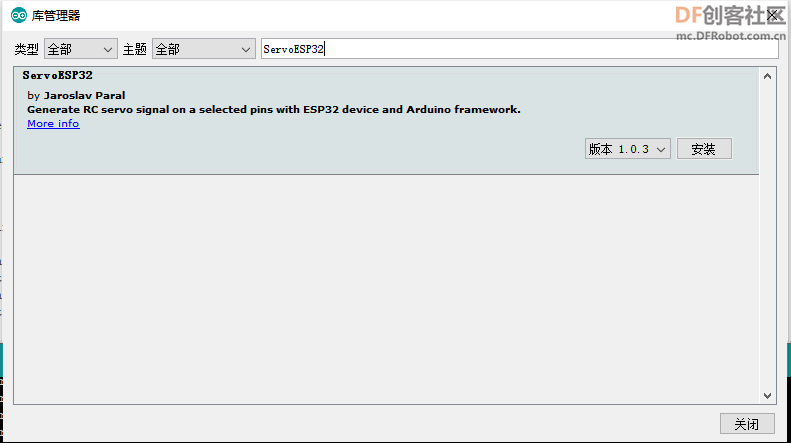
180°的舵机在arduino 板子上控制是很方便的。当我们用esp32板子编写的时候,。这时候我们应该去IDE那边下载个esp32专用的舵机库(ServoESP32)。
以下为测试程序
-
- #include <Servo.h>
-
- Servo myservo; // 创建舵机对象以控制舵机
- // 最多可以创建八个伺服对象
-
- int pos = 0; // 变量来存储伺服位置
-
- void setup()
- {
- myservo.attach(2); //舵机连接在引脚2(扩展板对应D9)
- }
-
-
- void loop()
- {
- for(pos = 0; pos < 180; pos += 20)
- {
- myservo.write(pos);
- delay(3000);
- }
- for(pos = 180; pos>=1; pos-=20)
- {
- myservo.write(pos);
- delay(3000);
- }
- }
-
【开热点】
ESP32具有WIFI功能,以下示例使用ESP32创建了一个wifi服务器,使用客户端连接到该服务器,遥控LED的亮灭。
/* WiFiAccessPoint.ino 创建了一个wifi热点并提供了一个web服务
Steps: 1. 连接到这个wifi "yourAp"
2. 访问 http://192.168.4.1/H 来开灯或者访问http://192.168.4.1/L 来关灯
OR Run raw TCP "GET /H" and "GET /L" on PuTTY terminal with 192.168.4.1 as IP address and 80 as port
*/-
- #include <WiFi.h>
- #include <WiFiClient.h>
- #include <WiFiAP.h>
-
-
- // 热点设置你的wifi与密码
- const char *ssid = "";
- const char *password = "";
-
- WiFiServer server(80);
-
- void setup() {
- pinMode(LED_BUILTIN, OUTPUT);//将LED引脚设置为输出模式
- Serial.begin(115200);
- Serial.println();
- Serial.println("Configuring access point...");
-
- // 配置wifi以及获取IP地址.
- WiFi.softAP(ssid, password);
- IPAddress myIP = WiFi.softAPIP();
- Serial.print("AP IP address: ");
- Serial.println(myIP);
- server.begin();
-
- Serial.println("Server started");
- }
-
- void loop() {
- WiFiClient client = server.available(); // listen for incoming clients
-
- if (client) { // if you get a client,
- Serial.println("New Client."); // print a message out the serial port
- String currentLine = ""; // make a String to hold incoming data from the client
- while (client.connected()) { // loop while the client's connected
- if (client.available()) { // if there's bytes to read from the client,
- char c = client.read(); // read a byte, then
- Serial.write(c); // print it out the serial monitor
- if (c == '\n') { // if the byte is a newline character
-
- // if the current line is blank, you got two newline characters in a row.
- // that's the end of the client HTTP request, so send a response:
- if (currentLine.length() == 0) {
- // HTTP headers always start with a response code (e.g. HTTP/1.1 200 OK)
- // and a content-type so the client knows what's coming, then a blank line:
- client.println("HTTP/1.1 200 OK");
- client.println("Content-type:text/html");
- client.println();
-
- // the content of the HTTP response follows the header:
- client.print("Click <a href="/H">here</a> to turn ON the LED.<br>");
- client.print("Click <a href="/L">here</a> to turn OFF the LED.<br>");
-
- // The HTTP response ends with another blank line:
- client.println();
- // break out of the while loop:
- break;
- } else { // if you got a newline, then clear currentLine:
- currentLine = "";
- }
- } else if (c != '\r') { // if you got anything else but a carriage return character,
- currentLine += c; // add it to the end of the currentLine
- }
-
- // Check to see if the client request was "GET /H" or "GET /L":
- if (currentLine.endsWith("GET /H")) {
- digitalWrite(LED_BUILTIN, HIGH); // GET /H turns the LED on
- }
- if (currentLine.endsWith("GET /L")) {
- digitalWrite(LED_BUILTIN, LOW); // GET /L turns the LED off
- }
- }
- }
- // close the connection:
- client.stop();
- Serial.println("Client Disconnected.");
- }
- }
【手机控制】
将开热点程序与控制舵机程序相结合,并通过App Inventor2,编写手机端程序。
1、FireBeetle Board ESP32 E主板程序:-
- #include <WiFi.h>
- #include <WiFiClient.h>
- #include <WiFiAP.h>
- #include <Servo.h>
- Servo myservo;
- // 热点设置你的wifi与密码
- const char *ssid = "";
- const char *password = "";
-
- WiFiServer server(80);
-
- void setup() {
- myservo.attach(2);
- pinMode(LED_BUILTIN, OUTPUT);//将LED引脚设置为输出模式
- Serial.begin(115200);
- Serial.println();
- Serial.println("Configuring access point...");
-
- // 配置wifi以及获取IP地址.
- WiFi.softAP(ssid, password);
- IPAddress myIP = WiFi.softAPIP();
- Serial.print("AP IP address: ");
- Serial.println(myIP);
- server.begin();
-
- Serial.println("Server started");
- }
-
- void loop() {
- WiFiClient client = server.available(); // listen for incoming clients
-
- if (client) { // if you get a client,
- Serial.println("New Client."); // print a message out the serial port
- String currentLine = ""; // make a String to hold incoming data from the client
- while (client.connected()) { // loop while the client's connected
- if (client.available()) { // if there's bytes to read from the client,
- char c = client.read(); // read a byte, then
- Serial.write(c); // print it out the serial monitor
- if (c == '\n') { // if the byte is a newline character
-
- // if the current line is blank, you got two newline characters in a row.
- // that's the end of the client HTTP request, so send a response:
- if (currentLine.length() == 0) {
- // HTTP headers always start with a response code (e.g. HTTP/1.1 200 OK)
- // and a content-type so the client knows what's coming, then a blank line:
- client.println("HTTP/1.1 200 OK");
- client.println("Content-type:text/html");
- client.println();
-
- // the content of the HTTP response follows the header:
- client.print("Click <a href="/H">here</a> to turn ON the LED.<br>");
- client.print("Click <a href="/L">here</a> to turn OFF the LED.<br>");
-
- // The HTTP response ends with another blank line:
- client.println();
- // break out of the while loop:
- break;
- } else { // if you got a newline, then clear currentLine:
- currentLine = "";
- }
- } else if (c != '\r') { // if you got anything else but a carriage return character,
- currentLine += c; // add it to the end of the currentLine
- }
-
- // Check to see if the client request was "GET /H" or "GET /L":
- if (currentLine.endsWith("GET /H")) {
- digitalWrite(LED_BUILTIN, HIGH); // GET /H turns the LED on
- myservo.write(100);
- delay(500);
- myservo.write(60);
- }
- if (currentLine.endsWith("GET /L")) {
- digitalWrite(LED_BUILTIN, LOW); // GET /L turns the LED off
- myservo.write(30);
- delay(500);
- myservo.write(60);
- }
- }
- }
- // close the connection:
- client.stop();
- Serial.println("Client Disconnected.");
- }
- }
2、手机app程序很简单,控件只使用“开关按钮”和“http客户端”。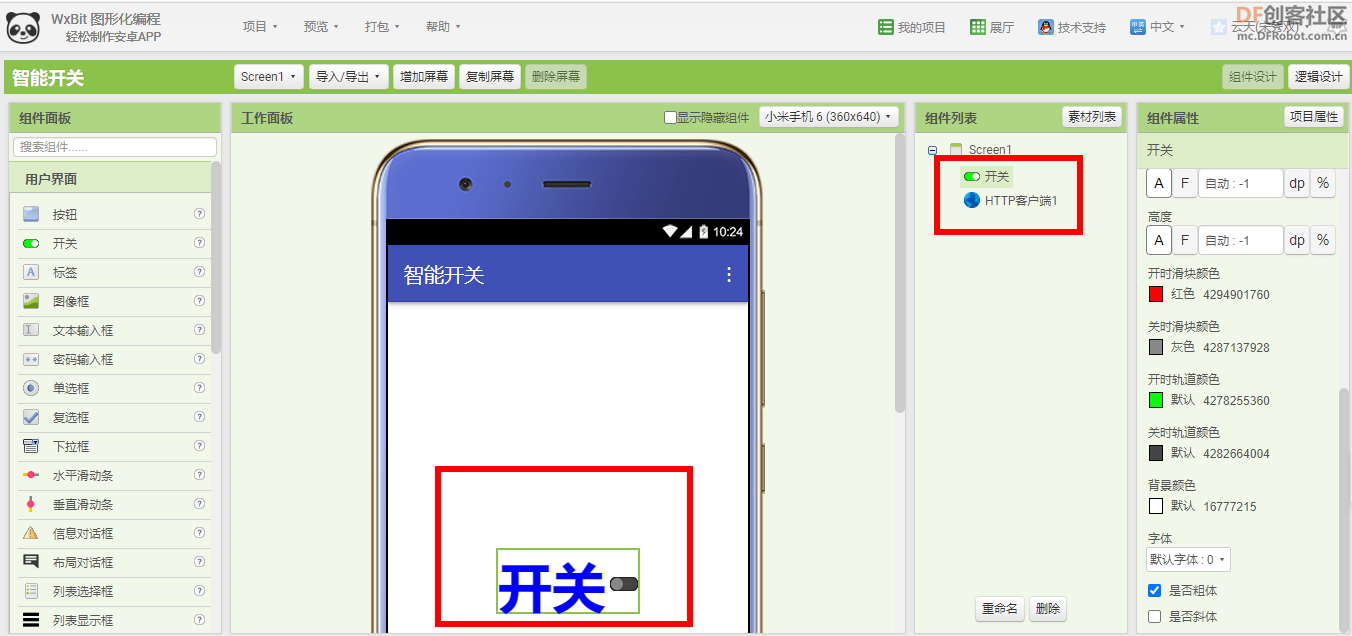
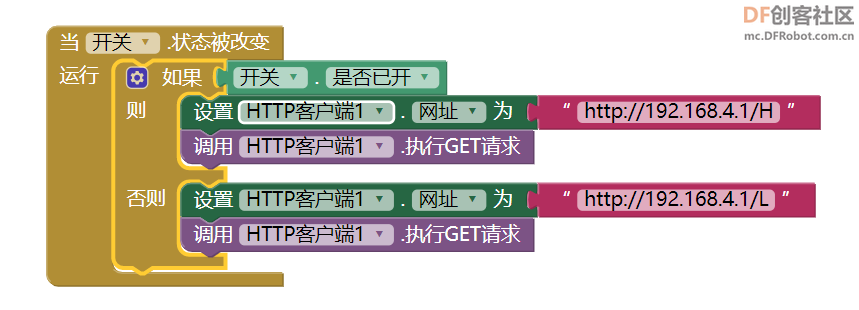
代码:当开关状态发生改变时,判断开关是开是关,访问对应地址。
  
【演示视频】
|