收到进阶版帮助帖的启发,写完网页控灯帖子(https://mc.dfrobot.com.cn/thread-318980-1-1.html)后,我又想到了用蓝牙的方式来控灯。
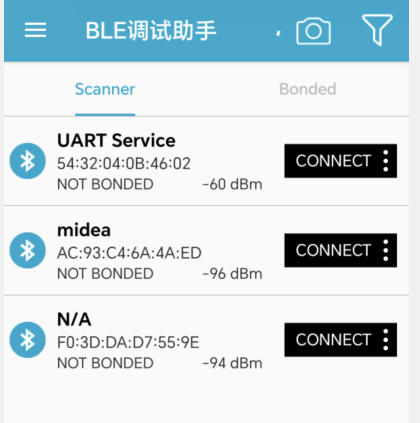
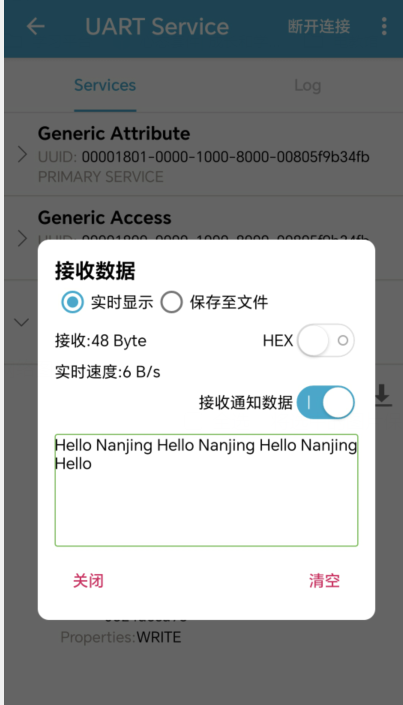
先来看下效果(分别是蓝牙发送和接收消息)。
整个测试的过程记录如下:
1、从帮助帖里面找到样例代码,修改提交,提示错误。
样例代码如下:
复制代码
报错如下:
D:\desktop\C6测评报告\LANYA-BLUETOOTH1\LANYA-BLUETOOTH1.ino: In member function 'virtual void MyCallbacks::onWrite(BLECharacteristic*)': D:\desktop\C6测评报告\LANYA-BLUETOOTH1\LANYA-BLUETOOTH1.ino:66:54: error: conversion from 'String' to non-scalar type 'std::string' {aka 'std::__cxx11::basic_string<char>'} requested exit status 1 Compilation error: conversion from 'String' to non-scalar type 'std::string' {aka 'std::__cxx11::basic_string<char>'} requested
2、于是修改样例代码,将std::string rxValue = pCharacteristic->getValue();//接收数据,并赋给rxValue 改成 String rxValue = pCharacteristic->getValue();
调试成功。
3、修改样例代码,增加米奇小灯的控灯程序,如下: - /*
- Video: https://www.youtube.com/watch?v=oCMOYS71NIU
- Based on Neil Kolban example for IDF: https://github.com/nkolban/esp32-snippets/blob/master/cpp_utils/tests/BLE%20Tests/SampleNotify.cpp
- Ported to Arduino ESP32 by Evandro Copercini
-
- Create a BLE server that, once we receive a connection, will send periodic notifications.
- The service advertises itself as: 6E400001-B5A3-F393-E0A9-E50E24DCCA9E
- Has a characteristic of: 6E400002-B5A3-F393-E0A9-E50E24DCCA9E - used for receiving data with "WRITE"
- Has a characteristic of: 6E400003-B5A3-F393-E0A9-E50E24DCCA9E - used to send data with "NOTIFY"
-
- The design of creating the BLE server is:
- 1. Create a BLE Server
- 2. Create a BLE Service
- 3. Create a BLE Characteristic on the Service
- 4. Create a BLE Descriptor on the characteristic
- 5. Start the service.
- 6. Start advertising.
-
- */
-
- /* 该示例演示了蓝牙数据透传,烧录代码,打开串口监视器,打开手机的BLE调试助手
- * 1.即可看见ESP32发送的数据--见APP使用图
- * 2.通过BLE调试助手的输入框可向ESP32发送数据--见APP使用图
- * 该示例由BLE_uart示例更改而来
- */
-
- #include <BLEDevice.h>
- #include <BLEServer.h>
- #include <BLEUtils.h>
- #include <BLE2902.h>
-
- #include <Adafruit_NeoPixel.h>
- #ifdef __AVR__
- #include <avr/power.h> // Required for 16 MHz Adafruit Trinket
- #endif
-
- // Which pin on the Arduino is connected to the NeoPixels?
- #define PIN 6 // On Trinket or Gemma, suggest changing this to 1
-
- // How many NeoPixels are attached to the Arduino?
- #define NUMPIXELS 15 // Popular NeoPixel ring size
-
- // When setting up the NeoPixel library, we tell it how many pixels,
- // and which pin to use to send signals. Note that for older NeoPixel
- // strips you might need to change the third parameter -- see the
- // strandtest example for more information on possible values.
- Adafruit_NeoPixel pixels(NUMPIXELS, PIN, NEO_GRB + NEO_KHZ800);
-
- BLEServer *pServer = NULL;
- BLECharacteristic * pTxCharacteristic;
- bool deviceConnected = false;
- uint8_t txValue = 0;
- int led = 15;
-
- // See the following for generating UUIDs:
- // https://www.uuidgenerator.net/
-
- #define SERVICE_UUID "6E400001-B5A3-F393-E0A9-E50E24DCCA9E" // UART service UUID
- #define CHARACTERISTIC_UUID_RX "6E400002-B5A3-F393-E0A9-E50E24DCCA9E"
- #define CHARACTERISTIC_UUID_TX "6E400003-B5A3-F393-E0A9-E50E24DCCA9E"
-
-
- //蓝牙连接/断开处理。当有连接/断开事件发生时自动触发
- class MyServerCallbacks: public BLEServerCallbacks {
- void onConnect(BLEServer* pServer) { //当蓝牙连接时会执行该函数
- Serial.println("蓝牙已连接");
- deviceConnected = true;
- };
-
- void onDisconnect(BLEServer* pServer) { //当蓝牙断开连接时会执行该函数
- Serial.println("蓝牙已断开");
- deviceConnected = false;
- delay(500); // give the bluetooth stack the chance to get things ready
- pServer->startAdvertising(); // restart advertising
-
- }
- };
-
- /****************数据接收部分*************/
- /****************************************/
- //蓝牙接收数据处理。当收到数据时自动触发
- class MyCallbacks: public BLECharacteristicCallbacks {
- void onWrite(BLECharacteristic *pCharacteristic) {
- String rxValue = pCharacteristic->getValue();//接收数据,并赋给rxValue
-
- if(rxValue == "ON"){
- Serial.println("OPEN");
- digitalWrite(led,HIGH);
- delay(0);
- for(int i=0; i<NUMPIXELS; i++) { // For each pixel...
-
- // pixels.Color() takes RGB values, from 0,0,0 up to 255,255,255
- // Here we're using a moderately bright green color:
- pixels.setPixelColor(i, pixels.Color(0, 150, 0));
-
- pixels.show(); // Send the updated pixel colors to the hardware.
- delay(0); // Pause before next pass through loop
- }
- } //判断接收的字符是否为"ON"
-
- if(rxValue == "OFF"){
- Serial.println("CLOSE");
- digitalWrite(led,LOW);
- pixels.clear(); //得到/OFF时关闭灯
- for(int i=0; i<NUMPIXELS; i++) { // For each pixel...
-
- // pixels.Color() takes RGB values, from 0,0,0 up to 255,255,255
- // Here we're using a moderately bright green color:
- pixels.setPixelColor(i, pixels.Color(0, 0, 0));
- pixels.show(); // Send the updated pixel colors to the hardware.
- delay(0); // Pause before next pass through loop
- }
- } //判断接收的字符是否为"OFF"
- }
- };
- /***************************************/
- /****************************************/
-
-
- void setup() {
- Serial.begin(115200);
- BLEBegin(); //初始化蓝牙
- pinMode(led,OUTPUT);
- #if defined(__AVR_ATtiny85__) && (F_CPU == 16000000)
- clock_prescale_set(clock_div_1);
- #endif
- pixels.begin();
-
- }
-
- void loop() {
- /****************数据发送部分*************/
- /****************************************/
- if (deviceConnected) { //如果有蓝牙连接,就发送数据
- pTxCharacteristic->setValue("Hello "); //发送字符串
- pTxCharacteristic->notify();
- delay(1000); // bluetooth stack will go into congestion, if too many packets are sent
-
- pTxCharacteristic->setValue("Nanjing "); //发送字符串
- pTxCharacteristic->notify();
- delay(1000); // bluetooth stack will go into congestion, if too many packets are sent
- }
- /****************************************/
- /****************************************/
- }
-
-
- void BLEBegin(){
- // Create the BLE Device
- BLEDevice::init(/*BLE名称*/"UART Service");
-
- // Create the BLE Server
- pServer = BLEDevice::createServer();
- pServer->setCallbacks(new MyServerCallbacks());
-
- // Create the BLE Service
- BLEService *pService = pServer->createService(SERVICE_UUID);
-
- // Create a BLE Characteristic
- pTxCharacteristic = pService->createCharacteristic(
- CHARACTERISTIC_UUID_TX,
- BLECharacteristic::PROPERTY_NOTIFY
- );
-
- pTxCharacteristic->addDescriptor(new BLE2902());
-
- BLECharacteristic * pRxCharacteristic = pService->createCharacteristic(
- CHARACTERISTIC_UUID_RX,
- BLECharacteristic::PROPERTY_WRITE
- );
-
- pRxCharacteristic->setCallbacks(new MyCallbacks());
-
- // Start the service
- pService->start();
-
- // Start advertising
- pServer->getAdvertising()->start();
- Serial.println("Waiting a client connection to notify...");
- }
4、在手机上下载“BLE调试助手”的app,连接蓝牙,查看收发消息情况。
测试成功。
测试后记:
1、本来还想验证一下太阳能板的使用,气象站、温湿度以及espnow等功能,但是时间有限;
2、其实投入的时间还是不少的,但是无奈测试过程中经常报错,遇到困难有时候无从下手,甚至一度搁置。幸亏在群里有众多高手,在群里咨询,加上看帖子之后,终于慢慢找到了头绪;
3、在参考测试了巴法云、EMQX等平台之后,感觉自己的知识结构又在不断完善,很有收获。
最后,再一次感谢论坛给我这次评测的机会。
|