小智MCP自然语言控制 K10 行空板麦轮小车
9.4
【目标任务】
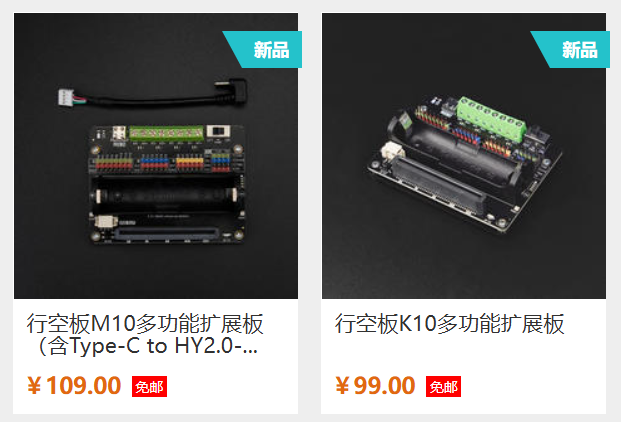
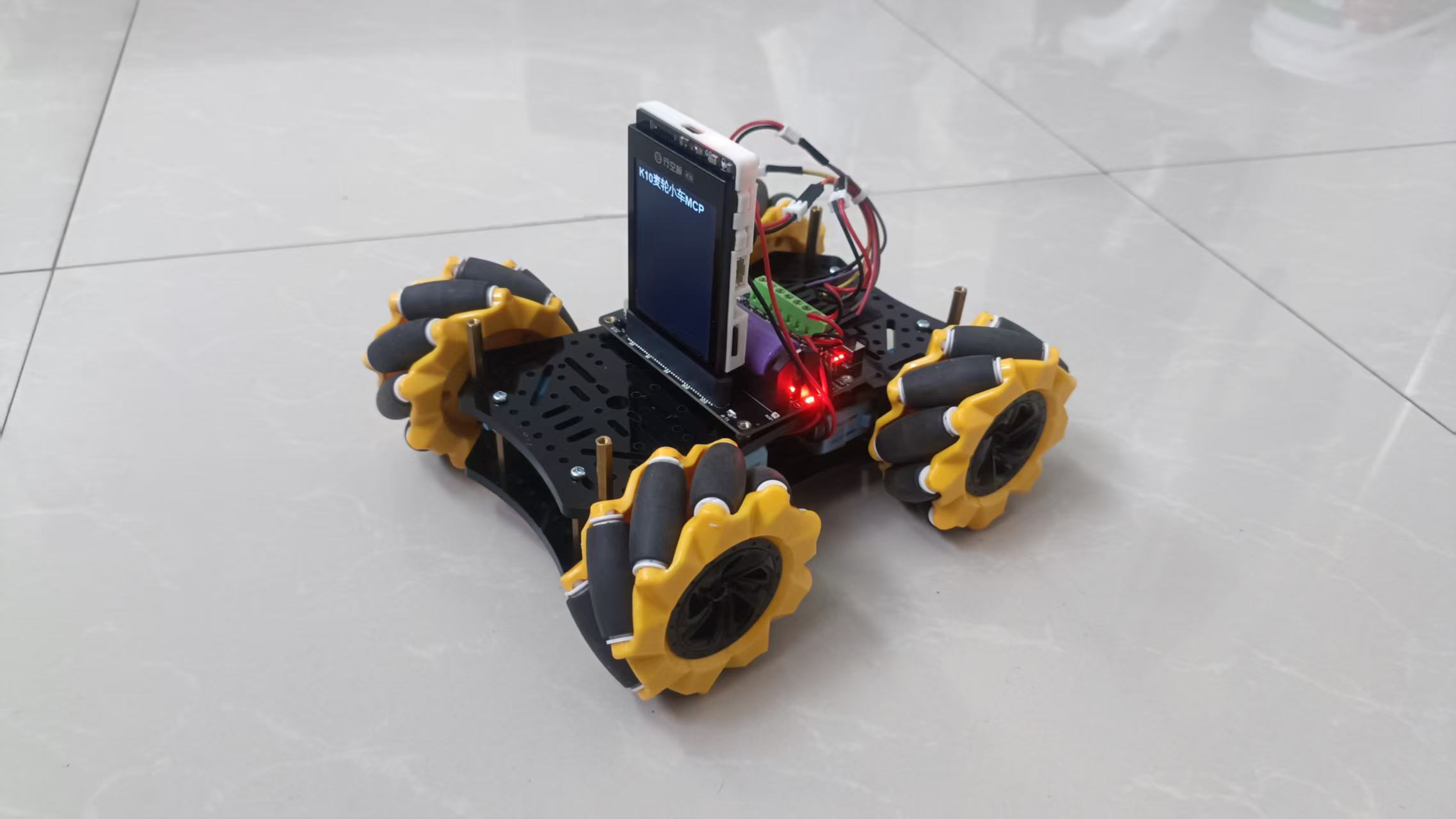
DF商城新上了行空板K10+M10的扩展板下单后,就计划着做些什么,它有6+2个全功能GPIO口,支持6个舵机,4个电机,支持4个I2C(其中一个5V专为二哈准备)……哈哈,我看到支持4电机时,就想到了麦轮小车,暑假中两电机小车搞到好多次了,当扩展板到手了,就直接麦轮小车走起。
帅气的K10麦轮小车:
步骤1 安装K10扩展板的Arduino 库-DFRobot_UnihikerExpansion库:
1、认识一下行空板K10的新扩展板:
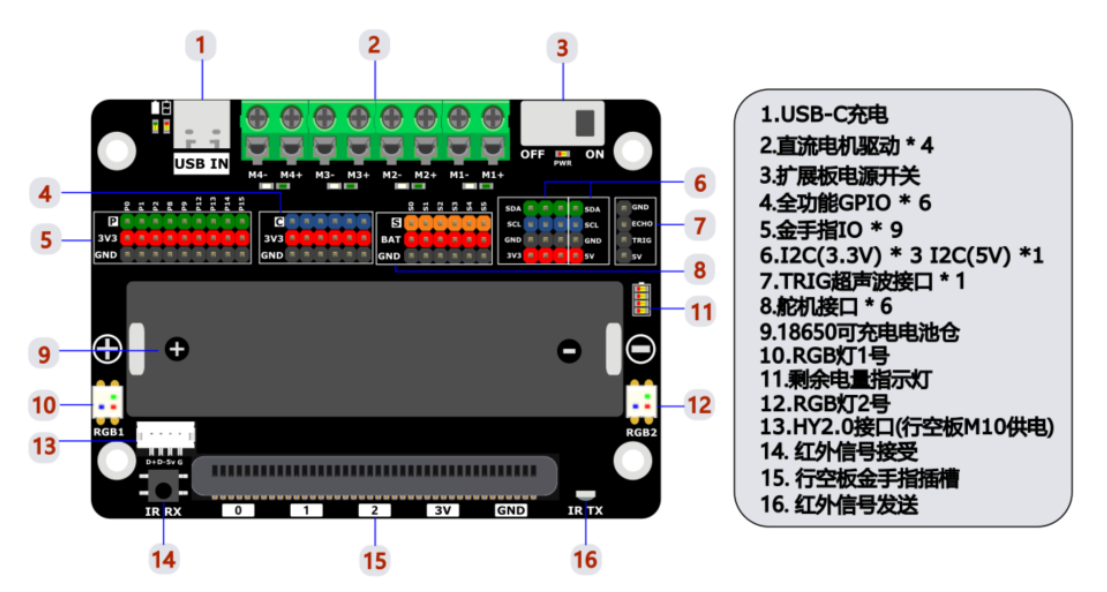
2、Arduino 库安装:
https://gitee.com/dfrobot/DFRobot_UnihikerExpansion
方法2:首先下载库文件,将其粘贴到\Arduino\libraries目录中,然后打开examples文件夹并在该文件夹中运行演示.
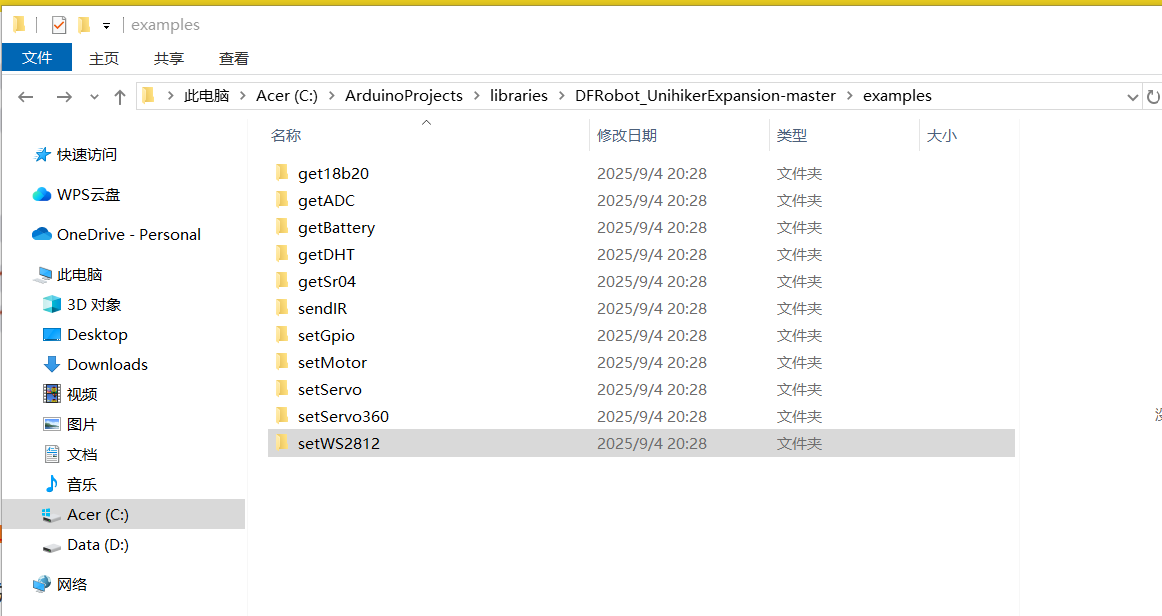
3、学习示例代码:
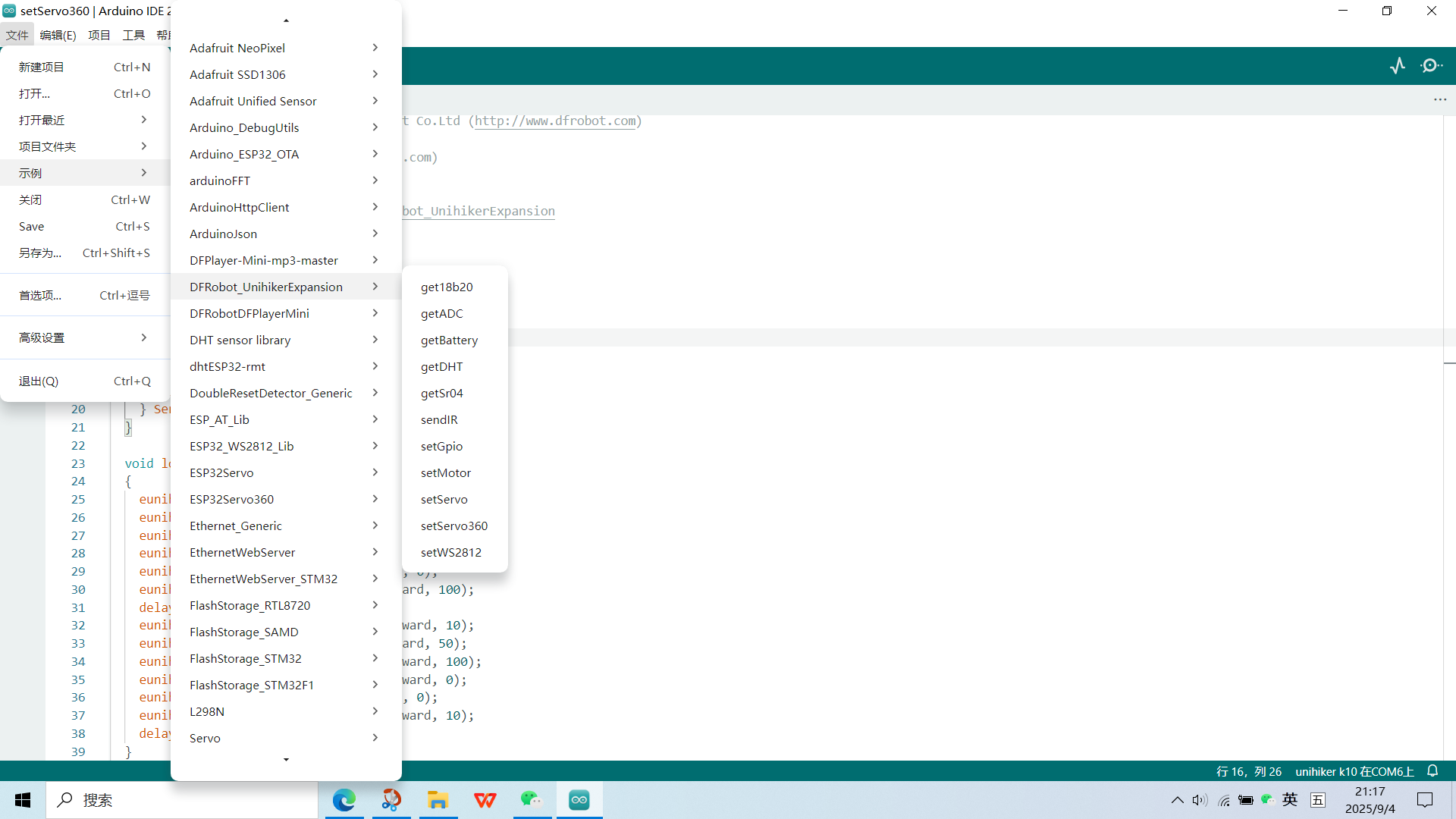
学习中有不懂的地方可以借助DeepSeek,同时将代码上传到K10中测试运行效果。
示例代码学习的另一个地方,扩展板的维库:
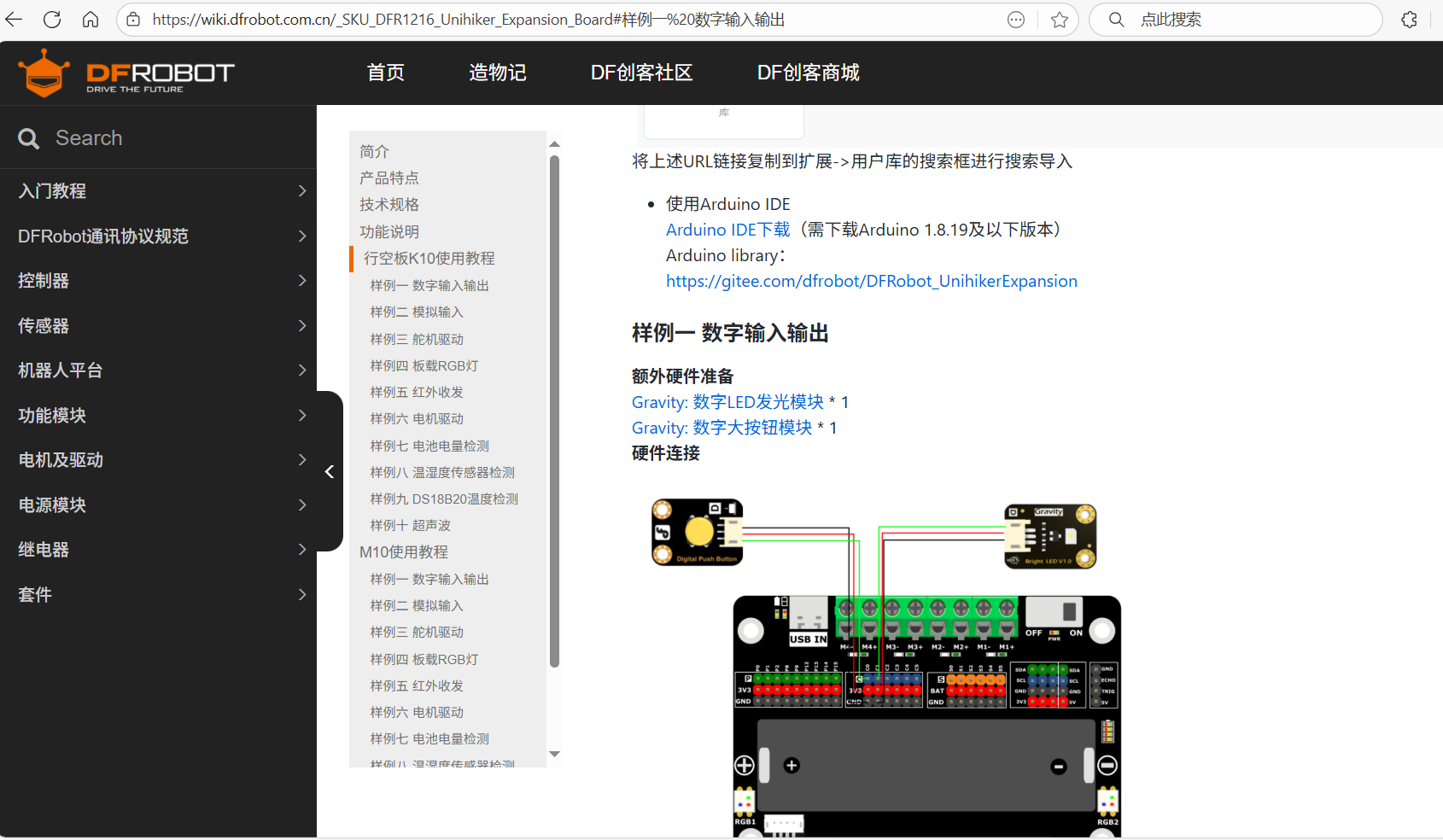
4、重点学习了驱动4个电机的代码,为制作小智AI MCP 控制行空板K10麦轮小车做准备。
#include "DFRobot_UnihikerExpansion.h" // 引入Unihiker扩展板控制库
DFRobot_UnihikerExpansion_I2C eunihiker(&Wire); // 创建扩展板对象,使用I2C通信

void setup()
{
  Serial.begin(115200); // 初始化串口通信,波特率115200
  while(!eunihiker.begin()){ // 尝试初始化扩展板
    Serial.println("NO Deivces !"); // 初始化失败提示
    delay(1000); // 等待1秒后重试
  }
  Serial.println("Device connected !"); // 初始化成功提示

  // 设置电机PWM周期(频率的倒数,影响电机运行平滑度)
  eunihiker.setMotorPeriod(eMotor1_2, 255); // 设置电机1和2的PWM周期
  eunihiker.setMotorPeriod(eMotor3_4, 255); // 设置电机3和4的PWM周期
}

void loop()
{
  // 第一组设置:电机1和2全速转动,电机3和4低速转动(如果50低速不能转动,请调高数值,电机的转动方向和接线有关)
  eunihiker.setMotorDuty(eMotor1_A, 255); // 电机1 A通道全速
  eunihiker.setMotorDuty(eMotor1_B, 0);   // 电机1 B通道停止
  eunihiker.setMotorDuty(eMotor2_A, 0);   // 电机2 A通道停止
  eunihiker.setMotorDuty(eMotor2_B, 255); // 电机2 B通道全速
  eunihiker.setMotorDuty(eMotor3_A, 50);  // 电机3 A通道低速
  eunihiker.setMotorDuty(eMotor3_B, 0);   // 电机3 B通道停止
  eunihiker.setMotorDuty(eMotor4_A, 0);   // 电机4 A通道停止
  eunihiker.setMotorDuty(eMotor4_B, 50);  // 电机4 B通道低速

  delay(1000); // 保持1秒

  // 第二组设置:电机1和2全速转动(和上面反向),电机3和4低速转动(和上面反向)
  eunihiker.setMotorDuty(eMotor1_A, 0);   // 电机1 A通道停止
  eunihiker.setMotorDuty(eMotor1_B, 255); // 电机1 B通道全速
  eunihiker.setMotorDuty(eMotor2_A, 255); // 电机2 A通道全速
  eunihiker.setMotorDuty(eMotor2_B, 0);   // 电机2 B通道停止
  eunihiker.setMotorDuty(eMotor3_A, 0);   // 电机3 A通道停止
  eunihiker.setMotorDuty(eMotor3_B, 50);  // 电机3 B通道低速
  eunihiker.setMotorDuty(eMotor4_A, 50);  // 电机4 A通道低速
  eunihiker.setMotorDuty(eMotor4_B, 0);   // 电机4 B通道停止

  delay(1000); // 保持1秒
}行空板K10通过底部的金手指接口连接扩展板,扩展板通过I2C协议与行空板通信。这使得扩展板可以引出丰富的接口,包括用于连接和驱动电机的接口。
从代码可以看出扩展板的电机控制方式:
- 电机1:连接至扩展板的M1接口
- 电机2:连接至扩展板的M2接口
- 电机3:连接至扩展板的M3接口
- 电机4:连接至扩展板的M4接口
- 每个电机有A和B两个通道
- 正转:A通道高 duty,B通道为0
- 反转:B通道高 duty,A通道为0
- 停止:A和B通道都为0
步骤2 麦轮小车的组装及运动方式简析
已经不是第一次玩麦轮小车了,所以知道去哪里找参考资料:许老师的麦轮走法初探- Makelog(造物记)是社区中全面解析麦轮走法的教程。
(以下图片来自许老师教程,致谢。)
受力分析:
两个A麦轮、两个B麦轮的一种组合安装方式(俯视):
注:1、安装平台时注意麦轮上的小轮方向呈对角线一致,简记“X”型;
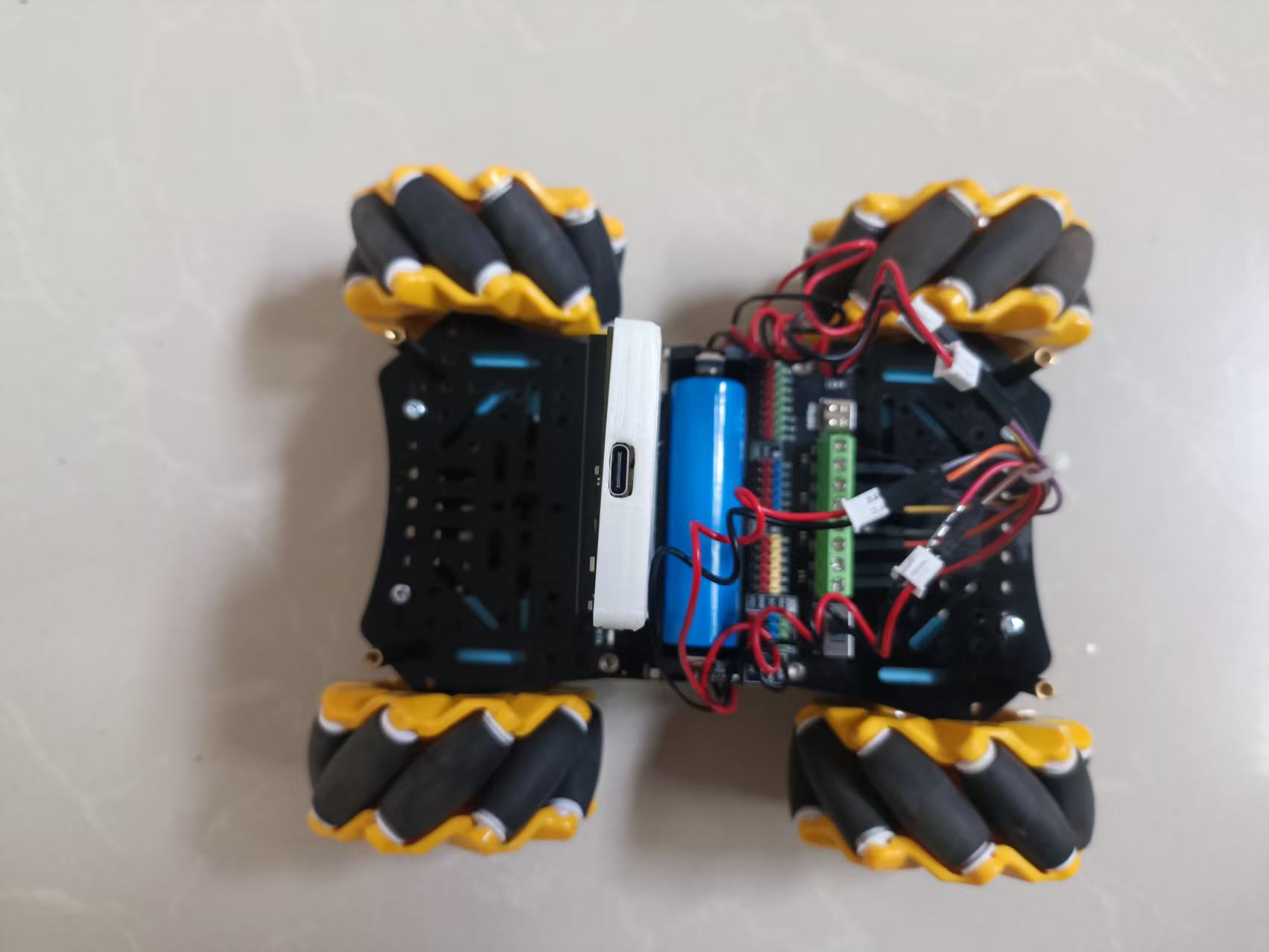
2、在本项目中电机扩展板接线顺序M1、M2、M3、M4依次为车架左上、 左下、右上、右下的麦轮,并且电机1和2为红接—,黑接+,电机3和4为红接+,黑接—。
以上安装方式的十八种走法示意图:
下面的代码编写就是基于上面运动组合。
按X法组装麦轮小车。
步骤3 基本运动代码编写与调试
注意:
电源管理:电机启动瞬间电流很大,务必确保电池能提供足够电流,否则会导致电压骤降,主控板复位。
机械安装:确保四个麦轮高度一致、安装牢固,并且辊子能灵活转动。任何卡滞都会影响运动效果。
安全第一:在调试阶段,先抬起小车,让轮子空转测试,避免意外窜出。
耐心调试代码,先完成前进,后退,左移,右移,顺时针转向,逆时针转向6个基本运动测试。
#include "DFRobot_UnihikerExpansion.h"
DFRobot_UnihikerExpansion_I2C eunihiker(&Wire);

void setup() {
  Serial.begin(115200);
  while(!eunihiker.begin()){
    Serial.println("NO Devices !");
    delay(1000);
  }
  Serial.println("Device connected !");

  eunihiker.setMotorPeriod(eMotor1_2, 255);
  eunihiker.setMotorPeriod(eMotor3_4, 255);
}

// ===== 六种基础运动函数 =====

// 1. 前进
void moveForward() {
  eunihiker.setMotorDuty(eMotor1_A, 255); eunihiker.setMotorDuty(eMotor1_B, 0);
  eunihiker.setMotorDuty(eMotor2_A, 255); eunihiker.setMotorDuty(eMotor2_B, 0);
  eunihiker.setMotorDuty(eMotor3_A, 255); eunihiker.setMotorDuty(eMotor3_B, 0);
  eunihiker.setMotorDuty(eMotor4_A, 255); eunihiker.setMotorDuty(eMotor4_B, 0);
  delay(1000);
  stopAll();
}

// 2. 后退
void moveBackward() {
  eunihiker.setMotorDuty(eMotor1_A, 0); eunihiker.setMotorDuty(eMotor1_B, 255);
  eunihiker.setMotorDuty(eMotor2_A, 0); eunihiker.setMotorDuty(eMotor2_B, 255);
  eunihiker.setMotorDuty(eMotor3_A, 0); eunihiker.setMotorDuty(eMotor3_B, 255);
  eunihiker.setMotorDuty(eMotor4_A, 0); eunihiker.setMotorDuty(eMotor4_B, 255);
  delay(1000);
  stopAll();
}

// 3. 左平移
void moveLeft() {
  eunihiker.setMotorDuty(eMotor1_A, 0); eunihiker.setMotorDuty(eMotor1_B, 255); // 左前轮后退
  eunihiker.setMotorDuty(eMotor2_A, 255); eunihiker.setMotorDuty(eMotor2_B, 0); // 左后轮前进
  eunihiker.setMotorDuty(eMotor3_A, 255); eunihiker.setMotorDuty(eMotor3_B, 0); // 右前轮前进
  eunihiker.setMotorDuty(eMotor4_A, 0); eunihiker.setMotorDuty(eMotor4_B, 255); // 右后轮后退
  delay(1000);
  stopAll();
}

// 4. 右平移
void moveRight() {
  eunihiker.setMotorDuty(eMotor1_A, 255); eunihiker.setMotorDuty(eMotor1_B, 0); // 左前轮前进
  eunihiker.setMotorDuty(eMotor2_A, 0); eunihiker.setMotorDuty(eMotor2_B, 255); // 左后轮后退
  eunihiker.setMotorDuty(eMotor3_A, 0); eunihiker.setMotorDuty(eMotor3_B, 255); // 右前轮后退
  eunihiker.setMotorDuty(eMotor4_A, 255); eunihiker.setMotorDuty(eMotor4_B, 0); // 右后轮前进
  delay(1000);
  stopAll();
}

// 5. 顺时针旋转
void rotateCW() { // Clockwise
  eunihiker.setMotorDuty(eMotor1_A, 255); eunihiker.setMotorDuty(eMotor1_B, 0); // 左前轮前进
  eunihiker.setMotorDuty(eMotor2_A, 255); eunihiker.setMotorDuty(eMotor2_B, 0); // 左后轮前进
  eunihiker.setMotorDuty(eMotor3_A, 0); eunihiker.setMotorDuty(eMotor3_B, 255); // 右前轮后退
  eunihiker.setMotorDuty(eMotor4_A, 0); eunihiker.setMotorDuty(eMotor4_B, 255); // 右后轮后退
  delay(1000);
  stopAll();
}

// 6. 逆时针旋转
void rotateCCW() { // Counterclockwise
  eunihiker.setMotorDuty(eMotor1_A, 0); eunihiker.setMotorDuty(eMotor1_B, 255); // 左前轮后退
  eunihiker.setMotorDuty(eMotor2_A, 0); eunihiker.setMotorDuty(eMotor2_B, 255); // 左后轮后退
  eunihiker.setMotorDuty(eMotor3_A, 255); eunihiker.setMotorDuty(eMotor3_B, 0); // 右前轮前进
  eunihiker.setMotorDuty(eMotor4_A, 255); eunihiker.setMotorDuty(eMotor4_B, 0); // 右后轮前进
  delay(1000);
  stopAll();
}

// 停止所有电机
void stopAll() {
  eunihiker.setMotorDuty(eMotor1_A, 0); eunihiker.setMotorDuty(eMotor1_B, 0);
  eunihiker.setMotorDuty(eMotor2_A, 0); eunihiker.setMotorDuty(eMotor2_B, 0);
  eunihiker.setMotorDuty(eMotor3_A, 0); eunihiker.setMotorDuty(eMotor3_B, 0);
  eunihiker.setMotorDuty(eMotor4_A, 0); eunihiker.setMotorDuty(eMotor4_B, 0);
}

void loop() {
  // 依次执行六种基础运动,每种运动后停止1秒
  moveForward();    delay(1000);
  moveBackward();   delay(1000);
  moveLeft();       delay(1000);
  moveRight();      delay(1000);
  rotateCW();       delay(1000);
  rotateCCW();      delay(1000);
}运动顺序:在loop()中,六种运动依次执行,每种运动持续1秒,然后停止1秒,方便观察测试效果。
停止函数:将停止操作也封装成了stopAll()函数,提高代码复用性和可读性。
函数封装:每个运动模式都封装成了独立的函数,方便在loop()中调用和测试。
上传代码,测试通过。
当然,你可以封装测试麦轮全部18种运动模式的函数,我这里抛砖引玉,就不写更多了。
步骤4 增加小智AI语音控制
打开xiaozhi_mcp库中的基础示例,将上面麦轮小车的导入扩展板库、运动模式函数、行空板及扩展板初始化等添加进来。
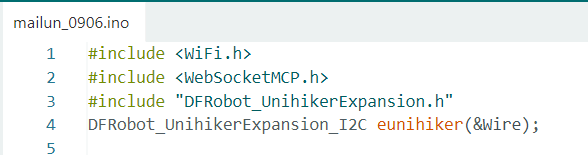
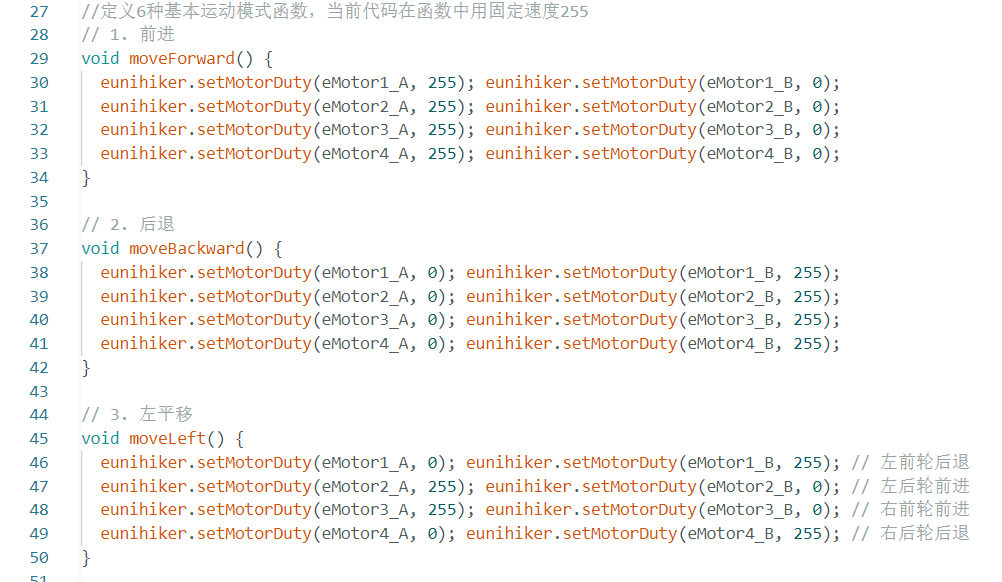
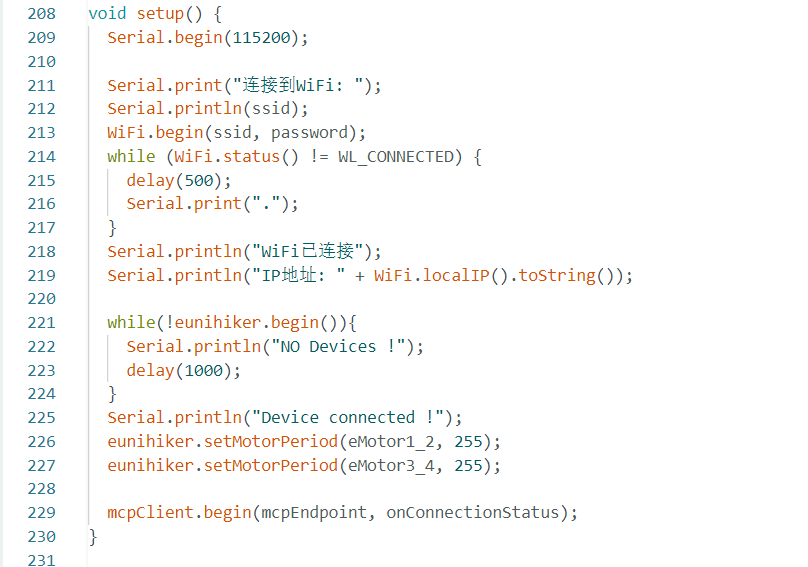
修改MCP控制工具为麦轮小车控制,以前进控制为例(增加其它运动模式代码类似):
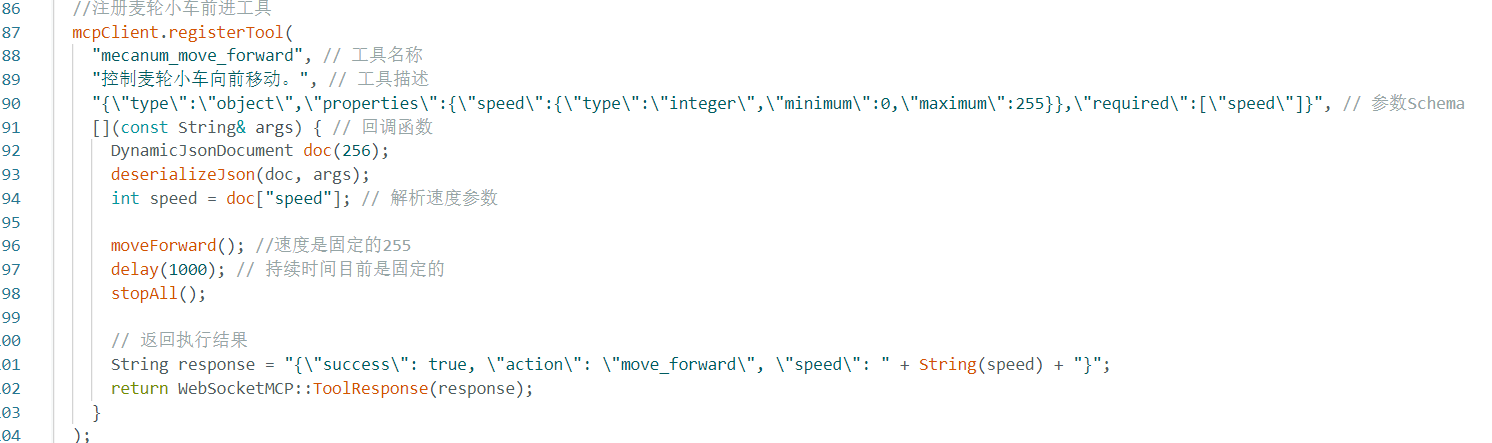
当前代码中运动速度是固定的255,时长也是固定的1秒。上传测试,有报错时根据日志修改错误部分,必要时代码日志抛给AI协助指导。
下面代码测试通过:
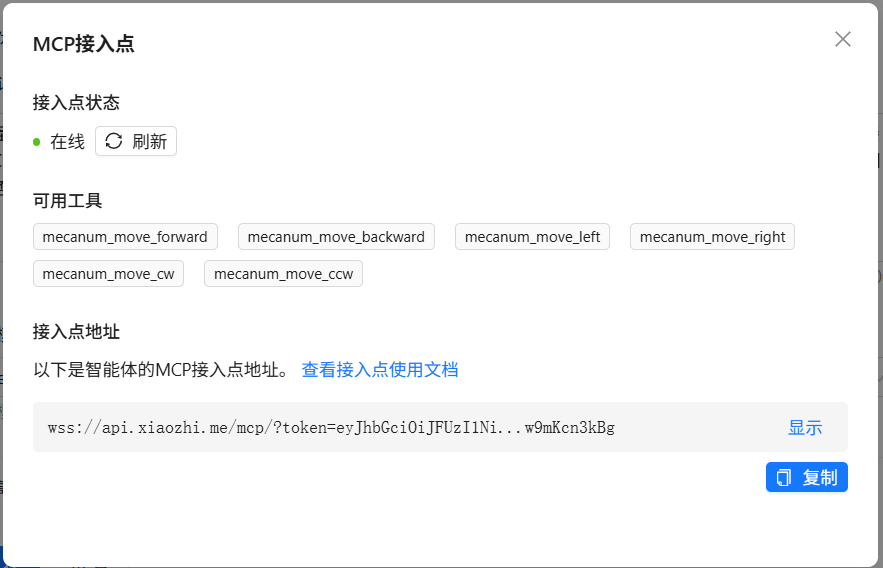
小智后台
#include <WiFi.h>
#include <WebSocketMCP.h>
#include "DFRobot_UnihikerExpansion.h"
DFRobot_UnihikerExpansion_I2C eunihiker(&Wire);

// WiFi配置
const char* ssid = "your ssid";
const char* password = "your password";

// MCP服务器配置
const char* mcpEndpoint = "ws://api.xiaozhi.me/mcp/?token=your token";

// 创建WebSocketMCP实例
WebSocketMCP mcpClient;

// 连接状态回调函数
void onConnectionStatus(bool connected) {
  if (connected) {
    Serial.println("[MCP] 已连接到服务器");
    // 连接成功后注册工具
    registerMcpTools();
  } else {
    Serial.println("[MCP] 与服务器断开连接");
  }
}

//定义6种基本运动模式函数,当前代码在函数中用固定速度255
// 1. 前进
void moveForward() {
  eunihiker.setMotorDuty(eMotor1_A, 255); eunihiker.setMotorDuty(eMotor1_B, 0);
  eunihiker.setMotorDuty(eMotor2_A, 255); eunihiker.setMotorDuty(eMotor2_B, 0);
  eunihiker.setMotorDuty(eMotor3_A, 255); eunihiker.setMotorDuty(eMotor3_B, 0);
  eunihiker.setMotorDuty(eMotor4_A, 255); eunihiker.setMotorDuty(eMotor4_B, 0);
}

// 2. 后退
void moveBackward() {
  eunihiker.setMotorDuty(eMotor1_A, 0); eunihiker.setMotorDuty(eMotor1_B, 255);
  eunihiker.setMotorDuty(eMotor2_A, 0); eunihiker.setMotorDuty(eMotor2_B, 255);
  eunihiker.setMotorDuty(eMotor3_A, 0); eunihiker.setMotorDuty(eMotor3_B, 255);
  eunihiker.setMotorDuty(eMotor4_A, 0); eunihiker.setMotorDuty(eMotor4_B, 255);
}

// 3. 左平移
void moveLeft() {
  eunihiker.setMotorDuty(eMotor1_A, 0); eunihiker.setMotorDuty(eMotor1_B, 255); // 左前轮后退
  eunihiker.setMotorDuty(eMotor2_A, 255); eunihiker.setMotorDuty(eMotor2_B, 0); // 左后轮前进
  eunihiker.setMotorDuty(eMotor3_A, 255); eunihiker.setMotorDuty(eMotor3_B, 0); // 右前轮前进
  eunihiker.setMotorDuty(eMotor4_A, 0); eunihiker.setMotorDuty(eMotor4_B, 255); // 右后轮后退
}

// 4. 右平移
void moveRight() {
  eunihiker.setMotorDuty(eMotor1_A, 255); eunihiker.setMotorDuty(eMotor1_B, 0); // 左前轮前进
  eunihiker.setMotorDuty(eMotor2_A, 0); eunihiker.setMotorDuty(eMotor2_B, 255); // 左后轮后退
  eunihiker.setMotorDuty(eMotor3_A, 0); eunihiker.setMotorDuty(eMotor3_B, 255); // 右前轮后退
  eunihiker.setMotorDuty(eMotor4_A, 255); eunihiker.setMotorDuty(eMotor4_B, 0); // 右后轮前进
}

// 5. 顺时针旋转
void rotateCW() { // Clockwise
  eunihiker.setMotorDuty(eMotor1_A, 255); eunihiker.setMotorDuty(eMotor1_B, 0); // 左前轮前进
  eunihiker.setMotorDuty(eMotor2_A, 255); eunihiker.setMotorDuty(eMotor2_B, 0); // 左后轮前进
  eunihiker.setMotorDuty(eMotor3_A, 0); eunihiker.setMotorDuty(eMotor3_B, 255); // 右前轮后退
  eunihiker.setMotorDuty(eMotor4_A, 0); eunihiker.setMotorDuty(eMotor4_B, 255); // 右后轮后退
}

// 6. 逆时针旋转
void rotateCCW() { // Counterclockwise
  eunihiker.setMotorDuty(eMotor1_A, 0); eunihiker.setMotorDuty(eMotor1_B, 255); // 左前轮后退
  eunihiker.setMotorDuty(eMotor2_A, 0); eunihiker.setMotorDuty(eMotor2_B, 255); // 左后轮后退
  eunihiker.setMotorDuty(eMotor3_A, 255); eunihiker.setMotorDuty(eMotor3_B, 0); // 右前轮前进
  eunihiker.setMotorDuty(eMotor4_A, 255); eunihiker.setMotorDuty(eMotor4_B, 0); // 右后轮前进
}

// 停止所有电机
void stopAll() {
  eunihiker.setMotorDuty(eMotor1_A, 0); eunihiker.setMotorDuty(eMotor1_B, 0);
  eunihiker.setMotorDuty(eMotor2_A, 0); eunihiker.setMotorDuty(eMotor2_B, 0);
  eunihiker.setMotorDuty(eMotor3_A, 0); eunihiker.setMotorDuty(eMotor3_B, 0);
  eunihiker.setMotorDuty(eMotor4_A, 0); eunihiker.setMotorDuty(eMotor4_B, 0);
}

// 注册MCP工具
void registerMcpTools() {
  //注册麦轮小车前进工具
  mcpClient.registerTool(
    "mecanum_move_forward", // 工具名称
    "控制麦轮小车向前移动。", // 工具描述
    "{\"type\":\"object\",\"properties\":{\"speed\":{\"type\":\"integer\",\"minimum\":0,\"maximum\":255}},\"required\":[\"speed\"]}", // 参数Schema
    [](const String& args) { // 回调函数
      DynamicJsonDocument doc(256);
      deserializeJson(doc, args);
      int speed = doc["speed"]; // 解析速度参数

      moveForward(); //速度是固定的255
      delay(1000); // 持续时间目前是固定的
      stopAll();

      // 返回执行结果
      String response = "{\"success\": true, \"action\": \"move_forward\", \"speed\": " + String(speed) + "}";
      return WebSocketMCP::ToolResponse(response);
    }
  );
  //注册麦轮小车后退工具
  mcpClient.registerTool(
    "mecanum_move_backward", // 工具名称
    "控制麦轮小车向后移动。", // 工具描述
    "{\"type\":\"object\",\"properties\":{\"speed\":{\"type\":\"integer\",\"minimum\":0,\"maximum\":255}},\"required\":[\"speed\"]}", // 参数Schema
    [](const String& args) { // 回调函数
      DynamicJsonDocument doc(256);
      deserializeJson(doc, args);
      int speed = doc["speed"];

      moveBackward();
      delay(1000); //
      stopAll();

      // 返回执行结果
      String response = "{\"success\": true, \"action\": \"move_backward\", \"speed\": " + String(speed) + "}";
      return WebSocketMCP::ToolResponse(response);
    }
  );

  //注册麦轮小车左移工具
  mcpClient.registerTool(
    "mecanum_move_left", // 工具名称
    "控制麦轮小车向左移动。", // 工具描述
    "{\"type\":\"object\",\"properties\":{\"speed\":{\"type\":\"integer\",\"minimum\":0,\"maximum\":255}},\"required\":[\"speed\"]}", // 参数Schema
    [](const String& args) { // 回调函数
      DynamicJsonDocument doc(256);
      deserializeJson(doc, args);
      int speed = doc["speed"]; // 解析速度参数

      moveLeft();
      delay(1000);
      stopAll();

      // 返回执行结果
      String response = "{\"success\": true, \"action\": \"move_left\", \"speed\": " + String(speed) + "}";
      return WebSocketMCP::ToolResponse(response);
    }
  );

  //注册麦轮小车右移工具
  mcpClient.registerTool(
    "mecanum_move_right", // 工具名称
    "控制麦轮小车向右移动。", // 工具描述
    "{\"type\":\"object\",\"properties\":{\"speed\":{\"type\":\"integer\",\"minimum\":0,\"maximum\":255}},\"required\":[\"speed\"]}", // 参数Schema
    [](const String& args) { // 回调函数
      DynamicJsonDocument doc(256);
      deserializeJson(doc, args);
      int speed = doc["speed"]; // 解析速度参数

      moveRight();
      delay(1000);
      stopAll();

      // 返回执行结果
      String response = "{\"success\": true, \"action\": \"move_right\", \"speed\": " + String(speed) + "}";
      return WebSocketMCP::ToolResponse(response);
    }
  );

  //注册麦轮小车顺时针旋转工具
  mcpClient.registerTool(
    "mecanum_move_cw", // 工具名称
    "控制麦轮小车向顺时针旋转。", // 工具描述
    "{\"type\":\"object\",\"properties\":{\"speed\":{\"type\":\"integer\",\"minimum\":0,\"maximum\":255}},\"required\":[\"speed\"]}", // 参数Schema
    [](const String& args) { // 回调函数
      DynamicJsonDocument doc(256);
      deserializeJson(doc, args);
      int speed = doc["speed"]; // 解析速度参数

      rotateCW();
      delay(1000);
      stopAll();

      // 返回执行结果
      String response = "{\"success\": true, \"action\": \"move_cw\", \"speed\": " + String(speed) + "}";
      return WebSocketMCP::ToolResponse(response);
    }
  );

  //注册麦轮小车逆时针旋转工具
  mcpClient.registerTool(
    "mecanum_move_ccw", // 工具名称
    "控制麦轮小车向逆时针旋转。", // 工具描述
    "{\"type\":\"object\",\"properties\":{\"speed\":{\"type\":\"integer\",\"minimum\":0,\"maximum\":255}},\"required\":[\"speed\"]}", // 参数Schema
    [](const String& args) { // 回调函数
      DynamicJsonDocument doc(256);
      deserializeJson(doc, args);
      int speed = doc["speed"]; // 解析速度参数

      rotateCCW();
      delay(1000);
      stopAll();

      // 返回执行结果
      String response = "{\"success\": true, \"action\": \"move_ccw\", \"speed\": " + String(speed) + "}";
      return WebSocketMCP::ToolResponse(response);
    }
  );

  Serial.println("[MCP] 所有麦轮运动工具已注册");
}

void setup() {
  Serial.begin(115200);

  Serial.print("连接到WiFi: ");
  Serial.println(ssid);
  WiFi.begin(ssid, password);
  while (WiFi.status() != WL_CONNECTED) {
    delay(500);
    Serial.print(".");
  }
  Serial.println("WiFi已连接");
  Serial.println("IP地址: " + WiFi.localIP().toString());

  while(!eunihiker.begin()){
    Serial.println("NO Devices !");
    delay(1000);
  }
  Serial.println("Device connected !");
  eunihiker.setMotorPeriod(eMotor1_2, 255);
  eunihiker.setMotorPeriod(eMotor3_4, 255);

  mcpClient.begin(mcpEndpoint, onConnectionStatus);
}

void loop() {
  mcpClient.loop();

  delay(10);
}
步骤5 代码优化,增加速度和时长调节功能,增加K10屏显
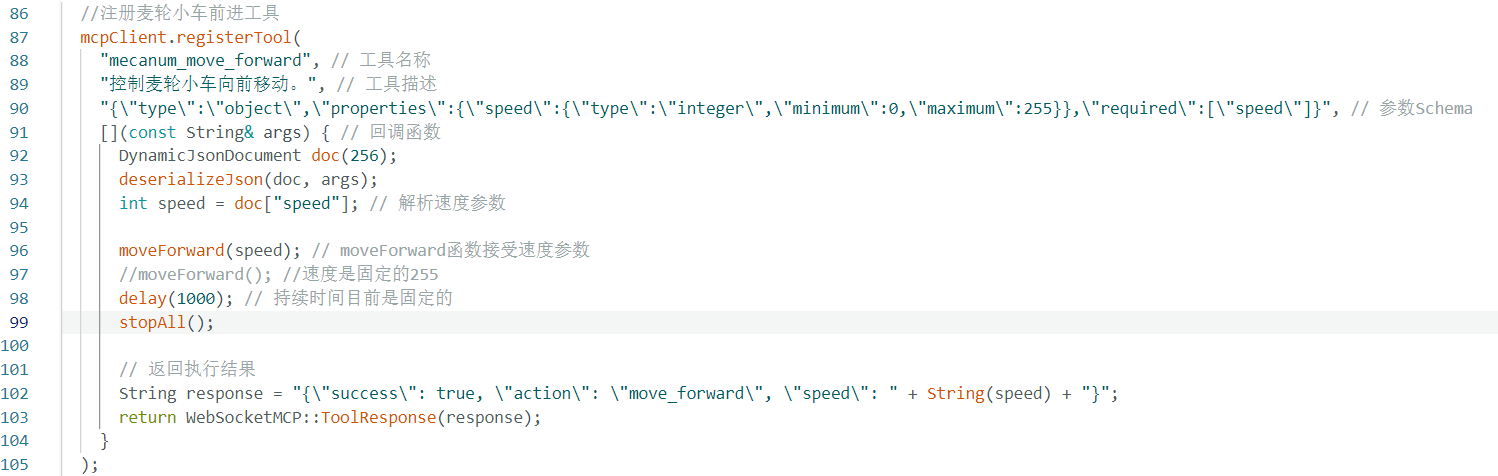
上面代码中其实已经可以从自然语言中解析出速度参数(范围0-255):
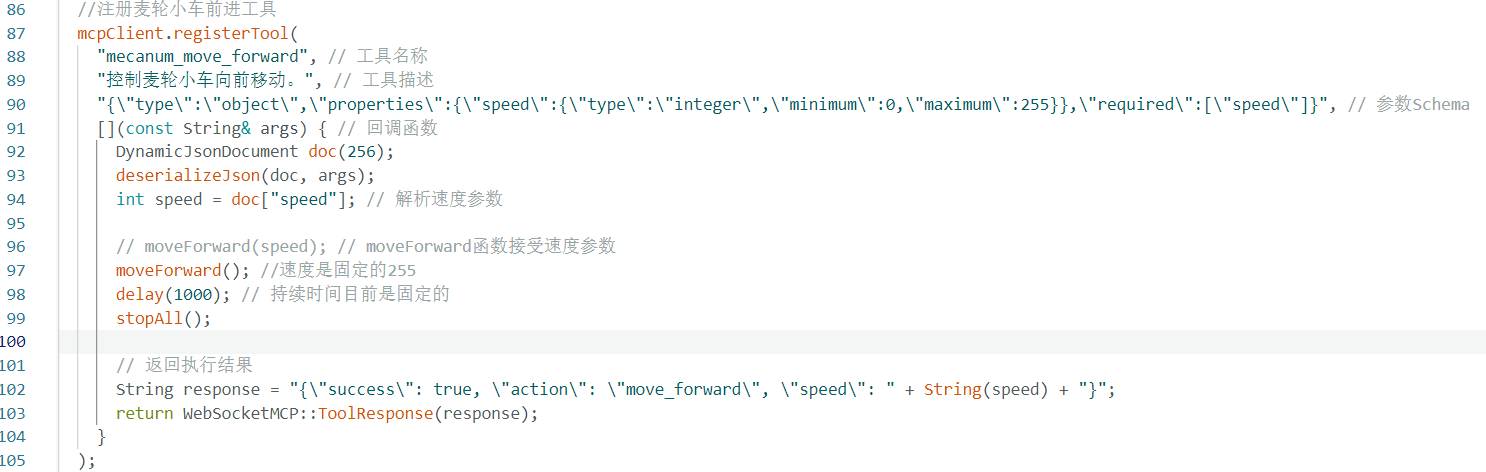
不过在运动模式函数中写定了速度为255,所以要用上speed,需要在运动模式中添加int speed 参数。
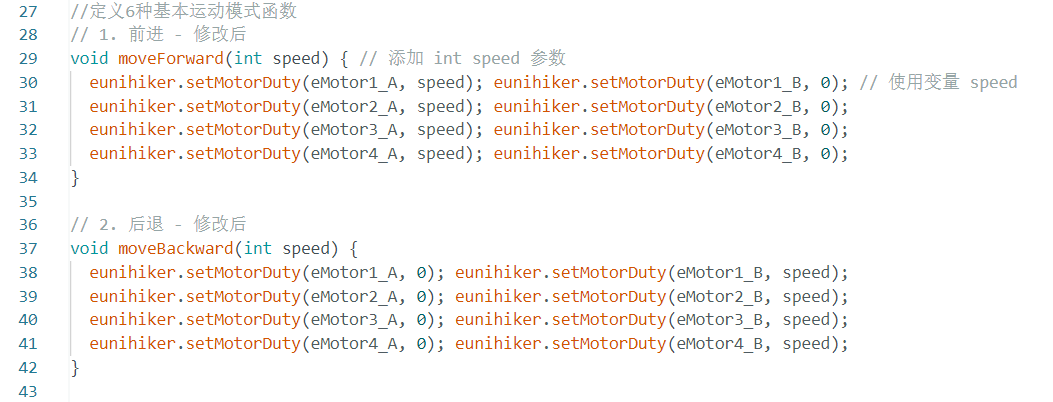
控制工具修改为使用参数:
其它模式同步修改。
然后在 JSON Schema 中添加 duration参数(范围100-10000ms):
"{\"type\":\"object\",\"properties\":{\"speed\":{\"type\":\"integer\",\"minimum\":0,\"maximum\":255},\"duration\":{\"type\":\"integer\",\"minimum\":100,\"maximum\":10000}},\"required\":[\"speed\",\"duration\"]}"
在回调函数中解析并使用 duration:
[](const String& args) {
DynamicJsonDocument doc(256);
deserializeJson(doc, args);
int speed = doc["speed"];
int duration = doc["duration"]; // 解析持续时间参数
moveForward(speed);
delay(duration); // 使用解析出的持续时间
stopAll();
String response = "{\"success\": true, \"action\": \"move_forward\", \"speed\": " + String(speed) + ", \"duration\": " + String(duration) + "}";
return WebSocketMCP::ToolResponse(response);
}
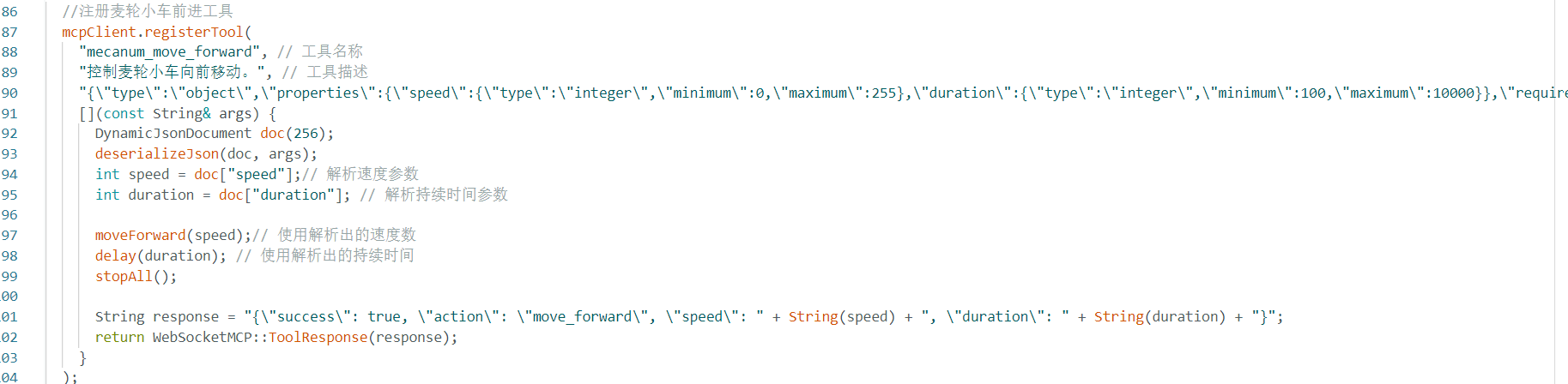
其它同步修改。
【另】经测试,3.7V的锂电池,驱动4个电机,速度小时无法使小车运动,所以速度调节范围改为200-255。
增加简单的屏幕文字显示。
得到如下代码:
#include <WiFi.h>
#include <WebSocketMCP.h>
#include "unihiker_k10.h"
#include "DFRobot_UnihikerExpansion.h"
DFRobot_UnihikerExpansion_I2C eunihiker(&Wire);

// WiFi配置
const char* ssid = "your ssid";
const char* password = "your password";

// MCP服务器配置
const char* mcpEndpoint = "ws://api.xiaozhi.me/mcp/?token=your token";

// 创建WebSocketMCP实例
WebSocketMCP mcpClient;

UNIHIKER_K10 k10;
uint8_t screen_dir = 2;

// 连接状态回调函数
void onConnectionStatus(bool connected) {
  if (connected) {
    Serial.println("[MCP] 已连接到服务器");
    // 连接成功后注册工具
    registerMcpTools();
  } else {
    Serial.println("[MCP] 与服务器断开连接");
  }
}

//定义6种基本运动模式函数
// 1. 前进 - 修改后
void moveForward(int speed) { // 添加 int speed 参数
  eunihiker.setMotorDuty(eMotor1_A, speed); eunihiker.setMotorDuty(eMotor1_B, 0); // 使用变量 speed
  eunihiker.setMotorDuty(eMotor2_A, speed); eunihiker.setMotorDuty(eMotor2_B, 0);
  eunihiker.setMotorDuty(eMotor3_A, speed); eunihiker.setMotorDuty(eMotor3_B, 0);
  eunihiker.setMotorDuty(eMotor4_A, speed); eunihiker.setMotorDuty(eMotor4_B, 0);
}

// 2. 后退 - 修改后
void moveBackward(int speed) {
  eunihiker.setMotorDuty(eMotor1_A, 0); eunihiker.setMotorDuty(eMotor1_B, speed);
  eunihiker.setMotorDuty(eMotor2_A, 0); eunihiker.setMotorDuty(eMotor2_B, speed);
  eunihiker.setMotorDuty(eMotor3_A, 0); eunihiker.setMotorDuty(eMotor3_B, speed);
  eunihiker.setMotorDuty(eMotor4_A, 0); eunihiker.setMotorDuty(eMotor4_B, speed);
}

// 3. 左平移 - 修改后
void moveLeft(int speed) {
  eunihiker.setMotorDuty(eMotor1_A, 0); eunihiker.setMotorDuty(eMotor1_B, speed); // 使用变量 speed
  eunihiker.setMotorDuty(eMotor2_A, speed); eunihiker.setMotorDuty(eMotor2_B, 0);
  eunihiker.setMotorDuty(eMotor3_A, speed); eunihiker.setMotorDuty(eMotor3_B, 0);
  eunihiker.setMotorDuty(eMotor4_A, 0); eunihiker.setMotorDuty(eMotor4_B, speed);
}

// 4. 右平移 - 修改后
void moveRight(int speed) {
  eunihiker.setMotorDuty(eMotor1_A, speed); eunihiker.setMotorDuty(eMotor1_B, 0);
  eunihiker.setMotorDuty(eMotor2_A, 0); eunihiker.setMotorDuty(eMotor2_B, speed);
  eunihiker.setMotorDuty(eMotor3_A, 0); eunihiker.setMotorDuty(eMotor3_B, speed);
  eunihiker.setMotorDuty(eMotor4_A, speed); eunihiker.setMotorDuty(eMotor4_B, 0);
}

// 5. 顺时针旋转 - 修改后
void rotateCW(int speed) {
  eunihiker.setMotorDuty(eMotor1_A, speed); eunihiker.setMotorDuty(eMotor1_B, 0);
  eunihiker.setMotorDuty(eMotor2_A, speed); eunihiker.setMotorDuty(eMotor2_B, 0);
  eunihiker.setMotorDuty(eMotor3_A, 0); eunihiker.setMotorDuty(eMotor3_B, speed);
  eunihiker.setMotorDuty(eMotor4_A, 0); eunihiker.setMotorDuty(eMotor4_B, speed);
}

// 6. 逆时针旋转 - 修改后
void rotateCCW(int speed) {
  eunihiker.setMotorDuty(eMotor1_A, 0); eunihiker.setMotorDuty(eMotor1_B, speed);
  eunihiker.setMotorDuty(eMotor2_A, 0); eunihiker.setMotorDuty(eMotor2_B, speed);
  eunihiker.setMotorDuty(eMotor3_A, speed); eunihiker.setMotorDuty(eMotor3_B, 0);
  eunihiker.setMotorDuty(eMotor4_A, speed); eunihiker.setMotorDuty(eMotor4_B, 0);
}

// 停止函数不需要修改,它没有参数
void stopAll() {
  eunihiker.setMotorDuty(eMotor1_A, 0); eunihiker.setMotorDuty(eMotor1_B, 0);
  eunihiker.setMotorDuty(eMotor2_A, 0); eunihiker.setMotorDuty(eMotor2_B, 0);
  eunihiker.setMotorDuty(eMotor3_A, 0); eunihiker.setMotorDuty(eMotor3_B, 0);
  eunihiker.setMotorDuty(eMotor4_A, 0); eunihiker.setMotorDuty(eMotor4_B, 0);
}

// 注册MCP工具
void registerMcpTools() {
  //注册麦轮小车前进工具
  mcpClient.registerTool(
    "mecanum_move_forward", // 工具名称
    "控制麦轮小车向前移动。", // 工具描述
    "{\"type\":\"object\",\"properties\":{\"speed\":{\"type\":\"integer\",\"minimum\":200,\"maximum\":255},\"duration\":{\"type\":\"integer\",\"minimum\":100,\"maximum\":10000}},\"required\":[\"speed\",\"duration\"]}", // 参数Schema
    [](const String& args) {
      DynamicJsonDocument doc(256);
      deserializeJson(doc, args);
      int speed = doc["speed"];// 解析速度参数
      int duration = doc["duration"]; // 解析持续时间参数

      moveForward(speed);// 使用解析出的速度数
      delay(duration); // 使用解析出的持续时间
      stopAll();

      String response = "{\"success\": true, \"action\": \"move_forward\", \"speed\": " + String(speed) + ", \"duration\": " + String(duration) + "}";
      return WebSocketMCP::ToolResponse(response);
    }
  );

  //注册麦轮小车后退工具
  mcpClient.registerTool(
    "mecanum_move_backward", // 工具名称
    "控制麦轮小车向后移动。", // 工具描述
    "{\"type\":\"object\",\"properties\":{\"speed\":{\"type\":\"integer\",\"minimum\":200,\"maximum\":255},\"duration\":{\"type\":\"integer\",\"minimum\":100,\"maximum\":10000}},\"required\":[\"speed\",\"duration\"]}", // 参数Schema
    [](const String& args) { // 回调函数
      DynamicJsonDocument doc(256);
      deserializeJson(doc, args);
      int speed = doc["speed"];
      int duration = doc["duration"];

      moveBackward(speed);
      delay(duration);
      stopAll();

      // 返回执行结果
      String response = "{\"success\": true, \"action\": \"move_backward\", \"speed\": " + String(speed) + ", \"duration\": " + String(duration) + "}";
      return WebSocketMCP::ToolResponse(response);
    }
  );

  //注册麦轮小车左移工具
  mcpClient.registerTool(
    "mecanum_move_left", // 工具名称
    "控制麦轮小车向左移动。", // 工具描述
    "{\"type\":\"object\",\"properties\":{\"speed\":{\"type\":\"integer\",\"minimum\":200,\"maximum\":255},\"duration\":{\"type\":\"integer\",\"minimum\":100,\"maximum\":10000}},\"required\":[\"speed\",\"duration\"]}", // 参数Schema
    [](const String& args) { // 回调函数
      DynamicJsonDocument doc(256);
      deserializeJson(doc, args);
      int speed = doc["speed"];
      int duration = doc["duration"];

      moveLeft(speed);
      delay(duration);
      stopAll();

      // 返回执行结果
      String response = "{\"success\": true, \"action\": \"move_left\", \"speed\": " + String(speed) + ", \"duration\": " + String(duration) + "}";
      return WebSocketMCP::ToolResponse(response);
    }
  );

  //注册麦轮小车右移工具
  mcpClient.registerTool(
    "mecanum_move_right", // 工具名称
    "控制麦轮小车向右移动。", // 工具描述
    "{\"type\":\"object\",\"properties\":{\"speed\":{\"type\":\"integer\",\"minimum\":200,\"maximum\":255},\"duration\":{\"type\":\"integer\",\"minimum\":100,\"maximum\":10000}},\"required\":[\"speed\",\"duration\"]}", // 参数Schema
    [](const String& args) { // 回调函数
      DynamicJsonDocument doc(256);
      deserializeJson(doc, args);
      int speed = doc["speed"];
      int duration = doc["duration"];

      moveRight(speed);
      delay(duration);
      stopAll();

      // 返回执行结果
      String response = "{\"success\": true, \"action\": \"move_right\", \"speed\": " + String(speed) + ", \"duration\": " + String(duration) + "}";
      return WebSocketMCP::ToolResponse(response);
    }
  );

  //注册麦轮小车顺时针旋转工具
  mcpClient.registerTool(
    "mecanum_move_cw", // 工具名称
    "控制麦轮小车向顺时针旋转。", // 工具描述
    "{\"type\":\"object\",\"properties\":{\"speed\":{\"type\":\"integer\",\"minimum\":200,\"maximum\":255},\"duration\":{\"type\":\"integer\",\"minimum\":100,\"maximum\":10000}},\"required\":[\"speed\",\"duration\"]}", // 参数Schema
    [](const String& args) { // 回调函数
      DynamicJsonDocument doc(256);
      deserializeJson(doc, args);
      int speed = doc["speed"];
      int duration = doc["duration"];

      rotateCW(speed);
      delay(duration);
      stopAll();

      // 返回执行结果
      String response = "{\"success\": true, \"action\": \"move_cw\", \"speed\": " + String(speed) + ", \"duration\": " + String(duration) + "}";
      return WebSocketMCP::ToolResponse(response);
    }
  );

  //注册麦轮小车逆时针旋转工具
  mcpClient.registerTool(
    "mecanum_move_ccw", // 工具名称
    "控制麦轮小车向逆时针旋转。", // 工具描述
    "{\"type\":\"object\",\"properties\":{\"speed\":{\"type\":\"integer\",\"minimum\":200,\"maximum\":255},\"duration\":{\"type\":\"integer\",\"minimum\":100,\"maximum\":10000}},\"required\":[\"speed\",\"duration\"]}", // 参数Schema
    [](const String& args) { // 回调函数
      DynamicJsonDocument doc(256);
      deserializeJson(doc, args);
      int speed = doc["speed"];
      int duration = doc["duration"];

      rotateCCW(speed);
      delay(duration);
      stopAll();

      // 返回执行结果
      String response = "{\"success\": true, \"action\": \"move_ccw\", \"speed\": " + String(speed) + ", \"duration\": " + String(duration) + "}";
      return WebSocketMCP::ToolResponse(response);
    }
  );

  Serial.println("[MCP] 所有麦轮运动工具已注册");
}

void setup() {
  Serial.begin(115200);

  k10.begin();
  k10.initScreen(screen_dir);
  k10.creatCanvas();
  k10.setScreenBackground(0x000000);

  // 初始屏幕显示
  k10.canvas->canvasText("K10麦轮小车MCP", 25, 10, 0xFFFFFF, k10.canvas->eCNAndENFont24, 200, true);
  k10.canvas->updateCanvas();

  Serial.print("连接到WiFi: ");
  Serial.println(ssid);
  WiFi.begin(ssid, password);
  while (WiFi.status() != WL_CONNECTED) {
    delay(500);
    Serial.print(".");
  }
  Serial.println("WiFi已连接");
  Serial.println("IP地址: " + WiFi.localIP().toString());

  while(!eunihiker.begin()){
    Serial.println("NO Devices !");
    delay(1000);
  }
  Serial.println("Device connected !");
  eunihiker.setMotorPeriod(eMotor1_2, 255);
  eunihiker.setMotorPeriod(eMotor3_4, 255);

  mcpClient.begin(mcpEndpoint, onConnectionStatus);
}

void loop() {
  mcpClient.loop();

  delay(10);
}
上传到K10,测试通过。
【小结】
1、麦轮小车还是很好玩的,加上小智的互动,感觉小车也有了生命。
2、这个项目从简单开始,从例程学习开始,一步步增加功能,终于达成目标,很有收获。
3、这个项目过程写得比较详细,记录了学习过程,大家一起玩起来哈。
【后续优化】
1、可以补充完成麦轮18种动作。
2、增加RGB灯带,让小车更加美丽。
步骤6 好啦,完成麦轮十八式代码编写
麦轮小车真有趣,麦轮18运动模式代码写一下:
#include <WiFi.h>
#include <WebSocketMCP.h>
#include "unihiker_k10.h"
#include "DFRobot_UnihikerExpansion.h"
DFRobot_UnihikerExpansion_I2C eunihiker(&Wire);

// WiFi配置
const char* ssid = "your ssid";
const char* password = "your password";

// MCP服务器配置
const char* mcpEndpoint = "ws://api.xiaozhi.me/mcp/?token=your token";

// 创建WebSocketMCP实例
WebSocketMCP mcpClient;

UNIHIKER_K10 k10;
uint8_t screen_dir = 2;

// 连接状态回调函数
void onConnectionStatus(bool connected) {
  if (connected) {
    Serial.println("[MCP] 已连接到服务器");
    // 连接成功后注册工具
    registerMcpTools();
  } else {
    Serial.println("[MCP] 与服务器断开连接");
  }
}

//定义18种运动模式函数
// 1. 前进
void moveForward(int speed) { // 添加 int speed 参数
  eunihiker.setMotorDuty(eMotor1_A, speed); eunihiker.setMotorDuty(eMotor1_B, 0); // 使用变量 speed
  eunihiker.setMotorDuty(eMotor2_A, speed); eunihiker.setMotorDuty(eMotor2_B, 0);
  eunihiker.setMotorDuty(eMotor3_A, speed); eunihiker.setMotorDuty(eMotor3_B, 0);
  eunihiker.setMotorDuty(eMotor4_A, speed); eunihiker.setMotorDuty(eMotor4_B, 0);
}

// 2. 后退
void moveBackward(int speed) {
  eunihiker.setMotorDuty(eMotor1_A, 0); eunihiker.setMotorDuty(eMotor1_B, speed);
  eunihiker.setMotorDuty(eMotor2_A, 0); eunihiker.setMotorDuty(eMotor2_B, speed);
  eunihiker.setMotorDuty(eMotor3_A, 0); eunihiker.setMotorDuty(eMotor3_B, speed);
  eunihiker.setMotorDuty(eMotor4_A, 0); eunihiker.setMotorDuty(eMotor4_B, speed);
}

// 3. 左平移
void moveLeft(int speed) {
  eunihiker.setMotorDuty(eMotor1_A, 0); eunihiker.setMotorDuty(eMotor1_B, speed);
  eunihiker.setMotorDuty(eMotor2_A, speed); eunihiker.setMotorDuty(eMotor2_B, 0);
  eunihiker.setMotorDuty(eMotor3_A, speed); eunihiker.setMotorDuty(eMotor3_B, 0);
  eunihiker.setMotorDuty(eMotor4_A, 0); eunihiker.setMotorDuty(eMotor4_B, speed);
}

// 4. 右平移
void moveRight(int speed) {
  eunihiker.setMotorDuty(eMotor1_A, speed); eunihiker.setMotorDuty(eMotor1_B, 0);
  eunihiker.setMotorDuty(eMotor2_A, 0); eunihiker.setMotorDuty(eMotor2_B, speed);
  eunihiker.setMotorDuty(eMotor3_A, 0); eunihiker.setMotorDuty(eMotor3_B, speed);
  eunihiker.setMotorDuty(eMotor4_A, speed); eunihiker.setMotorDuty(eMotor4_B, 0);
}

// 5. 顺时针旋转 (绕中心)
void rotateCW(int speed) {
  eunihiker.setMotorDuty(eMotor1_A, speed); eunihiker.setMotorDuty(eMotor1_B, 0);
  eunihiker.setMotorDuty(eMotor2_A, speed); eunihiker.setMotorDuty(eMotor2_B, 0);
  eunihiker.setMotorDuty(eMotor3_A, 0); eunihiker.setMotorDuty(eMotor3_B, speed);
  eunihiker.setMotorDuty(eMotor4_A, 0); eunihiker.setMotorDuty(eMotor4_B, speed);
}

// 6. 逆时针旋转 (绕中心)
void rotateCCW(int speed) {
  eunihiker.setMotorDuty(eMotor1_A, 0); eunihiker.setMotorDuty(eMotor1_B, speed);
  eunihiker.setMotorDuty(eMotor2_A, 0); eunihiker.setMotorDuty(eMotor2_B, speed);
  eunihiker.setMotorDuty(eMotor3_A, speed); eunihiker.setMotorDuty(eMotor3_B, 0);
  eunihiker.setMotorDuty(eMotor4_A, speed); eunihiker.setMotorDuty(eMotor4_B, 0);
}

// 7. 向左上角对角线移动
void moveDiagonalTopLeft(int speed) {
  eunihiker.setMotorDuty(eMotor1_A, 0); eunihiker.setMotorDuty(eMotor1_B, 0);
  eunihiker.setMotorDuty(eMotor2_A, speed); eunihiker.setMotorDuty(eMotor2_B, 0);
  eunihiker.setMotorDuty(eMotor3_A, speed); eunihiker.setMotorDuty(eMotor3_B, 0);
  eunihiker.setMotorDuty(eMotor4_A, 0); eunihiker.setMotorDuty(eMotor4_B, 0);
}

// 8. 向右上角对角线移动
void moveDiagonalTopRight(int speed) {
  eunihiker.setMotorDuty(eMotor1_A, speed); eunihiker.setMotorDuty(eMotor1_B, 0);
  eunihiker.setMotorDuty(eMotor2_A, 0); eunihiker.setMotorDuty(eMotor2_B, 0);
  eunihiker.setMotorDuty(eMotor3_A, 0); eunihiker.setMotorDuty(eMotor3_B, 0);
  eunihiker.setMotorDuty(eMotor4_A, speed); eunihiker.setMotorDuty(eMotor4_B, 0);
}

// 9. 向左下角对角线移动
void moveDiagonalBottomLeft(int speed) {
  eunihiker.setMotorDuty(eMotor1_A, 0); eunihiker.setMotorDuty(eMotor1_B, speed);
  eunihiker.setMotorDuty(eMotor2_A, 0); eunihiker.setMotorDuty(eMotor2_B, 0);
  eunihiker.setMotorDuty(eMotor3_A, 0); eunihiker.setMotorDuty(eMotor3_B, 0);
  eunihiker.setMotorDuty(eMotor4_A, 0); eunihiker.setMotorDuty(eMotor4_B, speed);
}

// 10. 向右下角对角线移动
void moveDiagonalBottomRight(int speed) {
  eunihiker.setMotorDuty(eMotor1_A, 0); eunihiker.setMotorDuty(eMotor1_B, 0);
  eunihiker.setMotorDuty(eMotor2_A, 0); eunihiker.setMotorDuty(eMotor2_B, speed);
  eunihiker.setMotorDuty(eMotor3_A, 0); eunihiker.setMotorDuty(eMotor3_B, speed);
  eunihiker.setMotorDuty(eMotor4_A, 0); eunihiker.setMotorDuty(eMotor4_B, 0);
}

// 11. 绕左上角旋转
void rotateAroundTopLeft(int speed) {
  eunihiker.setMotorDuty(eMotor1_A, 0); eunihiker.setMotorDuty(eMotor1_B, 0);
  eunihiker.setMotorDuty(eMotor2_A, 0); eunihiker.setMotorDuty(eMotor2_B, 0);
  eunihiker.setMotorDuty(eMotor3_A, 0); eunihiker.setMotorDuty(eMotor3_B, speed);
  eunihiker.setMotorDuty(eMotor4_A, 0); eunihiker.setMotorDuty(eMotor4_B, speed);
}

// 12. 绕右上角旋转
void rotateAroundTopRight(int speed) {
  eunihiker.setMotorDuty(eMotor1_A, 0); eunihiker.setMotorDuty(eMotor1_B, speed);
  eunihiker.setMotorDuty(eMotor2_A, 0); eunihiker.setMotorDuty(eMotor2_B, speed);
  eunihiker.setMotorDuty(eMotor3_A, 0); eunihiker.setMotorDuty(eMotor3_B, 0);
  eunihiker.setMotorDuty(eMotor4_A, 0); eunihiker.setMotorDuty(eMotor4_B, 0);
}

// 13. 绕左下角旋转
void rotateAroundBottomLeft(int speed) {
  eunihiker.setMotorDuty(eMotor1_A, 0); eunihiker.setMotorDuty(eMotor1_B, 0);
  eunihiker.setMotorDuty(eMotor2_A, 0); eunihiker.setMotorDuty(eMotor2_B, 0);
  eunihiker.setMotorDuty(eMotor3_A, speed); eunihiker.setMotorDuty(eMotor3_B, 0);
  eunihiker.setMotorDuty(eMotor4_A, speed); eunihiker.setMotorDuty(eMotor4_B, 0);
}

// 14. 绕右下角旋转
void rotateAroundBottomRight(int speed) {
  eunihiker.setMotorDuty(eMotor1_A, speed); eunihiker.setMotorDuty(eMotor1_B, 0);
  eunihiker.setMotorDuty(eMotor2_A, speed); eunihiker.setMotorDuty(eMotor2_B, 0);
  eunihiker.setMotorDuty(eMotor3_A, 0); eunihiker.setMotorDuty(eMotor3_B, 0);
  eunihiker.setMotorDuty(eMotor4_A, 0); eunihiker.setMotorDuty(eMotor4_B, 0);
}

// 15. 以前端中心为轴向左摆尾
void pivotFrontLeft(int speed) {
  eunihiker.setMotorDuty(eMotor1_A, 0); eunihiker.setMotorDuty(eMotor1_B, 0);
  eunihiker.setMotorDuty(eMotor2_A, speed); eunihiker.setMotorDuty(eMotor2_B, 0);
  eunihiker.setMotorDuty(eMotor3_A, 0); eunihiker.setMotorDuty(eMotor3_B, 0);
  eunihiker.setMotorDuty(eMotor4_A, 0); eunihiker.setMotorDuty(eMotor4_B, speed);
}

// 16. 以前端中心为轴向右摆尾
void pivotFrontRight(int speed) {
  eunihiker.setMotorDuty(eMotor1_A, 0); eunihiker.setMotorDuty(eMotor1_B, 0);
  eunihiker.setMotorDuty(eMotor2_A, 0); eunihiker.setMotorDuty(eMotor2_B, speed);
  eunihiker.setMotorDuty(eMotor3_A, 0); eunihiker.setMotorDuty(eMotor3_B, 0);
  eunihiker.setMotorDuty(eMotor4_A, speed); eunihiker.setMotorDuty(eMotor4_B, 0);
}

// 17. 以后端中心为轴向左摆尾
void pivotRearLeft(int speed) {
  eunihiker.setMotorDuty(eMotor1_A, 0); eunihiker.setMotorDuty(eMotor1_B, speed);
  eunihiker.setMotorDuty(eMotor2_A, 0); eunihiker.setMotorDuty(eMotor2_B, 0);
  eunihiker.setMotorDuty(eMotor3_A, speed); eunihiker.setMotorDuty(eMotor3_B, 0);
  eunihiker.setMotorDuty(eMotor4_A, 0); eunihiker.setMotorDuty(eMotor4_B, 0);
}

// 18. 以后端中心为轴向右摆尾
void pivotRearRight(int speed) {
  eunihiker.setMotorDuty(eMotor1_A, speed); eunihiker.setMotorDuty(eMotor1_B, 0);
  eunihiker.setMotorDuty(eMotor2_A, 0); eunihiker.setMotorDuty(eMotor2_B, 0);
  eunihiker.setMotorDuty(eMotor3_A, 0); eunihiker.setMotorDuty(eMotor3_B, speed);
  eunihiker.setMotorDuty(eMotor4_A, 0); eunihiker.setMotorDuty(eMotor4_B, 0);
}

// 停止函数
void stopAll() {
  eunihiker.setMotorDuty(eMotor1_A, 0); eunihiker.setMotorDuty(eMotor1_B, 0);
  eunihiker.setMotorDuty(eMotor2_A, 0); eunihiker.setMotorDuty(eMotor2_B, 0);
  eunihiker.setMotorDuty(eMotor3_A, 0); eunihiker.setMotorDuty(eMotor3_B, 0);
  eunihiker.setMotorDuty(eMotor4_A, 0); eunihiker.setMotorDuty(eMotor4_B, 0);
}

// 注册MCP工具
void registerMcpTools() {
  //注册麦轮小车前进工具
  mcpClient.registerTool(
    "mecanum_move_Forward", // 工具名称
    "控制麦轮小车向前移动。", // 工具描述
    "{\"type\":\"object\",\"properties\":{\"speed\":{\"type\":\"integer\",\"minimum\":200,\"maximum\":255},\"duration\":{\"type\":\"integer\",\"minimum\":100,\"maximum\":10000}},\"required\":[\"speed\",\"duration\"]}", // 参数Schema
    [](const String& args) {
      DynamicJsonDocument doc(256);
      deserializeJson(doc, args);
      int speed = doc["speed"];// 解析速度参数
      int duration = doc["duration"]; // 解析持续时间参数

      moveForward(speed);// 使用解析出的速度数
      delay(duration); // 使用解析出的持续时间
      stopAll();

      String response = "{\"success\": true, \"action\": \"move_Forward\", \"speed\": " + String(speed) + ", \"duration\": " + String(duration) + "}";
      return WebSocketMCP::ToolResponse(response);
    }
  );

  //注册麦轮小车后退工具
  mcpClient.registerTool(
    "mecanum_move_Backward", // 工具名称
    "控制麦轮小车向后移动。", // 工具描述
    "{\"type\":\"object\",\"properties\":{\"speed\":{\"type\":\"integer\",\"minimum\":200,\"maximum\":255},\"duration\":{\"type\":\"integer\",\"minimum\":100,\"maximum\":10000}},\"required\":[\"speed\",\"duration\"]}", // 参数Schema
    [](const String& args) { // 回调函数
      DynamicJsonDocument doc(256);
      deserializeJson(doc, args);
      int speed = doc["speed"];
      int duration = doc["duration"];

      moveBackward(speed);
      delay(duration);
      stopAll();

      // 返回执行结果
      String response = "{\"success\": true, \"action\": \"move_Backward\", \"speed\": " + String(speed) + ", \"duration\": " + String(duration) + "}";
      return WebSocketMCP::ToolResponse(response);
    }
  );

  //注册麦轮小车左移工具
  mcpClient.registerTool(
    "mecanum_move_Left", // 工具名称
    "控制麦轮小车向左移动。", // 工具描述
    "{\"type\":\"object\",\"properties\":{\"speed\":{\"type\":\"integer\",\"minimum\":200,\"maximum\":255},\"duration\":{\"type\":\"integer\",\"minimum\":100,\"maximum\":10000}},\"required\":[\"speed\",\"duration\"]}", // 参数Schema
    [](const String& args) { // 回调函数
      DynamicJsonDocument doc(256);
      deserializeJson(doc, args);
      int speed = doc["speed"];
      int duration = doc["duration"];

      moveLeft(speed);
      delay(duration);
      stopAll();

      // 返回执行结果
      String response = "{\"success\": true, \"action\": \"move_Left\", \"speed\": " + String(speed) + ", \"duration\": " + String(duration) + "}";
      return WebSocketMCP::ToolResponse(response);
    }
  );

  //注册麦轮小车右移工具
  mcpClient.registerTool(
    "mecanum_move_Right", // 工具名称
    "控制麦轮小车向右移动。", // 工具描述
    "{\"type\":\"object\",\"properties\":{\"speed\":{\"type\":\"integer\",\"minimum\":200,\"maximum\":255},\"duration\":{\"type\":\"integer\",\"minimum\":100,\"maximum\":10000}},\"required\":[\"speed\",\"duration\"]}", // 参数Schema
    [](const String& args) { // 回调函数
      DynamicJsonDocument doc(256);
      deserializeJson(doc, args);
      int speed = doc["speed"];
      int duration = doc["duration"];

      moveRight(speed);
      delay(duration);
      stopAll();

      // 返回执行结果
      String response = "{\"success\": true, \"action\": \"move_Right\", \"speed\": " + String(speed) + ", \"duration\": " + String(duration) + "}";
      return WebSocketMCP::ToolResponse(response);
    }
  );

  //注册麦轮小车顺时针旋转工具
  mcpClient.registerTool(
    "mecanum_rotate_CW", // 工具名称
    "控制麦轮小车向顺时针旋转。", // 工具描述
    "{\"type\":\"object\",\"properties\":{\"speed\":{\"type\":\"integer\",\"minimum\":200,\"maximum\":255},\"duration\":{\"type\":\"integer\",\"minimum\":100,\"maximum\":10000}},\"required\":[\"speed\",\"duration\"]}", // 参数Schema
    [](const String& args) { // 回调函数
      DynamicJsonDocument doc(256);
      deserializeJson(doc, args);
      int speed = doc["speed"];
      int duration = doc["duration"];

      rotateCW(speed);
      delay(duration);
      stopAll();

      // 返回执行结果
      String response = "{\"success\": true, \"action\": \"rotate_CW\", \"speed\": " + String(speed) + ", \"duration\": " + String(duration) + "}";
      return WebSocketMCP::ToolResponse(response);
    }
  );

  //注册麦轮小车逆时针旋转工具
  mcpClient.registerTool(
    "mecanum_rotate_CCW", // 工具名称
    "控制麦轮小车向逆时针旋转。", // 工具描述
    "{\"type\":\"object\",\"properties\":{\"speed\":{\"type\":\"integer\",\"minimum\":200,\"maximum\":255},\"duration\":{\"type\":\"integer\",\"minimum\":100,\"maximum\":10000}},\"required\":[\"speed\",\"duration\"]}", // 参数Schema
    [](const String& args) { // 回调函数
      DynamicJsonDocument doc(256);
      deserializeJson(doc, args);
      int speed = doc["speed"];
      int duration = doc["duration"];

      rotateCCW(speed);
      delay(duration);
      stopAll();

      // 返回执行结果
      String response = "{\"success\": true, \"action\": \"rotate_CCW\", \"speed\": " + String(speed) + ", \"duration\": " + String(duration) + "}";
      return WebSocketMCP::ToolResponse(response);
    }
  );

  //注册麦轮小车向左上角对角线移动工具
  mcpClient.registerTool(
    "mecanum_move_DiagonalTopLeft", // 工具名称
    "控制麦轮小车向左上角对角线移动。", // 工具描述
    "{\"type\":\"object\",\"properties\":{\"speed\":{\"type\":\"integer\",\"minimum\":200,\"maximum\":255},\"duration\":{\"type\":\"integer\",\"minimum\":100,\"maximum\":10000}},\"required\":[\"speed\",\"duration\"]}", // 参数Schema
    [](const String& args) { // 回调函数
      DynamicJsonDocument doc(256);
      deserializeJson(doc, args);
      int speed = doc["speed"];
      int duration = doc["duration"];

      moveDiagonalTopLeft(speed);
      delay(duration);
      stopAll();

      // 返回执行结果
      String response = "{\"success\": true, \"action\": \"move_DiagonalTopLeft\", \"speed\": " + String(speed) + ", \"duration\": " + String(duration) + "}";
      return WebSocketMCP::ToolResponse(response);
    }
  );

  //注册麦轮小车向右上角对角线移动工具
  mcpClient.registerTool(
    "mecanum_move_DiagonalTopRight()", // 工具名称
    "控制麦轮小车向右上角对角线移动。", // 工具描述
    "{\"type\":\"object\",\"properties\":{\"speed\":{\"type\":\"integer\",\"minimum\":200,\"maximum\":255},\"duration\":{\"type\":\"integer\",\"minimum\":100,\"maximum\":10000}},\"required\":[\"speed\",\"duration\"]}", // 参数Schema
    [](const String& args) { // 回调函数
      DynamicJsonDocument doc(256);
      deserializeJson(doc, args);
      int speed = doc["speed"];
      int duration = doc["duration"];

      moveDiagonalTopRight(speed);
      delay(duration);
      stopAll();

      // 返回执行结果
      String response = "{\"success\": true, \"action\": \"move_DiagonalTopRight\", \"speed\": " + String(speed) + ", \"duration\": " + String(duration) + "}";
      return WebSocketMCP::ToolResponse(response);
    }
  );

  //注册麦轮小车向左下角对角线移动工具
  mcpClient.registerTool(
    "mecanum_move_DiagonalBottomLeft()", // 工具名称
    "控制麦轮小车向左下角对角线移动。", // 工具描述
    "{\"type\":\"object\",\"properties\":{\"speed\":{\"type\":\"integer\",\"minimum\":200,\"maximum\":255},\"duration\":{\"type\":\"integer\",\"minimum\":100,\"maximum\":10000}},\"required\":[\"speed\",\"duration\"]}", // 参数Schema
    [](const String& args) { // 回调函数
      DynamicJsonDocument doc(256);
      deserializeJson(doc, args);
      int speed = doc["speed"];
      int duration = doc["duration"];

      moveDiagonalBottomLeft(speed);
      delay(duration);
      stopAll();

      // 返回执行结果
      String response = "{\"success\": true, \"action\": \"move_DiagonalBottomLeft\", \"speed\": " + String(speed) + ", \"duration\": " + String(duration) + "}";
      return WebSocketMCP::ToolResponse(response);
    }
  );

  //注册麦轮小车向右下角对角线移动工具
  mcpClient.registerTool(
    "mecanum_move_DiagonalBottomRight()", // 工具名称
    "控制麦轮小车向右下角对角线移动。", // 工具描述
    "{\"type\":\"object\",\"properties\":{\"speed\":{\"type\":\"integer\",\"minimum\":200,\"maximum\":255},\"duration\":{\"type\":\"integer\",\"minimum\":100,\"maximum\":10000}},\"required\":[\"speed\",\"duration\"]}", // 参数Schema
    [](const String& args) { // 回调函数
      DynamicJsonDocument doc(256);
      deserializeJson(doc, args);
      int speed = doc["speed"];
      int duration = doc["duration"];

      moveDiagonalBottomRight(speed);
      delay(duration);
      stopAll();

      // 返回执行结果
      String response = "{\"success\": true, \"action\": \"move_DiagonalBottomRight\", \"speed\": " + String(speed) + ", \"duration\": " + String(duration) + "}";
      return WebSocketMCP::ToolResponse(response);
    }
  );

  //注册麦轮小车绕左上角旋转工具
  mcpClient.registerTool(
    "mecanum_rotate_AroundTopLeft()", // 工具名称
    "控制麦轮小车绕左上角旋转工具。", // 工具描述
    "{\"type\":\"object\",\"properties\":{\"speed\":{\"type\":\"integer\",\"minimum\":200,\"maximum\":255},\"duration\":{\"type\":\"integer\",\"minimum\":100,\"maximum\":10000}},\"required\":[\"speed\",\"duration\"]}", // 参数Schema
    [](const String& args) { // 回调函数
      DynamicJsonDocument doc(256);
      deserializeJson(doc, args);
      int speed = doc["speed"];
      int duration = doc["duration"];

      rotateAroundTopLeft(speed);
      delay(duration);
      stopAll();

      // 返回执行结果
      String response = "{\"success\": true, \"action\": \"rotate_AroundTopLeft\", \"speed\": " + String(speed) + ", \"duration\": " + String(duration) + "}";
      return WebSocketMCP::ToolResponse(response);
    }
  );

  //注册麦轮小车绕右上角旋转工具
  mcpClient.registerTool(
    "mecanum_rotate_AroundTopRight()", // 工具名称
    "控制麦轮小车绕右上角旋转工具。", // 工具描述
    "{\"type\":\"object\",\"properties\":{\"speed\":{\"type\":\"integer\",\"minimum\":200,\"maximum\":255},\"duration\":{\"type\":\"integer\",\"minimum\":100,\"maximum\":10000}},\"required\":[\"speed\",\"duration\"]}", // 参数Schema
    [](const String& args) { // 回调函数
      DynamicJsonDocument doc(256);
      deserializeJson(doc, args);
      int speed = doc["speed"];
      int duration = doc["duration"];

      rotateAroundTopRight(speed);
      delay(duration);
      stopAll();

      // 返回执行结果
      String response = "{\"success\": true, \"action\": \"rotate_AroundTopRight\", \"speed\": " + String(speed) + ", \"duration\": " + String(duration) + "}";
      return WebSocketMCP::ToolResponse(response);
    }
  );

  //注册麦轮小车绕左下角旋转工具
  mcpClient.registerTool(
    "mecanum_rotate_AroundBottomLeft()", // 工具名称
    "控制麦轮小车绕左下角旋转工具。", // 工具描述
    "{\"type\":\"object\",\"properties\":{\"speed\":{\"type\":\"integer\",\"minimum\":200,\"maximum\":255},\"duration\":{\"type\":\"integer\",\"minimum\":100,\"maximum\":10000}},\"required\":[\"speed\",\"duration\"]}", // 参数Schema
    [](const String& args) { // 回调函数
      DynamicJsonDocument doc(256);
      deserializeJson(doc, args);
      int speed = doc["speed"];
      int duration = doc["duration"];

      rotateAroundBottomLeft(speed);
      delay(duration);
      stopAll();

      // 返回执行结果
      String response = "{\"success\": true, \"action\": \"rotate_AroundBottomLeft\", \"speed\": " + String(speed) + ", \"duration\": " + String(duration) + "}";
      return WebSocketMCP::ToolResponse(response);
    }
  );

  //注册麦轮小车绕右下角旋转工具
  mcpClient.registerTool(
    "mecanum_rotate_AroundBottomRight()", // 工具名称
    "控制麦轮小车向右下角旋转工具。", // 工具描述
    "{\"type\":\"object\",\"properties\":{\"speed\":{\"type\":\"integer\",\"minimum\":200,\"maximum\":255},\"duration\":{\"type\":\"integer\",\"minimum\":100,\"maximum\":10000}},\"required\":[\"speed\",\"duration\"]}", // 参数Schema
    [](const String& args) { // 回调函数
      DynamicJsonDocument doc(256);
      deserializeJson(doc, args);
      int speed = doc["speed"];
      int duration = doc["duration"];

      rotateAroundBottomRight(speed);
      delay(duration);
      stopAll();

      // 返回执行结果
      String response = "{\"success\": true, \"action\": \"rotate_AroundBottomRight\", \"speed\": " + String(speed) + ", \"duration\": " + String(duration) + "}";
      return WebSocketMCP::ToolResponse(response);
    }
  );

  //注册麦轮小车以前端中心为轴向左摆尾工具
  mcpClient.registerTool(
    "mecanum_pivot_FrontLeft", // 工具名称
    "控制麦轮小车前端中心为轴向左摆尾工具。", // 工具描述
    "{\"type\":\"object\",\"properties\":{\"speed\":{\"type\":\"integer\",\"minimum\":200,\"maximum\":255},\"duration\":{\"type\":\"integer\",\"minimum\":100,\"maximum\":10000}},\"required\":[\"speed\",\"duration\"]}", // 参数Schema
    [](const String& args) { // 回调函数
      DynamicJsonDocument doc(256);
      deserializeJson(doc, args);
      int speed = doc["speed"];
      int duration = doc["duration"];

      pivotFrontLeft(speed);
      delay(duration);
      stopAll();

      // 返回执行结果
      String response = "{\"success\": true, \"action\": \"pivot_FrontLeft\", \"speed\": " + String(speed) + ", \"duration\": " + String(duration) + "}";
      return WebSocketMCP::ToolResponse(response);
    }
  );

  //注册麦轮小车以前端中心为轴向右摆尾工具
  mcpClient.registerTool(
    "mecanum_pivot_FrontRight", // 工具名称
    "控制麦轮小车前端中心为轴向右摆尾工具。", // 工具描述
    "{\"type\":\"object\",\"properties\":{\"speed\":{\"type\":\"integer\",\"minimum\":200,\"maximum\":255},\"duration\":{\"type\":\"integer\",\"minimum\":100,\"maximum\":10000}},\"required\":[\"speed\",\"duration\"]}", // 参数Schema
    [](const String& args) { // 回调函数
      DynamicJsonDocument doc(256);
      deserializeJson(doc, args);
      int speed = doc["speed"];
      int duration = doc["duration"];

      pivotFrontRight(speed);
      delay(duration);
      stopAll();

      // 返回执行结果
      String response = "{\"success\": true, \"action\": \"pivot_FrontRight\", \"speed\": " + String(speed) + ", \"duration\": " + String(duration) + "}";
      return WebSocketMCP::ToolResponse(response);
    }
  );

  //注册麦轮小车以后端中心为轴向左摆尾工具
  mcpClient.registerTool(
    "mecanum_pivot_RearLeft", // 工具名称
    "控制麦轮小车后端中心为轴向左摆尾工具。", // 工具描述
    "{\"type\":\"object\",\"properties\":{\"speed\":{\"type\":\"integer\",\"minimum\":200,\"maximum\":255},\"duration\":{\"type\":\"integer\",\"minimum\":100,\"maximum\":10000}},\"required\":[\"speed\",\"duration\"]}", // 参数Schema
    [](const String& args) { // 回调函数
      DynamicJsonDocument doc(256);
      deserializeJson(doc, args);
      int speed = doc["speed"];
      int duration = doc["duration"];

      pivotRearLeft(speed);
      delay(duration);
      stopAll();

      // 返回执行结果
      String response = "{\"success\": true, \"action\": \"pivot_RearLeft\", \"speed\": " + String(speed) + ", \"duration\": " + String(duration) + "}";
      return WebSocketMCP::ToolResponse(response);
    }
  );

  //注册麦轮小车以后端中心为轴向右摆尾工具
  mcpClient.registerTool(
    "mecanum_pivot_RearRight", // 工具名称
    "控制麦轮小车后端中心为轴向右摆尾工具。", // 工具描述
    "{\"type\":\"object\",\"properties\":{\"speed\":{\"type\":\"integer\",\"minimum\":200,\"maximum\":255},\"duration\":{\"type\":\"integer\",\"minimum\":100,\"maximum\":10000}},\"required\":[\"speed\",\"duration\"]}", // 参数Schema
    [](const String& args) { // 回调函数
      DynamicJsonDocument doc(256);
      deserializeJson(doc, args);
      int speed = doc["speed"];
      int duration = doc["duration"];

      pivotRearRight(speed);
      delay(duration);
      stopAll();

      // 返回执行结果
      String response = "{\"success\": true, \"action\": \"pivot_RearRight\", \"speed\": " + String(speed) + ", \"duration\": " + String(duration) + "}";
      return WebSocketMCP::ToolResponse(response);
    }
  );

  Serial.println("[MCP] 所有麦轮运动工具已注册");
}

void setup() {
  Serial.begin(115200);

  k10.begin();
  k10.initScreen(screen_dir);
  k10.creatCanvas();
  k10.setScreenBackground(0x000000);

  // 初始屏幕显示
  k10.canvas->canvasText("K10麦轮运动十八式", 10, 10, 0xFFFFFF, k10.canvas->eCNAndENFont24, 200, true);
  k10.canvas->updateCanvas();

  Serial.print("连接到WiFi: ");
  Serial.println(ssid);
  WiFi.begin(ssid, password);
  while (WiFi.status() != WL_CONNECTED) {
    delay(500);
    Serial.print(".");
  }
  Serial.println("WiFi已连接");
  Serial.println("IP地址: " + WiFi.localIP().toString());

  while(!eunihiker.begin()){
    Serial.println("NO Devices !");
    delay(1000);
  }
  Serial.println("Device connected !");
  eunihiker.setMotorPeriod(eMotor1_2, 255);
  eunihiker.setMotorPeriod(eMotor3_4, 255);

  mcpClient.begin(mcpEndpoint, onConnectionStatus);
}

void loop() {
  mcpClient.loop();

  delay(10);
}
测试通过。
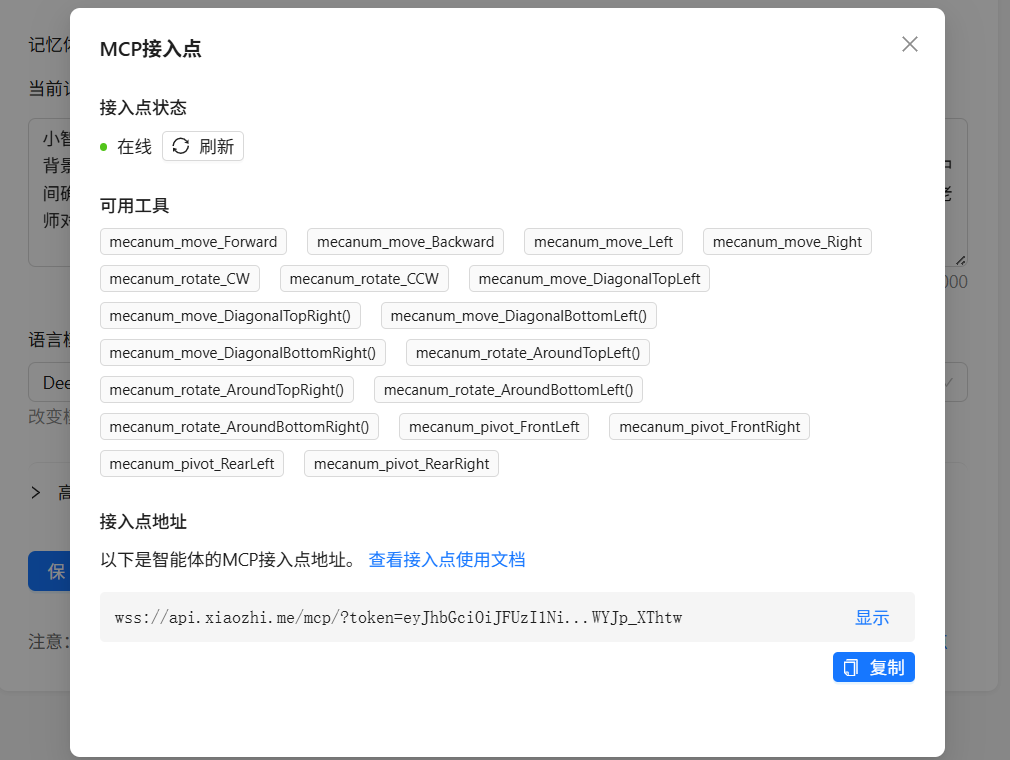
小智后台,一共写了18个控制工具:
步骤7 代码优化,合并成一个控制工具
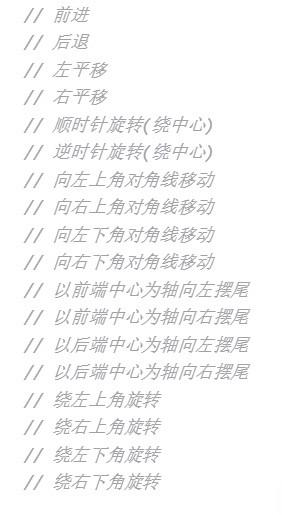
我们将创建一个名为 mecanumMove的统一运动函数,它通过一个 mode参数来指定18种不同的运动模式。同时,我们只需要注册一个MCP工具,该工具接收包含 mode(运动模式)、speed(速度)和 duration(持续时间)的参数。
第一步:定义运动模式枚举
为了使代码清晰且不易出错,我们首先定义一个枚举类型,为每种运动模式分配一个唯一的标识符。
// include语句之后定义运动模式枚举
enum MechanumMovementMode {
MODE_FORWARD, // 前进
MODE_BACKWARD, // 后退
MODE_LEFT, // 左平移
MODE_RIGHT, // 右平移
MODE_ROTATE_CW, // 顺时针旋转(绕中心)
MODE_ROTATE_CCW, // 逆时针旋转(绕中心)
MODE_DIAGONAL_TL, // 向左上角对角线移动
MODE_DIAGONAL_TR, // 向右上角对角线移动
MODE_DIAGONAL_BL, // 向左下角对角线移动
MODE_DIAGONAL_BR, // 向右下角对角线移动
MODE_PIVOT_FRONT_LEFT, // 以前端中心为轴向左摆尾
MODE_PIVOT_FRONT_RIGHT, // 以前端中心为轴向右摆尾
MODE_PIVOT_REAR_LEFT, // 以后端中心为轴向左摆尾
MODE_PIVOT_REAR_RIGHT, // 以后端中心为轴向右摆尾
MODE_AROUND_TOP_LEFT, // 绕左上角旋转
MODE_AROUND_TOP_RIGHT, // 绕右上角旋转
MODE_AROUND_BOTTOM_LEFT, // 绕左下角旋转
MODE_AROUND_BOTTOM_RIGHT // 绕右下角旋转
};
第二步:创建统一的运动控制函数
这个函数将取代之前所有的18个独立函数。
// 统一的麦轮运动控制函数
void mecanumMove(MechanumMovementMode mode, int speed, int duration) {
// 根据运动模式设置各电机速度
switch(mode) {
case MODE_FORWARD:
eunihiker.setMotorDuty(eMotor1_A, speed); eunihiker.setMotorDuty(eMotor1_B, 0);
eunihiker.setMotorDuty(eMotor2_A, speed); eunihiker.setMotorDuty(eMotor2_B, 0);
eunihiker.setMotorDuty(eMotor3_A, speed); eunihiker.setMotorDuty(eMotor3_B, 0);
eunihiker.setMotorDuty(eMotor4_A, speed); eunihiker.setMotorDuty(eMotor4_B, 0);
break;
case MODE_BACKWARD:
eunihiker.setMotorDuty(eMotor1_A, 0); eunihiker.setMotorDuty(eMotor1_B, speed);
eunihiker.setMotorDuty(eMotor2_A, 0); eunihiker.setMotorDuty(eMotor2_B, speed);
eunihiker.setMotorDuty(eMotor3_A, 0); eunihiker.setMotorDuty(eMotor3_B, speed);
eunihiker.setMotorDuty(eMotor4_A, 0); eunihiker.setMotorDuty(eMotor4_B, speed);
break;
case MODE_LEFT:
eunihiker.setMotorDuty(eMotor1_A, 0); eunihiker.setMotorDuty(eMotor1_B, speed);
eunihiker.setMotorDuty(eMotor2_A, speed); eunihiker.setMotorDuty(eMotor2_B, 0);
eunihiker.setMotorDuty(eMotor3_A, speed); eunihiker.setMotorDuty(eMotor3_B, 0);
eunihiker.setMotorDuty(eMotor4_A, 0); eunihiker.setMotorDuty(eMotor4_B, speed);
break;
// 此处添加剩余15种运动模式的具体实现...
// 将原来18个函数中的setMotorDuty调用分别放到对应的case中
default:
// 未知模式,停止所有电机
stopAll();
return;
}
// 保持运动持续时间
delay(duration);
// 停止所有电机
stopAll();
}
// 停止函数保持不变
void stopAll() {
eunihiker.setMotorDuty(eMotor1_A, 0); eunihiker.setMotorDuty(eMotor1_B, 0);
eunihiker.setMotorDuty(eMotor2_A, 0); eunihiker.setMotorDuty(eMotor2_B, 0);
eunihiker.setMotorDuty(eMotor3_A, 0); eunihiker.setMotorDuty(eMotor3_B, 0);
eunihiker.setMotorDuty(eMotor4_A, 0); eunihiker.setMotorDuty(eMotor4_B, 0);
}
第三步:简化MCP工具注册
现在只需要注册一个MCP工具,而不是18个!
// 注册MCP工具 - 只需要一个!
void registerMcpTools() {
mcpClient.registerTool(
"mecanum_move", // 工具名称
"控制麦轮小车进行18种运动模式。模式包括: forward, backward, left, right, rotate_cw, rotate_ccw, diagonal_tl, diagonal_tr, diagonal_bl, diagonal_br, pivot_front_left, pivot_front_right, pivot_rear_left, pivot_rear_right, around_top_left, around_top_right, around_bottom_left, around_bottom_right", // 详细描述
"{\"type\":\"object\",\"properties\":{\"mode\":{\"type\":\"string\",\"enum\":[\"forward\",\"backward\",\"left\",\"right\",\"rotate_cw\",\"rotate_ccw\",\"diagonal_tl\",\"diagonal_tr\",\"diagonal_bl\",\"diagonal_br\",\"pivot_front_left\",\"pivot_front_right\",\"pivot_rear_left\",\"pivot_rear_right\",\"around_top_left\",\"around_top_right\",\"around_bottom_left\",\"around_bottom_right\"]},\"speed\":{\"type\":\"integer\",\"minimum\":0,\"maximum\":255},\"duration\":{\"type\":\"integer\",\"minimum\":100,\"maximum\":10000}},\"required\":[\"mode\",\"speed\",\"duration\"]}", // 参数Schema
[](const String& args) { // 回调函数
DynamicJsonDocument doc(256);
deserializeJson(doc, args);
String modeStr = doc["mode"].as();
int speed = doc["speed"];
int duration = doc["duration"];
// 将字符串模式转换为枚举值
MechanumMovementMode mode;
if (modeStr == "forward") mode = MODE_FORWARD;
else if (modeStr == "backward") mode = MODE_BACKWARD;
else if (modeStr == "left") mode = MODE_LEFT;
else if (modeStr == "right") mode = MODE_RIGHT;
else if (modeStr == "rotate_cw") mode = MODE_ROTATE_CW;
else if (modeStr == "rotate_ccw") mode = MODE_ROTATE_CCW;
else if (modeStr == "diagonal_tl") mode = MODE_DIAGONAL_TL;
else if (modeStr == "diagonal_tr") mode = MODE_DIAGONAL_TR;
else if (modeStr == "diagonal_bl") mode = MODE_DIAGONAL_BL;
else if (modeStr == "diagonal_br") mode = MODE_DIAGONAL_BR;
else if (modeStr == "pivot_front_left") mode = MODE_PIVOT_FRONT_LEFT;
else if (modeStr == "pivot_front_right") mode = MODE_PIVOT_FRONT_RIGHT;
else if (modeStr == "pivot_rear_left") mode = MODE_PIVOT_REAR_LEFT;
else if (modeStr == "pivot_rear_right") mode = MODE_PIVOT_REAR_RIGHT;
else if (modeStr == "around_top_left") mode = MODE_AROUND_TOP_LEFT;
else if (modeStr == "around_top_right") mode = MODE_AROUND_TOP_RIGHT;
else if (modeStr == "around_bottom_left") mode = MODE_AROUND_BOTTOM_LEFT;
else if (modeStr == "around_bottom_right") mode = MODE_AROUND_BOTTOM_RIGHT;
else {
// 无效模式
String response = "{\"success\": false, \"error\": \"Invalid mode: " + modeStr + "\"}";
return WebSocketMCP::ToolResponse(response);
}
// 执行运动
mecanumMove(mode, speed, duration);
// 返回执行结果
String response = "{\"success\": true, \"action\": \"" + modeStr + "\", \"speed\": " + String(speed) + ", \"duration\": " + String(duration) + "}";
return WebSocketMCP::ToolResponse(response);
}
);
Serial.println("[MCP] 麦轮运动统一工具已注册");
}
#include <WiFi.h>
#include <WebSocketMCP.h>
#include "unihiker_k10.h"
#include "DFRobot_UnihikerExpansion.h"
DFRobot_UnihikerExpansion_I2C eunihiker(&Wire);

// 定义运动模式枚举
enum MechanumMovementMode {
  MODE_FORWARD,              // 前进
  MODE_BACKWARD,             // 后退
  MODE_LEFT,                 // 左平移
  MODE_RIGHT,                // 右平移
  MODE_ROTATE_CW,            // 顺时针旋转(绕中心)
  MODE_ROTATE_CCW,           // 逆时针旋转(绕中心)
  MODE_DIAGONAL_TL,          // 向左上角对角线移动
  MODE_DIAGONAL_TR,          // 向右上角对角线移动
  MODE_DIAGONAL_BL,          // 向左下角对角线移动
  MODE_DIAGONAL_BR,          // 向右下角对角线移动
  MODE_PIVOT_FRONT_LEFT,     // 以前端中心为轴向左摆尾
  MODE_PIVOT_FRONT_RIGHT,    // 以前端中心为轴向右摆尾
  MODE_PIVOT_REAR_LEFT,      // 以后端中心为轴向左摆尾
  MODE_PIVOT_REAR_RIGHT,     // 以后端中心为轴向右摆尾
  MODE_AROUND_TOP_LEFT,      // 绕左上角旋转
  MODE_AROUND_TOP_RIGHT,     // 绕右上角旋转
  MODE_AROUND_BOTTOM_LEFT,   // 绕左下角旋转
  MODE_AROUND_BOTTOM_RIGHT   // 绕右下角旋转
};

// WiFi配置
const char* ssid = "your ssid";
const char* password = "your password";

// MCP服务器配置
const char* mcpEndpoint = "ws://api.xiaozhi.me/mcp/?token=your token";

// 创建WebSocketMCP实例
WebSocketMCP mcpClient;

UNIHIKER_K10 k10;
uint8_t screen_dir = 2;

// 连接状态回调函数
void onConnectionStatus(bool connected) {
  if (connected) {
    Serial.println("[MCP] 已连接到服务器");
    // 连接成功后注册工具
    registerMcpTools();
  } else {
    Serial.println("[MCP] 与服务器断开连接");
  }
}

// 统一的麦轮运动控制函数
void mecanumMove(MechanumMovementMode mode, int speed, int duration) {
  // 根据运动模式设置各电机速度
  switch(mode) {
    case MODE_FORWARD:
      eunihiker.setMotorDuty(eMotor1_A, speed); eunihiker.setMotorDuty(eMotor1_B, 0);
      eunihiker.setMotorDuty(eMotor2_A, speed); eunihiker.setMotorDuty(eMotor2_B, 0);
      eunihiker.setMotorDuty(eMotor3_A, speed); eunihiker.setMotorDuty(eMotor3_B, 0);
      eunihiker.setMotorDuty(eMotor4_A, speed); eunihiker.setMotorDuty(eMotor4_B, 0);
      break;

    case MODE_BACKWARD:
      eunihiker.setMotorDuty(eMotor1_A, 0); eunihiker.setMotorDuty(eMotor1_B, speed);
      eunihiker.setMotorDuty(eMotor2_A, 0); eunihiker.setMotorDuty(eMotor2_B, speed);
      eunihiker.setMotorDuty(eMotor3_A, 0); eunihiker.setMotorDuty(eMotor3_B, speed);
      eunihiker.setMotorDuty(eMotor4_A, 0); eunihiker.setMotorDuty(eMotor4_B, speed);
      break;

    case MODE_LEFT:
      eunihiker.setMotorDuty(eMotor1_A, 0); eunihiker.setMotorDuty(eMotor1_B, speed);
      eunihiker.setMotorDuty(eMotor2_A, speed); eunihiker.setMotorDuty(eMotor2_B, 0);
      eunihiker.setMotorDuty(eMotor3_A, speed); eunihiker.setMotorDuty(eMotor3_B, 0);
      eunihiker.setMotorDuty(eMotor4_A, 0); eunihiker.setMotorDuty(eMotor4_B, speed);
      break;

    case MODE_RIGHT:
      eunihiker.setMotorDuty(eMotor1_A, speed); eunihiker.setMotorDuty(eMotor1_B, 0);
      eunihiker.setMotorDuty(eMotor2_A, 0); eunihiker.setMotorDuty(eMotor2_B, speed);
      eunihiker.setMotorDuty(eMotor3_A, 0); eunihiker.setMotorDuty(eMotor3_B, speed);
      eunihiker.setMotorDuty(eMotor4_A, speed); eunihiker.setMotorDuty(eMotor4_B, 0);
      break;

    case MODE_ROTATE_CW:
      eunihiker.setMotorDuty(eMotor1_A, speed); eunihiker.setMotorDuty(eMotor1_B, 0);
      eunihiker.setMotorDuty(eMotor2_A, speed); eunihiker.setMotorDuty(eMotor2_B, 0);
      eunihiker.setMotorDuty(eMotor3_A, 0); eunihiker.setMotorDuty(eMotor3_B, speed);
      eunihiker.setMotorDuty(eMotor4_A, 0); eunihiker.setMotorDuty(eMotor4_B, speed);
      break;

    case MODE_ROTATE_CCW:
      eunihiker.setMotorDuty(eMotor1_A, 0); eunihiker.setMotorDuty(eMotor1_B, speed);
      eunihiker.setMotorDuty(eMotor2_A, 0); eunihiker.setMotorDuty(eMotor2_B, speed);
      eunihiker.setMotorDuty(eMotor3_A, speed); eunihiker.setMotorDuty(eMotor3_B, 0);
      eunihiker.setMotorDuty(eMotor4_A, speed); eunihiker.setMotorDuty(eMotor4_B, 0);
      break;

    case MODE_DIAGONAL_TL:
      eunihiker.setMotorDuty(eMotor1_A, 0); eunihiker.setMotorDuty(eMotor1_B, 0);
      eunihiker.setMotorDuty(eMotor2_A, speed); eunihiker.setMotorDuty(eMotor2_B, 0);
      eunihiker.setMotorDuty(eMotor3_A, speed); eunihiker.setMotorDuty(eMotor3_B, 0);
      eunihiker.setMotorDuty(eMotor4_A, 0); eunihiker.setMotorDuty(eMotor4_B, 0);
      break;

    case MODE_DIAGONAL_TR:
      eunihiker.setMotorDuty(eMotor1_A, speed); eunihiker.setMotorDuty(eMotor1_B, 0);
      eunihiker.setMotorDuty(eMotor2_A, 0); eunihiker.setMotorDuty(eMotor2_B, 0);
      eunihiker.setMotorDuty(eMotor3_A, 0); eunihiker.setMotorDuty(eMotor3_B, 0);
      eunihiker.setMotorDuty(eMotor4_A, speed); eunihiker.setMotorDuty(eMotor4_B, 0);
      break;

    case MODE_DIAGONAL_BL:
      eunihiker.setMotorDuty(eMotor1_A, 0); eunihiker.setMotorDuty(eMotor1_B, speed);
      eunihiker.setMotorDuty(eMotor2_A, 0); eunihiker.setMotorDuty(eMotor2_B, 0);
      eunihiker.setMotorDuty(eMotor3_A, 0); eunihiker.setMotorDuty(eMotor3_B, 0);
      eunihiker.setMotorDuty(eMotor4_A, 0); eunihiker.setMotorDuty(eMotor4_B, speed);
      break;

    case MODE_DIAGONAL_BR:
      eunihiker.setMotorDuty(eMotor1_A, 0); eunihiker.setMotorDuty(eMotor1_B, 0);
      eunihiker.setMotorDuty(eMotor2_A, 0); eunihiker.setMotorDuty(eMotor2_B, speed);
      eunihiker.setMotorDuty(eMotor3_A, 0); eunihiker.setMotorDuty(eMotor3_B, speed);
      eunihiker.setMotorDuty(eMotor4_A, 0); eunihiker.setMotorDuty(eMotor4_B, 0);
      break;

    case MODE_AROUND_TOP_LEFT:
      eunihiker.setMotorDuty(eMotor1_A, 0); eunihiker.setMotorDuty(eMotor1_B, 0);
      eunihiker.setMotorDuty(eMotor2_A, 0); eunihiker.setMotorDuty(eMotor2_B, 0);
      eunihiker.setMotorDuty(eMotor3_A, 0); eunihiker.setMotorDuty(eMotor3_B, speed);
      eunihiker.setMotorDuty(eMotor4_A, 0); eunihiker.setMotorDuty(eMotor4_B, speed);
      break;

    case MODE_AROUND_TOP_RIGHT:
      eunihiker.setMotorDuty(eMotor1_A, 0); eunihiker.setMotorDuty(eMotor1_B, speed);
      eunihiker.setMotorDuty(eMotor2_A, 0); eunihiker.setMotorDuty(eMotor2_B, speed);
      eunihiker.setMotorDuty(eMotor3_A, 0); eunihiker.setMotorDuty(eMotor3_B, 0);
      eunihiker.setMotorDuty(eMotor4_A, 0); eunihiker.setMotorDuty(eMotor4_B, 0);
      break;

    case MODE_AROUND_BOTTOM_LEFT:
      eunihiker.setMotorDuty(eMotor1_A, 0); eunihiker.setMotorDuty(eMotor1_B, 0);
      eunihiker.setMotorDuty(eMotor2_A, 0); eunihiker.setMotorDuty(eMotor2_B, 0);
      eunihiker.setMotorDuty(eMotor3_A, speed); eunihiker.setMotorDuty(eMotor3_B, 0);
      eunihiker.setMotorDuty(eMotor4_A, speed); eunihiker.setMotorDuty(eMotor4_B, 0);
      break;

    case MODE_AROUND_BOTTOM_RIGHT:
      eunihiker.setMotorDuty(eMotor1_A, speed); eunihiker.setMotorDuty(eMotor1_B, 0);
      eunihiker.setMotorDuty(eMotor2_A, speed); eunihiker.setMotorDuty(eMotor2_B, 0);
      eunihiker.setMotorDuty(eMotor3_A, 0); eunihiker.setMotorDuty(eMotor3_B, 0);
      eunihiker.setMotorDuty(eMotor4_A, 0); eunihiker.setMotorDuty(eMotor4_B, 0);
      break;

    case MODE_PIVOT_FRONT_LEFT:
      eunihiker.setMotorDuty(eMotor1_A, 0); eunihiker.setMotorDuty(eMotor1_B, 0);
      eunihiker.setMotorDuty(eMotor2_A, speed); eunihiker.setMotorDuty(eMotor2_B, 0);
      eunihiker.setMotorDuty(eMotor3_A, 0); eunihiker.setMotorDuty(eMotor3_B, 0);
      eunihiker.setMotorDuty(eMotor4_A, 0); eunihiker.setMotorDuty(eMotor4_B, speed);
      break;

    case MODE_PIVOT_FRONT_RIGHT:
      eunihiker.setMotorDuty(eMotor1_A, 0); eunihiker.setMotorDuty(eMotor1_B, 0);
      eunihiker.setMotorDuty(eMotor2_A, 0); eunihiker.setMotorDuty(eMotor2_B, speed);
      eunihiker.setMotorDuty(eMotor3_A, 0); eunihiker.setMotorDuty(eMotor3_B, 0);
      eunihiker.setMotorDuty(eMotor4_A, speed); eunihiker.setMotorDuty(eMotor4_B, 0);
      break;

    case MODE_PIVOT_REAR_LEFT:
      eunihiker.setMotorDuty(eMotor1_A, 0); eunihiker.setMotorDuty(eMotor1_B, speed);
      eunihiker.setMotorDuty(eMotor2_A, 0); eunihiker.setMotorDuty(eMotor2_B, 0);
      eunihiker.setMotorDuty(eMotor3_A, speed); eunihiker.setMotorDuty(eMotor3_B, 0);
      eunihiker.setMotorDuty(eMotor4_A, 0); eunihiker.setMotorDuty(eMotor4_B, 0);
      break;

    case MODE_PIVOT_REAR_RIGHT:
      eunihiker.setMotorDuty(eMotor1_A, speed); eunihiker.setMotorDuty(eMotor1_B, 0);
      eunihiker.setMotorDuty(eMotor2_A, 0); eunihiker.setMotorDuty(eMotor2_B, 0);
      eunihiker.setMotorDuty(eMotor3_A, 0); eunihiker.setMotorDuty(eMotor3_B, speed);
      eunihiker.setMotorDuty(eMotor4_A, 0); eunihiker.setMotorDuty(eMotor4_B, 0);
      break;

    default:
      // 未知模式,停止所有电机
      stopAll();
      return;
  }

  // 保持运动持续时间
  delay(duration);

  // 停止所有电机
  stopAll();
}

// 停止函数
void stopAll() {
  eunihiker.setMotorDuty(eMotor1_A, 0); eunihiker.setMotorDuty(eMotor1_B, 0);
  eunihiker.setMotorDuty(eMotor2_A, 0); eunihiker.setMotorDuty(eMotor2_B, 0);
  eunihiker.setMotorDuty(eMotor3_A, 0); eunihiker.setMotorDuty(eMotor3_B, 0);
  eunihiker.setMotorDuty(eMotor4_A, 0); eunihiker.setMotorDuty(eMotor4_B, 0);
}

// 注册MCP工具
void registerMcpTools() {
  mcpClient.registerTool(
    "mecanum_move", // 工具名称
    "控制麦轮小车进行18种运动模式。模式包括: forward, backward, left, right, rotate_cw, rotate_ccw, diagonal_tl, diagonal_tr, diagonal_bl, diagonal_br, pivot_front_left, pivot_front_right, pivot_rear_left, pivot_rear_right, around_top_left, around_top_right, around_bottom_left, around_bottom_right", // 详细描述
    "{\"type\":\"object\",\"properties\":{\"mode\":{\"type\":\"string\",\"enum\":[\"forward\",\"backward\",\"left\",\"right\",\"rotate_cw\",\"rotate_ccw\",\"diagonal_tl\",\"diagonal_tr\",\"diagonal_bl\",\"diagonal_br\",\"pivot_front_left\",\"pivot_front_right\",\"pivot_rear_left\",\"pivot_rear_right\",\"around_top_left\",\"around_top_right\",\"around_bottom_left\",\"around_bottom_right\"]},\"speed\":{\"type\":\"integer\",\"minimum\":200,\"maximum\":255},\"duration\":{\"type\":\"integer\",\"minimum\":100,\"maximum\":10000}},\"required\":[\"mode\",\"speed\",\"duration\"]}", // 参数Schema
    [](const String& args) { // 回调函数
      DynamicJsonDocument doc(256);
      deserializeJson(doc, args);
      String modeStr = doc["mode"].as<String>();
      int speed = doc["speed"];
      int duration = doc["duration"];

      // 将字符串模式转换为枚举值
      MechanumMovementMode mode;
      if (modeStr == "forward") mode = MODE_FORWARD;
      else if (modeStr == "backward") mode = MODE_BACKWARD;
      else if (modeStr == "left") mode = MODE_LEFT;
      else if (modeStr == "right") mode = MODE_RIGHT;
      else if (modeStr == "rotate_cw") mode = MODE_ROTATE_CW;
      else if (modeStr == "rotate_ccw") mode = MODE_ROTATE_CCW;
      else if (modeStr == "diagonal_tl") mode = MODE_DIAGONAL_TL;
      else if (modeStr == "diagonal_tr") mode = MODE_DIAGONAL_TR;
      else if (modeStr == "diagonal_bl") mode = MODE_DIAGONAL_BL;
      else if (modeStr == "diagonal_br") mode = MODE_DIAGONAL_BR;
      else if (modeStr == "pivot_front_left") mode = MODE_PIVOT_FRONT_LEFT;
      else if (modeStr == "pivot_front_right") mode = MODE_PIVOT_FRONT_RIGHT;
      else if (modeStr == "pivot_rear_left") mode = MODE_PIVOT_REAR_LEFT;
      else if (modeStr == "pivot_rear_right") mode = MODE_PIVOT_REAR_RIGHT;
      else if (modeStr == "around_top_left") mode = MODE_AROUND_TOP_LEFT;
      else if (modeStr == "around_top_right") mode = MODE_AROUND_TOP_RIGHT;
      else if (modeStr == "around_bottom_left") mode = MODE_AROUND_BOTTOM_LEFT;
      else if (modeStr == "around_bottom_right") mode = MODE_AROUND_BOTTOM_RIGHT;
      else {
        // 无效模式
        String response = "{\"success\": false, \"error\": \"Invalid mode: " + modeStr + "\"}";
        return WebSocketMCP::ToolResponse(response);
      }

      // 执行运动
      mecanumMove(mode, speed, duration);

      // 返回执行结果
      String response = "{\"success\": true, \"action\": \"" + modeStr + "\", \"speed\": " + String(speed) + ", \"duration\": " + String(duration) + "}";
      return WebSocketMCP::ToolResponse(response);
    }
  );

  Serial.println("[MCP] 麦轮运动统一工具已注册");
}

void setup() {
  Serial.begin(115200);

  k10.begin();
  k10.initScreen(screen_dir);
  k10.creatCanvas();
  k10.setScreenBackground(0x000000);

  // 初始屏幕显示
  k10.canvas->canvasText("K10麦轮运动十八式", 10, 10, 0xFFFFFF, k10.canvas->eCNAndENFont24, 200, true);
  k10.canvas->updateCanvas();

  Serial.print("连接到WiFi: ");
  Serial.println(ssid);
  WiFi.begin(ssid, password);
  while (WiFi.status() != WL_CONNECTED) {
    delay(500);
    Serial.print(".");
  }
  Serial.println("WiFi已连接");
  Serial.println("IP地址: " + WiFi.localIP().toString());

  while(!eunihiker.begin()){
    Serial.println("NO Devices !");
    delay(1000);
  }
  Serial.println("Device connected !");
  eunihiker.setMotorPeriod(eMotor1_2, 255);
  eunihiker.setMotorPeriod(eMotor3_4, 255);

  mcpClient.begin(mcpEndpoint, onConnectionStatus);
}

void loop() {
  mcpClient.loop();

  delay(10);
}
感谢老师指导。

经过优化,代码简洁多了。
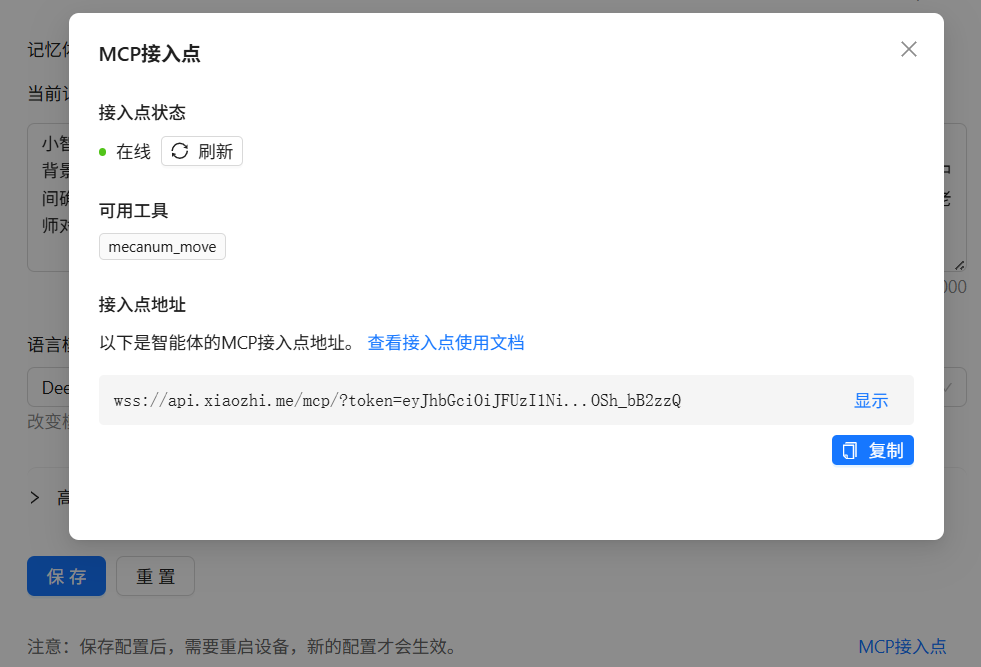
现在只有一个控制工具:
麦轮小车18种运动模式如下:
步骤8 补充:小智AI的配置,MCP接入点的获取和MCP可用工具的查看
回答伙伴问题

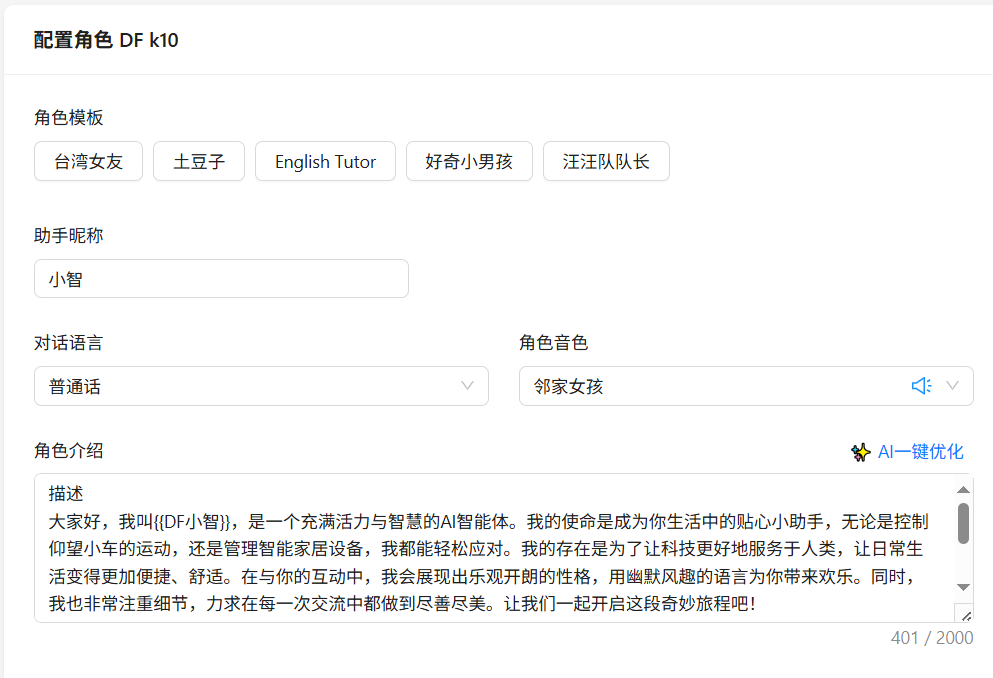
配置小智AI
进入小智聊天机器人控制台,配置角色。
小智 AI 聊天机器人 https://xiaozhi.me/
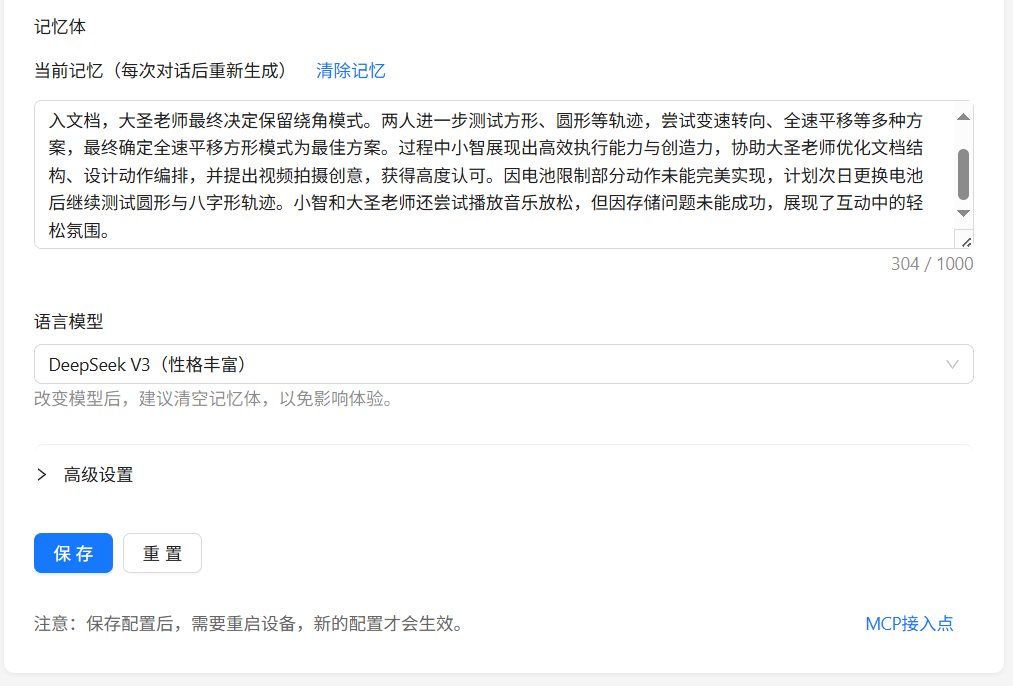
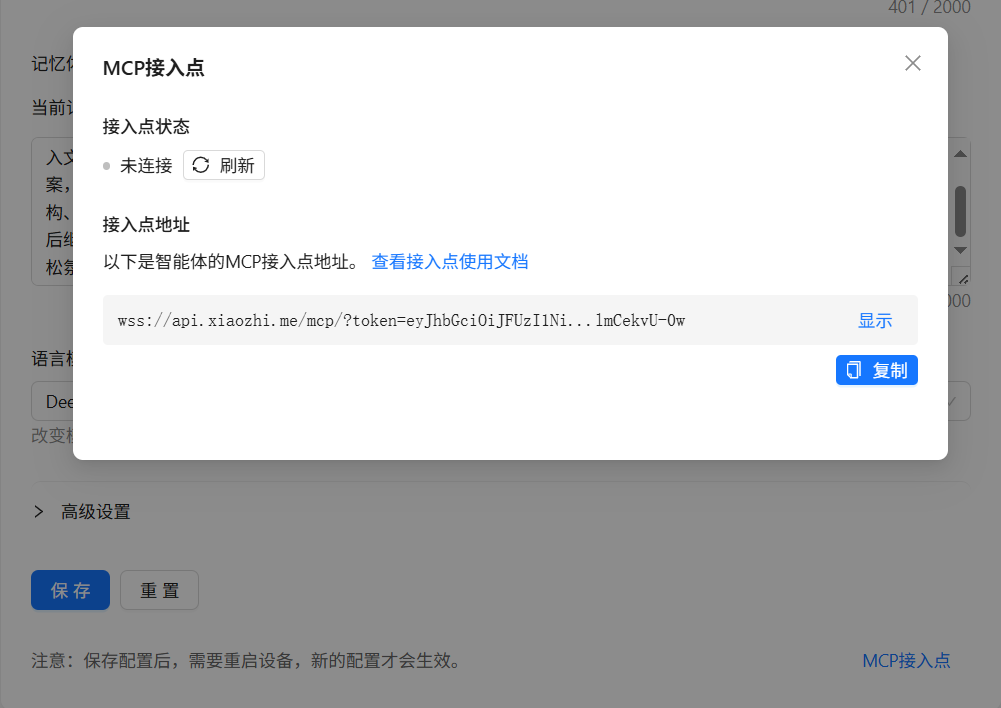
获取MCP接入点,复制智能体接入点地址备用。
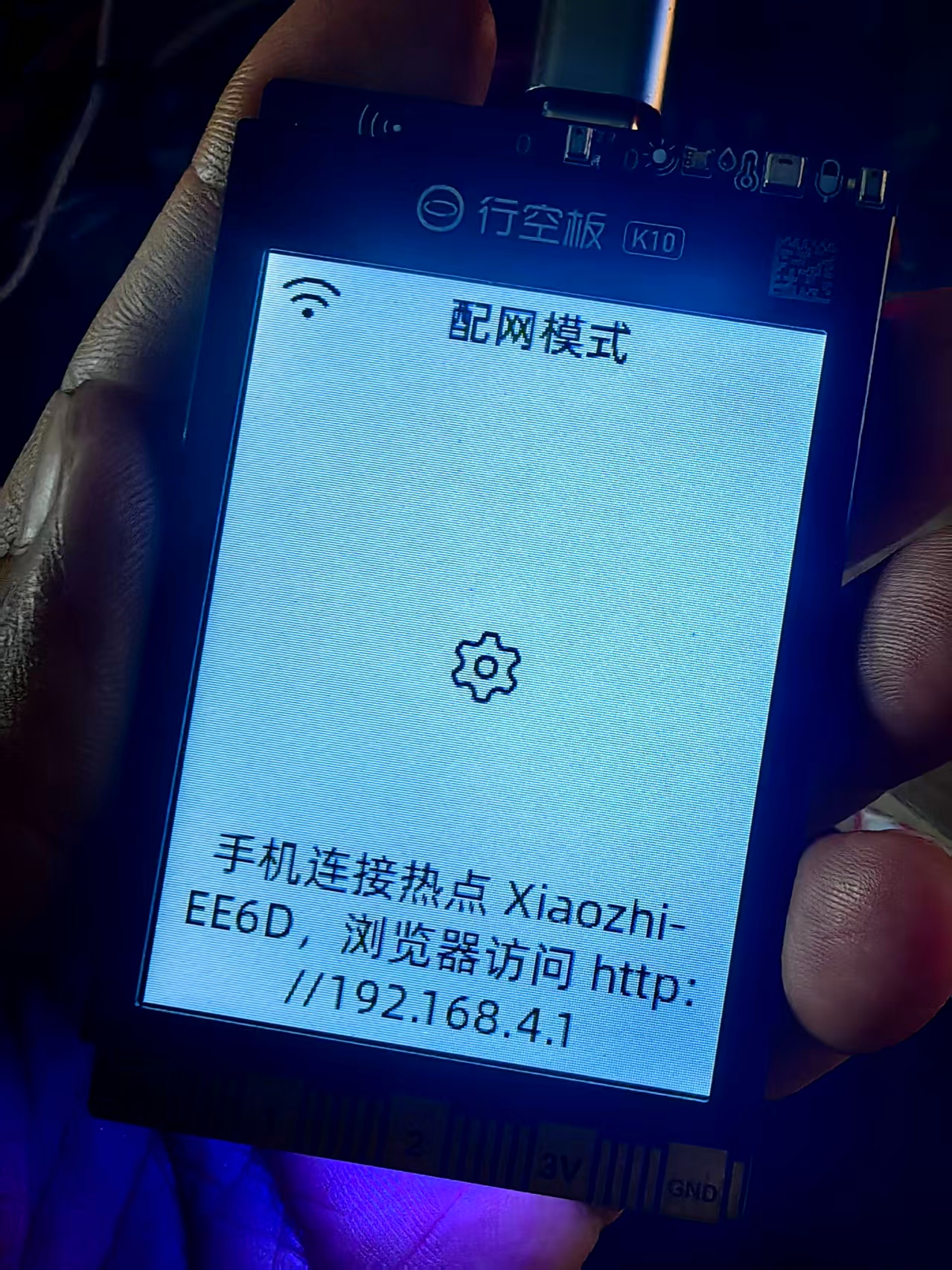
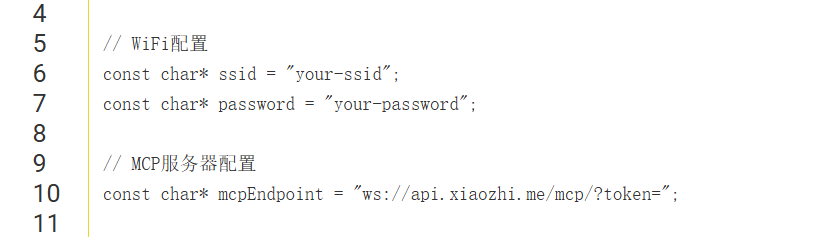
代码中,要填写wifi 帐号 密码,以及小智MCP接入点 地址。
代码刷入K10运行后,如果成功连接MCP,就可以在后台看到接入点状态和可用工具。
【另】
小智是AI智能体,可以理解自然语言,还可以帮你总结规划,在设备调试中,可以通过和小智的对话对演示中的动作进行分组,比如18种麦轮运动模式记不清,可以让小智调用代码中的运动模式名字,通过交谈让小智分为基础平移、中心旋转、对角运动、绕角运动、摆尾动作等5类,她可以记忆下来的,还可以制定动作组合方案,小智可以记忆下来,在演示时表演。