

【掌控】日行万步,OK
2019-02-108248
AI 快速预览详细
本文介绍了如何使用掌控板制作一个计步器小程序。通过加速度传感器和计时器实现精准计步。项目难度适中,适合8岁以上儿童进行编程启蒙。
|
虽然有手机 手环 计步器 可是 自己写一个计步器小程序 用掌控来玩 依然很美好  春节几天 X迭代了多个版本  比如加速度这块新的block 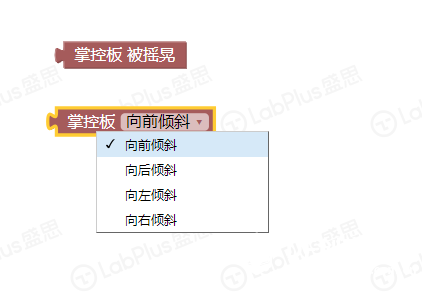 还多了一个新事件  下面是代码 [mw_shl_code=python,true]from mpython import * from machine import Timer _is_shaked = False _last_x = _last_y = _last_z = _count_shaked = 0 def on_shaked():pass tim12 = Timer(12) def timer12_tick(_): global _is_shaked, _last_x, _last_y, _last_z, _count_shaked if _is_shaked: _count_shaked += 1 if _count_shaked == 5: _count_shaked = 0 x=accelerometer.get_x(); y=accelerometer.get_y(); z=accelerometer.get_z() if _last_x == 0 and _last_y == 0 and _last_z == 0: _last_x = x; _last_y = y; _last_z = z; return diff_x = x - _last_x; diff_y = y - _last_y; diff_z = z - _last_z _last_x = x; _last_y = y; _last_z = z if _count_shaked > 0: return _is_shaked = (diff_x * diff_x + diff_y * diff_y + diff_z * diff_z > 1) if _is_shaked: on_shaked() tim12.init(period=100, mode=Timer.PERIODIC, callback=timer12_tick) def on_shaked(): pass [/mw_shl_code] 看完代码也没全明白 总之感觉用了计时器 所以做了计步器后更准确了 其实也可以做跳绳读数 或者其它好玩的东东  |

求指导!