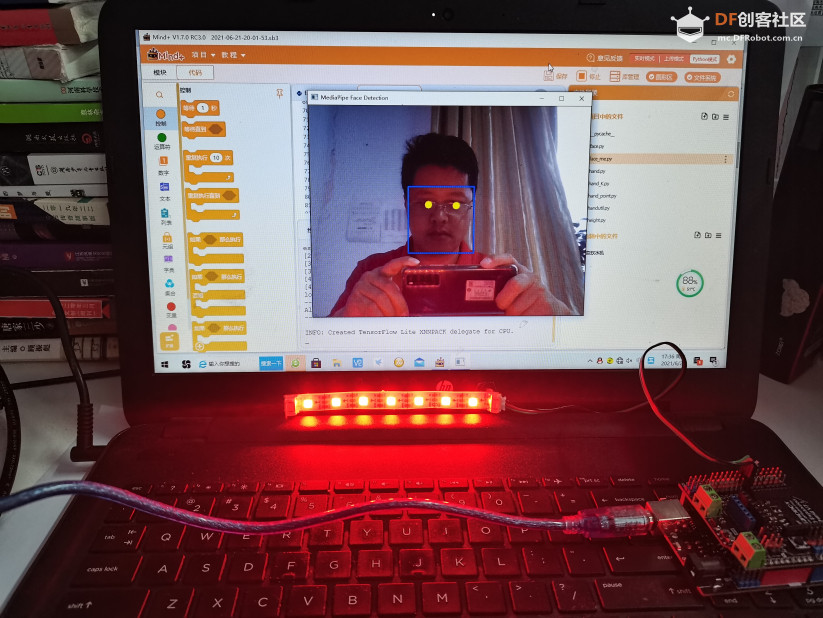
【MediaPipe 人脸检测】
检测到的人脸的集合,其中每个人脸都表示为一个检测原始消息,其中包含一个边界框和 6 个关键点(右眼、左眼、鼻尖、嘴巴中心、右耳和左耳)。边界框由xmin和width(均由[0.0, 1.0]图像宽度归一化)和ymin和height(均由[0.0, 1.0]图像高度归一化)组成。每个关键点由x和组成y,分别[0.0, 1.0]由图像宽度和高度归一化。
【程序代码】 通过左右眼纵坐标的差来判断头向左歪还是向右歪
-
- import cv2
-
- import mediapipe as mp
- from pinpong.board import Board,Pin,NeoPixel
- NEOPIXEL_PIN = Pin.D7
- PIXELS_NUM = 7 #灯数
- Board("uno").begin() #初始化,选择板型和端口号,不输入端口号则进行自动识别
- np = NeoPixel(Pin(NEOPIXEL_PIN), PIXELS_NUM)
- mp_face_detection = mp.solutions.face_detection
-
- mp_drawing = mp.solutions.drawing_utils
-
- # For webcam input:
-
- cap = cv2.VideoCapture(0)
- Width=cap.get(3)
- Height=cap.get(4)
- with mp_face_detection.FaceDetection(
-
- min_detection_confidence=0.5) as face_detection:
-
- while cap.isOpened():
-
- success, image = cap.read()
-
- if not success:
-
- print("Ignoring empty camera frame.")
-
- # If loading a video, use 'break' instead of 'continue'.
-
- continue
-
-
-
-
- # Flip the image horizontally for a later selfie-view display, and convert
-
- # the BGR image to RGB.
-
- image = cv2.cvtColor(cv2.flip(image, 1), cv2.COLOR_BGR2RGB)
-
- # To improve performance, optionally mark the image as not writeable to
-
- # pass by reference.
-
- image.flags.writeable = False
-
- results = face_detection.process(image)
-
- # Draw the face detection annotations on the image.
-
- image.flags.writeable = True
-
- image = cv2.cvtColor(image, cv2.COLOR_RGB2BGR)
-
- if results.detections:
-
- for detection in results.detections:
-
- #mp_drawing.draw_detection(image, detection)
-
- #计算左右眼坐标位置
- RIGHT_EYE=mp_face_detection.get_key_point(detection, mp_face_detection.FaceKeyPoint.RIGHT_EYE)
- LEFT_EYE=mp_face_detection.get_key_point(detection, mp_face_detection.FaceKeyPoint.LEFT_EYE)
- Rx=int(RIGHT_EYE.x*Width)
- Ry=int(RIGHT_EYE.y*Height)
- Lx=int(LEFT_EYE.x*Width)
- Ly=int(LEFT_EYE.y*Height)
-
- cv2.circle(image, (Lx,Ly), 8, (0, 255, 255), cv2.FILLED)
- cv2.circle(image, (Rx,Ry), 8, (0, 255, 255), cv2.FILLED)
【视频演示】
|



[10] Opening COM26...
[20] Waiting 4 seconds(arduino_wait) for Arduino devices to reset...
[22] Arduino compatible device found and connected to COM26
[30] Retrieving Arduino Firmware ID...
[32] Arduino Firmware ID: 2.6 DFRobot firmata
[40] Retrieving analog map...
[42] Auto-discovery complete. Found 20 Digital Pins and 6 Analog Pins
------------------------------
All right. PinPong go...
------------------------------
INFO: Created TensorFlow Lite XNNPACK delegate for CPU.
>>>