【项目背景】
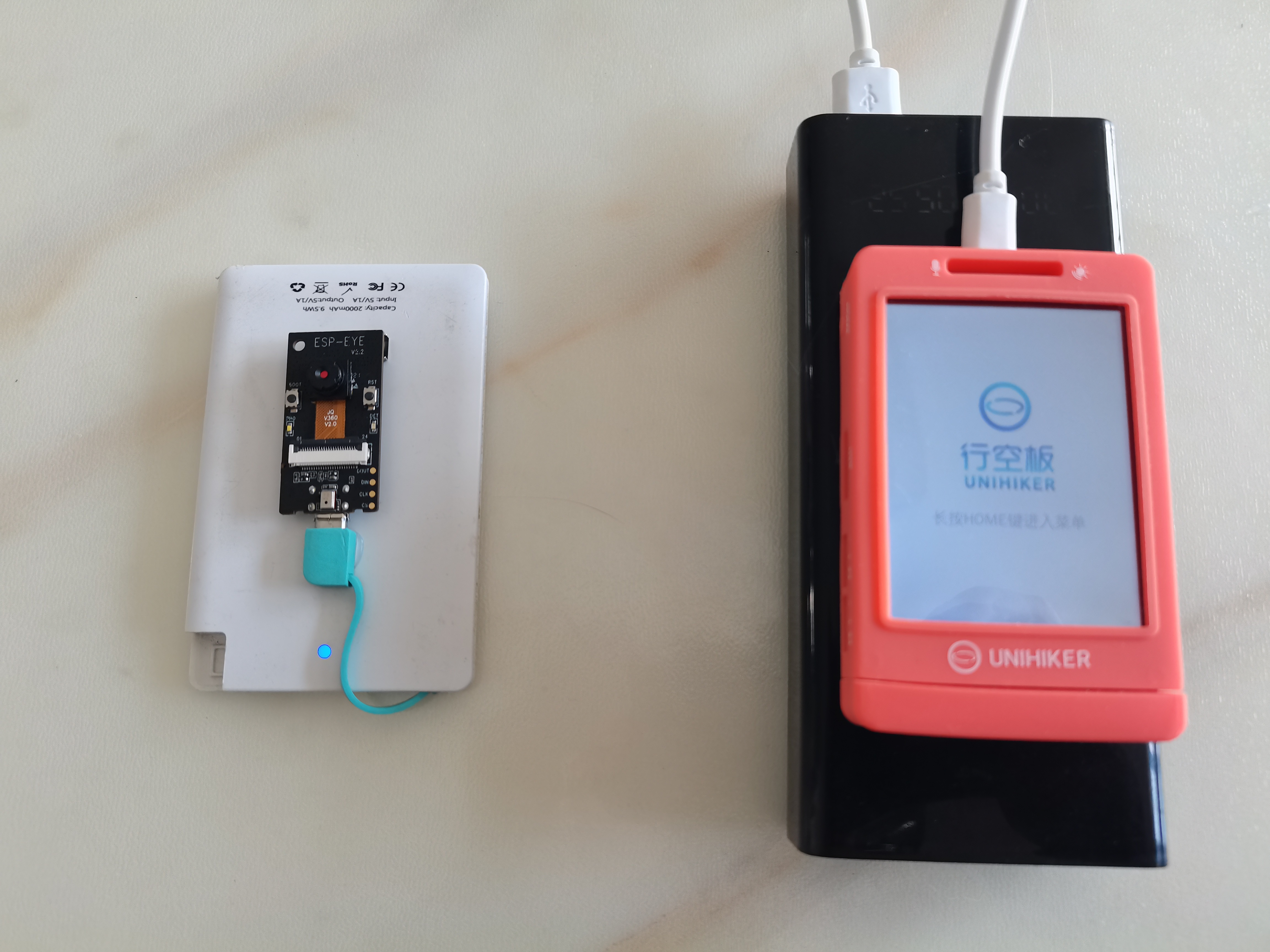
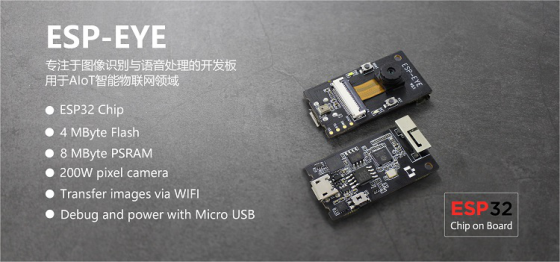
在DF商城看到一个ESP开发板,ESP-EYE 智能摄像头开发板 板载ESP32芯片,集成200万像素摄像头,支持Wi-Fi图像传输。很小巧,正好这段时间正在学习如何使用ESP32开发板,就用这个ESP-EYE开发板与行空板结合做一个小项目,数字“猫眼”。
【ESP EYE】
1.ESP-EYE是一款专注于图像识别与语音处理的开发板,板载ESP32芯片,集成200万像素摄像头、数字麦克风,拥有8 MByte PSRAM和4 MByte flash的丰富存储,支持Wi-Fi图像传输与Micro USB调试与供电,可广泛应用于智能物联网领域的应用开发。
2.Arduino IDE 编程
主控板要选择“AI Thinker ESP32-CAM”
3.利用示例“CameraWebServer”测试图传

-
- #include "esp_camera.h"
- #include <WiFi.h>
-
- // ===================
- // Select camera model
- // ===================
-
- #define CAMERA_MODEL_ESP_EYE // Has PSRAM
-
- #include "camera_pins.h"
-
- // ===========================
- //输入你的wifi凭据
- // ===========================
- const char* ssid = "**********";
- const char* password = "**********";
-
- void startCameraServer();
- void setupLedFlash(int pin);
-
- void setup() {
- Serial.begin(115200);
- Serial.setDebugOutput(true);
- Serial.println();
-
- camera_config_t config;
- config.ledc_channel = LEDC_CHANNEL_0;
- config.ledc_timer = LEDC_TIMER_0;
- config.pin_d0 = Y2_GPIO_NUM;
- config.pin_d1 = Y3_GPIO_NUM;
- config.pin_d2 = Y4_GPIO_NUM;
- config.pin_d3 = Y5_GPIO_NUM;
- config.pin_d4 = Y6_GPIO_NUM;
- config.pin_d5 = Y7_GPIO_NUM;
- config.pin_d6 = Y8_GPIO_NUM;
- config.pin_d7 = Y9_GPIO_NUM;
- config.pin_xclk = XCLK_GPIO_NUM;
- config.pin_pclk = PCLK_GPIO_NUM;
- config.pin_vsync = VSYNC_GPIO_NUM;
- config.pin_href = HREF_GPIO_NUM;
- config.pin_sccb_sda = SIOD_GPIO_NUM;
- config.pin_sccb_scl = SIOC_GPIO_NUM;
- config.pin_pwdn = PWDN_GPIO_NUM;
- config.pin_reset = RESET_GPIO_NUM;
- config.xclk_freq_hz = 20000000;
- config.frame_size = FRAMESIZE_UXGA;
- config.pixel_format = PIXFORMAT_JPEG; // for streaming
- //config.pixel_format = PIXFORMAT_RGB565; // for face detection/recognition
- config.grab_mode = CAMERA_GRAB_WHEN_EMPTY;
- config.fb_location = CAMERA_FB_IN_PSRAM;
- config.jpeg_quality = 12;
- config.fb_count = 1;
-
- // if PSRAM IC present, init with UXGA resolution and higher JPEG quality
- // for larger pre-allocated frame buffer.
- if(config.pixel_format == PIXFORMAT_JPEG){
- if(psramFound()){
- config.jpeg_quality = 10;
- config.fb_count = 2;
- config.grab_mode = CAMERA_GRAB_LATEST;
- } else {
- // Limit the frame size when PSRAM is not available
- config.frame_size = FRAMESIZE_SVGA;
- config.fb_location = CAMERA_FB_IN_DRAM;
- }
- } else {
- // Best option for face detection/recognition
- config.frame_size = FRAMESIZE_240X240;
- #if CONFIG_IDF_TARGET_ESP32S3
- config.fb_count = 2;
- #endif
- }
- #if defined(CAMERA_MODEL_ESP_EYE)
- pinMode(13, INPUT_PULLUP);
- pinMode(14, INPUT_PULLUP);
- #endif
-
- // camera init
- esp_err_t err = esp_camera_init(&config);
- if (err != ESP_OK) {
- Serial.printf("Camera init failed with error 0x%x", err);
- return;
- }
- sensor_t * s = esp_camera_sensor_get();
- // initial sensors are flipped vertically and colors are a bit saturated
- if (s->id.PID == OV3660_PID) {
- s->set_vflip(s, 1); // flip it back
- s->set_brightness(s, 1); // up the brightness just a bit
- s->set_saturation(s, -2); // lower the saturation
- }
- // drop down frame size for higher initial frame rate
- if(config.pixel_format == PIXFORMAT_JPEG){
- s->set_framesize(s, FRAMESIZE_QVGA);
- }
- #if defined(CAMERA_MODEL_M5STACK_WIDE) || defined(CAMERA_MODEL_M5STACK_ESP32CAM)
- s->set_vflip(s, 1);
- s->set_hmirror(s, 1);
- #endif
- #if defined(CAMERA_MODEL_ESP32S3_EYE)
- s->set_vflip(s, 1);
- #endif
- // Setup LED FLash if LED pin is defined in camera_pins.h
- #if defined(LED_GPIO_NUM)
- setupLedFlash(LED_GPIO_NUM);
- #endif
- WiFi.begin(ssid, password);
- WiFi.setSleep(false);
- while (WiFi.status() != WL_CONNECTED) {
- delay(500);
- Serial.print(".");
- }
- Serial.println("");
- Serial.println("WiFi connected");
- startCameraServer();
- Serial.print("Camera Ready! Use 'http://");
- Serial.print(WiFi.localIP());
- Serial.println("' to connect");
- }
-
- void loop() {
- // Do nothing. Everything is done in another task by the web server
- delay(10000);
- }
-
4.测试演示视频
【TCP图传】
1.ESP EYE使用“HTTPClient”库向行空板传送摄像头拍摄的图像。
-
- #include "esp_camera.h"
- #include <WiFi.h>
- #include <HTTPClient.h>
- // 用于上传照片的服务器地址,行空板IP地址
- const char *serverName = "http://192.168.31.71:9000/upload";
- // ===================
- // Select camera model
- #define CAMERA_MODEL_ESP_EYE // Has PSRAM
- #include "camera_pins.h"
- // ===========================
- // Enter your WiFi credentials
- // ===========================
- const char* ssid = "**********";
- const char* password = "***********";
- void setup() {
- Serial.begin(115200);
- Serial.setDebugOutput(true);
- Serial.println();
-
- camera_config_t config;
- config.ledc_channel = LEDC_CHANNEL_0;
- config.ledc_timer = LEDC_TIMER_0;
- config.pin_d0 = Y2_GPIO_NUM;
- config.pin_d1 = Y3_GPIO_NUM;
- config.pin_d2 = Y4_GPIO_NUM;
- config.pin_d3 = Y5_GPIO_NUM;
- config.pin_d4 = Y6_GPIO_NUM;
- config.pin_d5 = Y7_GPIO_NUM;
- config.pin_d6 = Y8_GPIO_NUM;
- config.pin_d7 = Y9_GPIO_NUM;
- config.pin_xclk = XCLK_GPIO_NUM;
- config.pin_pclk = PCLK_GPIO_NUM;
- config.pin_vsync = VSYNC_GPIO_NUM;
- config.pin_href = HREF_GPIO_NUM;
- config.pin_sccb_sda = SIOD_GPIO_NUM;
- config.pin_sccb_scl = SIOC_GPIO_NUM;
- config.pin_pwdn = PWDN_GPIO_NUM;
- config.pin_reset = RESET_GPIO_NUM;
- config.xclk_freq_hz = 20000000;
- config.frame_size = FRAMESIZE_UXGA;
- config.pixel_format = PIXFORMAT_JPEG; // for streaming
- //config.pixel_format = PIXFORMAT_RGB565; // for face detection/recognition
- config.grab_mode = CAMERA_GRAB_WHEN_EMPTY;
- config.fb_location = CAMERA_FB_IN_PSRAM;
- config.jpeg_quality = 12;
- config.fb_count = 1;
-
- // if PSRAM IC present, init with UXGA resolution and higher JPEG quality
- // for larger pre-allocated frame buffer.
- if(config.pixel_format == PIXFORMAT_JPEG){
- if(psramFound()){
- config.jpeg_quality = 10;
- config.fb_count = 2;
- config.grab_mode = CAMERA_GRAB_LATEST;
- } else {
- // Limit the frame size when PSRAM is not available
- config.frame_size = FRAMESIZE_SVGA;
- config.fb_location = CAMERA_FB_IN_DRAM;
- }
- } else {
- // Best option for face detection/recognition
- config.frame_size = FRAMESIZE_240X240;
- #if CONFIG_IDF_TARGET_ESP32S3
- config.fb_count = 2;
- #endif
- }
-
- #if defined(CAMERA_MODEL_ESP_EYE)
- pinMode(13, INPUT_PULLUP);
- pinMode(14, INPUT_PULLUP);
- #endif
-
- // camera init
- esp_err_t err = esp_camera_init(&config);
- if (err != ESP_OK) {
- Serial.printf("Camera init failed with error 0x%x", err);
- return;
- }
-
- sensor_t * s = esp_camera_sensor_get();
- // initial sensors are flipped vertically and colors are a bit saturated
- if (s->id.PID == OV3660_PID) {
- s->set_vflip(s, 1); // flip it back
- s->set_brightness(s, 1); // up the brightness just a bit
- s->set_saturation(s, -2); // lower the saturation
- }
- // drop down frame size for higher initial frame rate
- if(config.pixel_format == PIXFORMAT_JPEG){
- s->set_framesize(s, FRAMESIZE_QVGA);
- }
-
- #if defined(CAMERA_MODEL_M5STACK_WIDE) || defined(CAMERA_MODEL_M5STACK_ESP32CAM)
- s->set_vflip(s, 1);
- s->set_hmirror(s, 1);
- #endif
-
- #if defined(CAMERA_MODEL_ESP32S3_EYE)
- s->set_vflip(s, 1);
- #endif
- WiFi.begin(ssid, password);
- WiFi.setSleep(false);
- while (WiFi.status() != WL_CONNECTED) {
- delay(500);
- Serial.print(".");
- }
- Serial.println("");
- Serial.println("WiFi connected");
- }
- void loop() {
- // 拍摄照片
- camera_fb_t *fb = esp_camera_fb_get();
- if (!fb)
- {
- Serial.println("获取摄像头帧缓冲失败");
- return;
- }
- // 建立HTTP客户端
- HTTPClient http;
- // 将照片上传到服务器
- http.begin(serverName);
- http.addHeader("Content-Type", "image/jpeg");
- int httpResponseCode = http.POST(fb->buf, fb->len);
- if (httpResponseCode > 0)
- {
- Serial.printf("照片上传成功,服务器返回代码:%d\n", httpResponseCode);
- // 再闪一下提示上传成功
-
- }
- else
- {
- Serial.printf("照片上传失败,错误代码:%s\n", http.errorToString(httpResponseCode).c_str());
- }
- http.end();
-
- // 释放帧缓冲
- esp_camera_fb_return(fb);
- }
-
2.行空板使用“flask”库,接收图像并在屏幕上显示
-
- from flask import Flask, request
- from unihiker import GUI
-
- u_gui=GUI()
-
-
- 显图=u_gui.draw_image(image="base.png",h=320,x=0,y=0)
- app = Flask(__name__)
- @app.route('/upload', methods=['POST'])
- def upload():
-
- try:
- image = request.data
- # 保存照片到指定目录
-
- with open('base.png', 'wb') as f:
- f.write(image)
- f.close()
-
- 显图.config(image="base.png")
-
- return "照片上传成功", 200
- except Exception as e:
- print("照片上传失败:", str(e))
- return "照片上传失败", 500
-
- if __name__ == '__main__':
-
- app.run(host='192.168.31.71', port=9000)
【物联网开关】
使用行空板A、B键,利用Easy IOT物联网平台向ESP EYE发送开启或关闭发送图像的指令。
1.ESP EYE 物联网测试程序
-
- /*
- SimpleMQTTClient.ino
- The purpose of this exemple is to illustrate a simple handling of MQTT and Wifi connection.
- Once it connects successfully to a Wifi network and a MQTT broker, it subscribe to a topic and send a message to it.
- It will also send a message delayed 5 seconds later.
- */
-
- #include "EspMQTTClient.h"
-
- EspMQTTClient client(
- "sxs",
- "smj080823",
- "182.254.130.180", // MQTT Broker server ip
- "X8jykxFnR", // Can be omitted if not needed
- "u8jskbFngz", // Can be omitted if not needed
- "yuntian365", // Client name that uniquely identify your device
- 1883 // The MQTT port, default to 1883. this line can be omitted
- );
-
- void setup()
- {
- Serial.begin(115200);
-
- // Optional functionalities of EspMQTTClient
- client.enableDebuggingMessages(); // Enable debugging messages sent to serial output
- client.enableHTTPWebUpdater(); // Enable the web updater. User and password default to values of MQTTUsername and MQTTPassword. These can be overridded with enableHTTPWebUpdater("user", "password").
- client.enableOTA(); // Enable OTA (Over The Air) updates. Password defaults to MQTTPassword. Port is the default OTA port. Can be overridden with enableOTA("password", port).
- client.enableLastWillMessage("MNpA1p_4R", "I am going offline"); // You can activate the retain flag by setting the third parameter to true
- }
-
- // This function is called once everything is connected (Wifi and MQTT)
- // WARNING : YOU MUST IMPLEMENT IT IF YOU USE EspMQTTClient
- void onConnectionEstablished()
- {
- // Subscribe to "mytopic/wildcardtest/#" and display received message to Serial
- client.subscribe("1DXAmWJ4g", [](const String & topic, const String & payload) {
- Serial.println("(From wildcard) topic: " + topic + ", payload: " + payload);
- });
-
- // Publish a message to "mytopic/test"
- client.publish("k_eT7HUVR", "This is a message"); // You can activate the retain flag by setting the third parameter to true
-
- // Execute delayed instructions
- client.executeDelayed(5 * 1000, []() {
- client.publish("k_eT7HUVR", "This is a message sent 5 seconds later");
- });
- }
-
- void loop()
- {
- client.loop();
- }
-
【行空板完整程序】
行空板连接物联网及接收图传完整程序
-
-
-
- from flask import Flask, request
- from unihiker import GUI
- import siot
- import time
- u_gui=GUI()
- i=0
-
- 显图=u_gui.draw_image(image="base.png",h=320,x=0,y=0)
- app = Flask(__name__)
- @app.route('/upload', methods=['POST'])
- def upload():
-
- try:
- image = request.data
- # 保存照片到指定目录
-
- with open('base.png', 'wb') as f:
- f.write(image)
- f.close()
-
- 显图.config(image="base.png")
-
- return "照片上传成功", 200
- except Exception as e:
- print("照片上传失败:", str(e))
- return "照片上传失败", 500
- # 事件回调函数
- def on_buttona_click_callback():
- global i
- if i==0:
- i=1
- siot.publish(topic="1DXAmWJ4g", data="a")
- # 事件回调函数
- def on_buttonb_click_callback():
- global i
- if i==1:
- i=0
- siot.publish(topic="1DXAmWJ4g", data="b")
- if __name__ == '__main__':
- siot.init(client_id="yuntian367",server="iot.dfrobot.com.cn",port=1883,user="X8jykxFnR",password="u8jskbFngz")
- siot.connect()
- siot.loop()
-
- u_gui.on_a_click(on_buttona_click_callback)
- u_gui.on_b_click(on_buttonb_click_callback)
- app.run(host='192.168.31.71', port=9000)
-
【ESP EYE完整程序】
接收物联网指令,向行空板图传。
-
-
-
- #include "esp_camera.h"
- #include <WiFi.h>
-
- #include <HTTPClient.h>
-
- // 用于上传照片的服务器地址,行空板IP地址
- const char *serverName = "http://192.168.31.71:9000/upload";
- // ===================
- // Select camera model
-
- #define CAMERA_MODEL_ESP_EYE // Has PSRAM
-
- #include "camera_pins.h"
- #include "EspMQTTClient.h"
-
- EspMQTTClient client(
- "sxs",
- "smj080823",
- "182.254.130.180", // MQTT Broker server ip
- "X8jykxFnR", // Can be omitted if not needed
- "u8jskbFngz", // Can be omitted if not needed
- "yuntian365", // Client name that uniquely identify your device
- 1883 // The MQTT port, default to 1883. this line can be omitted
- );
- // ===========================
- // Enter your WiFi credentials
- // ===========================
- const char* ssid = "sxs";
- const char* password = "smj080823";
-
- int bs;
-
- void setup() {
- Serial.begin(115200);
- Serial.setDebugOutput(true);
- Serial.println();
-
- camera_config_t config;
- config.ledc_channel = LEDC_CHANNEL_0;
- config.ledc_timer = LEDC_TIMER_0;
- config.pin_d0 = Y2_GPIO_NUM;
- config.pin_d1 = Y3_GPIO_NUM;
- config.pin_d2 = Y4_GPIO_NUM;
- config.pin_d3 = Y5_GPIO_NUM;
- config.pin_d4 = Y6_GPIO_NUM;
- config.pin_d5 = Y7_GPIO_NUM;
- config.pin_d6 = Y8_GPIO_NUM;
- config.pin_d7 = Y9_GPIO_NUM;
- config.pin_xclk = XCLK_GPIO_NUM;
- config.pin_pclk = PCLK_GPIO_NUM;
- config.pin_vsync = VSYNC_GPIO_NUM;
- config.pin_href = HREF_GPIO_NUM;
- config.pin_sccb_sda = SIOD_GPIO_NUM;
- config.pin_sccb_scl = SIOC_GPIO_NUM;
- config.pin_pwdn = PWDN_GPIO_NUM;
- config.pin_reset = RESET_GPIO_NUM;
- config.xclk_freq_hz = 20000000;
- config.frame_size = FRAMESIZE_UXGA;
- config.pixel_format = PIXFORMAT_JPEG; // for streaming
- //config.pixel_format = PIXFORMAT_RGB565; // for face detection/recognition
- config.grab_mode = CAMERA_GRAB_WHEN_EMPTY;
- config.fb_location = CAMERA_FB_IN_PSRAM;
- config.jpeg_quality = 12;
- config.fb_count = 1;
-
- // if PSRAM IC present, init with UXGA resolution and higher JPEG quality
- // for larger pre-allocated frame buffer.
- if(config.pixel_format == PIXFORMAT_JPEG){
- if(psramFound()){
- config.jpeg_quality = 10;
- config.fb_count = 2;
- config.grab_mode = CAMERA_GRAB_LATEST;
- } else {
- // Limit the frame size when PSRAM is not available
- config.frame_size = FRAMESIZE_SVGA;
- config.fb_location = CAMERA_FB_IN_DRAM;
- }
- } else {
- // Best option for face detection/recognition
- config.frame_size = FRAMESIZE_240X240;
- #if CONFIG_IDF_TARGET_ESP32S3
- config.fb_count = 2;
- #endif
- }
-
- #if defined(CAMERA_MODEL_ESP_EYE)
- pinMode(13, INPUT_PULLUP);
- pinMode(14, INPUT_PULLUP);
- #endif
-
- // camera init
- esp_err_t err = esp_camera_init(&config);
- if (err != ESP_OK) {
- Serial.printf("Camera init failed with error 0x%x", err);
- return;
- }
-
- sensor_t * s = esp_camera_sensor_get();
- // initial sensors are flipped vertically and colors are a bit saturated
- if (s->id.PID == OV3660_PID) {
- s->set_vflip(s, 1); // flip it back
- s->set_brightness(s, 1); // up the brightness just a bit
- s->set_saturation(s, -2); // lower the saturation
- }
- // drop down frame size for higher initial frame rate
- if(config.pixel_format == PIXFORMAT_JPEG){
- s->set_framesize(s, FRAMESIZE_QVGA);
- }
-
- #if defined(CAMERA_MODEL_M5STACK_WIDE) || defined(CAMERA_MODEL_M5STACK_ESP32CAM)
- s->set_vflip(s, 1);
- s->set_hmirror(s, 1);
- #endif
-
- #if defined(CAMERA_MODEL_ESP32S3_EYE)
- s->set_vflip(s, 1);
- #endif
-
-
-
- WiFi.begin(ssid, password);
- WiFi.setSleep(false);
-
- while (WiFi.status() != WL_CONNECTED) {
- delay(500);
- Serial.print(".");
- }
- Serial.println("");
- Serial.println("WiFi connected");
-
- bs=0;
- client.enableDebuggingMessages(); // Enable debugging messages sent to serial output
- client.enableHTTPWebUpdater(); // Enable the web updater. User and password default to values of MQTTUsername and MQTTPassword. These can be overridded with enableHTTPWebUpdater("user", "password").
- client.enableOTA(); // Enable OTA (Over The Air) updates. Password defaults to MQTTPassword. Port is the default OTA port. Can be overridden with enableOTA("password", port).
- client.enableLastWillMessage("MNpA1p_4R", "I am going offline"); // You can activate the retain flag by setting the third parameter to true
-
- }
- void onConnectionEstablished()
- {
- // Subscribe to "mytopic/wildcardtest/#" and display received message to Serial
- client.subscribe("1DXAmWJ4g", [](const String & topic, const String & payload) {
- Serial.println("(From wildcard) topic: " + topic + ", payload: " + payload);
- if(payload=="a"){
- bs=1;
- }
- if(payload=="b"){
- bs=0;
- }
- });
-
- // Publish a message to "mytopic/test"
- client.publish("k_eT7HUVR", "This is a message"); // You can activate the retain flag by setting the third parameter to true
-
- // Execute delayed instructions
- client.executeDelayed(5 * 1000, []() {
- client.publish("k_eT7HUVR", "This is a message sent 5 seconds later");
- });
- }
- void loop() {
- if(bs==1){
- // 拍摄照片
- camera_fb_t *fb = esp_camera_fb_get();
- if (!fb)
- {
- Serial.println("获取摄像头帧缓冲失败");
- return;
- }
- // 建立HTTP客户端
- HTTPClient http;
- // 将照片上传到服务器
- http.begin(serverName);
- http.addHeader("Content-Type", "image/jpeg");
- int httpResponseCode = http.POST(fb->buf, fb->len);
- if (httpResponseCode > 0)
- {
- Serial.printf("照片上传成功,服务器返回代码:%d\n", httpResponseCode);
-
- // 再闪一下提示上传成功
-
- }
- else
- {
- Serial.printf("照片上传失败,错误代码:%s\n", http.errorToString(httpResponseCode).c_str());
- }
- http.end();
-
- // 释放帧缓冲
- esp_camera_fb_return(fb);
- }
- client.loop();
- }
-
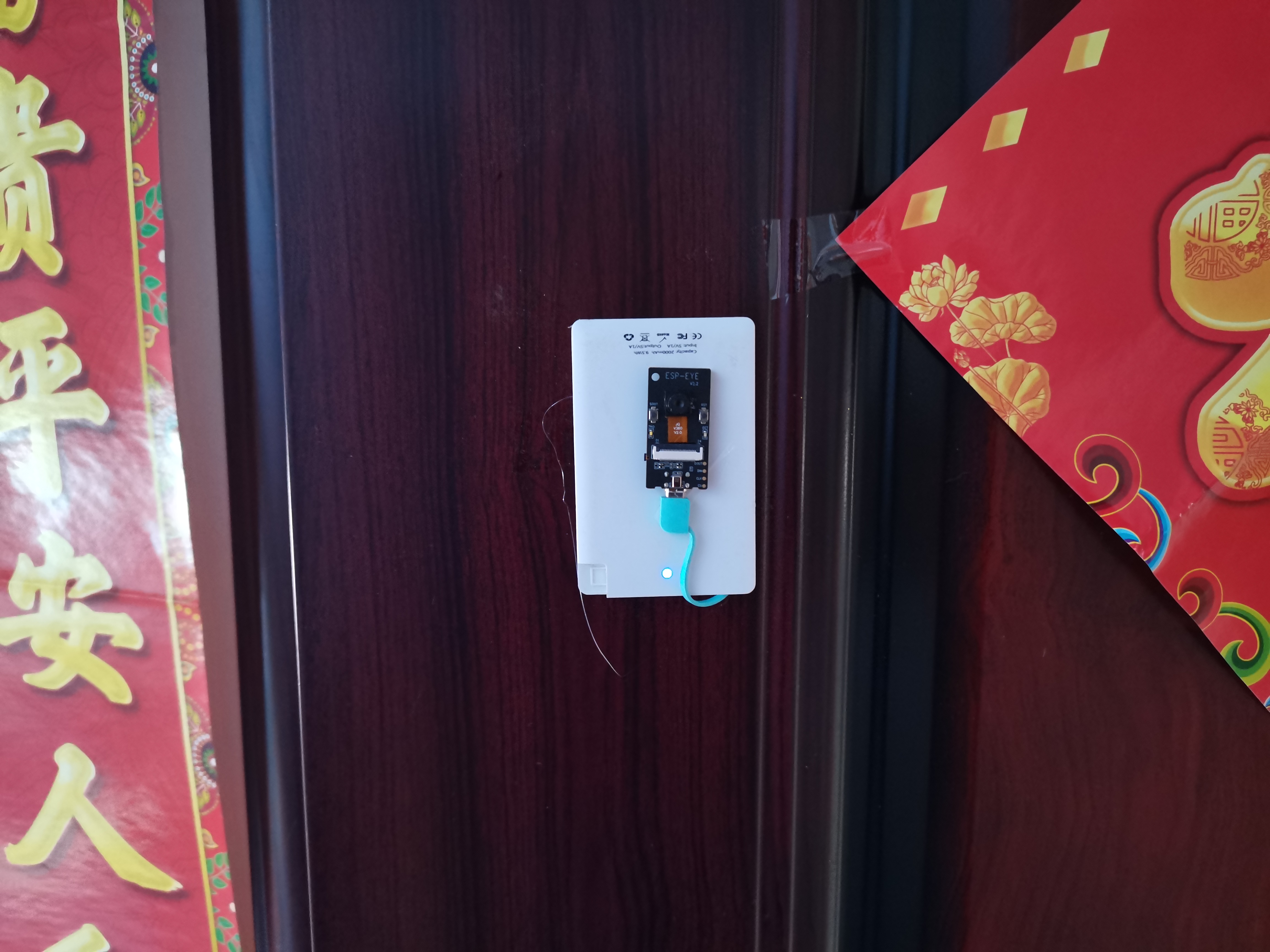
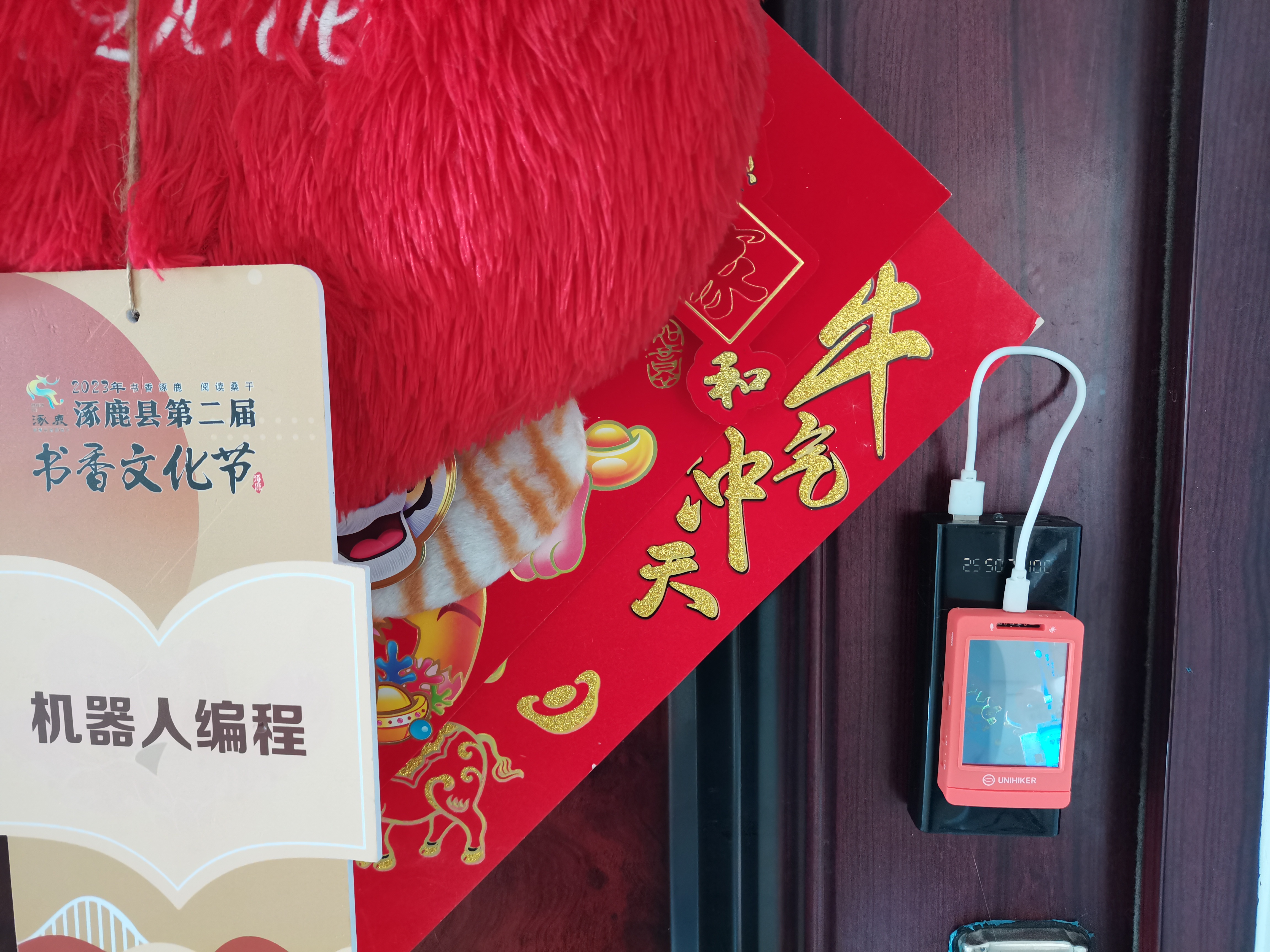
【数字“猫眼”】利用充电宝为行空板及ESP EYE供电,ESP EYE放置在门外摄像,行空板放置在门内查看视频图像。
【演示视频】
|