本次测试的是将摄像头与屏幕结合起来,实现监控相机功能。
一、测试屏幕显示
使用DFRobot_GDL库自带的“bitmap”示例。
引脚定义:
#define TFT_DC 3
#define TFT_CS 18
#define TFT_RST 38
#define TFT_BL 47
屏幕定义:
DFRobot_ILI9341_240x320_HW_SPI screen(/*dc=*/TFT_DC,/*cs=*/TFT_CS,/*rst=*/TFT_RST);
示例主程序:
-
- /*!
- * @file bitmap.ino
- * @brief Draw monochrome, colorful, and grayscale images based on the image array generated by the bitmap software.
- * [url=home.php?mod=space&uid=821650]@N[/url] The demo requires to be run on a main-controller with 40000 bytes of dynamic memory, like FireBeetle-ESP8266 and FireBeetle-ESP32 since there are 380,000 bytes in this project.
- * [url=home.php?mod=space&uid=843077]@n[/url] This demo supports mainboard FireBeetle-ESP32, FireBeetle-ESP8266, and FireBeetle-M0.
- * @copyright Copyright (c) 2010 DFRobot Co. Ltd (http://www.dfrobot.com)
- * @license The MIT License (MIT)
- * @author [YeHangYu] (hangyu.ye@dfrobot.com)
- * @version V0.1
- * @date 2020-01-07
- * @url https://github.com/DFRobot/DFRobot_GDL
- */
- #include "DFRobot_GDL.h"
- #include "Bitmap.h"
- #include "XBitmap.h"
- #include "GrayscaleBitmap.h"
- #include "mask.h"
- #include "RGBBitmap.h"
- //Custom communication pins
- /*M0*/
- #if defined Arduino_SAM_ZERO
- #define TFT_DC 7
- #define TFT_CS 5
- #define TFT_RST 6
- #define TFT_BL 9
- /*ESP32 and ESP8266*/
- #elif defined(ESP32) || defined(ESP8266)
- #define TFT_DC 3
- #define TFT_CS 18
- #define TFT_RST 38
- #define TFT_BL 47
- /* AVR series mainboard */
- #else
- #define TFT_DC 2
- #define TFT_CS 3
- #define TFT_RST 4
- #define TFT_BL 5
- #endif
-
- /**
- * @brief Constructor Constructor of hardware SPI communication
- * @param dc Command/data line pin for SPI communication
- * @param cs Chip select pin for SPI communication
- * @param rst reset pin of the screen
- */
- //DFRobot_ST7789_240x204_HW_SPI screen(/*dc=*/TFT_DC,/*cs=*/TFT_CS,/*rst=*/TFT_RST,/*bl=*/TFT_BL);
- //DFRobot_ST7789_240x240_HW_SPI screen(/*dc=*/TFT_DC,/*cs=*/TFT_CS,/*rst=*/TFT_RST);
- //DFRobot_ST7789_240x320_HW_SPI screen(/*dc=*/TFT_DC,/*cs=*/TFT_CS,/*rst=*/TFT_RST);
- DFRobot_ILI9341_240x320_HW_SPI screen(/*dc=*/TFT_DC,/*cs=*/TFT_CS,/*rst=*/TFT_RST);
- //DFRobot_ILI9488_320x480_HW_SPI screen(/*dc=*/TFT_DC,/*cs=*/TFT_CS,/*rst=*/TFT_RST);
- /* M0 mainboard DMA transfer */
- //DFRobot_ST7789_240x204_DMA_SPI screen(/*dc=*/TFT_DC,/*cs=*/TFT_CS,/*rst=*/TFT_RST,/*bl=*/TFT_BL);
- //DFRobot_ST7789_240x240_DMA_SPI screen(/*dc=*/TFT_DC,/*cs=*/TFT_CS,/*rst=*/TFT_RST);
- //DFRobot_ST7789_240x320_DMA_SPI screen(/*dc=*/TFT_DC,/*cs=*/TFT_CS,/*rst=*/TFT_RST);
- //DFRobot_ILI9341_240x320_DMA_SPI screen(/*dc=*/TFT_DC,/*cs=*/TFT_CS,/*rst=*/TFT_RST);
- //DFRobot_ILI9488_320x480_DMA_SPI screen(/*dc=*/TFT_DC,/*cs=*/TFT_CS,/*rst=*/TFT_RST);
-
-
-
- void setup() {
- Serial.begin(115200);
- screen.begin();
- }
-
- void loop() {
- /**
- * @brief Paint the screen white
- * @param 0xFFFF white parameter
- */
- screen.fillScreen(COLOR_RGB565_WHITE );
- /**
- * @brief Draw monochrome pictures with different drawing orders
- * @param x 0 Set the starting point to be at the upper left of the screen, near the left side
- * @param y 0 Near the upper side
- * @param bitmap gImage_XBitmap The array in the header file XBitmap, the array elements are single bytes
- * @param w 240 Picture width
- * @param h 240 Picture height
- * @param color 0x0000 The black picture part is set to black
- */
- screen.drawXBitmap(/*x=*/(screen.width()-240)/2,/*y=*/(screen.height()-240)/2,/*bitmap gImage_Bitmap=*/gImage_XBitmap,/*w=*/240,/*h=*/240,/*color=*/0x0000);
- screen.fillScreen(COLOR_RGB565_WHITE);
- /**
- * @brief Draw colorful picture
- * @param x 0 Set the starting point to be at the upper left of the screen, near the left side
- * @param y 0 Near the upper side
- * @param bitmap gImage_RGBBitmap The array of RGBBitmap header files, the array elements are single bytes, here forced to convert to 2 bytes
- * @param w 240 picture width
- * @param h 240 Picture height
- */
- screen.drawRGBBitmap(/*x=*/(screen.width()-240)/2,/*y=*/(screen.height()-240)/2,/*bitmap gImage_Bitmap=*/(const unsigned uint16_t*)gImage_RGBBitmap,/*w=*/240,/*h=*/240);
- /**
- * @brief Use the mask as a monochrome picture to draw a monochrome picture
- * @param x 0 Set the starting point to be at the upper left of the screen, near the left side
- * @param y 0 Near the upper side
- * @param bitmap gImage_mask The array in the header mask, the array elements are single bytes
- * @param w 240 Picture width
- * @param h 240 Picture height
- * @param color 0x0000 The black picture part is set to black
- */
- screen.drawBitmap(/*x=*/(screen.width()-240)/2,/*y=*/(screen.height()-240)/2,/*bitmap gImage_Bitmap=*/gImage_mask,/*w=*/240,/*h=*/240,/*color=*/0x0000);
- /**
- * @brief Draw a colorful picture, the white part of the mask is not painted
- * @param x 0 Set the starting point to be at the upper left of the screen, near the left side
- * @param y 0 Near the upper side
- * @param bitmap gImage_RGBBitmap The array of RGBBitmap header files, the array elements are single bytes, here forced to convert to 2 bytes
- * @param mask gImage_mask The array in the header mask, the array elements are single bytes
- * @param w 240 Picture width
- * @param h 240 Picture height
- */
- screen.drawRGBBitmap(/*x=*/(screen.width()-240)/2,/*y=*/(screen.height()-240)/2,/*bitmap gImage_Bitmap=*/(const unsigned uint16_t*)gImage_RGBBitmap,/*mask=*/gImage_mask,/*w=*/240,/*h=*/240);
- screen.fillScreen(COLOR_RGB565_BLACK);
- /**
- * @brief Draw a monochrome picture without background circularly, and the color is changing constantly.
- * @param x 0 Set the starting point to be at the upper left of the screen, near the left side
- * @param y 0 Near the upper side
- * @param bitmap gImage_Bitmap The array in the header file Bitmap, the array elements are single bytes
- * @param w 240 Picture width
- * @param h 240 Picture height
- * @param color i Set the black image part to bluish color
- */
- for (int16_t i = 0x00ff; ; i+=0x3300) {
- screen.drawBitmap(/*x=*/(screen.width()-240)/2,/*y=*/(screen.height()-240)/2,/*bitmap gImage_Bitmap=*/gImage_Bitmap,/*w=*/240,/*h=*/240,/*color=*/i);
- }
- //screen.drawGrayscaleBitmap(0,0,gImage_GrayscaleBitmap,240,240);//Draw grayscale image, not supported by this screen
- //screen.drawGrayscaleBitmap(0,0,gImage_GrayscaleBitmap,gImage_mask,240,240);//Draw grayscale image with mask, not supported by this screen
- }
-
二、摄像头与屏幕结合
1、需要Arduino IDE安装GFX_Library for Arduino、TJpg_Decoder、DFRobot_AXP313A库。
2、引脚定义
-
- #define TFT_CS 18
- #define TFT_RST 38
- #define TFT_DC 3
- #define TFT_MOSI 15
- #define TFT_SCK 17
- #define TFT_MISO 16
- #define PIN_BTN 47
3、要设置摄像头供电
-
- while (axp.begin() != 0)
- {
- Serial.println("init error");
- delay(1000);
- }
- axp.enableCameraPower(axp.eOV2640);
4、图像质量设置config.jpeg_quality = 12;
值越小越质量越好,但易出现重启。经测试小于6会出问题。

5、程序代码
-
-
-
- #include <Arduino.h>
- #include <Wire.h>
- #include <SPI.h>
- #include <Adafruit_GFX.h>
- #include <Arduino_GFX_Library.h>
- #include <TJpg_Decoder.h>
- #include "esp_camera.h"
- #include "DFRobot_AXP313A.h"
-
- DFRobot_AXP313A axp;
-
- #define CAMERA_MODEL_DFRobot_FireBeetle2_ESP32S3 // Has PSRAM
- #define PWDN_GPIO_NUM -1
- #define RESET_GPIO_NUM -1
- #define XCLK_GPIO_NUM 45
- #define SIOD_GPIO_NUM 1
- #define SIOC_GPIO_NUM 2
-
- #define Y9_GPIO_NUM 48
- #define Y8_GPIO_NUM 46
- #define Y7_GPIO_NUM 8
- #define Y6_GPIO_NUM 7
- #define Y5_GPIO_NUM 4
- #define Y4_GPIO_NUM 41
- #define Y3_GPIO_NUM 40
- #define Y2_GPIO_NUM 39
- #define VSYNC_GPIO_NUM 6
- #define HREF_GPIO_NUM 42
- #define PCLK_GPIO_NUM 5
-
- //以下引脚都可以成对配置,根据你的显示屏引脚位置自行选择,注意部分引脚不能混用.320*240
-
- #define TFT_CS 18
-
- #define TFT_RST 38
-
- #define TFT_DC 3
-
- #define TFT_MOSI 15
-
- #define TFT_SCK 17
-
- #define TFT_MISO 16
-
- #define PIN_BTN 47
-
- Arduino_ESP32SPI bus = Arduino_ESP32SPI(TFT_DC, TFT_CS, TFT_SCK, TFT_MOSI, TFT_MISO);
-
- Arduino_ILI9341 tft = Arduino_ILI9341(&bus, TFT_RST);
-
- bool tft_output(int16_t x, int16_t y, uint16_t w, uint16_t h, uint16_t* bitmap)
- {
- // Stop further decoding as image is running off bottom of screen
- if ( y >= tft.height() ) return 0;
- tft.draw16bitRGBBitmap(x, y, bitmap, w, h);
- // Return 1 to decode next block
- return 1;
-
- }
-
- void init_camera() {
-
- camera_config_t config;
- config.ledc_channel = LEDC_CHANNEL_0;
- config.ledc_timer = LEDC_TIMER_0;
- config.pin_d0 = Y2_GPIO_NUM;
- config.pin_d1 = Y3_GPIO_NUM;
- config.pin_d2 = Y4_GPIO_NUM;
- config.pin_d3 = Y5_GPIO_NUM;
- config.pin_d4 = Y6_GPIO_NUM;
- config.pin_d5 = Y7_GPIO_NUM;
- config.pin_d6 = Y8_GPIO_NUM;
- config.pin_d7 = Y9_GPIO_NUM;
- config.pin_xclk = XCLK_GPIO_NUM;
- config.pin_pclk = PCLK_GPIO_NUM;
- config.pin_vsync = VSYNC_GPIO_NUM;
- config.pin_href = HREF_GPIO_NUM;
- config.pin_sccb_sda = SIOD_GPIO_NUM;
- config.pin_sccb_scl = SIOC_GPIO_NUM;
- config.pin_pwdn = PWDN_GPIO_NUM;
- config.pin_reset = RESET_GPIO_NUM;
- config.xclk_freq_hz = 20000000;
- config.frame_size = FRAMESIZE_UXGA;
- config.pixel_format = PIXFORMAT_JPEG; // for streaming
- //config.pixel_format = PIXFORMAT_RGB565; // for face detection/recognition
- config.grab_mode = CAMERA_GRAB_WHEN_EMPTY;
- config.fb_location = CAMERA_FB_IN_PSRAM;
- config.jpeg_quality = 12;
- config.fb_count = 1;
-
- // if PSRAM IC present, init with UXGA resolution and higher JPEG quality
-
- // for larger pre-allocated frame buffer.
- if (psramFound()) {
- config.frame_size = FRAMESIZE_QVGA;
- config.jpeg_quality = 6;
- config.fb_count = 1;
- Serial.println("PSRAM");
- } else {
- config.frame_size = FRAMESIZE_QVGA;
- config.jpeg_quality = 12;
- config.fb_count = 1;
-
- }
-
- // camera init
- while (axp.begin() != 0)
- {
- Serial.println("init error");
- delay(1000);
- }
- axp.enableCameraPower(axp.eOV2640); // 设置摄像头供电
- esp_err_t err = esp_camera_init(&config);
- if (err != ESP_OK) {
- Serial.printf("Camera init failed with error 0x%x", err);
- return;
- }
-
- sensor_t * s = esp_camera_sensor_get();
- // initial sensors are flipped vertically and colors are a bit saturated
-
- if (s->id.PID == OV2640_PID) {
- Serial.println("PID");
- s->set_vflip(s, 1); // flip it back
- s->set_brightness(s, 2); // up the brightness just a bit
- s->set_saturation(s, 0);
- }
-
- }
- void setup() {
- Serial.begin(9600);
- Serial.println("ESP32-CAM Picture");
- //tft.Init(INITR_BLACKTAB);
- tft.begin();
- tft.setRotation(1);
- tft.fillScreen(MAGENTA);
- init_camera();
- TJpgDec.setJpgScale(1);
- // The decoder must be given the exact name of the rendering function above
- TJpgDec.setCallback(tft_output);
-
- }
- void take_picture() {
- Serial.println("Taking picture..");
- camera_fb_t * fb = NULL;
- fb = esp_camera_fb_get();
- if (!fb) {
- Serial.println("Camera capture failed");
- }
- uint16_t w = 0, h = 0;
- TJpgDec.getJpgSize(&w, &h, fb->buf, fb->len);
- Serial.print("- Width = "); Serial.print(fb->width); Serial.print(", height = "); Serial.println(fb->height);
- Serial.print("Width = "); Serial.print(w); Serial.print(", height = "); Serial.println(h);
- // Draw the image, top left at 0,0
- TJpgDec.drawJpg(0, 0, fb->buf, fb->len);
- esp_camera_fb_return(fb);
- }
-
- void loop() {
- Serial.println("start");
- while (true) {
- take_picture();
- }
- }
三、演示视频四、使用DF的“DFRobot_GDL”图形库
-
- #include <Arduino.h>
- #include <Wire.h>
- #include <SPI.h>
-
- #include "esp_timer.h"
- #include "esp_camera.h"
- #include "DFRobot_AXP313A.h"
- #include "DFRobot_GDL.h"
-
- DFRobot_AXP313A axp;
- #define TFT_DC 3
- #define TFT_CS 18
- #define TFT_RST 38
- #define TFT_BL 21
- DFRobot_ILI9341_240x320_HW_SPI screen(/*dc=*/TFT_DC,/*cs=*/TFT_CS,/*rst=*/TFT_RST);
- #define CAMERA_MODEL_DFRobot_FireBeetle2_ESP32S3 // Has PSRAM
- #define PWDN_GPIO_NUM -1
- #define RESET_GPIO_NUM -1
- #define XCLK_GPIO_NUM 45
- #define SIOD_GPIO_NUM 1
- #define SIOC_GPIO_NUM 2
-
- #define Y9_GPIO_NUM 48
- #define Y8_GPIO_NUM 46
- #define Y7_GPIO_NUM 8
- #define Y6_GPIO_NUM 7
- #define Y5_GPIO_NUM 4
- #define Y4_GPIO_NUM 41
- #define Y3_GPIO_NUM 40
- #define Y2_GPIO_NUM 39
- #define VSYNC_GPIO_NUM 6
- #define HREF_GPIO_NUM 42
- #define PCLK_GPIO_NUM 5
-
-
-
-
- void init_camera() {
-
- camera_config_t config;
- config.ledc_channel = LEDC_CHANNEL_0;
- config.ledc_timer = LEDC_TIMER_0;
- config.pin_d0 = Y2_GPIO_NUM;
- config.pin_d1 = Y3_GPIO_NUM;
- config.pin_d2 = Y4_GPIO_NUM;
- config.pin_d3 = Y5_GPIO_NUM;
- config.pin_d4 = Y6_GPIO_NUM;
- config.pin_d5 = Y7_GPIO_NUM;
- config.pin_d6 = Y8_GPIO_NUM;
- config.pin_d7 = Y9_GPIO_NUM;
- config.pin_xclk = XCLK_GPIO_NUM;
- config.pin_pclk = PCLK_GPIO_NUM;
- config.pin_vsync = VSYNC_GPIO_NUM;
- config.pin_href = HREF_GPIO_NUM;
- config.pin_sscb_sda = SIOD_GPIO_NUM;
- config.pin_sscb_scl = SIOC_GPIO_NUM;
- config.pin_pwdn = PWDN_GPIO_NUM;
- config.pin_reset = RESET_GPIO_NUM;
- config.xclk_freq_hz = 20000000;
- config.frame_size = FRAMESIZE_UXGA;
- //config.pixel_format = PIXFORMAT_JPEG; // for streaming
- config.pixel_format = PIXFORMAT_RGB565; // for face detection/recognition
- config.grab_mode = CAMERA_GRAB_WHEN_EMPTY;
- config.fb_location = CAMERA_FB_IN_PSRAM;
- config.jpeg_quality = 12;
- config.fb_count = 1;
-
- // if PSRAM IC present, init with UXGA resolution and higher JPEG quality
-
- // for larger pre-allocated frame buffer.
- if (psramFound()) {
- config.frame_size = FRAMESIZE_QVGA;
- config.jpeg_quality = 20;
- config.fb_count = 1;
- Serial.println("PSRAM");
- } else {
- config.frame_size = FRAMESIZE_QVGA;
- config.jpeg_quality = 12;
- config.fb_count = 1;
-
- }
-
- // camera init
- while (axp.begin() != 0)
- {
- Serial.println("init error");
- delay(1000);
- }
- axp.enableCameraPower(axp.eOV2640); // 设置摄像头供电
- esp_err_t err = esp_camera_init(&config);
- if (err != ESP_OK) {
- Serial.printf("Camera init failed with error 0x%x", err);
- return;
- }
-
- sensor_t * s = esp_camera_sensor_get();
- // initial sensors are flipped vertically and colors are a bit saturated
-
- if (s->id.PID == OV2640_PID) {
- Serial.println("PID");
- s->set_vflip(s, 1); // flip it back
- s->set_brightness(s, 2); // up the brightness just a bit
- s->set_saturation(s, 0);
- }
-
- }
- int64_t last_frame = 0;
- void setup() {
- Serial.begin(9600);
- Serial.println("ESP32-CAM Picture");
- //tft.Init(INITR_BLACKTAB);
-
- init_camera();
-
- screen.begin();
- screen.fillScreen(COLOR_RGB565_BLACK);
- screen.setRotation(1);
-
- if(!last_frame) {
- last_frame = esp_timer_get_time();
- }
- screen.setCursor(0, 50);
- }
-
-
- void loop() {
- Serial.println("start");
- while (true) {
- //int64_t fr_end = esp_timer_get_time();
- //int64_t frame_time = fr_end - last_frame;
- //int16_t color = 0x00FF;
- //last_frame = fr_end;
- //frame_time /= 1000;
- //bool s;
- camera_fb_t * fb = NULL;
- fb = esp_camera_fb_get();
- //size_t _jpg_len = 0;
- //uint8_t * _jpg_buf = NULL;
- //s=fmt2jpg(fb->buf,fb->len,fb->width,fb->height,fb->format,80,&_jpg_buf,&_jpg_len);
- //s=frame2jpg(fb,80,&_jpg_buf,&_jpg_len);
- //s=frame2bmp(fb,&_jpg_buf,&_jpg_len);
- screen.drawPIC(0,0,fb->width,fb->height,fb->buf);
- //screen.setCursor(20, 50);
- //screen.setTextColor(color+=0x3000);
- //screen.setTextSize(4);
- //screen.println(String(frame_time));
- esp_camera_fb_return(fb);
- delay(10);
- }
- }
-
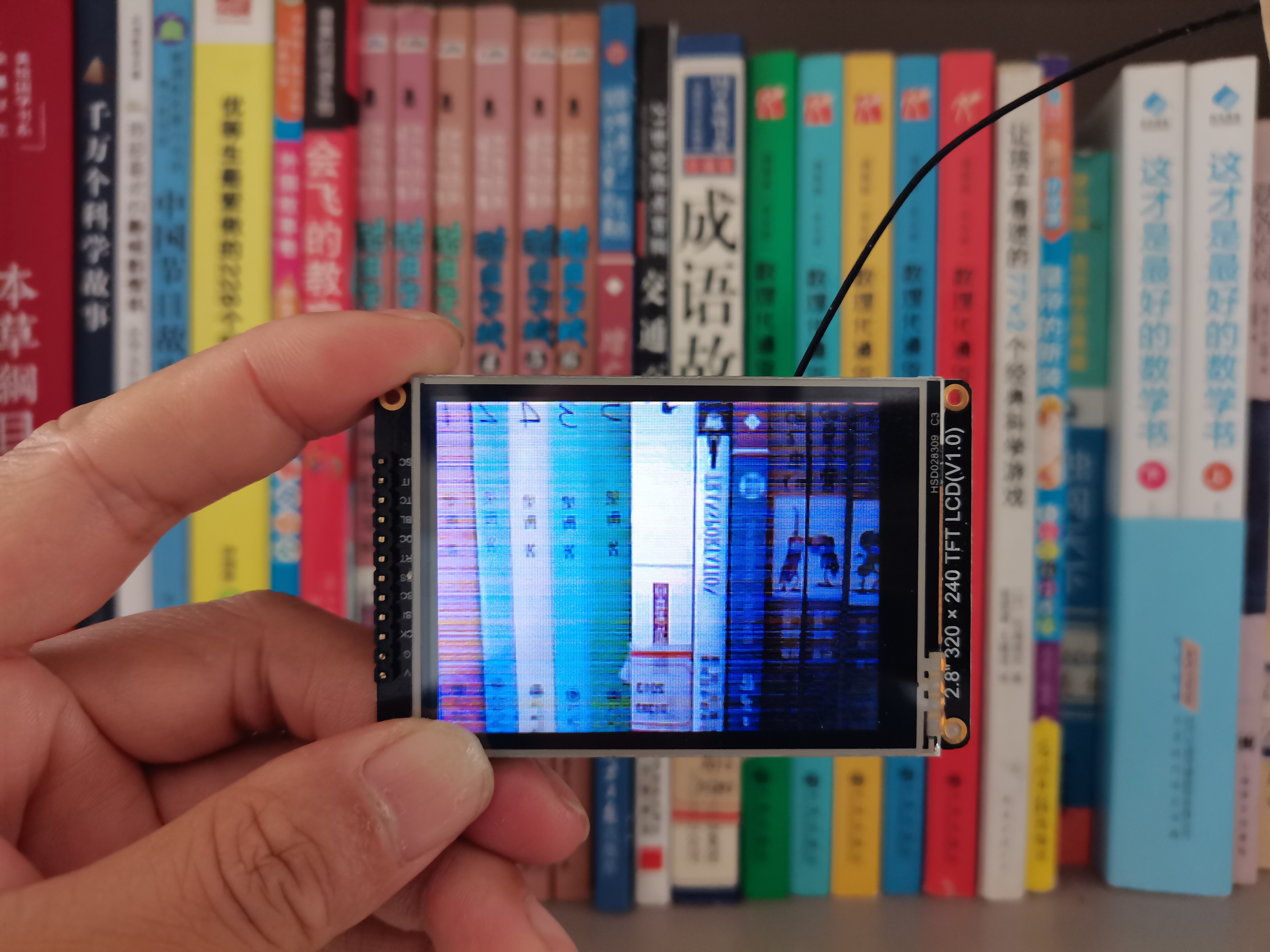
六、演示视频
|