一、产品介绍
DFRobot Fermion C4002 毫米波人体存在传感器,一款重新定义智能感知的24GHz FMCW毫米波雷达模块。它不再局限于传统红外传感器(PIR)仅能捕捉大幅运动的局限,而是通过前沿的毫米波技术,实现对10米×10米范围内人体全状态的精准探测——无论你是正在行走、安静地坐在沙发上看书、专注地伏案工作,还是进入睡眠,C4002都能稳定地感知你的存在,为智能家居、办公自动化和安防监控带来真正可靠的“真人在场”自动化体验。
1.1 核心优势:为何选择C4002?
精准的静态人体检测:这是C4002最核心的突破。它能捕捉到人体呼吸、心跳等引起的大于0.1毫米的微动位移,从而精准识别静坐、睡眠等静止状态。这意味着,你再也不必担心因安静阅读或小憩而被系统“误判”为无人,导致灯光或空调自动关闭。 强大的抗干扰能力:模块内置环境自适应滤波算法,能自动学习并过滤掉窗帘摆动、空调气流、绿植摇晃等常见环境干扰,大幅降低误报率,确保系统长期稳定运行。 灵活可调的探测范围:不同于固定范围的被动传感器,C4002支持通过软件灵活配置探测距离。你可以根据实际空间大小进行精确调整,甚至实现分区检测,精准匹配各种应用场景。 多维度的数据输出:通过UART串口,C4002不仅能输出“有人/无人”的简单状态,还能提供目标距离、运动速度、运动方向(靠近/远离) 以及环境光亮度等丰富数据。这为开发者实现更复杂、更智能的自动化逻辑提供了无限可能。 开箱即用的便捷性与强大生态:模块出厂前已完成预校准,并完美兼容 Arduino、ESP32、树莓派等主流开发平台。同时,它提供了与 Home Assistant 智能家居系统集成的现成方案和配置文件,让你能快速部署,极大缩短产品从原型到落地的研发周期。
1.2 技术规格速览
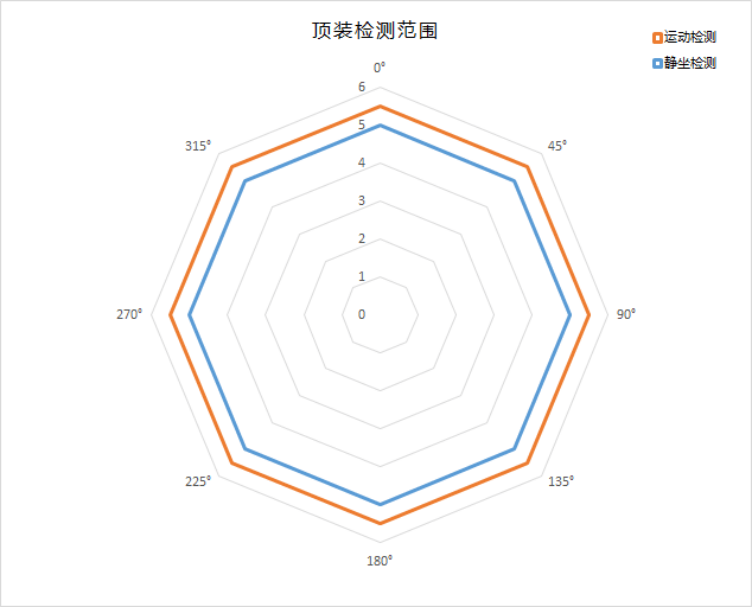
[td]特性 | 规格 | | 核心技术 | 24GHz FMCW (调频连续波) 毫米波雷达 | | 检测能力 | 运动人体、静止/微动人体 | | 最大检测距离 | 运动:11米;静止/微动:10米 | | 探测角度 | 120° × 120° | | 通信接口 | UART (串口) 和 OUT (可配置IO电平输出) | | 工作电压 | DC 3.6V ~ 5.5V | | 环境光检测 | 0 ~ 50 lux |
1.3范围检测图
1.4典型应用场景
C4002广泛适用于各类需要精准人体感知的场景: 智能照明:实现“人来灯亮,人走灯灭”的无感节能控制。 暖通空调(HVAC)控制:根据房间人员存在状态,自动调节空调、新风系统,实现节能与舒适并存。 安防监控:精准检测异常闯入或长时间滞留,触发警报。 健康与看护:监测老人或病患的久坐、静止状态,发现异常及时提醒。 智能睡眠监测:感知入睡状态,自动联动关闭灯光、调整空调。
本文档以我目前开发项目中的人在模块和功能来进行开发和设计:
二、开发指南
2.1配置环境
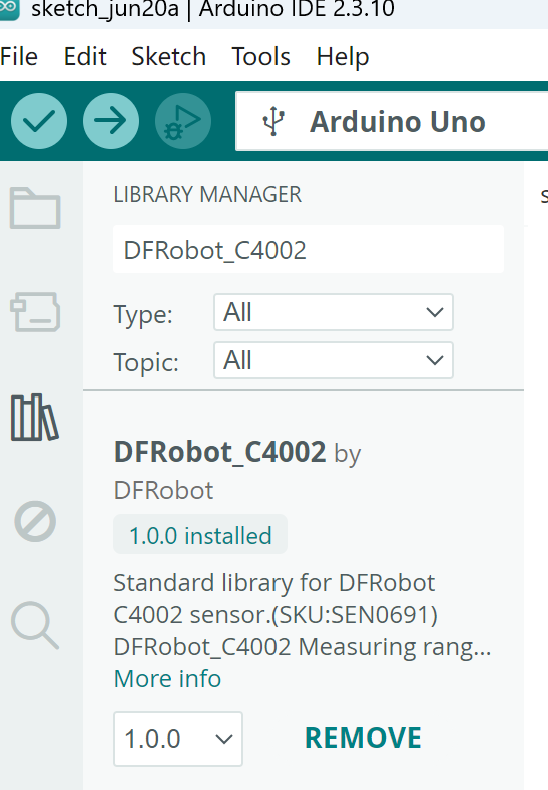
先在电脑上配置好Arduino IDE环境,这个网上有很多教程,大家可以搜索一下,我们本次使用ESP32-S3进行开发,大家可以安装好对应的库;然后在里面搜索下图中的内容并安装对应的库;
2.2 引脚说明
[td]引脚 | 功能描述 | | VIN | DC 3.6-5.5V输入 | | GND | 接地 | | RX | 传感器串口接收 | | TX | 传感器串口发送 | | OUT | 电平输出 |
2.3软件实现
这里我使用5V电源输入,RX引脚连接ESP32-S3开发板的5号引脚,TX连接6号引脚;LED灯连接4号引脚;实现当有人来时灯开,人走时自动熄灭的效果,具体实现代码如下:
- #include "DFRobot_C4002.h"
- // 定义LED控制引脚
- #define LED_PIN 4
-
- // 根据ESP32平台配置串口
- #if defined(ESP8266) || defined(ARDUINO_AVR_UNO)
- SoftwareSerial mySerial(4, 5);
- DFRobot_C4002 c4002(&mySerial, 115200);
- #elif defined(ESP32)
- // 参数说明:&Serial1 - 使用ESP32的硬件串口1
- // 115200 - 波特率
- // D6 - 传感器RX引脚(ESP32-S3的GPIO6)
- // D5 - 传感器TX引脚(ESP32-S3的GPIO5)
- DFRobot_C4002 c4002(&Serial1, 115200, D6, D5);
- #else
- DFRobot_C4002 c4002(&Serial1, 115200);
- #endif
-
- void setup()
- {
- // 初始化串口,用于向串口监视器输出调试信息
- Serial.begin(115200);
-
- // 配置LED引脚为输出模式,初始状态为熄灭(低电平)
- pinMode(LED_PIN, OUTPUT);
- digitalWrite(LED_PIN, LOW);
-
- // 初始化C4002传感器,直到成功为止
- while (c4002.begin() != true) {
- Serial.println("C4002 begin failed!");
- delay(1000);
- }
- Serial.println("C4002 begin success!");
- delay(50);
-
- // 关闭传感器上的运行指示灯(减少光污染)
- if (c4002.setRunLedState(eLedOff)) {
- Serial.println("Set run led success!");
- } else {
- Serial.println("Set run led failed!");
- }
- delay(50);
-
- // 关闭传感器上的输出指示灯
- if (c4002.setOutLedState(eLedOff)) {
- Serial.println("Set out led success!");
- } else {
- Serial.println("Set out led failed!");
- }
- delay(50);
-
- /*
- * 设置距离分辨率模式:
- * eResolution80Cm - 分辨率80cm,支持最多15个距离门,最远11.6米
- * eResolution20Cm - 分辨率20cm,支持最多25个距离门,最远4.9米
- * 室内小空间建议使用eResolution20Cm提高精度
- */
- if (c4002.setResolutionMode(eResolution80Cm)) {
- Serial.println("Set resolution mode success!");
- } else {
- Serial.println("Set resolution mode failed!");
- }
- delay(50);
-
- // 设置检测范围:0cm ~ 1100cm(0~11米)
- uint16_t closeRange = 0;
- uint16_t farRange = 1100;
- if (c4002.setDetectRange(closeRange, farRange)) {
- Serial.println("Set detect range success!");
- } else {
- Serial.println("Set detect range failed!");
- }
- delay(50);
-
- // 设置光照阈值(0~50 lux),此处设为0表示不触发光照相关的逻辑
- if (c4002.setLightThresh(0)) {
- Serial.println("Set light threshold success!");
- } else {
- Serial.println("Set light threshold failed!");
- }
- delay(50);
-
- // 启用所有15个运动距离门(当分辨率为80cm时支持15个)
- uint8_t gateState[15] = {
- C4002_ENABLE, C4002_ENABLE, C4002_ENABLE, C4002_ENABLE, C4002_ENABLE,
- C4002_ENABLE, C4002_ENABLE, C4002_ENABLE, C4002_ENABLE, C4002_ENABLE,
- C4002_ENABLE, C4002_ENABLE, C4002_ENABLE, C4002_ENABLE, C4002_ENABLE
- };
- if (c4002.configureGate(eMotionDistGate, gateState)) {
- Serial.println("Enable motion distance gate success!");
- }
- delay(50);
- if (c4002.configureGate(ePresenceDistGate, gateState)) {
- Serial.println("Enable presence distance gate success!");
- }
- delay(50);
-
- /*
- * 设置目标消失延迟时间(单位:秒)
- * 当传感器检测不到目标后,等待1秒才认为目标真正消失
- * 可以防止短暂信号丢失导致灯频繁闪烁
- */
- if (c4002.setTargetDisappearDelay(1)) {
- Serial.println("Set target disappear delay time success!");
- } else {
- Serial.println("Set target disappear delay time failed!");
- }
- delay(50);
-
- /*
- * 设置数据上报周期(单位:0.1秒)
- * 10 = 1秒上报一次数据
- * 校准和获取数据必须设置上报周期
- */
- if (c4002.setReportPeriod(10)) {
- Serial.println("Set report period success!");
- } else {
- Serial.println("Set report period failed!");
- }
-
- Serial.println("Setup complete! Waiting for detection...");
- }
-
- void loop()
- {
- // 获取传感器的所有检测结果
- sRetResult_t retResult = c4002.getNoteInfo();
-
- // 只有当返回类型为eResult时才表示有有效数据
- if (retResult.noteType == eResult) {
- // 获取目标状态
- eTargetState_t targetState = c4002.getTargetState();
-
- /*
- * 目标状态说明:
- * eNoTarget - 无目标
- * ePresence - 静态存在(静止/微动的人体)
- * eMotion - 运动目标
- *
- * 只要检测到存在(静态)或运动,就点亮LED灯
- * 只有当无目标时才熄灭LED灯
- */
- if (targetState == eNoTarget) {
- // 无人:熄灭LED灯
- digitalWrite(LED_PIN, LOW);
- Serial.println("No target detected - LED OFF");
- } else if (targetState == ePresence) {
- // 检测到静态存在:点亮LED灯
- digitalWrite(LED_PIN, HIGH);
- Serial.println("Static presence detected - LED ON");
- } else if (targetState == eMotion) {
- // 检测到运动:点亮LED灯
- digitalWrite(LED_PIN, HIGH);
- Serial.println("Motion detected - LED ON");
- }
-
- // 以下是调试信息,可根据需要保留或删除
- float light = c4002.getLightIntensity();
- Serial.print("Light: ");
- Serial.print(light);
- Serial.println(" lux");
-
- // 获取存在距离门倒计时(单位:秒)
- uint16_t presenceGateCount = c4002.getPresenceCountDown();
- Serial.print("Presence count down: ");
- Serial.print(presenceGateCount);
- Serial.println(" s");
-
- // 获取存在目标的距离和能量信息
- sPresenceTarget_t presenceTarget = c4002.getPresenceTargetInfo();
- Serial.print("Presence distance: ");
- Serial.print(presenceTarget.distance);
- Serial.println(" m");
- Serial.print("Presence energy: ");
- Serial.println(presenceTarget.energy);
-
- // 获取运动目标的距离、能量、速度和方向信息
- sMotionTarget_t motionTarget = c4002.getMotionTargetInfo();
- Serial.print("Motion distance: ");
- Serial.print(motionTarget.distance);
- Serial.println(" m");
- Serial.print("Motion energy: ");
- Serial.println(motionTarget.energy);
- Serial.print("Motion speed: ");
- Serial.print(motionTarget.speed);
- Serial.println(" m/s");
- Serial.print("Motion direction: ");
- if (motionTarget.direction == eAway) {
- Serial.println("Away");
- } else if (motionTarget.direction == eNoDirection) {
- Serial.println("No Direction");
- } else if (motionTarget.direction == eApproaching) {
- Serial.println("Approaching");
- }
- Serial.println("--------------------------------");
- }
- delay(50);
- }
三、产品图
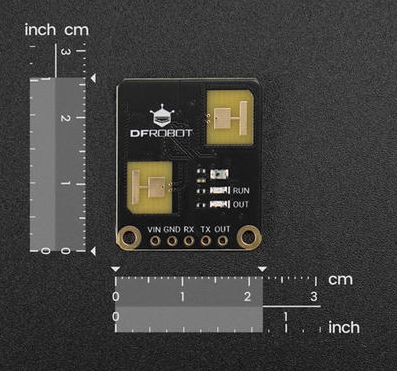
3.1 尺寸图
3.2 实物图
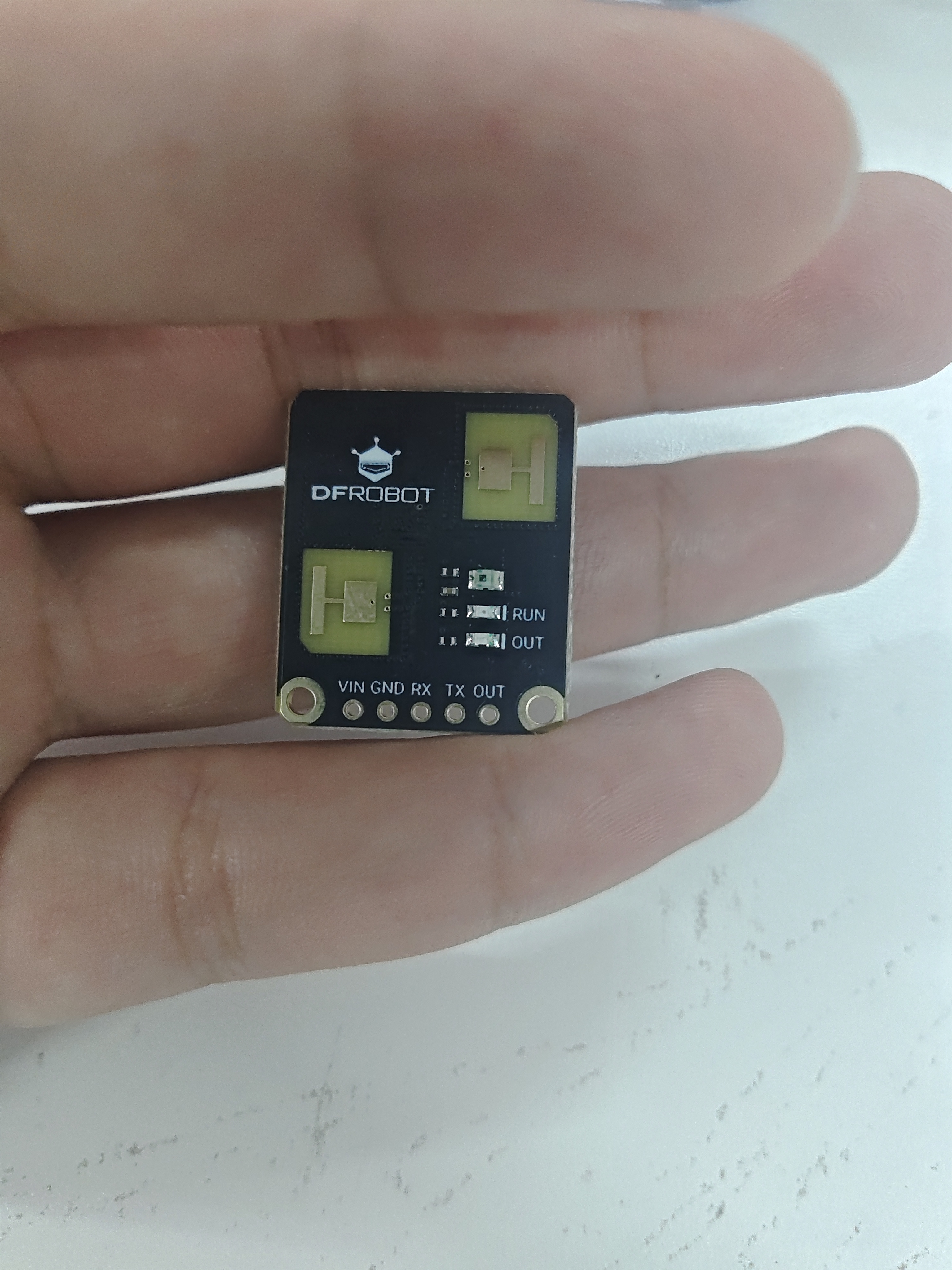 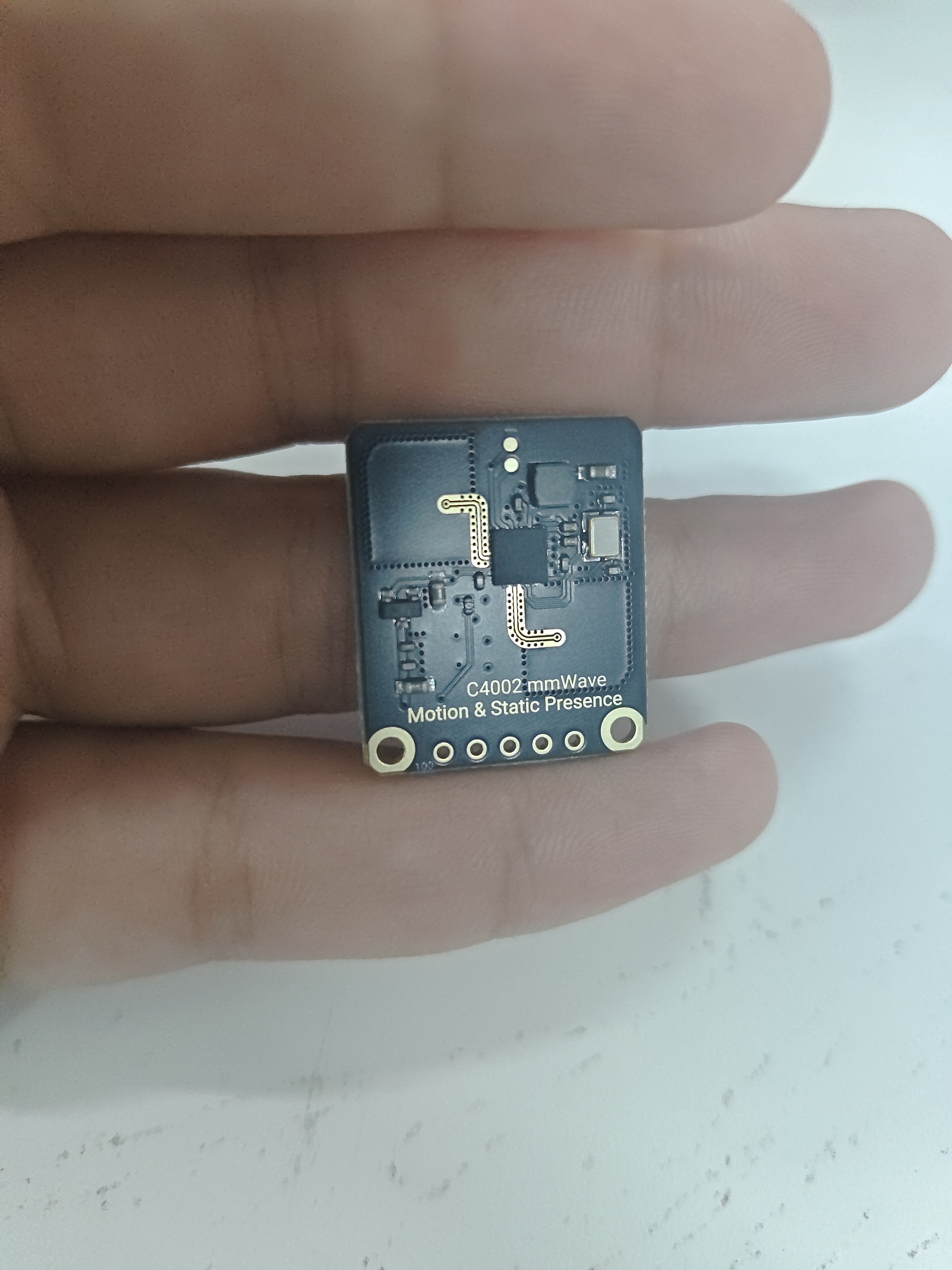
正面图 背面图
四、总结
基于DFRobot C4002毫米波雷达传感器与ESP32-S3的智能感应灯方案,彻底解决了传统红外传感器无法识别静止人体的痛点——C4002通过24GHz FMCW技术可精准检测呼吸、心跳等微动,实现10米内静态存在感知,无论你是安静阅读、伏案工作还是安然入睡,灯光始终稳定相伴,不再因“人不动”而误灭;该方案硬件接线仅需5根线,配合我们提供的完整示例代码,30分钟即可完成原型搭建,且内置抗干扰算法和可配置延迟时间,有效过滤窗帘摆动、空调气流等环境噪声,保证系统稳定可靠;除了照明,这套精准人体感知核心还可灵活扩展至智能家居联动、办公节能、安防监控、健康看护等多类场景,是开发者打造真正“无感智能”空间的理想选择。
|