
c4002人在传感器测试报告
2026-06-19587
AI 快速预览详细
C4002传感器是一款高灵敏度的运动检测传感器,适用于Arduino UNO和ESP32等主控板。测试报告显示,在3米处移动检测非常准确,但静止检测几乎无效。手动校准比自动校准更有效,特别是对于静态检测。通过手动设置检测区间和灵敏度,可以显著提高传感器的抗干扰性能。此外,传感器背面加屏蔽也有助于提高抗干扰能力。
|
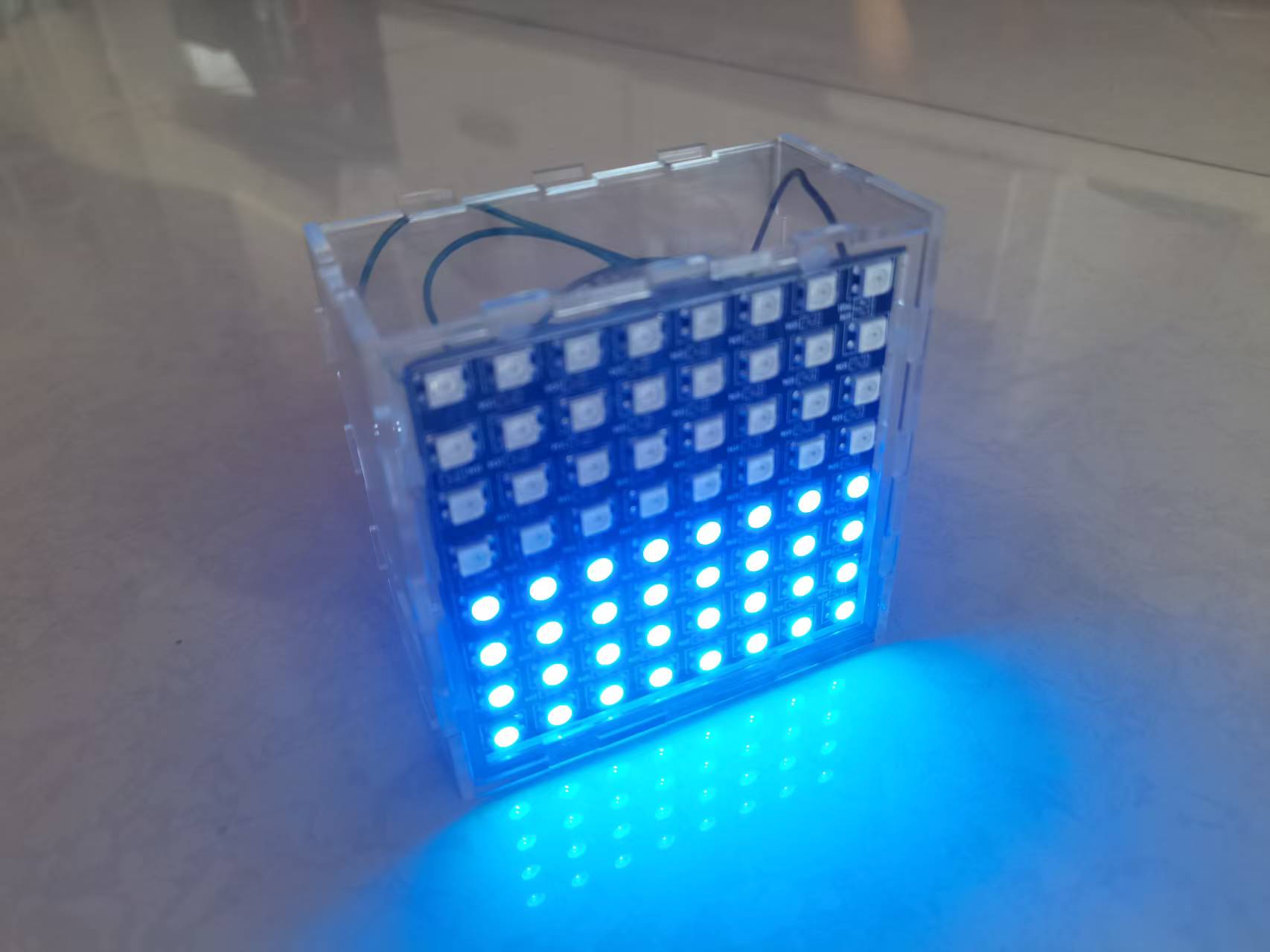
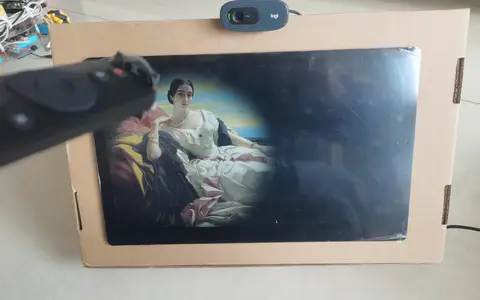
测试报告 测试结论 1灵敏度很高,如果空间比较小或者不需要大范围检测最好使用高精度模式可以有效的提高抗干扰性能。传感器背面加屏蔽有助于提高抗干扰能力。手动自定义灵敏度最有效。 2运动检测距离数据很准确,但静止检测位置基本无效 人在三米处移动 人在三米处不都 人能在两米处移动 人在两米处不动 3自动校准仅建议作为手动设置的参考数据,特别是静态检测时自动校准几乎没有意义,手动设置检测区间和灵敏度更好。 4传感器设置可以单独操作,可以避免在数据读取时重复设置传感器 项目所需原件 Uno主控和扩展板,k10主控和扩展板,按钮一只,电位器一只 Led两个,c4002传感器. 实施步骤 1测试自动校准程序, 2测试高精度自动校准 3测试手动校准 4精简优化手动校准程序,保留单独手动校准功能去掉其他 /*! *@file getAllResults.ino *@brief This is an example to show how to use the DFRobot_C4002 library to getall the results of the C4002 sensor. *@copyright Copyright (c) 2025DFRobot Co.Ltd (http://www.dfrobot.com) *@license The MIT License (MIT) *@author JiaLi(zhixin.liu@dfrobot.com) *@version V1.0 *@date 2025-11-04 *@url https://github.com/DFRobot/DFRobot_C4002 */ #include "DFRobot_C4002.h" /*--------------------------------------------------------------------------------------------------------------------- * board | MCU |Leonardo/Mega2560/M0 | UNO | ESP8266 | ESP32 | microbit | m0 | * VCC | 5V | 5V | 5V | 5V | 5V | X | 5V | * GND | GND | GND | GND | GND | GND | X | GND | * RX | TX | Serial1 TX1 | 5 | 5/D6 | 25/D2 | X | tx1 | * TX | RX | Serial1 RX1 | 4 | 4/D7 | 26/D3 | X | rx1 | *----------------------------------------------------------------------------------------------------------------------*/ /* Baud rate can be changed */ #if defined(ESP8266) ||defined(Arduino_AVR_UNO) SoftwareSerial mySerial(4, 5); DFRobot_C4002 c4002(&mySerial, 115200); #elif defined(ESP32) DFRobot_C4002 c4002(&Serial1, 115200,/*D2*/ D2, /*D3*/ D3); #else DFRobot_C4002 c4002(&Serial1, 115200); #endif void setup() { Serial.begin(115200); //Initialize the C4002 sensor while (c4002.begin() != true) { Serial.println("C4002 begin failed!"); delay(1000); } Serial.println("C4002 begin success!"); delay(50); //=====以下用于手动设置传感器,仅在需要修改设置时执行===== //Set the run led to on 开启运行LED if(c4002.setRunLedState(eLedOn)) { Serial.println("Set run led on success!"); }else { Serial.println("Set run led failed!"); } delay(50); //Set the out led to on if(c4002.setOutLedState(eLedOn)) { Serial.println("Set out led on success!"); }else { Serial.println("Set out led failed!"); } delay(50); //Set the Resolution mode to 80cm. /* if(c4002.setResolutionMode(eResolution80Cm)) { Serial.println("Set resolution mode success!"); }else { Serial.println("Set resolution mode failed!"); } */ //Set the Resolution mode to 20cm. if(c4002.setResolutionMode(eResolution20Cm)) { Serial.println("Set resolution mode to 20cm success!"); }else { Serial.println("Set resolution mode failed!"); } delay(50); /** *Note: *1. eResolution80Cm: This indicates that the resolution of the "distancegate" is 80cm. * With a resolution of 80 cm, itsupports up to 15 distance gates, with a maximum distance of 11.6 meters. *2. eResolution20Cm: This indicates that the resolution of the "distancegate" is 20cm. * With a resolution of 20 cm, itsupports up to 25 distance gates, with a maximum distance of 4.9 meters */ //Set the detect range to 0-1100cm================================================ /* uint16_t clostRange = 0; uint16_t farRange = 1100; if(c4002.setDetectRange(clostRange, farRange)) { // Max detect range(0-1100cm) Serial.println("Set detect range 1100cm success!"); }else { Serial.println("Set detect range failed!"); } delay(50); */ //=========Set the detect range to0-490cm================================================== uint16_t clostRange = 0; uint16_t farRange = 490; if(c4002.setDetectRange(clostRange, farRange)) { // Max detect range(0-490cm) Serial.println("Set detect range 490cm success!"); }else { Serial.println("Set detect range failed!"); } delay(50); //Set the light threshold to 0 lux.range: 0-50 lux if(c4002.setLightThresh(0)) { Serial.println("Set light threshold success!"); }else { Serial.println("Setlight threshold failed!"); } delay(50); //========================================================================================= /* *Note: * If the effect of automaticenvironmental calibration is not good, you can use the manual setting of *the environmental threshold below, as shown below, */ //// Set gate threshold to 50 ,range: 0-99 //// Resolution mode:eResolution80Cm,This means that the number of 'distancegates' we can operate is 15 //uint8_t presenceThreshold[15] = { 50, 50, 50, 50, 50, 50, 50, 50, 50, 50, 50,50, 50, 50, 50 }; //uint8_t motionThreshold[15] = { 50, 50,50, 50, 50, 50, 50, 50, 50, 50, 50, 50, 50, 50, 50 }; //// Resolution mode:eResolution20Cm,This means that the number of 'distancegates' we can operate is 25 uint8_t presenceThreshold[25] ={90,50,50,50,50,50,50,50,50,50,50,50,99,99,99,99,99,99,99,99,99,99,99,99,99}; uint8_t motionThreshold[25] ={90,30,30,30,30,30,30,30,30,30,30,30,99,99,99,99,99,99,99,99,99,99,99,99,99}; if(c4002.setGateThresh(ePresenceDistGate, presenceThreshold)) { Serial.println("手动设置Set presence gate threshold success!"); } else { Serial.println("Set presence gate threshold failed!"); } delay(50); if(c4002.setGateThresh(eMotionDistGate, motionThreshold)) { Serial.println("手动设置Set motion gate threshold success!"); }else { Serial.println("Set motion gate threshold failed!"); } delay(50); //Enable the 'distance gate' //Resolution mode:eResolution80Cm,This means that the number of 'distance gates'we can operate is 15 //disable : C4002_DISABLE, enable: C4002_ENABLE //======================================================================================================= //uint8_t gateState[15] = { C4002_ENABLE, C4002_ENABLE, C4002_ENABLE,C4002_ENABLE, C4002_ENABLE, C4002_ENABLE, C4002_ENABLE, C4002_ENABLE,C4002_ENABLE, C4002_ENABLE, C4002_ENABLE, C4002_ENABLE, C4002_ENABLE, C4002_ENABLE,C4002_ENABLE }; //Resolution mode:eResolution20Cm,This means that the number of 'distance gates'we can operate is 25 uint8_t gateState[25] = {C4002_DISABLE,C4002_ENABLE,C4002_ENABLE,C4002_ENABLE, C4002_ENABLE, C4002_ENABLE, C4002_ENABLE, C4002_ENABLE,C4002_ENABLE, C4002_ENABLE, C4002_ENABLE, C4002_ENABLE, C4002_ENABLE, C4002_ENABLE,C4002_ENABLE, C4002_ENABLE, C4002_ENABLE, C4002_ENABLE, C4002_ENABLE,C4002_ENABLE, C4002_ENABLE, C4002_ENABLE,C4002_ENABLE,C4002_ENABLE,C4002_ENABLE}; if(c4002.configureGate(eMotionDistGate, gateState)) { // Operation motion distance gate Serial.println("Enable motion distance gate 25 success!"); } delay(50); if(c4002.configureGate(ePresenceDistGate, gateState)) { // Operation presence distance gate Serial.println("Enable presence distance gate 25 success!"); } delay(50); //========================================================================================= //Set the target disappear delay time to 2s,range: 0-65535s if(c4002.setTargetDisappearDelay(2)) { Serial.println("Set target disappear delay time 2 success!"); }else { Serial.println("Set target disappear delay time failed!"); } delay(50); //Set the report period to 10 * 0.1s = 1s if(c4002.setReportPeriod(10)) { Serial.println("Set report period success!"); }else { Serial.println("Set report period failed!"); } /*note: Calibration and obtaining all data must have a set cycle */ } void loop() { } 5精简优化和数据读取,去掉重复设置内容。 /*! *@file getAllResults.ino *@brief This is an example to show how to use the DFRobot_C4002 library to getall the results of the C4002 sensor. *@copyright Copyright (c) 2025DFRobot Co.Ltd (http://www.dfrobot.com) *@license The MIT License (MIT) *@author JiaLi(zhixin.liu@dfrobot.com) *@version V1.0 *@date 2025-11-04 *@url https://github.com/DFRobot/DFRobot_C4002 */ #include "DFRobot_C4002.h" /*--------------------------------------------------------------------------------------------------------------------- * board | MCU |Leonardo/Mega2560/M0 | UNO | ESP8266 | ESP32 | microbit | m0 | * VCC | 5V | 5V | 5V | 5V | 5V | X | 5V | * GND | GND | GND | GND | GND | GND | X | GND | * RX | TX | Serial1 TX1 | 5 | 5/D6 | 25/D2 | X | tx1 | * TX | RX | Serial1 RX1 | 4 | 4/D7 | 26/D3 | X | rx1 | *----------------------------------------------------------------------------------------------------------------------*/ /* Baud rate can be changed */ #if defined(ESP8266) ||defined(ARDUINO_AVR_UNO) SoftwareSerial mySerial(4, 5); DFRobot_C4002 c4002(&mySerial, 115200); #elif defined(ESP32) DFRobot_C4002 c4002(&Serial1, 115200,/*D2*/ D2, /*D3*/ D3); #else DFRobot_C4002 c4002(&Serial1, 115200); #endif //================================================================= uint8_t outPin = 6; /** *Set the input pin numbers of the development board and connect the *'out' pin out of the sensor to the designated development board card */ eOutpinMode_t outMode = eOutpinMode3; /** *Note: *The output mode can be set to eOutpinMode1, eOutpinMode2, or eOutpinMode3. *eOutpinMode1: A high level will be output when motion is detected. *eOutpinMode2: A high level will be output when presence is detected. *eOutpinMode3: A high level will be output when motion or presence is detected. */ //================================================================= void setup() { Serial.begin(115200); //Initialize the C4002 sensor while (c4002.begin() != true) { Serial.println("C4002 begin failed!"); delay(1000); } Serial.println("C4002 begin success!"); delay(50); //===============设置io输出模式================= //Set the output pin mode to eOutpinMode3 if(c4002.setOutPinMode(outMode)) { Serial.println("Set output mode success!"); }else { Serial.println("Set output mode failed!"); } //=============================================== /* //Set the run led to on 开启运行LED if(c4002.setRunLedState(eLedOn)) { Serial.println("Set run led on success!"); }else { Serial.println("Set run led failed!"); } delay(50); //Set the out led to on if(c4002.setOutLedState(eLedOn)) { Serial.println("Set out led on success!"); }else { Serial.println("Set out led failed!"); } delay(50); //Set the Resolution mode to 80cm. if(c4002.setResolutionMode(eResolution80Cm)) { Serial.println("Set resolution mode success!"); }else { Serial.println("Set resolution mode failed!"); } //Set the Resolution mode to 20cm. if(c4002.setResolutionMode(eResolution20Cm)) { Serial.println("Set resolution mode to 20cm success!"); }else { Serial.println("Set resolution mode failed!"); } delay(50); /** *Note: *1. eResolution80Cm: This indicates that the resolution of the "distancegate" is 80cm. * With a resolution of 80 cm, itsupports up to 15 distance gates, with a maximum distance of 11.6 meters. *2. eResolution20Cm: This indicates that the resolution of the "distancegate" is 20cm. * With a resolution of 20 cm, itsupports up to 25 distance gates, with a maximum distance of 4.9 meters */ //Set the detect range to 0-1100cm================================================ /* uint16_t clostRange = 0; uint16_t farRange = 1100; if(c4002.setDetectRange(clostRange, farRange)) { // Max detect range(0-1100cm) Serial.println("Set detect range 1100cm success!"); }else { Serial.println("Set detect range failed!"); } delay(50); */ /* //Set the detect range to0-490cm================================================== uint16_t clostRange = 0; uint16_t farRange = 490; if(c4002.setDetectRange(clostRange, farRange)) { // Max detect range(0-490cm) Serial.println("Setdetect range 490cm success!"); }else { Serial.println("Set detect range failed!"); } delay(50); //Set the light threshold to 0 lux.range: 0-50 lux if(c4002.setLightThresh(0)) { Serial.println("Set light threshold success!"); }else { Serial.println("Set light threshold failed!"); } delay(50); //===================================================================================================== /* *Note: * If the effect of automaticenvironmental calibration is not good, you can use the manual setting of *the environmental threshold below, as shown below, */ //// Set gate threshold to 50 ,range: 0-99 //// Resolution mode:eResolution80Cm,This means that the number of 'distancegates' we can operate is 15 //uint8_t presenceThreshold[15] = { 50, 50, 50, 50, 50, 50, 50, 50, 50, 50, 50,50, 50, 50, 50 }; //uint8_t motionThreshold[15] = { 50, 50,50, 50, 50, 50, 50, 50, 50, 50, 50, 50, 50, 50, 50 }; //// Resolution mode:eResolution20Cm,This means that the number of 'distancegates' we can operate is 25 /* uint8_t presenceThreshold[25] ={90,50,50,50,50,50,50,50,50,50,50,50,99,99,99,99,99,99,99,99,99,99,99,99,99}; uint8_t motionThreshold[25] ={90,30,30,30,30,30,30,30,30,30,30,30,99,99,99,99,99,99,99,99,99,99,99,99,99}; if(c4002.setGateThresh(ePresenceDistGate, presenceThreshold)) { Serial.println("手动设置Set presence gate threshold success!"); } else { Serial.println("Set presence gate threshold failed!"); } delay(50); if(c4002.setGateThresh(eMotionDistGate, motionThreshold)) { Serial.println("手动设置Set motion gate threshold success!"); }else { Serial.println("Set motion gate threshold failed!"); } delay(50); //Enable the 'distance gate' //Resolution mode:eResolution80Cm,This means that the number of 'distance gates'we can operate is 15 //disable : C4002_DISABLE, enable: C4002_ENABLE //======================================================================================================= //uint8_t gateState[15] = { C4002_ENABLE, C4002_ENABLE, C4002_ENABLE,C4002_ENABLE, C4002_ENABLE, C4002_ENABLE, C4002_ENABLE, C4002_ENABLE,C4002_ENABLE, C4002_ENABLE, C4002_ENABLE, C4002_ENABLE, C4002_ENABLE, C4002_ENABLE,C4002_ENABLE }; //Resolution mode:eResolution20Cm,This means that the number of 'distance gates'we can operate is 25 uint8_t gateState[25] = {C4002_DISABLE,C4002_ENABLE,C4002_ENABLE,C4002_ENABLE, C4002_ENABLE, C4002_ENABLE, C4002_ENABLE, C4002_ENABLE,C4002_ENABLE, C4002_ENABLE, C4002_ENABLE, C4002_ENABLE, C4002_ENABLE, C4002_ENABLE,C4002_ENABLE, C4002_ENABLE, C4002_ENABLE, C4002_ENABLE, C4002_ENABLE,C4002_ENABLE, C4002_ENABLE, C4002_ENABLE,C4002_ENABLE,C4002_ENABLE,C4002_ENABLE}; if(c4002.configureGate(eMotionDistGate, gateState)) { // Operation motion distance gate Serial.println("Enable motion distance gate 25 success!"); } delay(50); if(c4002.configureGate(ePresenceDistGate, gateState)) { // Operation presence distance gate Serial.println("Enable presence distance gate 25 success!"); } delay(50); //========================================================================================= */ //Set the target disappear delay time to 2s,range: 0-65535s if(c4002.setTargetDisappearDelay(2)) { Serial.println("Set target disappear delay time 2 success!"); }else { Serial.println("Set target disappear delay time failed!"); } delay(50); //Set the report period to 10 * 0.1s = 1s if(c4002.setReportPeriod(10)) { Serial.println("Set report period success!"); }else { Serial.println("Set report period failed!"); } /*note: Calibration and obtaining all data must have a set cycle */ pinMode(10, OUTPUT); pinMode(11, OUTPUT); pinMode(12, OUTPUT); } void loop() { //Get all the results of the C4002 sensor,Default loop execution sRetResult_t retResult = c4002.getNoteInfo(); if(retResult.noteType == eResult) { Serial.println("------- Get all results --------"); //get the light intensity float light = c4002.getLightIntensity(); Serial.print("Light: "); Serial.print(light); Serial.println(" lux"); //get Target state eTargetState_t targetState = c4002.getTargetState(); Serial.print("Target state: "); if(targetState == eNoTarget) { Serial.println("No Target"); digitalWrite(10, LOW); digitalWrite(11, LOW); digitalWrite(12, LOW); }else if (targetState == ePresence) { Serial.println("Static Presence"); digitalWrite(10, HIGH); digitalWrite(11, LOW); digitalWrite(12, HIGH); }else if (targetState == eMotion) { Serial.println("Motion"); digitalWrite(10, HIGH);//运动+人在状态输出 digitalWrite(11, HIGH);//运动状态输出 digitalWrite(12, HIGH); //输出至 K10 p2脚 } //get presence count down uint16_t presenceGateCount = c4002.getPresenceCountDown(); Serial.print("Presence distance gate count down: "); Serial.print(presenceGateCount); Serial.println(" s"); //get Presence distance gate target info sPresenceTarget_t presenceTarget = c4002.getPresenceTargetInfo(); Serial.print("Presence distance: "); Serial.print(presenceTarget.distance); Serial.println(" m"); Serial.print("Presence energy: "); Serial.println(presenceTarget.energy); //get motion distance gate index sMotionTarget_t motionTarget = c4002.getMotionTargetInfo(); Serial.print("Motion distance: "); Serial.print(motionTarget.distance); Serial.println(" m"); Serial.print("Motion energy: "); Serial.println(motionTarget.energy); Serial.print("Motion speed: "); Serial.print(motionTarget.speed); Serial.println(" m/s"); Serial.print("Motion direction: "); if(motionTarget.direction == eAway) { Serial.println("Away!"); }else if (motionTarget.direction == eNoDirection) { Serial.println("No Direction!"); }else if (motionTarget.direction == eApproaching) { Serial.println("Approaching!"); } Serial.println("--------------------------------"); } delay(100); //====================io输出====================== /* //Get the target state by the output pin eTargetState_t targetState2 = c4002.getOutTargetState(); Serial.println("------- Get outpin results --------"); Serial.print("Output mode:"); if(outMode == eOutpinMode1) { Serial.println("Mode1"); }else if (outMode == eOutpinMode2) { Serial.println("Mode2"); }else if (outMode == eOutpinMode3) { Serial.println("Mode3"); } //Read the outPin status uint8_t outPinStatus = digitalRead(outPin); Serial.print("Outpin :"); if(outPinStatus == HIGH) { Serial.println(" high level!"); }else { Serial.println(" lowlevel!"); } //Print the target state Serial.print("Target state: "); if(targetState2 == eNoTarget) { Serial.println("No Target!"); }else if (targetState2 == ePresence) { Serial.println("Static Presence!"); }else if (targetState2 == eMotion) { Serial.println("Motion!"); }else if (targetState2 == eMotionOrNoTarget) { Serial.println("Motion or No Target!"); }else if (targetState2 == ePresenceOrNoTarget) { Serial.println("Static Presence or No Target!"); }else if (targetState2 == eMotionOrPresence) { Serial.println("Motion or Static Presence!"); }else { Serial.println("Pin error! please check the connection or pinnumber!"); } Serial.println("-----------------------------------"); delay(1000); */ } 6实现准确的检测,结果达到能够使用的要求 7利用可靠的检测结果制作相关实物作品。 结果展示 |
-
屏幕截图 2026-06-17 141213高精度人在正面三米处移动.jpg (73.89 KB, 下载次数: 147)


-
屏幕截图 2026-06-17 141618高精度人在对面三米不动.jpg (77.01 KB, 下载次数: 138)
-
屏幕截图 2026-06-17 142233高精度人在对面两米不动.jpg (78.1 KB, 下载次数: 129)
-
屏幕截图 2026-06-17 142417高精度人在对面两米移动.jpg (74.91 KB, 下载次数: 134)
-
屏幕截图 2026-06-19 111423手动设置.jpg (53.72 KB, 下载次数: 125)
-
屏幕截图 2026-06-18 081548加屏蔽人在背后0.5米不动.jpg (75.57 KB, 下载次数: 125)
-
屏幕截图 2026-06-18 081758加屏蔽人在背后0.5米不动.jpg (76.87 KB, 下载次数: 125)
-
IMG_20260619_114019.jpg (1.11 MB, 下载次数: 120)
-
IMG_20260619_095443.jpg (1.38 MB, 下载次数: 132)
-

-
9.03 MB, 下载次数: 227
项目所有原始资料
-

-
getAllResults_619-onlyset-mid.ino
7.36 KB, 下载次数: 280
传感器手动设置
-
-
9.35 MB, 下载次数: 260
演示视频