铁熊玩创客 | 吃货战车:谁说泡面只能用来填肚子

2017-12-314.4万
精华项目
AI 快速预览详细 收起
该项目介绍了如何制作一款名为“吃货战车”的创意履带车及其配套的橡皮泥遥控器。主要硬件包括Arduino Uno、电机驱动扩展板、N20金属齿轮电机等。通过蓝牙模块实现两个Arduino之间的通信,从而控制履带车的前进、后退、左转、右转。橡皮泥遥控器通过Makey Makey扩展板连接到Arduino,实现对履带车的控制。该项目不仅锻炼了孩子的动手能力,还培养了他们的编程思维。
【题外话】转眼在社区发帖已经度过了1个年头了,这应该是社区2018年的第一帖吧~在这里祝大家新年快乐!!!

听说社区最近特别流行履带车,那就随波逐流也来搞一发吧。但是传统的履带车玩起来又没有意思,又没有新奇的玩法呢?

正好看到小伙伴在玩 Makey Makey 水果钢琴,顿时天灵盖一亮,为何不搞一辆 Makey 履带车呢?然后给它配上一个超大的橡皮泥遥控器,一定很好玩,说干就干!

按照惯例,先来看一下效果:

铲车版:

铁熊玩创客 | 吃货战车:谁说泡面只能用来填肚子图21

超声波版(这辆是 maker_王 做的哈,maker_王 还做了另一辆履带坦克车:https://mc.dfrobot.com.cn/thread-30284-1-1.html):

铁熊玩创客 | 吃货战车:谁说泡面只能用来填肚子图22

英雄联盟:

铁熊玩创客 | 吃货战车:谁说泡面只能用来填肚子图23

演示视频:


## 履带车制作过程

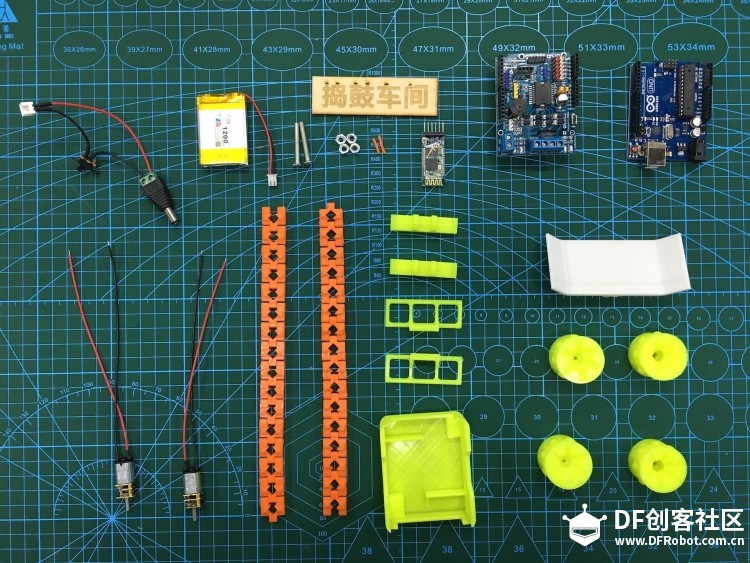
准备好履带车所需的材料。

电子元件

  • 电源开关
  • 7.4V 锂电池
  • 蓝牙模块
  • Arduino 电机驱动扩展板
  • Arduino Uno
  • N20 金属齿轮电机 * 2

3D 打印结构件

  • 履带 * 2
  • 连接器 * 2
  • 盖板 * 2
  • 底盘
  • 铲子
  • 主动轮 * 2
  • 从动轮 * 2

另外还需要:

  • M4*25 螺丝
  • M4 螺母 * 4

铁熊玩创客 | 吃货战车:谁说泡面只能用来填肚子图1

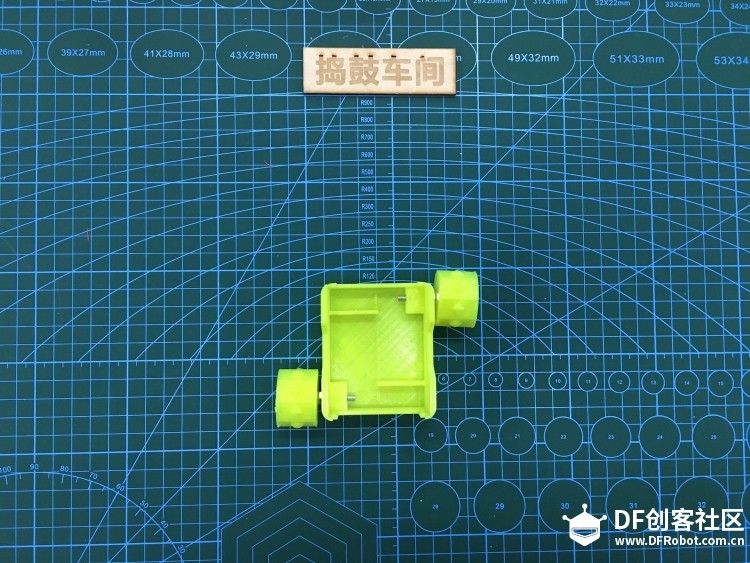
1、安装从动轮:准备好从动轮、底盘、M4螺丝和螺母,将从动轮安装到底盘上。
铁熊玩创客 | 吃货战车:谁说泡面只能用来填肚子图2

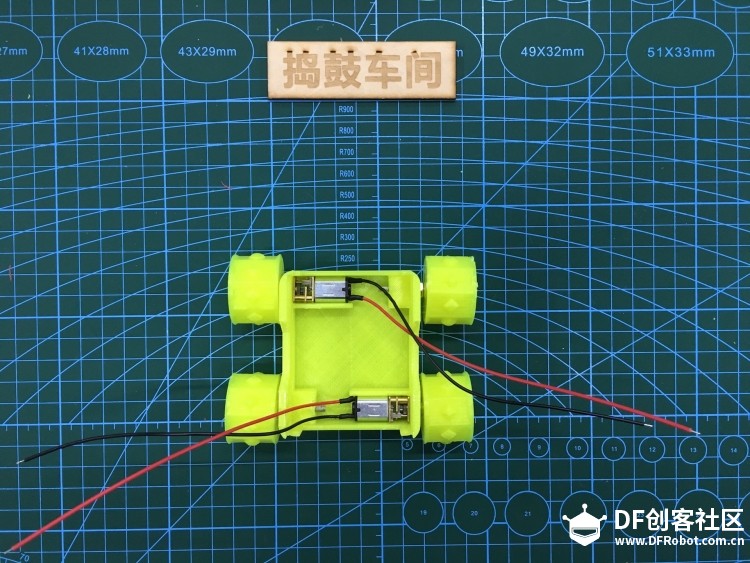
2、安装主动轮:准备好 N20 金属齿轮电机和主动轮,将主动轮安装到底盘上。
铁熊玩创客 | 吃货战车:谁说泡面只能用来填肚子图3

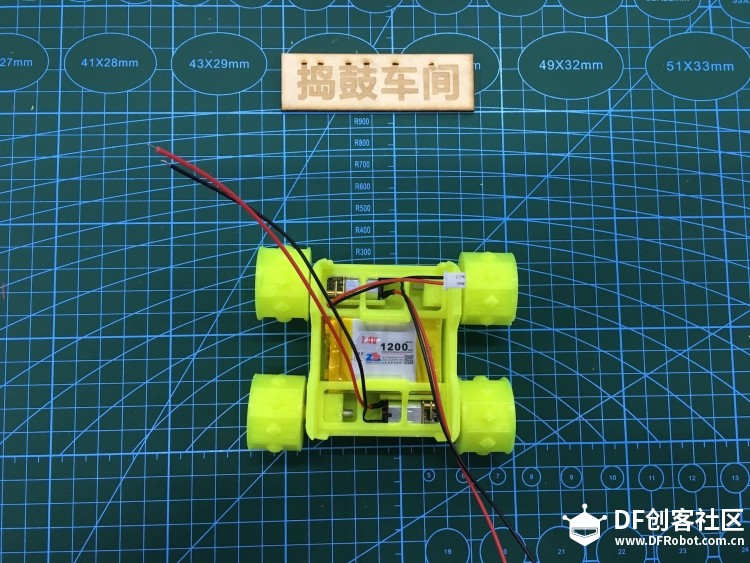
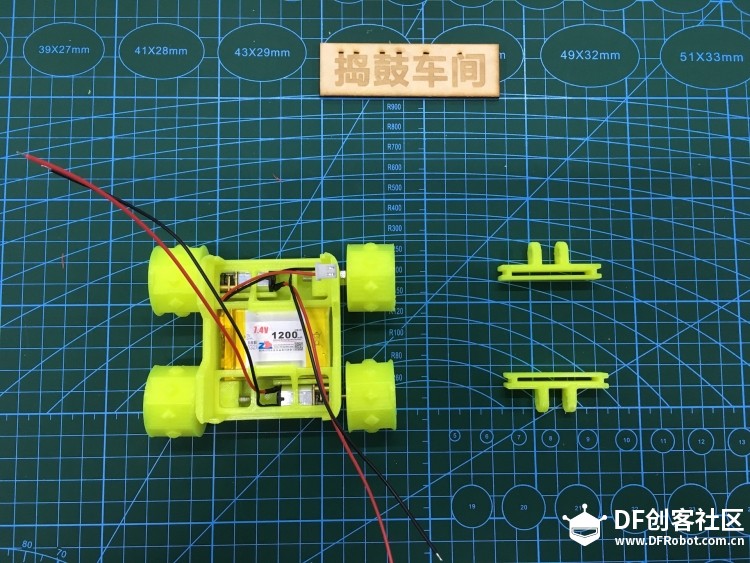
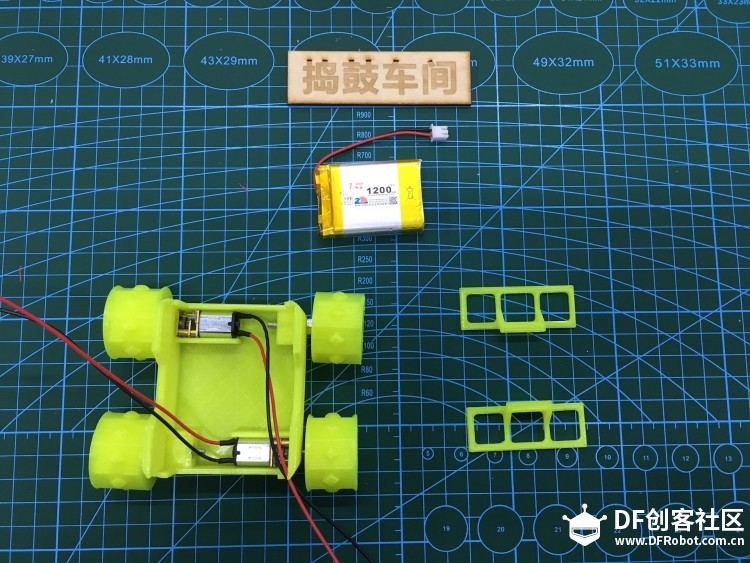
3、安装电池:准备好锂电池和盖板,将锂电池安装到底盘上,同时将盖板嵌入卡槽,固定好 N20 电机。
铁熊玩创客 | 吃货战车:谁说泡面只能用来填肚子图4

铁熊玩创客 | 吃货战车:谁说泡面只能用来填肚子图5

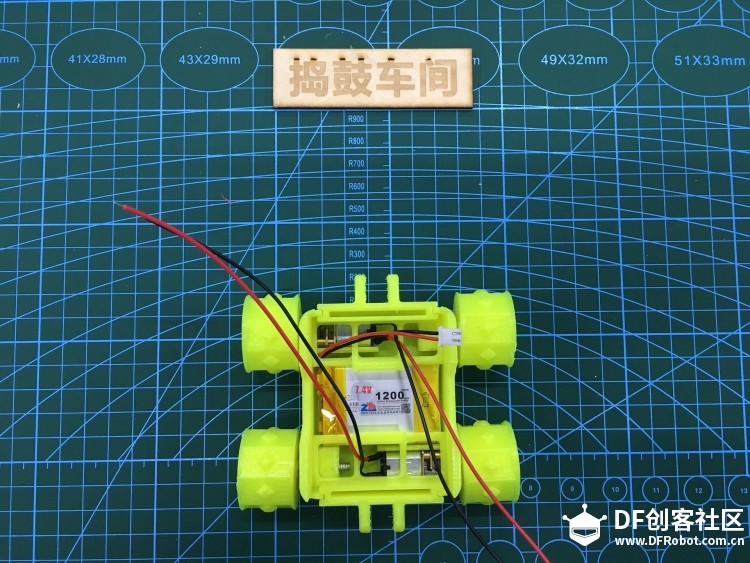
4、安装连接器:准备好连接器,安装到底盘卡槽上。

铁熊玩创客 | 吃货战车:谁说泡面只能用来填肚子图6

铁熊玩创客 | 吃货战车:谁说泡面只能用来填肚子图7

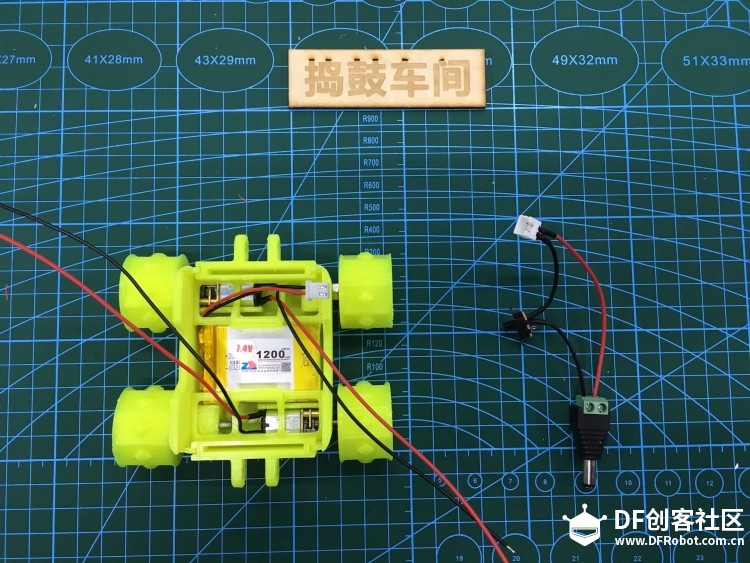
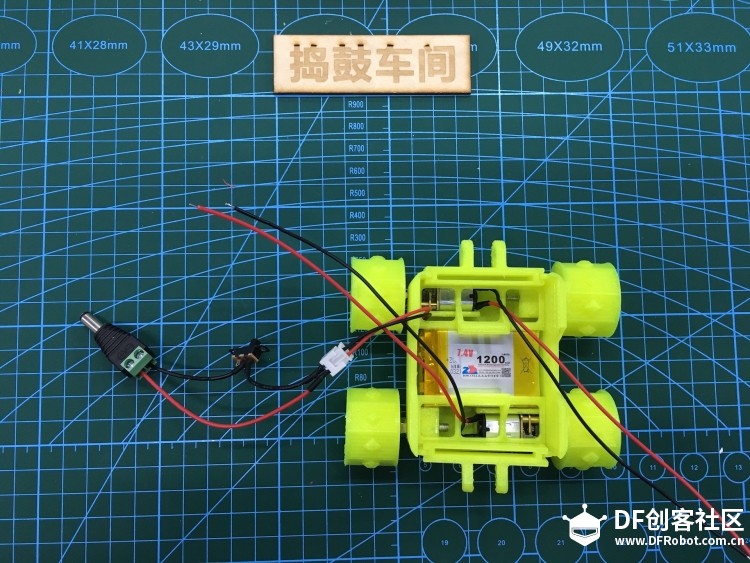
5、安装电源开关:准备好电源开关(已焊接好),并与电源连接。

铁熊玩创客 | 吃货战车:谁说泡面只能用来填肚子图8

铁熊玩创客 | 吃货战车:谁说泡面只能用来填肚子图9

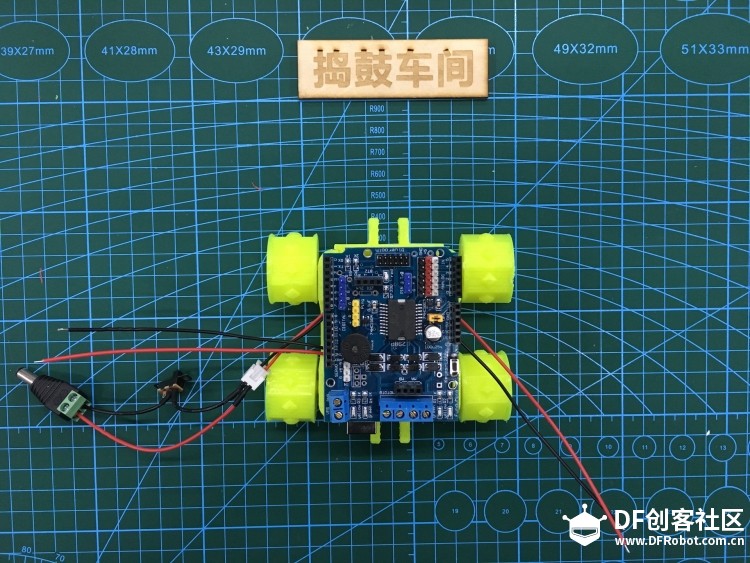
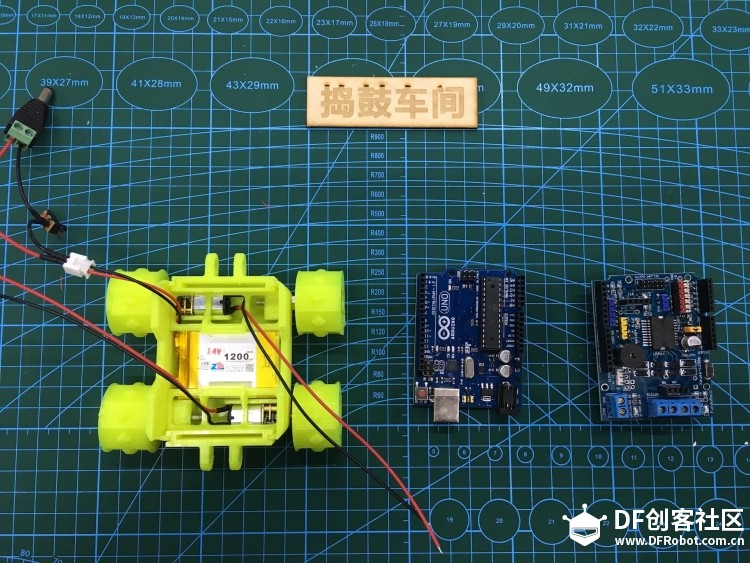
6、安装 Arduino 控制器:准备好 Arduino Uno 和电机驱动扩展板,并将 Arduino Uno 嵌入底座卡槽中。
铁熊玩创客 | 吃货战车:谁说泡面只能用来填肚子图10

铁熊玩创客 | 吃货战车:谁说泡面只能用来填肚子图11

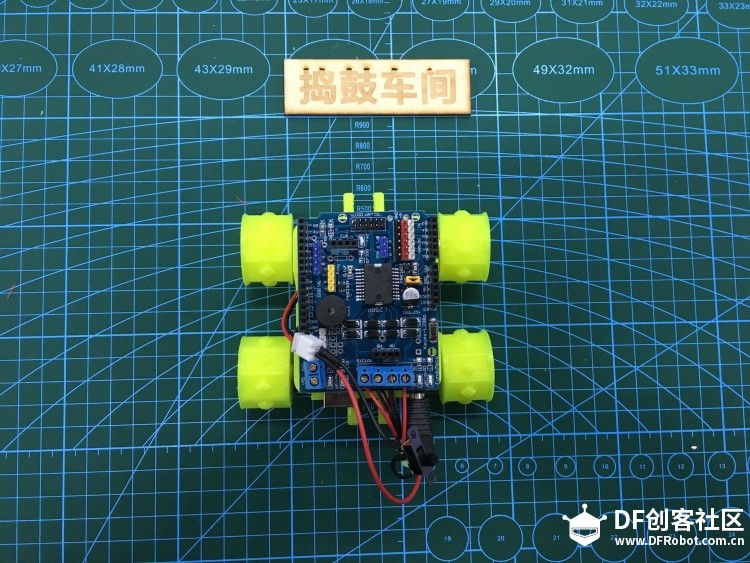
7、连接电源:将电源与 Arduino 连接,注意断开电源开关。

铁熊玩创客 | 吃货战车:谁说泡面只能用来填肚子图12

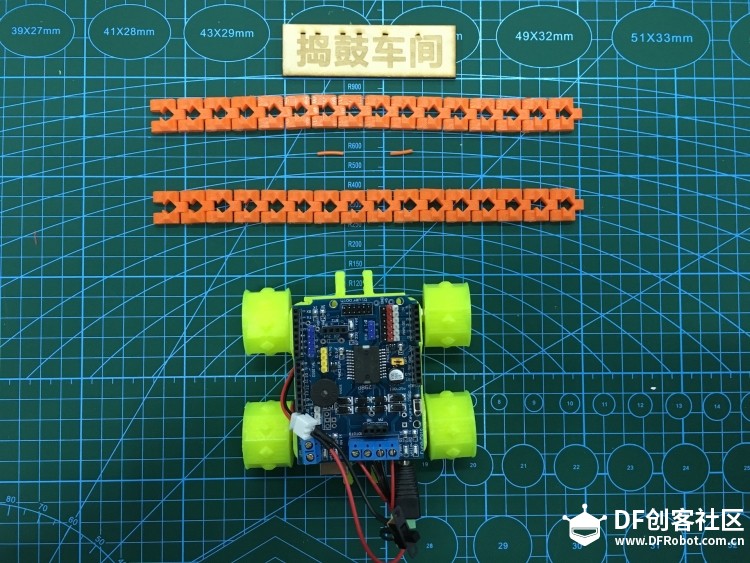
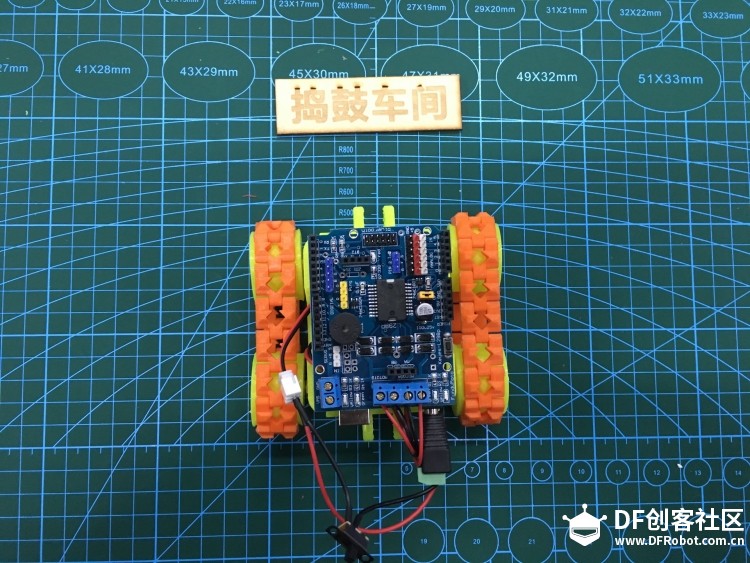
8、安装履带:准备好两条履带,并安装到轮子上。

铁熊玩创客 | 吃货战车:谁说泡面只能用来填肚子图13

铁熊玩创客 | 吃货战车:谁说泡面只能用来填肚子图14

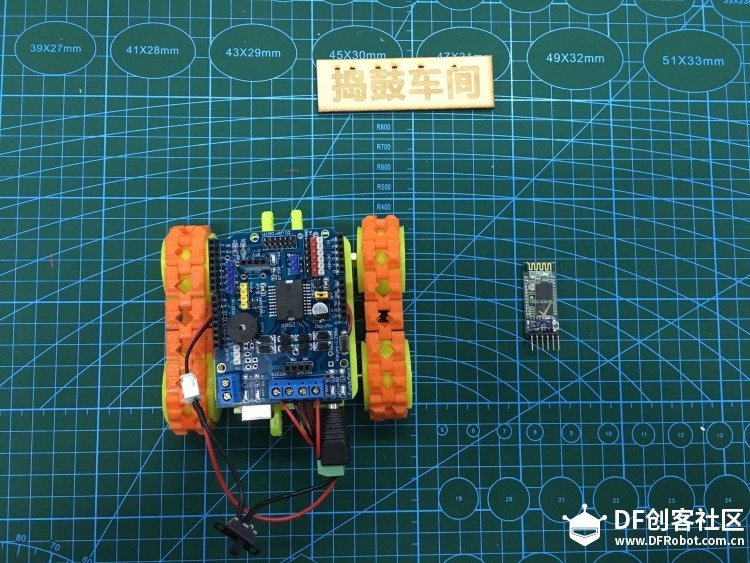
9、安装蓝牙模块:准备好蓝牙模块,并将蓝牙模块安装到扩展板相应位置。

铁熊玩创客 | 吃货战车:谁说泡面只能用来填肚子图15

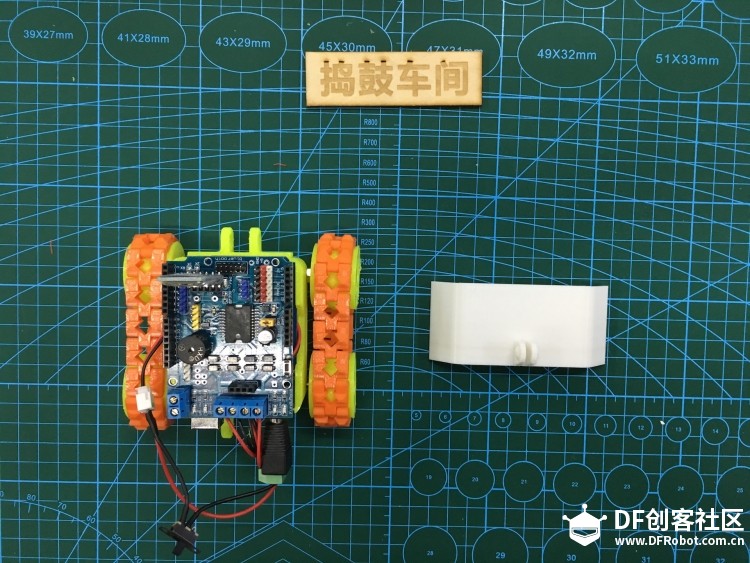
10、安装履带车铲子:准备好铲子,并将铲子嵌入到连接器相应位置。

铁熊玩创客 | 吃货战车:谁说泡面只能用来填肚子图16

铁熊玩创客 | 吃货战车:谁说泡面只能用来填肚子图17

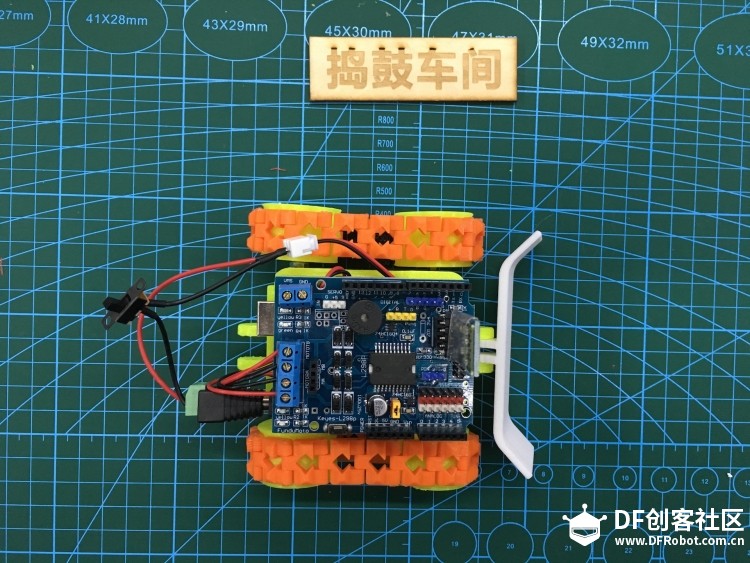
至此,履带车就安装完成啦。

## 橡皮遥控器制作过程

准备好所需的材料:
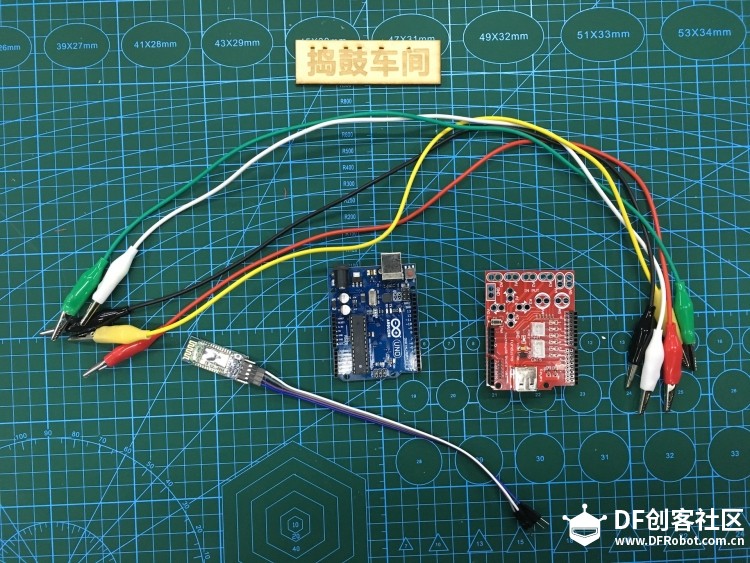
  • Arduino Uno
  • Makey 扩展板
  • 鳄鱼线 * 5
  • 蓝牙模块
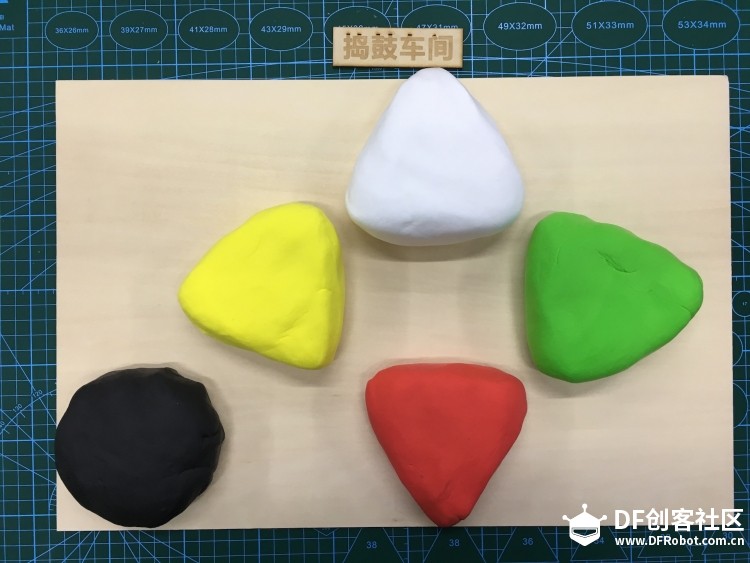
  • 5 块橡皮泥

铁熊玩创客 | 吃货战车:谁说泡面只能用来填肚子图18

铁熊玩创客 | 吃货战车:谁说泡面只能用来填肚子图19

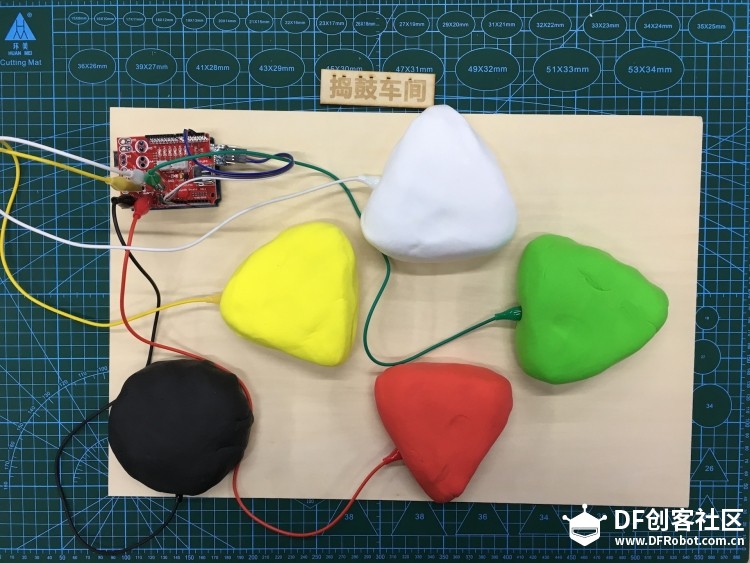
利用鳄鱼线,将橡皮泥与 Makey 扩展板相连,并将蓝牙模块连接到 Makey 扩展板上。
铁熊玩创客 | 吃货战车:谁说泡面只能用来填肚子图20

## 程序与电路

程序比较简单,主要就是两个 Arduino 之间蓝牙通信。具体电路连接也不再赘述,直接看程序就好。

履带车程序:

  1. int E1 = 10;
  2. int M1 = 12;
  3. int E2 = 11;
  4. int M2 = 13;
  5. void setup() {
  6.   // Open serial communications and wait for port to open:
  7.   Serial.begin(9600);
  8.   while (!Serial) {
  9.     ; // wait for serial port to connect. Needed for native USB port only
  10.   }
  11.   motorInit();
  12. }
  13. void loop() {
  14. //  test();
  15.   if (Serial.available() > 0) {
  16.     char cmd = Serial.read();
  17.     if (cmd == 'D')
  18.     {
  19.       //      Serial.println("Down");
  20.       moveBack();
  21.     }
  22.     if (cmd == 'U')
  23.     {
  24.       //      Serial.println("Up");
  25.       moveForward();
  26.     }
  27.     if (cmd == 'L')
  28.     {
  29.       //      Serial.println("Left");
  30.       turnLeft();
  31.     }
  32.     if (cmd == 'R')
  33.     {
  34.       //      Serial.println("Right");
  35.       turnRight();
  36.     }
  37.     if (cmd == 'S')
  38.     {
  39.       stop();
  40.     }
  41.   }
  42. }
  43. void motorInit()
  44. {
  45.   pinMode(M1, OUTPUT);
  46.   pinMode(M2, OUTPUT);
  47.   pinMode(E1, OUTPUT);
  48.   pinMode(E2, OUTPUT);
  49. }
  50. void moveForward()
  51. {
  52.   digitalWrite(M1, HIGH);
  53.   digitalWrite(M2, HIGH);
  54.   analogWrite(E1, 255);   //PWM调速
  55.   analogWrite(E2, 255);   //PWM调速
  56. }
  57. void moveBack()
  58. {
  59.   digitalWrite(M1, LOW);
  60.   digitalWrite(M2, LOW);
  61.   analogWrite(E1, 255);   //PWM调速
  62.   analogWrite(E2, 255);   //PWM调速
  63. }
  64. void turnLeft()
  65. {
  66.   digitalWrite(M1, LOW);
  67.   digitalWrite(M2, HIGH);
  68.   analogWrite(E1, 160);   //PWM调速
  69.   analogWrite(E2, 160);   //PWM调速
  70. }
  71. void turnRight()
  72. {
  73.   digitalWrite(M1, HIGH);
  74.   digitalWrite(M2, LOW);
  75.   analogWrite(E1, 160);   //PWM调速
  76.   analogWrite(E2, 160);   //PWM调速
  77. }
  78. void stop()
  79. {
  80.   digitalWrite(M1, HIGH);
  81.   digitalWrite(M2, HIGH);
  82.   analogWrite(E1, 0);   //PWM调速
  83.   analogWrite(E2, 0);   //PWM调速
  84. }
  85. void test()
  86. {
  87.   moveForward();
  88.   delay(3000);
  89.   moveBack();
  90.   delay(3000);
  91.   turnLeft();
  92.   delay(3000);
  93.   turnRight();
  94.   delay(3000);
  95. }
  96. [/mw_shl_code]
  97. 橡皮泥遥控器程序:
  98. [mw_shl_code=cpp,true]#include <SoftwareSerial.h>
  99. SoftwareSerial mySerial(2, 3); // RX, TX
  100. int InData1 = 0, InData2 = 0, InData3 = 0, InData4 = 0, InData5 = 0, InData0 = 0;  //触摸输入值暂存
  101. int TouchSensitivity = 30; //触摸灵敏度。0~1023,越大越不灵敏
  102. void setup()
  103. {
  104.   for (int i = A0; i <= A5; i++)
  105.   {
  106.     pinMode(i, INPUT);                        //A0~A5端设置为输入
  107.   }
  108.   for (int i = 6; i <= 12; i++)
  109.   {
  110.     pinMode(i, OUTPUT);                        //A0~A5端设置为输入
  111.   }
  112.   // Open serial communications and wait for port to open:
  113.   Serial.begin(9600);
  114.   while (!Serial) {
  115.     ; // wait for serial port to connect. Needed for native USB port only
  116.   }
  117.   mySerial.begin(9600);
  118.   
  119. //  mySerial.println("Hello, world?");
  120.   TIMSK0 &= !(1 << TOIE0);
  121. }
  122. void loop()
  123. {
  124.   // UsbKeyboard.update();
  125.   //读取所有引脚电压值,并且由于上拉电阻原因,
  126.   //默认所有引脚为最高电平1023,通过触摸拉低引脚电平。
  127.   //所以数值由1024-analogRead(A0);
  128.   InData0 = 1024 - analogRead(A0);
  129.   InData1 = 1024 - analogRead(A1);
  130.   InData2 = 1024 - analogRead(A2);
  131.   InData3 = 1024 - analogRead(A3);
  132.   InData4 = 1024 - analogRead(A4);
  133.   InData5 = 1024 - analogRead(A5);
  134.   //按照各种可能触发键盘事件
  135.   if (InData0 >= TouchSensitivity)
  136.   {
  137.     digitalWrite(6, HIGH);
  138.     mySerial.println("D");
  139. //    mySerial.write('D');
  140.   } else {
  141.     digitalWrite(6, LOW);
  142. //    mySerial.println("S");
  143.   }
  144.   if (InData1 >= TouchSensitivity)
  145.   {
  146.     digitalWrite(7, HIGH);
  147.     mySerial.println("L");
  148.   } else {
  149.     digitalWrite(7, LOW);
  150. //    mySerial.println("S");
  151.   }
  152.   if (InData2 >= TouchSensitivity)
  153.   {
  154.     digitalWrite(8, HIGH);
  155.     mySerial.println("R");
  156.   } else {
  157.     digitalWrite(8, LOW);
  158. //    mySerial.println("S");
  159.   }
  160.   if (InData3 >= TouchSensitivity)
  161.   {
  162.     digitalWrite(9, HIGH);
  163.     mySerial.println("U");
  164.   } else {
  165.     digitalWrite(9, LOW);
  166. //    mySerial.println("S");
  167.   }
  168.   if (InData4 >= TouchSensitivity)
  169.   {
  170.     digitalWrite(10, HIGH);
  171.   } else {
  172.     digitalWrite(10, LOW);
  173. //    mySerial.println("S");
  174.   }
  175.   if (InData5 >= TouchSensitivity)
  176.   {
  177.     digitalWrite(11, HIGH);
  178.   } else {
  179.     digitalWrite(11, LOW);
  180. //    mySerial.println("S");
  181.   }
  182.   if((InData0 < TouchSensitivity) && (InData1 < TouchSensitivity) && (InData2 < TouchSensitivity) && (InData3 < TouchSensitivity) && (InData4 < TouchSensitivity) && (InData5 < TouchSensitivity))
  183.   {
  184.     mySerial.println("S");
  185.   }
  186.   delay(100);
  187. }
复制代码

## 附件

3D 打印结构件下载地址:

链接: https://pan.baidu.com/s/1dE24aQl 密码: 9rye


# 往期作品:

## 创客技巧

- 创客项目缺少高颜值电路图?看这里就对了:https://mc.dfrobot.com.cn/thread-289862-1-1.html
- 小白也能学会的激光切割创意盒子设计方法:https://mc.dfrobot.com.cn/thread-276550-1-1.html

## 桌面机器人

- 桌面萌宠 Pando,这个机器人靠卖萌为生好多年:https://mc.dfrobot.com.cn/thread-35162-1-1.html
- 桌面萌宠 Pandy,谁说智能车不能卖萌:https://mc.dfrobot.com.cn/thread-36721-1-1.html
- 吃货战车:谁说泡面只能用来填肚子:https://mc.dfrobot.com.cn/thread-34679-1-1.html
- 纯野生黑科技,分分钟教你自制最skr的全向麦熊小车:https://mc.dfrobot.com.cn/thread-268968-1-1.html

## 智能家居

- Hey Siri, 打开 HAY 旋转灯:https://mc.dfrobot.com.cn/thread-26865-1-1.html
- Hey Siri,请告诉我传感器数据:https://mc.dfrobot.com.cn/thread-28859-1-1.html

## 创意生活

- HAY,你好 ── DIY HAY旋转灯:https://mc.dfrobot.com.cn/thread-26212-1-1.html
- DIY 你的专属酷炫照片投影灯:https://mc.dfrobot.com.cn/thread-26900-1-1.html
- 好色灯:你们吸猫,我吸色:https://mc.dfrobot.com.cn/thread-34483-1-1.html
- DIY 你的专属酷炫照片投影灯:https://mc.dfrobot.com.cn/thread-26900-1-1.html
- 没有什么问题是猜拳不能解决的:https://mc.dfrobot.com.cn/thread-38060-1-1.html
- 律动头饰皇冠:每个女孩心中都有一个公主梦:https://mc.dfrobot.com.cn/thread-267927-1-1.html

## 学生作品

- 陈朔:戒烟帽:https://mc.dfrobot.com.cn/thread-280204-1-1.html
- 梁立昊:体感骑行安全帽:https://mc.dfrobot.com.cn/thread-280093-1-1.html

## HCRbot 机器人(SLAM)


- HCRbot 系列 1──HCRbot 机器人简介:https://mc.dfrobot.com.cn/thread-26938-1-1.html
- HCRbot 系列 2──HCRbot 硬件介绍与设置:https://mc.dfrobot.com.cn/thread-26939-1-1.html
- HCRbot 系列 3──HCRbot 上位机 PC 端软件设置:https://mc.dfrobot.com.cn/thread-26975-1-1.html
- HCRbot 系列 4──HCRbot下位机设置(树莓派版):https://mc.dfrobot.com.cn/thread-27020-1-1.html
- HCRbot 系列 5──HCRbot下位机设置(Odroid XU4版):https://mc.dfrobot.com.cn/thread-27161-1-1.html
- HCRbot 系列 6──HCRbot 底层驱动 OpenCR 设置:https://mc.dfrobot.com.cn/thread-27296-1-1.html
- HCRbot 系列 7──启动 HCRbot 机器人:https://mc.dfrobot.com.cn/thread-28248-1-1.html
- HCRbot 系列 8──远程控制 HCRbot 机器人:https://mc.dfrobot.com.cn/thread-29354-1-1.html
- HCRbot 系列 9──控制 HCRbot 机器人绘制平面地图(SLAM):https://mc.dfrobot.com.cn/thread-29936-1-1.html

## 其他

- 掌控板 | 让掌控板像 Mixly 串口监视器一样绘图:https://mc.dfrobot.com.cn/thread-288929-1-1.html

创作许可协议

本项目采用 None(不开放任何权利,保留所有权利) 进行许可。

评论(17)
俺是胡胡
俺是胡胡

好棒的教程,
糖醋花生
糖醋花生
哇,用纸板做可以么,还没有打印机
Mr-k
Mr-k
赞!!!
aos
aos
1234567800
王佩奇儿
王佩奇儿
橡皮泥导电??
王佩奇儿
王佩奇儿回复铁熊
是特制的还是普通的橡皮泥?
铁熊
铁熊
作者
回复王佩奇儿
对的
DFrkdld8wCB
DFrkdld8wCB
3D打印件没有履带的3D打印
myrazhang
myrazhang
好棒的教程,感谢楼主分享
gray6666
gray6666
你好,能给个您的电池详细参数或是高清图或是淘宝地址吗?我最近一直在模仿研究但是电池总是弄不好。
gray6666
gray6666回复铁熊
已收到,谢谢
铁熊
铁熊
作者
回复gray6666

7.4v 锂电池,链接已私信发您
super-power
super-power
好厉害啊,我最关心履带是怎么弄出来的。楼主详细说一下吧。
super-power
super-power回复铁熊
我以为履带是软的。
gray6666
gray6666回复铁熊
试了,俺的机器大不了履带:'(
共4条回复,已加载2条,点击查看更多共4条回复,已加载全部
gray6666
gray6666
为啥马达一个前,一个后?改成双前驱动力是不是会增大?
铁熊
铁熊
作者
回复gray6666
一前一后可以错开,可以减少车身宽度,不然车子太大了
gray6666
gray6666
橡皮泥遥控器,个性
Johnny-xu
Johnny-xu
捣鼓车间真厉害,
铁熊
铁熊
作者
回复Johnny-xu
欢迎来捣鼓车间玩耍
Ash1
Ash1
厉害了~ 好棒的教程
微笑的rockets
微笑的rockets
鼓捣车间出品果然不同反响。
铁熊
铁熊
作者
回复微笑的rockets
哈哈哈哈哈哈哈
qq215104863549
qq215104863549
新年好呀
许培享
许培享
好鼓好鼓
铁熊
铁熊
作者
2018年第一沙发!:lol
- 没有更多了 -