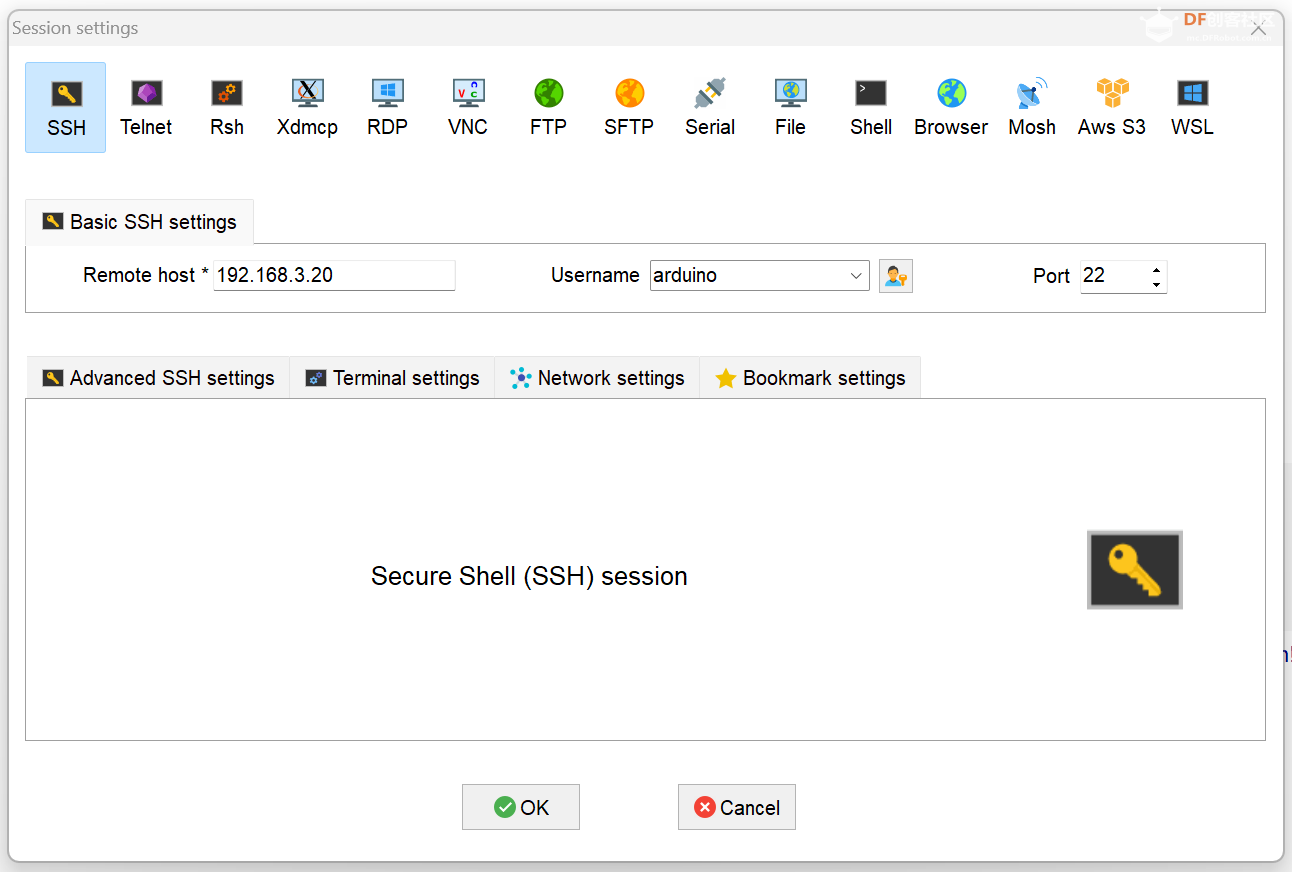
本帖最后由 topdog 于 2026-3-28 07:53 编辑 第二章 Nanobot的AI赋能,网络搜索,知识库和自我学习技能 每个开发者都有自己编程的习惯,笔者也尝试了VScode,CodeBuddy,Qwen,Trae CN,Kiro等编译器,但是ssh连接Arduino UNO Q(以下简称:Q板)时都会出现不稳定的现象,最好的方法是MobaXterm和Claude code,上传和下载文件特别方便。 MobaXterm Xserver with SSH, telnet, RDP, VNC and X11 - Download
2,Q板作为SBC(单板计算机)使用,有的爱好者喜欢VNC连接,但是配置起来非常麻烦。笔者用RDP就很方便易用。
# 编辑SSH配置文件
sudo nano /etc/ssh/sshd_config
# 确保以下行未被注释,Nanobot网络和显示需要的运行条件
Port 22
AddressFamily any
ListenAddress 0.0.0.0
ListenAddress ::
GatewayPorts yes
X11Forwarding yes
X11DisplayOffset 10
X11UseLocalhost yes
# 重启SSH服务
sudo systemctl restart sshd
# 安装xauth(关键!)Debian 13已经自带
sudo apt install xauth
sudo apt install xrdp
# 启动xrdp和状态
systemctl status xrdp
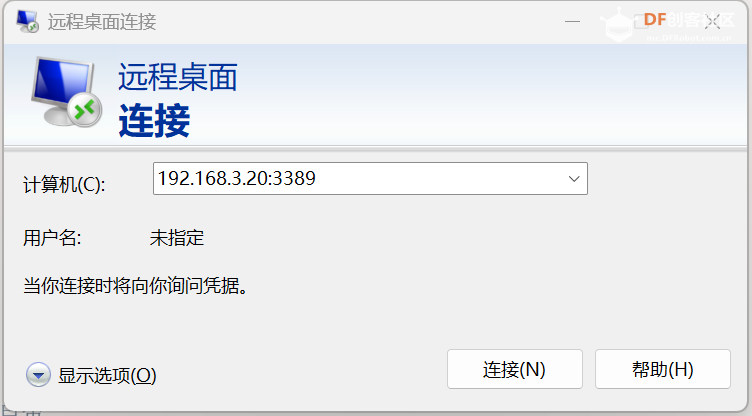
systemctl start xrdp 复制代码 3,在MobaXterm中设置RDP Session,端口是3389。RDP连接状态下,就不需要另外购置鼠标键盘来操作了,直接用PC的输入设备来远程操控 Q板。 4,在PC的搜索栏输入远程桌面,输入IP:3389。也能够远程登录到Arduino UNO Q的桌面。
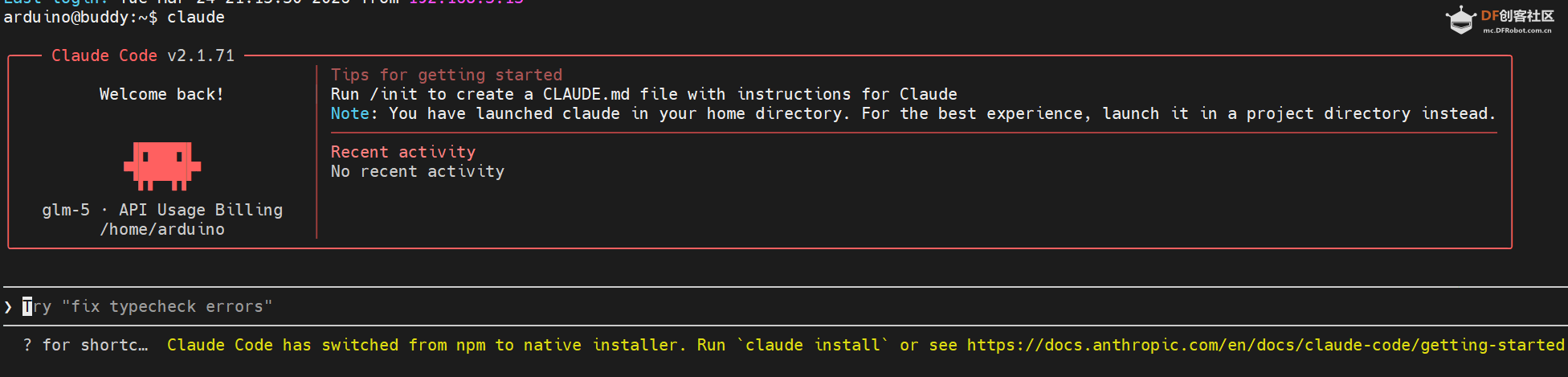
5,一般用ssh登录,在终端输入:claude ,启动Claude Code来为下面配置Nanobot进行AI赋能。调试好以后,另外一种AI赋能就是用飞书通信通道和Nanobot进行自然语言的交流操作。
二,Nanobot的调试
设置 Nanobot 自启动

方法:使用 systemd 用户服务

  1. 创建服务文件

  mkdir -p ~/.config/systemd/user
  nano ~/.config/systemd/user/nanobot-gateway.service

  2. 写入以下内容

  [Unit]
  Description=Nanobot Gateway Service
  After=network-online.target
  Wants=network-online.target

  [Service]
  Type=simple
  WorkingDirectory=/home/arduino/nanobot
  ExecStart=/home/arduino/nanobot/.venv/bin/nanobot gateway
  Restart=always
  RestartSec=10
  TimeoutStartSec=30
  TimeoutStopSec=10

  # 环境变量
  Environment="PATH=/home/arduino/nanobot/.venv/bin:/usr/local/bin:/usr/bin:/bin"

  # 安全设置
  NoNewPrivileges=yes
  ProtectSystem=strict
  ReadWritePaths=/home/arduino /tmp

  # 日志
  StandardOutput=journal
  StandardError=journal

  [Install]
  WantedBy=default.target

  3. 启用并启动服务

  # 重新加载 systemd 配置
  systemctl --user daemon-reload

  # 启用自启动
  systemctl --user enable nanobot-gateway

  # 立即启动
  systemctl --user start nanobot-gateway

  # 查看状态
  systemctl --user status nanobot-gateway

  4. 允许用户服务在登录前启动(可选)

  如果需要系统启动时就运行(不必等用户登录):

  sudo loginctl enable-linger $USER   复制代码
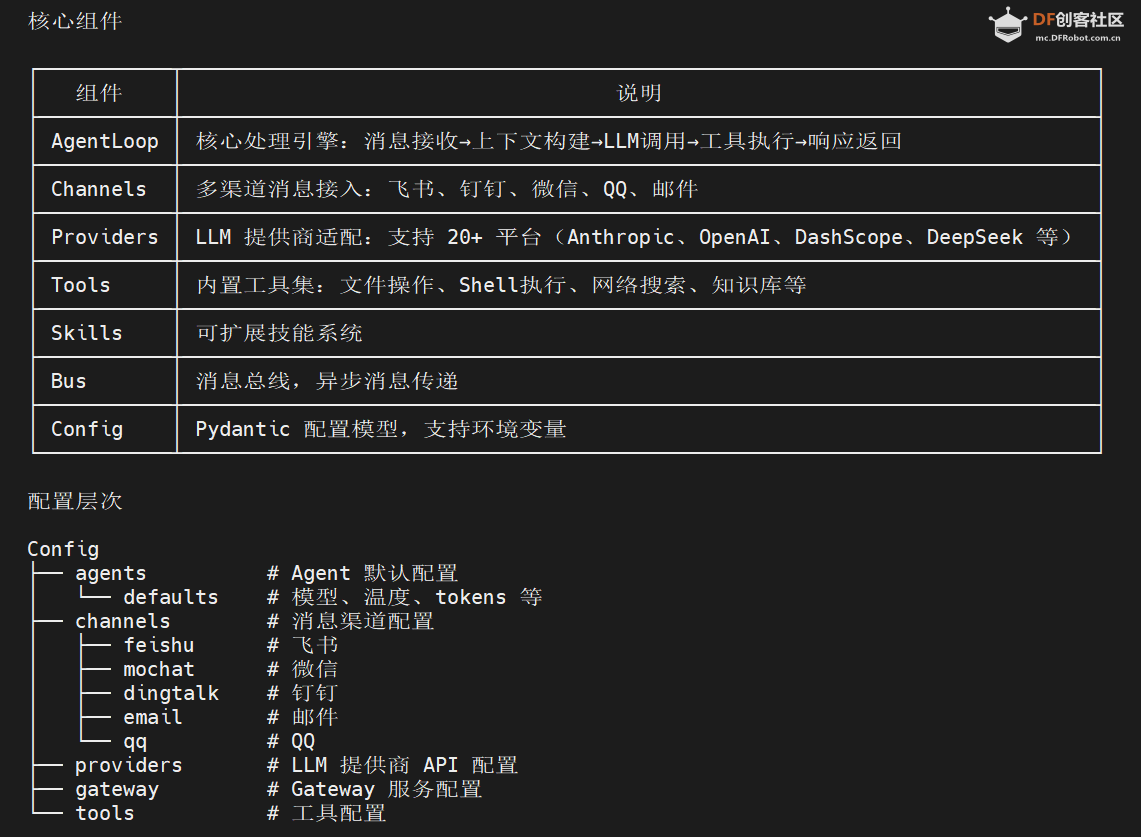
2,Nanobot的项目结构(笔者优化后的结构)
Nanobot 项目结构
nanobot/
├── nanobot/ # 核心模块
│ ├── __main__.py # 入口点: python -m nanobot
│ │
│ ├── cli/ # 命令行接口
│ │ └── commands.py # Typer CLI 命令
│ │
│ ├── agent/ # Agent 核心
│ │ ├── loop.py # 主循环引擎 (接收消息→构建上下文→调用LLM→执行工具→返回响应)
│ │ ├── context.py # 上下文构建器
│ │ ├── memory.py # 记忆存储
│ │ ├── subagent.py # 子代理管理
│ │ ├── skills.py # 技能系统
│ │ └── tools/ # 内置工具
│ │ ├── filesystem.py # 文件操作
│ │ ├── shell.py # 命令执行
│ │ ├── web.py # 网络搜索/抓取
│ │ ├── spawn.py # 子进程
│ │ ├── knowledge.py # 知识库
│ │ └── ...
│ │
│ ├── channels/ # 消息渠道
│ │ ├── base.py # 渠道基类
│ │ ├── manager.py # 渠道管理器
│ │ ├── feishu.py # 飞书/Lark
│ │ ├── dingtalk.py # 钉钉
│ │ ├── mochat.py # MoChat (微信)
│ │ ├── qq.py # QQ
│ │ └── email.py # 邮件
│ │
│ ├── config/ # 配置系统
│ │ ├── schema.py # Pydantic 配置模型
│ │ └── loader.py # 配置加载器
│ │
│ ├── providers/ # LLM 提供商
│ │ ├── base.py # 基类
│ │ ├── litellm_provider.py # LiteLLM 适配
│ │ ├── registry.py # 提供商注册表
│ │ └── ...
│ │
│ ├── bus/ # 消息总线
│ │ ├── queue.py # 消息队列
│ │ └── events.py # 事件定义
│ │
│ ├── session/ # 会话管理
│ │ └── manager.py # 会话管理器
│ │
│ ├── skills/ # 技能扩展
│ │ ├── weather/ # 天气查询
│ │ ├── github/ # GitHub 操作
│ │ ├── summarize/ # 文本摘要
│ │ ├── memory/ # 记忆管理
│ │ ├── cron/ # 定时任务
│ │ ├── tmux/ # 终端复用
│ │ └── ...
│ │
│ ├── knowledge/ # 知识库
│ │ ├── base.py # 基类
│ │ └── local_kb.py # 本地知识库
│ │
│ ├── heartbeat/ # 心跳服务
│ │ └── service.py # 定时心跳检测
│ │
│ ├── cron/ # 定时任务
│ │
│ └── utils/ # 工具函数
│
├── .venv/ # Python 虚拟环境
├── pyproject.toml # 项目依赖
├── start_gateway.sh # 启动脚本
└── nanobot_arch.png # 架构图 复制代码 3,删减改查
Nanobot 的网络搜索实现在 /home/arduino/nanobot/nanobot/agent/tools/web.py
原来的搜索引擎不适合中国网络,所以采用了百度千帆智能搜索。
(1}. WebSearchTool (网络搜索)
(2). WebFetchTool (网页抓取)
4,通信通道和QQ邮箱
5,Nanobot的自我学习,修复和管理
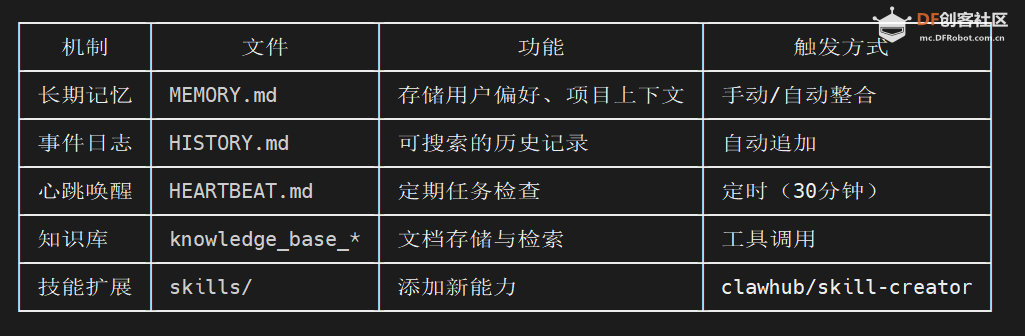
一、Memory 记忆系统(核心学习机制)
位置: /home/arduino/nanobot/nanobot/agent/memory.py
双层记忆架构
~/.nanobot/workspace/memory/
├── MEMORY.md # 长期记忆(始终加载到上下文)
└── HISTORY.md # 事件日志(grep 搜索,不自动加载)
自动整合机制
class MemoryStore:
async def consolidate(self, session, provider, model, ...):
"""
1. 提取旧对话
2. 调用 LLM 分析,提取关键信息
3. 更新 MEMORY.md(长期事实)
4. 追加到 HISTORY.md(事件日志)
"""
工作流程:
1. 当会话消息超过阈值时自动触发
2. LLM 分析对话内容
3. 通过 save_memory 工具调用保存结果
4. 更新 session.last_consolidated 标记
触发条件:
- 消息数超过 memory_window // 2
- 或显式调用 archive_all=True
---
二、Heartbeat 心跳服务(自我唤醒)
位置: /home/arduino/nanobot/nanobot/heartbeat/service.py
class HeartbeatService:
"""定期唤醒 agent 检查任务"""
async def _tick(self):
"""
1. 读取 HEARTBEAT.md
2. LLM 决定是否有任务需要执行
3. 有任务则执行并通过通知渠道返回结果
"""
配置:
{
"gateway": {
"heartbeat": {
"enabled": true,
"interval_s": 1800 // 30分钟
}
}
}
HEARTBEAT.md 示例:
# Heartbeat Tasks
## Periodic
- 每2小时检查新闻并发送摘要
- 每天检查系统状态
## One-time
- 2026-03-25 10:00 提醒会议
---
三、Knowledge Base 知识库
位置: /home/arduino/nanobot/nanobot/knowledge/
功能:
- 创建/删除知识库
- 添加文档/文件
- 语义搜索
工具调用:
# 创建知识库
knowledge_base_create(name="project-docs", description="项目文档")
# 添加文档
knowledge_base_add(kb_id="xxx", content="...", metadata={...})
# 搜索
knowledge_base_search(kb_id="xxx", query="如何配置...", top_k=5)
---
四、Skill 技能系统(自我扩展)
1. skill-creator(创建技能)
位置: /home/arduino/nanobot/nanobot/skills/skill-creator/
技能结构:
skill-name/
├── SKILL.md # 必需:技能说明 + YAML frontmatter
├── scripts/ # 可选:脚本文件
├── references/ # 可选:参考文档
└── assets/ # 可选:资源文件
创建流程:
# 1. 初始化
scripts/init_skill.py my-skill --path ~/.nanobot/workspace/skills
# 2. 编辑 SKILL.md
# 3. 打包
scripts/package_skill.py my-skill
2. clawhub(技能仓库)
搜索安装技能:
# 搜索
npx --yes clawhub@latest search "web scraping" --limit 5
# 安装
npx --yes clawhub@latest install <slug> --workdir ~/.nanobot/workspace
--- 复制代码 

 沪公网安备31011502402448

 置顶卡
置顶卡 变色卡
变色卡 千斤顶
千斤顶