本帖最后由 无垠的广袤 于 2026-4-2 21:34 编辑
【Beetle 树莓派 RP2350】热成像仪本文介绍了 DFRobot Beetle RP2350 开发板结合 MLX90640 模块和串口通信,实现网页热成像仪的项目设计。
项目介绍
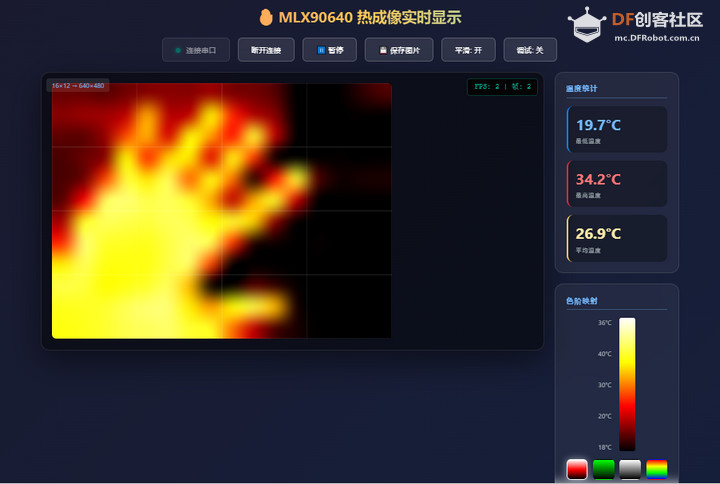
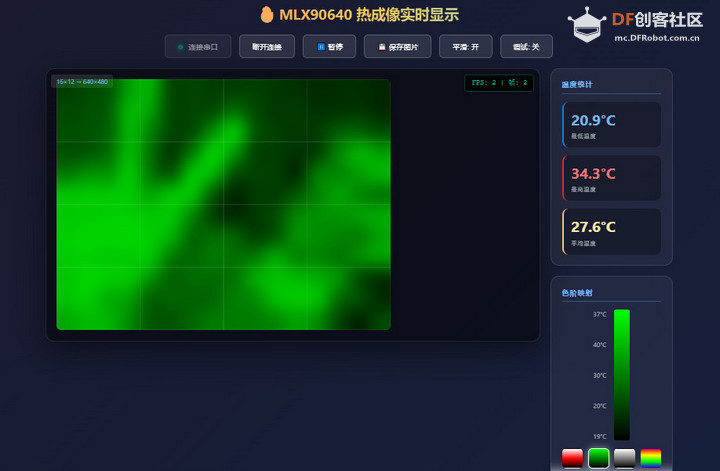
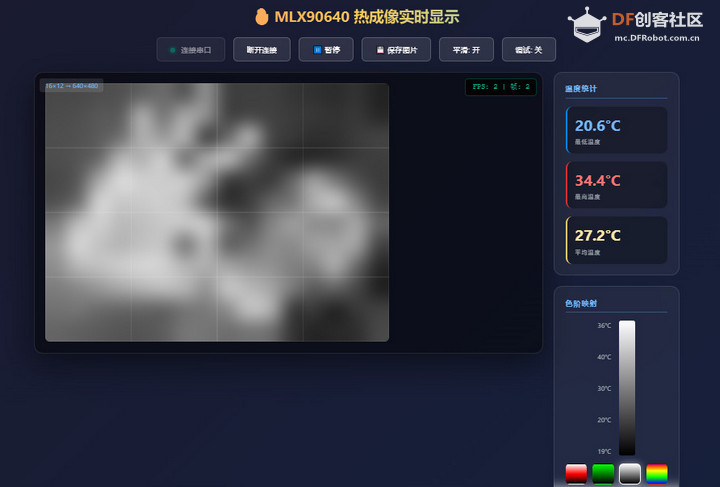
准备工作:MLX90640 驱动程序、功能测试等; 硬件连接:使用杜邦线连接传感器模块、USB转TTL工具、RP2350开发板; 工程代码:包括板端执行代码、网页设计代码; 效果演示:运行程序和网页,实现热成像画面帧的实时显示。
MLX90640
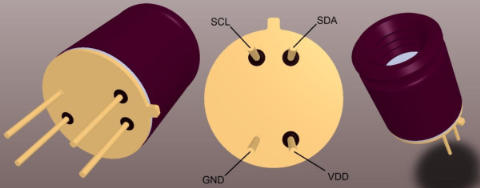
MLX90640 是一款高性能的 32x24 像素红外热成像传感器,支持非接触式温度测量,广泛应用于工业监控、智能家居和科研实验等领域。
模块设计
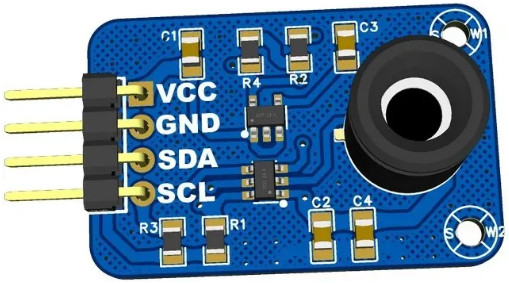
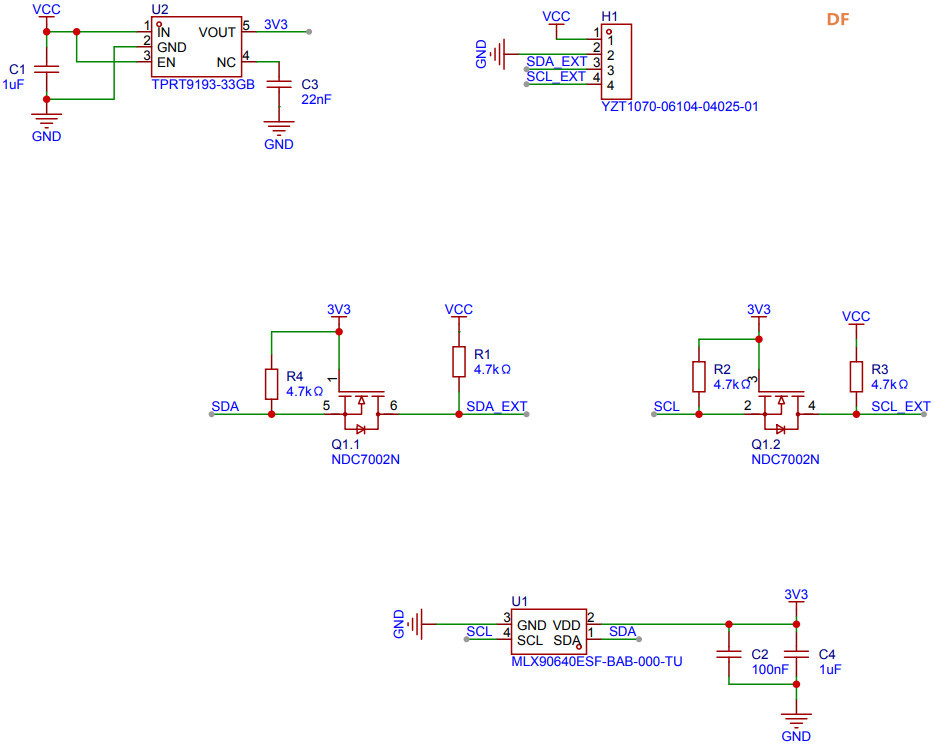
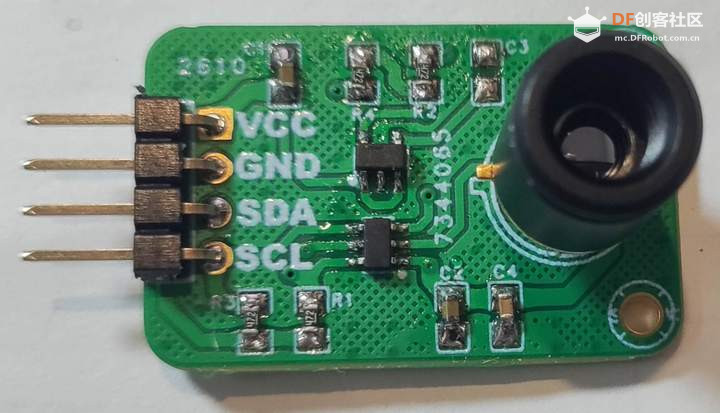
为了便于设备连接,设计 PCB 模块。
原理图
实物图
准备工作
包括驱动代码和功能测试。
驱动代码
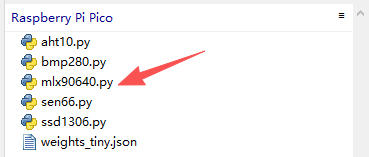
下载 并上传 mlx90640 驱动代码文件至开发板根目录;
功能测试
运行 Thonny IDE 新建文件,添加如下代码
- from machine import I2C
- import time
- from mlx90640 import MLX90640, RefreshRate
-
- # 温度数据缓冲区
- temperature_frame = [0.0] * 768
-
- time.sleep(3)
- print("FreakStudio:Testing the MLX90640 fractional infrared temperature sensor")
-
- # 初始化 I2C
- i2c = I2C(0, scl=5, sda=4, freq=100000)
-
- # 扫描 I2C 设备
- devices_list = i2c.scan()
- print('START I2C SCANNER')
- if len(devices_list) == 0:
- print("No i2c device !")
- else:
- print('i2c devices found:', len(devices_list))
- mlxaddr = next((d for d in devices_list if 0x31 <= d <= 0x35), None)
-
- # 初始化传感器
- try:
- thermal_camera = MLX90640(i2c, mlxaddr)
- print("MLX90640 sensor initialized successfully")
- except ValueError as init_error:
- print(f"Sensor initialization failed: {init_error}")
- raise SystemExit(1)
-
- print(f"Device serial number: {thermal_camera.serial_number}")
-
- # 设置刷新率
- try:
- thermal_camera.refresh_rate = RefreshRate.REFRESH_2_HZ
- print(f"Refresh rate set to {thermal_camera.refresh_rate} Hz")
- except ValueError as rate_error:
- print(f"Failed to set refresh rate: {rate_error}")
- raise SystemExit(1)
-
- thermal_camera.emissivity = 0.92
-
- # 主循环
- try:
- while True:
- try:
- thermal_camera.get_frame(temperature_frame)
- except RuntimeError as read_error:
- print(f"Frame acquisition failed: {read_error}")
- time.sleep(0.5)
- continue
-
- # 统计温度
- min_temp = min(temperature_frame)
- max_temp = max(temperature_frame)
- avg_temp = sum(temperature_frame) / len(temperature_frame)
-
- print("\n--- Temperature Statistics ---")
- print(f"Min: {min_temp:.2f} °C | Max: {max_temp:.2f} °C | Avg: {avg_temp:.2f} °C")
-
- # 打印左上角 4×4 样本像素
- print("--- Sample Pixels (Top-Left 4x4) ---")
- for row in range(4):
- row_data = [f"{temperature_frame[row*32 + col]:5.1f}" for col in range(4)]
- print(" | ".join(row_data))
-
- # 等待下一次测量
- time.sleep(1.0 / (thermal_camera.refresh_rate + 1))
-
- except KeyboardInterrupt:
- print("\nProgram terminated by user")
- finally:
- print("Testing process completed")
保存代码。
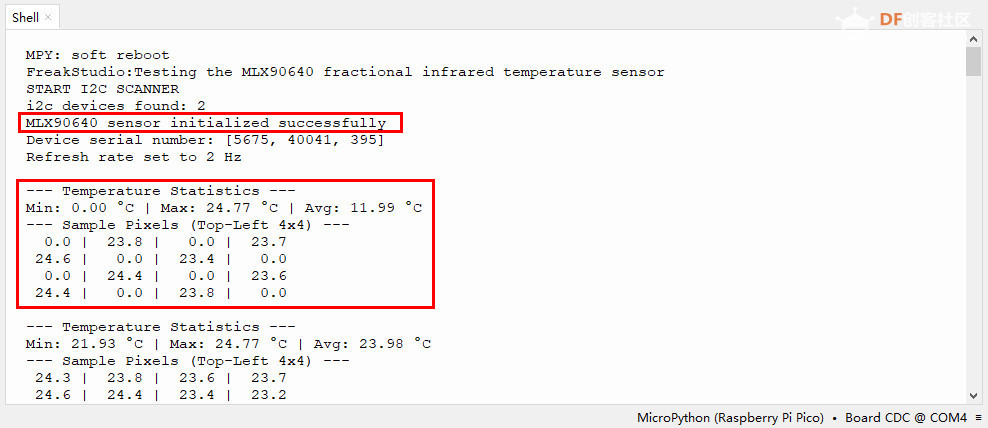
运行测试代码,终端输出初始化传感器信息、温度统计信息等;
硬件连接
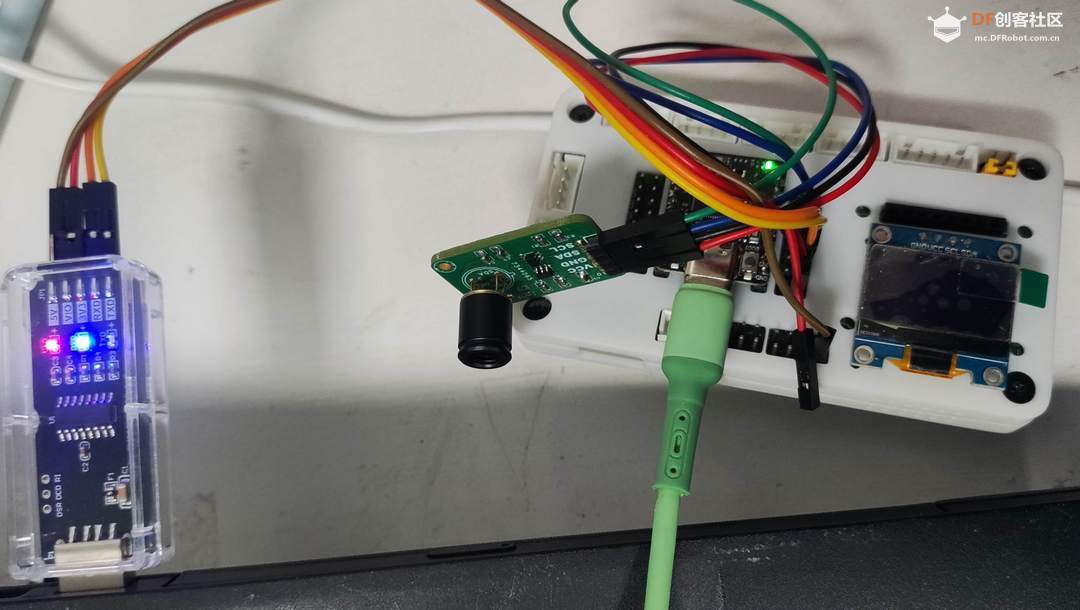
包括 MLX90640 模块和 USB 转 TTL 工具与 RP2350 开发板的连接。
MLX90640 模块
[td]RP2350 | MLX90640 module | Note | | SCL (Pin 8) | SCL | Serial Clock | | SDA (Pin 7) | SDA | Serial Data | | GND | GND | Ground | | 3.3V | VCC | Power |
USB 转 TTL 工具
[td]RP2350 | USB to TTL | Note | | RX (Pin 1) | TXD | Receive | | TX (Pin 0) | RXD | Transmite | | GND | GND | Ground |
实物图
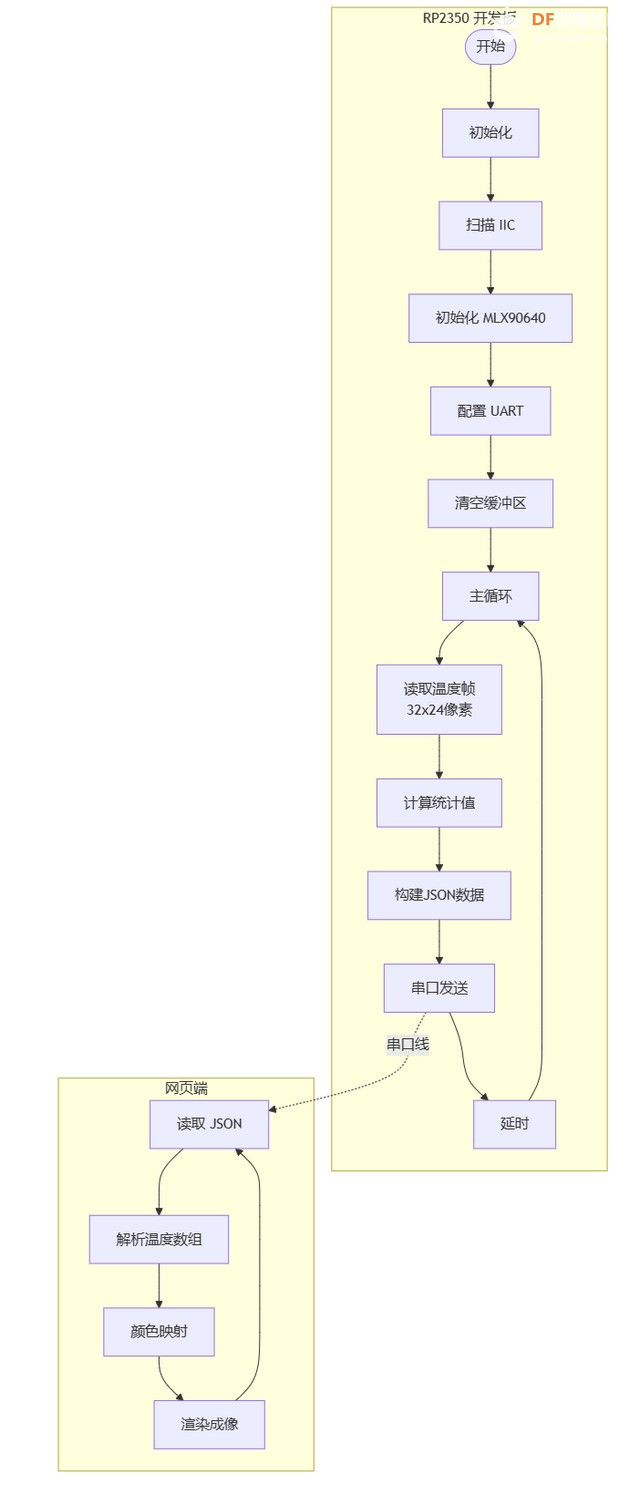
流程图
工程代码
运行 Thonny IDE 新建文件,添加如下代码
- from machine import I2C, UART, Pin
- import time
- from mlx90640 import MLX90640, RefreshRate
- import json
-
- # 温度数据缓冲区 (32x24 = 768像素)
- temperature_frame = [0.0] * 768
-
- print("MLX90640 Thermal Camera - JSON Mode")
- print("Baudrate: 115200")
-
- # 初始化 I2C
- i2c = I2C(0, scl=5, sda=4, freq=800000)
-
- # 扫描 I2C 设备
- devices_list = i2c.scan()
- print('I2C Scanner...')
- if len(devices_list) == 0:
- print("No I2C device found!")
- raise SystemExit(1)
-
- mlxaddr = next((d for d in devices_list if 0x31 <= d <= 0x35), None)
- if mlxaddr is None:
- print("MLX90640 not found!")
- raise SystemExit(1)
-
- print(f"MLX90640 found at 0x{mlxaddr:02X}")
-
- # 初始化传感器
- try:
- thermal_camera = MLX90640(i2c, mlxaddr)
- print("Sensor initialized")
- except Exception as e:
- print(f"Init failed: {e}")
- raise SystemExit(1)
-
- print(f"Serial: {thermal_camera.serial_number}")
-
- # 设置刷新率
- try:
- thermal_camera.refresh_rate = RefreshRate.REFRESH_4_HZ
- print("Refresh rate: 4Hz")
- except:
- thermal_camera.refresh_rate = RefreshRate.REFRESH_2_HZ
- print("Refresh rate: 2Hz")
-
- thermal_camera.emissivity = 0.95
-
- # 初始化UART
- try:
- uart = UART(0, baudrate=115200, tx=Pin(0), rx=Pin(1), timeout=100)
- # 清空缓冲区
- while uart.any():
- uart.read()
- print("UART initialized at 115200")
- except Exception as e:
- print(f"UART init failed: {e}")
- raise SystemExit(1)
-
- # 等待系统稳定
- time.sleep(0.5)
-
- frame_count = 0
- last_print = time.ticks_ms()
-
- def send_json_frame():
- """发送JSON格式的温度帧"""
- global frame_count, last_print
-
- # 获取温度数据
- try:
- thermal_camera.get_frame(temperature_frame)
- except Exception as e:
- print(f"Frame error: {e}")
- return False
-
- frame_count += 1
-
- # 计算统计值
- min_temp = min(temperature_frame)
- max_temp = max(temperature_frame)
- avg_temp = sum(temperature_frame) / len(temperature_frame)
-
- # 降采样到 16x12
- downsampled = []
- for y in range(0, 24, 2):
- row = []
- for x in range(0, 32, 2):
- idx = y * 32 + x
- # 取2x2区域的平均值
- val = (temperature_frame[idx] +
- temperature_frame[idx+1] +
- temperature_frame[idx+32] +
- temperature_frame[idx+33]) / 4
- row.append(round(val, 1))
- downsampled.append(row)
-
- # 构建JSON
- data = {
- "f": frame_count,
- "t": time.ticks_ms(),
- "min": round(min_temp, 2),
- "max": round(max_temp, 2),
- "avg": round(avg_temp, 2),
- "data": downsampled
- }
-
- # 确保完整发送
- json_str = json.dumps(data) + '\n'
-
- # 发送前再次清空接收缓冲区(防止回显干扰)
- while uart.any():
- uart.read()
-
- # 发送数据
- bytes_written = uart.write(json_str.encode('utf-8'))
-
- # 每秒打印一次状态
- now = time.ticks_ms()
- if time.ticks_diff(now, last_print) > 1000:
- print(f"Frame {frame_count}: {min_temp:.1f}~{max_temp:.1f}°C, sent {bytes_written} bytes")
- last_print = now
-
- return True
-
- # 主循环
- print("Starting main loop...")
- time.sleep(0.5)
-
- while True:
- try:
- send_json_frame()
- except Exception as e:
- print(f"Loop error: {e}")
-
- # 帧率控制 (4Hz)
- time.sleep_ms(250)
保存代码。
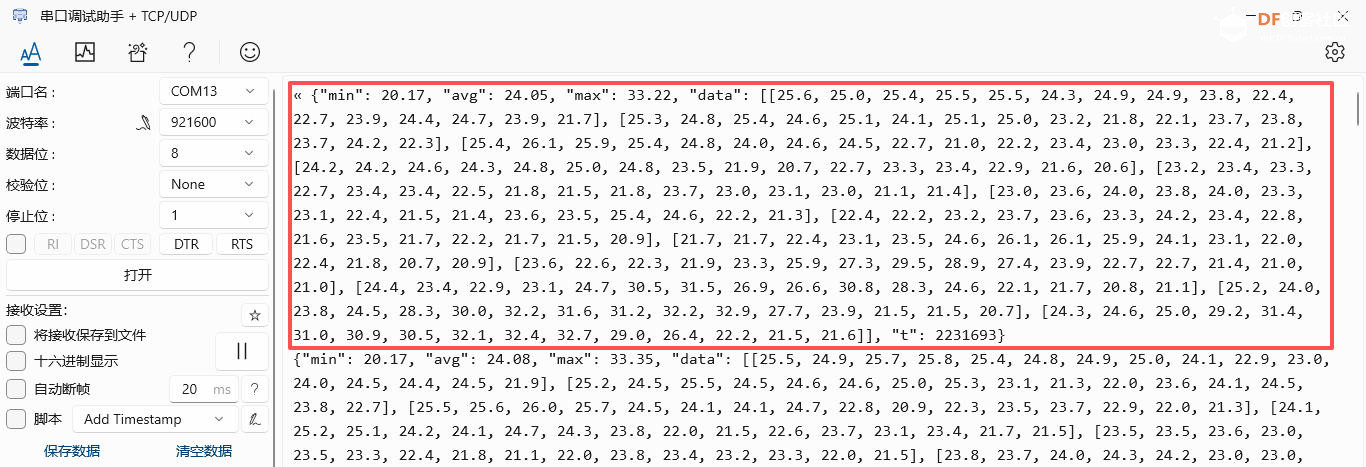
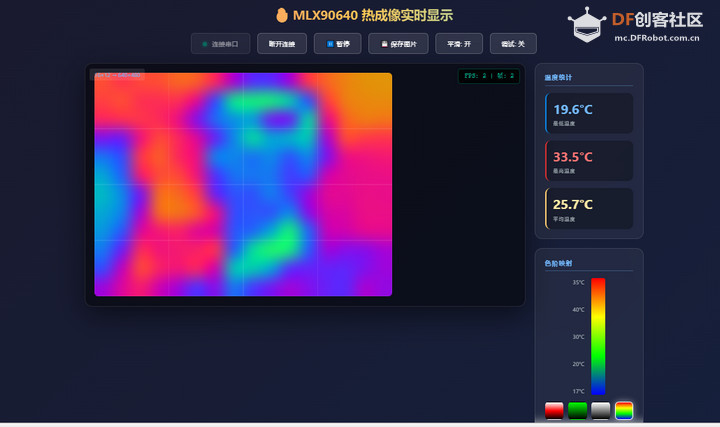
效果演示
总结
本文介绍了 DFRobot Beetle RP2350 开发板结合 MLX90640 模块和串口通信,实现网页热成像仪的项目设计,为相关产品的快速开发和应用设计提供了参考。
| 



 沪公网安备31011502402448

 置顶卡
置顶卡 变色卡
变色卡 千斤顶
千斤顶