|
26| 4
|
[K10项目分享] 【花雕学编程】在行空板K10上部署MimiClaw并与飞书整合 |
|
原标题 《【花雕学编程】跨平台移植实战:在行空板K10上部署MimiClaw并与飞书深度整合》 飞书是字节跳动开发的一站式企业协作平台,核心整合即时通讯、云文档、视频会议、日历和工作台五大模块。它以提升组织协同效率为核心,通过无限消息记录、实时多人文档编辑、智能会议纪要等特色功能,打造流畅的协作体验。平台提供丰富的开放API接口,支持深度集成第三方应用,特别适合企业级场景。2023年推出的飞书智能伙伴集成大模型AI能力,实现智能对话、文档创作和知识问答。在教育领域,飞书可作为MimiClaw等AI硬件的理想接入平台,通过机器人API和云文档实现智能设备管理与数据协同,构建完整的教育信息化生态。  |
|
本帖最后由 驴友花雕 于 2026-4-4 19:15 编辑 一、环境与代码准备(需核对) 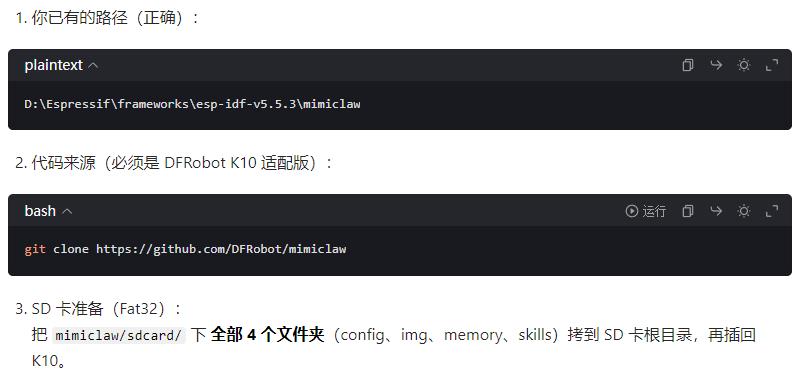 二、创建必须的 SD 卡文件 文件夹: D:\Espressif\frameworks\esp-idf-v5.5.3\mimiclaw 手动新建文件夹:sdcard 结构必须如下: 最重要:在 sdcard/config/ 里新建 system.conf 内容直接复制,把你的信息填进去: |
|
三、把整个 sdcard 复制到 K10 的 TF 卡根目录 步骤: 把 K10 配的 TF 卡 拿出来 插电脑 把刚创建的 sdcard 里的 4 个文件夹 config / img / memory / skills 直接复制到 TF 卡根目录 把 TF 卡插回 K10 四、编译烧录(直接复制命令) 打开你的 ESP-IDF 5.5.3 命令行 |
|
五、飞书连接成功标志 烧录后你会在串口看到: WiFi connect success Feishu bot connected MimiClaw started 看到 Feishu bot connected 说明飞书已经接入成功! MimiClaw运行日志 I (895) mimi: SPIFFS: total=11378081, used=7530 I (895) bus: Message bus initialized (queue depth 16) I (895) memory: Memory store initialized at /spiffs I (895) skills: Initializing skills system I (1235) skills: Skills system ready (4 skills on SPIFFS) I (1235) session: Session manager initialized at /spiffs/sessions I (1235) pp: pp rom version: e7ae62f I (1235) net80211: net80211 rom version: e7ae62f I (1245) wifi:wifi driver task: 3fcee95c, prio:23, stack:6656, core=0 I (1245) wifi:wifi firmware version: 4df78f2 I (1245) wifi:wifi certification version: v7.0 I (1245) wifi:config NVS flash: enabled I (1245) wifi:config nano formatting: disabled I (1255) wifi:Init data frame dynamic rx buffer num: 6 I (1255) wifi:Init static rx mgmt buffer num: 5 I (1255) wifi:Init management short buffer num: 32 I (1255) wifi:Init dynamic tx buffer num: 32 I (1255) wifi:Init static tx FG buffer num: 2 I (1255) wifi:Init static rx buffer size: 1600 I (1255) wifi:Init static rx buffer num: 3 I (1255) wifi:Init dynamic rx buffer num: 6 I (1255) wifi_init: rx ba win: 3 I (1255) wifi_init: accept mbox: 6 I (1255) wifi_init: tcpip mbox: 16 I (1255) wifi_init: udp mbox: 6 I (1255) wifi_init: tcp mbox: 6 I (1255) wifi_init: tcp tx win: 5760 I (1255) wifi_init: tcp rx win: 5760 I (1255) wifi_init: tcp mss: 1440 I (1255) wifi_init: WiFi IRAM OP enabled I (1255) wifi_init: WiFi RX IRAM OP enabled I (1255) wifi: WiFi manager initialized W (1255) telegram: No Telegram bot token. Use CLI: set_tg_token <TOKEN> I (1255) feishu: Feishu credentials loaded (app_id=cli_a95a...) I (1255) llm: LLM proxy initialized (provider: openai, model: deepseek-chat) W (1255) web_search: No search API key. Use CLI: set_search_key or set_tavily_key I (1255) tools: Registered tool: web_search I (1255) tools: Registered tool: get_current_time I (1255) tools: Registered tool: read_file I (1255) tools: Registered tool: write_file I (1255) tools: Registered tool: edit_file I (1255) tools: Registered tool: list_dir I (1255) tools: Registered tool: cron_add I (1255) tools: Registered tool: cron_list I (1255) tools: Registered tool: cron_remove I (1255) tool_gpio: GPIO tool initialized (pin range 1-21) I (1255) tools: Registered tool: gpio_write I (1255) tools: Registered tool: gpio_read I (1255) tools: Registered tool: gpio_read_all I (1265) tools: Tools JSON built (12 tools) I (1265) tools: Tool registry initialized I (1655) cron: No cron file found, starting fresh I (1655) heartbeat: Heartbeat service initialized (file: /spiffs/HEARTBEAT.md, interval: 1800s) I (1655) agent: Agent loop initialized Type 'help' to get the list of commands. Use UP/DOWN arrows to navigate through command history. Press TAB when typing command name to auto-complete. Your terminal application does not support escape sequences. Line editing and history features are disabled. On Windows, try using Windows Terminal or Putty instead. mimi> I (2655) cli: Serial CLI started I (2655) mimi: Serial CLI started. Type 'help' for commands. I (2655) wifi: Connecting to SSID: zhz3 W (2665) wifi:Password length matches WPA2 standards, authmode threshold changes from OPEN to WPA2 I (2665) phy_init: phy_version 711,97bcf0a2,Aug 25 2025,19:04:10 I (2695) wifi:mode : sta (cc:ba:97:24:bd:ac) I (2695) wifi:enable tsf I (2695) mimi: Scanning nearby APs on boot... I (2695) wifi: Scanning nearby APs... W (2705) wifi: Disconnected (reason=36:UNKNOWN) W (2705) wifi: Disconnected, retry 1/10 in 1000ms W (3705) wifi: No APs found E (3705) wifi:sta is connecting, return error I (3705) mimi: Waiting for WiFi connection... I (4435) wifi:new:<7,0>, old:<1,0>, ap:<255,255>, sta:<7,0>, prof:1, snd_ch_cfg:0x0 I (4435) wifi:state: init -> auth (0xb0) I (4495) wifi:state: auth -> assoc (0x0) I (4535) wifi:state: assoc -> run (0x10) I (4665) wifi:connected with zhz3, aid = 2, channel 7, BW20, bssid = 3c:cd:57:69:0f:3a I (4665) wifi:security: WPA2-PSK, phy: bgn, rssi: -51 I (4665) wifi:pm start, type: 1 I (4665) wifi:dp: 1, bi: 102400, li: 3, scale listen interval from 307200 us to 307200 us I (4665) wifi:set rx beacon pti, rx_bcn_pti: 0, bcn_timeout: 25000, mt_pti: 0, mt_time: 10000 I (4675) wifi:AP's beacon interval = 102400 us, DTIM period = 1 I (5195) wifi:<ba-add>idx:0 (ifx:0, 3c:cd:57:69:0f:3a), tid:0, ssn:2, winSize:64 I (6405) esp_netif_handlers: sta ip: 192.168.28.75, mask: 255.255.255.0, gw: 192.168.28.1 I (6405) wifi: Connected! IP: 192.168.28.75 I (6405) mimi: WiFi connected: 192.168.28.75 I (6405) onboard: ======================================== I (6405) onboard: Starting WiFi Configuration Portal I (6405) onboard: ======================================== I (6405) wifi:mode : sta (cc:ba:97:24:bd:ac) + softAP (cc:ba:97:24:bd:ad) I (6405) wifi:Total power save buffer number: 16 I (6405) wifi:Init max length of beacon: 752/752 I (6405) wifi:Init max length of beacon: 752/752 I (6415) esp_netif_lwip: DHCP server started on interface WIFI_AP_DEF with IP: 192.168.4.1 I (6415) wifi:Total power save buffer number: 16 I (6415) onboard: Soft AP started: MimiClaw-BDAD (open) I (6415) esp_netif_lwip: DHCP server started on interface WIFI_AP_DEF with IP: 192.168.4.1 I (6415) onboard: HTTP server started on port 80 I (6425) onboard: Connect to MimiClaw-XXXX WiFi, then open http://192.168.4.1 I (6425) onboard: Local admin portal stays available while STA is connected I (6425) mimi: Outbound dispatch started I (6425) agent: agent_loop task created with stack=24576 bytes I (6425) agent: Agent loop started on core 1 I (6425) feishu: Feishu WebSocket mode enabled I (6425) ws: WebSocket server started on port 18789 I (6425) mimi: All services started! I (6425) mimi: MimiClaw ready. Type 'help' for CLI commands. I (6435) main_task: Returned from app_main() I (6465) wifi:<ba-add>idx:1 (ifx:0, 3c:cd:57:69:0f:3a), tid:5, ssn:1, winSize:64 I (8395) feishu: WS config ready: service_id=33554678 ping=90000ms I (8395) websocket_client: Started I (9395) feishu: Feishu WS connected I (55675) feishu: Message from ou_1f6ce18f5c5d222d9fa9a1719b359ee2 in oc_1c91518431fd91ea11c03cf269bdcd33(p2p): 你好 I (55675) agent: Processing message from feishu:ou_1f6ce18f5c5d222d9fa9a1719b359ee2 I (57815) skills: Skills summary: 511 bytes I (57815) context: System prompt built: 3912 bytes I (57815) agent: LLM turn context: channel=feishu chat_id=ou_1f6ce18f5c5d222d9fa9a1719b359ee2 I (58345) mimi: Dispatching response to feishu:ou_1f6ce18f5c5d222d9fa9a1719b359ee2 I (58355) llm: Calling LLM API with tools (provider: openai, model: deepseek-chat, body: 8712 bytes) I (58355) llm: LLM tools request (8712 bytes): {"model":"deepseek-chat","max_completion_tokens":4096,"messages":[{"role":"system","content":"# MimiClaw\n\nYou are MimiClaw, a personal AI assistant running on ... I (59115) feishu: Got tenant access token (expires in 7200s) I (59985) feishu: Sent to ou_1f6ce18f5c5d222d9fa9a1719b359ee2 (22 bytes) I (59995) mimi: Feishu send success for ou_1f6ce18f5c5d222d9fa9a1719b359ee2 (22 bytes) I (61715) llm: LLM tools raw response (682 bytes): {"id":"ec95d3ac-65a5-4403-8caf-3ad3adc4226d","object":"chat.completion","created":1775300551,"model":"deepseek-chat","choices":[{"index":0,"message":{"role":"as ... I (61715) llm: Response: 208 bytes text, 0 tool calls, stop=end_turn I (62825) agent: Session saved for chat ou_1f6ce18f5c5d222d9fa9a1719b359ee2 I (62825) agent: Queue final response to feishu:ou_1f6ce18f5c5d222d9fa9a1719b359ee2 (208 bytes) I (62825) agent: Free PSRAM: 8285012 bytes I (62825) mimi: Dispatching response to feishu:ou_1f6ce18f5c5d222d9fa9a1719b359ee2 I (63865) feishu: Sent to ou_1f6ce18f5c5d222d9fa9a1719b359ee2 (208 bytes) I (63865) mimi: Feishu send success for ou_1f6ce18f5c5d222d9fa9a1719b359ee2 (208 bytes) I (120695) feishu: Message from ou_1f6ce18f5c5d222d9fa9a1719b359ee2 in oc_1c91518431fd91ea11c03cf269bdcd33(p2p): 你好 I (120695) agent: Processing message from feishu:ou_1f6ce18f5c5d222d9fa9a1719b359ee2 I (123425) skills: Skills summary: 511 bytes I (123425) context: System prompt built: 3912 bytes I (123425) agent: LLM turn context: channel=feishu chat_id=ou_1f6ce18f5c5d222d9fa9a1719b359ee2 I (123435) mimi: Dispatching response to feishu:ou_1f6ce18f5c5d222d9fa9a1719b359ee2 I (123445) llm: Calling LLM API with tools (provider: openai, model: deepseek-chat, body: 8991 bytes) I (123445) llm: LLM tools request (8991 bytes): {"model":"deepseek-chat","max_completion_tokens":4096,"messages":[{"role":"system","content":"# MimiClaw\n\nYou are MimiClaw, a personal AI assistant running on ... I (124505) feishu: Sent to ou_1f6ce18f5c5d222d9fa9a1719b359ee2 (22 bytes) I (124505) mimi: Feishu send success for ou_1f6ce18f5c5d222d9fa9a1719b359ee2 (22 bytes) I (127065) llm: LLM tools raw response (779 bytes): {"id":"982d7c20-7016-456a-9496-bb483f359ef2","object":"chat.completion","created":1775300616,"model":"deepseek-chat","choices":[{"index":0,"message":{"role":"as ... I (127075) llm: Response: 295 bytes text, 0 tool calls, stop=end_turn I (127085) agent: Session saved for chat ou_1f6ce18f5c5d222d9fa9a1719b359ee2 I (127085) agent: Queue final response to feishu:ou_1f6ce18f5c5d222d9fa9a1719b359ee2 (295 bytes) I (127085) agent: Free PSRAM: 8285012 bytes I (127085) mimi: Dispatching response to feishu:ou_1f6ce18f5c5d222d9fa9a1719b359ee2 I (128095) feishu: Sent to ou_1f6ce18f5c5d222d9fa9a1719b359ee2 (295 bytes) I (128095) mimi: Feishu send success for ou_1f6ce18f5c5d222d9fa9a1719b359ee2 (295 bytes) 通过飞书进行对话 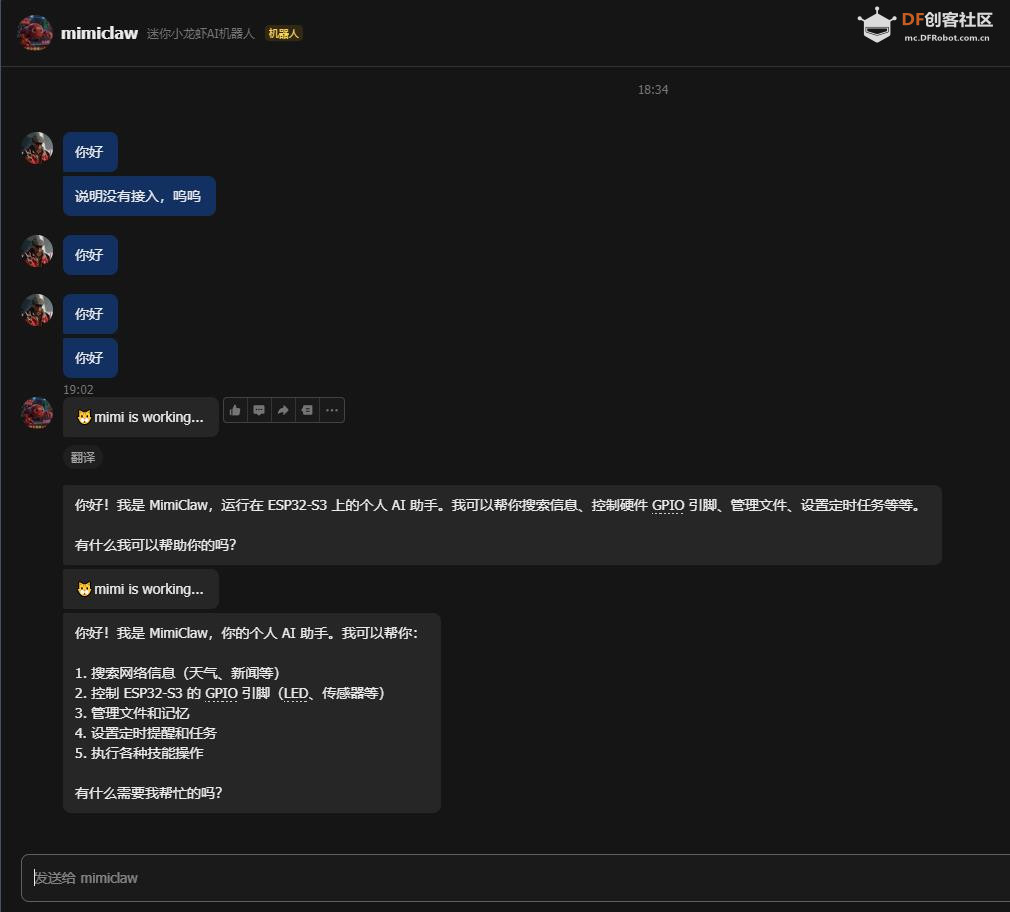 |

 沪公网安备31011502402448
© 2013-2026 Comsenz Inc. Powered by Discuz! X3.4 Licensed


 置顶卡
置顶卡 变色卡
变色卡 千斤顶
千斤顶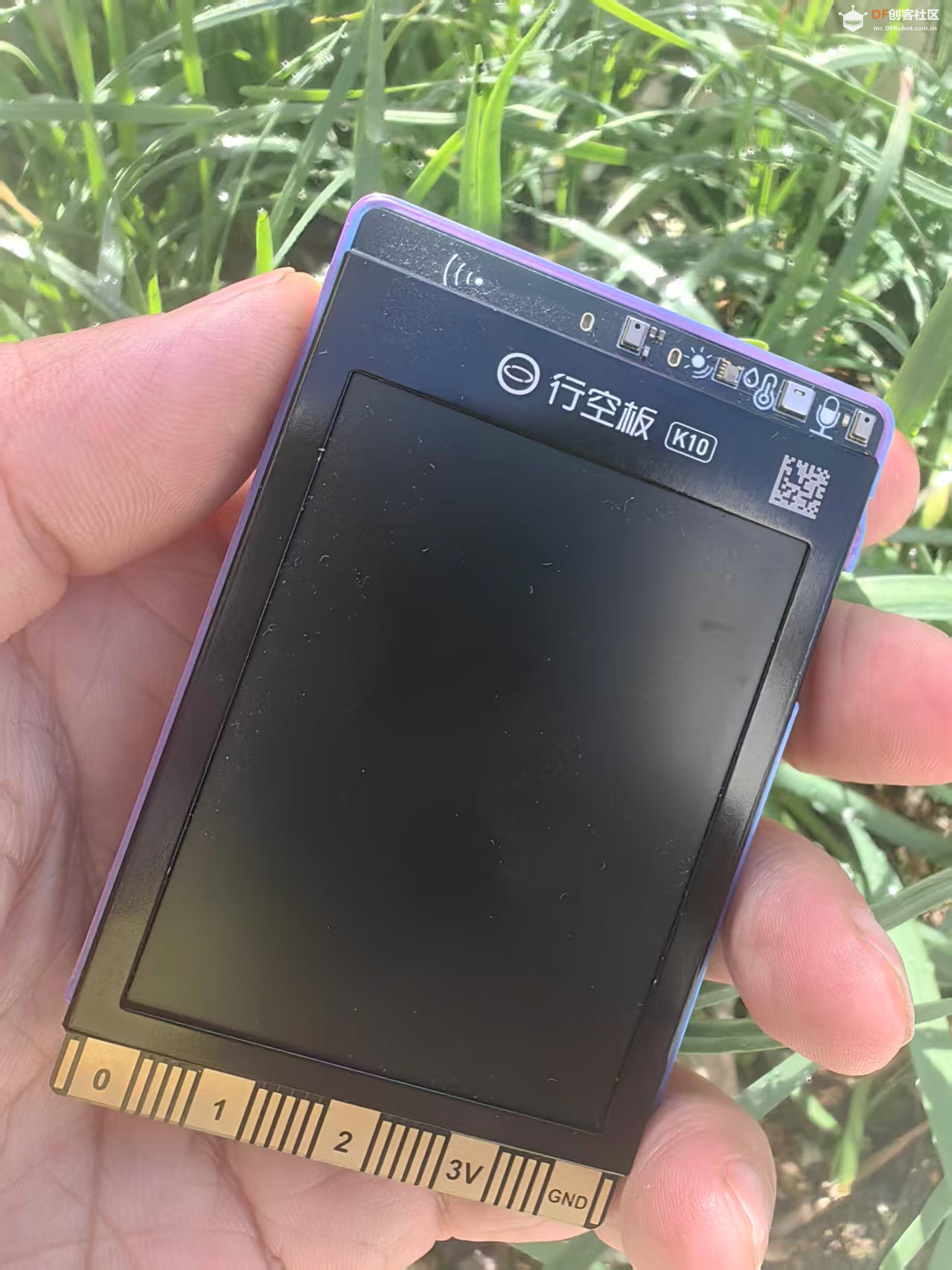


 萌萌哒新人
萌萌哒新人
 活跃会员
活跃会员
 宣传大使
宣传大使
 牛X认证
牛X认证
 创作达人
创作达人
 ARD DAY
 摸鱼团员
摸鱼团员
 志“童”道合
 编辑选择奖
编辑选择奖