本帖最后由 云天 于 2026-1-26 09:32 编辑
【项目背景】
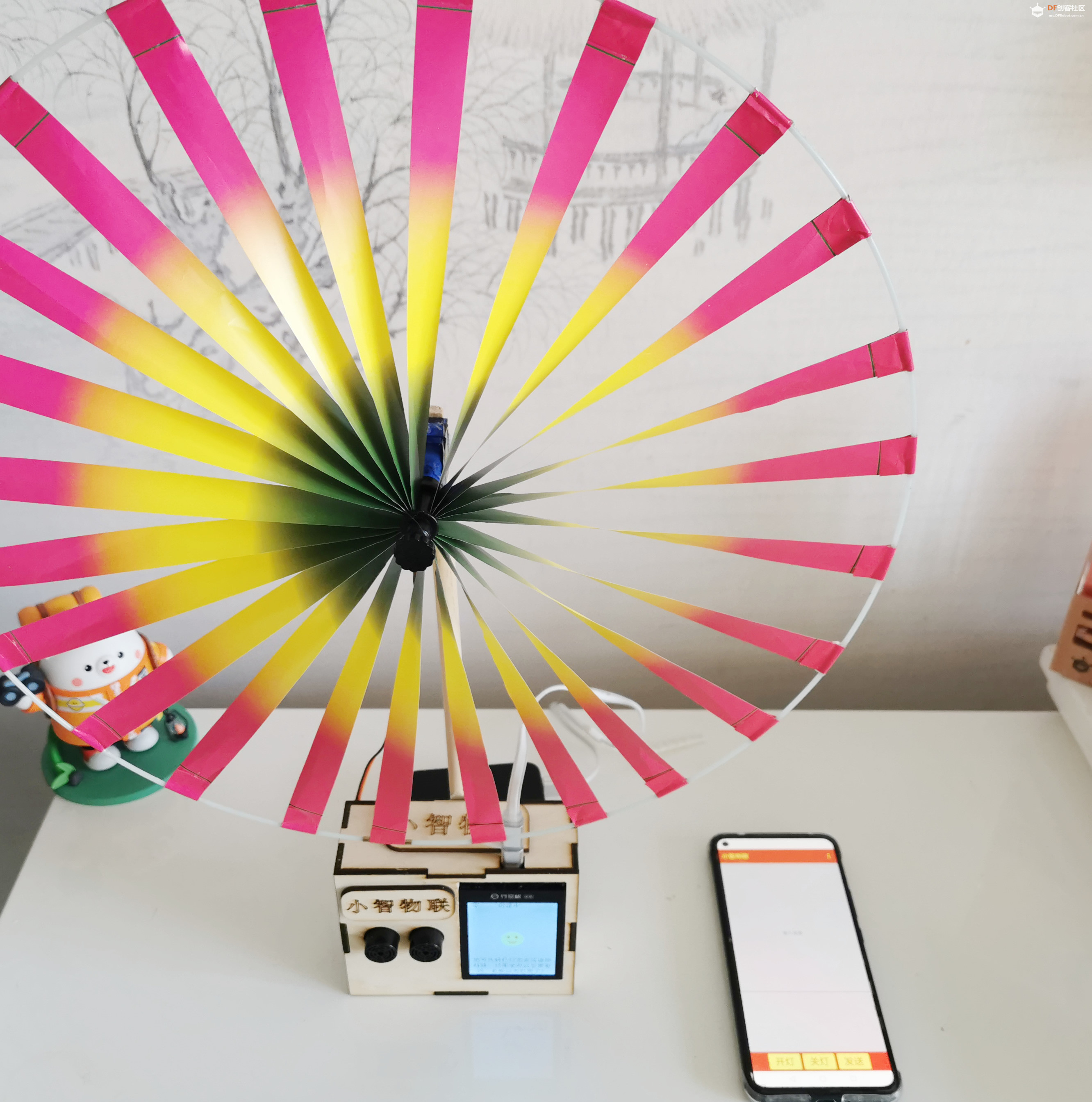
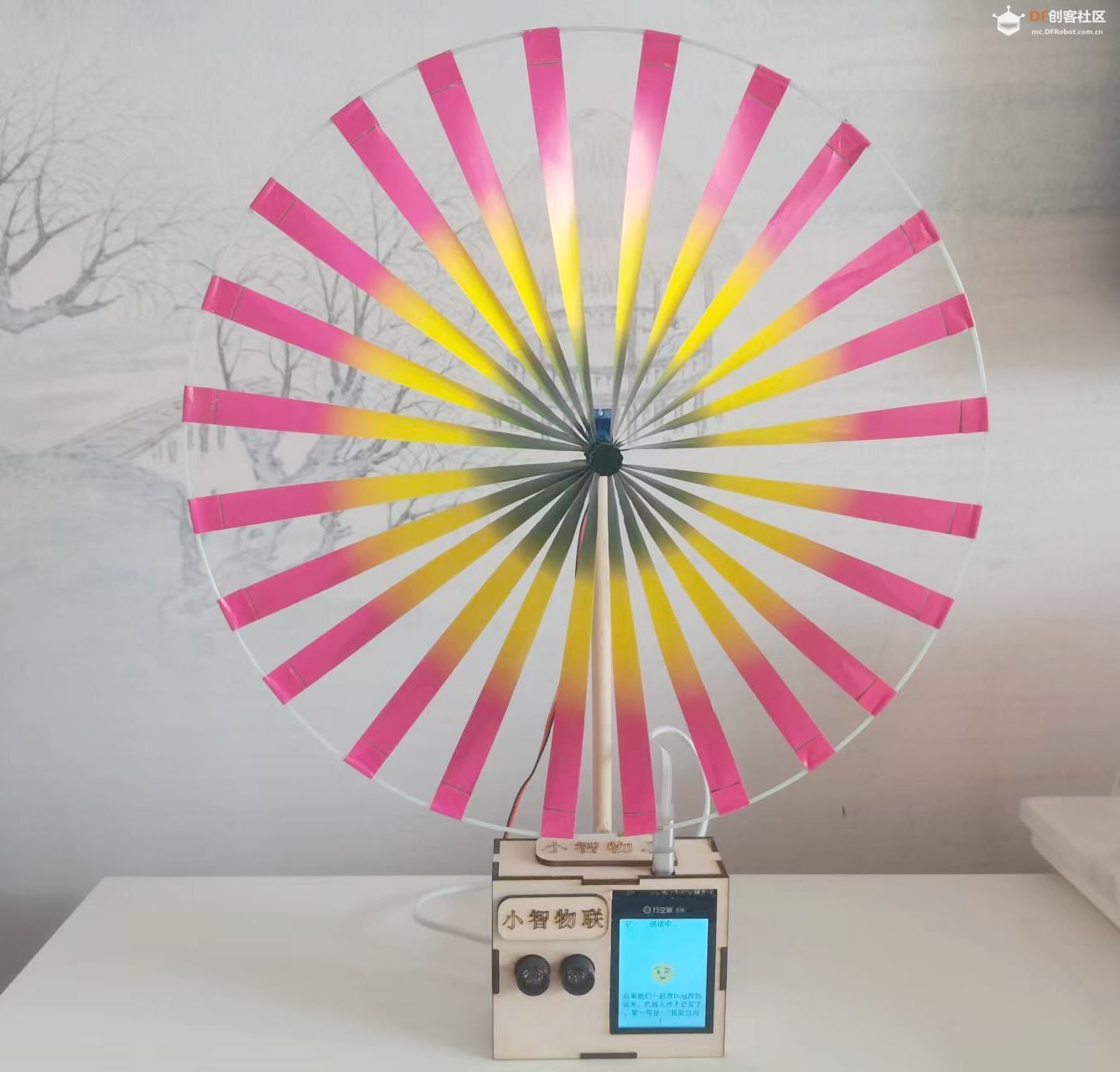
本项目基于行空板 K10 硬件平台,通过修改小智 AI 开源固件,融合 Easy IOT 物联网平台、I2C 超声波传感器(URM09)和 360 舵机,打造一套儿童学习姿态智能看护系统。系统可实现远程唤醒姿态监测、实时距离检测、语音提醒、物联网消息互通等核心功能,帮助家长远程监管孩子的学习状态,及时纠正不良坐姿,同时支持自定义语音交互(如讲故事、播报健康知识)。
【核心功能】
物联网双向通信:小智 AI 与 Easy IOT 平台互发指令,支持远程开启 / 关闭监测、发送语音交互指令(如 “讲个故事”“播报坐姿重要性”);姿态监测:通过 I2C 超声波传感器实时检测孩子与学习桌的距离,判断是否趴桌学习,触发语音提醒并上报数据至物联网平台;硬件控制:支持通过语音 / 远程指令控制行空板 P0 引脚的 360 舵机(转速 / 方向),扩展互动功能;语音交互:小智 AI 可根据物联网平台指令或本地检测结果,通过自然语言提醒孩子端正坐姿、播报健康知识等。
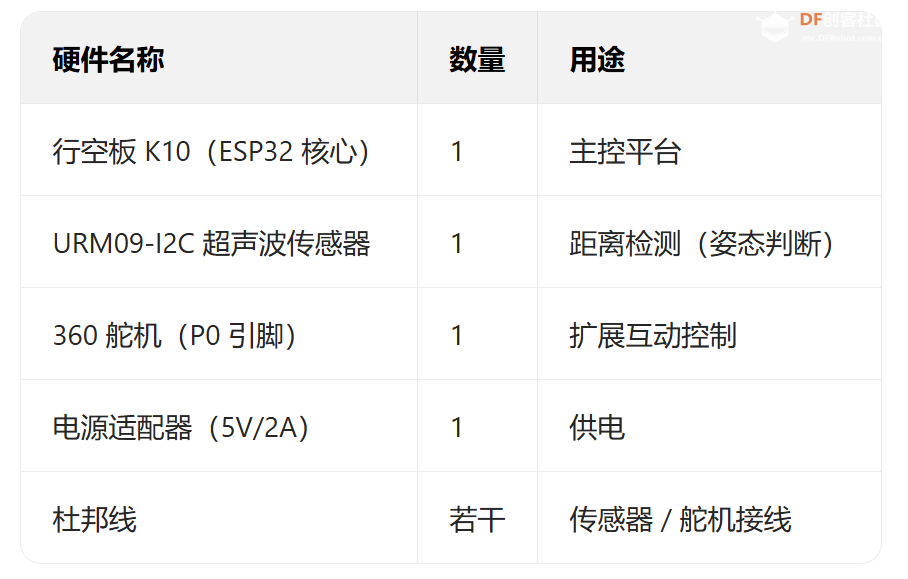
【硬件清单】
【软件环境】
固件基础:小智 AI 开源代码(xiaozhi-esp32-2.0.5);开发框架:ESP-IDF(适配 ESP32 的物联网开发框架);物联网平台:Easy IOT(DFRobot 提供的 MQTT 物联网平台);传感器库:适配 ESP-IDF 的 URM09 超声波传感器 C++ 库(基于 Arduino 库改写)
【核心技术实现】
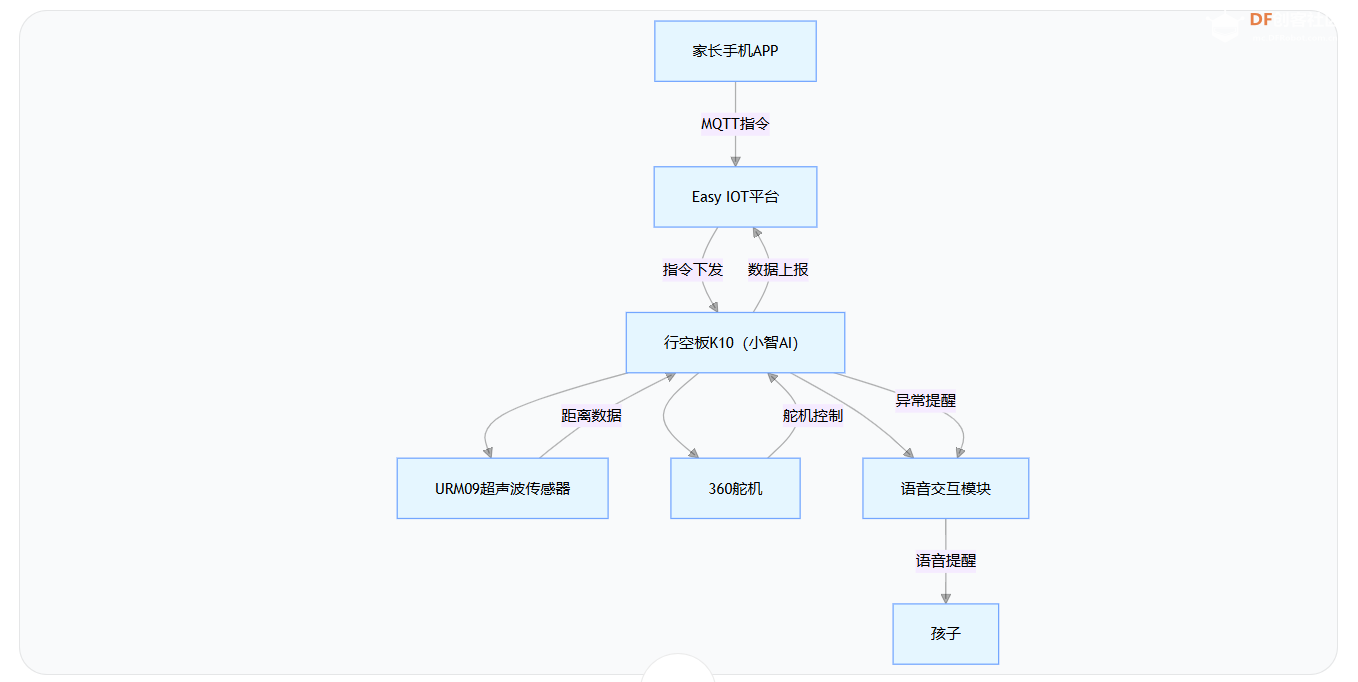
1.系统整体架构
2.关键功能实现
(1)Easy IOT MQTT 通信集成
核心修改文件
xiaozhi-esp32-2.0.5/main/boards/common/board.h:新增 MQTT 通信虚函数接口;
- // +++ 新增的 Easy IoT 相关接口 +++
- virtual void StartEasyIoTService() {} // 默认空实现(可选)
- virtual bool IsEasyIoTConnected() const { return false; } // 默认返回false
- virtual void SendEasyIoTSensorData(int volume) {} // 示例方法
- virtual void SendEasyIoTStringData(const std::string& data, const std::string& data_type){}
xiaozhi-esp32-2.0.5/main/boards/df-k10/df_k10_board.cc:实现 MQTT 客户端初始化、事件处理、消息收发;
- #include "mqtt_client.h"
- #define IOT_TOPIC "z4ksqL6Ig" // 设备数据上报主题
- #define IOT_TOPIC_control "PufUUHKNR" // 控制指令接收主题
- #define IOT_TOPIC_talk "6zYbX90Hg" // 设备对话通信主题
在 class Df_K10Board : public WifiBoard 的 private 区域 新增:
- private:
- // ... 原有代码 ...
-
- // ===================== 新增MQTT相关成员 =====================
- // MQTT客户端实例句柄,管理MQTT连接
- esp_mqtt_client_handle_t easyiot_mqtt_client_ = nullptr;
-
- // MQTT连接状态标志,true表示已连接
- bool easyiot_connected_ = false;
-
- // MQTT消息回调函数类型定义,用于处理特定主题的消息
- using MqttMessageCallback = std::function<void(const std::string& topic, const std::string& payload)>;
-
- // 主题-回调函数映射表,存储不同主题对应的处理函数
- std::unordered_map<std::string, MqttMessageCallback> topic_callbacks_;
-
- // MQTT事件处理静态函数(适配ESP32事件系统)
- static void MqttEventHandler(void* handler_args, esp_event_base_t base,
- int32_t event_id, void* event_data);
-
- // MQTT事件处理成员函数(实际处理逻辑)
- void HandleMqttEvent(esp_mqtt_event_handle_t event);
-
- // MQTT消息处理核心函数,分发到具体回调
- void ProcessMqttMessage(const std::string& topic, const std::string& payload);
-
- // 订阅指定主题,可设置服务质量等级
- esp_err_t SubscribeToTopic(const std::string& topic, int qos = 0);
-
- // 取消订阅指定主题
- esp_err_t UnsubscribeFromTopic(const std::string& topic);
-
- // ... 其他原有成员 ...
在 class Df_K10Board : public WifiBoard 的 public 区域 新增:
- public:
- // ... 原有代码 ...
-
- // ===================== 新增MQTT相关公共接口 =====================
- // 启动Easy IoT服务,初始化MQTT客户端并建立连接
- void StartEasyIoTService() override;
-
- // 检查MQTT连接状态
- bool IsEasyIoTConnected() const override;
-
- // 发送传感器数据到MQTT主题
- void SendEasyIoTSensorData(int volume) override;
-
- // 发送字符串数据到MQTT主题,支持数据类型标识
- void SendEasyIoTStringData(const std::string& data, const std::string& data_type) override;
-
- // 注册主题回调函数:为指定主题绑定消息处理函数
- void RegisterTopicCallback(const std::string& topic, MqttMessageCallback callback);
-
- // 移除主题回调函数:取消指定主题的消息处理绑定
- void RemoveTopicCallback(const std::string& topic);
-
- // ... 其他原有方法 ...
Df_K10Board 类中 MQTT 相关成员函数的完整实现代码
- // ===================== MQTT相关成员函数实现 =====================
-
- /**
- * 启动Easy IoT服务
- * 功能:初始化MQTT客户端,配置连接参数,注册事件处理器,并启动连接
- * 注意:只能启动一次,重复调用会警告并返回
- */
- void Df_K10Board::StartEasyIoTService() {
- if (easyiot_mqtt_client_ != nullptr) {
- ESP_LOGW(TAG, "Easy IoT service already started");
- return;
- }
- ESP_LOGI(TAG, "Starting Easy IoT service");
-
- // 配置 MQTT 客户端
- esp_mqtt_client_config_t mqtt_cfg = {};
- mqtt_cfg.broker.address.uri = "mqtt://iot.dfrobot.com.cn:1883"; // MQTT服务器地址
- mqtt_cfg.credentials.client_id = "AVNLqL6SR"; // 客户端ID
- mqtt_cfg.credentials.username = "AVNLqL6SR"; // 用户名
- mqtt_cfg.credentials.authentication.password = "04HYqY6IRz"; // 密码
-
- // 配置连接参数
- mqtt_cfg.session.keepalive = 60; // 60秒心跳包
- mqtt_cfg.session.disable_clean_session = false; // 清除会话(重新连接时不保留旧消息)
- mqtt_cfg.network.disable_auto_reconnect = false; // 启用自动重连
- mqtt_cfg.network.reconnect_timeout_ms = 5000; // 5秒重连间隔
-
- // 初始化MQTT客户端
- easyiot_mqtt_client_ = esp_mqtt_client_init(&mqtt_cfg);
-
- // 注册事件处理函数
- esp_mqtt_client_register_event(easyiot_mqtt_client_,
- static_cast<esp_mqtt_event_id_t>(ESP_EVENT_ANY_ID), // 监听所有MQTT事件
- MqttEventHandler, // 静态事件处理函数
- this); // 传入当前对象指针作为上下文
-
- // 启动MQTT客户端(开始连接服务器)
- esp_mqtt_client_start(easyiot_mqtt_client_);
-
- // ===================== 注册默认回调函数 =====================
-
- // 1. 控制主题回调:处理LED控制命令
- RegisterTopicCallback(IOT_TOPIC_control, [this](const std::string& topic, const std::string& payload) {
- // 处理LED控制命令
- if (payload == "on") {
- led_strip_->SetAllColor(RGBToColor(0, 255, 0)); // 绿色
- GetDisplay()->ShowNotification("LED ON");
- } else if (payload == "off") {
- led_strip_->SetAllColor(RGBToColor(0, 0, 0)); // 关闭
- GetDisplay()->ShowNotification("LED OFF");
- } else if (payload == "blink") {
- // 闪烁效果
- for (int i = 0; i < 5; i++) {
- led_strip_->SetAllColor(RGBToColor(255, 255, 0)); // 黄色
- vTaskDelay(pdMS_TO_TICKS(200));
- led_strip_->SetAllColor(RGBToColor(0, 0, 0)); // 关闭
- vTaskDelay(pdMS_TO_TICKS(200));
- }
- }
- });
-
- // 2. 对话主题回调:处理语音交互命令
- RegisterTopicCallback(IOT_TOPIC_talk, [this](const std::string& topic, const std::string& payload) {
- auto& app = Application::GetInstance();
- DeviceState state = app.GetDeviceState();
-
- // 在屏幕上显示收到的消息
- GetDisplay()->ShowNotification(payload);
-
- // 根据设备状态处理消息
- if (state == kDeviceStateListening) {
- // 向服务器发送唤醒词检测
- app.NotifyWakeWord(payload);
- } else if (state == kDeviceStateIdle) {
- // 触发完整的对话
- app.WakeWordInvoke(payload);
- } else if (state == kDeviceStateSpeaking) {
- if (payload == "stop") {
- // 停止说话命令
- app.StopSpeaking();
- }
- }
- });
- }
-
- /**
- * 检查MQTT连接状态
- * 返回值:true表示已连接,false表示未连接
- */
- bool Df_K10Board::IsEasyIoTConnected() const {
- return easyiot_connected_;
- }
-
- /**
- * 发送字符串数据到Easy IoT平台
- * 功能:将字符串数据(如base64编码的图片)以JSON格式发送到指定主题
- * 参数:data - 要发送的数据字符串
- * data_type - 数据类型标识(如"Information"、"camera_photo"等)
- * 注意:会自动处理数据大小限制,过大数据会被截断
- */
- void Df_K10Board::SendEasyIoTStringData(const std::string& data, const std::string& data_type) {
- if (!easyiot_mqtt_client_) {
- ESP_LOGW(TAG, "Easy IoT MQTT client not initialized");
- return;
- }
-
- // MQTT消息大小限制(假设最大为4KB)
- size_t json_overhead = 100; // JSON格式额外开销
- size_t max_mqtt_payload = 4096; // 假设MQTT最大payload为4KB
-
- ESP_LOGW(TAG, "Sending data type: %s, data length: %u", data_type.c_str(), data.length());
-
- // 检查数据是否超过MQTT限制
- if (data.length() + json_overhead > max_mqtt_payload) {
- // 数据太大,需要截断
- ESP_LOGW(TAG, "Information data too large (%u bytes), truncating...", data.length());
-
- // 计算最大可发送数据大小
- size_t max_data_size = max_mqtt_payload - json_overhead - 100; // 留出更多空间
- if (max_data_size > data.length()) {
- max_data_size = data.length();
- }
-
- // 安全地截取子字符串
- std::string truncated_data = data.substr(0, max_data_size);
-
- // 确保数据中不包含null字符(替换为空格)
- for (size_t i = 0; i < truncated_data.length(); i++) {
- if (truncated_data[i] == '\0') {
- truncated_data[i] = ' ';
- }
- }
-
- // 构建JSON格式的payload
- char payload[max_mqtt_payload];
- int written = snprintf(payload, sizeof(payload),
- "{"type":"%s","data":"%s"}",
- data_type.c_str(), truncated_data.c_str());
-
- if (written < 0 || written >= (int)sizeof(payload)) {
- ESP_LOGE(TAG, "Failed to format JSON payload");
- return;
- }
-
- // 发布消息到主题
- int msg_id = esp_mqtt_client_publish(easyiot_mqtt_client_,
- IOT_TOPIC, // 设备数据上报主题
- payload, 0, 1, 0);
- ESP_LOGI(TAG, "Sent truncated data to Easy IoT, msg_id=%d, payload_size=%d",
- msg_id, written);
- return;
- }
-
- // 数据大小合适,直接发送
- char payload[data.length() + json_overhead + 100];
-
- // 清理数据中的null字符
- std::string clean_data = data;
- for (size_t i = 0; i < clean_data.length(); i++) {
- if (clean_data[i] == '\0') {
- clean_data[i] = ' ';
- }
- }
-
- // 根据数据类型构建不同的JSON格式
- int written = 0;
- if (data_type == "Information" || data_type == "camera_photo") {
- // 特殊数据类型包含大小信息
- written = snprintf(payload, sizeof(payload),
- "{"type":"%s","data":"%s","size":%u}",
- data_type.c_str(),
- clean_data.c_str(),
- clean_data.length());
- } else {
- // 普通数据类型
- written = snprintf(payload, sizeof(payload),
- "{"type":"%s","data":"%s"}",
- data_type.c_str(), clean_data.c_str());
- }
-
- if (written < 0 || written >= (int)sizeof(payload)) {
- ESP_LOGE(TAG, "Failed to format JSON payload");
- return;
- }
-
- // 发布消息
- int msg_id = esp_mqtt_client_publish(easyiot_mqtt_client_,
- IOT_TOPIC, // 设备数据上报主题
- payload, 0, 1, 0);
- ESP_LOGI(TAG, "Sent string data to Easy IoT, msg_id=%d, payload_size=%d",
- msg_id, written);
- }
-
- /**
- * 发送传感器数据到Easy IoT平台
- * 功能:将传感器数据(如音量)以JSON格式发送
- * 参数:volume - 传感器采集的音量值
- */
- void Df_K10Board::SendEasyIoTSensorData(int volume) {
- // 构建JSON格式的传感器数据
- char payload[100];
- snprintf(payload, sizeof(payload),
- "{"volume":%d}",
- volume);
-
- // 发布消息到传感器数据主题
- int msg_id = esp_mqtt_client_publish(easyiot_mqtt_client_,
- IOT_TOPIC, // 设备数据上报主题
- payload, 0, 1, 0);
- ESP_LOGI(TAG, "Sent sensor data to Easy IoT, msg_id=%d", msg_id);
- }
-
- /**
- * 静态MQTT事件处理函数
- * 功能:将ESP32事件系统的MQTT事件转发给成员函数处理
- * 参数:handler_args - 传入的上下文(this指针)
- * base - 事件基础类型
- * event_id - 事件ID
- * event_data - 事件数据
- */
- void Df_K10Board::MqttEventHandler(void* handler_args, esp_event_base_t base,
- int32_t event_id, void* event_data) {
- // 将静态上下文转换为对象指针,调用成员函数处理事件
- auto self = static_cast<Df_K10Board*>(handler_args);
- self->HandleMqttEvent(static_cast<esp_mqtt_event_handle_t>(event_data));
- }
-
- /**
- * 实例MQTT事件处理函数
- * 功能:处理所有MQTT事件,包括连接、断开、订阅、发布、数据接收等
- * 参数:event - MQTT事件句柄
- */
- void Df_K10Board::HandleMqttEvent(esp_mqtt_event_handle_t event) {
- switch (event->event_id) {
- case MQTT_EVENT_CONNECTED:
- ESP_LOGI(TAG, "MQTT_EVENT_CONNECTED");
- easyiot_connected_ = true; // 更新连接状态
-
- // 连接成功后自动订阅主题
- SubscribeToTopic(IOT_TOPIC_control); // 控制主题
- SubscribeToTopic(IOT_TOPIC_talk); // 对话主题
-
- // 在屏幕上显示连接成功通知
- GetDisplay()->ShowNotification("MQTT Connected");
- break;
-
- case MQTT_EVENT_DISCONNECTED:
- ESP_LOGI(TAG, "MQTT_EVENT_DISCONNECTED");
- easyiot_connected_ = false; // 更新连接状态
- GetDisplay()->ShowNotification("MQTT Disconnected");
- break;
-
- case MQTT_EVENT_SUBSCRIBED:
- ESP_LOGI(TAG, "MQTT_EVENT_SUBSCRIBED, msg_id=%d", event->msg_id);
- break;
-
- case MQTT_EVENT_UNSUBSCRIBED:
- ESP_LOGI(TAG, "MQTT_EVENT_UNSUBSCRIBED, msg_id=%d", event->msg_id);
- break;
-
- case MQTT_EVENT_PUBLISHED:
- ESP_LOGI(TAG, "MQTT_EVENT_PUBLISHED, msg_id=%d", event->msg_id);
- break;
-
- case MQTT_EVENT_DATA: {
- ESP_LOGI(TAG, "MQTT_EVENT_DATA");
-
- // 提取主题和消息内容
- std::string topic(event->topic, event->topic_len);
- std::string payload(event->data, event->data_len);
-
- ESP_LOGI(TAG, "Received message on topic: %s", topic.c_str());
- ESP_LOGI(TAG, "Payload: %s", payload.c_str());
-
- // 处理接收到的消息
- ProcessMqttMessage(topic, payload);
- break;
- }
-
- case MQTT_EVENT_ERROR:
- ESP_LOGE(TAG, "MQTT_EVENT_ERROR");
- // 处理TCP传输错误
- if (event->error_handle->error_type == MQTT_ERROR_TYPE_TCP_TRANSPORT) {
- ESP_LOGE(TAG, "Last error code reported from esp-tls: 0x%x",
- event->error_handle->esp_tls_last_esp_err);
- ESP_LOGE(TAG, "Last tls stack error number: 0x%x",
- event->error_handle->esp_tls_stack_err);
- }
- break;
-
- default:
- ESP_LOGI(TAG, "Other event id:%d", event->event_id);
- break;
- }
- }
-
- /**
- * 处理MQTT消息
- * 功能:根据主题分发消息到对应的回调函数
- * 参数:topic - 消息主题
- * payload - 消息内容
- */
- void Df_K10Board::ProcessMqttMessage(const std::string& topic, const std::string& payload) {
- // 在屏幕上显示简短通知
- GetDisplay()->ShowNotification("MQTT Msg: " + payload.substr(0, 20));
-
- // 查找是否有注册的回调函数
- auto it = topic_callbacks_.find(topic);
- if (it != topic_callbacks_.end()) {
- // 调用注册的回调函数
- it->second(topic, payload);
- } else {
- // 默认消息处理逻辑(无回调注册时使用)
- ESP_LOGW(TAG, "No callback registered for topic: %s", topic.c_str());
-
- // 简单解析控制命令(示例)
- if (topic.find(IOT_TOPIC_control) != std::string::npos) {
- if (payload.find(""led":"on"") != std::string::npos) {
- led_strip_->SetAllColor(RGBToColor(255, 0, 0)); // 红色
- } else if (payload.find(""led":"off"") != std::string::npos) {
- led_strip_->SetAllColor(RGBToColor(0, 0, 0)); // 关闭
- }
- }
- }
- }
-
- /**
- * 注册主题回调函数
- * 功能:为指定主题绑定消息处理函数
- * 参数:topic - 主题名称
- * callback - 回调函数
- */
- void Df_K10Board::RegisterTopicCallback(const std::string& topic, MqttMessageCallback callback) {
- topic_callbacks_[topic] = callback;
-
- // 如果已经连接,立即订阅该主题
- if (easyiot_connected_ && easyiot_mqtt_client_) {
- SubscribeToTopic(topic);
- }
- }
-
- /**
- * 移除主题回调函数
- * 功能:取消指定主题的回调函数绑定
- * 参数:topic - 主题名称
- */
- void Df_K10Board::RemoveTopicCallback(const std::string& topic) {
- topic_callbacks_.erase(topic);
- }
-
- /**
- * 订阅主题
- * 功能:向MQTT服务器订阅指定主题
- * 参数:topic - 主题名称
- * qos - 服务质量等级(0-2,默认0)
- * 返回值:ESP_OK成功,ESP_FAIL失败
- */
- esp_err_t Df_K10Board::SubscribeToTopic(const std::string& topic, int qos) {
- if (!easyiot_mqtt_client_ || !easyiot_connected_) {
- ESP_LOGW(TAG, "MQTT client not connected, cannot subscribe to topic: %s", topic.c_str());
- return ESP_FAIL;
- }
-
- int msg_id = esp_mqtt_client_subscribe(easyiot_mqtt_client_, topic.c_str(), qos);
- if (msg_id < 0) {
- ESP_LOGE(TAG, "Failed to subscribe to topic: %s", topic.c_str());
- return ESP_FAIL;
- }
-
- ESP_LOGI(TAG, "Subscribed to topic: %s, msg_id: %d", topic.c_str(), msg_id);
- return ESP_OK;
- }
-
- /**
- * 取消订阅主题
- * 功能:从MQTT服务器取消订阅指定主题
- * 参数:topic - 主题名称
- * 返回值:ESP_OK成功,ESP_FAIL失败
- */
- esp_err_t Df_K10Board::UnsubscribeFromTopic(const std::string& topic) {
- if (!easyiot_mqtt_client_ || !easyiot_connected_) {
- return ESP_FAIL;
- }
-
- int msg_id = esp_mqtt_client_unsubscribe(easyiot_mqtt_client_, topic.c_str());
- if (msg_id < 0) {
- ESP_LOGE(TAG, "Failed to unsubscribe from topic: %s", topic.c_str());
- return ESP_FAIL;
- }
-
- ESP_LOGI(TAG, "Unsubscribed from topic: %s, msg_id: %d", topic.c_str(), msg_id);
- return ESP_OK;
- }
在 mcp_server.cc 文件中新增 MCP 工具函数,用于将信息发送到物联网平台:
- // ===================== 新增:发送信息到物联网平台工具 =====================
-
- /**
- * 工具名称:self.send_data_to_iot
- * 功能描述:发送信息到物联网平台
- * 适用场景:当需要与物联网平台共享信息或照片时使用此工具
- * 参数说明:
- * - Information: 要发送的字符串信息,可以是文本信息
- * 调用示例:用户说"分享***信息到物联网"
- */
- AddTool("self.send_data_to_iot",
- "发送信息到物联网平台,Information:信息",
- PropertyList({
- Property("Information", kPropertyTypeString)
- }),
- [camera, &board](const PropertyList& properties) -> ReturnValue {
- // 从参数中提取要发送的信息
- auto Information = properties["Information"].value<std::string>();
-
- // 记录调试信息
- ESP_LOGI("MCP_SERVER", "Sending data to IoT platform, length: %d", Information.length());
-
- // 发送到物联网平台,数据类型为"Information"
- board.SendEasyIoTStringData(std::string(Information), "Information");
-
- // 返回成功
- return true;
- });
核心代码逻辑:
初始化 MQTT 客户端,连接 Easy IOT 平台(地址:mqtt://iot.dfrobot.com.cn:1883);
订阅两个核心主题:
IOT_TOPIC_control:硬件控制指令(如开关灯、舵机控制);
IOT_TOPIC_talk:语音交互指令(如 “讲个故事”“播报坐姿重要性”);
实现消息回调机制:接收到平台指令后,触发硬件控制或语音交互;
封装数据上报函数:支持字符串 / 传感器数据(如距离、提醒信息)格式化上报至平台。
【URM09 超声波传感器适配】
核心修改:
- 将 Arduino 版 URM09 库改写为 ESP-IDF 兼容的 C++ 库(DFRobot_URM09.h/.cc),适配 I2C 主机驱动;
- 在df_k10_board.cc中集成传感器初始化、数据读取函数:
- InitializeSensors():初始化 I2C 总线并挂载传感器,设置自动测量模式(500cm 量程);
- GetSensorData():读取距离 / 温度数据,格式化返回(如 “当前距离为 20 厘米,环境温度为 25.5 摄氏度”);
- 在mcp_server.cc注册self.get_distance工具函数,支持小智 AI 调用传感器数据。
URM09-I2C超声波测距传感器库DFRobot_URM09.h文件代码内容
- /*!
- * @file DFRobot_URM09.h
- * @brief Basic structure of DFRobot_URM09 class for ESP-IDF
- * @copyright Copyright (c) 2010 DFRobot Co.Ltd (http://www.dfrobot.com)
- * @license The MIT License (MIT)
- * @author ZhixinLiu(zhixin.liu@dfrobot.com)
- * @version V2.0 (ESP-IDF Adaptation)
- * @date 2024-01-01
- * @url https://github.com/DFRobot/DFRobot_URM09
- */
- #ifndef __DFRobot_URM09_H__
- #define __DFRobot_URM09_H__
-
- #include <driver/i2c_master.h>
- #include <esp_log.h>
- #include <cstdint>
- #include <string>
-
- // 测量模式定义
- #define MEASURE_MODE_AUTOMATIC 0x80
- #define MEASURE_MODE_PASSIVE 0x00
-
- #define CMD_DISTANCE_MEASURE 0x01
-
- // 测量范围定义
- #define MEASURE_RANG_500 0x20
- #define MEASURE_RANG_300 0x10
- #define MEASURE_RANG_150 0x00
-
- class DFRobot_URM09 {
- public:
- // 寄存器枚举
- typedef enum {
- eSLAVEADDR_INDEX = 0,
- ePID_INDEX,
- eVERSION_INDEX,
- eDIST_H_INDEX,
- eDIST_L_INDEX,
- eTEMP_H_INDEX,
- eTEMP_L_INDEX,
- eCFG_INDEX,
- eCMD_INDEX,
- eREG_NUM
- } eRegister_t;
-
- /**
- * @brief 构造函数
- * @param i2c_bus I2C总线句柄(已在主程序中初始化)
- * @param i2c_addr I2C设备地址(默认为0x11)
- */
- DFRobot_URM09(i2c_master_bus_handle_t i2c_bus, uint8_t i2c_addr = 0x11);
-
- /**
- * @brief 析构函数
- */
- ~DFRobot_URM09();
-
- /**
- * @brief 初始化传感器
- * @return 初始化状态
- */
- bool begin();
-
- /**
- * @brief 设置测量模式和范围
- * @param range 测量范围
- * @param mode 测量模式
- */
- void setModeRange(uint8_t range, uint8_t mode);
-
- /**
- * @brief 发送测量命令(被动模式)
- */
- void measurement();
-
- /**
- * @brief 获取温度值
- * @return 温度值(℃)
- */
- float getTemperature();
-
- /**
- * @brief 获取距离值
- * @return 距离值(cm)
- */
- int16_t getDistance();
-
- /**
- * @brief 扫描I2C设备
- * @return 设备地址,未找到返回-1
- */
- int16_t scanDevice();
-
- /**
- * @brief 获取当前I2C地址
- * @return I2C地址
- */
- uint8_t getI2CAddress();
-
- /**
- * @brief 修改I2C地址
- * @param address 新地址(1-127)
- */
- void modifyI2CAddress(uint8_t address);
-
- private:
- // I2C写函数
- esp_err_t i2cWriteRegister(uint8_t reg, uint8_t *data, uint8_t len);
-
- // I2C读函数
- esp_err_t i2cReadRegister(uint8_t reg, uint8_t *data, uint8_t len);
-
- i2c_master_bus_handle_t i2c_bus_; // I2C总线句柄
- i2c_master_dev_handle_t i2c_dev_; // I2C设备句柄
- uint8_t i2c_addr_; // I2C设备地址
- uint8_t txbuf[10] = {0}; // 发送缓冲区
- const char* TAG = "URM09"; // 日志标签
- };
-
- #endif // __DFRobot_URM09_H__
URM09-I2C超声波测距传感器库文件DFRobot_URM09.cc文件内容
- /*!
- * @file DFRobot_URM09.cpp
- * @brief ESP-IDF implementation of DFRobot_URM09 class
- * @copyright Copyright (c) 2010 DFRobot Co.Ltd ([url]http://www.dfrobot.com[/url])
- * @license The MIT License (MIT)
- * @author ZhixinLiu([email]zhixin.liu@dfrobot.com[/email])
- * @version V2.0 (ESP-IDF Adaptation)
- * @date 2024-01-01
- */
- #include "DFRobot_URM09.h"
-
- // 构造函数 - 注意初始化列表顺序必须与类声明顺序一致
- DFRobot_URM09::DFRobot_URM09(i2c_master_bus_handle_t i2c_bus, uint8_t i2c_addr)
- : i2c_bus_(i2c_bus), i2c_dev_(nullptr), i2c_addr_(i2c_addr) {
- // 构造函数体(可为空)
- }
-
- // 析构函数
- DFRobot_URM09::~DFRobot_URM09() {
- if (i2c_dev_) {
- i2c_master_bus_rm_device(i2c_dev_);
- }
- }
-
- // 初始化传感器
- bool DFRobot_URM09::begin() {
- // 配置I2C设备
- i2c_device_config_t dev_cfg = {
- .dev_addr_length = I2C_ADDR_BIT_LEN_7,
- .device_address = i2c_addr_,
- .scl_speed_hz = 100000, // 100kHz
- };
-
- esp_err_t ret = i2c_master_bus_add_device(i2c_bus_, &dev_cfg, &i2c_dev_);
- if (ret != ESP_OK) {
- ESP_LOGE(TAG, "Failed to add I2C device: %s", esp_err_to_name(ret));
- return false;
- }
-
- ESP_LOGI(TAG, "URM09 initialized at address 0x%02X", i2c_addr_);
- return true;
- }
-
- // 设置测量模式和范围
- void DFRobot_URM09::setModeRange(uint8_t range, uint8_t mode) {
- txbuf[0] = (uint8_t)(range | mode);
- i2cWriteRegister(eCFG_INDEX, txbuf, 1);
- }
-
- // 发送测量命令
- void DFRobot_URM09::measurement() {
- txbuf[0] = CMD_DISTANCE_MEASURE;
- i2cWriteRegister(eCMD_INDEX, txbuf, 1);
- }
-
- // 获取温度
- float DFRobot_URM09::getTemperature() {
- uint8_t rxbuf[2] = {0};
-
- if (i2cReadRegister(eTEMP_H_INDEX, rxbuf, 2) != ESP_OK) {
- ESP_LOGE(TAG, "Failed to read temperature");
- return -999.0f;
- }
-
- int16_t temp_raw = ((int16_t)rxbuf[0] << 8) | rxbuf[1];
- return temp_raw / 10.0f;
- }
-
- // 获取距离
- int16_t DFRobot_URM09::getDistance() {
- uint8_t rxbuf[2] = {0};
-
- if (i2cReadRegister(eDIST_H_INDEX, rxbuf, 2) != ESP_OK) {
- ESP_LOGE(TAG, "Failed to read distance");
- return -1;
- }
-
- return ((int16_t)rxbuf[0] << 8) | rxbuf[1];
- }
-
- // I2C写寄存器
- esp_err_t DFRobot_URM09::i2cWriteRegister(uint8_t reg, uint8_t *data, uint8_t len) {
- uint8_t write_buf[10];
-
- if (len > 9) {
- ESP_LOGE(TAG, "Write data too long");
- return ESP_FAIL;
- }
-
- write_buf[0] = reg;
- memcpy(&write_buf[1], data, len);
-
- return i2c_master_transmit(i2c_dev_, write_buf, len + 1, -1);
- }
-
- // I2C读寄存器
- esp_err_t DFRobot_URM09::i2cReadRegister(uint8_t reg, uint8_t *data, uint8_t len) {
- // 先发送寄存器地址
- uint8_t reg_addr = reg;
- esp_err_t ret = i2c_master_transmit(i2c_dev_, ®_addr, 1, -1);
- if (ret != ESP_OK) {
- return ret;
- }
-
- // 然后读取数据
- return i2c_master_receive(i2c_dev_, data, len, -1);
- }
-
- // 扫描设备
- int16_t DFRobot_URM09::scanDevice() {
- // 注意:此函数需要独立I2C操作,可能不适用于已添加到总线的设备
- for (uint8_t address = 1; address < 127; address++) {
- i2c_device_config_t scan_cfg = {
- .dev_addr_length = I2C_ADDR_BIT_LEN_7,
- .device_address = address,
- .scl_speed_hz = 100000,
- };
-
- i2c_master_dev_handle_t scan_dev;
- esp_err_t ret = i2c_master_bus_add_device(i2c_bus_, &scan_cfg, &scan_dev);
- if (ret == ESP_OK) {
- i2c_master_bus_rm_device(scan_dev);
- return address;
- }
- }
- return -1;
- }
-
- // 获取当前I2C地址
- uint8_t DFRobot_URM09::getI2CAddress() {
- uint8_t rxbuf[1] = {0};
-
- if (i2cReadRegister(eSLAVEADDR_INDEX, rxbuf, 1) != ESP_OK) {
- return 0;
- }
-
- return rxbuf[0];
- }
-
- // 修改I2C地址
- void DFRobot_URM09::modifyI2CAddress(uint8_t address) {
- txbuf[0] = address;
- i2cWriteRegister(eSLAVEADDR_INDEX, txbuf, 1);
- i2c_addr_ = address; // 更新内部地址
-
- // 需要重新初始化设备
- if (i2c_dev_) {
- i2c_master_bus_rm_device(i2c_dev_);
- i2c_dev_ = nullptr;
- }
-
- // 重新添加设备
- i2c_device_config_t dev_cfg = {
- .dev_addr_length = I2C_ADDR_BIT_LEN_7,
- .device_address = i2c_addr_,
- .scl_speed_hz = 100000,
- };
-
- i2c_master_bus_add_device(i2c_bus_, &dev_cfg, &i2c_dev_);
- }
将 DFRobot_URM09.cc 源文件添加到编译系统中,确保 URM09 超声波传感器的驱动代码被编译并链接到最终的可执行文件中。
CMakeLists.txt 文件修改,修改位置:在 CMakeLists.txt 的源文件列表部分- list(APPEND SOURCES "boards/df-k10/DFRobot_URM09.cc") # 新增:URM09超声波传感器驱动
board.h 文件修改,修改位置:在 board.h 的类声明中,在公共接口部分"public:"
- // ===================== 在 Board 基类中新增传感器数据获取接口 =====================
- // 位置:在 board.h 文件的 Board 类定义中,public: 区域
-
- class Board {
- public:
- // ... 原有虚函数声明 ...
-
- /**
- * 获取传感器数据的字符串表示
- * 功能:返回当前所有传感器数据的汇总字符串(JSON格式或其他格式)
- * 注意:这是一个虚函数,派生类可以覆盖以提供具体的传感器数据
- * 返回值:传感器数据的字符串表示,默认返回空字符串
- * 使用场景:
- * 1. 用于物联网平台数据上报
- * 2. 用于设备状态监控
- * 3. 用于调试和日志记录
- *
- */
- <blockquote> // 获取JSON格式(用于数据解析)
DFRobot URM09 超声波传感器集成代码
在 df_k10_board.cc 文件中新增内容- // ===================== 新增URM09超声波传感器支持 =====================
- // 位置:在文件开头的头文件包含部分
- #include "DFRobot_URM09.h" // 新增:URM09超声波传感器驱动
-
- // ===================== 在 Df_K10Board 类中新增成员变量 =====================
- // 位置:在类定义的私有成员部分
- private:
- // ... 其他私有成员 ...
-
- // 超声波传感器相关成员
- DFRobot_URM09* urm09_sensor_; // URM09传感器实例指针
- int16_t last_distance_cm_; // 最近一次测量的距离(厘米)
- float last_temperature_c_; // 最近一次测量的温度(摄氏度)
-
- // 新增初始化函数声明
- void InitializeSensors(); // 初始化所有传感器
- public:
- // 位置:在构造函数定义处
- Df_K10Board::Df_K10Board()
- : urm09_sensor_(nullptr) // 在初始化列表中初始化为nullptr
- , last_distance_cm_(0)
- , last_temperature_c_(0.0f)
- {
- // 初始化各硬件组件
- InitializeI2c();
- InitializeIoExpander();
- InitializeSpi();
- InitializeIli9341Display();
- InitializeButtons();
- InitializeIot();
- InitializeCamera();
- servo.Initialize();
- servo.InitializeTools();
-
- // 新增传感器初始化
- InitializeSensors();
-
- ESP_LOGI(TAG, "Df_K10Board initialized with URM09 sensor support");
- }
-
- // ===================== 析构函数实现 =====================
- // 位置:在类实现文件的析构函数部分
- Df_K10Board::~Df_K10Board() {
- // 清理URM09传感器资源
- if (urm09_sensor_) {
- delete urm09_sensor_;
- urm09_sensor_ = nullptr;
- ESP_LOGI(TAG, "URM09 sensor resources cleaned up");
- }
-
- // 其他资源清理...
- }
-
- // ===================== 新增传感器初始化函数 =====================
- /**
- * 初始化所有传感器
- * 功能:初始化URM09超声波传感器,配置测量模式
- * 注意:需要在I2C总线初始化之后调用
- */
- void Df_K10Board::InitializeSensors() {
- // 确保 I2C 总线已初始化
- if (!i2c_bus_) {
- ESP_LOGE(TAG, "I2C bus not initialized before sensor init");
- return;
- }
- urm09_sensor_ = new DFRobot_URM09(i2c_bus_, 0x11);
- if (urm09_sensor_->begin()) {
- urm09_sensor_->setModeRange(MEASURE_RANG_500, MEASURE_MODE_AUTOMATIC);
- ESP_LOGI(TAG, "URM09 sensor initialized successfully");
- } else {
- ESP_LOGE(TAG, "Failed to initialize URM09 sensor");
- delete urm09_sensor_;
- urm09_sensor_ = nullptr;
- }
- }
-
- // ===================== 实现 GetSensorDataJson函数 =====================
- /**
- * 获取传感器数据的字符串表示
- * 功能:读取URM09传感器的距离和温度数据,并格式化为字符串
- * 返回值:包含距离和温度信息的字符串,格式为"当前距离为X厘米,环境温度为Y摄氏度。"
- * 如果传感器未初始化或数据无效,返回相应的错误信息
- * 覆盖:此函数覆盖了基类 Board 中的 GetSensorDataJson() 虚函数
- */
- std::string Df_K10Board::GetSensorDataJson() {
- if (!urm09_sensor_) {
- return "{"error":"传感器未初始化"}";
- }
- last_distance_cm_ = urm09_sensor_->getDistance();
- last_temperature_c_ = urm09_sensor_->getTemperature();
- if (last_distance_cm_ < 0 || last_distance_cm_ > 500) {
- return "{"error":"距离数据无效"}";
- }
- char buffer[128];
- snprintf(buffer, sizeof(buffer),
- "{"distance_cm":%d,"temperature_c":%.1f}",
- last_distance_cm_, last_temperature_c_);
- return std::string(buffer);
- }
- // ===================== 实现 GetSensorRawData函数 =====================
- /**
- *获取 URM09 传感器的距离和温度数据
- *验证数据的有效性
- *通过引用参数返回原始数据
- *提供简单的数据有效性验证
-
- */
- bool Df_K10Board::GetSensorRawData(int& distance_cm, float& temperature_c) {
- if (!urm09_sensor_) {
- return false;
- }
- ESP_LOGI(TAG, "开始获取数据");
-
- distance_cm = urm09_sensor_->getDistance();
- temperature_c = urm09_sensor_->getTemperature();
- ESP_LOGI(TAG, "距离数据为:%d",distance_cm);
- ESP_LOGI(TAG, "真假为:%d",distance_cm >= 0 && distance_cm <= 500);
-
- return (distance_cm >= 0 && distance_cm <= 500);
- }
【360舵机控制】
CMakeLists.txt 文件修改,修改位置:在 CMakeLists.txt 的源文件列表部分
- set(SOURCES
- "boards/df-k10/servo_controller.cc" # 新增:360舵机驱动
- # ... 其他源文件 ...
- )
360舵机servo_controller.h库文件内容:
- #ifndef __SERVO_CONTROLLER_H__
- #define __SERVO_CONTROLLER_H__
-
- #include <driver/ledc.h>
- #include <driver/gpio.h>
- #include <esp_log.h>
- #include <freertos/FreeRTOS.h>
- #include <freertos/task.h>
- #include <freertos/queue.h>
- #include <functional>
- #include "config.h"
- #include "mcp_server.h"
-
- class ServoController {
- public:
- ServoController(gpio_num_t servo_pin);
- ~ServoController();
-
- // 基本控制方法
- bool Initialize();
- void InitializeTools(); // 初始化MCP工具
-
- // 360度舵机控制方法
- void SetSpeed(int speed); // 设置速度 (-100到100)
- void RotateContinuous(int speed); // 持续旋转
- void RotateForTime(int speed, int duration_ms); // 旋转指定时间
- void RotateForDegrees(int speed, int degrees); // 旋转指定角度(估算)
- void Stop();
- void Brake(); // 刹车(保持当前位置)
-
- // 状态查询
- int GetCurrentSpeed() const { return current_speed_; }
- bool IsMoving() const { return is_moving_; }
- bool IsRotating() const { return is_rotating_; }
-
- // 设置回调函数
- void SetOnMoveCompleteCallback(std::function<void()> callback) {
- on_move_complete_callback_ = callback;
- }
-
- private:
- // 硬件相关
- gpio_num_t servo_pin_;
- ledc_channel_t ledc_channel_;
- ledc_timer_t ledc_timer_;
-
- // 状态变量
- int current_speed_;
- bool is_moving_;
- bool is_rotating_;
- bool stop_requested_;
-
- // 校准参数
- float calibration_factor_; // 校准因子,调整旋转角度与实际角度关系
- float speed_to_angle_per_sec_; // 速度到角度/秒的映射
-
- // 任务和队列
- TaskHandle_t servo_task_handle_;
- QueueHandle_t command_queue_;
-
- // 回调函数
- std::function<void()> on_move_complete_callback_;
-
- // 命令类型
- enum CommandType {
- CMD_SET_SPEED, // 设置速度
- CMD_ROTATE_CONTINUOUS, // 持续旋转
- CMD_ROTATE_TIME, // 定时旋转
- CMD_ROTATE_DEGREES, // 旋转指定角度
- CMD_STOP,
- CMD_BRAKE
- };
-
- // 命令结构
- struct ServoCommand {
- CommandType type;
- int param1; // 速度
- int param2; // 持续时间(ms)或角度(degrees)
- int param3; // 备用
- };
-
- // 私有方法
- void WriteSpeed(int speed);
- uint32_t SpeedToCompare(int speed);
- bool IsValidSpeed(int speed) const;
- int ConstrainSpeed(int speed) const;
-
- // 校准方法
- void CalibrateSpeed(int target_speed, int measured_time_ms, int measured_degrees);
-
- // 任务函数
- static void ServoTask(void* parameter);
- void ProcessCommands();
- void ExecuteSetSpeed(int speed);
- void ExecuteRotateContinuous(int speed);
- void ExecuteRotateForTime(int speed, int duration_ms);
- void ExecuteRotateForDegrees(int speed, int degrees);
- };
-
- #endif // __SERVO_CONTROLLER_H__
360舵机库文件servo_controller.cc内容:
- #include "servo_controller.h"
- #include <esp_log.h>
- #include <cmath>
-
- #define TAG "ServoController"
-
- ServoController::ServoController(gpio_num_t servo_pin)
- : servo_pin_(servo_pin)
- , current_speed_(0)
- , is_moving_(false)
- , is_rotating_(false)
- , stop_requested_(false)
- , calibration_factor_(1.0f)
- , speed_to_angle_per_sec_(6.0f) // 默认:100速度对应60度/秒
- , servo_task_handle_(nullptr)
- , command_queue_(nullptr)
- , on_move_complete_callback_(nullptr) {
-
- // 根据 GPIO 引脚分配不同的 LEDC 通道
- // 假设最多支持2个舵机
- static int channel_counter = 0;
- switch (channel_counter++) {
- case 0:
- ledc_channel_ = LEDC_CHANNEL_0;
- ledc_timer_ = LEDC_TIMER_0;
- break;
- case 1:
- ledc_channel_ = LEDC_CHANNEL_1;
- ledc_timer_ = LEDC_TIMER_1;
- break;
- default:
- ledc_channel_ = LEDC_CHANNEL_2;
- ledc_timer_ = LEDC_TIMER_2;
- break;
- }
-
- ESP_LOGI(TAG, "创建360度舵机控制器,引脚: %d", servo_pin_);
- }
-
- ServoController::~ServoController() {
- Stop();
- if (servo_task_handle_ != nullptr) {
- vTaskDelete(servo_task_handle_);
- }
- if (command_queue_ != nullptr) {
- vQueueDelete(command_queue_);
- }
- }
-
- bool ServoController::Initialize() {
- ESP_LOGI(TAG, "初始化360度舵机控制器,引脚: %d", servo_pin_);
-
- // 配置LEDC定时器 (50Hz,14位分辨率)
- ledc_timer_config_t timer_config = {
- .speed_mode = LEDC_LOW_SPEED_MODE,
- .duty_resolution = LEDC_TIMER_14_BIT,
- .timer_num = ledc_timer_,
- .freq_hz = 50, // 50Hz for servo
- .clk_cfg = LEDC_AUTO_CLK
- };
-
- esp_err_t ret = ledc_timer_config(&timer_config);
- if (ret != ESP_OK) {
- ESP_LOGE(TAG, "LEDC定时器配置失败: %s", esp_err_to_name(ret));
- return false;
- }
-
- // 配置LEDC通道
- ledc_channel_config_t channel_config = {
- .gpio_num = servo_pin_,
- .speed_mode = LEDC_LOW_SPEED_MODE,
- .channel = ledc_channel_,
- .intr_type = LEDC_INTR_DISABLE,
- .timer_sel = ledc_timer_,
- .duty = 0,
- .hpoint = 0
- };
-
- ret = ledc_channel_config(&channel_config);
- if (ret != ESP_OK) {
- ESP_LOGE(TAG, "LEDC通道配置失败: %s", esp_err_to_name(ret));
- return false;
- }
-
- // 创建命令队列
- command_queue_ = xQueueCreate(10, sizeof(ServoCommand));
- if (command_queue_ == nullptr) {
- ESP_LOGE(TAG, "创建命令队列失败");
- return false;
- }
-
- // 创建舵机控制任务
- BaseType_t task_ret = xTaskCreate(
- ServoTask,
- "servo_task",
- 4096,
- this,
- 5,
- &servo_task_handle_
- );
-
- if (task_ret != pdPASS) {
- ESP_LOGE(TAG, "创建舵机任务失败");
- return false;
- }
-
- // 设置初始速度(停止)
- WriteSpeed(0);
-
- ESP_LOGI(TAG, "360度舵机控制器初始化成功");
- return true;
- }
-
- void ServoController::InitializeTools() {
- auto& mcp_server = McpServer::GetInstance();
- ESP_LOGI(TAG, "开始注册360度舵机MCP工具...");
-
- // 设置速度
- mcp_server.AddTool("self.servo.set_speed",
- "设置360度舵机旋转速度。speed: 速度值(-100到100,0=停止,负值=逆时针,正值=顺时针)",
- PropertyList({Property("speed", kPropertyTypeInteger, 0, -100, 100)}),
- [this](const PropertyList& properties) -> ReturnValue {
- int speed = properties["speed"].value<int>();
- SetSpeed(speed);
- return "舵机速度设置为 " + std::to_string(speed) + " (0-停止,负-逆时针,正-顺时针)";
- });
-
- // 持续旋转
- mcp_server.AddTool("self.servo.rotate_continuous",
- "360度舵机持续旋转。speed: 速度值(-100到100)",
- PropertyList({Property("speed", kPropertyTypeInteger, 50, -100, 100)}),
- [this](const PropertyList& properties) -> ReturnValue {
- int speed = properties["speed"].value<int>();
- RotateContinuous(speed);
- return "舵机开始持续旋转,速度: " + std::to_string(speed);
- });
-
- // 定时旋转
- mcp_server.AddTool("self.servo.rotate_timed",
- "360度舵机旋转指定时间。speed: 速度值(-100到100); duration_ms: 持续时间(毫秒)",
- PropertyList({Property("speed", kPropertyTypeInteger, 50, -100, 100),
- Property("duration_ms", kPropertyTypeInteger, 1000, 100, 30000)}),
- [this](const PropertyList& properties) -> ReturnValue {
- int speed = properties["speed"].value<int>();
- int duration = properties["duration_ms"].value<int>();
- RotateForTime(speed, duration);
- return "舵机旋转 " + std::to_string(duration) + "ms,速度: " + std::to_string(speed);
- });
-
- // 旋转指定角度(估算)
- mcp_server.AddTool("self.servo.rotate_degrees",
- "360度舵机旋转指定角度(估算)。speed: 速度值(30-100或-30--100); degrees: 旋转角度",
- PropertyList({Property("speed", kPropertyTypeInteger, 60, -100, 100),
- Property("degrees", kPropertyTypeInteger, 90, 1, 3600)}),
- [this](const PropertyList& properties) -> ReturnValue {
- int speed = properties["speed"].value<int>();
- int degrees = properties["degrees"].value<int>();
- RotateForDegrees(speed, degrees);
- return "舵机旋转 " + std::to_string(degrees) + "度,速度: " + std::to_string(speed);
- });
-
- // 停止舵机
- mcp_server.AddTool("self.servo.stop",
- "立即停止360度舵机运动",
- PropertyList(),
- [this](const PropertyList& properties) -> ReturnValue {
- Stop();
- return "舵机已停止";
- });
-
- // 刹车(保持当前位置)
- mcp_server.AddTool("self.servo.brake",
- "360度舵机刹车(保持当前位置)",
- PropertyList(),
- [this](const PropertyList& properties) -> ReturnValue {
- Brake();
- return "舵机已刹车";
- });
-
- // 获取舵机状态
- mcp_server.AddTool("self.servo.get_status",
- "获取360度舵机当前状态",
- PropertyList(),
- [this](const PropertyList& properties) -> ReturnValue {
- int speed = GetCurrentSpeed();
- bool moving = IsMoving();
- bool rotating = IsRotating();
-
- std::string status = "{"speed":" + std::to_string(speed) +
- ","moving":" + (moving ? "true" : "false") +
- ","rotating":" + (rotating ? "true" : "false") + "}";
- return status;
- });
-
- // 校准舵机(高级功能)
- mcp_server.AddTool("self.servo.calibrate",
- "校准360度舵机速度映射。target_speed: 测试速度; measured_time_ms: 测量时间; measured_degrees: 测量角度",
- PropertyList({Property("target_speed", kPropertyTypeInteger, 100, -100, 100),
- Property("measured_time_ms", kPropertyTypeInteger, 1000, 100, 10000),
- Property("measured_degrees", kPropertyTypeInteger, 360, 1, 7200)}),
- [this](const PropertyList& properties) -> ReturnValue {
- int target_speed = properties["target_speed"].value<int>();
- int measured_time = properties["measured_time_ms"].value<int>();
- int measured_degrees = properties["measured_degrees"].value<int>();
- CalibrateSpeed(target_speed, measured_time, measured_degrees);
- return "舵机校准完成,新校准因子: " + std::to_string(calibration_factor_);
- });
-
- ESP_LOGI(TAG, "360度舵机MCP工具注册完成");
- }
-
- void ServoController::SetSpeed(int speed) {
- if (!IsValidSpeed(speed)) {
- ESP_LOGW(TAG, "无效速度: %d,将限制在有效范围内", speed);
- speed = ConstrainSpeed(speed);
- }
-
- ServoCommand cmd = {CMD_SET_SPEED, speed, 0, 0};
- xQueueSend(command_queue_, &cmd, portMAX_DELAY);
- }
-
- void ServoController::RotateContinuous(int speed) {
- speed = ConstrainSpeed(speed);
- ServoCommand cmd = {CMD_ROTATE_CONTINUOUS, speed, 0, 0};
- xQueueSend(command_queue_, &cmd, portMAX_DELAY);
- }
-
- void ServoController::RotateForTime(int speed, int duration_ms) {
- if (duration_ms <= 0) {
- ESP_LOGW(TAG, "持续时间必须大于0");
- return;
- }
-
- speed = ConstrainSpeed(speed);
- ServoCommand cmd = {CMD_ROTATE_TIME, speed, duration_ms, 0};
- xQueueSend(command_queue_, &cmd, portMAX_DELAY);
- }
-
- void ServoController::RotateForDegrees(int speed, int degrees) {
- if (degrees <= 0) {
- ESP_LOGW(TAG, "旋转角度必须大于0");
- return;
- }
-
- speed = ConstrainSpeed(speed);
- ServoCommand cmd = {CMD_ROTATE_DEGREES, speed, degrees, 0};
- xQueueSend(command_queue_, &cmd, portMAX_DELAY);
- }
-
- void ServoController::Stop() {
- stop_requested_ = true;
- ServoCommand cmd = {CMD_STOP, 0, 0, 0};
- xQueueSend(command_queue_, &cmd, 0); // 不等待,立即发送停止命令
- }
-
- void ServoController::Brake() {
- ServoCommand cmd = {CMD_BRAKE, 0, 0, 0};
- xQueueSend(command_queue_, &cmd, portMAX_DELAY);
- }
-
- void ServoController::WriteSpeed(int speed) {
- speed = ConstrainSpeed(speed);
- uint32_t compare_value = SpeedToCompare(speed);
- ledc_set_duty(LEDC_LOW_SPEED_MODE, ledc_channel_, compare_value);
- ledc_update_duty(LEDC_LOW_SPEED_MODE, ledc_channel_);
- current_speed_ = speed;
-
- ESP_LOGD(TAG, "设置速度: %d, PWM占空比: %lu", speed, compare_value);
- }
-
- uint32_t ServoController::SpeedToCompare(int speed) {
- // 360度舵机速度控制:
- // 速度范围:-100 到 100
- // 脉冲宽度范围:1.0ms 到 2.0ms
- // -100: 1.0ms (逆时针全速)
- // 0: 1.5ms (停止)
- // 100: 2.0ms (顺时针全速)
-
- // 将速度映射到脉冲宽度
- float pulse_width_ms;
- if (speed == 0) {
- pulse_width_ms = 1.5f; // 停止
- } else if (speed > 0) {
- // 顺时针:1.5ms 到 2.0ms
- pulse_width_ms = 1.5f + (speed / 100.0f) * 0.5f;
- } else {
- // 逆时针:1.0ms 到 1.5ms
- pulse_width_ms = 1.5f + (speed / 100.0f) * 0.5f;
- }
-
- // 确保在有效范围内
- if (pulse_width_ms < 1.0f) pulse_width_ms = 1.0f;
- if (pulse_width_ms > 2.0f) pulse_width_ms = 2.0f;
-
- float duty_cycle = pulse_width_ms / 20.0f; // 20ms周期
- uint32_t compare_value = (uint32_t)(duty_cycle * 16383); // 14-bit resolution (2^14 - 1)
-
- return compare_value;
- }
-
- bool ServoController::IsValidSpeed(int speed) const {
- return speed >= -100 && speed <= 100;
- }
-
- int ServoController::ConstrainSpeed(int speed) const {
- if (speed < -100) return -100;
- if (speed > 100) return 100;
- return speed;
- }
-
- void ServoController::CalibrateSpeed(int target_speed, int measured_time_ms, int measured_degrees) {
- // 计算实际的角度/秒
- float actual_degrees_per_sec = (measured_degrees * 1000.0f) / measured_time_ms;
-
- // 计算校准因子
- calibration_factor_ = actual_degrees_per_sec / (abs(target_speed) * speed_to_angle_per_sec_ / 100.0f);
-
- // 更新速度到角度/秒的映射
- speed_to_angle_per_sec_ = (abs(target_speed) * 6.0f * calibration_factor_) / 100.0f;
-
- ESP_LOGI(TAG, "校准完成: 速度=%d, 时间=%dms, 角度=%d度, 校准因子=%.3f",
- target_speed, measured_time_ms, measured_degrees, calibration_factor_);
- ESP_LOGI(TAG, "新的速度-角度映射: %.2f 度/秒 在 100速度", speed_to_angle_per_sec_ * 100);
- }
-
- void ServoController::ServoTask(void* parameter) {
- ServoController* controller = static_cast<ServoController*>(parameter);
- controller->ProcessCommands();
- }
-
- void ServoController::ProcessCommands() {
- ServoCommand cmd;
-
- while (true) {
- if (xQueueReceive(command_queue_, &cmd, pdMS_TO_TICKS(100)) == pdTRUE) {
- if (stop_requested_ && cmd.type != CMD_STOP) {
- continue; // 忽略非停止命令
- }
-
- switch (cmd.type) {
- case CMD_SET_SPEED:
- ExecuteSetSpeed(cmd.param1);
- break;
-
- case CMD_ROTATE_CONTINUOUS:
- ExecuteRotateContinuous(cmd.param1);
- break;
-
- case CMD_ROTATE_TIME:
- ExecuteRotateForTime(cmd.param1, cmd.param2);
- break;
-
- case CMD_ROTATE_DEGREES:
- ExecuteRotateForDegrees(cmd.param1, cmd.param2);
- break;
-
- case CMD_STOP:
- is_moving_ = false;
- is_rotating_ = false;
- stop_requested_ = false;
- WriteSpeed(0);
- ESP_LOGI(TAG, "舵机停止");
- break;
-
- case CMD_BRAKE:
- // 刹车:设置速度到0并保持当前位置
- is_moving_ = false;
- is_rotating_ = false;
- WriteSpeed(0);
- ESP_LOGI(TAG, "舵机刹车");
- break;
- }
- }
- }
- }
-
- void ServoController::ExecuteSetSpeed(int speed) {
- ESP_LOGI(TAG, "设置舵机速度: %d", speed);
- is_moving_ = (speed != 0);
- is_rotating_ = false;
- WriteSpeed(speed);
-
- if (on_move_complete_callback_) {
- on_move_complete_callback_();
- }
- }
-
- void ServoController::ExecuteRotateContinuous(int speed) {
- ESP_LOGI(TAG, "持续旋转,速度: %d", speed);
- is_moving_ = true;
- is_rotating_ = true;
- WriteSpeed(speed);
-
- // 持续旋转直到收到停止命令
- while (!stop_requested_) {
- vTaskDelay(pdMS_TO_TICKS(100));
- }
-
- if (!stop_requested_) {
- WriteSpeed(0);
- is_moving_ = false;
- is_rotating_ = false;
-
- if (on_move_complete_callback_) {
- on_move_complete_callback_();
- }
- }
- }
-
- void ServoController::ExecuteRotateForTime(int speed, int duration_ms) {
- ESP_LOGI(TAG, "定时旋转,速度: %d,时间: %dms", speed, duration_ms);
- is_moving_ = true;
- is_rotating_ = true;
- WriteSpeed(speed);
-
- // 计算需要等待的tick数
- TickType_t start_tick = xTaskGetTickCount();
- TickType_t delay_ticks = pdMS_TO_TICKS(duration_ms);
-
- // 等待指定时间,但可以提前被停止
- while ((xTaskGetTickCount() - start_tick) < delay_ticks && !stop_requested_) {
- vTaskDelay(pdMS_TO_TICKS(10));
- }
-
- // 停止舵机
- if (!stop_requested_) {
- WriteSpeed(0);
- }
-
- is_moving_ = false;
- is_rotating_ = false;
-
- if (on_move_complete_callback_ && !stop_requested_) {
- on_move_complete_callback_();
- }
- }
-
- void ServoController::ExecuteRotateForDegrees(int speed, int degrees) {
- ESP_LOGI(TAG, "旋转指定角度,速度: %d,角度: %d度", speed, degrees);
-
- // 计算所需时间(基于校准参数)
- float speed_percentage = abs(speed) / 100.0f;
- float degrees_per_sec = speed_to_angle_per_sec_ * 100 * speed_percentage * calibration_factor_;
- int duration_ms = (int)((degrees / degrees_per_sec) * 1000);
-
- ESP_LOGI(TAG, "预计旋转时间: %dms (%.1f 度/秒)", duration_ms, degrees_per_sec);
-
- is_moving_ = true;
- is_rotating_ = true;
- WriteSpeed(speed);
-
- // 等待计算出的时间
- TickType_t start_tick = xTaskGetTickCount();
- TickType_t delay_ticks = pdMS_TO_TICKS(duration_ms);
-
- while ((xTaskGetTickCount() - start_tick) < delay_ticks && !stop_requested_) {
- vTaskDelay(pdMS_TO_TICKS(10));
- }
-
- // 停止舵机
- if (!stop_requested_) {
- WriteSpeed(0);
- }
-
- is_moving_ = false;
- is_rotating_ = false;
-
- if (on_move_complete_callback_ && !stop_requested_) {
- on_move_complete_callback_();
- }
- }
df_k10_board.cc文件中新增
- #include "servo_controller.h"
- // 创建360度舵机控制器
- ServoController servo(SERVO_PIN_HORIZONTAL);
- class Df_K10Board : public WifiBoard {
- private:
- Df_K10Board(): urm09_sensor_(nullptr) // 在初始化列表中初始化为nullptr
- , last_distance_cm_(0)
- , last_temperature_c_(0.0f) {
- // 原初始化各硬件组件
- // 新增:舵机初始化
- servo.Initialize();
- servo.InitializeTools();
- }
- }
【板载温湿度传感器】使用DF在小智AI开源代码中的方案,这里不再赘述。
修改发送信息到物联网平台工具。
- AddTool("self.send_to_iot",
- "发送信息或传感器数据到物联网平台\n"
- "使用方式:\n"
- "1. 发送自定义信息:提供 content 参数\n"
- "2. 发送温湿度数据:不提供 content 参数\n"
- "参数:content - 可选,要发送的消息内容",
- PropertyList({
- Property("content", kPropertyTypeString,"") // 可选
- }),
- [&board](const PropertyList& properties) -> ReturnValue {
- // 检查是否有content参数
- // 使用 try-catch 来处理可选参数
- std::string content;
- bool has_content = false;
-
- try {
- // 尝试获取content参数
- content = properties["content"].value<std::string>();
- has_content = !content.empty();
- } catch (...) {
- // 如果没有content参数或为空,has_content保持false
- has_content = false;
- }
-
- if (has_content) {
- // 发送自定义消息
- board.SendEasyIoTStringData(content, "UserMessage");
- ESP_LOGI(TAG, "已发送自定义消息到平台: %s", content.c_str());
- return std::string("消息发送成功: ") + content;
- } else {
- // 获取并发送温湿度数据
- std::string sensor_data = board.get_temp_humid_sensor();
- ESP_LOGI(TAG, "温湿度传感器数据: %s", sensor_data.c_str());
-
- // 发送到物联网平台
- board.SendEasyIoTStringData(sensor_data, "TemperatureHumidity");
- return sensor_data;
- }
- });
【手机APP】使用“WxBit图形化编程”制作手机APP。
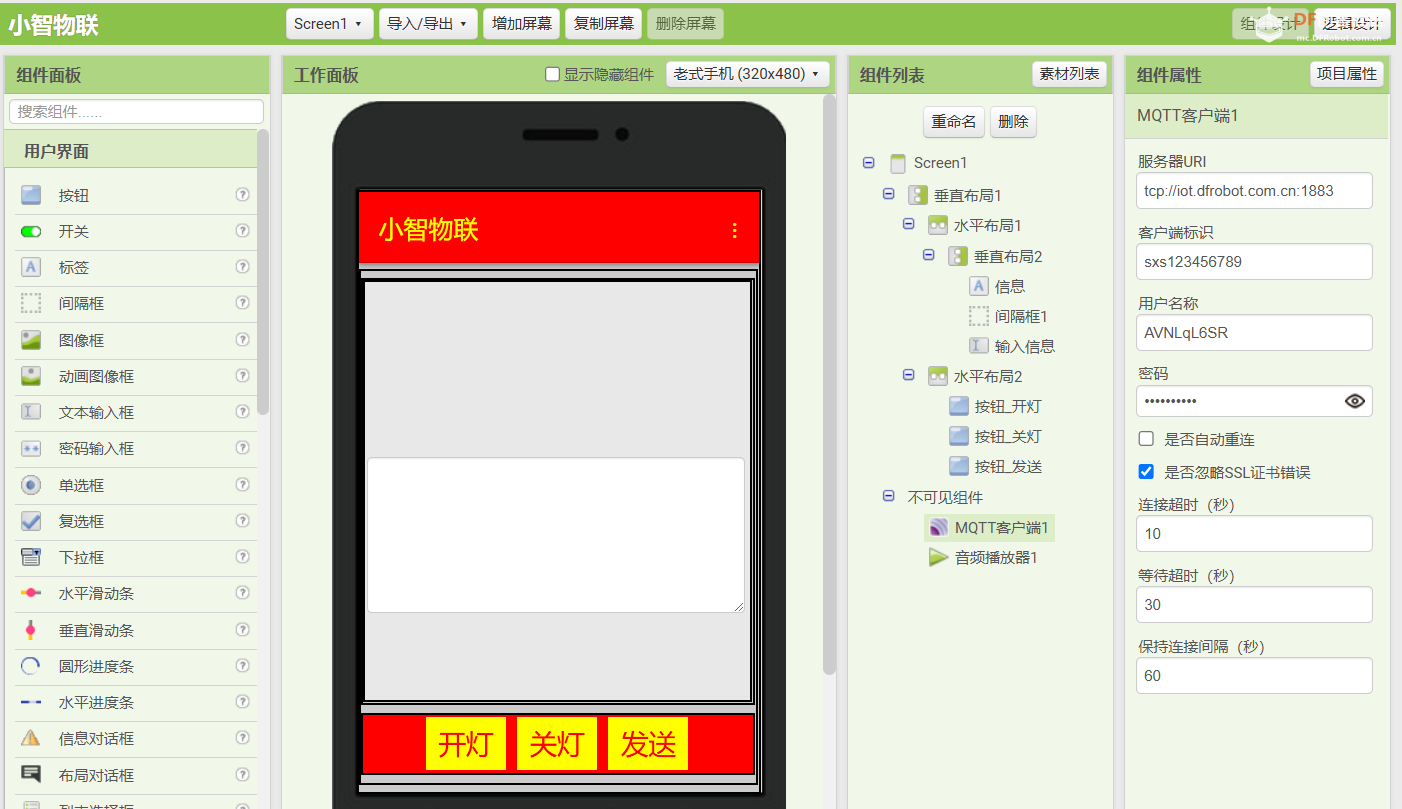
界面设计
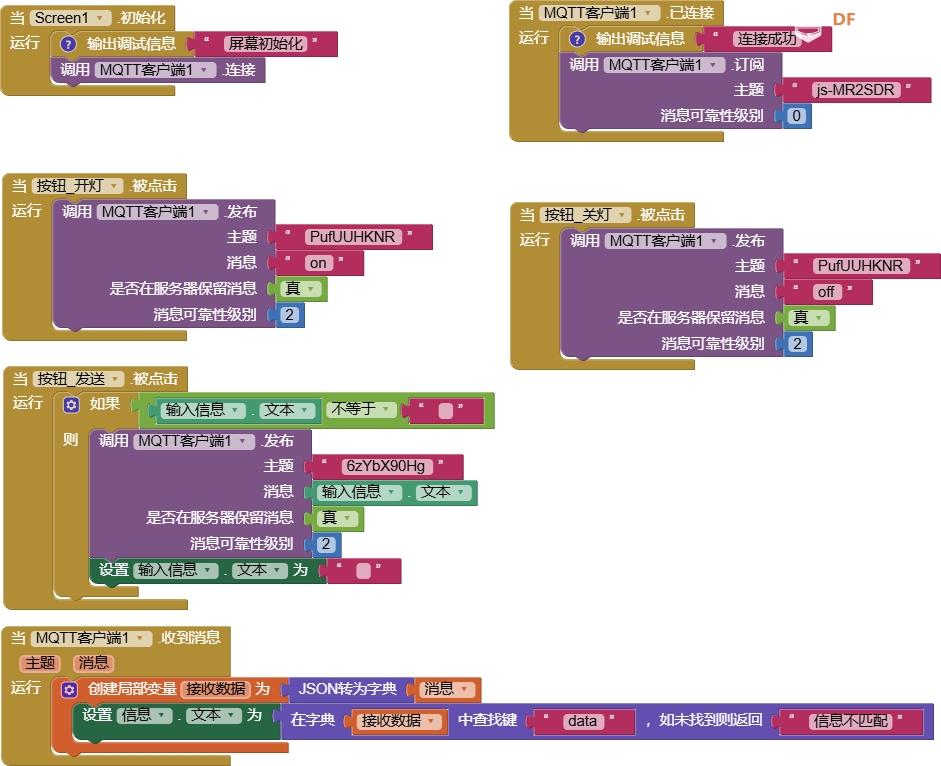
程序设计
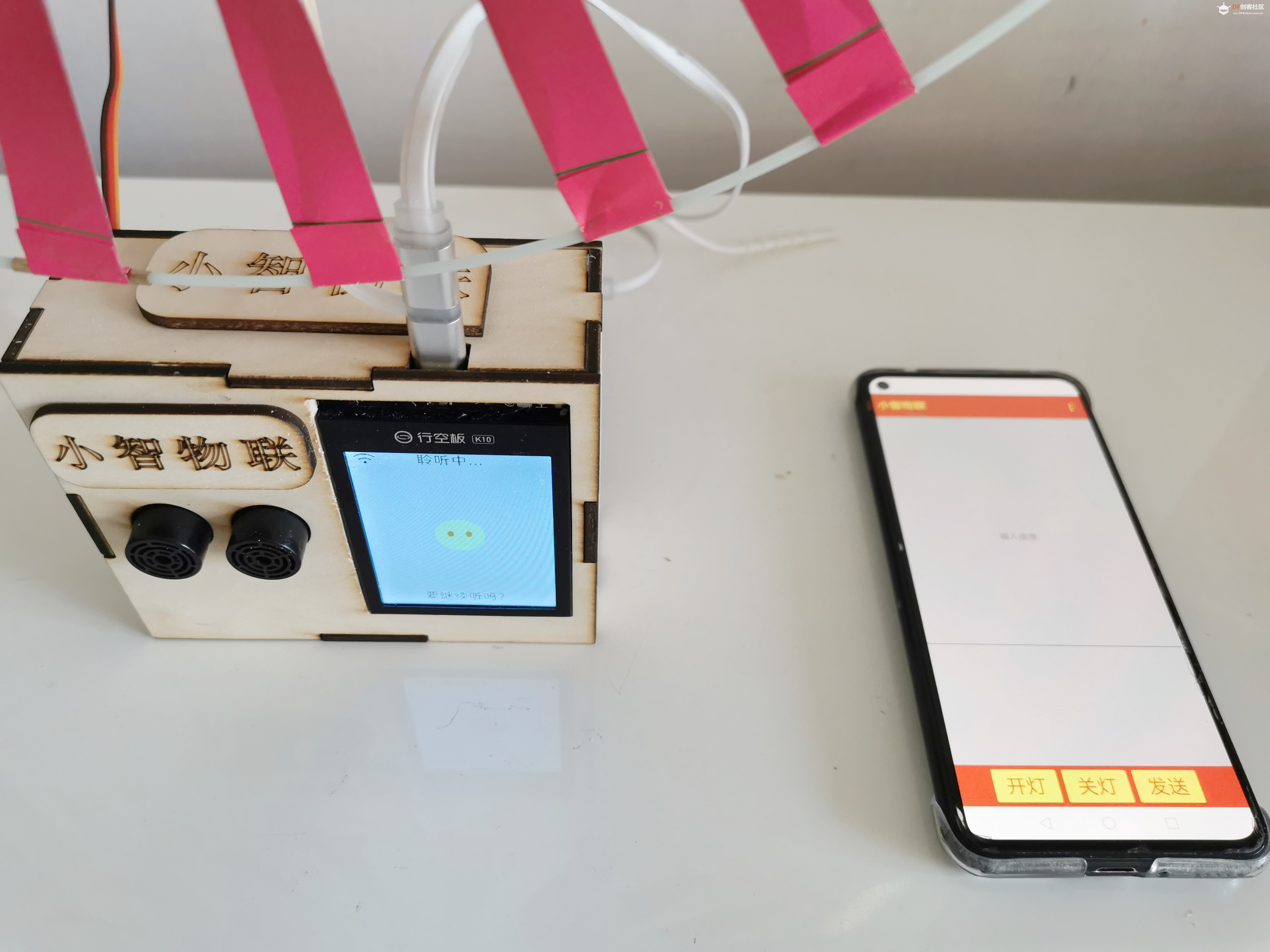
【视频演示】
1.测试小智获取I2C距离传感器数据信息。(对于360舵机的控制,是本项目附加测试功能)
2.测试小智与Easy IOT物联网平台通信功能
|


 沪公网安备31011502402448

 置顶卡
置顶卡 变色卡
变色卡 千斤顶
千斤顶


 活跃会员
活跃会员
 宣传大使
宣传大使
 牛X认证
牛X认证
 创客造
创客造
 编辑选择奖
编辑选择奖
 志“童”道合
 编辑选择奖
编辑选择奖
 编辑选择奖
编辑选择奖
 编辑选择奖
编辑选择奖
 编辑选择奖
编辑选择奖